You've relaunched your site. The homepage appears in Google, but your new articles and product pages don't. You've published a sitemap, checked that the pages open in your browser, and started wondering whether another indexing request would help.
If you're asking, “How do I get my site indexed by Google?”, start by finding where Google stopped. A page Google hasn't discovered needs a different fix from a page it crawled but didn't select for its index.
Find Which Indexing Stage Is Stuck
Indexing is a process, not a submission receipt. Google needs to discover a URL, fetch its content, assess its eligibility for the index, and then decide whether to serve it for a search.
Google's guide to how Search works explains that there's no central registry of every webpage. Its systems continually discover URLs through links and other signals, then analyze content and identify preferred versions of duplicate pages.
Publishing a page doesn't complete those stages. Requesting a crawl doesn't guarantee indexing, and an indexed page can still receive no impressions.
Match the status to the next action
Open Google Search Console, paste a missing URL into URL Inspection, and read the reported status before changing anything.
Indexing stage by Search Console status
| Status you see | Stage | What it means | Next move |
|---|---|---|---|
| URL is unknown to Google | Discovery | Google hasn't recorded this URL through a discovery path | Add an HTML link and include the canonical URL in the sitemap |
| Discovered – currently not indexed | Discovery, not yet crawled | Google knows the URL but hasn't fetched it | Strengthen internal links and wait; don't resubmit the same URL |
| Crawled – currently not indexed | Eligibility | Google fetched the page but hasn't selected it for the index | Investigate duplication, canonicals, or thin content before requesting again |
| Blocked by robots.txt | Crawl access | Googlebot was told not to fetch the URL or a needed resource | Allow the URL in robots.txt, then retest the live URL |
| Excluded by ‘noindex' tag | Eligibility directive | A meta robots or X-Robots-Tag directive tells Google to keep it out | Remove noindex only if the page should be searchable |
| URL is on Google, no impressions | Serving, not indexing | The page is indexed but isn't appearing for searches in the selected reporting period | Treat titles, intent, and links as a ranking job |
| Duplicate, Google chose different canonical | Eligibility | Google selected another URL as the preferred version | Align redirects, canonicals, and the sitemap on the preferred URL |
Sample templates before changing the site
Inspect your homepage, a category or template page, a new article, and a product URL. If you don't sell products, substitute another important page type.
These examples help distinguish a sitewide configuration problem from an isolated page issue. A working homepage doesn't prove that an article template is indexable.
Follow the row that matches each URL. Don't rewrite every page because a category is blocked, or change robots.txt because an indexed article isn't ranking.
Submit the Sitemap and Inspect Key URLs
Before submitting anything, confirm that your site is verified in Google Search Console as a Domain property or URL-prefix property. Make sure your account can open both Sitemaps and Page indexing, and that the selected property covers the host and protocol you use.
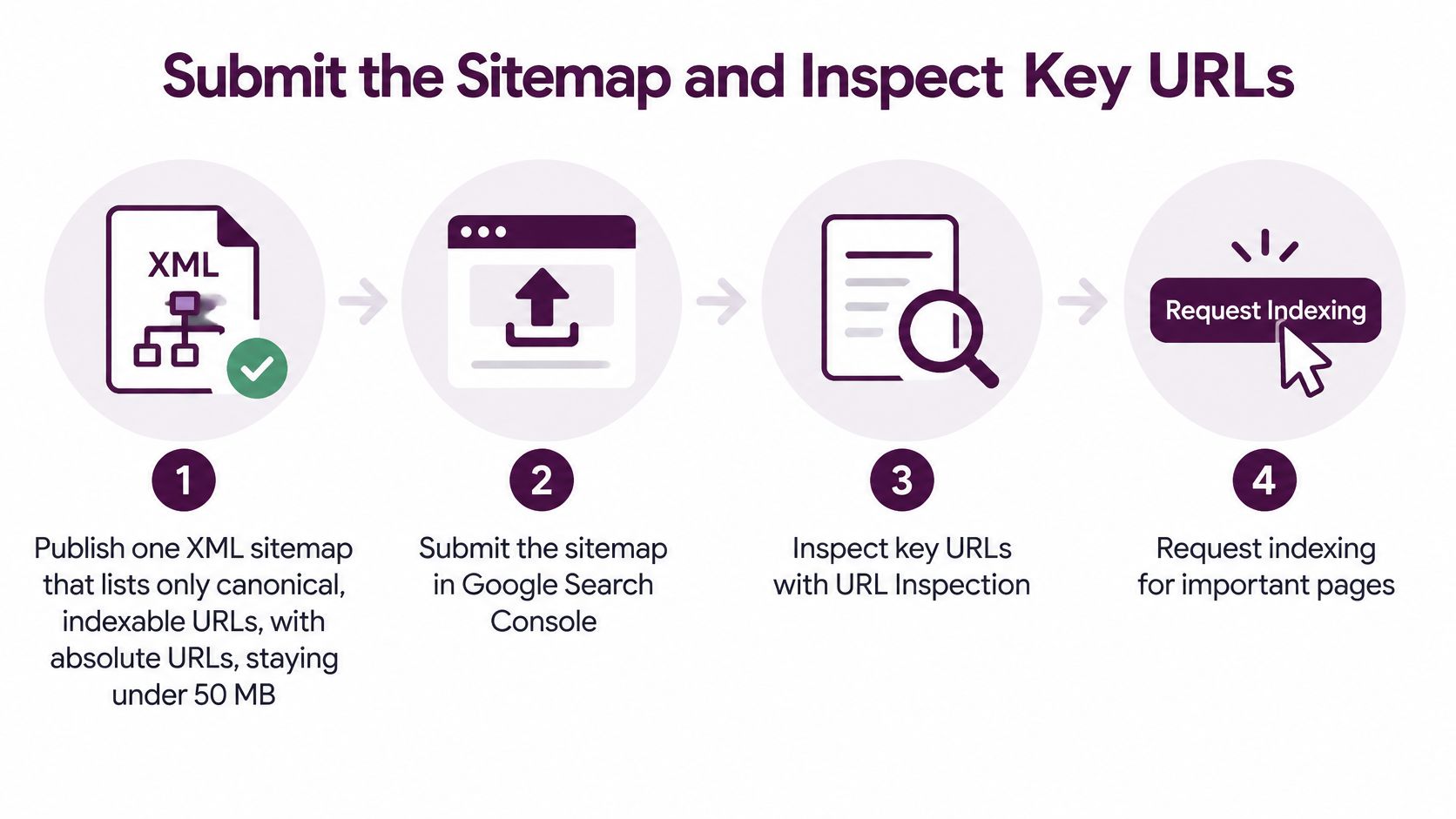
The workflow combines broad discovery with selective inspection.
Publish and submit a clean sitemap
Publish an XML sitemap containing canonical, indexable URLs. Use absolute URLs, meaning complete addresses rather than relative paths. According to Google's recrawl guidance, each sitemap is limited to 50 MB uncompressed or 50,000 URLs; larger collections should use a sitemap index. That guidance also says individual indexing requests are quota-limited and repeated requests for the same URL don't accelerate crawling.
Leave out redirected addresses, intentionally excluded pages, and duplicate versions. For a large catalog, make sure recently updated and strategically important pages are represented, rather than assuming sitemap order determines crawl priority.
Reference the sitemap in robots.txt and submit it in Search Console. Open Indexing → Sitemaps, enter the sitemap location, and select Submit. Check the reported result afterward: Success means Google could process the file, while Couldn't fetch needs investigation.
If fetching fails, open the sitemap directly and check that it's public, contains valid XML, and isn't returning a login screen or server error. For decisions about sitemap contents and maintenance, use these sitemap best practices for SEO.
Inspect before escalating
Inspect representative URLs. Paste the homepage, category or template page, new article, and product page into URL Inspection. Read the stored indexing information, then select Test live URL to check the current page.
These views answer different questions. The indexed version reflects Google's recorded state; the live test checks what Google can access now. A successful live test doesn't establish that the URL has entered the index.
Request indexing for a small set of priority pages only after diagnosis. Use Request Indexing when an important URL is ready and any identified barrier has been removed. Don't keep pressing it while the same blocking condition remains.
If you manage a Shopify store, Presidio's guide to Shopify content and performance optimization can help organize storefront improvements alongside these checks. Treat that work as preparation for a useful, accessible page, not a substitute for inspecting its status.
Let the sitemap handle the remaining URLs. For routine publishing across a site, maintain the sitemap instead of manually submitting every page. Update it when pages are added, consolidated, or retired.
Verify the inspected URL's technical signals. Confirm a successful HTTP 200 response, a canonical matching the sitemap address, and a crawlable HTML link pointing to it. Check the final destination after redirects, not just the address you originally pasted.
Practical rule: Sitemap success confirms a discovery mechanism is working. It doesn't confirm that every listed page qualifies for indexing.
A submitted file can still contain pages Google excludes because of duplication, conflicting canonicals, access failures, or insufficient value. Resolve the page's actual condition rather than treating submission as approval.
Clear Robots and Noindex Blocks
A damaging mistake is blocking a page in robots.txt while expecting Google to read its noindex directive. The block can prevent Google from fetching the very instruction intended to remove the page.
Google's JavaScript SEO basics distinguishes crawl control from indexing control: robots.txt restricts fetching, while Google must be able to crawl a page to see its noindex directive. A blocked URL can still be discovered and indexed through outside links.
Check access in the order Google encounters it
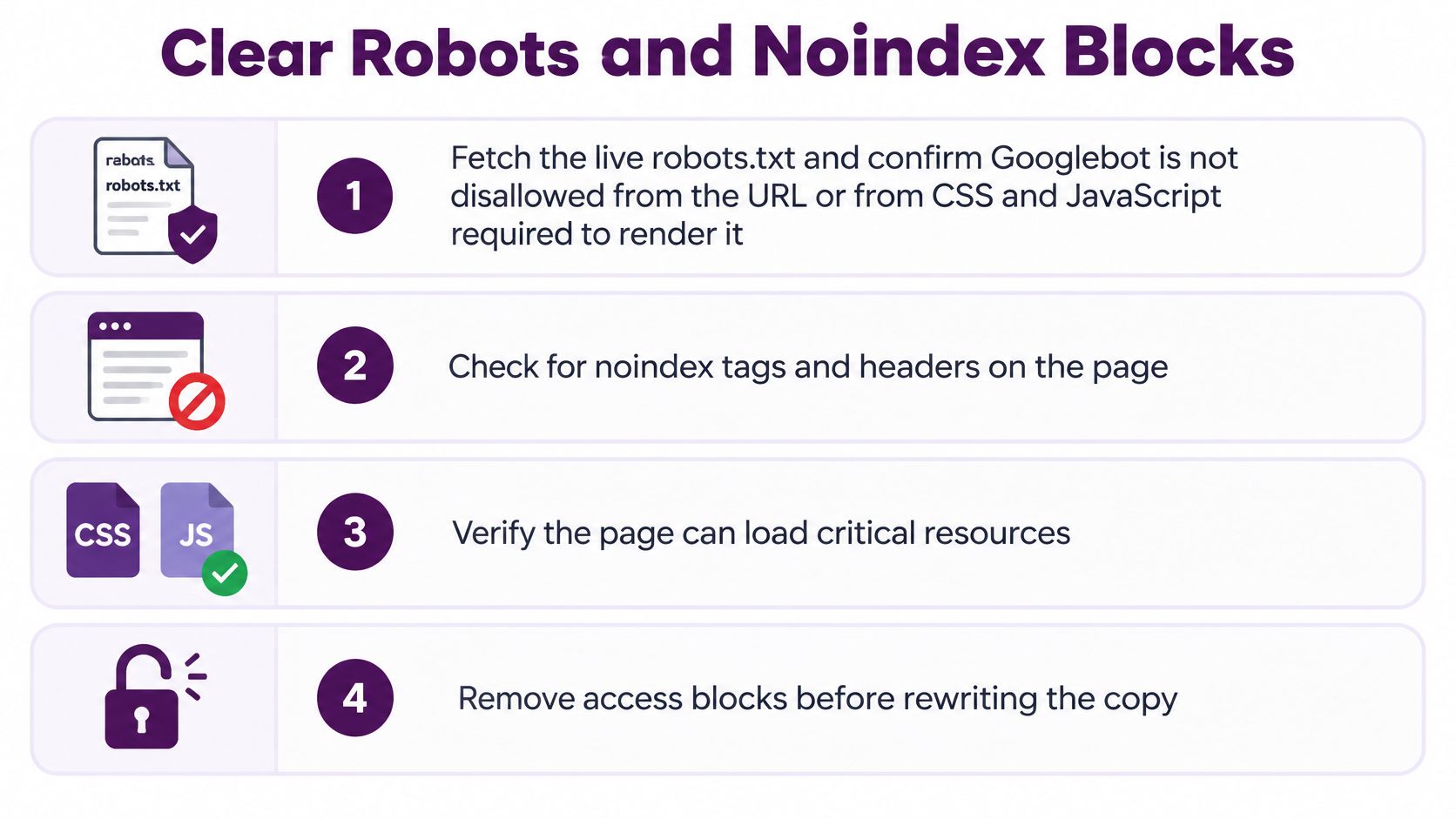
Start with the live robots.txt file, not an old copy in your project folder. Review the rules applying to Googlebot and check both the page path and the resources needed to render it.
A broad filter rule can accidentally block a script or stylesheet. If that resource builds the product description or navigation, Google may receive an incomplete page even though the main address isn't disallowed.
Use these checks to separate the problems:
- Crawl permission: Allow public pages and their essential resources. Reserve robots.txt restrictions for crawl targets you deliberately want to limit, such as unnecessary internal search or faceted combinations.
- Index permission: Inspect the HTML for a robots meta tag and the response headers for X-Robots-Tag. Remove an accidental noindex directive wherever it's being generated.
- Public access: Check that visitors and Googlebot don't encounter a login requirement, security challenge, DNS failure, or server error on public content.
If you need to generate your robots.txt rules, review the resulting file against actual page and resource paths before publishing it. A syntactically valid rule can still block the wrong content.
Compare source HTML with rendered content
On JavaScript-heavy templates, inspect both the raw HTML and the rendered DOM, which is the page structure after scripts run. In URL Inspection, open the tested page details and examine the rendered output and loaded resources.
Check that Google can find the title, canonical, headings, main copy, links, and relevant structured data. Prefer delivering essential content in the original HTML instead of relying entirely on client-side execution.
Keep the canonical in the original HTML, and don't let a script replace it with a conflicting address. A browser can display the correct product while the page sends inconsistent signals about which URL should be indexed.
For a manufacturing catalog or industrial website, Machine Marketing's SEO audit steps for industrial websites provide a useful framework for organizing template checks and assigning repairs.
Keep a page crawlable when Google needs to read its noindex instruction.
After deployment, retest the same affected URL and inspect its headers again. A staging setting can survive in a theme, plugin, or server rule even after someone removes a visible tag.
Judge the repair by what the live test can access and, after recrawling, whether the exclusion reason changes. Don't promise a fixed turnaround just because the configuration is now correct.
Link Important Pages From Crawlable HTML
Say a store launches a new collection, but shoppers can reach its products only by entering a search term or selecting filters. The pages exist, yet the site gives crawlers no straightforward route from its public navigation to those products.
A sitemap helps discovery, but it shouldn't be the only place an important URL appears. Give readers and crawlers an ordinary link they can follow.
Build a homepage-to-hub-to-page path
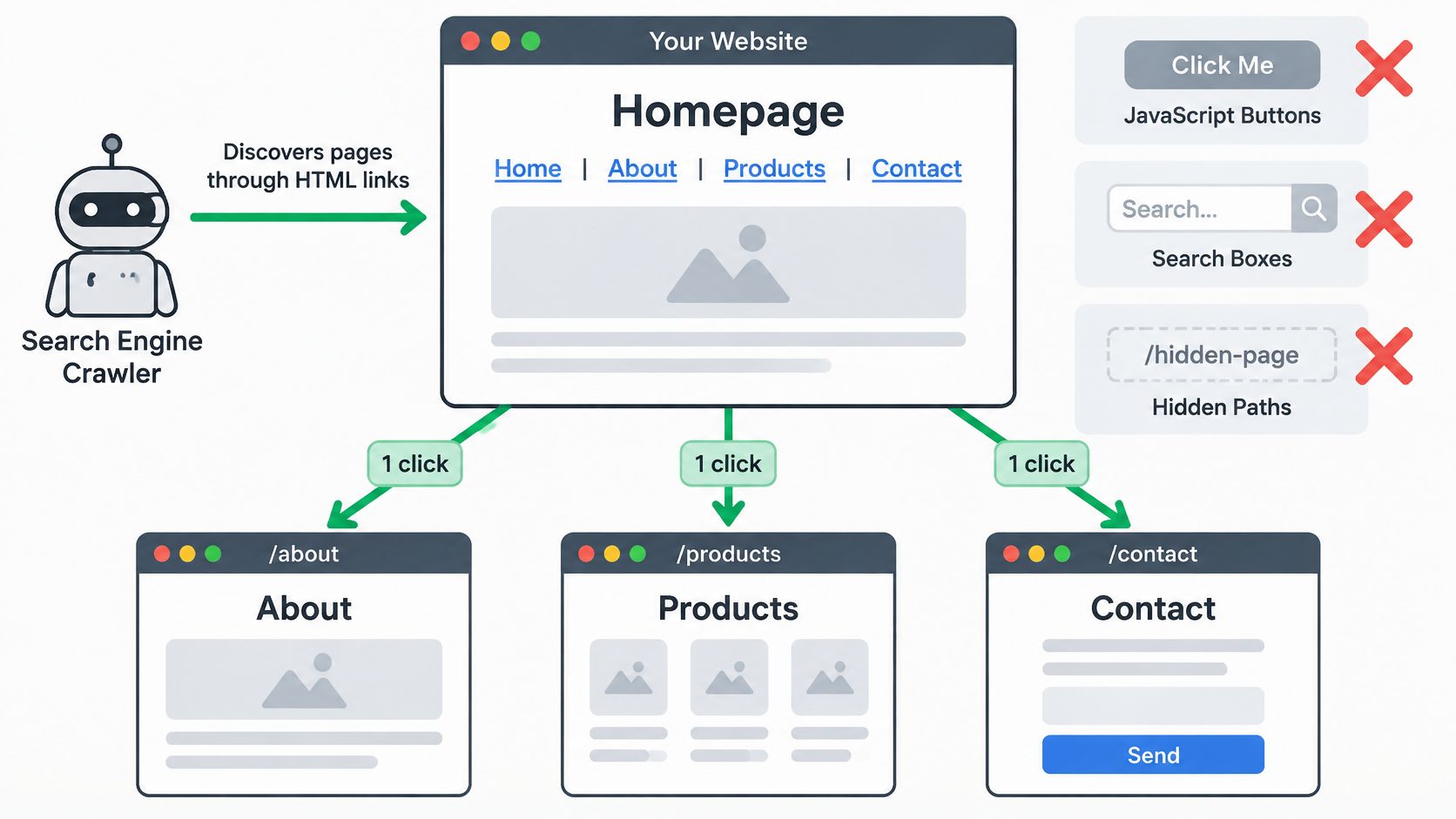
Use a hub-and-article structure for content and the equivalent category-to-product structure for a store. Keep important destinations within an easy browsing path rather than burying them behind interactions.
- Homepage to hub: Link to the main topics, services, or product categories using ordinary HTML anchors with an
href. - Hub to detail page: Add each new article or product to its relevant hub, with descriptive link text that tells readers what they'll find.
- Related page to related page: Add contextual links between connected resources, such as a buying guide and the products it explains.
- Migration cleanup: Find valuable pages that lost their incoming links when navigation, categories, or URL paths changed.
A button that runs a script isn't an adequate substitute for a normal destination link. Neither is an on-site search box that requires someone to supply a query.
For example, a gardening site might link from its homepage to a seed-starting hub. That hub links to an article about transplanting seedlings, and the article links to a relevant growing guide. Each connection helps a reader continue the task while giving crawlers another discovery path.
Make every link support the preferred URL
Choose the preferred HTTPS host and use it consistently in navigation and contextual links. Each indexable page should declare its clean canonical URL, with permanent redirects from equivalent HTTP or alternate-host versions.
When duplicate URLs carry the same content, choose the keeper first. Then update internal links to point directly to it instead of relying on redirects to correct every click.
Use a crawl report to find broken destinations, redirecting links, and orphan pages. You can fix internal links with Keyword Kick as part of that cleanup, checking the destination and its place in the site structure rather than replacing links blindly.
Discovery check: Can someone reach the page by following links from your homepage without searching, submitting a form, or guessing its address?
Crawl-budget management deserves special attention on exceptionally large, frequently changing sites. For an ordinary blog or store, start with missing links and conflicting URLs rather than assuming Google has exhausted a crawl allowance.
Finally, regenerate the sitemap to reflect the preferred URLs you've linked. Remove retired addresses and duplicate variants so your discovery signals agree.
Fix Pages That Stay Out of the Index
Crawled – currently not indexed is a frustrating leftover because Google has already visited. Once access and discovery checks are clean, another submission won't explain why the page wasn't selected.
Look at the page type and the value of the specific URL. A tag archive containing recycled excerpts needs a different decision from a detailed product page whose canonical points elsewhere.
Pair the remaining symptom with a repair
Use the following table after checking the sitemap, crawl access, rendering, and internal links. The causes are diagnostic starting points, not proof that every URL with the same status has the same problem.
Still not indexed: cause and fix
| What you still see | Likely cause | Change to make | Request indexing? |
|---|---|---|---|
| New posts unknown, homepage indexed | Orphan URLs or a sitemap that wasn't updated | Restore discovery by linking each post from its hub and refreshing the sitemap | No, use the sitemap for routine discovery |
| Blocked by robots.txt on the live test | Disallow rule or blocked CSS or JavaScript | Allow the URL and required resources | Once, after the live test can fetch it |
| Excluded by noindex on production | Theme, plugin, or X-Robots-Tag left on | Remove the unwanted directive from HTML and headers | Once, after the live test is clean |
| Crawled – currently not indexed on thin templates | Tag, filter, or duplicate pages with little unique value | Consolidate into a useful keeper; exclude copies that shouldn't appear | No, until the page is worth indexing |
| Indexed URL is HTTP or the other host | Redirect or canonical mismatch | Permanently redirect the alternate version to the preferred HTTPS URL | No, let Google process the redirect |
| Google selected another canonical | Duplicate URLs or a canonical swapped by JavaScript | Align the original HTML canonical, links, and sitemap on the keeper | Once, on the keeper only |
For thin templates, avoid adding filler just to make the page longer. A useful category might need a clearer selection, meaningful product distinctions, or guidance that helps someone choose; a redundant filter page may not need indexing at all.
A soft 404 needs a separate content check. If the page returns a successful response but shows an empty template or missing-product message, restore the intended content if the URL should remain live.
A 5xx server error needs an infrastructure repair, not a copy edit. Give the server or hosting owner the affected URL and failure details, then retest after the service is stable.
Set expectations without inventing a deadline
Google describes its index as containing hundreds of billions of webpages and other digital content in its explanation of organizing information. Its crawling systems operate continuously as content changes.
There isn't a universal indexing deadline. Accessibility, discovery links, update patterns, and Google's assessment of the site affect when it revisits pages, and a URL can enter the index and later drop out.
After a meaningful repair, request indexing once for a priority keeper whose live test is clean. For routine batches of newly linked pages, update and submit the sitemap rather than opening every URL individually.
Requesting indexing is an escalation, not the strategy. Use it when discovery and eligibility are already clean.
Once a page is indexed, broader visibility work becomes relevant. Google AI Overview strategies from OGTool can inform that later planning, but they don't replace resolving an excluded URL's actual indexing condition.
Watch indexed counts and exclusion reasons over time. A changed status is more informative than repeatedly refreshing the request confirmation.
Check Coverage Again After the Fixes
A successful live test is encouraging, but it isn't the same as an updated indexing record. Keep a short monitoring routine so you can distinguish a deployed repair from a repair Google has processed.
Google's crawling and indexing FAQ explains that crawling and indexing have no guaranteed timeline and that sitemap submission doesn't guarantee indexing or improve rankings. Use URL Inspection for individual URLs and the Page indexing report for patterns across templates.
Recheck the same evidence
Record the baseline. Open Indexing → Pages and note the indexed count and main exclusion reasons. Save representative affected URLs so you don't judge progress only by whichever page you happen to inspect next.
Return to the same sample after a recrawl. Recheck the homepage, category or template, new article, and product page. Compare the recorded crawl information with the live test; if Google's recorded crawl predates your deployment, the old exclusion may still describe the previous version.
Verify migration destinations. Confirm that the sitemap uses the new preferred host and that old versions permanently redirect to their corresponding destinations. Check affected deep pages, not just the homepage.
Respond to the remaining reason. If the status hasn't changed after Google has revisited, stop requesting the URL and investigate the reported condition. Use Validate fix where the report offers it after you've repaired the affected group.
Separate indexing from visibility. If a URL is indexed but receives no impressions, open the Search results performance report and check the page filter and reporting period. Then work on search intent, titles, and internal links rather than treating it as an indexing failure.
Keep the next action visible
Maintain a short issue log with the affected template, representative URL, repair owner, deployment date, and current status. This gives an agency, in-house team, or solo owner a consistent way to follow unresolved exclusions.
Alongside direct checks in Search Console, Keyword Kick offers a workspace combining Search Console data, site audits, and JavaScript rendering checks. Use it to keep the evidence and next action for excluded templates together after manual repairs.
Another indexing request is worth making only when discovery and eligibility are already clean.
Connect your Search Console data with site audits and JavaScript rendering checks in Keyword Kick to investigate excluded pages in one workspace. Use the findings to prioritize the next repair, then monitor whether Google processes the change.