A content team can publish consistently, redesign the site, merge product lines, and still miss a basic failure: links that no longer lead anywhere. The problem usually surfaces later, when a customer reports a dead resource, an editor finds a broken citation, or an SEO audit produces a report too large to work through manually.
The practical answer isn't another quarterly spreadsheet that nobody owns. A reliable process combines a full crawl, Google Search Console, server evidence, backlink data, clear prioritization, and recurring monitoring. This guide explains how to find broken links, distinguish genuine failures from temporary errors, fix the right URLs first, and build link health into your publishing and deployment routine.
Why Broken Links Pile Up Faster Than You Think
A site can accumulate broken links without a dramatic failure event. Content editors remove outdated articles, developers change URL structures, and a migration preserves some redirects while missing others. At the same time, external resources disappear beyond your team's control.
Three sources of link rot
Content churn creates internal breakage. Deletions, content merges, CMS migrations, product reorganizations, and URL rewrites all change the destinations that existing pages reference. A link embedded in an older guide may still look correct in the editor while returning an error to visitors.
External decay creates a separate maintenance burden. A government PDF can move, a research page can be replaced, or a partner can take down a resource. The more a site relies on citations, documentation, and third-party references, the more often editors need to validate those destinations.
Redirect debt is subtler. A redirect added during a domain change may point to another redirect, and that destination can later be removed. A chain that worked during the last audit can become a dead end after another release.
A study covering more than 2 million websites found that link rot is widespread. Since January 2013, 66.5% of links pointing to the sampled sites had rotted, while 74.5% of links were considered lost overall (Ahrefs' analysis of the large-scale link-rot study). The study also found that decay becomes more severe as links age, including 72% rot for 1998 links in one dataset. That supports recurring checks rather than a one-time cleanup.
Practical rule: Treat link health like content freshness. A page doesn't remain reliable simply because it passed an audit once.
Age matters beyond SEO teams' own crawls. Pew Research Center found that 38% of webpages that existed in 2013 were unavailable by October 2023, compared with 8% of pages that existed in 2023 (Pew Research Center's web preservation analysis). Older, heavily cited, and institutional pages deserve early attention because their references have had more time to fail.
The workflow below uses four link types, internal errors, external errors, redirect failures, and content-level failures such as soft-404s. It then adds a triage lens, so a broken link on an important landing page doesn't sit behind a long list of low-impact outbound references.
What Actually Counts as a Broken Link
A broken link isn't limited to a visible 404 page. Audit tools report several failure classes, and each one needs a different response. Start with the server status, then check what a person sees.
Read the response and the rendered page
A 4xx response usually means the requested resource isn't available. A 404 may be temporary or accidental, while a 410 generally indicates intentional removal. A 403 can mean the page exists but blocks the crawler or visitor, so it shouldn't automatically be treated as deleted content.
A 5xx response points to a server-side problem. It may be temporary downtime, an application failure, or an overloaded origin. Replacing the link won't solve the underlying issue if the destination is meant to remain live.
Redirect chains also belong in the report. A link can eventually reach a valid page while passing through multiple redirects, and a loop never reaches a destination at all. Link directly to the final relevant URL where possible instead of making every future request traverse old migration logic.
Soft-404s are harder to catch. The server returns 200, but the rendered page says the content isn't available, perhaps through a generic “page not found” template. A crawler that only reads status codes can miss this, which is why rendered content and page templates matter.
Network-level failures add another layer. DNS resolution problems, connection timeouts, and SSL handshake errors can prevent retrieval even when the target URL hasn't been deleted. Raw logs and repeated tests help separate a transient fetch issue from genuine link rot.
| Broken Link Types and What They Mean | |||
|---|---|---|---|
| Type | Example Status | User Impact | Fix Direction |
| 4xx error | 403, 404, 410 | The destination may be blocked, missing, or intentionally removed | Confirm intent, restore, redirect, update, or remove |
| 5xx error | 500, 502, 503 | The destination may be temporarily unavailable | Investigate hosting or application reliability |
| Redirect failure | Multiple hops or loop | Slower access, failed retrieval, and confusing crawl paths | Point links to the final URL and simplify the map |
| Soft-404 | 200 with missing-page content | Users see a dead end even though the status appears valid | Correct the template, status, or destination |
| Network failure | Timeout, TLS, or DNS error | The crawler or visitor can't establish a usable connection | Re-test, check availability, and escalate infrastructure issues |
The mental model is simple: the status code tells you what the server reported, while rendered content tells you what the user experienced. You need both before assigning a fix.
Detection Methods That Catch Real Issues
No single tool sees every broken link. A crawler maps the site you can reach, Search Console shows what Googlebot encountered, logs reveal real requests, and backlink tools show where other websites still point. Use each channel for the problem it is suited to finding.
Start with a controlled crawl
Use Screaming Frog, Sitebulb, or Ahrefs Site Audit for the primary inventory. Configure the crawl to check external links, follow redirects, render JavaScript where the site needs it, and export both the broken destination and the page containing the link. A crawler that checks only internal URLs will miss outbound references and may leave important template areas untested.
For larger properties, split the crawl by subdomain, template, sitemap, or directory when a single run becomes difficult to process. The important output isn't just a list of failed targets. Preserve the source page, anchor text, status code, final URL, redirect path, and crawl context.
Keyword Kick's site audit by Keyword Kick is another option for a technical crawl that includes broken-link detection. For a broader publishing and technical SEO review, Refact's SEO checklist from Refact can help teams place link checks alongside other pre-publish controls.
Use Search Console as evidence of Googlebot activity
Google Search Console's Pages report surfaces URLs that Google has tried to process, including not-found and server-error patterns. Crawl Stats adds request and response context, while URL Inspection can help identify how Google discovered a problematic URL.
Search Console won't replace a crawl. It reflects Google's observed activity, not every link present on your site, and it won't provide complete coverage of broken external references. Use it to validate which failures have entered Google's crawl path and to spot issues that your own crawl configuration may have missed.
Read server logs for requests outside your crawl map
Access logs from your hosting environment, or systems such as Loggly and Splunk, show requests made by visitors, bots, and other clients. There, you may find old campaign URLs, links from external sites, parameters excluded from your crawl, or paths absent from the XML sitemap.
Filter for failed responses, then group by requested path and referring context where available. A URL requested repeatedly by users deserves more attention than an abandoned test path that nobody reaches.
Check broken backlinks separately
Ahrefs, Semrush, and Majestic can reveal external sites linking to pages on your domain that no longer resolve. Those URLs may still have useful referral potential or authority signals, and the referring page gives you context for deciding whether a redirect is appropriate or whether outreach is worthwhile.
Archive research can support that decision. Inspect an older version of the destination with the Wayback Machine, compare its topic and purpose with a current page, and contact the referring site only when the replacement is relevant.
Keep spot checks and alerts in the mix
Browser extensions such as Check My Links and LinkMiner are useful for a single article, staging page, or recently edited template. They aren't a replacement for a crawl, but they catch obvious mistakes before publication.
For faster feedback, use scheduled monitoring through tools such as Sitebulb Cloud or ContentKing. Automated detection is becoming common, and one industry compilation reports that 68% of companies use automated tools to detect broken links and that such tools cut detection time by 60% (industry compilation on broken-link statistics). Treat those figures as directional industry reporting, not a reason to abandon manual verification.
Prioritizing Which Broken Links to Fix First
A crawl report is an inventory, not a work queue. If you hand developers a list sorted by URL, they may fix easy low-value issues while a broken link on a key commercial page remains untouched.
Score the source page, destination, and link type
Export the report into a sheet or issue tracker and add three practical signals:
- Traffic relevance: Check organic visits, conversions, and Search Console impressions for the source page and the broken destination where data exists.
- Source authority: Give more weight to indexed category pages, product pages, guides, and conversion paths than to obscure archives or unpublished material.
- Link function: An internal link that helps users reach an important page usually outranks an unrelated outbound reference in a low-traffic article.
Sort first by business and organic impact, then by technical severity. A single broken link from a high-value category page can deserve action before dozens of dead citations in older posts.
Flag redirect chains longer than two hops, soft-404s, and sudden clusters of 5xx responses. Those patterns often indicate structural or infrastructure problems rather than isolated content maintenance.
| Broken Link Prioritization Matrix | ||||
|---|---|---|---|---|
| Priority Tier | Traffic to Broken URL | Referring Page Authority | Link Type | Action |
| Immediate | Strong organic or conversion relevance | Important indexed page | Internal or valuable backlink | Restore, update, or redirect after verification |
| High | Meaningful discovery or referral value | Strong guide, category, or product page | Internal link or relevant external link | Assign an owner and fix in the current sprint |
| Planned | Limited measurable demand | Ordinary indexed content | Useful outbound reference | Replace or remove during content maintenance |
| Low | No meaningful traffic or business role | Weak, duplicate, draft, or archived page | Low-value external mention | Defer, remove, or handle in bulk |
External link rot on a page that still ranks or converts can justify careful replacement. A broken link inside an unpublished draft usually doesn't. Record the decision rules in the audit runbook, including who owns each tier, so future audits produce consistent choices instead of starting the debate again.
Verifying and Fixing Links the Right Way
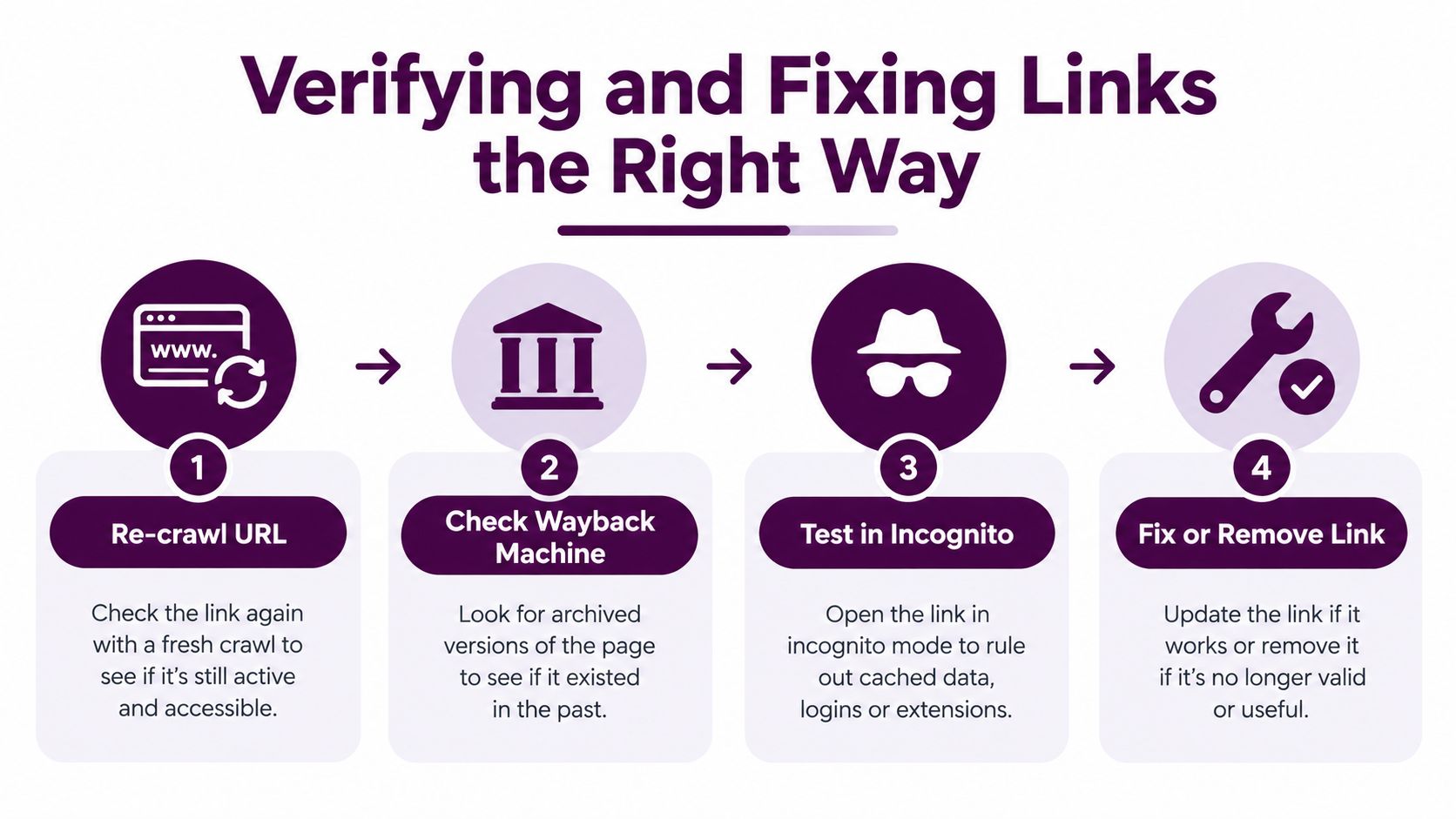
Don't change a URL based on one failed request. First confirm that the failure is reproducible and understand why the target was linked in the first place.
Confirm the failure before editing
Re-crawl the exact destination, including a HEAD request where your tool supports it, then make a normal browser request. Test in an incognito window to rule out login walls, cookies, geo-restrictions, or a session-specific response. If the result is inconsistent, compare timestamps and inspect logs before labeling the URL dead.
The Wayback Machine can reveal the original page's topic, format, and intent. That context matters because a replacement should satisfy the same user need, not merely contain a similar keyword.
Choose the least disruptive correction
For internal links, use one of four decisions:
- Restore the page when the content remains useful and was removed accidentally.
- Redirect the old URL to the closest topical equivalent when the original page has been replaced.
- Rewrite the source link to point directly to a live, relevant alternative.
- Remove the link when no credible destination exists.
A redirect should represent a genuine replacement, not a blanket route to the homepage. Update internal references to the final URL even when a redirect exists, and avoid building new chains on top of old migration rules.
For external links, replace the destination with a current authoritative resource, use an archived version when that is appropriate and legally suitable, or remove the reference. Don't substitute a vaguely related page just to make the status code turn green.
Use a redirect checker tool after changes to inspect the response path and final destination. Then re-crawl the affected source pages, test the links in a browser, and record the change in the redirect map. Search Console may continue to show an old error until Google revisits the URL, so treat its report as a follow-up signal rather than an instant confirmation.
Turning Audits Into Continuous Link Monitoring
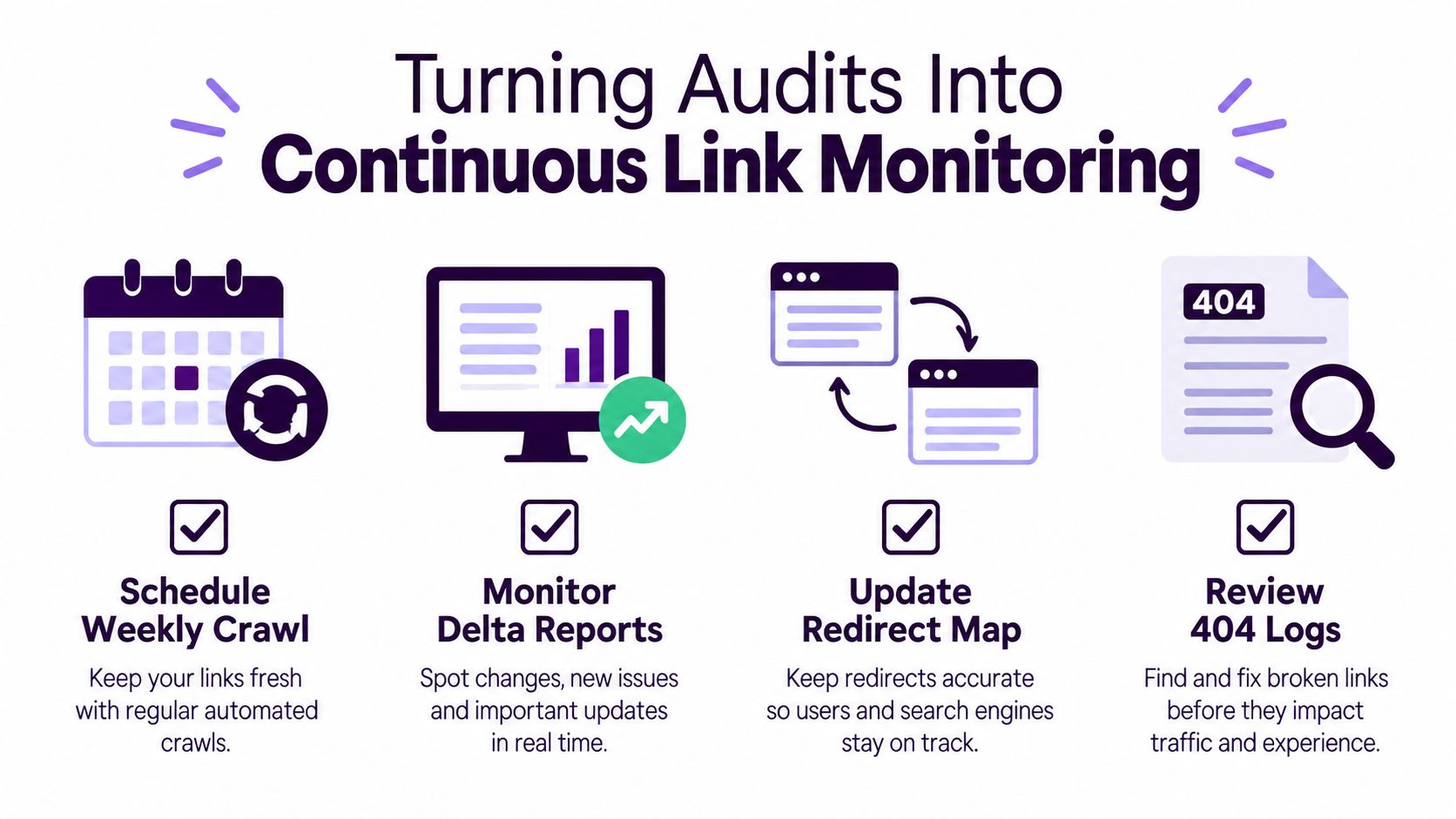
A one-off crawl tells you what failed when the crawl ran. A monitoring routine tells you what changed since the last check and gives someone a defined responsibility for acting on it.
Build the operating rhythm
Schedule recurring crawls in Screaming Frog, Sitebulb, or Ahrefs Site Audit according to publishing and deployment volume. Send the delta, not just the full export, to a shared sheet, Slack channel, or issue tracker. Each new failure should include the source page, target, status, owner, severity, and due date.
Review Search Console's Pages and Crawl Stats reports as part of the regular technical review. Set a separate alert for a sudden increase in 5xx responses from server logs, because an infrastructure incident needs escalation rather than content editing.
Make link checks part of release control
Run a pre-launch crawl after migrations, template changes, mass URL rewrites, and navigation updates. Crawl staging when possible, then repeat against production after the release. This catches broken navigation, missing redirects, JavaScript-rendered failures, and accidental changes to shared components before they spread across the site.
Ownership should be explicit:
- Editors validate internal links in drafts and flag content removals.
- SEO reviews external references, broken backlinks, and prioritization.
- Engineering maintains redirect maps and investigates server or deployment failures.
- Product or marketing owners decide whether an outdated destination should be restored, replaced, or retired.
Document the cadence, crawl settings, alert thresholds, export fields, and escalation path in a runbook. The process should survive team changes and contractor handoffs without relying on one person's memory.
Quick Checklist and Common Questions
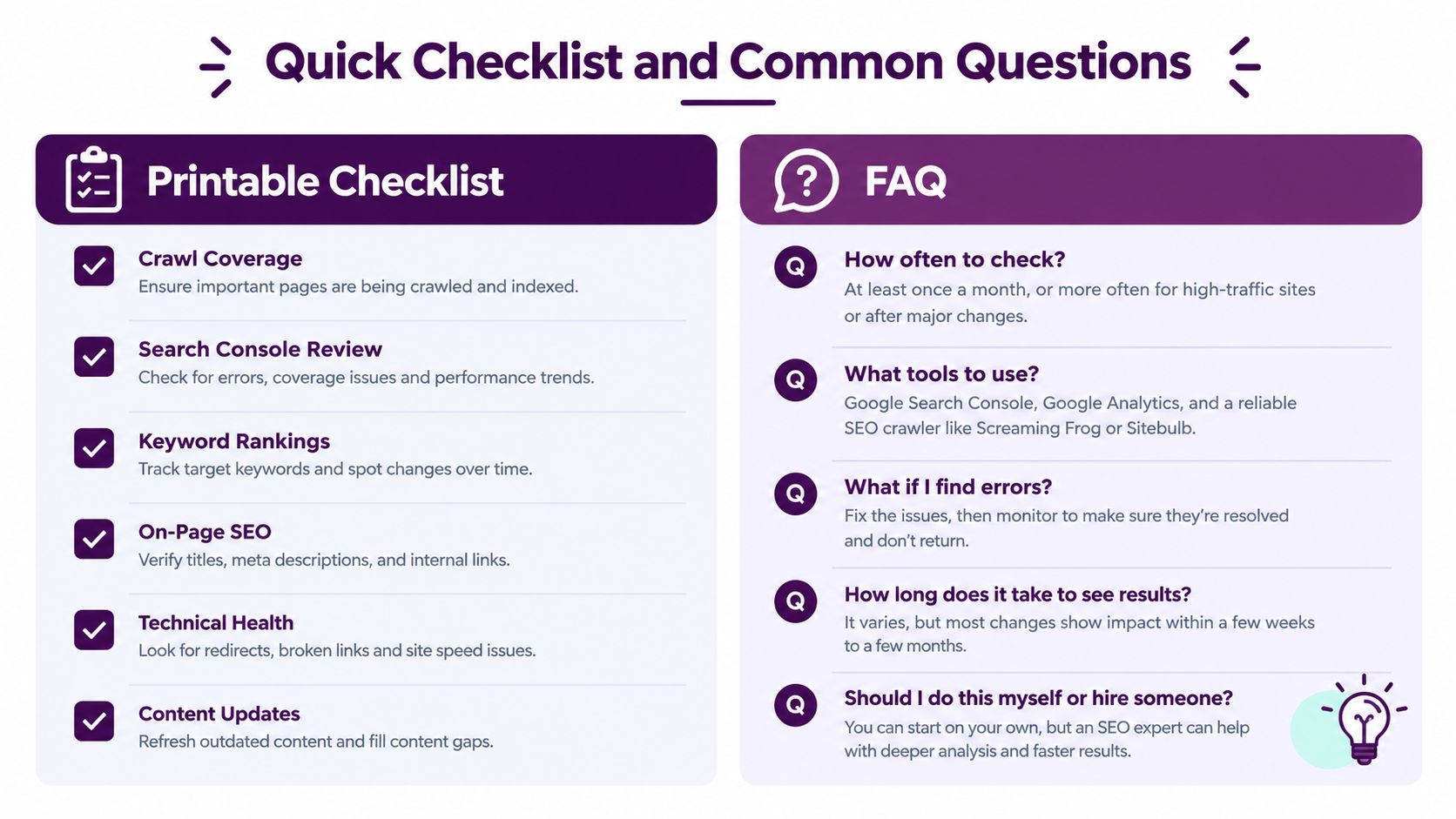
Use this compact routine before publication and during scheduled maintenance:
- Crawl coverage: Include internal links, outbound links, redirects, JavaScript-rendered areas, and important subdomains.
- Response review: Separate 4xx, 5xx, redirect chains, soft-404s, and network failures.
- Search Console check: Compare crawler findings with URLs Googlebot has encountered.
- Backlink spot-check: Review important referring domains that point to dead pages.
- Redirect map update: Record every new redirect and link directly to final destinations.
- 404 log scan: Look for repeated requests, high-value paths, and failures outside the sitemap.
- Release validation: Re-crawl after migrations, template changes, and large URL updates.
For a publishing workflow that extends beyond link health, use this complete audit for new content before a page goes live.
Common operational questions
Do 404 errors automatically hurt rankings? No. A few expected 404s aren't a ranking emergency. Prioritize broken internal paths, important backlinks, repeated user requests, and failures that interrupt discovery or conversion.
How often should a site be crawled? Match cadence to change volume. A frequently edited or frequently deployed site needs scheduled checks more often than a stable brochure site. Add a pre-launch crawl regardless of the routine schedule.
Why does a crawler find errors that Search Console doesn't? The crawler may discover links Google hasn't requested, while Search Console reflects Google's observed crawl and indexing activity. The two datasets answer different questions.
Does redirecting an old URL preserve its value? A relevant redirect can preserve access and consolidate signals, but it must lead to a suitable destination. A forced redirect to an unrelated page is not a reliable fix.
When will Google stop showing an old broken URL? It depends on when Google revisits the URL and how the page responds. Validate the fix, keep the correct redirect or status in place, and monitor the report rather than expecting an immediate disappearance.
Keyword Kick brings crawl findings, Search Console data, analytics, rankings, backlinks, and technical signals into one workspace so teams can turn broken-link reports into prioritized actions. Visit Keyword Kick to review how its site-audit workflow can fit into your recurring link-health process.