
You inherit a website with years of accumulated content, several CMS migrations, and a spreadsheet nobody has opened since the last strategy meeting. The team knows traffic has shifted, some pages have disappeared from search, and others attract visitors without producing qualified leads. Yet the proposed response is another crawl export and a slide deck full of red flags.
A useful web content audit does more than describe what exists. It connects each URL to business value, search visibility, content quality, technical accessibility, and the likelihood that search engines or AI systems can retrieve and cite it. The workflow below turns that evidence into four decisions, keep, expand, merge, or remove, with a follow-up process that makes the next audit faster.
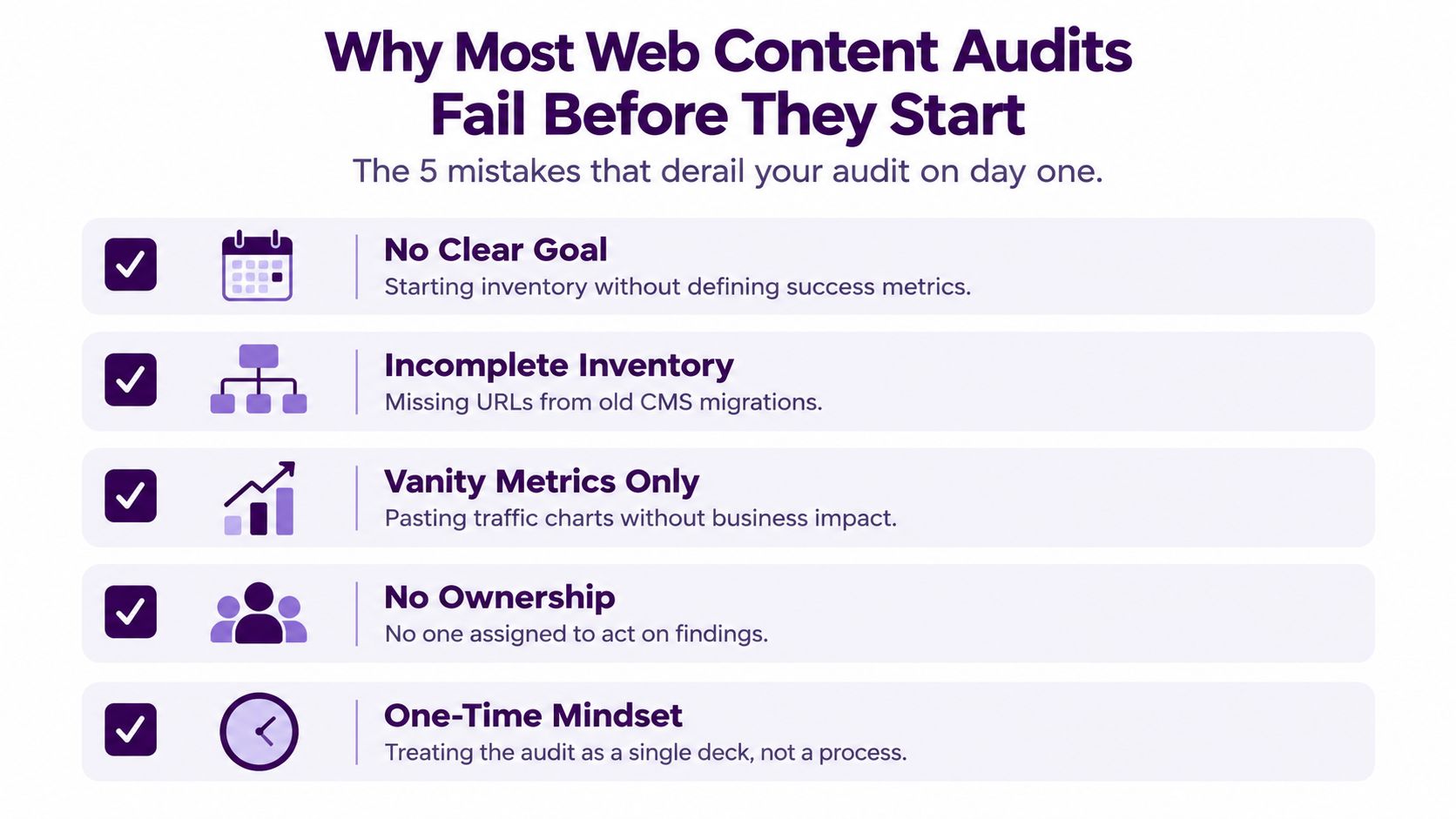
Why Most Web Content Audits Fail Before They Start
An in-house SEO manager often discovers the problem on the first day. The site has accumulated content across multiple teams and migrations, the URL inventory is incomplete, and every stakeholder has a different idea of what “good performance” means. Someone starts exporting URLs, another person pastes traffic charts into a presentation, and weeks later the team still can't answer the basic question: which pages should change, and why?
This pattern repeats because the audit begins as a data collection exercise instead of a business decision. An audit should define goals and KPIs, build a complete URL inventory, collect performance data, then score pages before prioritizing actions, as outlined in Orbit Media's content audit workflow. Without those anchors, the spreadsheet becomes a catalogue of problems rather than an operating plan.
Lock the audit charter first
Before anyone runs a crawl, write a one-page charter containing:
- Business outcome: State whether the audit supports revenue, qualified leads, pipeline influence, retention, or another measurable commercial outcome.
- Audit window: Use a target period of six to twelve months, with a clearly recorded baseline date.
- Scope: Specify the folders, templates, content types, markets, and languages included.
- Decision rights: Name the people who can approve updates, redirects, removals, and technical fixes.
- Keep definition: Describe what makes a page worth retaining, such as conversion contribution, strategic relevance, defensible links, or a clear audience need.
The charter should also state how success will be judged after implementation. If the business outcome is qualified pipeline, organic sessions alone aren't sufficient. If the priority is discoverability, conversion data still matters because a page can win visibility while attracting the wrong audience.
A useful gate is five yes-or-no questions:
- Is the primary business outcome written in one sentence?
- Is the baseline date recorded?
- Is the measurement window consistent across data sources?
- Does every URL have an owner or an escalation path?
- Can the team make a keep, expand, merge, or remove decision from the evidence?
If any answer is no, pause the crawl. Teams that need a deeper technical foundation can use a practical site audit for developers to clarify how crawlability and implementation constraints affect the content work.
Building Your URL Inventory and Data Pipeline
The master inventory is the audit's source of truth. Don't build it from the XML sitemap alone. Sitemaps can omit legacy URLs, redirected destinations, JavaScript-rendered pages, and content still linked from internal systems.
Start with a full crawl in Screaming Frog, Sitebulb, or a comparable crawler. Configure the crawl to follow redirects, render JavaScript where the site depends on client-side content, and respect canonical chains. Record the user agent, maximum crawl depth, and a crawl budget cap. Those controls help prevent staging URLs, infinite parameter combinations, and faceted navigation from overwhelming the export.
Build the master row
Merge crawl data with the CMS and analytics exports using a normalized URL format. Strip trailing-slash inconsistencies, protocol variations, tracking parameters, and duplicate hostnames before matching rows. The inventory should capture technical status and editorial ownership in the same record.
| Column | Source | Purpose |
|---|---|---|
| URL | Crawler and CMS | Establishes the page-level audit key |
| HTTP status | Crawler | Separates live pages from errors and redirects |
| Indexability status | Crawler and Search Console | Shows whether the page can appear in search |
| Canonical target | Crawler | Identifies consolidation and canonicalization issues |
| Word count | Crawler | Flags unusually light pages for review |
| Last modified date | CMS | Supports freshness and decay analysis |
| Schema type | Crawler extraction | Shows structured-data coverage |
| Primary content owner | CMS or tagging system | Assigns implementation responsibility |
Remove non-pages before adding performance data. That includes admin paths, internal search results, faceted navigation, tag and author archives, paginated comment feeds, and campaign landing pages with a defined expiration. Leaving them in creates false comparisons and makes editorial teams responsible for URLs they never intended to maintain.
Use one documented analytics window for every page. A practical standard is the trailing 12 months ending on the last day of the previous month, with that cutoff written in the spreadsheet header. Orbit Media specifically recommends using at least one year of page-level traffic history and standardizing the measurement period, because comparing one URL over a short period with another over a much longer period distorts prioritization. For search-query analysis, you can improve SEO with real search data by joining Search Console queries to the normalized page list.
The Metrics That Actually Matter per Page
Traffic is useful, but it shouldn't control the audit. A page that attracts a large audience and produces no commercial outcome may deserve less attention than a smaller page that consistently assists a sale or generates a qualified enquiry.
Collect five metric families on every audit row, in decision order.
Organic sessions come first, but not alone
Pull organic sessions from GA4 using the organic search medium and the agreed audit window. This tells you whether search sends users to the page. It doesn't tell you whether those users fit the target audience, whether the page supports a conversion, or whether branded demand is inflating the result.
Conversion events carry more decision weight. Record both assisted and last-click contribution where your attribution model supports it. A page can rank modestly yet influence trials, demos, purchases, or sales conversations. Conversely, a high-ranking educational article may attract broad research traffic without moving a buyer forward.
Search Console adds impressions, clicks, click-through rate, and average position. Separate branded from non-branded queries so navigational demand doesn't disguise weak informational visibility. Average position is directional, not a promise of stable placement, and it doesn't reveal whether the page matches the intent behind the query.
Links and engagement explain the context
Record referring domains and dofollow links from a backlink tool. Link data helps explain why two pages with similar topics perform differently, but it doesn't prove that a page deserves expansion. Links can point to outdated, commercially irrelevant, or poorly aligned content.
Use engaged sessions, scroll depth, and time on page as decay indicators. They can show that visitors leave early or stop reading, but they aren't direct ranking factors and shouldn't replace a qualitative review of intent, structure, and accuracy.
| Metric | Source | What it tells you | What it does not tell you |
|---|---|---|---|
| Organic sessions | GA4 | Search-driven audience demand | Commercial value or audience fit |
| Conversion events | GA4 and CRM | Contribution to a business outcome | Full influence across a long buying journey |
| Branded and non-branded position | Search Console | Visibility and query alignment | Guaranteed clicks or stable rankings |
| Referring domains and dofollow links | Backlink tool | External authority and discoverability context | Content quality or conversion intent |
| Engagement signals | GA4 and UX tools | Possible relevance or usability decay | A direct ranking score |
Consider two pages in the same audit. One attracts 8,000 monthly sessions at a 0.1% conversion rate, while another attracts 400 sessions at a 6% conversion rate. The first produces about eight conversions under a simple calculation, while the second produces about 24. The point isn't that conversion rate should replace traffic. It's that traffic-only prioritization can send the team toward the wrong page.
Spotting Thin Decaying and Cannibalized Content
Health labels should make the inventory easier to act on, not create a false sense of scientific precision. Use the signals below as triage rules, then review intent, audience, and business value before changing a URL.
Classify the page problem
Thin content is a candidate for review when an informational page has fewer than 800 words, no internal links pointing to it, a Search Console click-through rate below 1%, and zero conversions during the trailing 90 days. Those conditions don't prove that the page is useless. A short product page, glossary entry, or support page may be valuable for a reason that traffic data misses.
Decaying content needs a trend view rather than a single-month comparison. Flag a page when traffic declines by at least 20% month over month across a six-month window, average position falls, and the last-modified date is older than 18 months. Check seasonality and major site changes before rewriting it.
Cannibalized content requires query grouping. Cluster pages by shared primary keyword intent and identify cases where two or more URLs from the same domain appear on page one. The issue is not that multiple URLs mention the same words. It is that they offer competing answers to the same search need.
Outdated content is separate from performance. Flag unsupported claims, old statistics, obsolete screenshots, expired offers, and product references that no longer match the current experience. A page can still attract traffic while giving users incorrect information.
Use Screaming Frog to filter low word counts, missing inlinks, status codes, canonicals, and modified dates. In Ahrefs, compare organic page trends, top pages, referring domains, and overlapping keyword targets. In Search Console, export page-query data and group URLs that receive impressions for the same intent, especially where clicks and average positions fluctuate between pages.
Put the signals in one health tab
Create a Content Health tab with these fields:
- Traffic trend: Direction across the selected comparison window.
- Position trend: Movement for the primary query group.
- Word count and inlinks: Quantitative triage signals.
- Freshness date: Last verified editorial update.
- Cannibalization group: Shared intent and competing URLs.
- Recommended action: Keep, expand, merge, or remove.
- Evidence note: The reason another reviewer should reach the same conclusion.
For teams dealing with overlapping targets, a focused guide on how to stop keyword cannibalization fast can help translate query overlap into consolidation work.
| Content type | Primary signal | Threshold | Data source |
|---|---|---|---|
| Thin | Light content plus weak discovery and outcomes | Under 800 words, no inlinks, below 1% CTR, zero conversions over 90 days | Crawler, Search Console, GA4 |
| Decaying | Sustained traffic and position decline | At least 20% monthly decline across six months, older than 18 months | GA4, Search Console, CMS |
| Cannibalized | Multiple URLs serving one intent | Two or more own URLs on page one | Search Console and rank tracker |
| Outdated | Claims or references no longer valid | Editorial verification required | Page review and CMS |
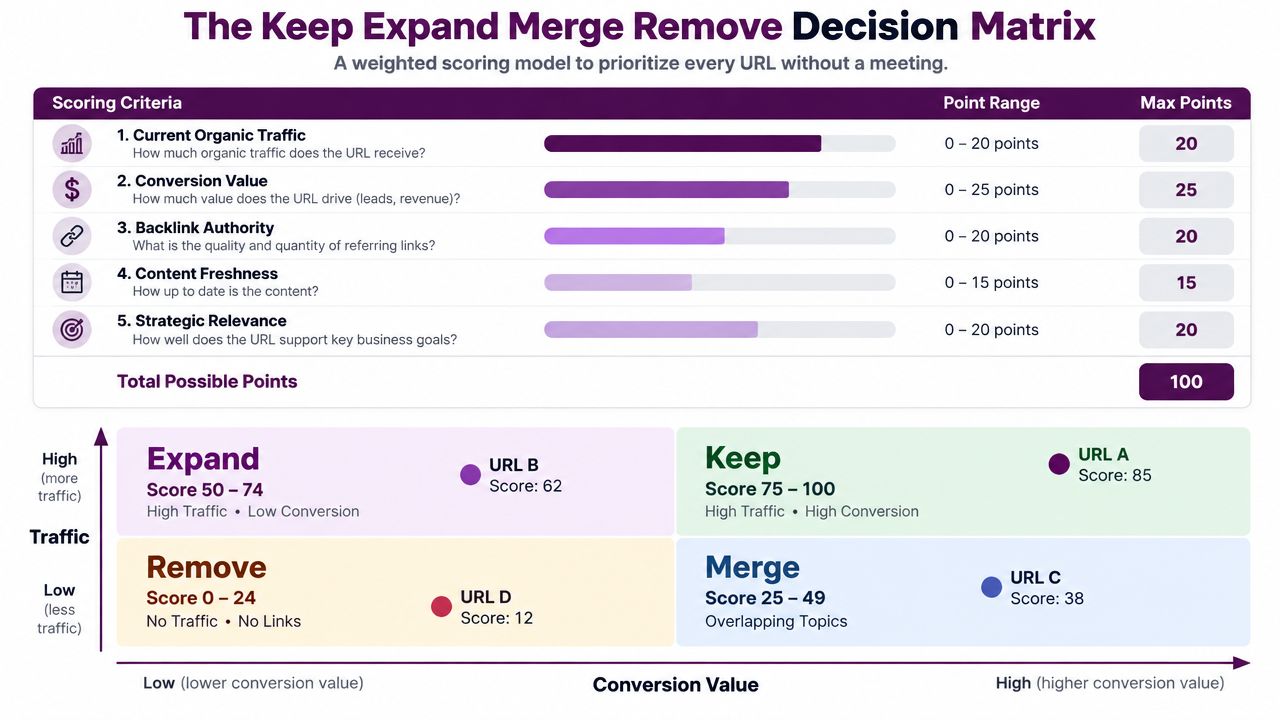
The Keep Expand Merge Remove Decision Matrix
Stakeholder preference is a poor prioritization system. Score each URL before the meeting so the meeting can focus on exceptions, evidence, and implementation capacity.
Use a 100-point model with five criteria:
| Criterion | Points | Scoring guidance |
|---|---|---|
| Current organic traffic | 0 to 20 | Award points for meaningful, relevant demand |
| Conversion contribution | 0 to 25 | Give the highest weight to assisted and direct outcomes |
| Ranking potential | 0 to 15 | Consider position, intent, and attainable demand |
| Backlink profile strength | 0 to 15 | Assess referring domains and useful link equity |
| Strategic alignment | 0 to 25 | Score fit with current business priorities and audience |
The decision bands are straightforward:
- 70 or more, Keep: Retain the page, making only minor accuracy, UX, or internal-link updates.
- 50 to 69, Expand: Add missing subtopics, stronger evidence, useful media, clearer answers, or conversion paths.
- 30 to 49, Merge: Consolidate the strongest material into a canonical URL and create a redirect map.
- Below 30, Remove: Return a 410 when the resource has no suitable successor, or use a 301 to a relevant live page.
Score a page without arguing about it
Take a commercial guide with moderate organic traffic, a few referring domains, clear relevance to a current product line, and some visibility just outside the strongest results. It might receive 12 points for traffic, 18 for conversion contribution, 10 for ranking potential, 8 for backlinks, and 22 for strategic alignment, producing a total of 70. That page belongs in Keep, with a controlled refresh rather than a complete rewrite.
A different page may attract substantial traffic but receive no conversion credit and target a topic outside the current strategy. Its traffic score could be high, yet its strategic and conversion scores should pull the total down. That is why a high-traffic page isn't automatically a Keep.
Decision rule: When a score falls on a boundary, business value and revenue attribution outweigh raw traffic.
For merges, choose the surviving URL deliberately. Review historical performance, query intent, links, content quality, and conversion paths. Then map every retired URL to the most relevant destination, update internal links, preserve valuable sections, and validate the redirect after deployment. Don't merge pages merely because their titles look similar. Similar wording can hide different user needs.
Technical UX and AI-Search Checks in One Pass
Run technical, UX, and retrieval checks from the same crawl wherever possible. Separate reports encourage teams to fix the most visible error rather than the issue that blocks discovery, comprehension, or conversion.
Start with field performance from PageSpeed Insights and Chrome UX Report. Review mobile Core Web Vitals at the 75th percentile, using LCP under 2.5 seconds, INP under 200 milliseconds, and CLS under 0.1 as the pass criteria. Lab results help diagnose a page, but field data tells you how real visitors experience it.
Accessibility belongs in the same pass. Use Lighthouse and axe to check meaningful image alt text, contrast ratios above 4.5:1, logical heading order, and visible keyboard focus states. Accessibility failures can make content harder to understand and interact with, even when the page is technically indexable.
Inspect the paths that connect pages
Review orphaned pages, broken anchors, redirect chains longer than two hops, and missing contextual links on high-traffic URLs. Internal links should reflect the site's information architecture and help users move from research to evaluation to action. Don't add links for volume. Add them where the destination answers the next reasonable question.
For the implementation team, Keyword Kick's pre-publish checklist provides a practical reference for checking page readiness before release.
Add citation readiness to the audit row
AI-search visibility requires more than traditional ranking signals. Newer audit guidance argues that teams should assess whether AI search systems can find and cite a page, not just whether it ranks, as discussed in Huble's content-audit guidance. Treat citationability as an audit criterion:
- Structured data: Validate relevant Schema.org Article, FAQPage, and Organization markup.
- Author evidence: Include an author bio with credentials and consistent sameAs links.
- Answer-first structure: Put an explicit answer block near the beginning of the page.
- Source stability: Link statistical and factual claims to durable, relevant sources.
- Freshness signal: Show a clear last-updated timestamp when the content changes.
Configure custom extraction in Screaming Frog for schema types and visible author markup. Then manually review whether the page gives a retrieval system a concise, attributable answer rather than forcing it to infer the conclusion from a long introduction.
Measuring Impact and Building a Follow-Up Cadence
The audit ends when the actions ship, not when the spreadsheet is approved. Create a change log that records the URL, decision, implementation date, owner, redirect destination where relevant, and the baseline metrics used for comparison.
Track indexed URL count, average position for target keyword clusters, organic sessions to updated pages, conversions attributed through UTMs and goal paths, and Core Web Vitals regressions. Keep the data sources and measurement windows consistent so changes are attributable rather than anecdotal.
Review technical fixes after four to six weeks, content rewrites and merges after eight to twelve weeks, and retirement or 301 consolidation after three to six months. These are review windows, not guaranteed result dates. Search systems, users, seasonality, and implementation quality can all affect the outcome.
| Action type | Primary KPIs | Wait time before review | Re-audit frequency | Owner |
|---|---|---|---|---|
| Technical fixes | Indexed URLs, crawl errors, Core Web Vitals | 4 to 6 weeks | Quarterly priority check | Technical SEO and development |
| Content rewrites | Organic sessions, positions, conversions, CTR | 8 to 12 weeks | Quarterly priority check | Content and SEO |
| Consolidation and merges | Surviving URL visibility, conversions, redirects | 8 to 12 weeks | Quarterly priority check | SEO and content |
| Retirement and 301 work | Index coverage, destination performance, referral paths | 3 to 6 months | After major changes and annual review | SEO, development, analytics |
Run a lightweight check each quarter on the priority cohort. Run a full audit annually, and restart the process after a migration, template change, or major algorithm shift. Feed every useful finding into the editorial brief, including recurring intent gaps, missing evidence, weak answer structures, and common technical defects. That turns each audit into a better production standard.
If your team needs to assemble data from multiple web sources, Scrapeway's blog about web scraping APIs offers useful background on collection workflows and API-based extraction. The principle is simple: automate repetitive collection, then reserve human judgment for intent, value, accuracy, and the final URL decision.
Keyword Kick helps teams connect analytics, Search Console, rankings, backlinks, and technical audit signals so each URL can be prioritized against business outcomes rather than traffic alone. Start your next web content audit with Keyword Kick, connect the relevant data sources, and turn the resulting URL list into an owned action plan with measurable follow-up dates.