You check a keyword, find your page near the top of Google, and expect the traffic report to look healthier. Instead, clicks are thin. Open the actual results page, and the reason may be sitting above your listing: an answer box, a map, or a summary that gives searchers enough information to stop.
That's why answering what is a SERP feature takes more than naming the boxes on Google. You need to understand what each format lets someone do before visiting your website, then decide whether earning that visibility supports your business.
What a SERP Feature Looks Like on Google
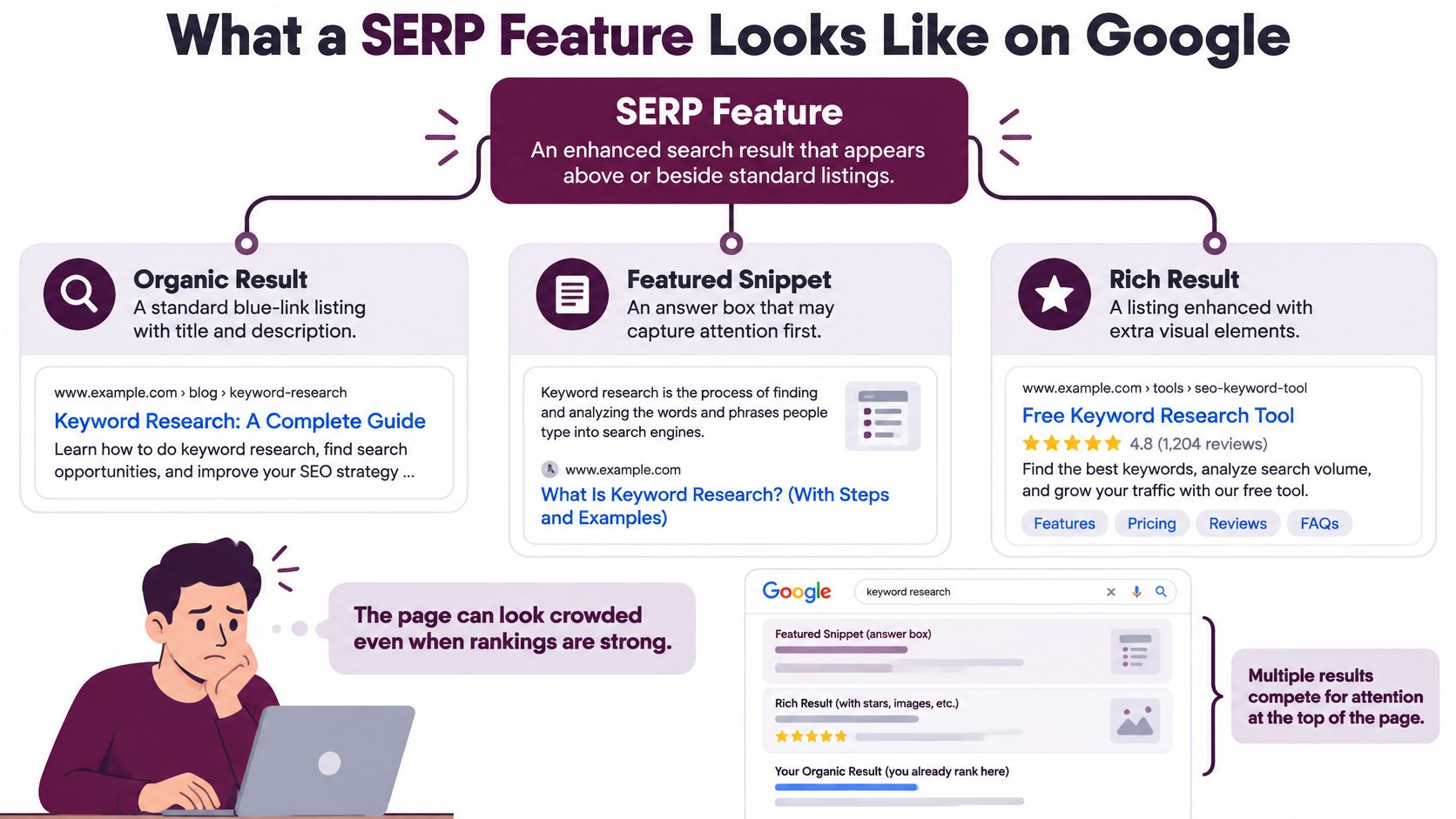
Your page ranks well, but a searcher still has to scroll past other elements to reach it. The ranking hasn't necessarily failed. You're looking at a page where position and presentation are different things.
A SERP feature is an enhanced or specialized element on a search engine results page beyond the ordinary organic listing. Google can combine conventional results with answers, information about entities, media, and related questions, as its explanation of Search features describes.
Read the page like a directory with previews
Think of a traditional blue-link list as a directory. Each entry gives you a title and description, and you choose which destination to visit.
SERP features add previews and shortcuts around that directory. Sometimes the preview helps you choose a destination. Sometimes it gives you everything you need without opening one.
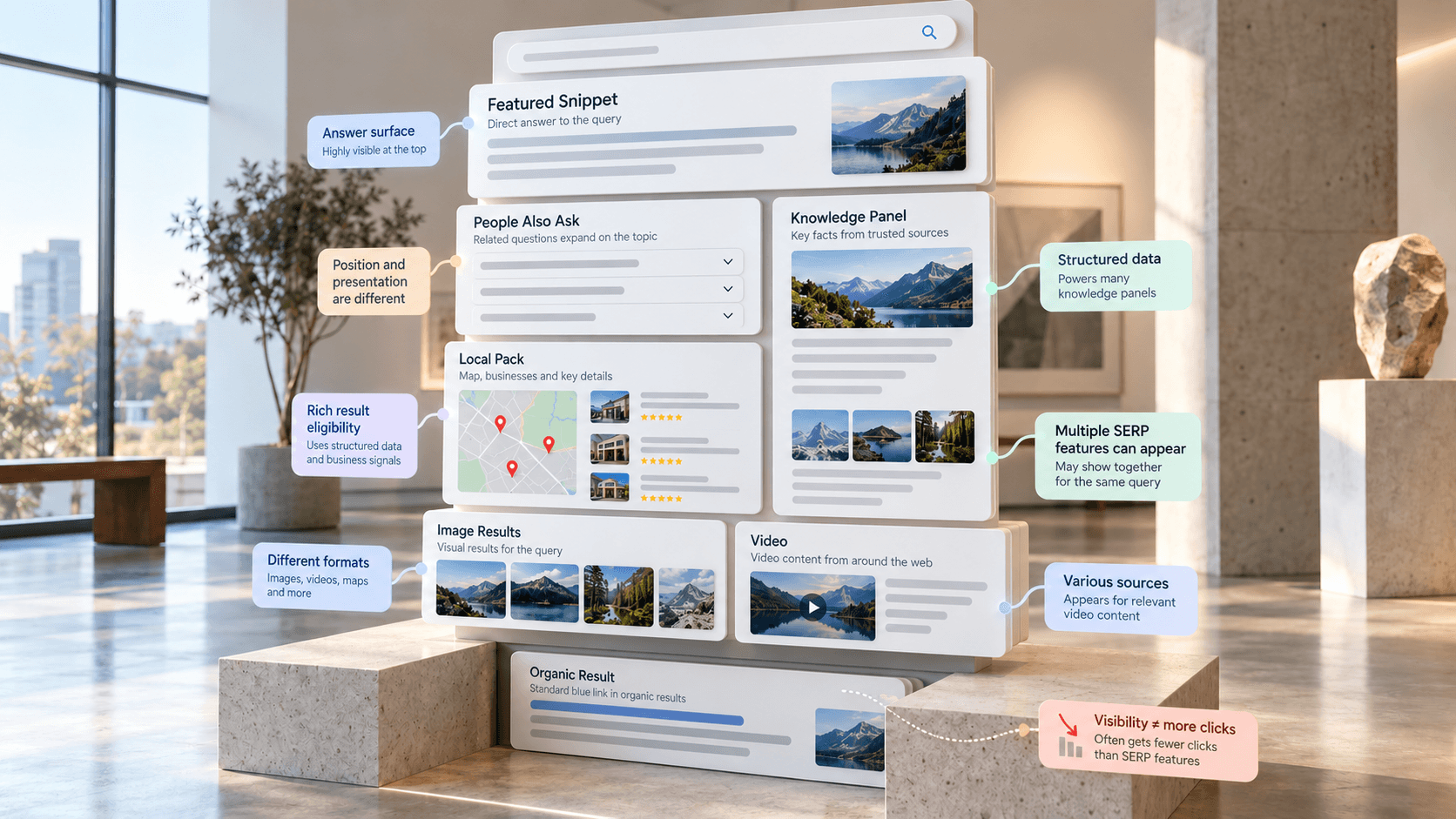
On an illustrative results page, you might encounter these formats:
Format | What you're looking at |
|---|---|
Featured snippet | A prominent answer attributed to a webpage |
Knowledge Panel | Information about a person, place, organization, or thing |
Image result | Visual content presented within the results |
Video result | A video-focused result or group of videos |
Local result | Location-oriented information relevant to the search |
People Also Ask | Related questions that users can expand |
These aren't interchangeable opportunities. A person comparing pictures has a different task from someone looking for a nearby business or a short explanation.
Separate the listing from the format
Google describes featured snippets as prominent page descriptions selected when its systems determine they'll help people find information more easily. They can appear at the top of results, inside related questions, or alongside Knowledge Graph information.
A webpage can therefore compete for a conventional listing while also qualifying for an enhanced presentation. Don't assume, however, that a prominent answer and an ordinary result will always appear together for your page.
The practical shift is to assess where the page appears and how Google presents it. Relevance, usefulness, content quality, and sometimes structured data affect eligibility. You're competing for a useful presentation, not reserving a guaranteed box.
How SERP Features Became Part of Search
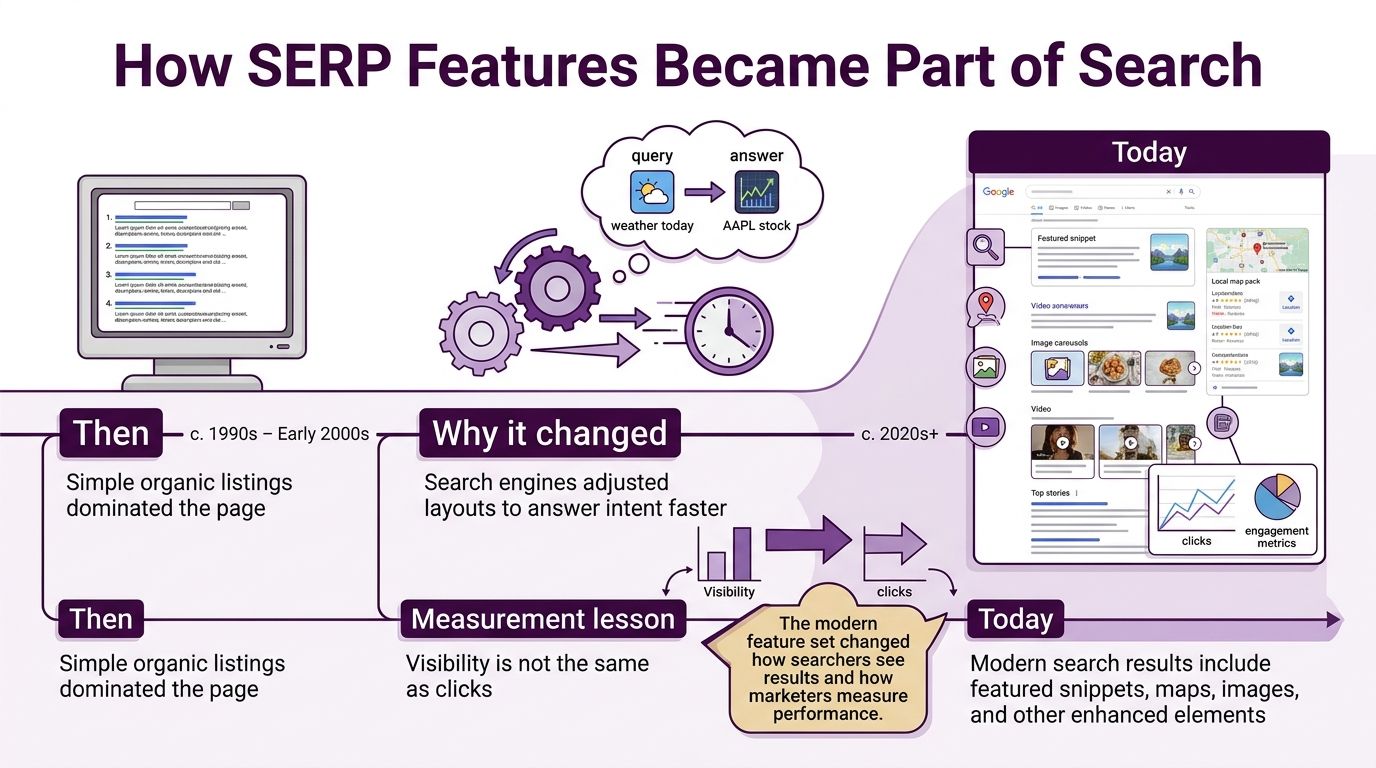
Search-result layouts didn't change through a single launch. Google expanded beyond conventional listings during the 2010s, developing answer-oriented and discovery-oriented interfaces.
In December 2017, Google described improvements to expanded featured snippets, Knowledge Panels, and suggested content; by July 2019, it was discussing formats such as featured snippets, Knowledge Panels, and Autocomplete while reporting more than 3,200 search-system changes during the preceding year, milestones captured in the supplied history of Google's search and discovery improvements.
The important lesson isn't the release calendar. It's that SERP features aren't a fixed product with a permanent layout.
Related questions changed the reading path
Consider how someone might research an unfamiliar topic. They start with a broad question, notice a related question that better matches their concern, and expand it before choosing a website.
A People Also Ask group clusters questions connected to the original query. Each expanded question can display a featured snippet, creating another place where someone can encounter a webpage's answer.
That changes how an SEO should read the results. The searcher's path isn't necessarily query, ranking, click. It may involve reading an answer, exploring another question, and deciding whether further research is necessary.
A stable ranking doesn't mean a stable opportunity to earn a click.
Keep a history of the layout
For an agency explaining a traffic decline, a ranking report alone leaves an important question unanswered: did the client lose position, or did Google change what appeared around that position?
Keep separate records for the following observations:
Ranking movement: Did the page move relative to competing organic results?
Layout movement: Did an enhanced element appear, disappear, or occupy more prominent space?
Source movement: Did Google select a different webpage for an answer?
Performance movement: Did clicks change while impressions remained broadly comparable?
These are diagnostic questions, not proof of causation. A layout change that coincides with fewer clicks deserves investigation, but demand, query mix, and other changes may also matter.
Historical feature tracking gives teams a better explanation than “the keyword still ranks.” It helps them identify what changed in the experience a potential visitor saw.
How Structured Data Shapes Rich Results
A recipe page offers a useful way to understand structured data. A reader can recognize ingredients, cooking time, temperature, and calories from the page's wording and layout. A search system needs to interpret those details too.
Structured data provides standardized labels for entities and their attributes. Google explains how this markup helps it understand page content and assess eligibility for enhanced displays in its introduction to structured data.
Think of it as attaching accurate labels to the contents of a cabinet. The labels make the contents easier to identify. They don't force anyone to display the cabinet in a shop window.
Understand what markup can influence
Google interprets page content, query intent, and eligibility signals when generating enhanced results. Depending on the result type, the presentation can include recipe details, review information, product attributes, breadcrumbs, event data, or video elements.
A rich result is an enhanced presentation, not another name for every possible SERP feature. That distinction matters because implementing markup and writing an answerable passage are different tasks.
The intended workflow is straightforward: accurate, policy-compliant labels improve machine-readable understanding, which can support eligibility for a relevant rich result. Valid markup doesn't guarantee display. Nor should you assume that schema creates eligibility for an unrelated format.
For a closer look at the terminology and implementation considerations, consult Keyword Kick's guide to rich snippets.
Give technical teams an operating checklist
Treat structured data as an ongoing template-level responsibility rather than a deployment you never revisit.
Validate syntax: Check whether the markup is technically readable before judging its search impact.
Match the visible page: Marked-up information should be visible and consistent with what visitors receive.
Review policy compliance: Correct syntax doesn't excuse misleading or inappropriate information.
Monitor templates: Check patterns across product, recipe, or other relevant page types instead of inspecting isolated URLs only.
Compare outcomes: Evaluate impressions, clicks, and click-through rate separately when assessing enhanced presentation.
CTR, or click-through rate, describes how often an impression leads to a click. It answers a different question from eligibility: not “can this page receive an enhancement?” but “are searchers choosing to visit?”
Keep technical success and business success separate. Fixing markup can be worthwhile even before a display change appears, but a richer presentation isn't evidence of proportional traffic growth.
Featured Snippets and the Answer Surface
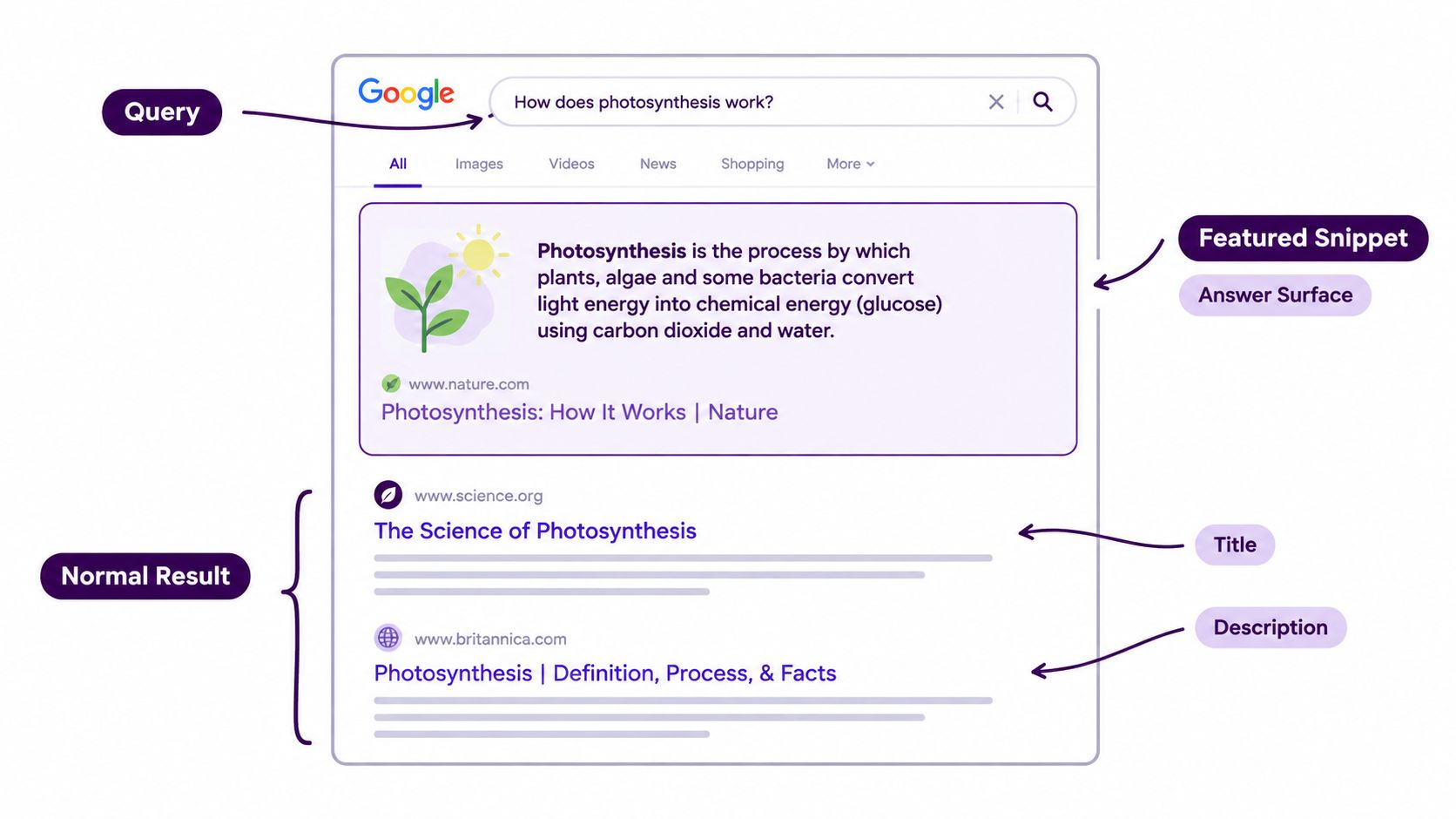
An ordinary result typically presents a title before its description. A featured snippet reverses that emphasis: Google shows the descriptive answer first, followed by attribution to the source page.
Google's featured-snippet documentation explains that its systems select these results based on how well they answer a question and help the user. That makes optimization an answer-retrieval problem, not a keyword-placement exercise.
Write a passage someone can actually use
Suppose you're drafting a page about the difference between a featured snippet and a rich result. Opening with a long history of search forces readers to hunt for the distinction.
Instead, place a direct explanation beneath a descriptive heading, then supply the qualifications and examples nearby. The passage should make sense when read on its own without becoming misleading when separated from the surrounding article.
Use the format that fits the information:
Definitions: Give a concise explanation followed by context that resolves likely confusion.
Processes: Present actions in their actual order rather than burying them in a paragraph.
Comparisons: Use a table when readers need to inspect equivalent attributes.
Conditional answers: Keep important exceptions close to the main answer, especially when a short extract could oversimplify it.
There's no need to pad the passage with repeated variations of the query. Clear wording serves the person asking the question and makes the answer easier to interpret.
The deeper explanation of how featured snippets work in 2026 can help distinguish this format from other enhanced results.
Track the answer, not just the keyword
Because a snippet can also appear within related questions, inspect the exact question Google answered. A broad keyword label may hide important differences between a definition, a comparison, and a troubleshooting request.
Record the query, feature type, source URL, and displayed format together. Then connect those observations to changes in impressions and clicks over time.
Editorial rule: Make the answer easy to extract, but give the visitor a genuine reason to read beyond it.
For example, an answer passage can establish the distinction while the full page provides a decision framework or a detailed implementation explanation. Don't withhold the answer merely to manufacture a click. Make the destination useful for the reader's next task.
Why a SERP Feature Can Steal Your Clicks
The uncomfortable question comes after you earn visibility: did anyone still need to visit?
An AI Overview, featured snippet, local pack, image group, video carousel, or People Also Ask group can appear above or alongside conventional listings. These formats serve different purposes, so you shouldn't assume that winning any of them produces the same traffic outcome.
What the observed click behavior shows
In its analysis of 68,879 Google searches by roughly 900 U.S. adults in March 2025, Pew Research Center's study of AI summaries and clicking found AI Overviews in 18% of searches and reported the comparison below.
Clicks When an AI Overview Appears
Outcome | AI Overview present | No AI Overview |
|---|---|---|
Clicked a traditional result | 8% of visits | 15% of visits |
Clicked a link inside the summary | 1% of visits | Not applicable |
Ended the browsing session | 26% of visits | 16% of visits |
These figures describe the study's observed behavior, not a forecast for your website. They also concern AI Overviews specifically, not every enhanced result.
The decision-changing point is that prominence and downstream clicking can move in different directions. You can't use an appearance in a summary as a substitute for measuring the visits or outcomes it supports.
For teams coordinating organic and paid search, Keywordme's AI search insights for PPC teams offers a related resource for examining ad-click questions. Keep that paid-search analysis separate from the organic behavior measured above.
Build a business scorecard
Assess a feature against the job your page performs, using evidence you can observe.
Qualified clicks: Are visitors arriving with a need the page or business can serve?
Conversions: Do those visits produce meaningful actions, rather than just more sessions?
Assisted revenue: Is there evidence of a contribution to later purchases within your attribution limits?
Brand exposure: Is awareness an explicit objective, and what evidence will you accept for it?
Own-result cannibalization: Could the feature be replacing clicks your conventional listing previously received?
Classify the result as a win, a wash, or a click leak. A win supports useful outcomes; a wash adds presentation without a clear business change; a click leak coincides with lost valuable visits without an evident offsetting benefit.
Search Console provides performance dimensions, but it doesn't independently prove the incremental business value of every format. Pair search observations with on-site outcomes, and acknowledge uncertainty when you can't isolate the feature's contribution.
When to Chase a SERP Feature or Skip It
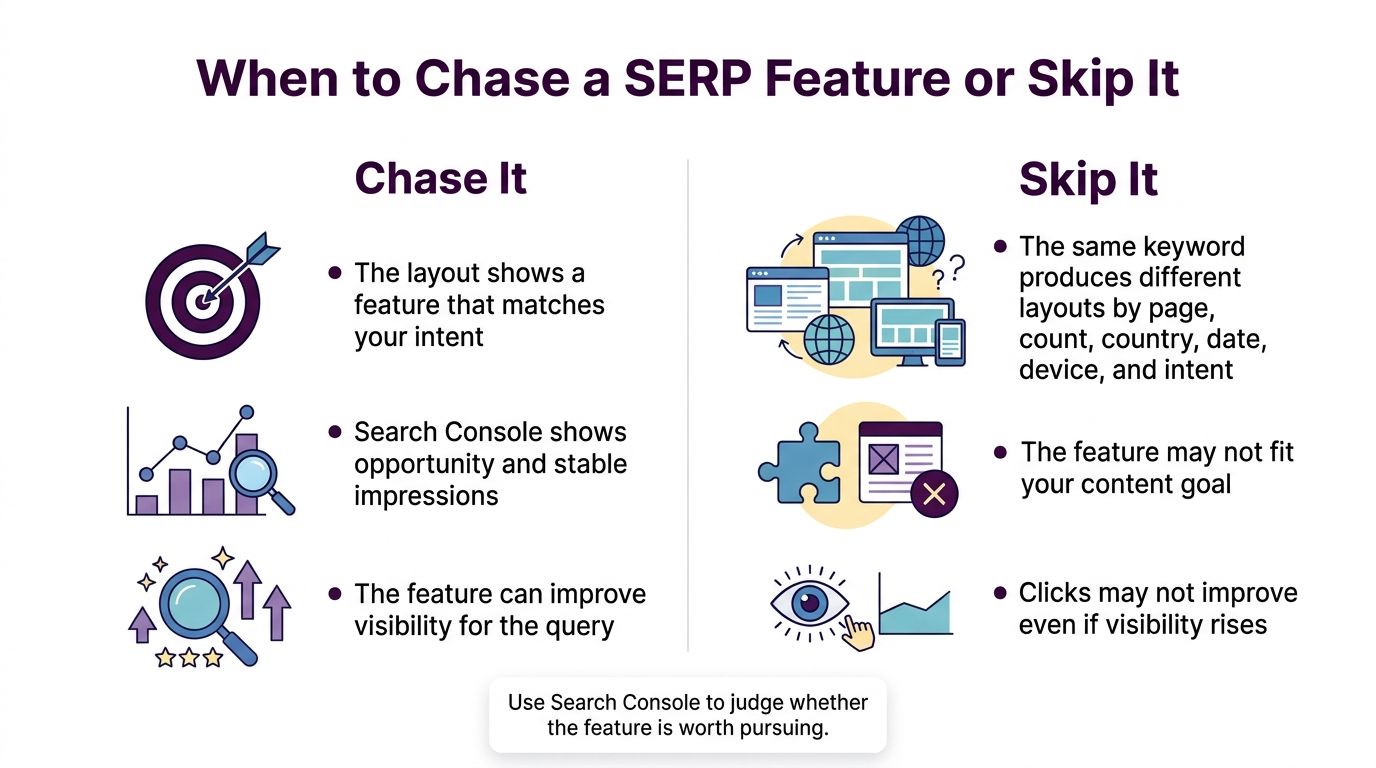
Don't treat a feature as a permanent prize attached to a keyword. The same search can produce different layouts across markets, devices, dates, and intents.
Google's Search Console performance documentation describes dimensions and filters including query, page, country, device, and date, alongside metrics such as impressions, clicks, CTR, and position. Use those filters to compare relevant audiences instead of blending unlike searches into a single average.
Match the opportunity to the visitor's task
Consider a hypothetical product page and an informational guide. A product-rich result may help a shopper recognize a relevant item and decide to investigate it. A short answer from the guide may resolve the reader's question before a visit becomes necessary.
Neither outcome is automatically good or bad. The product page needs commercial discovery; the guide may need qualified readership, brand recognition, or a path toward a more complex task.
Use intent, market, and device to choose among these responses:
Decision | When it makes sense | What to do |
|---|---|---|
Pursue | The format matches your content and could support a valuable next action | Improve the relevant content or eligibility, then assess outcomes |
Defend | A previously useful answer placement has moved to a competitor | Compare the selected answer, accuracy, context, and page usefulness |
Avoid | The format doesn't serve your audience or justify the effort | Maintain accurate content and prioritize a stronger opportunity |
Avoid means choosing not to invest in that feature. It doesn't mean making the page worse or assuming you can control whether Google displays it.
Choose monitoring tools by the question
Search Console is useful for understanding reported search performance. Manual inspection helps you see the current layout, but it doesn't replace a historical record.
Keyword Kick is another option for this workflow, combining SERP feature tracking, rank tracking, Search Console, keyword research, and competitor analysis. Use that context to examine which site appears in an answer feature and decide which pages deserve attention.
The distinction matters when reporting to a client or manager. A screenshot establishes what you observed at that moment; a performance comparison helps evaluate whether it matters commercially.
The AI Overview findings discussed earlier are a reason to test assumptions, not abandon informational content. Make the investment decision at the level where you can connect the audience's task, the displayed format, and the outcome you want.
Track SERP Features and Pick Your Next Move
Choose a query that already earns impressions and audit it this week. Starting with an existing opportunity gives you a page and a performance record to investigate, rather than an abstract target.
Open the live results on mobile and desktop. Note your country and the date, and treat what you see as an observation rather than a universal version of the results.
Build a useful observation record
Capture the details that let a teammate reproduce your reasoning:
Feature and source: Name the format and record the URL Google presents within it.
Your relationship: Mark your page as the source, a competing result, or absent.
Visitor's next task: Describe what someone would still need after reading or using the feature.
Comparable performance: Review clicks and CTR for the same query and relevant device and country.
Proposed action: Assign a content improvement, an eligibility check, a competitive review, or no further investment.
Don't confuse a prominent answer with demand. Inspect whether impressions changed too, and avoid crediting a layout change for a traffic movement that could reflect a different mix of searches.
For a fuller monitoring workflow, use the guide to tracking search result features in 2026.
Turn the observation into a decision
Improve the answer passage when there's evidence that the placement sends or assists qualified visits. If a competitor has replaced a previously useful source placement, investigate the difference before rewriting the whole page.
When the results already satisfy the query and your page's conversions don't move, stop treating feature ownership as the objective. You may have a better use for the same editorial or development effort.
Weekly check: Review the feature owner, device, country, and change in clicks before assigning the next optimization task.
Keep the record concise enough to maintain. The useful deliverable isn't another screenshot, but a decision someone can implement and later evaluate.
Keyword Kick offers SERP feature tracking, rank history, and connected Search Console data so you can compare enhanced visibility with actual search performance. Visit Keyword Kick, bring a query you already rank for, and use its competitive context and prioritized recommendations to choose whether to pursue, defend, or skip the feature.