You're staring at a site that's “just” overdue for an update. A few pages still mention old numbers, one template looks dated on mobile, and someone finally asked if the homepage copy can be “freshened up” before the next campaign. That's exactly when teams get into trouble, because a website update isn't a cosmetic task, it's a ranking-risk task unless you control the sequence, the scope, and the measurement.
The pages that already rank are carrying equity you can't see in the CMS. If you edit them casually, Google recrawls the changes, users bounce, internal links shift, and the traffic drop doesn't announce itself with a neat error message. The safest way to how to update a website is to treat every change like a controlled experiment, with a baseline, a reason, and a rollback plan.
The Update That Quietly Killed Your Rankings
The worst update failures rarely look dramatic on launch day. The site loads, the copy reads better, and nobody notices the problem until impressions soften weeks later, with no single broken thing to blame. That's why the first question isn't “what should we change?” It's “what already works, and what can't afford to be disturbed?”
When a page already ranks, the main job is to preserve the signals that got it there. That means identifying the URLs that matter, understanding which ones pull organic traffic, and resisting the urge to rewrite them just because the design team wants consistency. If you change too many variables at once, you lose attribution, and once attribution is gone, every debate about the update turns into guesswork.
Practical rule: if a page is earning search visibility, don't treat it like a blank canvas.
The ranking-protection lens is simple. Update the page only if the change improves accuracy, usefulness, or conversion intent. If two pages chase the same query and one is weaker, consolidation is often safer than refreshing both and making the cannibalization worse. If a page is stale but still strong, a targeted refresh beats a broad rewrite.
Baseline first, edits second
Document what the page is doing before anyone touches it. Capture clicks, impressions, CTR, and current rankings in Google Search Console, then note any conversion behavior you care about in analytics. If a change performs badly, you need to know whether the problem started with the copy, the template, the redirect, or the internal links.
That baseline is also what stops teams from arguing about feelings. A designer may think the layout improved. An SEO may think the rewrite was too aggressive. The baseline tells you whether the page held its ground.
The most useful habit is boring: write down what you changed, when you changed it, and why. A clean changelog turns a risky refresh into something you can diagnose later instead of defend vaguely.
Run an Audit Before You Touch Anything
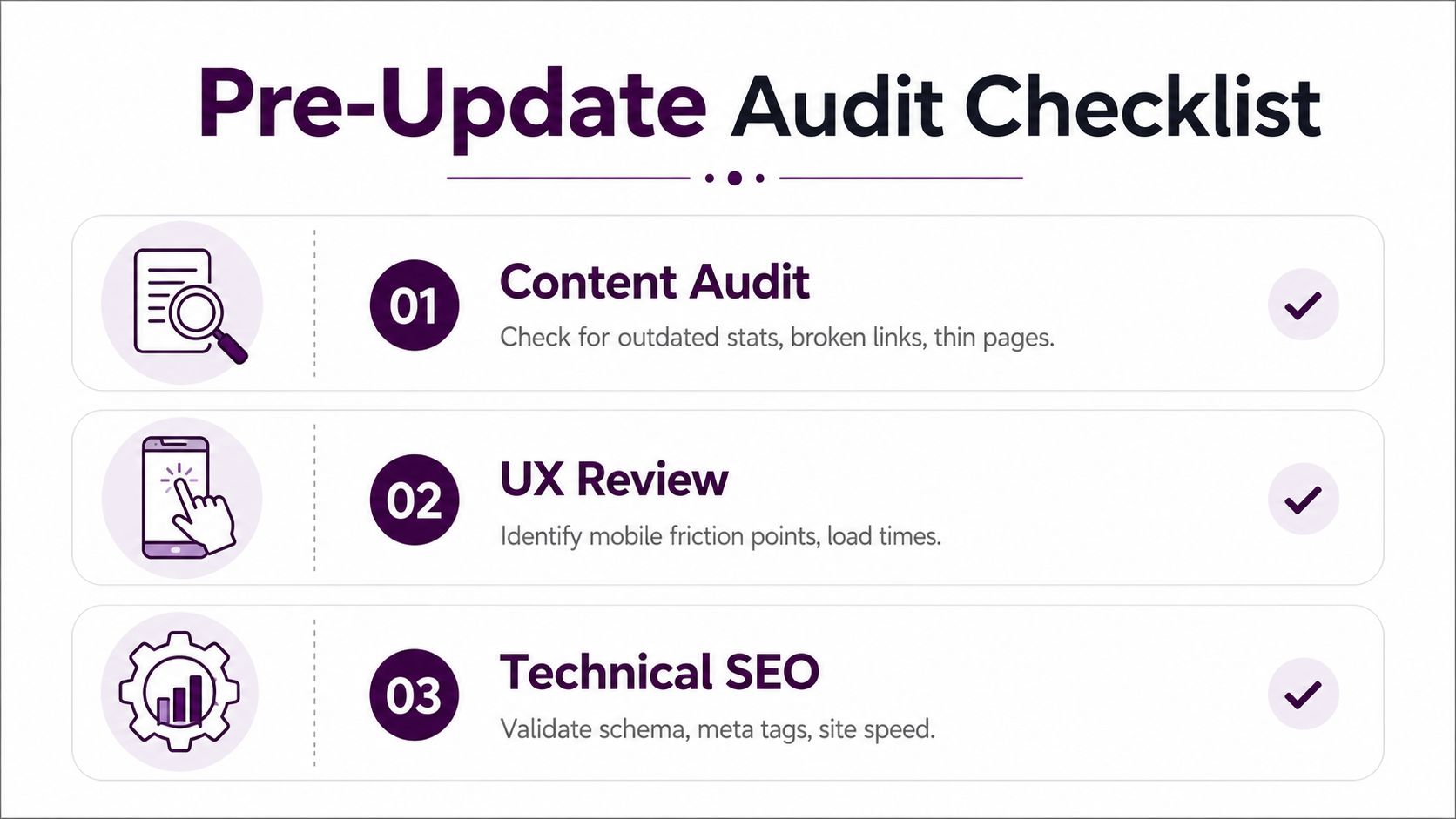
A website update without an audit is a guess with a fresh coat of paint. Before anyone changes copy, templates, or navigation, check what the page already does well and what is hurting performance. The ranking-protection mindset starts here, because the first job is not to make the site prettier, it is to avoid breaking pages that already earn search demand. A clean update workflow starts with content, UX, technical performance, and security, then sets clear goals and KPIs such as engagement, conversion rate, and page-load time before publishing changes, which matches the review approach outlined in Webflow and its advice to use analytics, user research, and broken-link checks during the process.
Content and UX are the first filters
Start with content. Look for outdated statistics, dead outbound links, thin pages, duplicate pages, and articles that are still indexed but no longer match a clear search intent. Source checking matters here because if you refresh a page without verifying citations, you can end up preserving a claim that no longer has support. Use this SEO site audit checklist to catch the gaps before the page goes live, and apply the same standard to every source link in the updated article so the destination still exists and still supports the point.
Then move to UX. The pages that cause the most friction are often the ones teams stop reviewing because they look stable. Mobile layout shifts, confusing navigation, slow hero sections, and forms that feel fine on desktop but painful on a phone are common update blockers. If the page looks current but feels clumsy, fix the experience before you touch the copy.
Technical performance and security are not separate chores
The technical review should include page speed, script errors, meta tag consistency, schema, and obvious crawl issues like broken internal links. Webflow explicitly recommends checking loading speed, responsiveness, and broken links with tools such as Google Search Console or Broken Link Checker. Security checks matter too, because stale plugins or expired certificates turn an ordinary content refresh into an avoidable incident.
Use search data to decide priority. Search Engine Land's guidance on refreshing content points site owners toward Google Search Console for finding pages with declining performance, then measuring what happens after pruning, consolidation, or redirection instead of assuming every update helps. That matters because a weak page does not always deserve a refresh. If two URLs are competing for the same query and one is clearly inferior, consolidation is often the cleaner move.
Useful habit: do not audit the whole site with equal intensity. Start with the pages that have traffic, revenue potential, or ranking history.
That is also where a focused checklist earns its keep. Compare your process against a published review checklist like this SEO site audit checklist and use it to catch the misses before the page goes live.
Backups, Staging, and the Safe Deployment Sequence
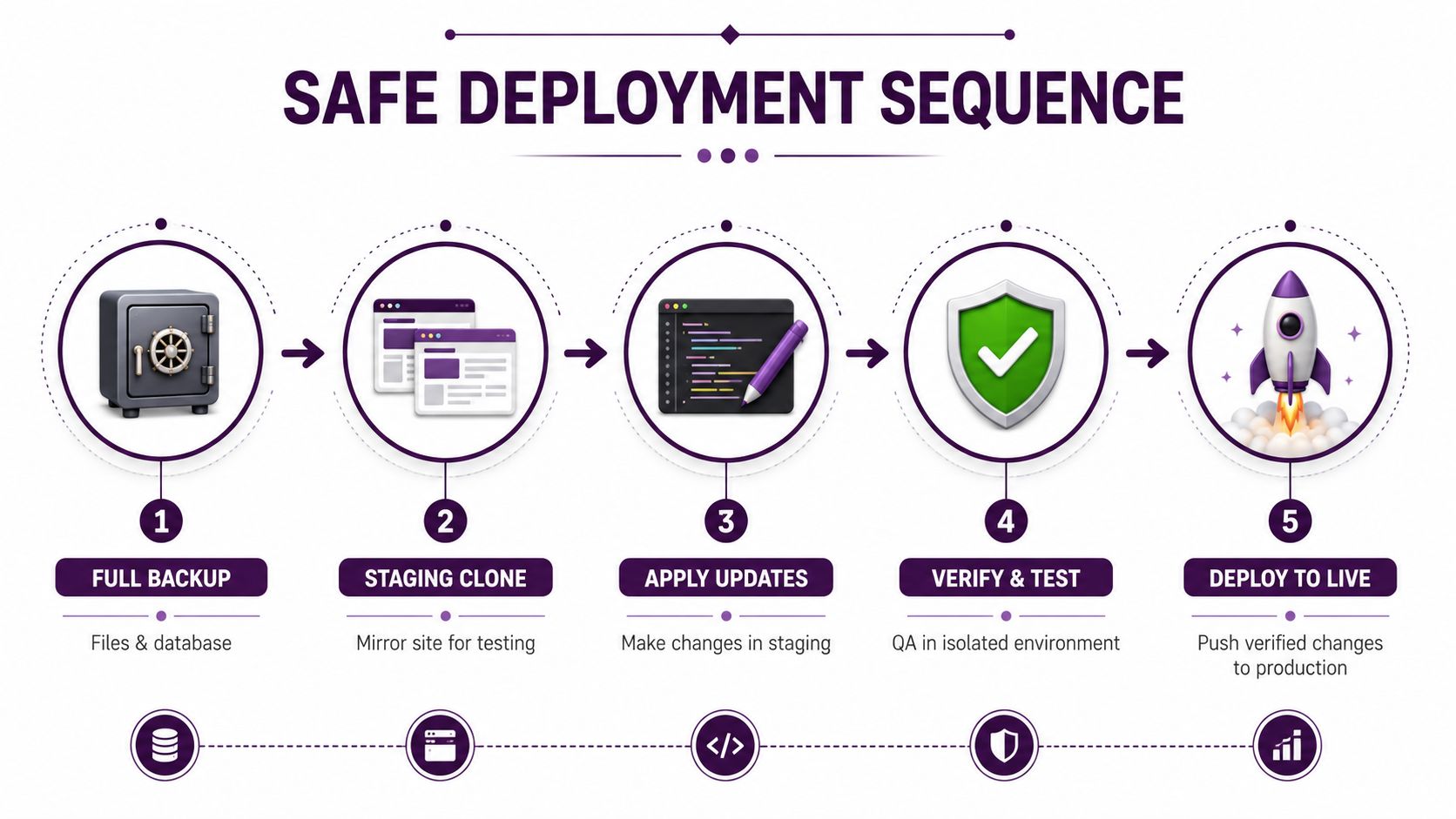
The safest deployment sequence is not creative. It's methodical because methodical is what survives real-world updates. Start with a complete backup of files and database, then test changes on a staging clone, update plugins or apps first, then the theme, then the core CMS, and after launch purge all cache layers and verify the live page in a private browser window. That order reduces conflict risk because plugins are commonly the source of update problems, and it gives you a rollback path if something breaks (Website Sally).
Why the order matters
Backups come first because they're the only thing that makes recovery fast. If the update breaks templates, corrupts data, or strips a page layout, you need a restore point that's already complete, not a partial snapshot you're assembling after the fact.
Staging comes next because production is not a lab. Even small changes can trigger plugin conflicts, CSS regressions, or cached assets that make the live site behave differently from the copy you tested. If your stack is messy, use troubleshooting staging and configuration as a practical reference for untangling common environment problems before they hit users.
Update in layers, then test in isolation
The safest order is plugins or apps, theme, then core. That sequence matters because a theme built for an older plugin version can break when the dependency changes, and a core update can expose every sloppy integration under it. After each step, test the exact templates you're about to ship, not just the homepage.
Cache is another trap. A page cache can show you an old layout, a server cache can hide a failing script, and a CDN can keep serving stale assets even after you've fixed the source file. Purge every layer, then open the page in a private browser window so you know you're seeing the response.
When the stack is enterprise-heavy, the same sequence still applies, but the tooling gets more formal. If you're dealing with complex governance, multiple environments, or upgrade windows that need coordination across teams, enterprise CMS upgrade solutions from Kogifi are the kind of reference worth studying because the operational problems are the same even when the platform is bigger.
The point isn't to be precious about process. It's to make the next failure obvious, reversible, and isolated instead of mysterious.
How the Workflow Differs by Platform
The core logic stays the same across platforms, but the mechanics change fast. A WordPress site, a static build, a no-code builder, and a headless stack all need audit, backup, staging, update, test, deploy, and monitor. What changes is where those steps live and how much of them you have to fake.
Platform type | Backup method | Staging option | Deploy mechanism |
|---|---|---|---|
Traditional CMS | Full site and database backup | Native staging or host clone | Admin publish or host push |
Static site generator | Git branch and build artifacts | Preview branch or local clone | Merge and rebuild |
No-code builder | Export where possible, plus page snapshots | Duplicate project or draft workflow | Native publish |
Headless CMS | Content export plus repository backup | Preview environment and draft content | API or frontend deploy |
CMS and hosted builders
WordPress is the clearest example of a platform where plugin order matters, but the same caution applies to any CMS with layered dependencies. If you publish directly on production because “it's only copy,” you've skipped the part where content changes can still break templates, schema, or redirects.
Webflow and similar builders make publishing easier, but that doesn't remove the need for staging discipline. If the platform doesn't give you a full clone, use draft modes, duplicate projects, or exported snapshots to simulate one. The update process is still audit, edit, test, publish, monitor, just with fewer recovery tools.
Static and headless setups
Static site generators like Next.js behave differently because the content update is often tied to a build. The change may be tiny, but the deploy path is code-shaped, not page-shaped. That means version control and preview deployments carry more weight than CMS buttons.
Headless setups need an extra layer of attention because content, frontend, and APIs can drift apart. If the content team updates a field and the frontend doesn't render it correctly, the issue may not show up until the build or cache cycle completes. That's why preview environments and draft branches matter more in headless work than in many classic CMS workflows.
The platform question is not “which tool is best?” It's “where do I create a safe mirror of production?” Once you know that, the rest of the process becomes repeatable instead of improvised.
SEO and Redirects Without the Regressions
Search performance usually gets hurt in three places, and all three are preventable. Teams change the wrong URL without a redirect plan. They refresh two pages that should have been merged into one. They update content without checking whether the outbound sources still support the claims on the page.
Decide whether the page should be updated, merged, or removed
The right move is not always a rewrite. If two pages target the same query and neither one is strong, consolidation usually makes more sense than polishing both and splitting relevance. If a page has stale information but still earns attention, update it carefully and preserve the URL. If a page has no search value, no engagement, and no reason to exist, deleting it or redirecting it may be cleaner than feeding it more maintenance.
Canonical tags should stay aligned with that decision. If you are consolidating, the preferred URL has to be unmistakable, and the old pages need a clean redirect path. For a practical redirect workflow, the master URL redirect on Shopify guide from ECORN is useful because it shows how much damage happens when redirects are added late instead of planned early.
Keep the update signals clean
Refreshing statistics is fine, but only if the replacement source is current and the link still resolves to the referenced data. That source-check habit keeps weak updates from slipping through. Updating the last modified date after a genuine refresh is also sensible because it makes the change visible to users and search engines, but do not fake freshness on pages that barely changed.
Use a redirect checker before launch if any slugs are changing. A simple check with Keyword Kick's redirect checker helps you catch chains, loops, and accidental dead ends before they touch traffic.
If a page already ranks, protect the URL structure unless you have a better reason to change it than “it looks cleaner.”
That is the SEO rule that keeps updates from turning into regressions. Clean structure matters, but ranking stability matters more. Every URL change should answer one question clearly, whether it is preserving a good page, merging two weak ones, or retiring something that no longer deserves crawl budget.
Testing, Launching, and Knowing When to Roll Back
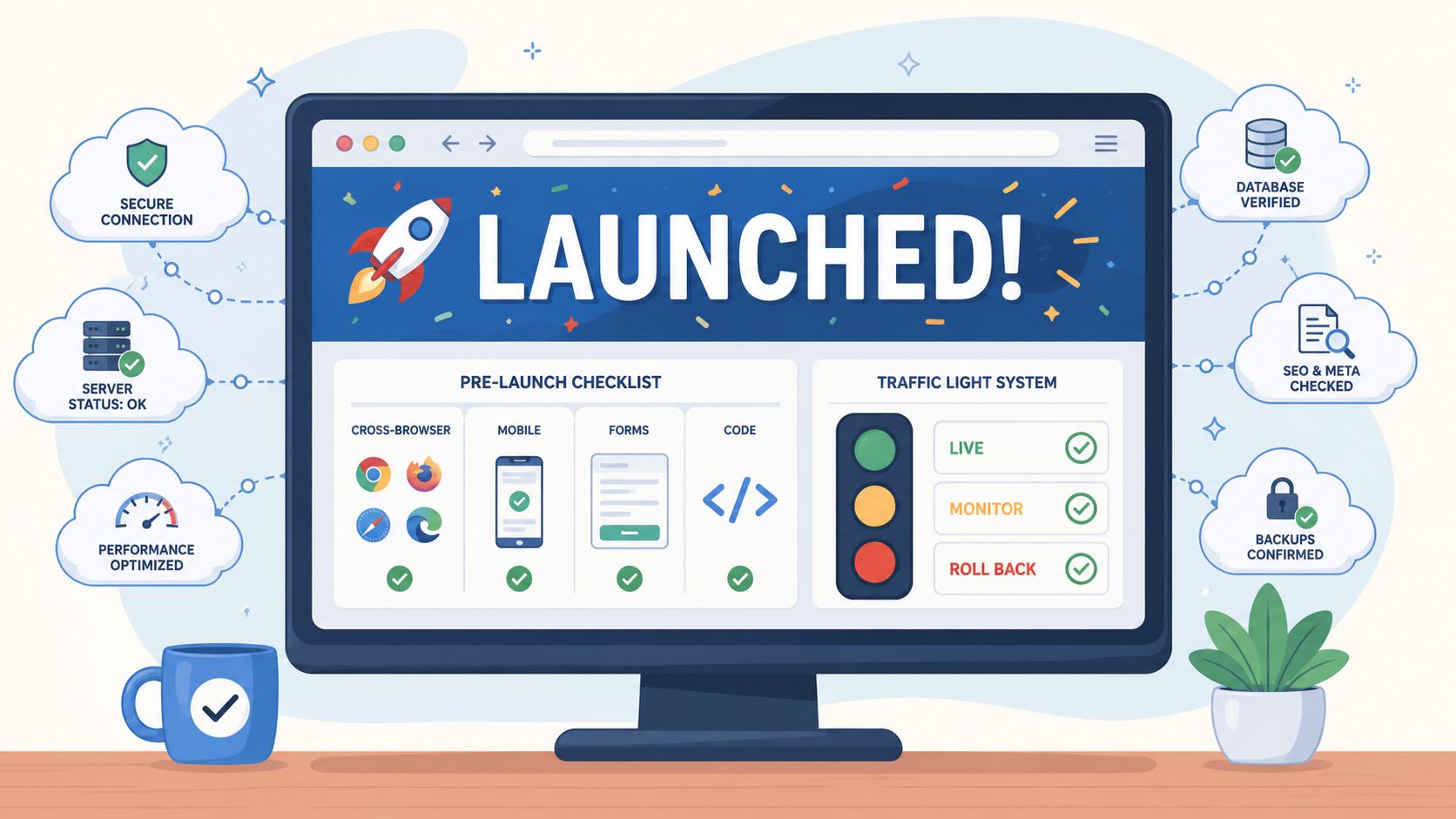
Launch day is where verification starts. A site can look fine in staging and still break in production, especially when cached assets, browser quirks, or JavaScript-heavy templates behave differently after release. Before you push live, check cross-browser rendering, mobile layouts, form submissions, schema, and any template that depends on JavaScript. Then open the live version in a private window so you are not judging cached output.
Watch the right metrics after the launch
The post-deploy window needs a baseline, which is why the earlier audit matters so much. Compare clicks, impressions, CTR, and rankings against the pre-update numbers over the following 2 to 6 weeks, using the same monitoring window referenced in the content-refresh guidance from Gravitate Design. If a page improves in one area but slips in another, hold off on declaring success until the pattern settles.
Focus on the pages that can move rankings fast if they break. A homepage, a money page, or a high-traffic article deserves closer attention than a low-value utility page, because a small issue there has a larger search impact. If you changed titles, headings, or internal links, watch those pages first and isolate each edit so you know what caused the shift.
Roll back before the damage spreads
Rollback triggers need to be defined before the update goes live. A broken core template, a JavaScript error that stops forms or navigation, or a sustained traffic decline should force a review right away, not a wait-and-see posture. If the change touches indexable pages and search visibility starts falling, act fast rather than letting the problem sit while the crawl sorts itself out.
A good launch checklist helps here, especially when it covers the templates and workflows teams usually miss. Use this site launch checklist as a practical comparison point against your own process.
The teams that recover quickly already know what bad looks like. They do not argue with the evidence, and they do not delay the rollback because nobody wants to own the call.
A Sustainable Update Cadence That Prevents Emergencies
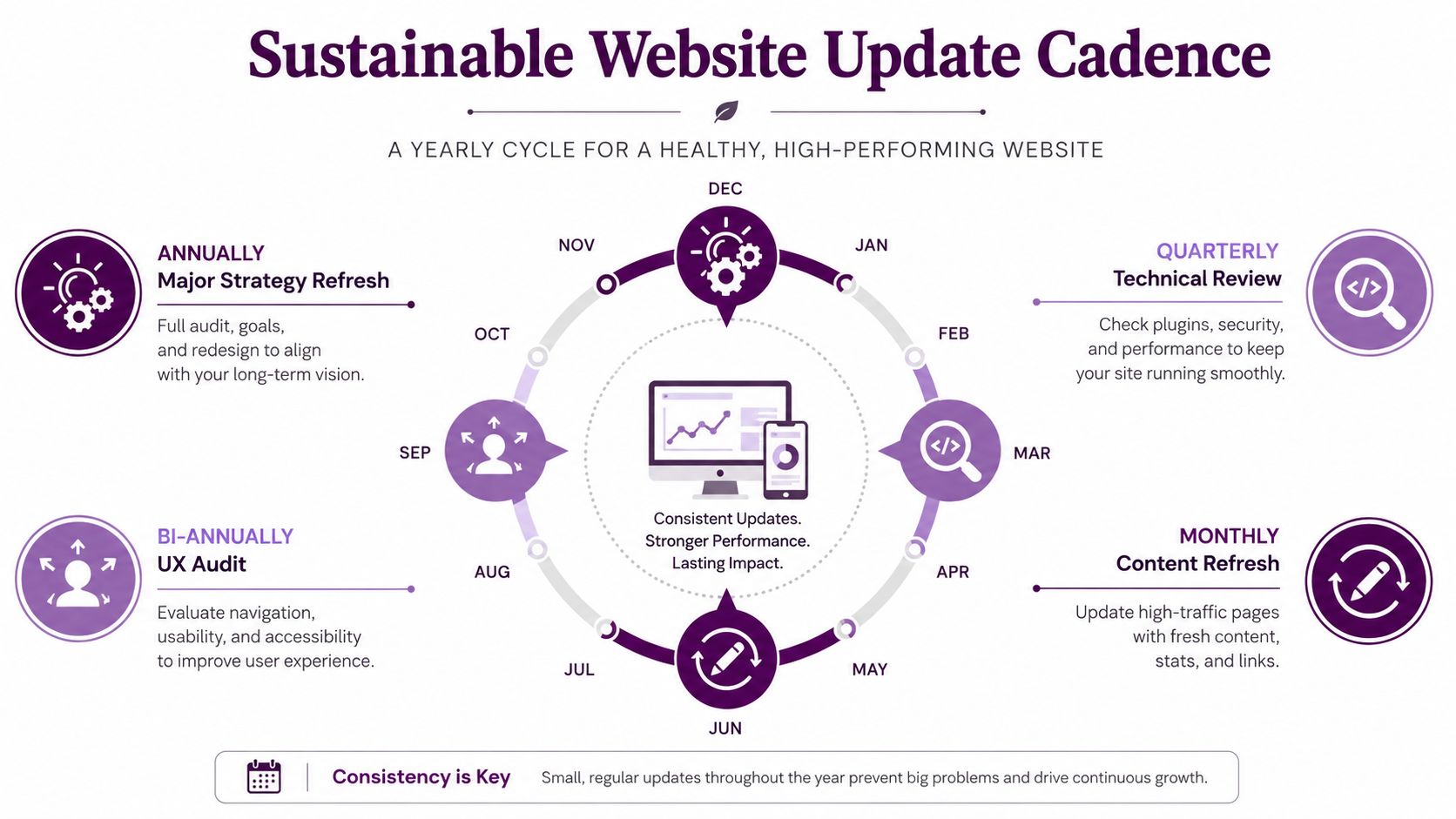
A site update should not feel like an emergency response. The safer pattern is to keep important content on a regular review cycle, handle SEO and technical checks on a fixed schedule, and reserve larger design or structural changes for planned windows instead of last-minute fixes. A practical cadence is monthly content refreshes, quarterly SEO and technical checks, and broader design or structural work on a slower, planned cycle. Evergreen pages also deserve recurring review, with post-update behavior tracked in Google Analytics and Google Search Console for several weeks after release.
Make the cadence operational
The benefit is consistency. If the same owner checks the same pages on the same schedule, it becomes easier to compare changes and easier to reverse them when a release goes sideways. Changelogs, baseline metrics, and rollback notes turn updates into a repeatable process instead of a scramble.
Assign ownership by page type, not by whichever page is fastest to edit. High-traffic pages need tighter review because they carry more ranking risk if something breaks. Structural changes need slower review because they can alter internal linking, templates, and crawl paths. Security and dependency updates should never sit around waiting for a marketing window.
A site holds up better when it is treated like a live product. That means fewer rushed fixes, fewer surprise regressions, and a better chance that the work published today still performs next month.