You're in the weekly traffic meeting, and organic clicks have dropped. Someone blames the page titles, someone else blames rankings, and another person says it's probably seasonality. Everyone is looking at the same decline, but nobody has established what changed.
The Google Search Console Performance report helps separate those explanations. The trick is knowing which numbers describe overall performance, which rows help you investigate it, and where Google's reporting leaves deliberate gaps.
What the Performance Report Answers
The Performance report records your site's exposure in Google Search and the clicks that followed. That makes it useful for investigating what happened before someone reached your website, rather than what they did after arriving.
In that traffic meeting, start with a narrower question: did people see the site less often, choose it less often, or encounter a different mix of results? Those are different problems, and they call for different changes.
Google established this segmentation-first approach when it introduced Search Analytics on May 6, 2015, replacing Search Queries with a more precise reporting system, according to its Search Analytics launch announcement.
Start with the question, not the suspected fix. A decline in clicks doesn't, by itself, justify rewriting titles or replacing content.
The headline measurements are clicks, impressions, click-through rate, and average position. Read them together, then use queries, pages, countries, and devices to locate the change.
Search Console and analytics answer complementary questions. For the on-site side of the investigation, Bruce and Eddy's guide to track organic search in GA4 helps connect search acquisition with visitor behavior.
Establish a trustworthy starting point
Treat the report as intentionally incomplete. The property chart supplies your performance baseline, while the visible rows help prioritize investigation rather than inventory every search.
Before interpreting any movement, select a finished date range. A recent day that's still processing can look like a sudden collapse, especially when someone compares it with a completed day and immediately starts proposing fixes.
Clicks Impressions CTR and Average Position
| Metric | What it counts | How it is calculated | First reading when it moves |
|---|---|---|---|
| Clicks | A searcher selects a link to the site | Count of those selections | Fewer clicks with steady impressions points toward click choice or query mix, not necessarily lower demand |
| Impressions | The site or a page appears in Search results | Count of those appearances | A fall means the site recorded fewer appearances |
| CTR | The share of impressions that earned a click | Clicks divided by impressions | A fall means appearances turned into clicks less often |
| Average position | How high the triggering result sat | Average of the positions recorded for impressions | A higher number means a lower average placement |
These definitions follow Google's Performance report documentation, which also specifies a maximum history of 16 months and says Search Console data can take up to 48 hours to become available in connected Analytics reporting.
Read each measurement in context
Clicks tell you how often people selected a result leading to your site. They're a useful acquisition outcome, but they don't establish whether those visitors became customers, submitted enquiries, or found what they needed.
If clicks fall while impressions remain steady, inspect what changed in the results people encountered. Titles, competing results, search features, and the types of queries generating exposure are all candidates. Don't assume the site lost rankings.
Impressions describe appearances in Search, not visits and not a count of unique people. Rising impressions can mean useful expansion into relevant searches, but they can also reflect exposure to broader queries that rarely produce visits.
Say a specialist retailer begins appearing for general product questions alongside its buying-focused queries. More exposure may be welcome, but the blended CTR can fall even if its established commercial pages perform normally.
CTR expresses the relationship between clicks and impressions. In a hypothetical example, 45 clicks from 1,000 impressions gives a CTR of 4.5%. The arithmetic is straightforward; deciding why that percentage changed requires a comparable audience and query mix.
A lower CTR for the same page, query, country, and device warrants checking the result's appeal. A lower property-wide CTR after expansion into informational searches calls for a different interpretation.
Average position summarizes placements across recorded impressions. It isn't a promise that every searcher saw your result at the displayed rank, and an improved average doesn't necessarily mean each important query improved.
Use the measurements as a set
- More impressions, lower CTR: Investigate relevance, result presentation, and expansion into less-clicked queries before treating it as failure.
- Fewer impressions, worse position: Investigate lost visibility, then locate the affected pages and audience segments.
- Fewer clicks, better position: Check whether lower-ranking impressions disappeared, leaving a stronger-looking average but less traffic.
Keep the property chart free of query, page, country, and device filters when reporting the overall KPI for your chosen search type. Preserve exports if you need a longer-term reporting archive.
Also check the counting level. At property level, position reflects the site's topmost result for each search appearance; at page level, it reflects the individual URL. The same underlying search can therefore produce different-looking metrics depending on the view.
Set the Date Range and Filters
Start with the property selector. Confirm that you're examining the intended website scope, particularly when your account contains both domain properties and narrower URL-prefix properties. Otherwise, a perfectly accurate report can answer the wrong question.
Open the Performance report and select a completed date range. Use Date comparison to place it alongside a comparable period, checking that both ranges cover equal lengths and a similar weekday mix.
Build a reproducible comparison
Apply the controls in a deliberate order:
- Search type: Choose Web, Image, or Video according to the traffic you're investigating. Don't compare different search types and describe the result as a ranking change.
- Query: Use this when testing a search-intent or brand-related hypothesis.
- Page: Isolate a URL, directory, or group of pages sharing a template.
- Country: Check whether the movement belongs to a particular market.
- Device: Separate mobile and desktop behavior before recommending a universal change.
Apply one investigative filter at a time. If you change the country, device, and page selection together, you won't know which restriction explains the difference.
Keep a clean baseline available in another browser tab. That lets you return to the original comparison without reconstructing the report from memory.
Record the setup, not just the result
Add the property, date ranges, search type, active filters, and selected metrics to every export or screenshot you share. A screenshot showing a decline without its filter context is easy to misinterpret in a slide deck or messaging thread.
Treat recent data as provisional, and don't assume Search Console's reporting day aligns perfectly with your analytics configuration. If someone challenges a daily discrepancy, verify the reporting setup before searching for a technical fault.
Property Aggregation Versus Page Aggregation
Say a search returns a retailer's category page in position 3 and a buying guide from the same site in position 8. Those are hypothetical placements, but they expose an important distinction: are you measuring the website's appearance or each URL's appearance?
Under Google's aggregation rules, property-level reporting counts multiple results from the site as one impression, uses the topmost result for position, and aggregates repeated clicks on the property; page-level reporting measures each unique URL separately.
| View | Impressions | Average position |
|---|---|---|
| Property view | 1 | 3 |
| Page view, higher URL | 1 | 3 |
| Page view, lower URL | 1 | 8 |
| Page table total | 2 | Not applicable |
The table applies those rules to the hypothetical search above. Its final row isn't a combined ranking: adding page impressions doesn't create a meaningful total position.
Choose the counting level that matches the question
Practical rule: Use the property view for overall visibility. Use the page view to investigate competing URLs, weak templates, or pages exchanging traffic.
If a searcher selects both results in that example, page reporting can attribute a click to each URL, while property reporting applies its property-level counting rule. Neither view is broken. They describe different units.
This comparison shows how the same search becomes different report entries:
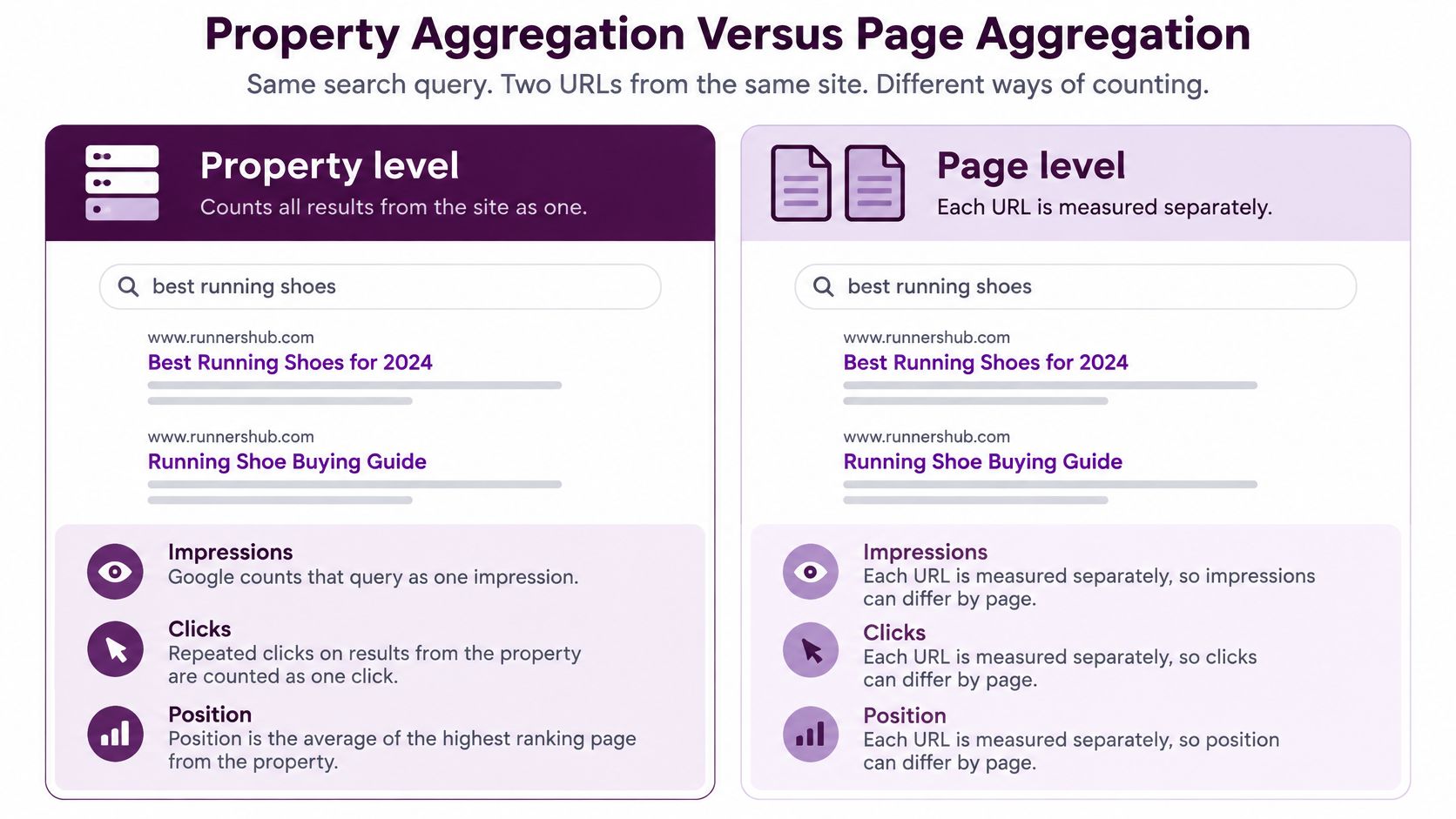
The practical consequence is that the Pages table can add up differently from the chart. You shouldn't interpret that difference as missing tracking or duplicate visits.
Don't mistake competing URLs for proven cannibalization
When related pages appear for the same query, investigate their roles before consolidating them. A category page and a buying guide may satisfy different needs and provide useful coverage together.
The warning sign is not merely shared queries. Look for an unsuitable URL replacing the intended landing page, unstable URL switching, or weaker business outcomes after the change.
Use the page view to ask:
- Which URL changed? Identify the landing page losing exposure or clicks.
- Which sibling gained? Check whether another page absorbed that visibility.
- Which intent fits? Compare what the searcher needs with what each page offers.
The graph remains property-aggregated when the table is grouped by page, so it isn't a direct total of the page rows underneath it. Keep a sitewide investigation anchored to the property chart; investigate an isolated URL loss through the page table and comparable sibling pages.
Why the Query Table Undercounts the Chart
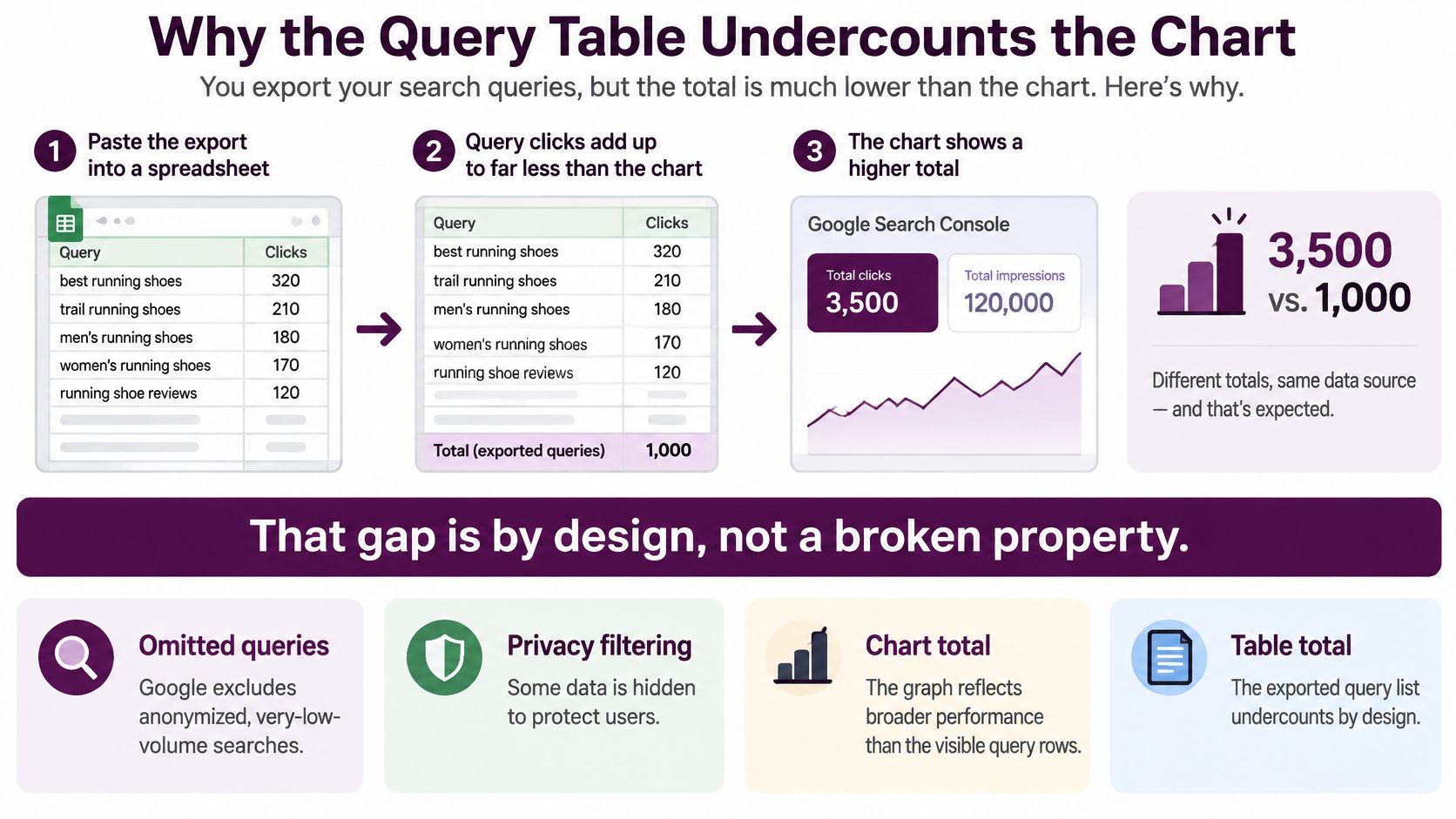
You export the Queries table, paste it into a spreadsheet, and sum the clicks. The result is lower than the chart. Before checking formulas or reconnecting the property, recognize that the query export isn't a complete ledger.
Use the unfiltered chart for your overall search KPI. Use the query rows to decide where to investigate and what to improve.
According to Google's reporting documentation, anonymized queries can remain in unfiltered chart totals while being omitted from tables, standard tables are limited to 1,000 rows, and the Search Analytics API provides up to 50,000 rows per day per search type.
Why the missing rows stay missing
Privacy suppression removes anonymized, very-low-volume, personal, or sensitive searches from query-level reporting. Separately, Google stores the most important rows rather than retaining every possible detailed combination.
The API offers greater access, but it doesn't turn the report into an exhaustive keyword database. Grouping requests by page or query can still cause data to be dropped for processing reasons.
This distinction matters when you're preparing a client report. A spreadsheet can faithfully contain every exported row and still fail to represent every click included in the chart.
The filter trap
A Contains filter and a Does not contain filter for the same term don't necessarily add back to the unfiltered total. Applying a query filter changes the treatment of anonymized queries, so the filtered subsets don't reconstruct the original population.
For example, splitting searches into branded and non-branded queries is useful for diagnosis. It doesn't justify claiming that those visible groups account for every organic search click.
Use this operating method:
- Report KPIs from the chart: Preserve the unfiltered property baseline for your chosen search type and reporting period.
- Prioritize from the rows: Use visible queries and pages to find consequential opportunities, not to declare the full keyword universe.
- Segment larger requests: Split API pulls by search type, date, country, device, or page where useful.
- Document incompleteness: Label exports as partial, prioritized reporting extracts rather than statistically representative samples.
- Compare like with like: Keep dimensions and filters consistent when assessing movement.
Google's performance-data deep dive also explains the usual two-to-three-day processing lag and Pacific Time labeling, both relevant when checking the daily alignment established during date setup.
A longer keyword list isn't automatically better evidence. If the process used to create it changes the reporting population, its apparent precision can make the final interpretation less reliable.
How to Read a Performance Drop
An unfinished recent day is a common false alarm. Exclude it before comparing completed periods of equal length, and inspect the metrics together before assigning a cause.
The patterns below are diagnostic starting points, not proof. Each suggests the next comparison that could support or weaken your explanation.
| Pattern | Likely meaning | Check next |
|---|---|---|
| Impressions down and average position worse | Fewer or lower placements | Indexing, then whether a template, country, or device explains the loss |
| Impressions down and average position steady | Less demand or fewer eligible queries | Brand versus non-brand, and equivalent seasonal dates if available |
| Impressions steady or up and CTR down | Seen as often, chosen less | Titles and descriptions on the pages that lost click share |
| Clicks down while average position improves | Better aggregate placement or a shift toward low-click queries | Query mix before any sitewide title rewrite |
| One URL down and the property chart flat | A page or template issue worth investigating | The Pages table against sibling URLs |
| Only mobile or only one country moves | A segment event, not necessarily a global collapse | Device and Country filters before changing content |
Match the intervention to the evidence
When impressions and position deteriorate together, inspect indexing and technical changes before commissioning replacement content. Don't assume weaker copy caused a page to disappear from relevant searches.
When impressions decline but position holds, investigate demand and query coverage. Don't rewrite a successful landing page just because fewer people searched for its subject.
When CTR falls despite steady exposure, inspect the live results and affected snippets. Don't promise that a new title will fix the problem if competing features or a different query mix explain the change.
When position improves while clicks fall, check which impressions disappeared. Don't celebrate the average or start a sitewide title rewrite without understanding the underlying queries.
For an isolated URL decline, compare related pages before treating the whole domain as damaged. For a device or country-specific decline, investigate that segment before changing content that still performs elsewhere.
If the pattern remains unclear, use a structured workflow to diagnose an organic traffic drop. Keep hypotheses separate from confirmed findings, especially when technical deployments and search changes happened close together.
Work through a localized loss
Say an ecommerce category template loses impressions on mobile in a particular country after a layout deployment. Desktop performance holds, other countries remain stable, and product pages aren't showing the same movement.
That points toward inspecting the affected template in the affected environment. Test rendered content, navigation, localization, and access to important category links.
The timing makes the deployment a candidate cause, not a proven one. Compare affected and unaffected URLs, reproduce the behavior, and verify the suspected defect before releasing a fix.
Don't use summed visible queries to prove the size of the overall loss, and don't label a reporting delay an algorithm hit. Most of all, don't prescribe a domain-wide content purge for a localized template problem.
How AI Overviews Change Position and CTR
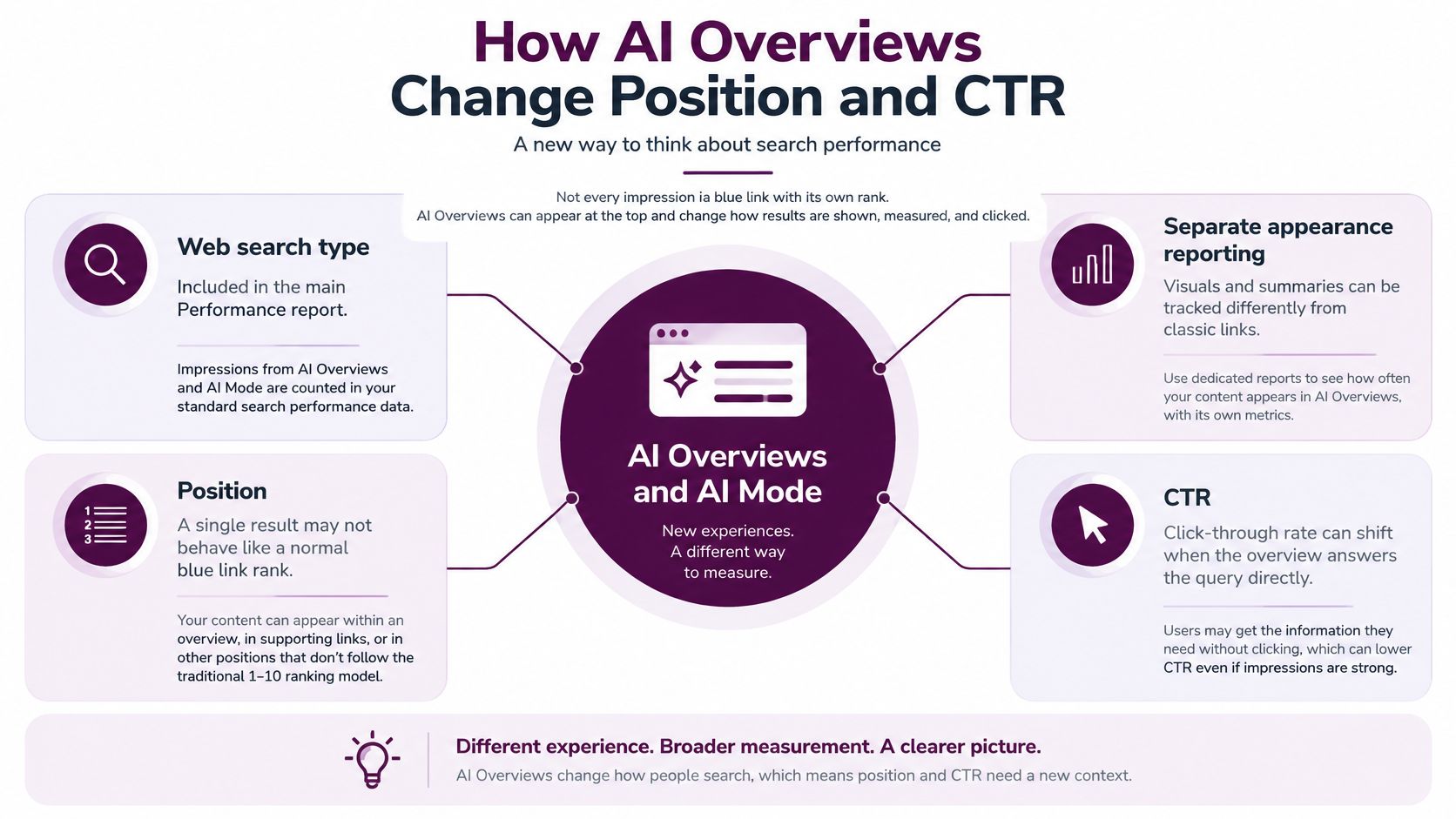
Not every impression represents a conventional blue link with an independent rank. Google's AI-feature reporting guidance places AI Overviews and AI Mode activity within the Web search type and describes separate generative-AI reporting for link impressions.
The position rule requires particular care:
An AI Overview occupies a shared search position. Links inside it receive that position rather than independent blue-link ranks.
A strong-looking average position can therefore reflect inclusion within an overview rather than placement as a traditional standalone result. A change in the mixture of result formats can alter how you should interpret the headline average.
Separate visibility from visit behavior
A falling CTR doesn't automatically prove that your title became less persuasive. The searcher may have encountered your link in a different layout, alongside an answer that changed the reason to visit.
Likewise, excellent reported position doesn't establish that your link had the prominence or click opportunity of a conventional top result. To understand the surrounding layouts, examine how SERP features affect click-through rates.
The measurement relationships are summarized below:
The useful response is to broaden the investigation, not abandon clicks as a metric. Pair search exposure with the outcomes you can observe after a visit.
- Query characteristics: Review whether visible searches became more conversational or complex, without treating query length as proof of AI-feature exposure.
- Landing-page engagement: Check whether arriving visitors use the content and continue toward relevant actions.
- Conversions: Establish whether fewer visits also mean fewer valuable outcomes.
- Assisted outcomes: Examine later journeys where your analytics setup supports them.
Respect the attribution boundary
Compare feature-level exposure with broader Web performance where reporting permits, but don't claim a clean AI-versus-non-AI click split unless the available dimensions support it. Separate impression reporting doesn't automatically supply equivalent click attribution.
Search reporting can establish recorded exposure and clicks. It cannot establish that an AI answer satisfied a searcher who never visited your site, or that every missing click was displaced by that answer.
That uncertainty matters when allocating work. A visibility change, a traffic change, and a customer-acquisition change are different findings, even when they occur together. Don't optimize the property for click volume alone when part of its exposure comes from a feature whose links share a position.
Decide the Next Check After the Report
Leave the report with a testable action, not a larger spreadsheet. Run these checks before assigning work to content, development, or SEO.
Lock the baseline. Record clicks, impressions, CTR, and average position together from the unfiltered property chart over a finished range. Keep the search type and comparison setup attached so someone else can reproduce the result.
Choose a single investigative filter. Let the observed pattern determine whether you inspect a page, query group, country, or device. Use Keyword Kick's Search Console research guide when the next question concerns query opportunities rather than a technical loss.
Check the business consequence. Take the affected landing pages into analytics and examine engagement and conversions. A lost click and a lost customer require different responses, while an AI-feature impression may never have represented an intended visit.
Define done with a sentence naming the observed pattern, affected segment, and page or template to investigate or change.
A useful conclusion sounds like this: mobile category-page exposure fell in the affected market after the template deployment, so development should test rendered navigation there. That gives the team a bounded task and a way to evaluate the result.
Don't ship a sitewide rewrite until you've distinguished demand, placement, click share, URL-level movement, device behavior, and result-format changes. The next check should reduce uncertainty before the next change increases risk.
Keyword Kick connects Search Console with analytics, rank tracking, and technical SEO signals to help turn reporting observations into prioritized tasks. Visit Keyword Kick to bring those signals into a shared workspace and investigate which pages need attention next.