Introduction
Most SEO strategies chase new rankings from scratch. New keywords, new content, new links — all of which take months to pay off.
Quick wins work differently.
A quick win keyword is one you're already ranking for — just not on page 1. You're at position 11, 14, or 18. You're getting impressions. Users are seeing your result. They're just not clicking, because page 2 gets less than 1% of all clicks.
The gap between position 15 and position 7 is far smaller than the gap between not ranking and position 15. That's why page 2 keywords are the highest-ROI opportunity in SEO — existing authority, minimal extra effort, disproportionate traffic gains.
This guide shows you exactly how to find them, evaluate them, and push them over the line.
Why Page 2 Keywords Are Your Best Opportunity Right Now
Let's quantify the opportunity.
A keyword with 2,000 monthly searches:
Position | Avg. CTR | Monthly Clicks |
|---|---|---|
15 (page 2) | ~0.8% | ~16 clicks |
8 (bottom of page 1) | ~3% | ~60 clicks |
5 (mid page 1) | ~5% | ~100 clicks |
3 (top of page 1) | ~10% | ~200 clicks |
Moving from position 15 to position 5 on a single keyword turns 16 clicks per month into 100. That's a 6× traffic increase on a page that already exists — no new content required in many cases.
Now multiply that across 10, 20, or 50 such keywords on your site. The compound effect is significant.
What Makes a Good Page 2 Opportunity?
Not every position 11–20 keyword is worth pursuing. A strong page 2 opportunity has:
Criteria | Why It Matters |
|---|---|
Position 11–20 | Close enough to page 1 that a modest improvement delivers results |
100+ monthly impressions | Enough search volume to justify the effort |
Existing ranking URL | You don't need to create new content — just improve what's there |
Keyword matches page intent | The page ranking for it is actually relevant to the query |
Low-to-medium competition | Competitors on page 1 have beatable authority or content depth |
The worst page 2 keywords to pursue: high-competition head terms where page 1 is dominated by Wikipedia, Forbes, and authoritative institutions with 1,000+ backlinks. Focus on mid-tail and long-tail queries where the gap is closeable.
How to Find Page 2 Keywords in Keyword Kick
The fastest way to surface these opportunities is Keyword Kick's Page 2 Opportunities filter — it automatically identifies keywords where you rank 11–20 with meaningful impression volume, sorted by traffic potential.
Step-by-step:
Open Keyword Kick → navigate to Opportunities
Select the Page 2 opportunity type
You'll see a ranked list of keywords sorted by impressions (highest first)
Each row shows: keyword, current position, impressions, CTR, and the ranking URL
Filter by minimum impressions (start with 200+) to remove noise
Click into any keyword to see the full query detail and competing URLs
What you're looking for: Keywords where impressions are high, CTR is near zero, and the ranking URL is a real, indexable page with existing content. These are your targets.
How to Find Page 2 Keywords in Google Search Console
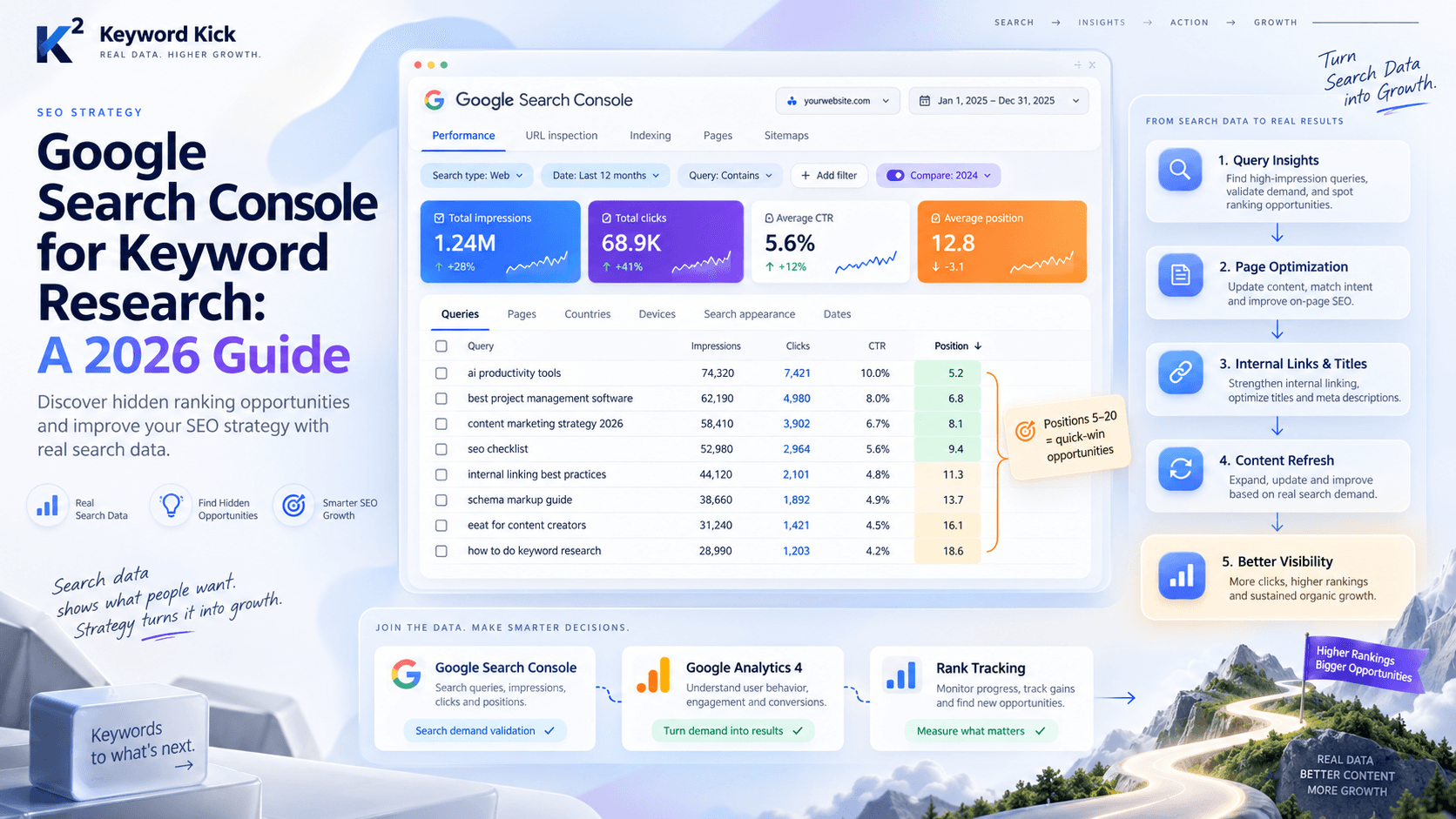
If you prefer to work directly in GSC, here's the manual approach:
Go to Search Console → Search Results
Toggle on Clicks, Impressions, CTR, and Position
Click the Pages tab → select a page you want to improve
Switch to the Queries tab to see which keywords that page ranks for
Filter by Average Position > 10 (type "10" in the position filter, select "Greater than")
Sort by Impressions descending
You'll now see every query where that page ranks on page 2, ordered by how many people are seeing it. The top rows are your quick wins.
Limitation of this approach: You have to do it page by page. Keyword Kick's Opportunities tool aggregates this across your entire site automatically, saving hours of manual filtering.
How to Evaluate Each Opportunity
Before investing time in a page 2 keyword, spend 3 minutes evaluating whether it's actually winnable.
Step 1 — Look at the SERP
Google the keyword. What does page 1 look like?
Are there featured snippets or PAA boxes? These compress organic results and lower CTR — the opportunity may be smaller than impressions suggest.
What type of content dominates? Long-form guides, product pages, forum threads? Your content needs to match or beat this format.
What's the DR of page 1 results? If every result is DR 80+, this keyword needs more link building before content improvements will move the needle.
Step 2 — Audit the Ranking Page
Open the page currently ranking for the keyword. Ask honestly:
Does this page actually answer the query, or does the keyword appear incidentally?
Is the content comprehensive enough compared to what's ranking on page 1?
When was it last updated? Freshness matters for some query types.
Does it have internal links from relevant, higher-authority pages on your site?
Is the title tag optimised for this keyword?
Step 3 — Check the Keyword Difficulty
A keyword at position 14 with KD 25 is very different from one at position 14 with KD 75. Low-to-medium difficulty means you can improve with on-page optimisation alone. High difficulty means you'll also need links.
Keyword Kick's Keyword Research module shows KD scores so you can quickly separate the low-hanging fruit from the long-term plays.
5 Ways to Push a Page 2 Keyword to Page 1
Once you've identified a strong opportunity, here are the levers to pull — in order of effort and impact.
1. Optimise the Title Tag and Meta Description
This is always step one. If the primary keyword isn't near the front of the title tag, fix that immediately. A weak title both hurts rankings (it's a relevance signal) and suppresses CTR when you do rank.
Rewrite the title using the keyword naturally, with a compelling hook. Rewrite the meta description to match intent and encourage clicks.
2. Strengthen the On-Page Content
Compare your page against the top 3 results for the keyword:
Are they covering subtopics your page misses? Add them.
Are they using structured formats (tables, numbered steps, FAQs) that yours lacks? Add those.
Is their word count significantly higher? Depth matters — but only if the extra content is genuinely useful.
Are they answering the query in the first 100 words? Google rewards direct, front-loaded answers.
One specific tactic: add an H2 that uses the exact keyword phrase as a heading. This is a low-effort, high-signal relevance boost.
3. Add Internal Links From Stronger Pages
Internal links pass PageRank. If your ranking page has few internal links pointing to it, it's under-supported.
Find 2–3 of your highest-traffic pages that are topically related. Add a contextual link to the underperforming page using the target keyword as anchor text.
This is one of the fastest ways to move a page 2 ranking to page 1 — especially for newer content that hasn't yet accumulated external links.
4. Improve Page Speed and Core Web Vitals
If two pages are otherwise comparable, the faster one wins. Run the ranking URL through PageSpeed Insights. If LCP is above 3 seconds or CLS is above 0.1, address those issues.
For the full breakdown of what to fix, see: Understanding Core Web Vitals: What SEOs Need to Know in 2026.
5. Earn External Links to the Specific Page
Content improvements and internal links will move most page 2 keywords. For competitive keywords where DR of page 1 is notably higher than yours, you'll also need external links pointing directly to that URL.
Options:
Reach out to sites that linked to a competitor's similar page
Add a link from a relevant guest post you're publishing elsewhere
Use broken link building to replace a dead competitor link with yours
How to Prioritize Your Page 2 Keyword List
When you have 30+ opportunities, work through them in this order:
Tier 1 — Fix first (highest ROI):
Position 11–15, impressions 500+, KD under 40
Existing content just needs a title rewrite and a few internal links
Tier 2 — Fix next:
Position 16–20, impressions 200–500, KD under 50
Content needs a refresh and structural improvements
Tier 3 — Longer-term plays:
Position 11–20, high KD (50+), requires both content work and link building
Add to your 3-month content/link plan, not your quick-win sprint
Tracking Progress
Once you've made improvements, set a reminder to check back in 3–4 weeks. Most on-page changes reflect in rankings within 2–6 weeks for established sites.
In Keyword Kick:
Use Rank Tracking to monitor weekly position changes for the keywords you're targeting
Check Ranking Changes → Improved to see which quick win keywords moved up after your edits
If a keyword hasn't moved after 6 weeks, it likely needs the next lever — more content depth or more internal/external links
Quick Win Checklist
For each page 2 keyword you target:
Confirmed position 11–20 with 100+ impressions
SERP reviewed — no dominant featured snippet or knowledge panel blocking clicks
Page 1 competition is beatable (DR, content format, depth)
Title tag includes the primary keyword near the front
Meta description is written and compelling
Content covers the topic at least as comprehensively as page 1 results
At least 2 internal links from relevant pages pointing here
Core Web Vitals not failing
Rank tracking set up to monitor progress