Most advice on AMP still treats it like a switch you flip for instant mobile speed. That's the wrong mental model. In production, how to use AMP is closer to launching a constrained page system that has to fit your CMS, your analytics stack, your review process, and your search reporting, or it'll sit there half-deployed and hard to trust.
AMP was introduced by Google in 2015 as an open-source initiative to make mobile pages load faster, but the operational work starts long before a page goes live. The practical question isn't whether AMP can be fast, it's whether your team can build, validate, and measure it cleanly enough to keep it alive after launch.
If you're trying to improve mobile delivery more broadly, this guide from Hire-a.dev on how to improve page speed is a useful companion because AMP is only one part of the performance conversation. The bigger win usually comes from matching the format to the page type, then proving the result with real measurement instead of assuming the template solved everything.
Why Most AMP Implementations Fail Before They Start
AMP failures usually start with optimism. Teams hear “mobile pages load faster” and assume the rest will be straightforward, but the friction is operational, not conceptual. In production, the first breakpoints are usually the CMS, the review path, and the reporting setup, not the AMP markup itself. If those pieces are unclear, the project stalls even when the pages validate.
The hidden work lives in your workflow
A team can ship a valid AMP page and still fail if nobody owns the template path, canonical logic, validation checks, and rollback process. That is where non-developer SEO teams feel the strain most. They are often expected to coordinate the page build, confirm the output in the CMS, and catch mismatches before production starts behaving inconsistently.
Practical rule: if you cannot say who validates AMP, who approves canonical links, and who checks post-launch reporting, the project is not ready to ship.
The teams that get value from AMP usually document the build steps, the review steps, and the rollback path before they touch production. They also think about CMS constraints early. If your blog platform cannot expose the right template hooks or if your marketing team cannot verify the output, AMP becomes a maintenance burden instead of an advantage.
Measurement planning belongs in the same conversation. A page can look fine in the browser and still be hard to trust if engagement, conversion, and traffic source reporting are not mapped cleanly from the start. If you also need context on the broader performance work around AMP, the operational angle overlaps with how to improve page speed, because speed work only matters when the implementation can be maintained.
The real question is whether AMP fits the page, not whether it exists
A page can be technically eligible for AMP and still be a bad candidate. If the page depends on complex interactions, heavy personalization, or frequent layout changes, the effort often outweighs the benefit. AMP works best when the page structure is predictable and the team can standardize the output without fighting the CMS every week.
A strong implementation plan treats AMP as a project with owners, inputs, and success criteria. A weak plan treats it as a checkbox and then wonders why no one keeps the templates current. For non-developer SEO teams, that difference is practical. It determines whether AMP becomes a repeatable publishing workflow or a one-off request that never gets cleaned up.

When AMP Actually Makes Sense for Your Site
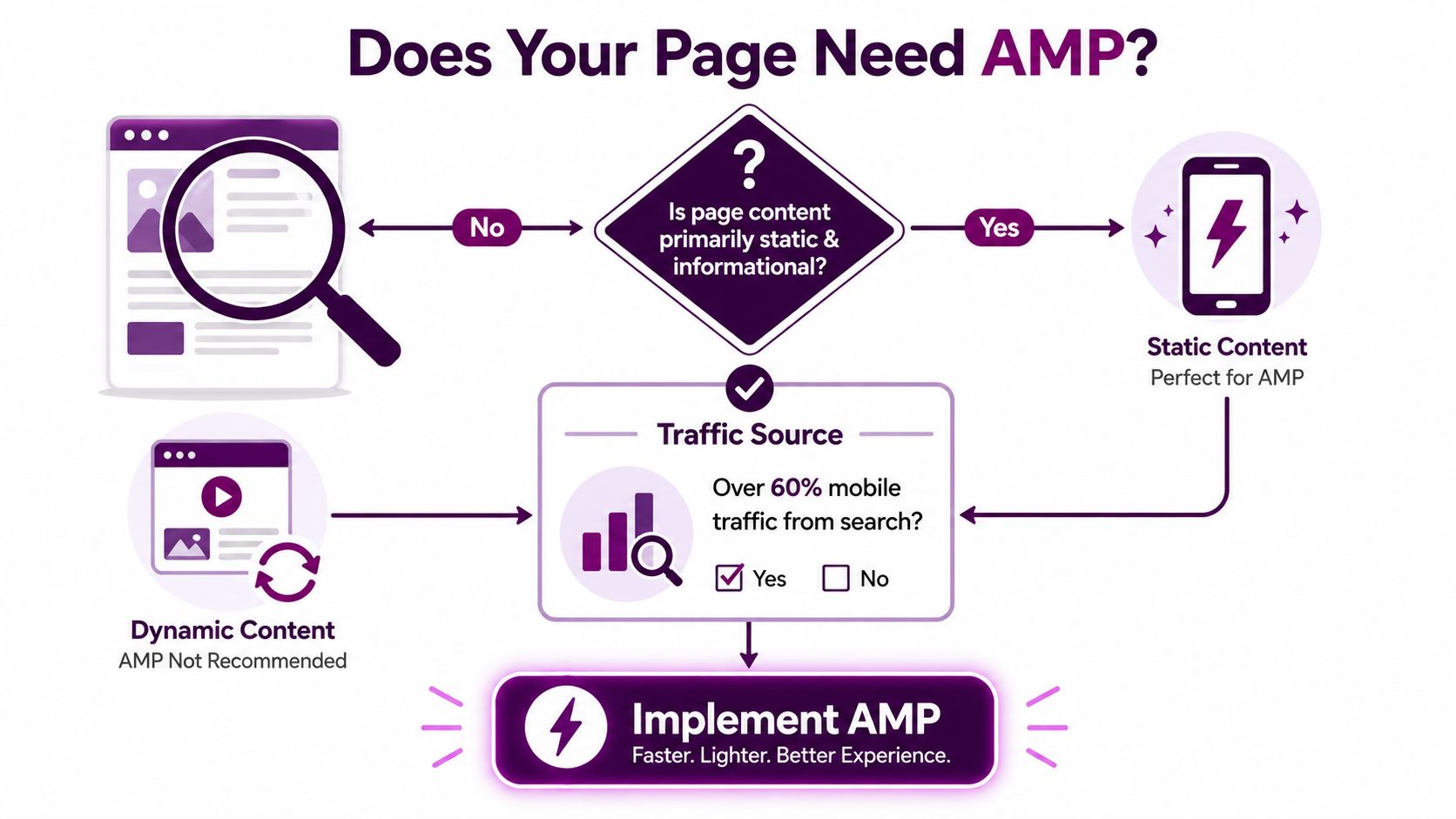
AMP makes sense when the page is repetitive enough to template well and important enough to justify a separate workflow. That usually means content pages where mobile search traffic matters and the business wants a cleaner path from crawl to rendering. The wrong instinct is to ask whether AMP is “better” than responsive design in the abstract. The right question is whether a specific page type has enough upside to repay the implementation overhead.
Start with page type, then look at traffic behavior
Static or mostly informational pages are the easiest fit because they don't need much JavaScript-heavy interactivity. Blog posts, news articles, evergreen explainers, and some landing pages tend to be the first candidates because they're easier to standardize. If the page already ranks and brings meaningful mobile traffic, the implementation effort is easier to justify than on a page with little search demand.
Audience behavior matters just as much. If the page is mostly visited from search on mobile, AMP has a clearer use case than a page discovered mainly through email, paid social, or internal navigation. AMP's value comes from reducing friction in the mobile consumption path, so the audience has to be using that path.
If the page isn't meant to be consumed quickly on mobile, AMP probably isn't the best use of the team's time.
Use a readiness check instead of a gut feel
A simple scoring exercise helps avoid overbuilding. Review each candidate page against these practical signals.
Content stability: the template changes rarely, and the layout doesn't depend on lots of custom widgets.
Mobile importance: the page serves mobile users well enough that faster rendering could matter commercially.
Search dependence: organic discovery is a meaningful entry point for the page.
Template repeatability: the CMS can generate the same structure without hand edits.
Measurement access: the team can compare AMP and non-AMP behavior after launch.
This is also where modern performance work overlaps with classic SEO. A page that's already responsive and stable may benefit more from broader speed work than from a parallel AMP version. If you're already auditing core page delivery, AMP should be one option in the stack, not the only one. The most useful decision is usually the least flashy one.
Setting Up AMP Pages from Scratch or Through Your CMS
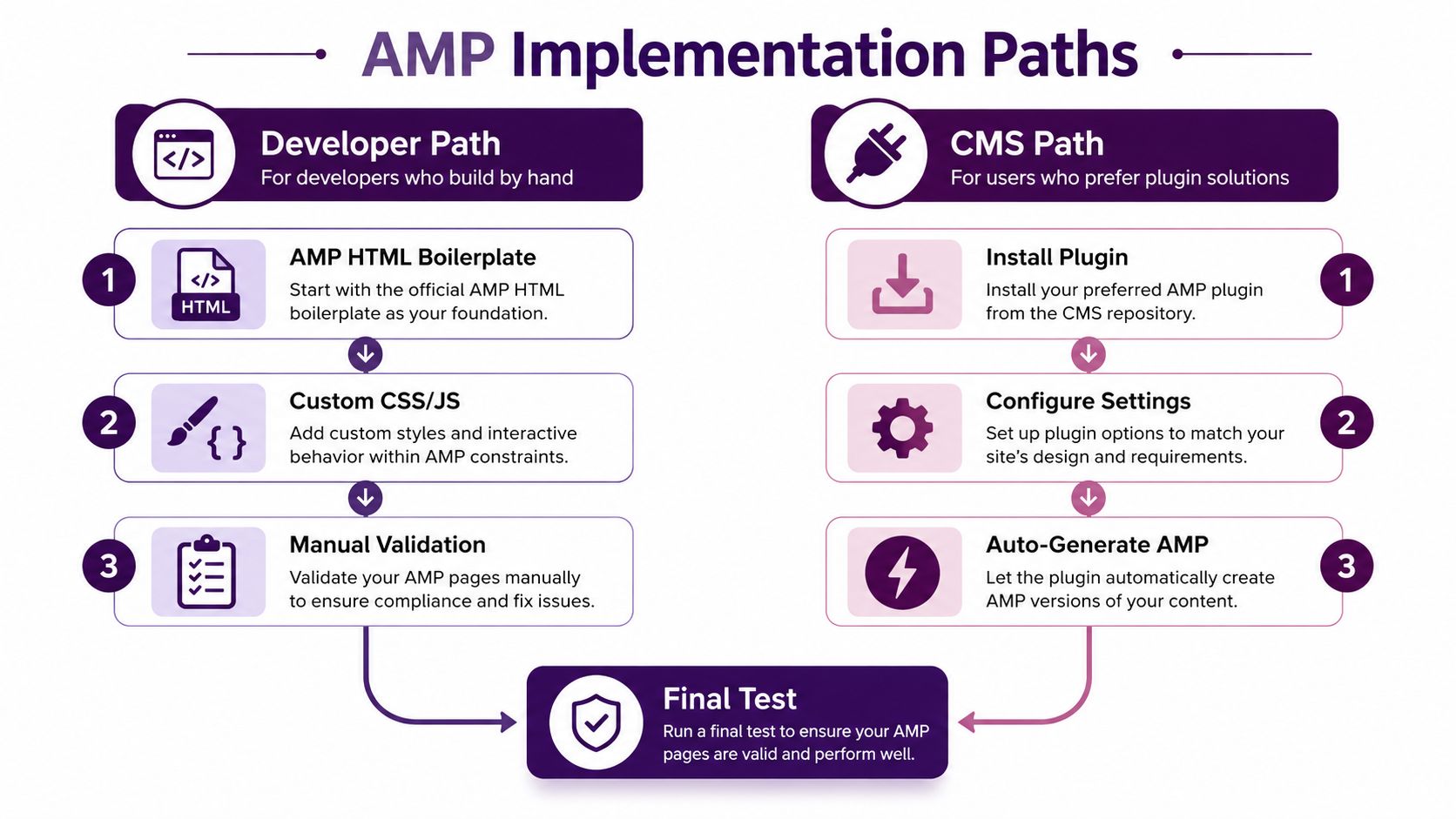
The cleanest AMP builds start with the template, not the page copy. Google's create workflow is straightforward, build the AMP HTML page, validate it with the AMP Validator, publish it with a canonical link back to the non-AMP page, then monitor performance in Search Console and PageSpeed Insights. The sequence matters because it keeps the implementation tied to an actual testable output instead of a theory about speed. AMP page creation workflow
The manual path works when the developer owns the template
On a hand-built implementation, the AMP boilerplate is required. The page must follow the AMP HTML specification, and the canonical relationship has to be correct so search engines understand which version is primary. If the AMP page exists without a stable canonical return path, you can create duplication problems that take longer to debug than the original build.
The technical discipline here is simple. Build the AMP version, keep the HTML compliant, and validate before anyone shares the URL internally. That sounds basic, but most problems I see are caused by small misses, not dramatic architecture failures.
The CMS path is easier to launch and easier to break
On WordPress, Drupal, and headless setups, the main job is configuration discipline. The CMS has to output the right AMP template, preserve canonical integrity, and insert tracking in a way that won't disappear on the next theme or plugin update. Many teams think the plugin has solved the problem, then discover that analytics tags or template fields were never filled in correctly.
For WordPress teams, a working plugin still needs real editorial control, especially if the site has multiple content types or custom templates. The same is true in headless systems, where the front end and the content model can drift apart if the AMP version isn't mapped deliberately. A practical WordPress reference for implementation teams is the Keyword Kick WordPress integration guide, which is useful when your publishing stack already has a lot of moving parts.
Operational rule: don't assume “auto-generate AMP” means “safe to publish AMP.” It just means the template is being produced automatically.
Validate the path before you scale it
Whatever route you use, publish one page type first and inspect the output carefully. Check that the AMP page is reachable, the canonical points where it should, and the tracking code is present. If the first page is clean, the next template is much easier to trust. If the first page is broken, the rest of the rollout needs to pause.
Working with AMP HTML Components and Common Patterns
AMP works because it limits what the page can do. That restriction can feel annoying at first, but it also forces a cleaner build. Instead of trying to port every normal web pattern into AMP, it helps to think in terms of the components the framework already expects.
Match the component to the job
amp-img handles responsive images without letting image markup get sloppy. amp-video covers video embeds when the content really needs motion. amp-carousel is the right pattern for image galleries or repeated content blocks that need swipe interaction. amp-sidebar solves navigation or supplemental content without turning the page into a full app shell. amp-form is the option when the page needs a controlled form interaction and the team can't rely on standard JavaScript behavior.
The practical win is that each component has a narrow job. That makes it easier to reason about layout and easier to spot when a feature request belongs outside AMP entirely.
Use amp-iframe sparingly and with intent
Third-party embeds are where many AMP pages get messy. amp-iframe is the escape hatch for content that can't be represented natively, but every extra embed adds complexity and testing overhead. If a page depends on multiple third-party widgets to function, that's a warning sign that AMP may be the wrong container for it.
This is why gallery pages, simple contact forms, and editorial embeds usually work better than pages that behave like mini web apps. The more the design depends on custom scripting, the more you're asking AMP to do something it wasn't meant to carry.
Build for layout stability first
The best AMP pages feel simple because they're structurally predictable. Images have clear dimensions. Interactive elements are chosen from the component set, not improvised with custom scripts. The layout looks good on mobile because it was built with the mobile constraints in mind, not because the desktop page was squeezed down at the end.
A common mistake is to keep the same ambition as the non-AMP page and only reduce the scripts. That usually leaves a half-adapted layout that's harder to maintain than either a clean AMP template or a good responsive page. If a component doesn't solve a specific publishing problem, leave it out.
Validating and Testing Your AMP Pages Before Launch
An AMP page that fails validation is still a broken page, just with AMP styling wrapped around it. Validation is the release gate. Google's create workflow puts it before publication for a reason, and the practical sequence stays the same in production, run the validator, inspect the error, fix the template, then validate again before you ask Search Console to accept it. AMP validator workflow is part of that discipline because invalid markup makes both rendering and measurement harder to trust.
Treat validation as a release step
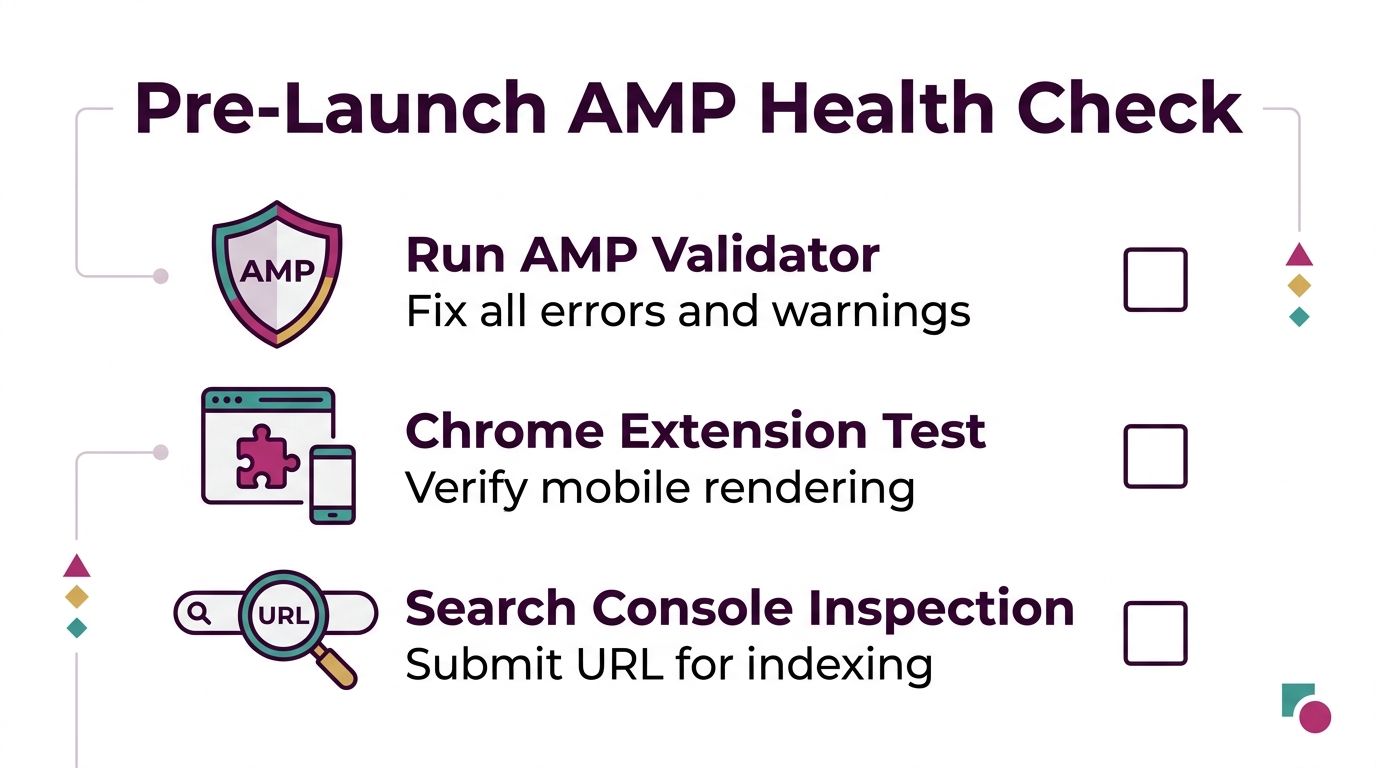
The AMP Validator should sit inside the deployment workflow, not in a manual cleanup pass after launch. The Chrome extension is useful for fast visual checks, especially when you want to confirm how a live page renders on mobile without waiting for a broader reporting cycle. Search Console then shows whether Google is seeing the page the same way you do.
A launch checklist catches the failures that become production noise if they slip through. Missing required attributes, disallowed tags, malformed URLs, and template output that changes after the CMS renders it are common examples. Those are easier to fix before publish than after indexing.
Common failures usually come from embeds or template drift
HubSpot's AMP guidance points to the same patterns I see across CMS platforms, disallowed script tags, unsupported styles, malformed links, and featured image problems on blog templates. The page often looks fine inside the editor, then the theme, embed code, or module output changes just enough to break compliance. HubSpot AMP troubleshooting guidance
Reusable modules need explicit AMP testing. A module that passes on the standard page can fail in the AMP version because the allowed HTML surface is narrower. That shows up most often when marketers paste in third-party widgets that were built for ordinary pages.
Use a validation checklist before the first live crawl
Run AMP Validator: fix errors before publishing, and do not treat warnings as cosmetic.
Test with the Chrome extension: confirm the mobile rendering and check that the layout still reads cleanly.
Inspect in Search Console: confirm that indexing and AMP status match what you deployed.
Check the canonical path: make sure search engines can move between the AMP and non-AMP versions without confusion.
Re-test after CMS edits: template updates can break compliance even when the original launch passed.
For teams already managing structured content and technical QA, an external review layer helps keep template errors from slipping through. A practical complement to AMP checks is this structured data validation tool, especially when the same content team owns both markup discipline and search visibility.
Tracking Performance with AMP Analytics and Search Console
AMP measurement works only when the tracking plan is built for AMP from the start. The platform's core guidance separates amp-pixel for basic pageview tracking from amp-analytics for broader event measurement, and both can be used together. That split matters in production because a pageview only confirms that the page loaded. It does not show whether users scrolled, converted, or left immediately. AMP analytics basics
Build a measurement stack, not a single report
amp-pixel is the simplest option when you only need a lightweight pageview signal. amp-analytics fits richer measurement, including event-based behavior and more useful performance interpretation. If your AMP template includes form interactions, content engagement, or monetization events, amp-analytics is the component that gives you room to measure those actions correctly.
AMP Analytics Component Comparison | Component | Use Case | Capabilities | Complexity |
|---|---|---|---|---|
AMP Analytics Component Comparison |
| Simple pageview tracking | Basic fire-and-forget measurement | Low |
AMP Analytics Component Comparison |
| Broader event and engagement tracking | Pageviews, events, custom measurement logic | Moderate |
Google's reporting guidance for AMP points teams toward comparing AMP and non-AMP pages through similar-page or time-based views, using custom reports for pageviews, sessions, bounce rate, and session duration. That structure helps you see whether the AMP version is changing user behavior, not just loading in a different format. Google Analytics AMP reporting guidance
Search Console tells you whether the page is really live in search
Search Console is the operational truth source for AMP status. It shows whether Google can index the page, whether rendering is clean, and whether the AMP version is producing the search presence you expected. If the page looks fine on your side but Search Console reports issues, trust the report and check the template.
For teams setting up broader reporting around organic visibility, the Keyword Kick Google Search Console setup guide is useful because AMP measurement gets easier when GSC data is already connected cleanly to the rest of the SEO workflow. The same reporting discipline also helps teams compare AMP performance with newer AI search visibility tools when organic traffic patterns start shifting.
Tie measurement to the rollout decision
Tracking AMP is not about filling another dashboard. It is about answering a direct question, whether the AMP version improved the outcome enough to keep it. If you cannot compare the AMP pages to a control group or to a clear pre-launch baseline, the numbers will look busier than they are. Good AMP measurement is comparative, not decorative.
Rolling Out AMP Strategically and Measuring Real Impact
A sitewide AMP rollout is usually the wrong first move. Start with a small set of high-value pages, preferably pages that already rank and already receive enough mobile traffic to create a usable comparison. That approach aligns with the practical rollout guidance from Bruce Clay, which recommends focusing on one or two high-value page types and running the test for at least one month before deciding whether to expand. AMP rollout strategy guidance
Use a controlled test instead of a blanket launch
The strongest AMP rollouts compare an AMP experiment group against a non-AMP control group. Google's reporting guidance even points teams toward explicit segments like AMP Experiment and Non-AMP Control with mobile-only filtering, which is exactly how you keep the analysis from getting muddy. If the page is important, split the test clearly and give the test enough time to breathe before you call it a win or a miss.
The metrics that matter most are the ones that describe real behavior, not vanity. Pageviews, sessions, bounce rate, and session duration form the basic comparison set, and any business-specific conversion signal should sit beside them. If the AMP version wins traffic but loses engagement, that's not a clean victory.
Expand only when the pattern is stable
A measured rollout lets you see whether the gains hold across page types and CMS templates. If the first candidate works, expand to the next most similar page group. If the first candidate causes operational friction, pause and fix the template before widening the surface area.
For teams also tracking broader search demand shifts, especially where AI-assisted search experiences affect discovery, a separate lens on AI search visibility tools can help keep AMP from becoming the only thing you measure. AMP can support visibility, but it shouldn't be the only visibility conversation your team has.
When the rollout is done, document what worked, what broke, and what has to be maintained by the CMS owner, the SEO lead, and the analytics owner. AMP succeeds when the process is repeatable, not when one person remembers how the original launch was assembled.
If you want a cleaner way to manage AMP decisions across templates, analytics, and reporting, Keyword Kick can help teams turn scattered SEO signals into one prioritized workflow. Visit Keyword Kick to see how its platform connects technical SEO, GA4, and Search Console data into actionable next steps for page-level decisions like AMP rollout and measurement.