You're probably staring at a blank content calendar, a keyword spreadsheet full of big generic terms, and a nagging sense that your site should be doing more with the pages it already has. That's the usual small-business trap. You don't need a hundred keyword ideas. You need a short list of queries that match what you sell, what buyers type, and what one of your pages can realistically win.
Keyword research for small business works best when it's treated like a revenue filter, not a brainstorming exercise. Google's Keyword Planner is built to show how often terms are searched and how those searches change over time, while external industry data suggests marketers spend about 12 hours per week on keyword research and 63% use Google Keyword Planner as their primary tool, with 68% tracking competitor keywords, up from 45% in 2021 (Google Keyword Planner). That shift matters because small teams can't afford to guess. They need a system that quickly separates useful demand from busywork.
Why Most Small Businesses Keyword Research the Wrong Way
The usual mistake is starting with the biggest term in the category and hoping it pays off. That approach can work for a large site with a deep content budget. It breaks down fast when you have 10 or 20 meaningful pages, a small team, and real work pulling attention away from SEO.
Head terms eat the schedule and give little back
A small business usually loses by chasing keywords it cannot credibly rank for yet. Broad terms pull in giants, marketplace sites, and brands with far more authority than a local or niche business can match. The better move is to ask what page could satisfy the query.
That starts with four intent buckets. Informational queries are research mode. Navigational queries are brand or site lookups. Commercial queries are comparison mode. Transactional queries are purchase mode. A local bakery might use informational content for “how to freeze sourdough,” commercial pages for “best birthday cake shop near me,” and transactional pages for “order custom cake delivery.” A B2B service business might answer informational questions in a guide, compare options on a service page, and send ready buyers to a quote page.
Practical rule: if the query does not map to a page you can publish, it does not belong on your target list.
Small sites win by narrowing, not expanding
The strongest keyword plans I have seen for SMBs are compact. HubSpot's guidance points toward a map built from 4 to 6 foundational phrases and 8 to 12 long-tail phrases, which usually turns into about 10 to 12 pages instead of a bloated content machine (HubSpot). That is the scale that fits a small business.
Long-tail and intent-specific queries are where small sites can still compete. One industry compilation reports that long-tail keywords account for roughly 70% of search traffic and face about 80% less competition than short-tail terms. The same source says about 46% of Google searches have local intent, the top three organic results capture about 75% of clicks, and the number-one result averages a 27.6% click-through rate (Resourcera). Those conditions favor a focused SMB, especially in local services.
A useful filter is the ideal customer moment. Write one short paragraph that describes what someone is trying to do right before they buy from you. For a local bakery, it might be a parent needing a birthday cake this week, in a specific city, with a clear price ceiling. For a B2B bookkeeping firm, it might be an owner who is behind on books and searching for a trustworthy, low-friction handoff. If a keyword does not fit that moment, it is usually a distraction.
A long-tail keyword framework helps here because it pushes the list toward specific queries that match real buying situations, not broad terms that look impressive in a spreadsheet.
For local discovery, the better keyword research approach for Google Maps is worth reading alongside your service-area pages. The same principle applies there, relevance first, then visibility.
Reject shiny terms early
Before you put a keyword into your plan, ask three questions. Does it match what we sell? Does it map to a page type we can build? Would a buyer search this right before or during the buying process?
If the answer to any of those is no, move on. That habit saves more time than any tool purchase.
Free and Low-Cost Data Sources Worth Your Time
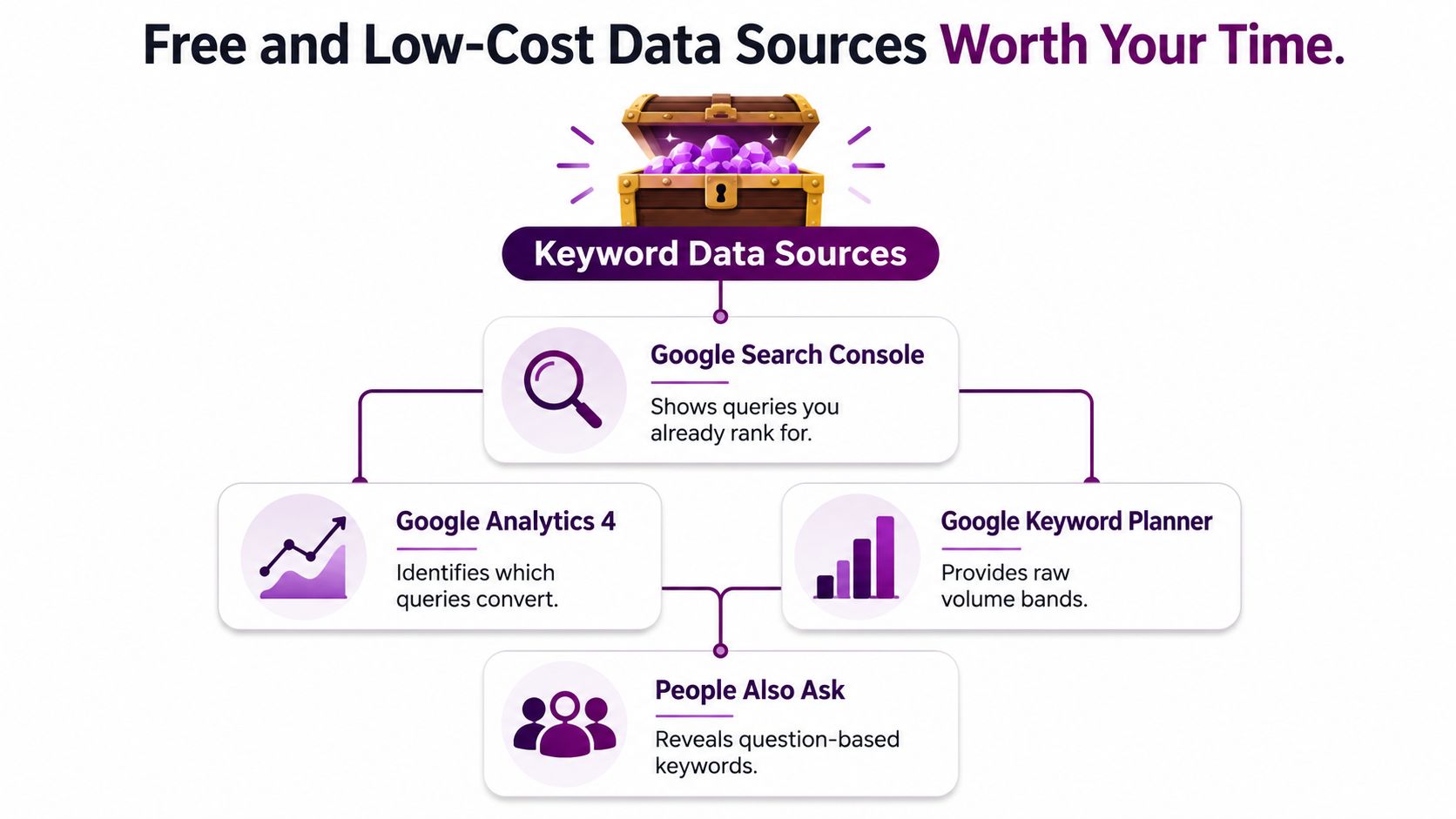
Most small businesses don't need a giant software stack to start. They need the right order of operations. The cleanest workflow is to begin with Google Search Console and GA4, let data accumulate, then validate the best terms in a keyword tool instead of trying to invent a strategy from scratch.
Start with what your site already tells you
GSC shows the queries your site already appears for, which is the fastest route to quick wins. The useful part is not only the clicks. It's the partial rankings. A page sitting around positions 4 to 15 is often far more actionable than a brand-new keyword with no history, and the sequencing advice to start with GSC plus GA4, then wait about 1 to 2 weeks for usable data, comes from practical SMB workflow guidance (Sonary).
GA4 tells you which landing pages and query-driven sessions move toward action. If a page gets traffic but nothing happens, that's a different problem from a page that converts well but doesn't earn visibility. Those are not the same fix.
Google Keyword Planner is useful for rough demand checks and related ideas. Its main limitation is that it's built for ads, not SEO, so exact volume visibility can be restricted unless you're running ads. Treat it as a validation layer, not a truth machine.
Use Google itself before you pay for more
Autocomplete, People Also Ask, and related searches are free, fast, and messy in a useful way. They show how people phrase questions, which is often better than raw seed-keyword expansion. The catch is volatility. PAA questions change by query, and the suggestions you see today won't always be there tomorrow.
For a practical tool stack, I'd use one paid or freemium tracker only after you've exhausted your owned data. A small business can also work with a rank tracker free tier, plus direct competitor searches, to see what kinds of pages are already winning. If you're comparing software options for a lean team, this small-business SEO software guide is a useful side-by-side starting point.
The rule is simple. Owned data first. Tool data second. Google surfaces third. Anything else turns research into random browsing.
Generate Seed Keywords and Expand Into Long Tail Variants
Seed keywords are just the starting nouns. Value comes from expanding them into terms that sound like a buyer, not a marketer. I've seen small business teams waste hours collecting a giant keyword dump when they only needed a clean set of 20 or 30 terms they could use.
Mine the language buyers already use
The best phrases usually show up in customer emails, sales calls, reviews, and support threads. People describe pain in plain language, and that language often becomes your highest-quality seed set. If someone writes “emergency leak under sink” instead of “residential plumbing services,” use the first version as a clue.
Then layer in Google's own suggestions. Type a seed term into autocomplete, note the suggestions, and scan People Also Ask for question forms. This is especially useful for service businesses where buyers don't search in industry jargon.
Expand with competitors and question stems
Competitor keyword gaps are another fast source. You're not copying their strategy, you're checking which topics they've already earned visibility for while you're still invisible. That can reveal entire page types you haven't built yet.
Question stems also do a lot of heavy lifting. Start with how, what, cost, near me, and vs. Those modifiers force the keyword set to split by intent, which makes prioritization much easier.
Good expansion works like this: one seed term should turn into a small set of publishable, intent-specific queries, not a giant spreadsheet you'll never touch.
A useful example is plumber. It can become emergency plumber near me, plumber for water heater repair, same day drain cleaning, affordable plumber for leak detection, plumbing quote for bathroom remodel, licensed plumber in [city], best plumber for gas line repair, 24 hour plumber service, plumber for clogged toilet, and residential plumbing service pricing. Those are different pages or subpages, not ten ways of saying the same thing.
If you want more structure around the long-tail side of this work, this long-tail keyword guide is a helpful companion. The point isn't to find endless variants. It's to find the few that match real demand and a real offer.
Prioritize by Relevance, Intent, and Competition Not Volume
Volume is a tiebreaker. It's not a strategy. For small businesses, high search volume often hides the exact problems that waste budget, intent mismatch, impossible competition, and traffic that doesn't convert.
Use a simple scorecard
I prefer a 0 to 3 score for each of four dimensions, because it keeps the conversation practical. You can drop this into a spreadsheet in minutes.
Keyword | Relevance (0-3) | Intent match (0-3) | Competition (0-3) | Business value (0-3) | Total |
|---|---|---|---|---|---|
emergency plumber near me | 3 | 3 | 2 | 3 | 11 |
plumbing tips for homeowners | 1 | 1 | 1 | 0 | 3 |
how much does drain cleaning cost | 2 | 2 | 2 | 2 | 8 |
best plumbing tools | 0 | 1 | 2 | 0 | 3 |
licensed plumber in chicago | 3 | 3 | 2 | 3 | 11 |
The scoring logic is straightforward. Relevance asks whether the business can serve the query. Intent match asks whether the page type fits. Competition asks whether a small site has a realistic path. Business value asks whether the query leads to revenue, not just visits.
Why boring terms often win
The best keywords for a small business are often the ones that feel less glamorous. They are usually closer to the offer and easier to turn into a page that converts. That's why a decent-volume, specific, commercially aligned term is often more valuable than a broad phrase that attracts browsers.
This is also where a resource like Impact Marketer's playbook for high ticket affiliate income can be useful as a conceptual comparison. The point isn't affiliate income itself, it's the prioritization mindset. High-value outcomes usually come from terms with clear intent and a direct path to action, not from vague traffic targets.
If you want to sanity-check the scoring, use this test. Could a visitor on this page buy, book, or enquire without needing a second article? If not, the keyword probably belongs in supporting content, not on the money page.
Map Keywords to Pages and Build a Lean Site Structure
Once the list is scored, the work becomes page assignment. A lot of small businesses either stay disciplined or drift back into random blogging. A lean structure usually outperforms a large one because it concentrates authority and reduces internal competition.
One primary keyword per URL keeps the site clean
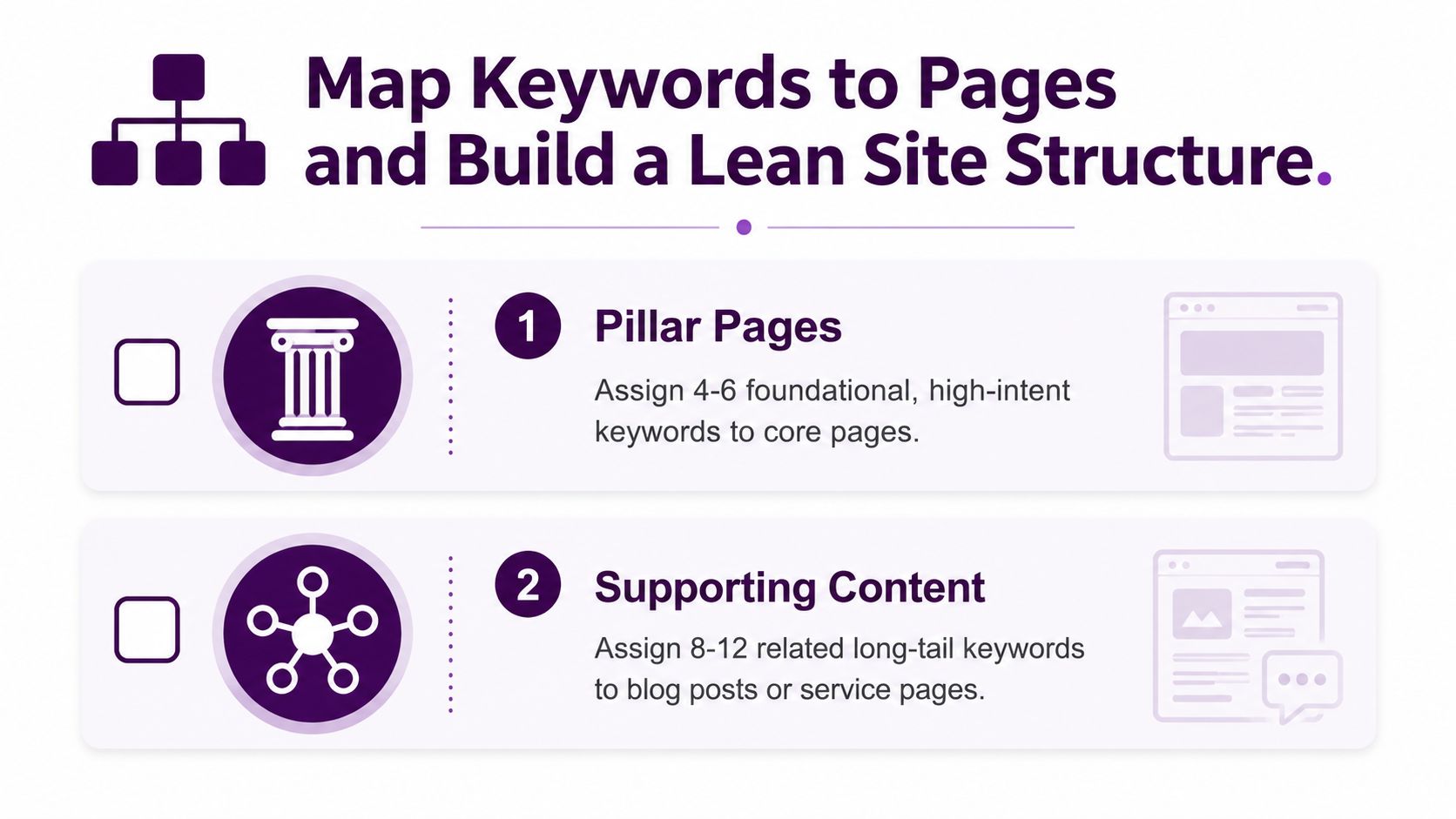
A strong small-business map usually starts with 4 to 6 foundational phrases that deserve pillar pages. Around those, build 8 to 12 long-tail phrases as supporting posts, FAQs, or service subpages. That gives you a site structure that can fit in roughly 10 to 12 pages without turning thin or repetitive.
The rule I use is simple. One URL, one primary keyword, one clear intent. Close variants can live on the same page if the intent is the same. If the intent changes, create a separate page.
Local modifiers often become dedicated landing pages when the business serves distinct areas. A dentist with several locations may need separate city pages. A freelancer serving one metro area usually does not need that complexity. The page should match the actual buying pattern, not the fantasy of a giant site.
Check for cannibalization before you publish more
Before you add a page, search site:yourdomain.com alongside the target keyword. If more than one page is trying to own the same intent, you have cannibalization risk. That usually leads to diluted rankings and messy reporting.
If two pages want the same query, Google has to choose. A small site cannot afford to make that decision harder than it needs to be.
Close variants belong together when they share the same page type. For example, “emergency plumbing repair” and “urgent plumbing repair” might live on one service page. But “how to fix a burst pipe” should usually be a separate educational page that feeds the service page.
What Changes in 2026 With AI Search and Zero Click Results
The old goal was to rank. The newer goal is to be visible in the places where searchers make decisions. That includes classic organic results, but it also includes AI summaries, snippets, and question surfaces that can absorb the click before a user ever reaches your site.
Keep intent, add citation readiness
The foundation hasn't changed. Intent still matters, and topical coverage still matters. What changes is that a page now has to be written so an AI system can pull a clean answer from it. That means clearer structure, tighter headings, and direct language that answers the query without burying the point.
Small-business teams should also pay more attention to question queries. They're more likely to surface in answer-style results and they naturally fit the way people ask AI systems for help. If you want another practical angle on this shift, this guide to AI keyword research tools pairs well with the page-type mapping above.
Add two new KPIs to the old ranking mindset
A page can be successful even if it doesn't win the exact blue-link position you wanted. In 2026, visibility in AI answers and snippets is its own kind of win. That means your dashboard shouldn't only ask, “Did we rank?”
It should also ask, “Did we become the page Google and AI systems can quote?” and “Did the right query lead to the right page type?” For that reason, broader topical pages matter more than thin one-topic posts. A single in-depth resource is often a better bet than a cluster of weak pages that all say almost the same thing.
AY Rank's optimize for Google AI Overviews service is an example of the kind of focused support businesses are now looking for, because the optimization target is no longer just one classic ranking position. For SMBs, the practical shift is to build pages that answer clusters of related questions, not just exact-match terms.
Track, Measure, and Iterate With Real Numbers
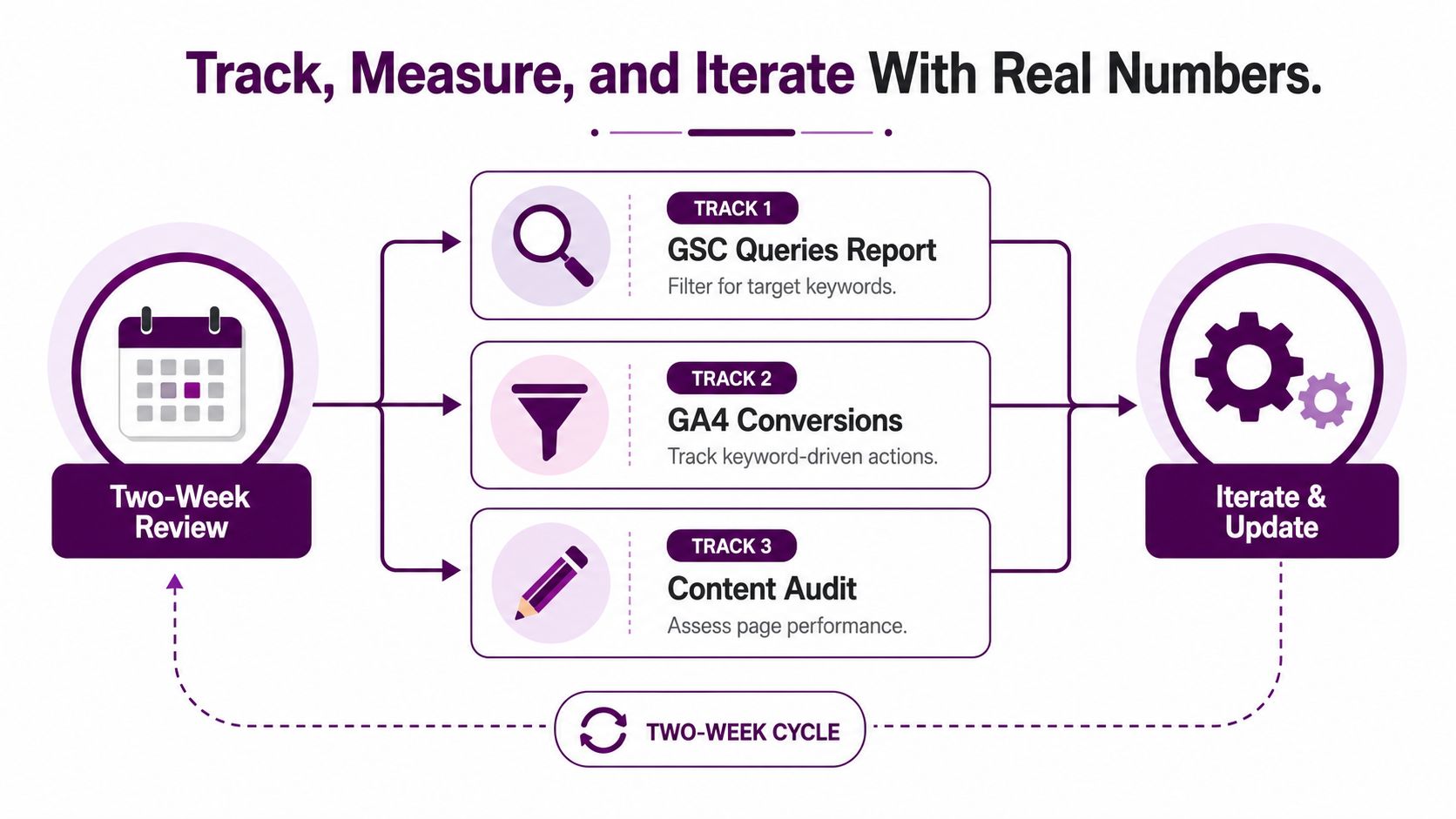
Keyword research only becomes useful when it changes what you publish next. A two-week review rhythm is enough for most small businesses to avoid both overreacting and drifting. It gives you a clean loop between search visibility, landing-page behavior, and actual conversions.
Watch three reports and act on four signals
In GSC, filter the Queries report for your target terms and look for movement. In GA4, check which pages produce engagement or conversions. In the Pages view, compare URLs that get impressions with URLs that get nothing.
Then use four simple triggers. If a keyword moves from position 8 to 5, push harder with a better title, stronger internal links, or a cleaner page. If it's stuck at 14+ for two months, rewrite or cut it. If clicks stay flat while impressions rise, the title or meta description is weak. If a page converts but still doesn't rank, the intent is probably right but the page needs more visibility support.
A lean cadence beats a perfect plan
A two-person service business doesn't need a giant editorial calendar. It needs a repeatable cycle. One review session, one scorecard update, one decision about what to keep, improve, or retire.
A focused 12-page map usually beats random publishing. I've seen small teams stop chasing blog volume, publish to a tighter structure, and get far more clarity in a single quarter than they had with months of scattered content. The win wasn't more content. It was fewer pages with clearer intent and a better feedback loop.
Day one: pull GSC queries and GA4 landing pages. Week one: score the best candidates and reject the rest. By day 30: map the top 10 terms to pages, publish or refresh the pages that matter, and set the next review date. That habit is what separates a busy site from a useful one.
If you want keyword research to stop feeling like guesswork, Keyword Kick brings GSC, GA4, rank tracking, competitor data, and audits into one workflow so you can see which queries deserve attention first. Visit Keyword Kick if you want a clearer way to turn search data into a lean, revenue-focused keyword map for your small business.