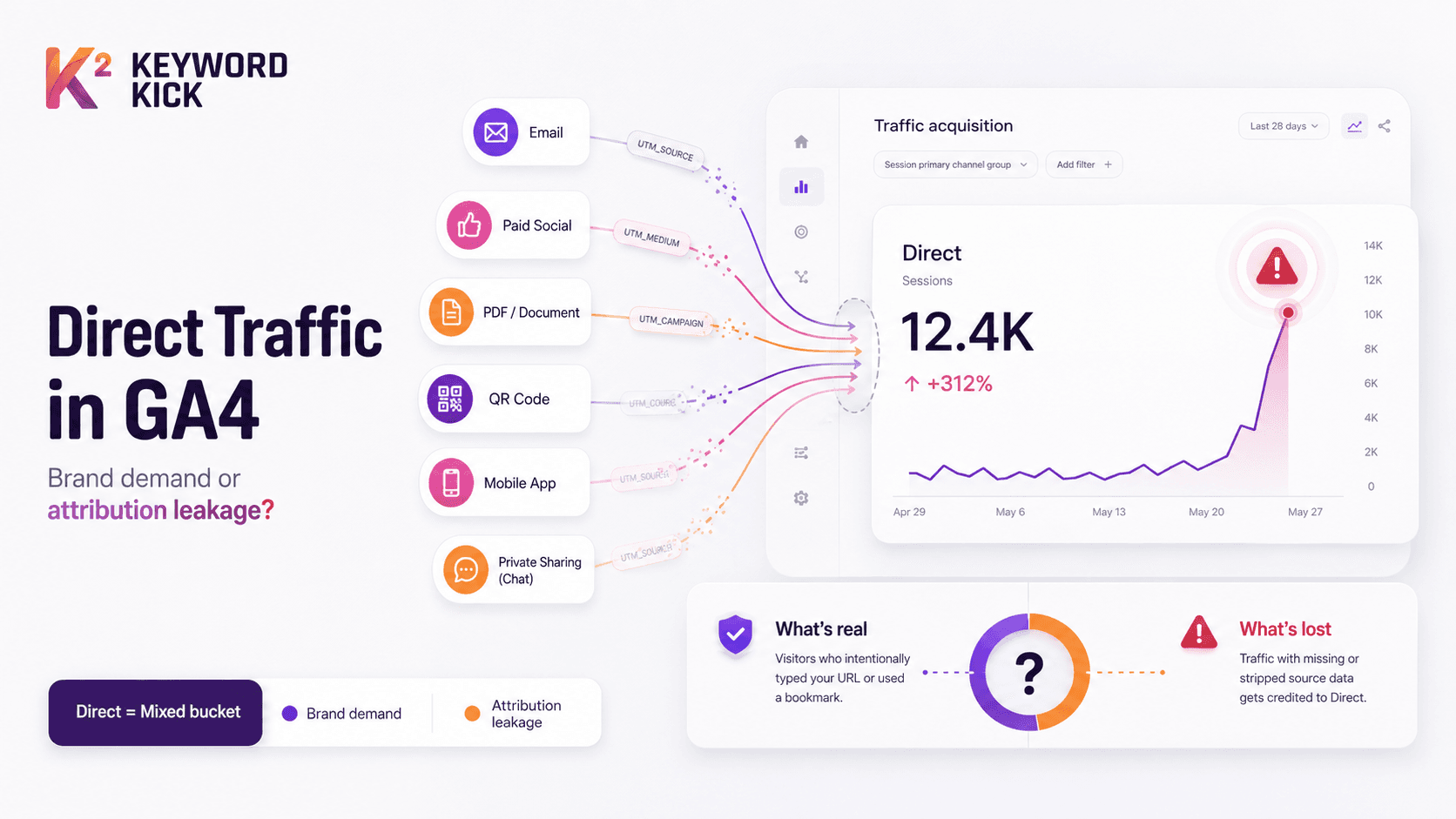
You open GA4, head to acquisition, and see Direct eating a huge share of traffic. The team splits immediately. One person says brand demand is finally paying off. Another thinks tracking broke. Both could be right, and that's exactly why direct traffic confuses smart marketers.
In practice, direct traffic in Google Analytics is often less of a channel and more of a warning light. A lot of visits in that bucket didn't arrive because someone lovingly typed your URL from memory. They arrived because the source data got lost somewhere between click and session.
That distinction matters. If you treat all direct traffic as proof of brand strength, you'll over-credit loyalty and under-fix attribution. If you treat all of it as broken data, you'll miss the people who really do come straight to you. The job isn't to pick one story. The job is to separate true direct from dark traffic.
That Giant Spike in Direct Traffic Is It Good or Bad
A familiar scene plays out after a launch. The email went out. Paid social is live. The sales team shared the deck. Someone posted the PDF in a partner Slack. Then GA4 shows a big jump in Direct, and nobody can explain it cleanly.
That's when teams make expensive interpretation mistakes. They celebrate “brand lift” when what they're seeing is unattributed campaign traffic. Or they panic about tracking when part of the spike is legitimate repeat visitors coming back through bookmarks and homepage visits.
The reason this happens is simple. A direct spike often contains both signal and noise. Recent industry reporting noted that 40% to 60% of direct spikes in enterprise e-commerce correlate with untagged offline campaigns, PDF links, and cross-device handoffs where privacy settings block the referrer, as discussed in MarTech's analysis of why direct traffic in GA4 isn't what it looks like.
What marketers usually get wrong
Many teams ask one bad question first: “Is direct good or bad?”
That's too blunt. The better question is: what kind of direct is this?
A homepage-heavy pattern from returning users can reflect brand equity. A sudden surge landing on long article URLs, product variants, or filtered category pages usually points somewhere else. Nobody is manually typing those URLs at scale.
Practical rule: If Direct rises right after campaigns launch, assume attribution leakage until proven otherwise.
The right mindset
Treat Direct like a mixed bin. Some of it belongs there. Some of it got thrown in because no label survived the trip.
That changes how you work. Instead of reporting Direct as a single performance story, you investigate it like a forensic analyst. You look at landing pages, device mix, redirect behavior, tagging discipline, and campaign timing. Once you do that, the metric stops being mysterious.
And that's the shift that matters most. Direct isn't automatically a win. It isn't automatically a disaster. It's a bucket that needs sorting.
What Google Analytics Really Means by Direct Traffic
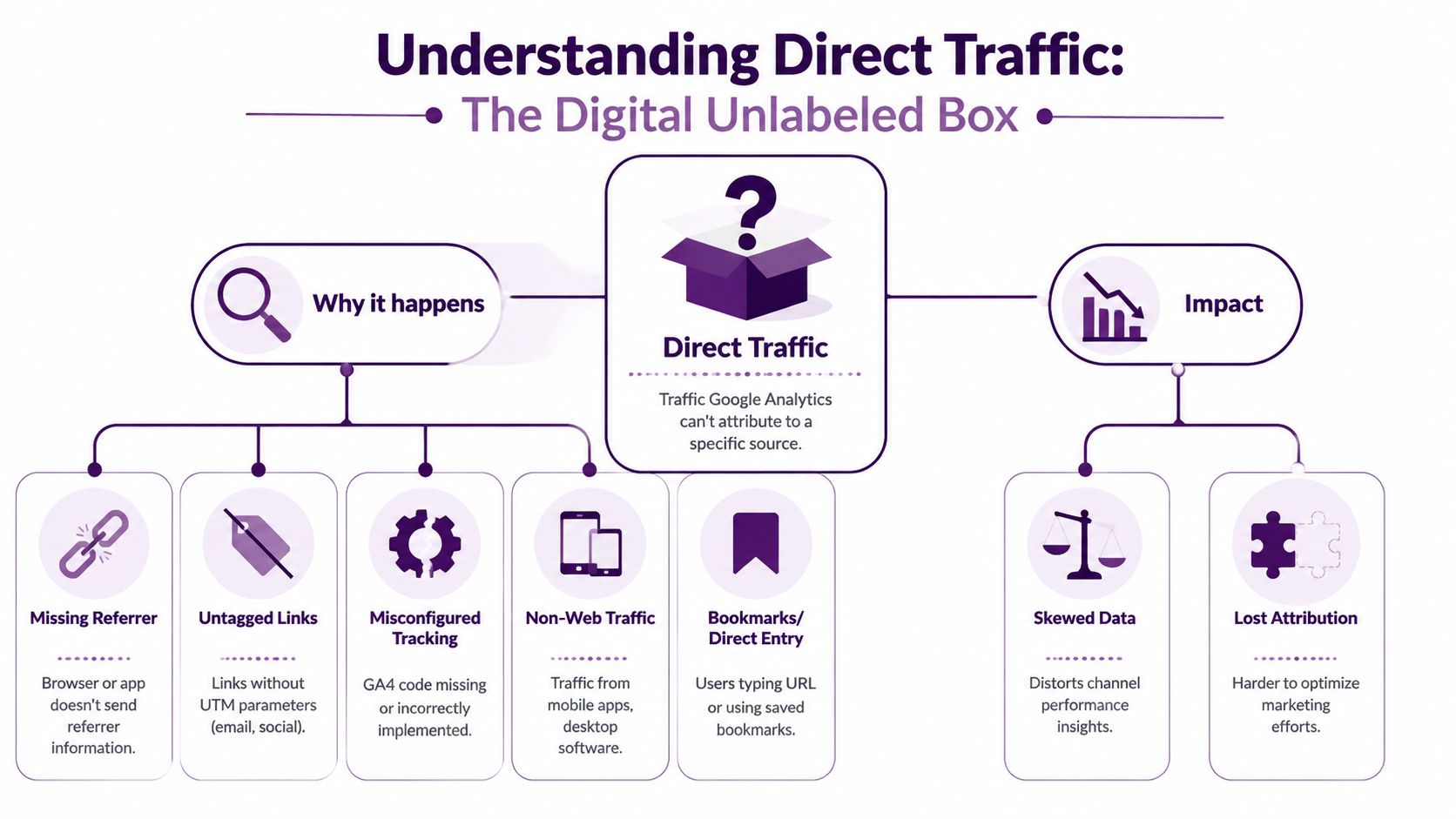
In GA4, direct traffic has a precise technical meaning, and it's less flattering than most dashboards make it look. Direct is the bucket GA4 uses when it can't identify a better source.
The GA4 definition that matters
In Google Analytics 4, direct traffic is defined as sessions where the source medium is “(direct)” and the source is “(none)”, which means referrer data and campaign tags are absent. A healthy benchmark is typically below 20% of total sessions, and going above that often points to attribution problems rather than pure user intent.
That's why I call Direct a data dumpster. Not because all of it is junk, but because GA4 throws a lot of unrelated things into the same place once labeling fails.
What belongs there and what gets dumped there
Some sessions are legitimately direct:
Typed visits when someone enters the domain manually
Bookmarks from repeat visitors
Saved browser shortcuts or homepage launch habits
But a lot of sessions land there for less noble reasons:
Untagged email clicks
Links from apps that suppress referrers
Visits where redirect behavior strips tracking data
Sessions affected by privacy controls
Offline links from PDFs, QR codes, or documents
That's the practical meaning of direct traffic Google Analytics reports. It's not saying, “this visitor definitely chose you on purpose.” It's saying, “I can't confidently attribute this session.”
Direct is often an attribution failure wearing the costume of brand demand.
Why marketers overestimate direct
The label itself causes trouble. “Direct” sounds intentional. It sounds like loyalty. It sounds like the cleanest channel in the report.
But the mechanics say otherwise. GA4 only knows what the browser, app, campaign parameters, and tracking setup give it. If those signals disappear, GA4 doesn't shrug and create a nuanced explanation. It files the session under Direct.
A simple way to understand this:
Scenario | What it suggests |
|---|---|
Homepage or short vanity URL landing | More likely true direct |
Deep product page landing | More likely unattributed traffic |
Long blog URL with parameters missing | Often tracking leakage |
Spike after email send or social post | Usually worth auditing before celebrating |
When a team sees Direct above that healthy threshold, I don't read it as evidence of superior brand power first. I read it as an audit queue. That mindset leads to better decisions, better tagging discipline, and better channel reporting.
The Common Culprits Behind Inflated Direct Traffic
The fastest way to clean up direct traffic Google Analytics reports is to stop treating it like a mystery and start treating it like a lineup of usual suspects. Most inflation comes from a short list of repeat offenders.

Referrer loss during the visit
A major technical cause is the loss of the HTTP referrer before GA4 can use it. That happens in certain transitions, especially when traffic moves from HTTPS to HTTP, or when users click from mobile apps and email clients that suppress referrer data by default.
If the referrer disappears, GA4 has less to work with. If campaign tags are also missing, the session often lands in Direct.
This is why mobile-heavy sites often see more attribution mess than expected. The click itself was real. The channel was real. The metadata didn't survive.
Untagged campaigns
This is still the biggest avoidable issue I see. Teams run good campaigns with bad link hygiene.
Common examples include:
Email newsletters with some links tagged and others forgotten
Organic social posts published through multiple tools with inconsistent URLs
Affiliate and partner links sent out without a shared UTM standard
QR codes and printed materials pointing to naked URLs
The user clicks. The page loads. The visit is real. But because the URL carries no campaign context, GA4 has to guess. When it can't, Direct gets another session.
Dark social and app sharing
A lot of traffic lives in private sharing environments. Think WhatsApp, Messenger, Slack, SMS, native mail apps, and copied links passed around inside teams. Marketers often call this dark social because the traffic originated socially but arrives without clear attribution.
That traffic is especially tricky because it can be highly valuable. It often reflects real interest and recommendation behavior. It just doesn't arrive with a clean referral chain.
Some of your best traffic can look like your worst attribution problem.
Redirects, migrations, and implementation gaps
Technical teams can accidentally manufacture Direct traffic during otherwise normal site changes.
Watch for problems like these:
Protocol issues where old links still touch non-secure pages before landing correctly
Redirect chains that don't preserve query parameters cleanly
Site migrations where tracking was missed on key templates
Consent or script behavior that interferes with first-page source capture
These problems are frustrating because they hide behind successful page loads. The visitor reaches the right page, so everyone assumes the data is fine. It often isn't.
Offline and non-browser sources
Not every click starts on a webpage. Traffic from PDFs, slide decks, downloadable documents, desktop software, or printed QR codes often lacks normal referral signals.
That means a campaign can perform well in practice while looking like a Direct surge in GA4. The marketing worked. The analytics trail didn't.
If you remember one thing from this section, remember this: inflated Direct rarely comes from one dramatic failure. It usually comes from many small missing labels spread across channels and devices.
How to Diagnose Your Direct Traffic Problem in GA4
You don't solve direct traffic by staring at channel totals. You solve it by investigating patterns. The cleanest diagnostic framework is to start with landing pages, then move outward into devices, campaign timing, and implementation.
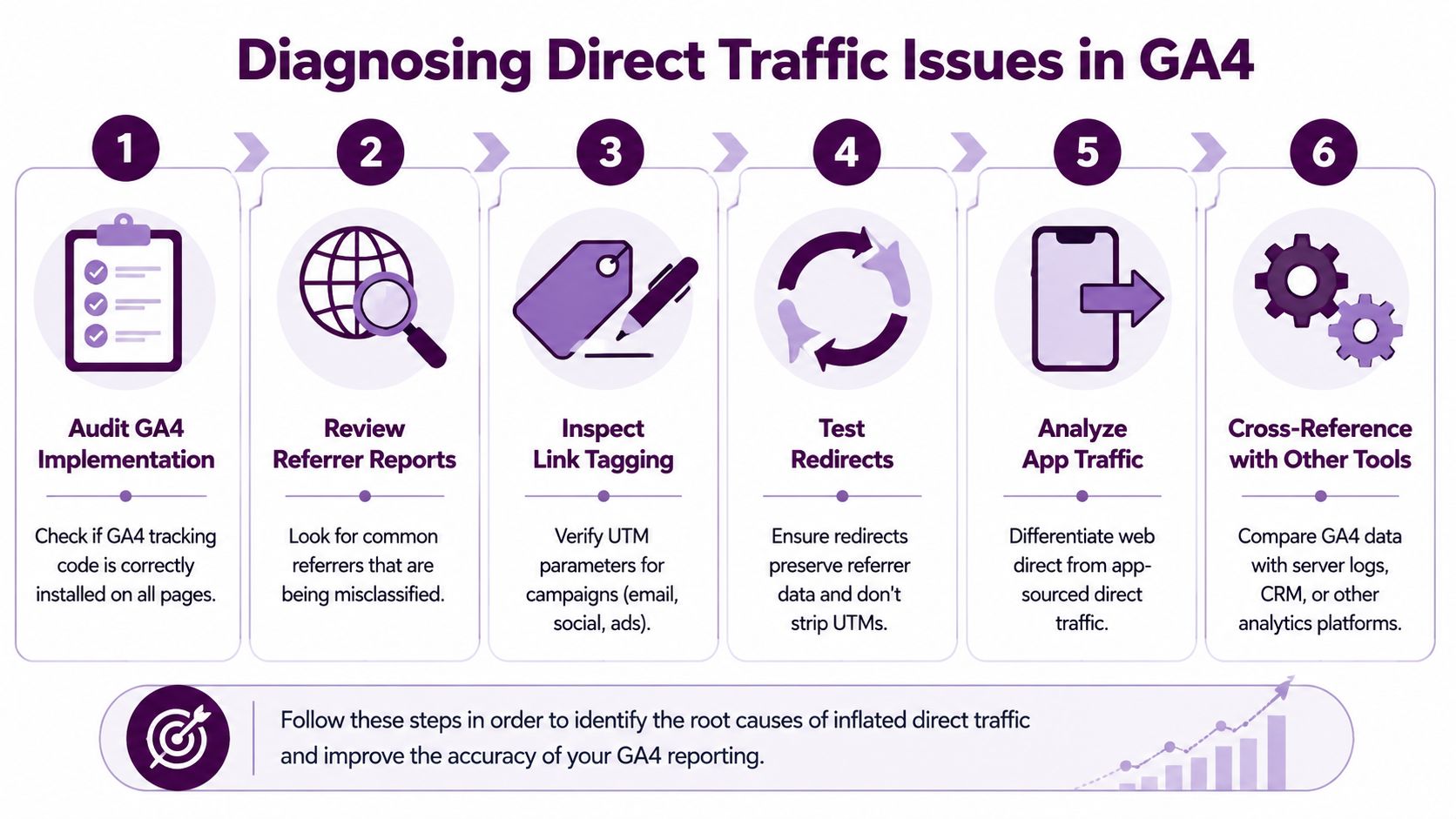
Start with landing pages
This is the highest-value check. Analytics audits regularly show that spikes in Direct landing on deep product pages or interior pages are statistically unlikely to be manual entries, which strongly suggests untagged emails, social links, or affiliate traffic instead.
Open your GA4 reports and isolate Direct. Then review landing pages, not just overall sessions.
Look for patterns like:
Complex product URLs receiving unusual direct volume
Long blog article slugs appearing near the top of direct landings
Filtered category pages or pages with internal path depth that nobody would memorize
Pages tied to a campaign launch showing up as “direct”
If Direct is concentrated on pages that only make sense in a campaign context, you're not looking at pure brand traffic.
Compare homepage behavior to deep-page behavior
A useful mental split is this:
Landing pattern | Likely interpretation |
|---|---|
Homepage, contact page, short vanity URL | More likely true direct |
Product detail pages | More likely dark traffic |
Blog posts tied to active promotion | Often unattributed campaign traffic |
Seasonal landing pages | Usually worth checking UTMs and referral flow |
You're not proving intent with this table. You're building confidence around what's plausible.
Break it down by device
Next, segment Direct by device category. Mobile often tells the truth faster than desktop because app environments and privacy controls interfere with referrer passing more often.
If mobile Direct looks disproportionately heavy, ask:
Are email clicks opening in native apps?
Are social shares happening inside private messaging tools?
Are app browsers involved?
Did a recent campaign lean heavily on mobile-first audiences?
This step won't give you a perfect answer, but it narrows the field quickly.
When direct traffic behaves very differently on mobile versus desktop, behavior usually isn't the whole explanation.
Cross-check your campaign calendar
Pull up your send schedule, paid launch dates, partner pushes, influencer drops, webinar reminders, PDF distribution, and offline activations. Then compare those dates against Direct trend changes.
The question isn't whether a channel “should” have caused direct. The question is whether a campaign created traffic opportunities where tracking labels might have been lost.
Teams often find the smoking gun in scenarios like these. A forgotten email template. A social scheduler using raw URLs. A sales deck link copied into chats. A QR code campaign with no tagged destination.
If your team needs a stronger GA4 foundation before doing this kind of investigation, this guide to Google Analytics for SEO is a useful reference.
Compare Direct with branded search qualitatively
One of the best judgment checks is to compare direct trends with branded search demand. If Direct rises but branded demand doesn't move in the same direction, that weakens the “brand is booming” explanation.
You don't need perfect one-to-one alignment. You're looking for directional support. Stronger brand intent usually leaves multiple footprints. Tracking failure often leaves one big ugly footprint in Direct and nowhere else.
Inspect implementation friction
Once the pattern suggests attribution leakage, review the mechanics:
Confirm GA4 fires on the landing page
Test campaign URLs end to end
Check whether redirects preserve parameters
Review consent behavior on first entry
Verify cross-domain measurement where relevant
Do this on the pages and journeys that showed up in your landing-page review. Don't audit the whole internet. Audit the suspicious paths first.
That's how you separate true direct from dark traffic. Not by guessing. By asking what kind of landing, on what device, after which campaign, through which path.
Concrete Fixes to Reclaim Your Attribution Data
Once you've diagnosed the leak, the fix usually isn't glamorous. It's operational discipline. Teams want a magic GA4 setting. What works better is a boring system that nobody gets to ignore.
Multiple industry reports have found that Google Analytics often assigns between 20% and 60% of site traffic to Direct, and anything above 50% is often treated by experts as a “data dumpster” fire because attribution has clearly broken down. That's why cleanup work matters. You're not polishing dashboards. You're recovering decision-quality data.
Build one UTM standard and enforce it
If I had to pick one intervention, this would be it. A unified tagging policy does more to reduce inflated Direct than most account tweaks.
Your standard should define:
Source naming so “newsletter,” “email,” and “mailchimp” don't all describe the same thing
Medium naming so social, paid social, affiliate, and partner traffic stay distinct
Campaign naming tied to launch theme, initiative, or promotion
Ownership so someone reviews tagged links before launch
The key is consistency across teams. Marketing, lifecycle, partnerships, paid media, PR, content, and sales enablement all create links. If one team freelances the rules, Direct fills up again.
Tag the channels people forget
Teams usually remember paid ads. They forget the edges.
Audit these first:
Email templates in your CRM or marketing automation tool
Social publishing tools used by brand and regional teams
PDFs, decks, and downloadable guides
QR codes on packaging, events, and print collateral
Affiliate and partner links
Sales outreach assets that include trackable links
These are common sources of “mystery direct” because they live outside the tidy paid-media workflow.
Fix redirect and protocol issues
If any part of the visit path still risks losing referral information, clean that up next. Ensure your site is consistently secure and that redirect paths don't mangle UTMs or send users through avoidable detours.
If your team is reviewing redirect behavior during a migration or cleanup, this primer on 301 and 302 redirects is a good baseline for the discussion.
Field note: A page can load perfectly for users and still destroy attribution on the way in.
Audit consent and measurement setup
Consent tooling, cross-domain setup, and partial GA4 implementation can all feed the Direct bucket. Review them with actual test journeys, not just documentation.
Focus on questions like:
Check | Why it matters |
|---|---|
Is GA4 present on key landing pages? | Missing first-page measurement can break source capture |
Do redirects preserve parameters? | Lost UTMs become Direct sessions |
Is cross-domain measurement configured? | Domain hops can sever attribution |
Does consent logic delay source capture? | First-touch information can disappear |
Accept what you can't eliminate
Some Direct traffic will always remain. People do use bookmarks. Some apps won't pass referrers. Some privacy controls will obscure source data no matter how tidy your setup is.
The goal isn't zero Direct. The goal is credible Direct. When the bucket shrinks to mostly real direct behavior plus unavoidable privacy loss, your other channel reports become much more trustworthy.
That's the payoff. Better budget allocation. Better campaign reporting. Fewer fake victories. Fewer blind spots.
Your Direct Traffic Troubleshooting Checklist
When a team asks me how to handle direct traffic Google Analytics reports, I don't start with theory. I start with a checklist. Good diagnostics come from repeatable questions.
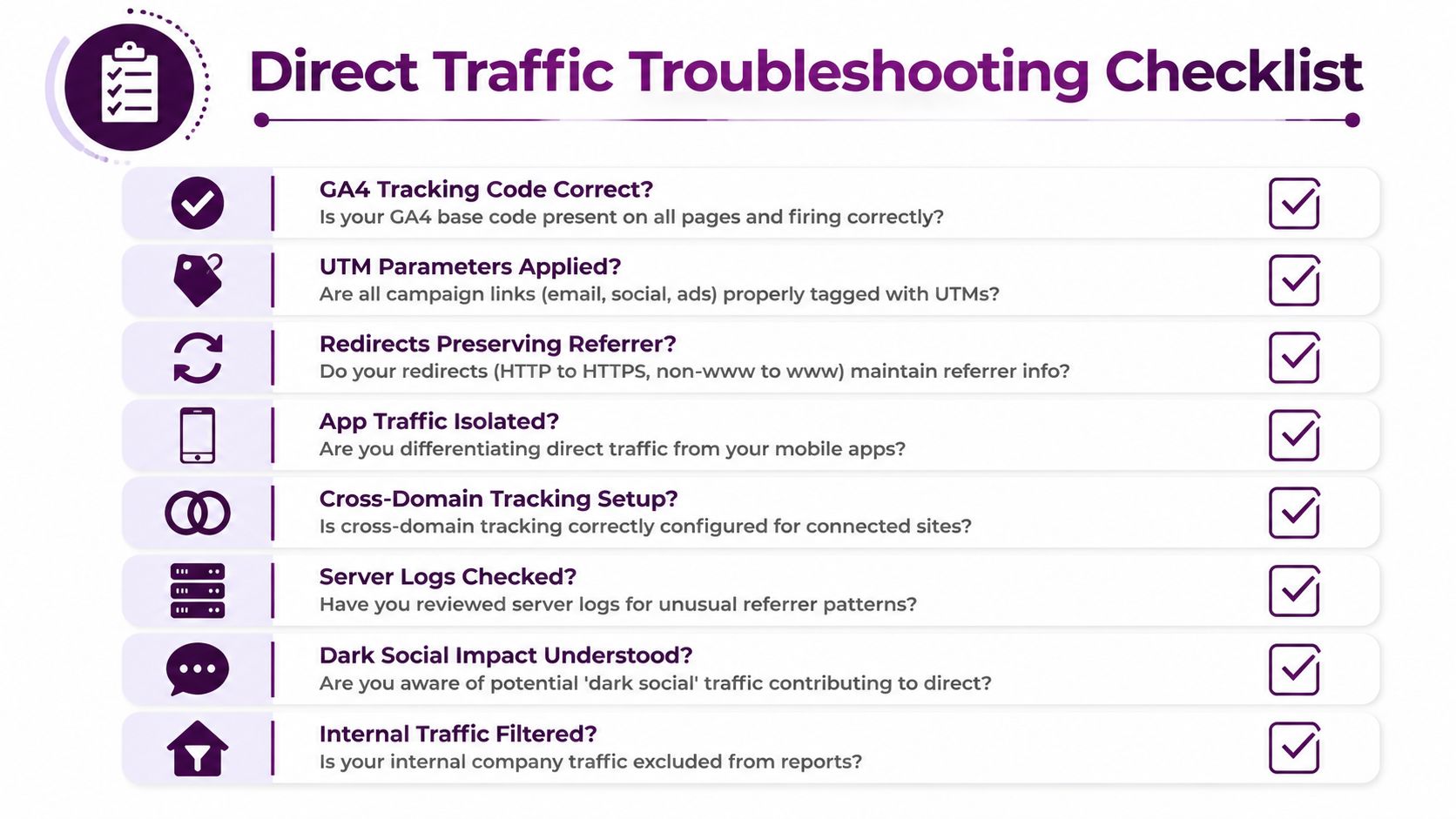
Diagnosis questions
Use these to decide whether your Direct bucket reflects brand equity, attribution leakage, or both.
Check landing-page plausibility. Are direct sessions entering through the homepage and short URLs, or through deep pages that make manual entry unlikely?
Review device patterns. Does mobile produce a noticeably different Direct mix than desktop?
Match spikes to launches. Did Direct jump after an email send, partner promotion, PDF release, QR deployment, or social campaign?
Inspect campaign hygiene. Are all outbound marketing links tagged consistently?
Verify technical path quality. Do redirects, protocol changes, or domain hops strip parameters or referral clues?
If your best explanation for a Direct surge is “people must have remembered that exact product URL,” keep digging.
Actionable fixes
Once the diagnosis points to dark traffic, move through this list in order.
Create a UTM policy document. Define naming rules, required fields, ownership, and approval.
Audit email and social templates. Remove raw URLs from reusable assets.
Tag non-web assets. Add campaign parameters to PDFs, decks, QR destinations, and partner links.
Test redirect chains manually. Follow campaign URLs from click to landing page and confirm parameters survive.
Confirm sitewide secure paths. Remove any protocol inconsistency that risks losing referral context.
Review GA4 coverage. Make sure the landing page itself is measured, not just the next page.
Check migration and domain changes. If attribution became messy after a redesign or replatform, inspect that timeline first.
If your Direct problem began around a redesign or domain move, this site migration checklist can help you review the implementation details that often create attribution gaps.
What success looks like
You don't need Direct to disappear. You need it to make more sense.
A healthier Direct bucket usually has clearer homepage intent, fewer absurd deep-page entries, tighter correlation with real repeat visitors, and less contamination from campaign activity. Once you get there, channel reporting becomes easier to trust and much easier to act on.
Keyword Kick helps teams turn messy search and analytics signals into clear next steps. If you're trying to understand attribution gaps, prioritize SEO work, and connect GA4 data with search performance, Keyword Kick gives you one workspace to investigate what changed and what to do next.