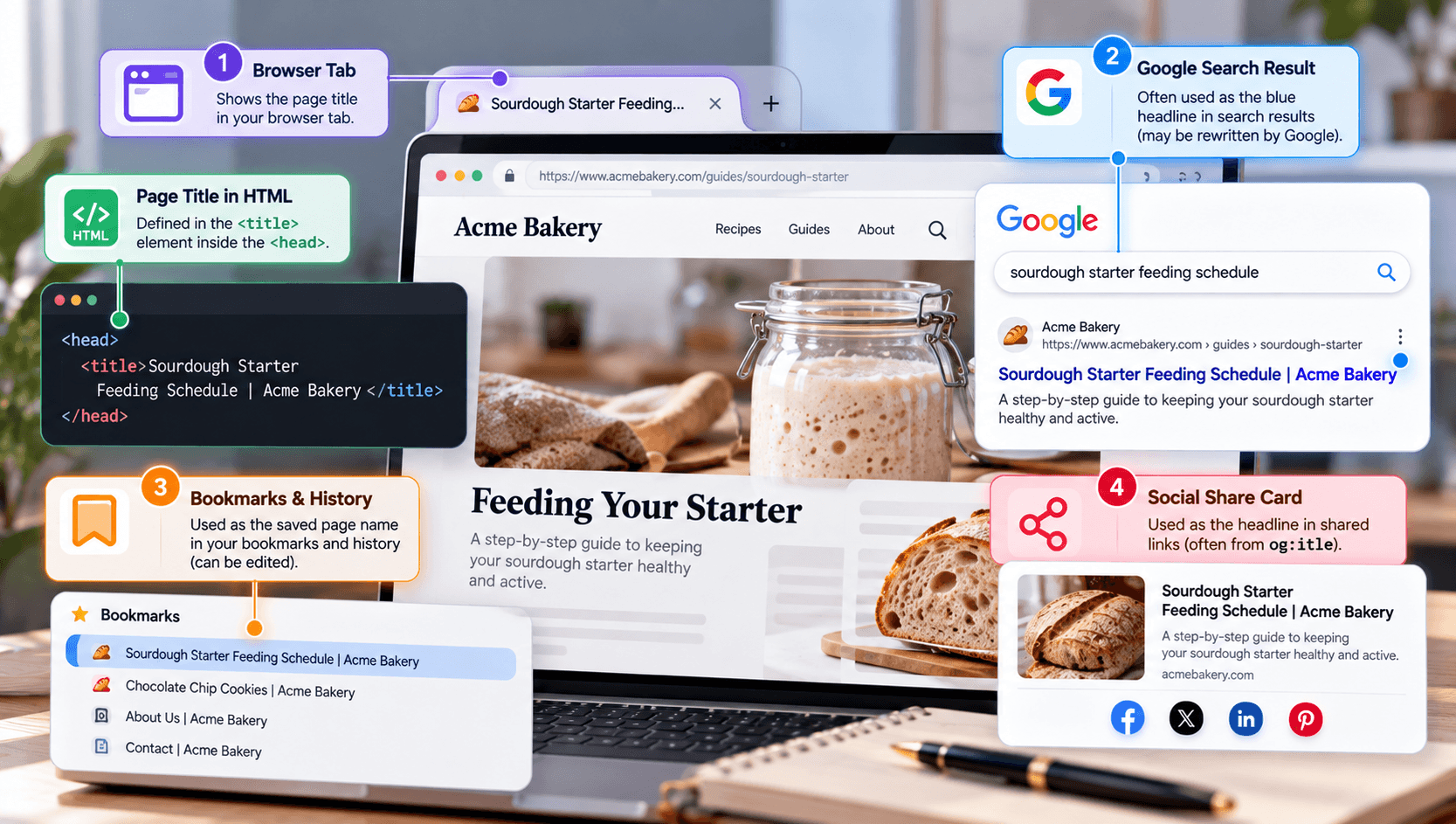
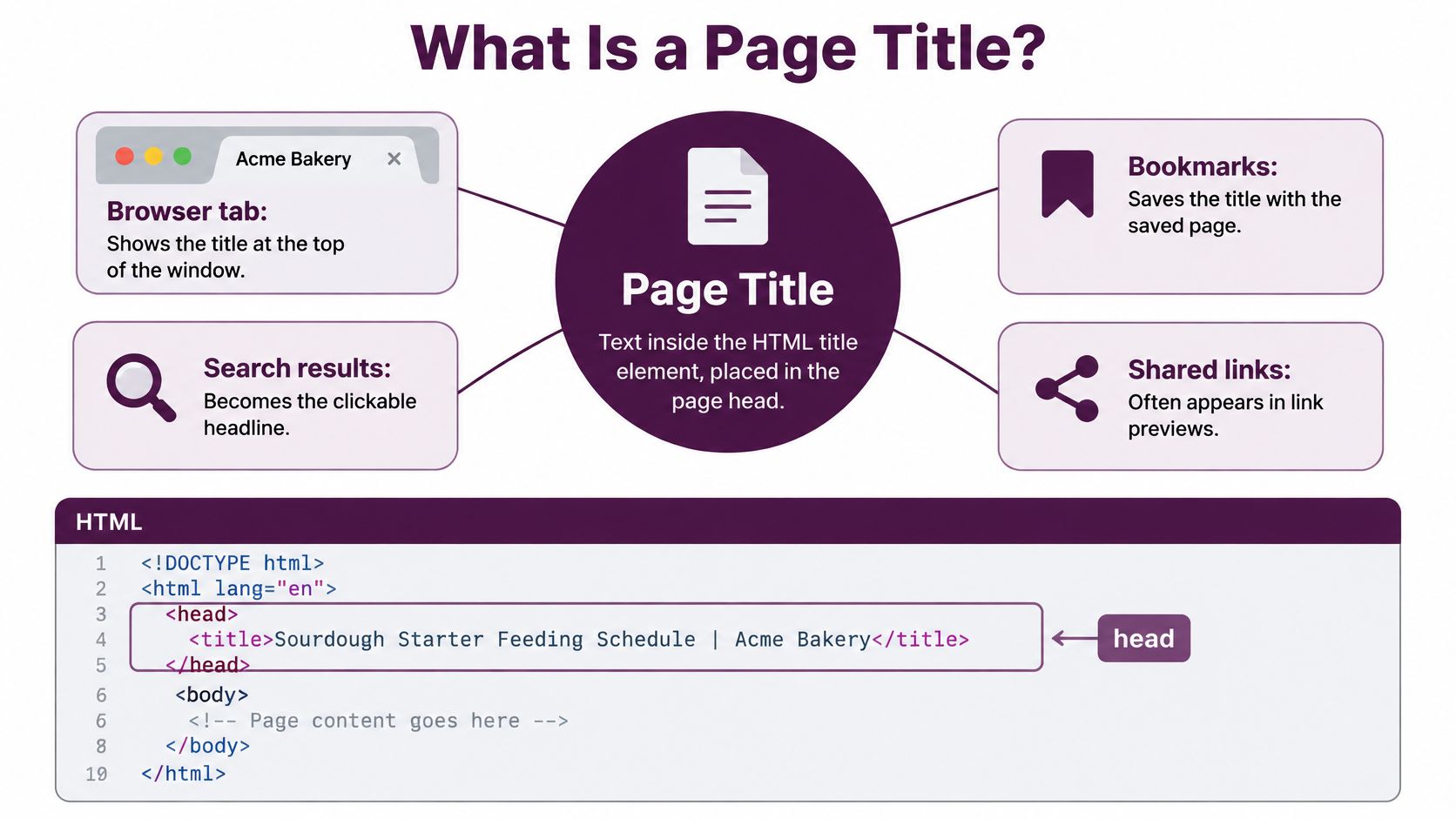
A page title is the text inside the HTML <title> element in the page's <head>, shown in browser tabs and often used as the blue headline in Google results.
You've probably used one without thinking about it today. You opened several tabs, glanced across their labels, and picked the page you wanted. If you're asking what is a page title because your own tab says Home, or Google shows something different from your headline, the distinction starts with where that label comes from.
What a Page Title Is and Where It Appears
Say you're looking for instructions on feeding a sourdough starter. You open a bakery's guide, then switch to another tab to check a recipe. When you return, a descriptive tab label helps you find the guide without reopening every page.
The page title works like the label on a folder. It identifies the document even when you can't see what's inside. A useful label describes the contents, rather than relying on the surrounding website to explain it.
The title lives in the page head
For the bakery's guide, the HTML could look like this:
<head>
  <title>Sourdough Starter Feeding Schedule | Acme Bakery</title>
</head>
The <head> contains information about the document. It's separate from the <body>, where the reader sees the article, navigation, images, and other page content.
The HTML standard permits no more than one <title> element per document and recommends a document name that remains identifiable outside the page; Google's title-link guidance likewise emphasizes descriptive, page-specific title text. For an ordinary indexable page, the practical implementation is a meaningful title in the head.
Your page title isn't the same thing as your H1, the main heading visible on the page. The H1 might say Feeding Your Starter because the bakery's logo and navigation already provide context. The title needs enough context to make sense in a browser tab or saved bookmark.
The label travels beyond the page
Different interfaces can draw on different fields. That's why changing an SEO title doesn't necessarily change every shared preview or search headline.
Where a page title appears and what it draws from
Surface | What the Reader Sees | Where the Text Comes From |
|---|---|---|
Browser tab | Page name, often cut short | The title element in the head |
Bookmarks and history | Saved page name | The title element in the head, although bookmark names can be edited |
Google title link | Blue clickable headline | Chosen from the title element, H1, |
Social share card | Headline in the shared preview |
|
To inspect your own page, hover over its browser tab to reveal the full label. Then open View Page Source and search for <title.
If JavaScript changes the title after loading, the original source may not show the final value. Inspect the live <head> in your browser's developer tools, or enter document.title in the console to read the current title.
Why Page Titles Matter for Rankings and Clicks
In 2024, 98.0% of desktop web pages and 98.2% of mobile web pages contained an HTML title element, according to the HTTP Archive's Web Almanac. A missing title is therefore an exception, but merely having the element doesn't mean its wording helps anyone.
Searchers need a reason to choose your page
A title helps search engines interpret a page's subject. For the person searching, it also makes a promise about what they'll find after clicking.
Compare a result labeled Plant Care with one labeled How to Water Container Plants Without Overwatering. Someone struggling with soggy pots can recognize the second page's purpose immediately. The specific wording helps them judge whether it answers their problem.
That doesn't mean a more descriptive title guarantees a higher ranking. Search visibility also depends on whether search engines can access the page, understand its content, and consider it relevant to the query. If important pages aren't being discovered, MyMentions' guide can help you fix crawl issues limiting search visibility before you spend time polishing their labels.
A library offers a useful comparison: readers need both an organized collection and meaningful names to find the right material.

Visitors still need the label after clicking
A returning visitor may recognize a page through its tab, bookmark, or history entry rather than through Google. Labels such as Untitled or Welcome make that task unnecessarily difficult.
Screen reader users also rely on document titles to orient themselves. Depending on the browser and assistive technology, the title may be announced when a document opens or receives focus. Describing the page's purpose helps the reader understand where they've arrived.
Practical rule: Write a title that helps someone identify the page before they can inspect its contents.
A useful title serves the searcher comparing results, the returning visitor finding a saved resource, and the assistive technology user navigating documents. Keyword placement matters only if the resulting label still works for those people.
How Google Chooses the Title It Shows
You update a title, check Google, and see a different headline. That can feel like Google ignored your work, but your HTML title is an important input, not a command controlling the search result.
Google calls the clickable search headline a title link. The distinction matters: the title element belongs to your document, while Google generates the title link for its search interface.
Google can choose from several signals
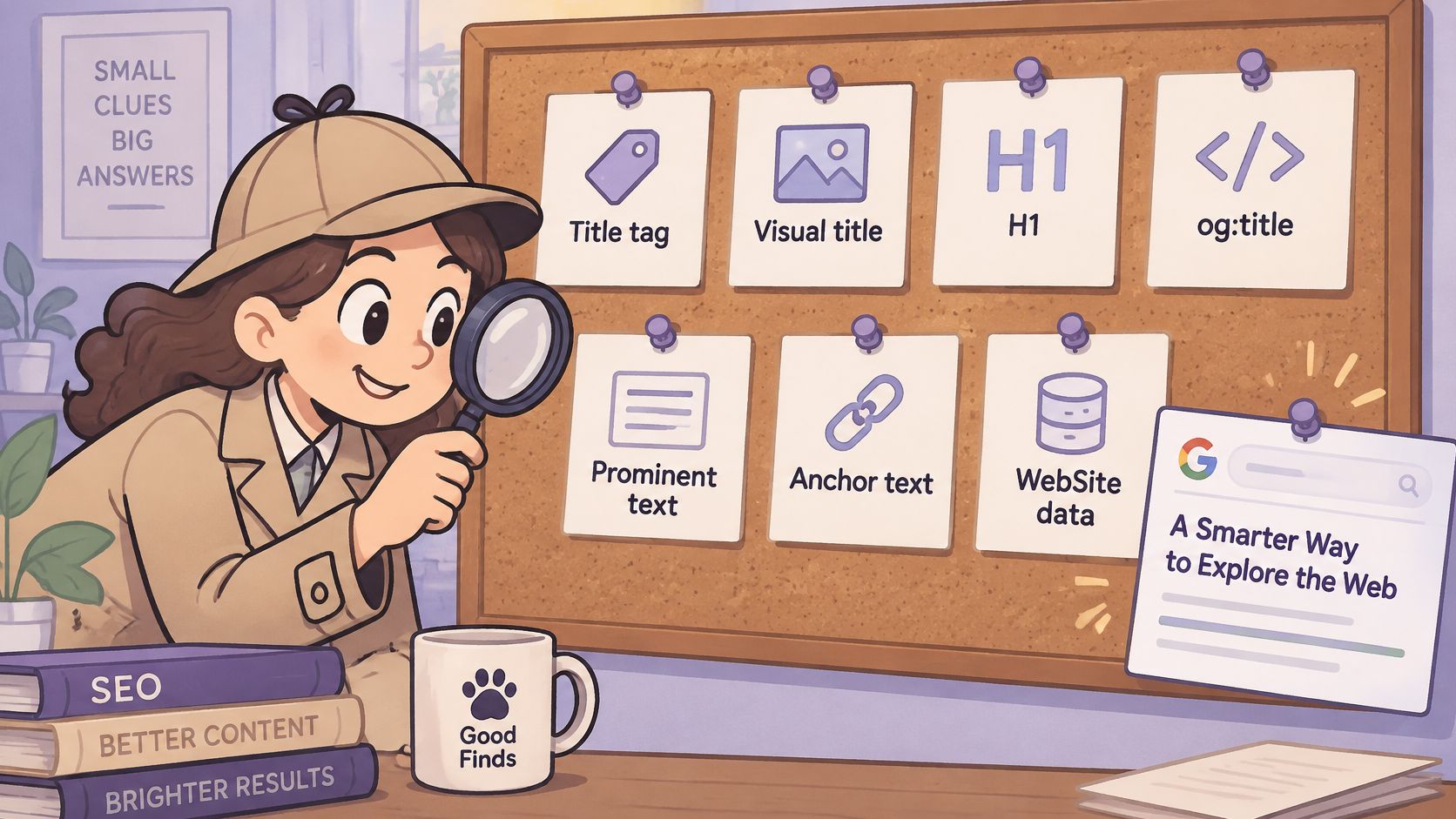
Google's Search updates explain that alternative titles can better represent a page or its relevance to a query, including when the supplied title is missing or non-descriptive. Inputs can include:
Document metadata: The HTML
<title>andog:title.Visible page text: The main visual title, headings such as
<h1>, and other prominent wording.Link context: Anchor text on the page and in links pointing to it.
Site information:
WebSitestructured data can also contribute context.
Say a gardening guide has the title Acme Learning Center, but its main heading clearly describes pruning apple trees. A search headline using that heading could be more helpful than the generic title you supplied.
The useful response is investigation, not automatically changing the title again.
Diagnose a rewrite before editing
Compare the rendered title and H1. Check the live page, not just the CMS field. Look for an old template, missing product name, or heading that describes a different purpose.
Check
og:title. A stale social title can introduce conflicting wording.Review internal links to the URL. Descriptive anchors should identify the same destination rather than use outdated category or product names.
Record the exact query and displayed headline. Use Search Console to investigate queries associated with the page, then inspect the relevant search result. Search Console doesn't provide a report listing every displayed title variation.
Decide whether Google's version describes the content more accurately. If it doesn't, align the metadata, headings, and link wording around the page's actual purpose.
Large sites deserve particular attention because translated templates, outdated product names, and repeated brand suffixes can introduce conflicts across page groups.
A rewritten headline isn't automatically an SEO failure. Judge whether it helps the searcher understand the destination.
How to Write a Page Title That Works
Put the page's main topic near the beginning. That gives readers useful information before a narrow tab or shortened search display hides the remaining words.
For a product page, lead with the product and its distinguishing feature. For a guide, lead with the task or question it answers. Don't make readers pass through a slogan before discovering what the page contains.
Write for recognition before length
There isn't a universal character count that guarantees Google will display a title in full. Letters occupy different amounts of space, and the available display width changes across interfaces. Write concisely, then preview the actual wording rather than treating a character counter as a pass-or-fail test.
Add the brand at the end when it provides useful context. A pipe or hyphen is a readable separator. The homepage can reasonably lead with the brand because identifying the business is often its primary job.
MDN's HTMLTitleElement reference describes the text-based title interface that browsers expose. Keep the title as plain text, not an attempt to add presentation markup.
Use the page's primary language, and choose a natural phrase your intended reader would recognize. Repeating close variations of the same keyword makes the label harder to read without clarifying its meaning.
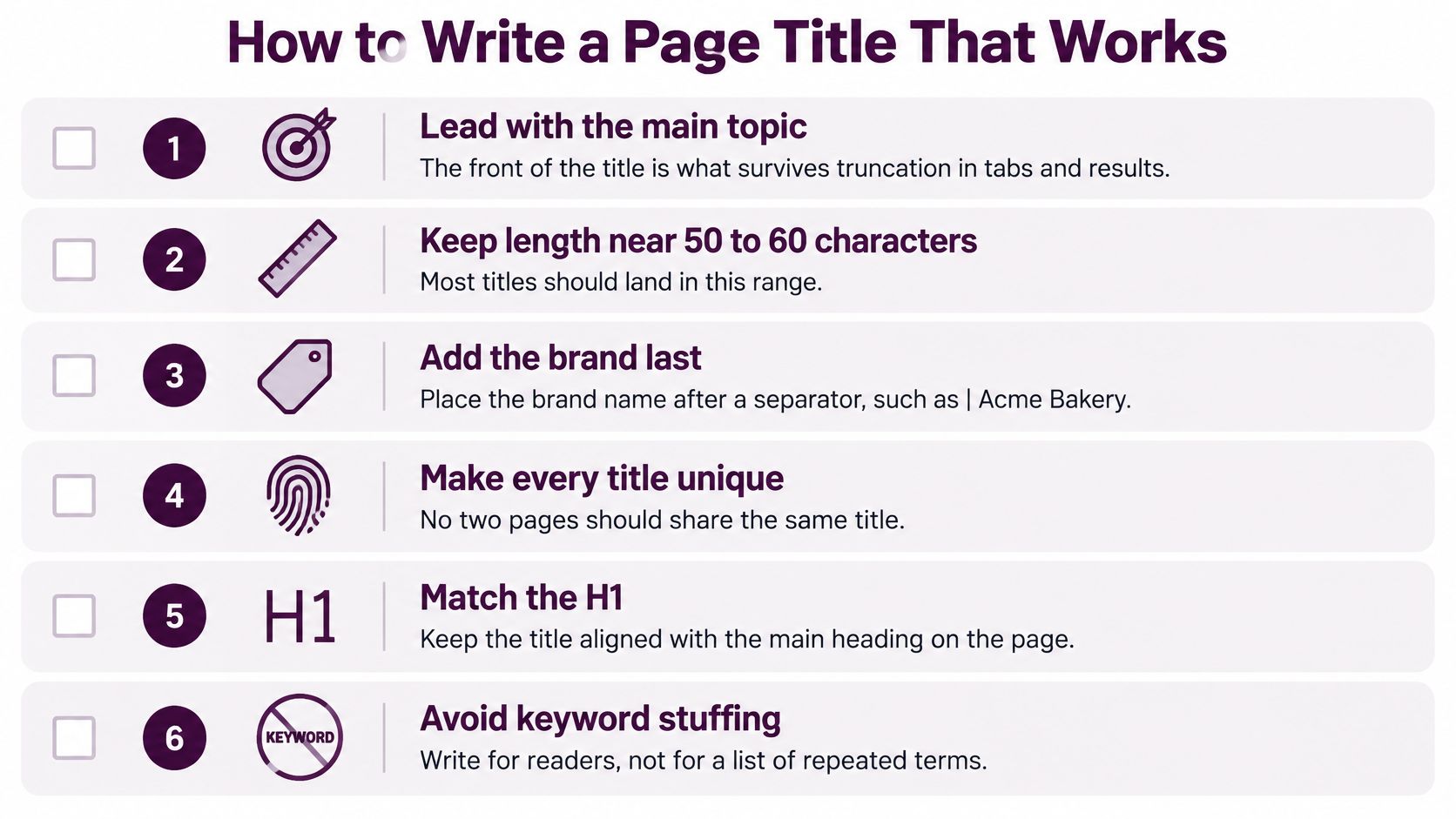
Treat length guidance in a checklist as an editing prompt, not a technical limit. Accuracy and clear identification matter more than hitting a prescribed count.
Apply the rules to the page type
These hypothetical examples show how the same principles produce different wording.
Weak and stronger page titles by page type
Page Type | Weak Title | Stronger Title | Why It Works |
|---|---|---|---|
Homepage | Home | Acme Garden Tools - Hand Tools and Pruners | Names the business and what it sells |
Product page | Product | Bypass Pruner with Replaceable Blade - Acme | Shows the product and its key spec first |
Blog post | How to Water Plants | How to Water Container Plants Without Overwatering - Acme Garden Blog | Promises a specific outcome the post delivers |
Category page | Category | Garden Hand Tools - Acme | Names the category and sets it apart from other lists |
Pricing page | Pricing | Pricing Plans for Small Teams - Acme | Matches what visitors are searching for |
The longer blog example illustrates a trade-off. Its opening identifies the task clearly, but the brand suffix may not remain visible everywhere. You could shorten the suffix if the full label feels cumbersome.
Every title should distinguish its destination from neighboring pages. A category page and a buying guide might target related language, but their titles should make the difference between browsing products and reading advice obvious.
Before publishing, review on-page SEO elements alongside the title. A compelling label won't help if the heading and actual content describe a different page.
Use this final writing check:
Purpose: Can a reader tell what they'll find?
Specificity: Does the wording distinguish this URL from similar pages?
Accuracy: Can the page deliver every promise in the title?
Readability: Does the title sound natural when read aloud?
Common Title Mistakes and Their Effects
Start with missing and empty titles, then inspect repeated templates. A template defect can affect an entire product collection, while a poorly worded article title may require only a local edit.
Don't confuse duplicate labels with duplicate pages. Search engines can use other signals to distinguish URLs, but identical titles make their purposes less clear to readers and weaken your control over how each page is described.
Match the repair to the cause
Common title mistakes, their effects and fixes
Mistake | What It Causes | Fix |
|---|---|---|
Missing or empty title | Browsers lack an intentional label, and Google must choose alternative text | Write a unique title for every indexable page |
Same title across many pages | Readers and search engines get less help distinguishing the pages | Put the page-specific topic first in the template |
Keyword stuffing | Spam-like reading and a greater chance of alternative title text | Use a natural primary phrase and a brand suffix |
Brand name first on every page | Topic pushed out of view | Move the brand to the end where appropriate |
Title promises more than the page covers | Disappointed visitors who may leave without completing their task | Match the title to the page's real content |
H1 used in place of the title element | Missing intentional browser label and title metadata | Write the title and H1 separately |
Long titles need editorial judgment rather than automatic deletion. Remove repeated category names, promotional filler, and unnecessary brand wording before cutting information that distinguishes the page.
Repair priority: Fix the rule generating bad titles before manually rewriting the pages that inherit it.
Check what happens when content is missing
A product template might insert an empty attribute into an otherwise sensible title. Test what happens when a product lacks a material, variant name, or collection assignment.
Use a fallback that still produces a readable label, then inspect the rendered result. Treat title templates as part of publishing quality control, not a field to configure once and forget.
Preview a Title Before You Publish
A draft can read well in a spreadsheet but become unclear in the interface where someone uses it. Test the wording in its destination contexts before approving it.
Inspect the different displays
Search result: Paste the draft into a SERP title and description preview. Check whether the visible portion identifies the page without relying on words that may be cut off. A preview is an approximation, not a promise about Google's display.
Browser tab: Open the page among other tabs. Can you distinguish it from related pages when the available space narrows?
Bookmark: Save the page and inspect the default name. It should remain understandable without the website's navigation beside it.
Social card: Check the share preview and its metadata. Confirm that the shared headline describes the same subject, even if you've chosen different wording for that audience.
Approve the promise, not just the appearance
Before publishing, confirm that the title belongs to this page, reads naturally, and matches the visible content. Check the H1 for alignment, but don't force identical wording when a more contextual heading helps readers.
Record the publication or edit date and retain the previous title. That gives you a clear reference when evaluating performance later, rather than relying on memory to reconstruct what changed.
Audit Your Page Titles Before Your Next Edit
For a site-wide review, use the SEO site audit checklist before publishing to connect title repairs with broader publishing checks. Then build a working queue from your URLs and search performance.
Export indexable URLs and their titles. Use a crawler such as Screaming Frog or your CMS export. Include rendered titles when JavaScript changes them.
Flag empty, repeated, brand-only, and unwieldy labels. Group the findings by template so you can separate shared defects from individual writing problems.
Add Search Console context. Review impressions, clicks, click-through rates, queries, and positions. Compare pages with similar search intent rather than assuming every low click-through rate indicates bad copy.
Select a manageable batch of high-visibility pages with unclear titles. Save the original wording, draft replacements, and run the previews before publishing.
Reassess after Google has had time to revisit the pages. Inspect search results for displayed wording, and use Search Console to evaluate performance. Account for position changes and shifts in query mix.
Keyword Kick's site audits are an option alongside crawler exports for finding missing and duplicated titles, while rank tracking helps contextualize position changes after edits.
Your immediate decision is simple: which pages have enough visibility, unclear enough labels, and sufficiently useful content to justify rewriting their titles first?
Bring title checks into your regular publishing workflow with Keyword Kick. Its SEO tools combine site audits, search performance context, and rank tracking so you can identify title problems, prioritize edits, and monitor what happens afterward.