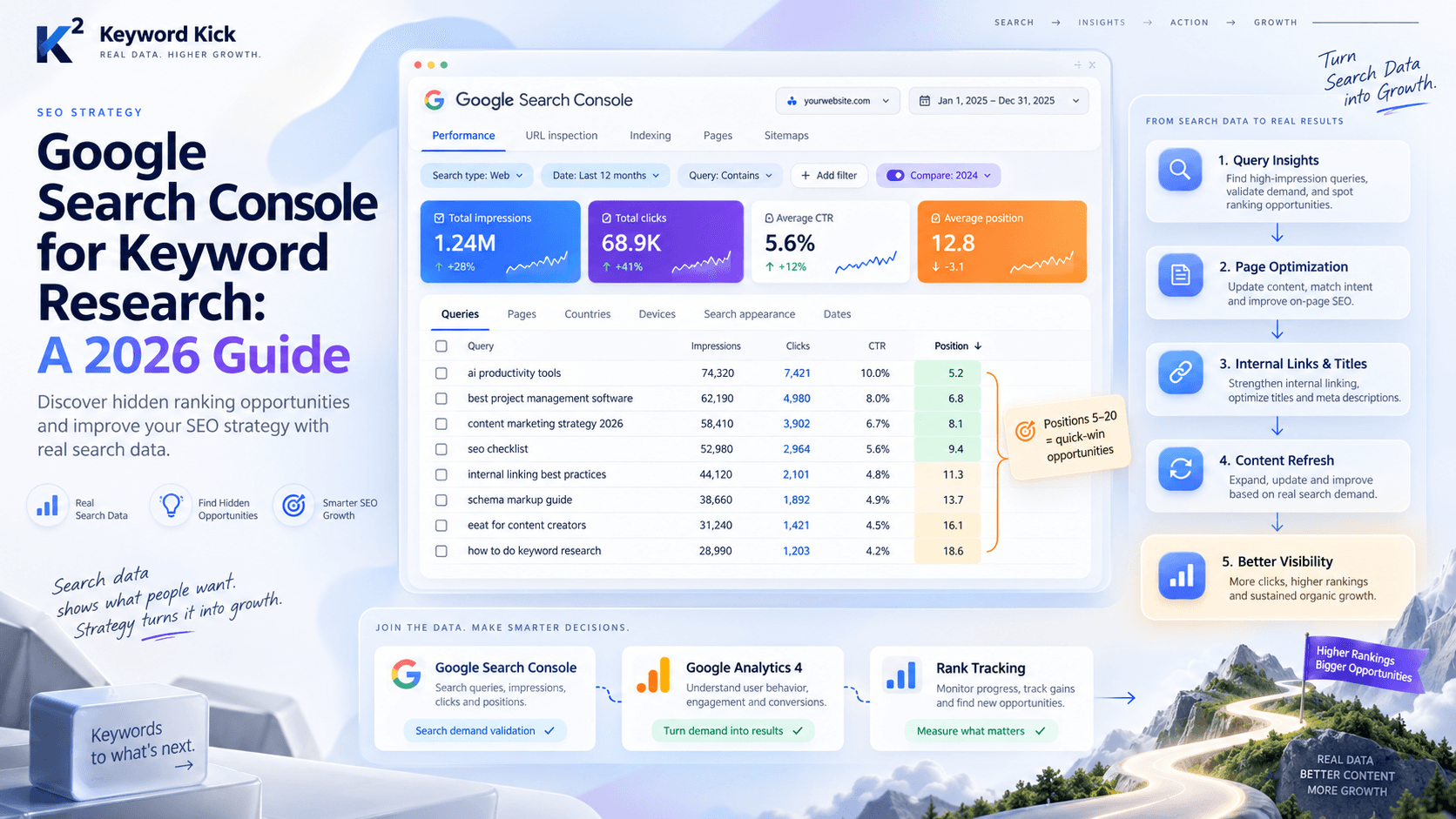
You probably have the same tabs open every day. Google Search Console. GA4. A crawler. A rank tracker. Maybe a backlink tool. Maybe a sheet with your last content plan that no one has touched in weeks.
Then someone asks a simple question: why did traffic drop, what should we fix first, or which pages are closest to a meaningful lift? That's where the friction starts. The data exists, but the answer still takes too long.
That gap is where AI agent SEO becomes useful. Not for one-click blog writing. Not for replacing strategy. For building repeatable analysis loops that pull data, apply logic, and turn scattered signals into prioritized actions your team can ship.
Beyond the Dashboard The New Era of AI Agent SEO
Most SEO teams don't have a data shortage. They have an interpretation bottleneck.
The old workflow still looks familiar. Export from Search Console. Compare a date range. Pull rankings from another tool. Check a few competitor pages manually. Build a spreadsheet. Add notes. Send a Slack message. Create tickets later, if there's time. The work is valuable, but too much of it is janitorial.
Why dashboards stopped being enough
A dashboard can show you a drop. It usually can't tell you what to do next with enough context to be useful.
That matters more now because search visibility is no longer just ten blue links and a featured snippet. Google AI Overviews changed the environment that SEO teams operate in. A reported shift to AI-generated answer layers forced SEO to adapt from ranking-only thinking to citation and visibility thinking inside AI-generated results, as outlined in this roundup of AI SEO statistics.
The practical consequence is simple. If your workflow still ends at “we found a problem,” it's too slow.
What changes when you use agents
An AI agent doesn't replace judgment. It replaces repetitive analysis sequences.
Instead of asking a person to manually re-run the same diagnostic every week, you design a loop:
Pull fresh inputs from sources like GSC, analytics, crawl data, and rankings
Apply rules that reflect how your team prioritizes SEO work
Return an action such as a brief, ticket, alert, or recommendation
Repeat on a schedule so opportunities don't sit buried in dashboards
Practical rule: If the same SEO analysis happens more than once a month, it's a candidate for an agent.
That's the key shift. You stop treating SEO tooling as a reporting layer and start treating it as an operational system.
A useful mental model is this: dashboards are for observing; agents are for deciding what deserves attention next. That's why the move from manual reporting to AI-guided workflows has become such a common discussion in modern teams, and this look at the shift from dashboard SEO to AI-guided SEO captures that transition well.
What Exactly Are AI Agents for SEO
The term gets abused constantly. A long prompt in ChatGPT is not an SEO agent.
A real AI agent for SEO has three parts working together. It needs access to live data, logic for making decisions, and a way to trigger an output. If one of those is missing, you usually just have a chatbot or a static automation.
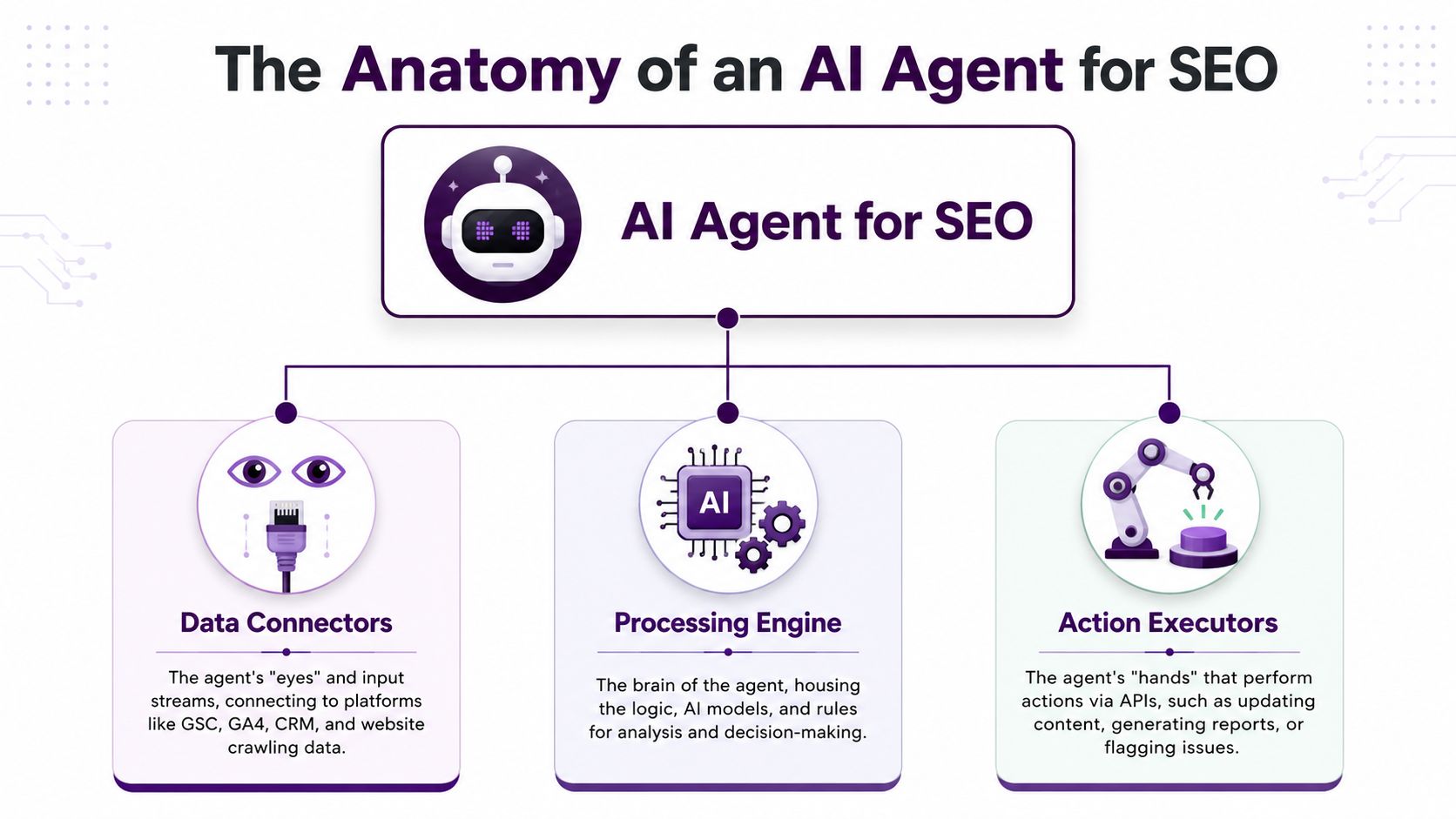
The eyes, brain, and hands model
Think about a strong SEO analyst. They look at data, interpret it, then do something with that conclusion. An SEO agent follows the same pattern.
Component | What it does | Typical SEO examples |
|---|---|---|
Data connectors | Give the agent visibility into real inputs | GSC, GA4, crawl exports, rank data, CRM signals |
Processing engine | Applies rules, prompts, and decision logic | Detecting drops, finding gaps, prioritizing pages |
Action executors | Pushes the result somewhere useful | Jira tickets, Slack alerts, briefs, reports |
If you only give the system a prompt, it has language ability but no operating context. If you only wire up automations, it can move data around but won't reason about it. The useful middle ground is both.
Why this matters now
The search environment got more complicated. A reported set of milestones around AI Overviews shows why. They were said to appear in up to 47% of Google search results in 2026, one source said they reached 30% of all search results in January 2025 and 74% of problem-solving queries, and another reported that 1.5 billion users now see AI Overviews each month, according to Tenet's AI SEO statistics roundup.
That doesn't just change reporting. It changes what the agent should optimize for. Traditional rank tracking still matters, but the system also needs to surface pages likely to earn citations and answer-layer visibility.
What's hype and what's real
The hype is the idea that one agent will “run SEO.”
What works is narrower and more valuable:
Monitor one recurring workflow
Use explicit decision rules
Return a small number of high-confidence tasks
Keep a human approval layer before site changes
That's why I usually advise teams to start by browsing existing implementation patterns before building from scratch. A curated collection like Browse AI tools from Needle is useful because it shows how others are structuring agent tasks across real business workflows.
Treat the agent like a literal-minded analyst. It can be fast and consistent, but only if you define the job clearly.
How to Build Your First AI Agent Workflow
Start with one loop that saves real time. Don't start with “find all SEO opportunities.” That's too broad, and broad agents drift into vague output.
The most reliable first build is a striking-distance workflow. The job is specific: find pages that already rank close enough to move, confirm that the keyword is worth pursuing, and push a task into the team's execution queue.
The workflow logic that actually works
One practical AI agent SEO process is to pull Google Search Console rankings, compare them with competitor ranking data, identify keyword gaps, then generate content briefs or technical tickets. One independent guide says that replaces roughly 6-8 hours of manual keyword-gap analysis with about 15 minutes, and broader AI SEO agent workflows can cut 4-8 hour manual research or audit tasks down to 10-30 minutes when the system is connected to Search Console and Analytics APIs and uses rule-based prioritization like preferring pages in positions 7-15 with 1,000+ monthly searches and lower keyword difficulty, as described in this guide to AI SEO agents.
That last part is why this workflow is so effective. It has a concrete filter. The agent isn't trying to be creative. It's trying to be useful.
Build the loop in five parts
Connect the inputs
Give the agent access to GSC query and page data, plus your rank tracking or competitor keyword set. If you can't connect both, the workflow loses its validation step.Define the filter
Use rules, not vibes. Start with pages ranking in positions 7-15, keywords with 1,000+ monthly searches, and lower difficulty where available.Check against competitors
The agent should verify that competing pages are ranking for the target phrase and note obvious coverage gaps. This step helps avoid wasting time on false positives.Generate a task, not a report
The output should include:Target URL
Primary query
Why it qualifies
Recommended action, such as refresh content, improve internal links, or tighten on-page relevance
Send it somewhere your team already works
Jira, Trello, Asana, Notion, Slack. The destination matters less than consistency.
A sample task payload
Here's the kind of output you want the agent to create:
Page: /category/example-page
Keyword: example keyword
Reason flagged: ranking in striking distance, search demand threshold met, competitor pages show deeper coverage
Recommended action: refresh the page, expand supporting sections, add internal links from related articles, review title and intro alignment
That's actionable. A spreadsheet tab full of exported terms isn't.
What to avoid in your first build
A few common mistakes slow this down:
Too many scoring factors. If you bake in every possible SEO signal on day one, the workflow becomes fragile.
No output threshold. Agents that return twenty loose ideas every morning become background noise.
No owner field. If the task doesn't name who reviews or implements it, it won't move.
I'd rather have a smaller loop that runs every week and produces a short queue of high-confidence tasks than a giant orchestration that nobody trusts. If you want a broader view of how teams scale these workflows beyond one loop, this guide to SEO automation tooling is a useful companion read.
The payoff is consistency
Manual SEO analysis often fails because it depends on available time. Agents help because the loop keeps running even when the team is busy with launches, client meetings, or reporting.
That doesn't make strategy automatic. It makes prioritization repeatable.
Real-World AI Agent Examples and Prompts
Once the first workflow is stable, the next wins usually come from guardrails, decay detection, and competitor monitoring. These aren't glamorous tasks, but they're exactly the kind of recurring work agents handle well.

Technical SEO guardrail agent
This is the least flashy and one of the most valuable.
A technical guardrail agent watches production conditions and sends an alert when something breaks your assumptions. It's ideal for teams with frequent releases, multiple environments, or a history of accidental noindex and redirect issues.
Prompt template
Continuously monitor staging and production sitemaps. Alert me in Slack if any URL on the production sitemap returns a 404, 302, or has a noindex tag. Include the affected URL, issue type, and suggested next check.
What the output should look like:
Immediate alert with the affected URL
Simple classification of the issue
Suggested owner such as engineering, SEO, or content ops
This works because the prompt is specific. It doesn't ask the agent to “watch technical SEO.” It defines a narrow job with clear failure conditions.
Content decay identifier
Most sites lose traffic gradually, page by page. Teams notice the aggregate drop too late because no one has time to inspect content performance continuously.
A decay agent checks for pages that deserve a refresh review and pushes them into a queue.
Prompt template
On the first of each month, identify any article that has lost more than 30% of its organic traffic month-over-month and create a Trello card to review it for a content refresh.
The useful output isn't just the list of URLs. It should include context such as whether impressions dropped, CTR softened, or rankings slipped. That helps the reviewer decide whether the issue is freshness, competition, intent mismatch, or a SERP layout change.
Don't let the agent rewrite the article automatically. Let it surface the page, explain the likely cause, and suggest the update angle.
If you're already running scheduled rank monitoring, this kind of workflow pairs well with a disciplined setup like the one outlined in this rank tracking campaign walkthrough.
Competitive intelligence scout
A competitor tracking agent should not try to summarize everything your market does. That creates endless noise. Keep it focused on content moves that are new and gaining traction.
Prompt template
Track new pages published by competitor1.com and competitor2.com. If a new page gets more than 500 estimated organic visitors within 60 days, flag it for a content gap analysis.
What makes this useful is the trigger threshold plus the time window. The system isn't flagging every post. It's flagging pages that appear to be getting meaningful traction quickly.
A good output includes:
Field | Why it matters |
|---|---|
Competitor URL | Gives the analyst the source page immediately |
Topic cluster | Helps classify whether it fits your roadmap |
Likely search intent | Stops you from copying pages that don't serve your audience |
Recommended response | New page, refresh existing page, or ignore |
Why prompts fail in practice
Bad prompts are broad, abstract, and detached from a business process.
Good prompts do three things:
Name the trigger
Define the condition
Specify the output destination
That's what makes an AI agent feel less like an assistant you chat with and more like a system that keeps watch over work that usually slips between meetings.
Measuring Success in the AI Agent SEO Era
A lot of teams still measure AI agent SEO with the same lens they use for traditional campaigns: rankings, sessions, conversions. Those still matter, but they don't capture the whole value of agent workflows.
The reason is structural. Search behavior changed, and click behavior changed with it.
One 2026 industry report says organic CTR drops by 61% for queries where an AI Overview is present, while another says 93% of AI Mode searches end without a click, compared with 43% zero-click behavior for AI Overviews. The same report also notes that being cited in an AI Overview can make organic CTR 35% higher, according to these AI SEO statistics from Position Digital.
The metrics that deserve more attention
If an agent helps you identify the right page to improve, catch a technical issue before it ships, or route work faster, the value may show up before a ranking lift ever appears.
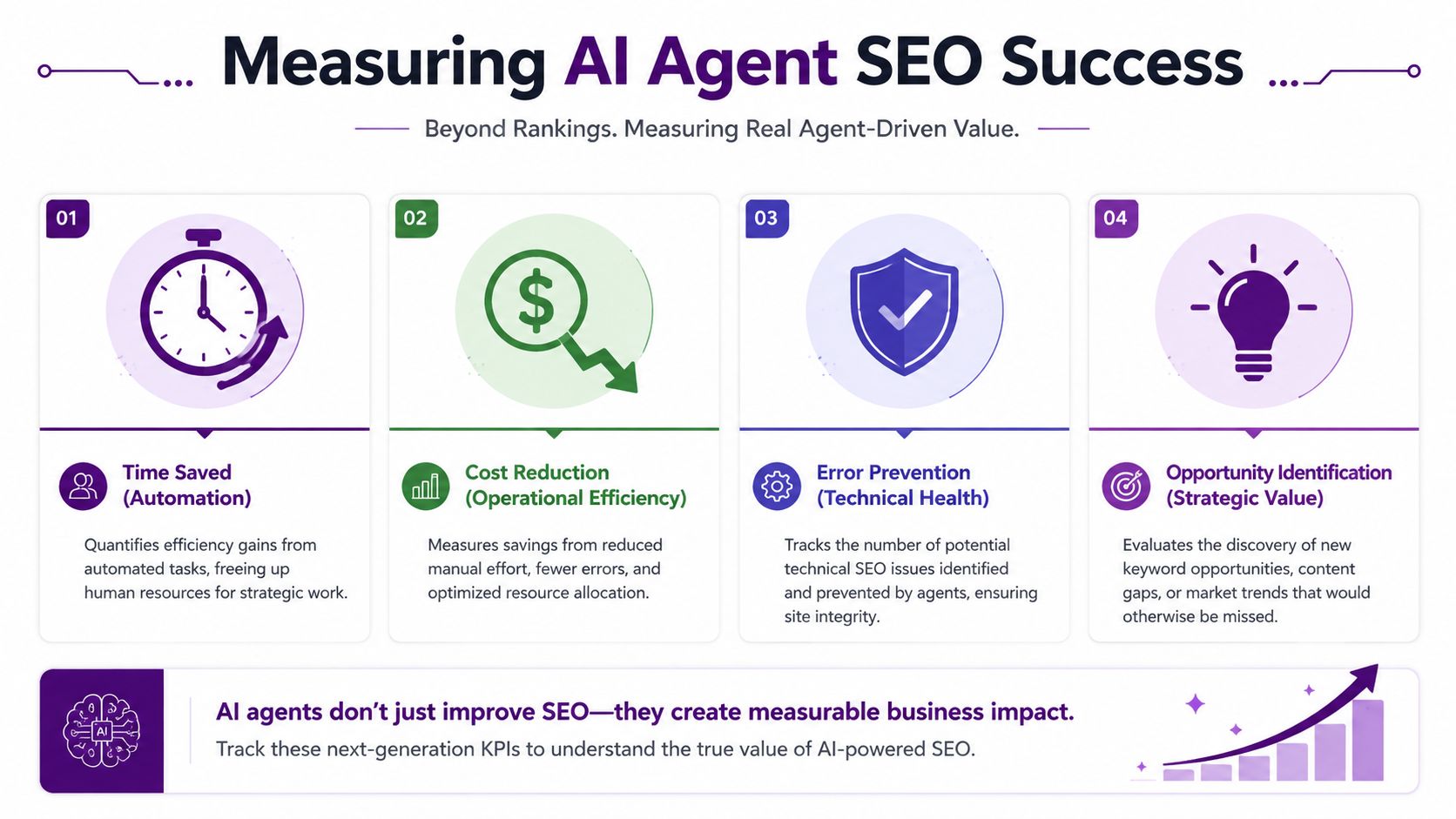
I'd measure four things.
Time to insight
How long does it take from noticing a problem to identifying a likely cause and next action? This is often where agents earn trust first.Task velocity
Count how many data-backed SEO tasks the team completes, not just how many recommendations the system produces.Error prevention
Technical guardrail agents save value by catching mistakes early. That impact won't always show up as a traffic gain because the issue never reached production.Citation-oriented opportunity capture
In a search environment shaped by AI answer layers, some pages matter because they are likely to earn citations, not just clicks.
A practical scorecard
KPI | What to measure | Why it matters |
|---|---|---|
Time to insight | Time from anomaly to diagnosis | Reflects operating speed |
Task completion rate | Recommended actions completed by the team | Separates output from execution |
Prevented issues | Alerts caught before they created visible damage | Shows operational protection |
Citation candidate coverage | Share of priority pages reviewed for AI answer visibility | Aligns with changing SERP behavior |
ROI isn't only about traffic anymore
Many teams frequently get stuck. They can describe what the agent does, but not how to justify it internally.
One useful way to think about this is the same way support or product ops teams justify automation. They don't ask whether each automation generated traffic. They ask whether it reduced cycle time, prevented failures, and improved throughput.
That logic applies in SEO too. If an agent surfaces comment themes, product complaints, or language patterns that improve page updates, that signal can support SEO work even if it doesn't appear in rank tracking directly. That's one reason adjacent tooling like AI tools for comment analysis can be relevant in an SEO measurement stack. It helps teams capture voice-of-customer inputs that agents can route into refreshes, FAQs, and supporting content.
A useful SEO agent should create fewer opinions and more decisions.
The reporting shift teams need to make
Monthly reporting should include operational metrics alongside traffic metrics.
If the report only says sessions were flat, you miss the point. If it shows that the team identified issues faster, shipped more high-confidence updates, and increased visibility in citation-prone content areas, you're much closer to the underlying value of the system.
Common Pitfalls and How to Avoid Them
Most AI agent SEO projects don't fail because the model is weak. They fail because the workflow design is sloppy.
The first failure point is bad input quality. If GSC exports are incomplete, tracking rules are inconsistent, or crawl data is stale, the agent will still return answers. They just won't be answers you should trust. This is the old garbage-in problem wearing a new coat.
Pitfall one, vague jobs
Agents break when the assignment is fuzzy.
Don't tell a system to “find growth opportunities.” Tell it to identify pages with likely cannibalization, detect production URLs with noindex tags, or flag pages in striking distance that match your thresholds. Specificity is what makes automation reliable.
Pitfall two, blind automation
It's tempting to connect an agent directly to your CMS and let it push changes. That's usually a mistake early on.
Use a review layer first. Have the agent draft the recommendation, create the ticket, and attach the reasoning. Let a human approve implementation until you've seen enough consistent output to trust the loop.
The safest setup is analysis first, execution second.
Pitfall three, weak measurement
A lot of teams still expect a straight line from agent activity to traffic gain. That's often too narrow, especially now.
BrightEdge reported that AI training crawl activity grew by more than 160% in a single month in late 2025 and distinguishes between training crawls, citation behavior, and traditional search indexing, as described in BrightEdge's guide for AI agents. That's a strong reminder that SEO visibility signals and AI system behavior don't always map neatly to clicks.
So measure the workflow itself. Did the agent shorten diagnosis time? Did it prevent technical errors? Did it produce tasks the team executed? If you can't answer those questions, the setup may be active, but it isn't operational.
The teams getting the most from AI agent SEO aren't chasing a black box. They're building small, deliberate systems that watch specific signals, apply clear logic, and feed real work into the team.
If you want a platform built around that operating model, Keyword Kick is one option to evaluate. It connects Google Analytics 4, Google Search Console, rank tracking, backlink data, and technical SEO signals in one workspace, then uses its K² AI Agent to turn those inputs into prioritized actions, explanations, and next-step recommendations for agencies, in-house teams, and consultants.