Introduction
Rank tracking is the most fundamental measurement in SEO. Without it, you're flying blind — publishing content, building links, fixing technical issues, and having no reliable way to know whether any of it is working.
A rank tracking campaign solves that. It monitors a defined set of keywords every day, records position changes over time, and alerts you when something significant moves — up or down.
Setting one up takes less than ten minutes. But setting one up correctly — with the right keywords, the right locations, the right device split — determines whether the data you get is actually useful.
This guide walks through the entire process step by step, from campaign creation to reading your first results.
What Is a Rank Tracking Campaign?
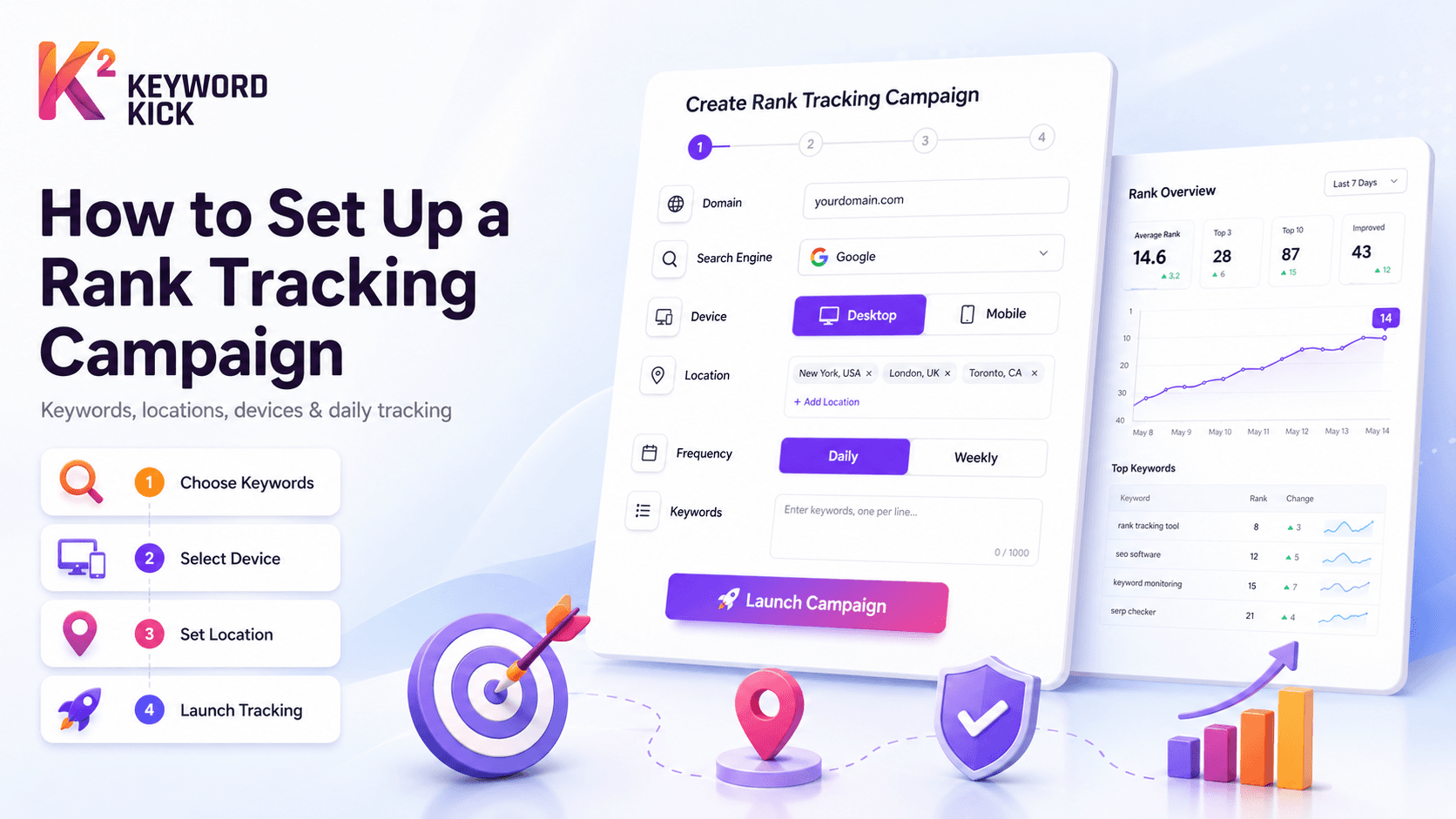
A rank tracking campaign is a configured set of keywords you want to monitor, attached to a specific domain, location, device type, and search engine.
Each campaign checks your positions daily (or on your chosen frequency) and stores a historical record. Over time, this builds a ranking trend you can analyze — spotting improvements from content updates, drops from algorithm changes, and opportunities from keywords hovering just outside page 1.
You can run multiple campaigns for the same domain — for example, one for desktop rankings in the US, one for mobile rankings in the UK, and one tracking a specific product category across a different language. Keyword Kick supports all of this within a single project.
Before You Create a Campaign: Plan Your Keyword List
The quality of your rank tracking campaign depends almost entirely on the quality of the keywords you put into it. Tracking the wrong keywords gives you data that looks busy but tells you nothing useful.
Choose keywords that reflect actual business goals
Your tracked keywords should map to pages that matter — your homepage, core feature pages, main product categories, and your highest-traffic blog posts. If a keyword isn't connected to a page that drives conversions or revenue, it probably doesn't need to be in your primary campaign.
Include a mix of keyword types
A well-structured campaign tracks three tiers:
Tier | Type | Example | Why Track It |
|---|---|---|---|
Tier 1 | Brand keywords | "Keyword Kick", "keywordkick.com" | Baseline — you should always rank #1 for your own brand |
Tier 2 | Core product/category keywords | "rank tracking tool", "SEO site audit" | The keywords that drive your most valuable organic traffic |
Tier 3 | Long-tail and opportunity keywords | "how to set up rank tracking", "page 2 SEO opportunities" | Early indicators of content performance and growth areas |
Keep the initial list focused
It's tempting to track 200 keywords from day one. Resist this. Start with 15–30 keywords that genuinely matter. You can always add more — but a bloated campaign full of low-priority keywords makes it harder to see the signal through the noise.
Separate by topic or intent when volume justifies it
Once you have more than 30–40 keywords, create separate campaigns by theme or intent. For example:
Campaign 1: Core product keywords (commercial intent)
Campaign 2: Educational blog content (informational intent)
Campaign 3: Competitor alternative keywords
Campaign 4: Local or language-specific keywords
This is exactly the structure Keyword Kick uses internally — separate campaigns for US Desktop, Global English Core Keywords, and Turkish-language keywords — keeping each campaign's data clean and comparable over time.
Step-by-Step: Creating a Campaign in Keyword Kick
Step 1 — Open Rank Tracking and create a new campaign
Navigate to Rank Tracking in your Keyword Kick project. Click "New Campaign." You'll be prompted to name the campaign — use a descriptive name that includes the target market and device so it's immediately clear when you return to it later.
Good examples:
"US Desktop – Core Keywords"
"UK Mobile – Blog Content"
"DE Desktop – German Market"
Avoid generic names like "Campaign 1" or "Main" — these become confusing the moment you create a second campaign.
Step 2 — Select your search engine and device
Choose the search engine (Google, Bing, or Yahoo) and device type (desktop, mobile, or tablet).
For most sites, create at least two campaigns per market: one for desktop and one for mobile. Google uses mobile-first indexing, meaning your mobile rankings are the ones Google primarily uses to evaluate your site — but desktop rankings often differ significantly, especially for commercial queries. Tracking both gives you a complete picture.
If your audience is predominantly mobile (e-commerce, local services, consumer apps), priorities the mobile campaign. If it's predominantly desktop (B2B SaaS, enterprise tools), start with desktop.
Step 3 — Set your target location
Location targeting is one of the most important and most overlooked settings in rank tracking.
Google serves different results to users in different locations. A keyword like "SEO tool" returns different rankings for someone searching in New York versus London versus Istanbul. If you're tracking position 4 but your audience is in London and you're measuring from a US location, the data doesn't reflect your actual visibility.
Set your location to match your primary target market. If you're targeting multiple countries, create a separate campaign for each one.
For local SEO — where you need rankings at city level rather than country level — Keyword Kick supports city-level location targeting. A plumber in Manchester doesn't need to know their national UK ranking; they need to know their ranking in Manchester.
Step 4 — Add your keywords
Paste your keyword list directly into the input field, one keyword per line. Keyword Kick accepts plain text — no special formatting required.
At this stage, review each keyword before confirming:
Is this keyword actually being searched, or is it a variant you invented?
Does this keyword map to a specific page on your site?
Is it specific enough to be meaningful? ("SEO" is too broad; "rank tracking tool for agencies" is actionable)
If you're not sure which keywords to track, Keyword Kick's Keyword Research module can surface the queries your site is already ranking for via GSC data — a reliable starting point for your first campaign.
Step 5 — Set check frequency
Choose how often you want rankings checked: daily, every 3 days, or weekly.
For most campaigns, daily tracking is the right choice. SEO moves slowly in general, but ranking drops from algorithm updates or technical issues can happen overnight. Daily tracking means you catch problems within 24 hours rather than discovering them a week later.
Weekly tracking is appropriate for lower-priority keyword sets or when you're managing a large number of campaigns and want to keep costs down.
Step 6 — Save and launch
Confirm your settings and launch the campaign. Keyword Kick will run the first position check within the hour and populate your dashboard with initial rankings.
Note: the first day's data is a snapshot, not a trend. Ranking trends become meaningful after 7–14 days of daily data. Resist the urge to draw conclusions from the first 24 hours.
Reading Your First Results
Once your campaign has been running for a week, here's what to look at:
Position distribution
How many of your tracked keywords are in positions 1–3 (top of page 1), 4–10 (rest of page 1), 11–20 (page 2), and beyond? This is your benchmark. Everything you do in SEO should move more keywords into the top 10.
Ranking changes
Filter by "Improved" and "Declined" to see which keywords are moving. Early movers — both up and down — are worth investigating immediately. An unexpected improvement might indicate a piece of content is gaining traction. An unexpected decline might be a technical issue or early signal of an algorithm impact.
Keywords not ranking in top 100
If you added a keyword that isn't appearing in your tracked positions at all, either the keyword is too competitive for your current authority level, or your site doesn't have a relevant page targeting it. Both are useful to know.
SERP features
Keyword Kick tracks whether your keywords are triggering SERP features — featured snippets, local packs, image packs, and People Also Ask boxes. These directly affect CTR even when your position is strong. A keyword where you rank 2nd but the top result is a featured snippet has a very different traffic profile than a clean position 2 result.
Common Mistakes to Avoid
Tracking too many keywords from day one Start focused. A campaign of 300 keywords looks comprehensive but is harder to act on. Build up keyword count as you understand which segments matter most.
Not separating desktop and mobile If you only track desktop, you're missing the device Google prioritizes. If your mobile rankings are significantly worse than desktop, that's an urgent problem — and you won't see it without a mobile campaign.
Using the wrong location Tracking a US location when your customers are in Germany produces data that misrepresents your real visibility. Always match location to your actual target audience.
Ignoring ranking alerts Setting up a campaign but never checking it defeats the purpose. Configure Keyword Kick's alert system to notify you when any tracked keyword moves by more than 5 positions in a single day. That's your early warning system for both problems and opportunities.
Not connecting rank data to other metrics Rankings in isolation are incomplete. A keyword moving from position 8 to position 3 should produce more traffic — confirm this in your GSC or GA4 data. If the ranking improved but traffic didn't, there may be a CTR issue (title tag, SERP feature interference) worth addressing.
Structuring Campaigns for Agencies
If you're managing SEO for multiple clients, each client gets their own Keyword Kick project — and within each project, their own campaigns. This keeps data separate and makes reporting clean.
For agency reporting, name campaigns in a way that makes the monthly report self-explanatory: "Client Name – UK Desktop – Core Services" rather than "Campaign 3." When you're generating white-label reports, campaign names appear directly in the output.