Introduction
Everyone tells you keyword research is the foundation of SEO. Fewer people explain what that actually means — or where to start when you've never done it before.
This guide is for complete beginners. No assumed knowledge, no jargon without explanation. By the end, you'll understand exactly how to find the right keywords for your site, evaluate whether they're worth targeting, and start ranking on Google — one page at a time.
Let's start from zero.
What Is Keyword Research?
Keyword research is the process of finding the specific words and phrases people type into search engines when looking for information, products, or services related to your topic.
The goal isn't to find every possible keyword — it's to find the ones where:
Your target audience is searching
You have a realistic chance of ranking
Ranking will actually drive valuable traffic to your site
Done well, keyword research tells you exactly what content to create, how to structure it, and which pages to prioritize. Done poorly (or skipped entirely), you end up writing content nobody searches for.
Why Keyword Research Matters More in 2026
Google processes over 8.5 billion searches per day. The difference between a page that gets 2,000 visitors/month and one that gets 20 is almost always keyword selection — not writing quality, not design, not domain age.
Two pages can cover identical topics. The one that chose the right keyword wins. The one that guessed loses.
Keyword research removes the guesswork.
Core Keyword Concepts You Need to Understand
Search Volume
The average number of times a keyword is searched per month. A keyword with 10,000 monthly searches isn't necessarily better than one with 500 — context matters enormously.
Keyword Difficulty (KD)
A score (typically 0–100) indicating how hard it is to rank for a keyword based on the strength of pages currently ranking for it. Lower = easier to rank. Beginners should target KD 0–30.
Search Intent
The underlying goal behind a search query. There are four types:
Intent Type | What the User Wants | Example |
|---|---|---|
Informational | To learn something | "how to make cold brew coffee" |
Navigational | To find a specific site | "Starbucks menu" |
Transactional | To buy something | "buy espresso machine online" |
Commercial | To compare before buying | "best espresso machine under $500" |
Matching your content to the right intent is as important as finding the right keyword. A product page won't rank for an informational query — Google knows what users want and serves accordingly.
Long-Tail vs. Short-Tail Keywords
Type | Example | Volume | Difficulty | Conversion |
|---|---|---|---|---|
Short-tail | "coffee" | Very high | Very hard | Low |
Mid-tail | "coffee grinder reviews" | Medium | Medium | Medium |
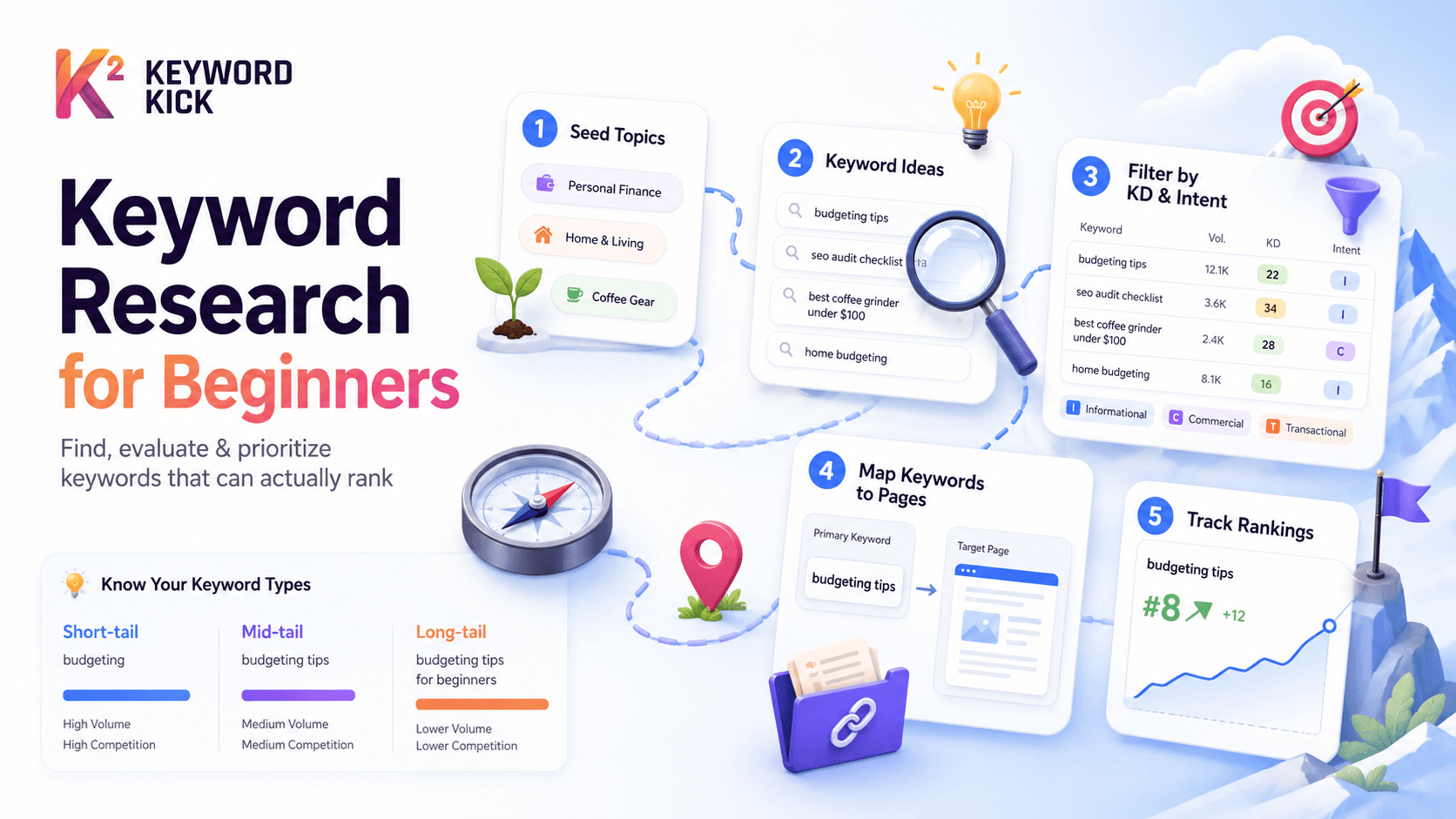
Long-tail | "best burr coffee grinder under $100" | Low | Easy | High |
For beginners: Long-tail keywords are your best friend. Lower competition, clearer intent, and visitors who know exactly what they want — making them more likely to convert.
SERP Features
Beyond the 10 blue links, Google now shows featured snippets, People Also Ask boxes, image packs, local results, and shopping carousels. Some keywords trigger these features — knowing which ones can inform your content format.
The 5-Step Keyword Research Process
Step 1: Define Your Topic Universe
Before opening any tool, spend 10 minutes brainstorming. Ask yourself:
What does my site/business actually offer?
What problems does it solve?
What questions do my customers ask me repeatedly?
What would I search for if I were a customer looking for what I offer?
Write down 20–30 seed topics. Don't worry about search volume yet — just capture the universe of what your site could cover.
Example for a personal finance blog:
budgeting, saving money, investing for beginners, credit cards, emergency fund, debt payoff, retirement planning, side hustles, passive income, frugal living
Step 2: Expand Your Seeds Into Keyword Ideas
Take each seed topic and expand it into specific keyword variations. Two methods:
Method A: Google Autocomplete Type your seed into Google and observe the autocomplete suggestions. These are real searches people are making — Google shows you what it knows users want.
Type "budgeting" and Google suggests:
budgeting tips for beginners
budgeting apps
budgeting worksheets
budgeting for couples
budgeting on a low income
Each of these is a potential page topic.
Method B: People Also Ask Search any keyword and scroll to the "People Also Ask" box. These questions represent real search intent and are often perfect for FAQ sections or standalone articles.
Method C: Use Keyword Kick's Research Module Enter any seed keyword and Keyword Kick surfaces:
Related keyword variations with search volume
Keyword difficulty scores
Search intent classification
Questions people ask about the topic
Competitor pages ranking for related terms
This turns your 20 seed topics into hundreds of specific keyword opportunities in minutes.
Step 3: Evaluate Each Keyword
Not every keyword you discover is worth targeting. Evaluate each one against three criteria:
🔢 Search Volume Is anyone actually searching for this? A keyword with 10 monthly searches isn't worth a full article. Aim for keywords with at least 100 monthly searches as a starting benchmark for beginners — or lower if you're in a very niche market.
⚔️ Keyword Difficulty Can you realistically rank? Check who's currently ranking for the keyword. If positions 1–10 are dominated by Wikipedia, Forbes, Healthline, and other massive authority sites, ranking is going to be very hard as a new site.
Keyword Kick shows a KD score (0–100) for every keyword:
0–20: Very low competition — new sites can rank
21–40: Low-moderate competition — realistic for sites with some authority
41–60: Moderate — requires solid content and backlinks
61–80: Hard — established sites with strong link profiles needed
81–100: Very hard — typically dominated by major brands
For new sites: Focus exclusively on KD 0–30 for your first 6–12 months.
🎯 Business Relevance Does ranking for this keyword actually bring the right people to your site? A personal finance blog could rank for "best video games" with low competition — but that traffic won't convert into newsletter subscribers or affiliate revenue.
Step 4: Map Keywords to Pages
Each page on your site should target one primary keyword (the main topic) and several secondary keywords (related variations).
The rule: One page, one primary intent, one primary keyword.
Common beginner mistake: targeting the same keyword on multiple pages. This creates keyword cannibalization — your own pages compete against each other, splitting authority and confusing Google about which page to rank. Keyword Kick automatically detects cannibalization conflicts and flags them for you.
Create a simple keyword map:
Page | Primary Keyword | Secondary Keywords | Intent |
|---|---|---|---|
Homepage | personal finance tips | money management, financial advice | Navigational |
Blog: budgeting basics | budgeting for beginners | how to budget, simple budget plan | Informational |
Blog: savings accounts | best high yield savings account | high interest savings, where to save money | Commercial |
Blog: debt payoff | how to pay off debt fast | debt snowball method, debt avalanche | Informational |
Step 5: Prioritize and Execute
You now have a list of keywords mapped to pages. Not everything can be done at once — prioritize based on:
Lowest KD + highest volume = highest potential quick wins
Closest to ranking = keywords where you already appear on page 2 (positions 11–20) are the fastest path to more traffic
Highest business value = keywords whose visitors are most likely to convert
The execution order for a new site:
Homepage + core service/product pages (essential foundation)
3–5 long-tail informational articles (build initial authority)
Comparative/commercial articles (drive conversion-intent traffic)
Expand topically (build out related clusters)
How to Use Keyword Kick for Keyword Research
Here's a practical walkthrough of Keyword Kick's keyword research module:
Finding Keywords
Navigate to Keywords → Research
Enter a seed keyword (e.g., "home budgeting")
Set your target country and language
Review the results — sorted by volume by default
Filtering by Difficulty
Click KD filter and set maximum to 30 (for new sites) or 50 (for established sites). This instantly removes keywords that are unrealistic targets and surfaces the opportunities you can actually win.
Filtering by Intent
Use the Intent filter to view only informational keywords (for blog content), commercial keywords (for comparison/review pages), or transactional keywords (for product/service pages). This ensures your content format matches what Google wants to rank for each query.
Saving Keywords
Mark keywords you want to target and save them to a keyword list. Keyword Kick organizes these by list so you can group them by topic cluster, content calendar phase, or priority level.
Setting Up Rank Tracking
Once you've published content targeting a keyword, add it to a rank tracking campaign. Keyword Kick monitors your position daily and alerts you when rankings change — so you know when your efforts are paying off.
👉 Start your keyword research with Keyword Kick →
Common Keyword Research Mistakes Beginners Make
Targeting Keywords That Are Too Broad
"Coffee" has millions of monthly searches — and is dominated by Wikipedia, NCA, Starbucks, and major media brands. A new site targeting "coffee" will rank nowhere. "Best home coffee grinder for beginners" has lower volume but is winnable.
Ignoring Search Intent
Writing a product page for an informational keyword, or a how-to guide for a transactional keyword, means your content doesn't match what Google's algorithm determines users want. You won't rank regardless of content quality.
Only Targeting High-Volume Keywords
A keyword with 50 monthly searches and KD 5 will often drive more actual traffic than a keyword with 10,000 monthly searches and KD 75 — because you'll rank for the first and not the second.
Not Checking the Actual SERP
Before committing to a keyword, search it yourself (in a private/incognito window to reduce personalization). Look at who's ranking and what format they're using. If all top results are videos, Google might prefer video content. If all results are long-form guides, that's your signal.
Treating Keyword Research as a One-Time Activity
Search behaviour changes. New keywords emerge. Competitors shift. Revisit your keyword research every 3–6 months and update your content map accordingly.
Your First 30 Days: A Beginner's Action Plan
Week 1: Foundation
Brainstorm 20–30 seed topics
Use Keyword Kick to expand seeds into 100+ keyword ideas
Filter by KD ≤ 30 and minimum 100 monthly searches
Select your top 10 target keywords
Week 2: Mapping
Assign one primary keyword per existing page
Identify 3–5 gaps where new content is needed
Check SERP for each target keyword (incognito)
Note content format, length, and structure of top-ranking pages
Week 3: Creation
Write your first optimized piece of content for the highest-priority keyword
Follow the format Google is already rewarding (guide, list, comparison, etc.)
Add the keyword to rank tracking in Keyword Kick
Week 4: Review
Check initial rankings for published content (allow 2–4 weeks for Google to index)
Review keyword map for any gaps
Identify your next 3 content pieces based on keyword research
Establish monthly keyword review habit
Keyword research isn't complicated — but it does require a process. The sites that consistently grow organic traffic aren't publishing more content than their competitors. They're publishing the right content, targeting keywords they can actually win, matched to the intent of their target audience.
Start with your seed topics. Expand with a tool. Filter by difficulty and intent. Map keywords to pages. Track your rankings. Iterate based on what the data shows.
That's the entire process. The sites that follow it grow. The ones that skip it guess — and guessing doesn't scale.