Introduction
If you run a local business, national ranking data is almost useless.
A plumber in Chicago doesn't need to know they rank 12th nationally for "emergency plumber." They need to know where they rank when someone in Chicago searches that exact phrase — because that's the only search that generates a call.
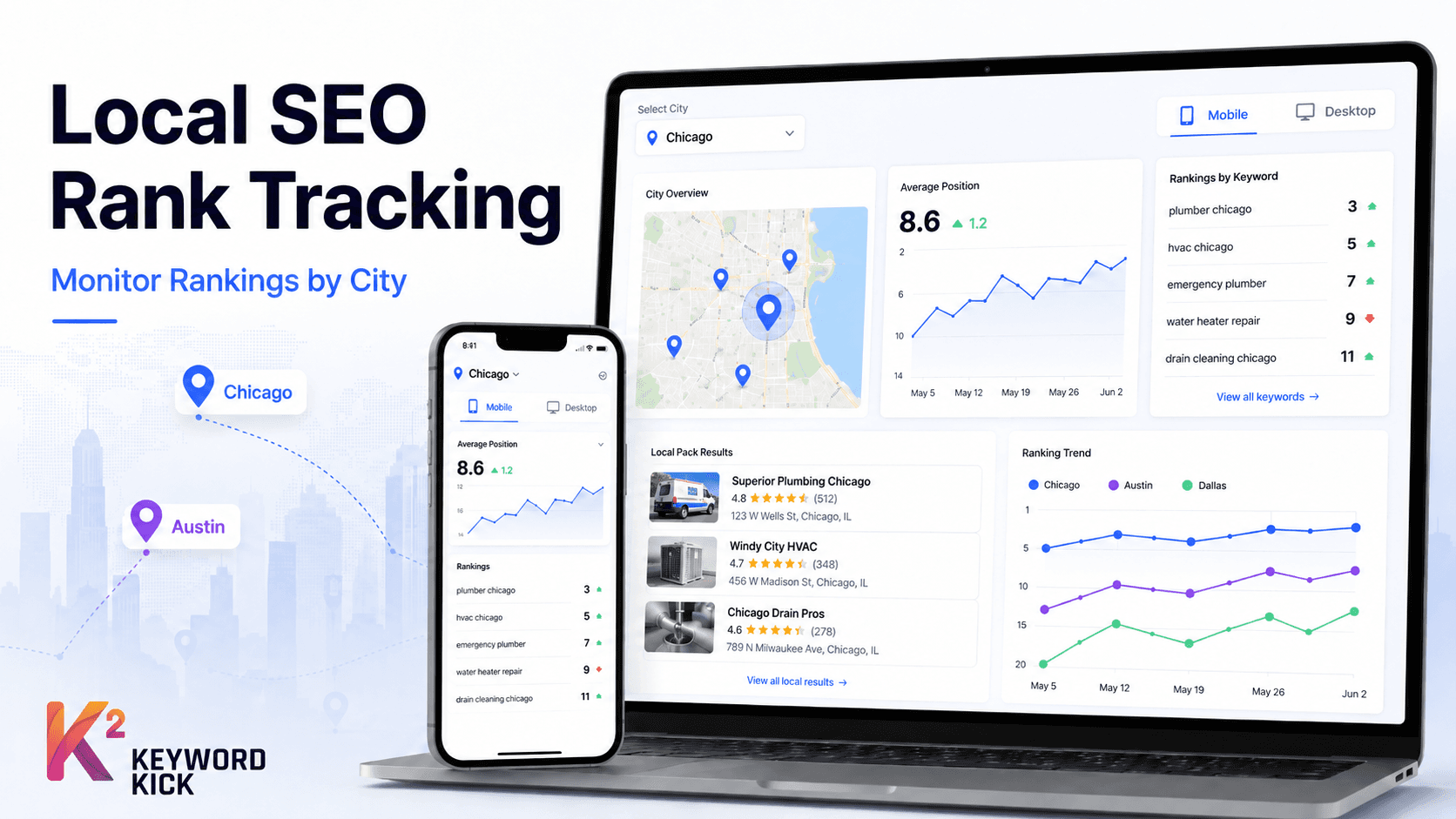
Local SEO rank tracking solves this. It measures your position specifically for users in your target city, giving you data that actually reflects the visibility your potential customers see.
This guide explains how local rank tracking works, why it differs from standard tracking, and how to set it up correctly in Keyword Kick — including multi-city businesses, Google Maps visibility, and the most common mistakes that make local tracking data unreliable.
Why Standard Rank Tracking Fails Local Businesses
Standard rank tracking measures your position based on a national or global average. For a business targeting customers in a specific city, this produces numbers that are systematically misleading.
Here's why. Google localises search results based on the searcher's physical location. When someone in Austin searches "best dentist near me," Google shows businesses ranked for Austin — and those rankings are different from what someone in Dallas or New York would see for the same query.
If your rank tracker is measuring from a US national location rather than Austin specifically, it's averaging positions across thousands of different local SERPs. The number it reports may have no relation to your actual visibility in the city you're trying to rank in.
For local businesses, every campaign must be configured at city level — not country level.
How Google Decides Local Rankings
Before setting up tracking, it helps to understand what Google is measuring. Local rankings are influenced by three core factors:
Proximity — how close the business is to the searcher's location. You can't change this, but you can optimize for it by targeting the right geographic keywords.
Relevance — how well your business matches the search query. This is influenced by your Google Business Profile categories, your website content, and the keywords associated with your listings and pages.
Prominence — how well-known and trusted your business is. This includes your Google reviews, backlinks, citations across directories, and your organic search authority.
Local rank tracking measures the output of all three — where you actually appear in the local pack and organic results for a given query from a given location. It doesn't tell you why you're ranking where you are, but it tells you whether your local SEO efforts are moving the needle.
Setting Up a City-Level Rank Tracking Campaign in Keyword Kick
Step 1 — Create a new campaign with city-level location
In Keyword Kick, create a new rank tracking campaign. When selecting location, choose the specific city rather than the country. Keyword Kick supports city-level targeting for thousands of locations worldwide — type the city name and select the correct result from the dropdown.
If you serve multiple cities, create a separate campaign for each one. Do not combine cities into a single campaign — the data becomes impossible to interpret.
Example campaign naming structure:
"Chicago – Plumbing Services – Mobile"
"Chicago – Plumbing Services – Desktop"
"Austin – Plumbing Services – Mobile"
The city name in the campaign title makes reporting immediately clear.
Step 2 — Prioritize mobile over desktop
For local searches, mobile is dominant. The majority of "near me" queries and local service searches happen on mobile devices, often from people who are already out and looking for an immediate solution.
When creating local campaigns, always create the mobile campaign first. Desktop is secondary — still worth tracking, but not your primary local signal.
Step 3 — Build your local keyword list
Local keyword lists differ from standard SEO keyword lists in a specific way: they combine service keywords with geographic modifiers.
The three main patterns:
Format | Example |
|---|---|
Service + city | "dentist Chicago", "plumber Austin TX" |
Service + near me | "emergency plumber near me", "dentist near me" |
Service + neighborhood | "dentist Lincoln Park", "plumber Wicker Park" |
"Near me" keywords are important to include even though they don't contain a specific city name. Google interprets them based on the user's real-time location — and your rank tracking tool simulates that location when you've set city-level targeting, so the data is still accurate.
Also include non-geographic service keywords that trigger local results. For many local queries — "dentist," "plumber," "electrician" — Google automatically shows a local pack even without a city name in the query, because the intent is inherently local.
Step 4 — Track both local pack and organic positions separately
This is a nuance many local SEOs miss. There are actually two distinct ranking surfaces for local queries:
The local pack (the map with 3 business listings) — driven by your Google Business Profile The organic results (the standard blue links below the map) — driven by your website's SEO
These two surfaces have different ranking factors and often different results. A business can rank in the top 3 of the local pack but not appear in the organic results at all — or vice versa.
Keyword Kick tracks both surfaces. When reviewing your local campaign data, look at local pack positions and organic positions as separate metrics. Improvements to your Google Business Profile primarily affect the local pack; improvements to your website content affect organic.
Which Keywords to Track for Local SEO
A complete local rank tracking campaign for a single location typically includes:
Primary service keywords (5–10) Your core offerings combined with the city name. These are the highest-value keywords — if someone in your city searches these, they're a potential customer.
"emergency plumber Chicago", "licensed electrician Austin", "family dentist Boston"
Near me variants (3–5) The same services with "near me" appended. These capture mobile searches from users actively looking for a local provider right now.
Neighborhood-level keywords (5–15 for multi-neighborhood businesses) If your business serves multiple neighborhood's within a city, or if you're trying to rank for searches originating from specific areas, track neighborhood-specific variants.
Branded keywords (2–3) Your business name, your business name plus city, your business name plus service. You should rank #1 for all of these. If you don't, that's an urgent problem.
Competitor brand keywords (optional) Tracking where you rank when someone searches a competitor's name can reveal conquest opportunities — pages where your business is visible alongside competitor searches.
Tracking Rankings Across Multiple Cities
For businesses operating in multiple cities — franchise locations, regional service businesses, multi-location retailers — the campaign structure becomes more important.
The right approach: one campaign per city per device type. This sounds like a lot of campaigns, but it keeps data clean and comparable.
Location | Device | Campaign Name |
|---|---|---|
Chicago | Mobile | Chicago – Core Services – Mobile |
Chicago | Desktop | Chicago – Core Services – Desktop |
Austin | Mobile | Austin – Core Services – Mobile |
Austin | Desktop | Austin – Core Services – Desktop |
Each campaign tracks the same keyword set, measured from its specific city. This lets you compare performance across locations — "Why is our Austin mobile ranking for 'emergency plumber' declining while Chicago holds steady?" — and direct optimization effort where it's most needed.
If you're managing local SEO for a client with 10+ locations, this structure also makes reporting clean. Each location's performance is visible independently, which is exactly what a franchise owner or multi-location business manager needs to see.
Google Business Profile and Its Impact on Local Rankings
Rank tracking data tells you where you appear. Your Google Business Profile (GBP) is one of the primary factors determining where you appear in the local pack.
Key GBP signals that affect local pack rankings:
Categories — your primary category must match your core service exactly. Secondary categories should cover your other services without overreaching into unrelated areas.
Business name — don't keyword-stuff your business name. Google can suspend listings for this. Your name should match your actual business name.
Reviews — review count, recency, and average rating all affect local pack prominence. Responding to reviews — both positive and negative — is also a positive signal.
Photos and posts — regularly updated photos and GBP posts signal an active business, which Google weights in local rankings.
NAP consistency — your Name, Address, and Phone number must be identical across your website, GBP listing, and every directory citation. Inconsistencies create confusion for Google's local ranking systems.
Keyword Kick's rank tracking shows you where you appear after all of these signals combine. If your local pack rankings are stagnant despite content improvements, the issue is often with GBP signals rather than your website — and that's a different optimization path entirely.
Diagnosing Local Ranking Problems
When a city-level campaign shows poor or declining rankings, the diagnostic process follows a specific order:
First — check if the problem is local pack or organic If local pack rankings dropped but organic is stable, the issue is GBP-related: recent negative reviews, a category change, or a listing suspension.
If organic dropped but local pack is stable, the issue is website-related: content changes, technical issues, or algorithm impact.
If both dropped simultaneously, a broader issue is likely — a Google core update, a site-wide technical problem, or a significant backlink loss.
Second — check the timeline When did the drop start? Does it coincide with a Google algorithm update, a change you made to the site, or a change to your GBP listing? Keyword Kick overlays known algorithm update dates on your ranking history, which makes this correlation immediately visible.
Third — compare against competitors Did your competitors gain the positions you lost? If yes, something changed in the competitive landscape — new competitors, competitors improving their GBP, or a competitor acquiring a local link you haven't. If competitors also dropped, a broader algorithm change affected the whole local niche.