Introduction
You've written the post. The images are uploaded. Your finger is hovering over "Publish."
Stop.
Publishing without an SEO audit is like sending a proposal without proofreading — you only notice the mistakes after it's too late. A quick pre-publish audit takes 15 minutes but can save weeks of trying to claw back rankings you never earned in the first place.
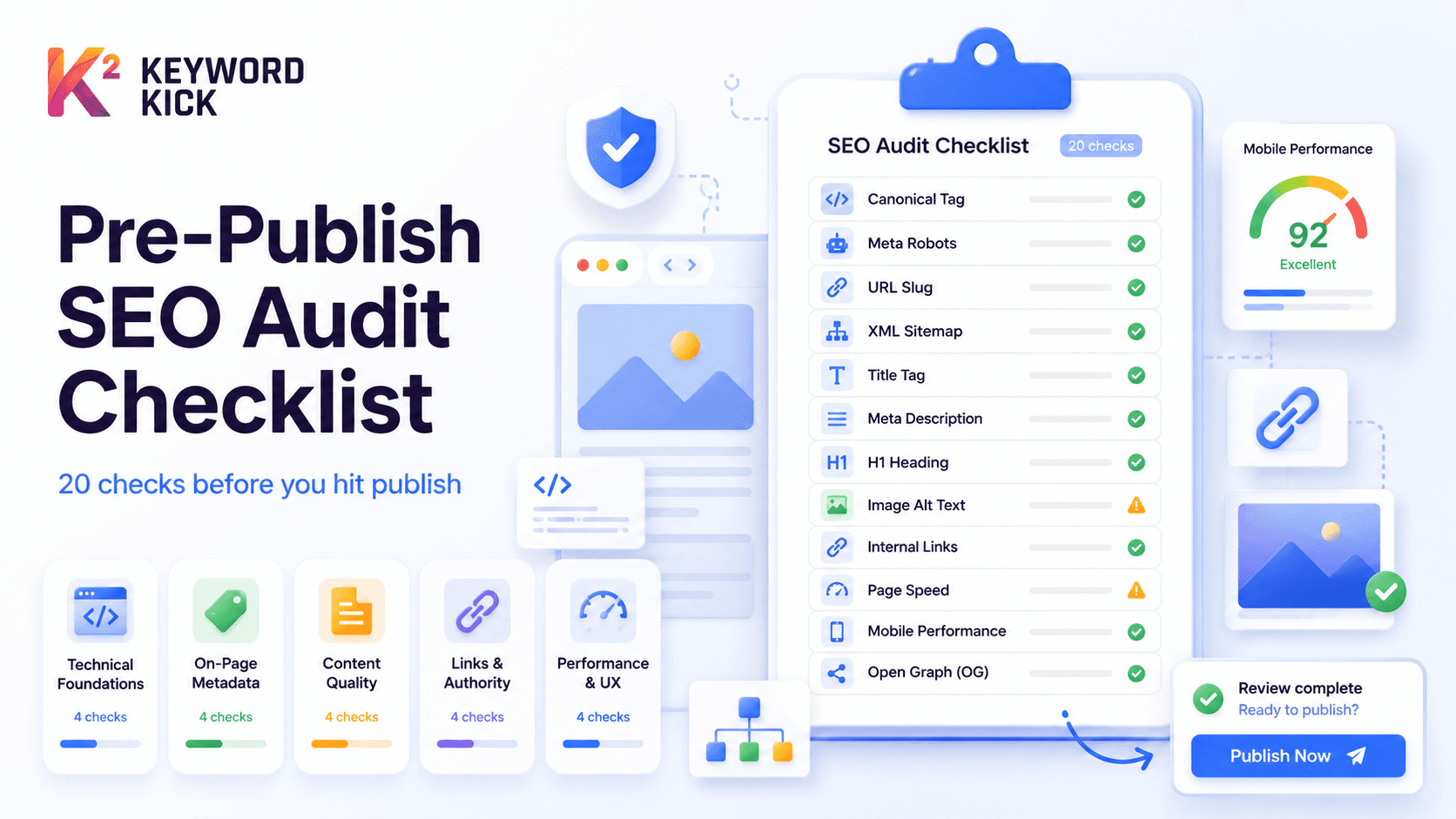
This checklist covers the 20 most common SEO issues found across thousands of pages. Work through it top to bottom before you hit publish on anything.
Pro tip: Keyword Kick's Site Audit tool automates checks #1–#12 and flags issues the moment they appear. Use this checklist manually for new content, then let the tool monitor your whole site automatically.
🔍 Section 1: Technical Foundations (Checks 1–6)
These are the basics Google needs to crawl, index, and understand your page. Get these wrong and nothing else matters.
1. Canonical Tag Is Set Correctly
Every page should have a self-referencing canonical tag:
htmlCopy message<link rel="canonical" href="https://yourdomain.com/your-page/" />
Common mistakes:
Canonical points to a different, non-authoritative URL
No canonical tag at all (Google picks one for you — often the wrong one)
Canonical tag points to a 404 or redirected URL
☑️ Check: View page source → search for rel="canonical". Verify it matches the intended URL exactly.
2. Meta Robots Is Not Blocking Indexation
A single misplaced noindex tag can silently remove your page from Google.
htmlCopy message<!-- ❌ This will de-index your page -->
<meta name="robots" content="noindex, follow" />
<!-- ✅ This is correct for a page you want indexed -->
<meta name="robots" content="index, follow" />
☑️ Check: Source code search for noindex. If you're on WordPress, verify the "Discourage search engines" setting is OFF.
3. URL Slug Is Clean and Keyword-Rich
Your URL is a ranking signal and a click signal.
❌ Bad | ✅ Good |
|---|---|
|
|
|
|
|
|
Rules:
Lowercase, hyphens only (no underscores)
Include your primary keyword
Keep it under 60 characters
Remove stop words (a, the, for, and) unless necessary
4. Page Returns a 200 Status Code
This sounds obvious but is surprisingly common — staging URLs, draft pages, and recently-moved content can return 301, 302, or 404 codes.
☑️ Check: Use Keyword Kick's redirect checker tool or paste your URL into your browser's dev tools (Network tab → status code).
5. Page Is Not Blocked by Robots.txt
Some CMS configurations block /wp-admin/, /staging/, or entire subdirectories. Make sure your new page isn't accidentally caught in a broad disallow rule.
☑️ Check: Visit yourdomain.com/robots.txt and look for Disallow rules that could match your page's URL path.
6. Page Is Included in Your XML Sitemap
Google discovers new pages faster when they're in your sitemap. Most CMS platforms add pages automatically, but verify anyway.
☑️ Check: Visit yourdomain.com/sitemap.xml and search for your page slug. If it's missing, manually trigger a sitemap refresh in your CMS or SEO plugin.
📝 Section 2: On-Page Metadata (Checks 7–11)
Metadata doesn't just help rankings — it determines whether users click when they do rank.
7. Title Tag Is Optimized (Under 60 Characters)
Your title tag is the single most important on-page ranking factor. It also appears as your clickable headline in Google.
Formula that works:
Primary Keyword – Secondary Keyword | Brand Name
Rules:
50–60 characters (Google truncates beyond ~580px / ~60 chars)
Primary keyword near the front
No keyword stuffing — write for humans first
☑️ Check: Paste your title into a SERP preview tool. Does it get cut off? Does it make you want to click?
8. Meta Description Is Written and Under 155 Characters
Meta descriptions don't directly affect rankings but massively affect CTR. Google sometimes rewrites them — but having a well-crafted description reduces that risk.
What to include:
Primary keyword (Google bolds it in results)
A clear value proposition or call to action
140–155 characters
☑️ Check: Missing a meta description? Keyword Kick's meta description generator creates keyword-rich, click-optimized descriptions in seconds.
9. H1 Tag Exists and Contains the Primary Keyword
Every page should have exactly one H1. It should closely match your title tag but doesn't have to be identical.
Issue | Fix |
|---|---|
No H1 | Add one — your page title is usually the H1 |
Multiple H1s | Keep one; convert others to H2 |
H1 doesn't include keyword | Rewrite to naturally include it |
10. Heading Hierarchy Is Logical (H2 → H3 → H4)
Google uses heading structure to understand your content outline. Don't skip levels (e.g., H1 → H4) or use headings purely for styling.
☑️ Check: Use browser dev tools or Keyword Kick's site audit to extract the heading tree. It should read like a logical table of contents.
11. Image Alt Text Is Filled In
Every image on your page should have descriptive alt text. This:
Helps Google understand the image context
Is indexed in Google Image Search
Improves accessibility (and accessibility is a ranking signal)
Alt text formula: [Descriptive context] + [keyword if natural]
❌ alt="image1.jpg" ✅ alt="SEO site audit checklist screenshot in Keyword Kick dashboard"
📊 Section 3: Content Quality (Checks 12–15)
12. Content Satisfies the Search Intent
Before you publish, Google the target keyword yourself. Look at the top 3–5 results:
Are they long-form guides or short answers?
Are they product pages or blog posts?
Are they beginner-level or advanced?
Your content should match the dominant format. Publishing a 500-word overview when competitors have 2,500-word guides is a guaranteed way to stay off page 1.
13. No Keyword Cannibalization With Existing Pages
If you already have a page targeting the same keyword, publishing a second one splits your authority. Google will rank whichever one it prefers — often neither, effectively.
☑️ Check: Search your site for the target keyword: site:yourdomain.com "your target keyword". If another page appears, consider merging or differentiating clearly. Keyword Kick's cannibalization detection feature automates this across your whole site.
14. Content Is Long Enough to Be Comprehensive
"Thin content" (under ~300 words for informational queries) rarely ranks. But word count alone isn't the goal — completeness is.
Quick benchmark by content type:
Content Type | Minimum Word Count |
|---|---|
Product page | 300–500 |
Local landing page | 500–800 |
How-to guide | 1,000–1,500 |
Pillar / comprehensive guide | 2,000+ |
15. No Duplicate Content With Other URLs
Identical or near-identical content across multiple URLs confuses Google and dilutes authority.
Common culprits:
Pagination (
/page/2,/page/3)Tag and category pages with overlapping posts
Print-friendly page versions
HTTP vs. HTTPS duplicates
☑️ Fix: Use canonical tags for intentional duplicates. Consolidate or redirect unintentional ones.
🔗 Section 4: Links and Authority (Checks 16–18)
16. At Least 2–3 Internal Links Point TO This Page
New pages start with zero authority. Internal links pass equity from your stronger pages to your new one — this is how you give new content a head start.
☑️ Action: Before publishing, go back to 2–3 of your highest-traffic existing pages and add a contextual link to your new post with a relevant anchor text.
17. This Page Links OUT to at Least 2–3 Relevant Internal Pages
Internal links flowing out of your page help Google map your site structure and keep users engaged longer.
Link to related posts or features that expand on a topic
Use descriptive anchor text (not "click here")
Don't over-link — aim for 1 internal link per 200–300 words as a rough guide
18. No Broken Links in the Content
Nothing tanks user trust faster than clicking a link and landing on a 404.
☑️ Check: After drafting, click every link in your content. For ongoing monitoring, Keyword Kick's site audit automatically flags broken internal and external links across your site.
⚡ Section 5: Performance and UX (Checks 19–20)
19. Page Loads Fast on Mobile
Google uses mobile-first indexing. A page that loads in 4+ seconds on a phone will struggle to rank regardless of content quality.
Quick checks:
Images are compressed (WebP format preferred, under 100KB each)
No render-blocking JavaScript above the fold
Fonts are loaded efficiently
☑️ Check: Run the URL through Google PageSpeed Insights. Target LCP under 2.5 seconds, CLS under 0.1. Keyword Kick's Core Web Vitals report shows these metrics for every page on your site.
20. Open Graph Tags Are Set (For Social Sharing)
When someone shares your page on LinkedIn, Twitter/X, or Facebook, Open Graph tags control the title, description, and image shown. Missing OG tags = ugly, unbranded previews that get fewer clicks.
Minimum required:
htmlCopy message<meta property="og:title" content="Your Page Title" />
<meta property="og:description" content="Your meta description" />
<meta property="og:image" content="https://yourdomain.com/your-image.jpg" />
<meta property="og:url" content="https://yourdomain.com/your-page/" />
☑️ Check: Paste your URL into Facebook's Sharing Debugger to preview what the share card looks like.
✅ The Complete Checklist (Printable Summary)
Technical Foundations
Canonical tag is set correctly and self-referencing
noindexis NOT present (unless intentional)URL slug is clean, lowercase, and keyword-rich
Page returns 200 status code
Page is not blocked by robots.txt
Page is included in XML sitemap
On-Page Metadata
Title tag is under 60 characters and includes primary keyword
Meta description is 140–155 characters with a clear CTA
One H1 tag exists and contains the primary keyword
Heading hierarchy is logical (H1 → H2 → H3)
All images have descriptive alt text
Content Quality
Content matches the dominant search intent for the keyword
No keyword cannibalization with existing pages
Word count is appropriate for content type
No duplicate content issues
Links and Authority
2–3 internal links from existing pages point TO this page
This page links OUT to 2–3 relevant internal pages
No broken links in the content
Performance and UX
Page loads fast on mobile (LCP < 2.5s)
Open Graph tags are set for social sharing
Automate the Boring Checks
Going through this list manually every time is slow. The good news: most of these checks can be automated.
Keyword Kick's Site Audit tool crawls your entire site and flags:
Missing or broken canonical tags
noindexpages that shouldn't be blockedMissing meta descriptions and title tags
Broken internal and external links
Core Web Vitals issues (LCP, CLS, INP)
Thin content pages
Duplicate content across URLs
Run a full audit, then keep it running automatically so issues get caught before they affect rankings — not after.