Introduction
You've published your content. You've done your keyword research. You've optimized your pages. Now you want to know: is it actually working?
That's where keyword rank monitoring comes in.
If you're new to SEO, the term can sound more technical than it is. This guide explains everything from scratch — what rank monitoring means, why it matters, how it works, and how to get started without needing a developer or an enterprise budget.
What Is Keyword Rank Monitoring?
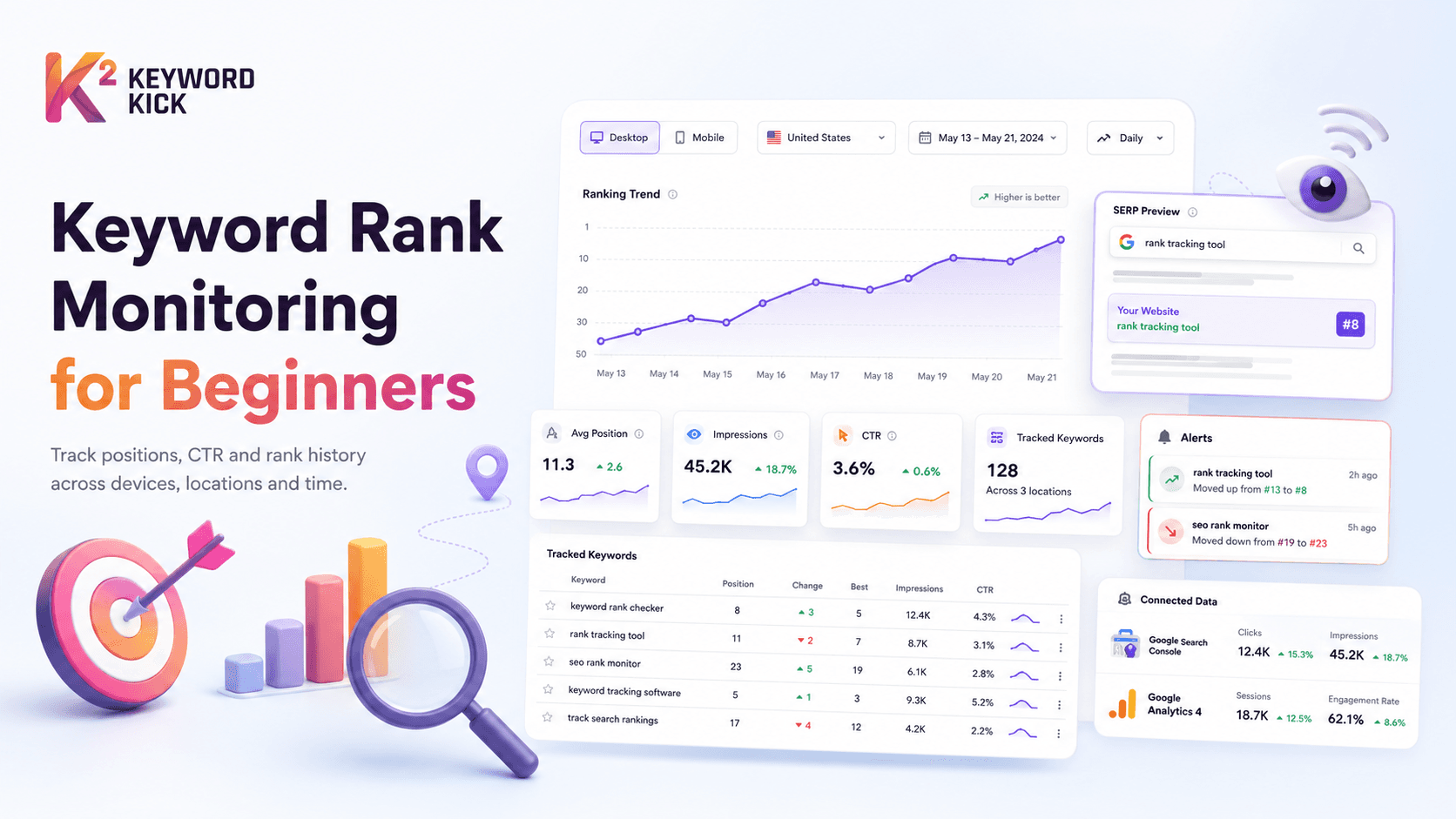
Keyword rank monitoring (also called rank tracking or position tracking) is the process of regularly checking where your website appears in search engine results pages (SERPs) for specific keywords.
For example:
You write a blog post targeting the keyword "best coffee grinders under $100"
You want to know: when someone searches that phrase on Google, does your page appear? And if so, where — position 3? Position 15? Position 47?
Rank monitoring answers that question — not just once, but continuously over time, so you can see if your rankings are improving, declining, or staying stable.
Why Does Keyword Ranking Matter?
Where you rank has a direct and measurable impact on how much traffic you receive.
Based on industry CTR (click-through rate) data:
Position | Average CTR |
|---|---|
#1 | 25–35% |
#2 | 12–18% |
#3 | 8–12% |
#4–5 | 5–8% |
#6–10 | 2–5% |
#11–20 (Page 2) | 0.5–2% |
What this means in practice: If your page ranks at position 11 and gets 5,000 monthly impressions, you're receiving roughly 25–100 clicks. Move it to position 3, and those same impressions could deliver 400–600 clicks — a 10x+ improvement with no additional content investment.
This is why rank monitoring isn't just a vanity metric. It's how you identify exactly which pages and keywords deserve your attention.
Key Terms You Need to Know
📍 Position / Ranking
The number that indicates where your page appears in search results for a given keyword. Position 1 is the top organic result; position 10 is the last result on page 1.
🔍 SERP
Search Engine Results Page — the page Google (or Bing) shows after someone searches a keyword. Includes organic results, paid ads, featured snippets, image packs, and other features.
📊 Impression
The number of times your page appeared in search results for a keyword — regardless of whether anyone clicked it. High impressions + low clicks = CTR problem worth fixing.
👆 Click-Through Rate (CTR)
The percentage of people who see your page in results and actually click on it. CTR = Clicks ÷ Impressions × 100.
📉 Rank Drop
When your position for a keyword gets worse — e.g., moving from position 5 to position 12. Can be caused by algorithm updates, competitor improvements, or technical issues on your site.
📈 Rank Improvement
When your position moves up — e.g., from position 22 to position 8. Often the direct result of content updates, new backlinks, or fixing technical SEO issues.
📅 Rank History
A record of how your position for a keyword has changed over time. Essential for identifying trends and correlating ranking changes with specific actions.
How Does Keyword Rank Monitoring Work?
At its simplest, rank monitoring works like this:
You specify a keyword (e.g., "best running shoes for flat feet")
You specify a domain (e.g., yoursite.com)
A rank tracking tool checks Google — simulating a real search from a specified location and device
It records your position for that keyword on that day
It repeats this daily (or weekly, depending on your settings)
It shows you the history as a graph or table so you can see trends
Modern rank tracking tools like Keyword Kick do this automatically — you set up your keywords once, and the tool checks positions daily without any manual effort on your part.
What Can You Monitor?
Rank monitoring isn't just about a single number. Modern tools track multiple dimensions:
By Device
Google ranks pages differently for mobile and desktop searches. A page might rank #3 on desktop but #8 on mobile — meaning mobile users have a very different experience. Tracking both is essential if your audience uses multiple devices.
By Location
A restaurant in Manchester needs to know its rankings in Manchester — not the UK average. Rank monitoring by city or region is critical for local businesses and any site targeting geographically specific audiences.
By Search Engine
Google dominates, but Bing has meaningful market share — particularly in desktop searches and Microsoft Edge's default search. Tracking both gives you a complete picture.
By Language
If your site serves multiple languages, ranking in English and ranking in German or French are entirely separate — requiring separate keyword sets and tracking campaigns.
Manual vs. Automated Rank Monitoring
Manual Rank Checking (Not Recommended)
Many beginners start by simply Googling their target keywords and noting where their site appears. This approach has serious problems:
Personalization bias. Google personalizes results based on your search history. Your site may appear higher for you than for a stranger searching the same term.
Location bias. Your results reflect your physical location, not your target audience's.
Not scalable. If you have 50 keywords across 5 pages, manual checking takes hours — and needs to be repeated regularly.
No history. You can't track trends without recording every check manually.
Automated Rank Monitoring (Recommended)
A rank tracking tool eliminates all of these problems:
Uses neutral, location-specific searches without personalization
Checks all keywords simultaneously
Runs automatically on a schedule (daily by default)
Stores historical data for trend analysis
Alerts you when significant changes occur
What to Do With Rank Monitoring Data
Tracking rankings is only useful if you act on what you find. Here's how to translate rank data into decisions:
🟡 Keywords ranking on page 2 (positions 11–20)
These are your highest-priority quick wins. You're close to page 1 — a content update, a few new backlinks, or a title tag improvement can push you over. Keyword Kick flags these automatically as "page 2 opportunities."
🔴 Keywords that dropped significantly
A sudden drop often signals a technical issue (page accidentally no indexed, canonical tag error) or a Google algorithm update. Investigate immediately — the longer you wait, the more traffic you lose.
🟠 Keywords with high impressions but low CTR
You're ranking, but people aren't clicking. The issue is almost always your title tag or meta description — they're not compelling enough to earn the click even when you appear in results.
🟢 Keywords that improved
Understand what caused the improvement — was it a content update? New backlinks? A competitor dropping? Knowing what works helps you replicate it across other pages.
How to Set Up Keyword Rank Monitoring with Keyword Kick
Getting started takes about 10 minutes:
Step 1: Create your project Add your domain to Keyword Kick. Connect Google Search Console to pull in your existing keyword data alongside rank tracking.
Step 2: Create a rank tracking campaign Name your campaign (e.g., "Main Keywords" or "Blog Posts"), select your target country and device type (desktop, mobile, or both), and choose your check frequency (daily recommended).
Step 3: Add your keywords Paste your target keywords directly or import from a CSV. Group them logically — by topic, by page, or by priority.
Step 4: Set up rank change alerts Configure email notifications for significant position changes — a drop of 5+ positions triggers an alert so you can investigate before it affects traffic.
Step 5: Connect Google Search Console and GA4 This layers real click and impression data on top of your rank tracking — so you can see not just where you rank, but how many clicks each position actually generates.
Step 6: Review your first report Within 24 hours, your first ranking snapshot is ready. You'll see current positions, any historical data Keyword Kick can pull, and initial opportunity flags.
👉 Set up your first rank tracking campaign →
Common Rank Monitoring Mistakes Beginners Make
Tracking too many keywords at once
Start with 20–30 core keywords. Tracking 500 keywords before you understand what the data means creates noise, not insight.
Checking rankings too frequently
Positions fluctuate daily due to Google's normal algorithm behavior. Daily tracking is ideal; checking hourly creates anxiety without actionable data.
Ignoring device split
If 60% of your traffic comes from mobile but you only track desktop rankings, you're missing the picture your actual visitors see.
Not recording what you changed
Rank data only tells you that something changed — not why. Keep a simple log of content updates, new backlinks, and technical changes so you can correlate actions with results.
Treating every small movement as a crisis
Positions fluctuating by 1–2 spots daily is completely normal. Focus on sustained trends over 2–4 weeks, not daily noise.
Rank Monitoring vs. Google Search Console: What's the Difference?
A common question from beginners: "I already have Google Search Console — do I need a separate rank tracker?"
Feature | Google Search Console | Keyword Kick Rank Tracker |
|---|---|---|
Position data | ✅ (averaged) | ✅ (daily, precise) |
Historical data | 16 months | Unlimited |
Device split | ✅ | ✅ |
Location split | Country level | City/region level |
Click + impression data | ✅ | ✅ via GSC integration |
Competitor tracking | ❌ | ✅ |
Rank change alerts | ❌ | ✅ |
Daily snapshots | ❌ (averaged) | ✅ |
Keyword grouping | ❌ | ✅ |
The short answer: GSC is essential and free — use it always. A dedicated rank tracker complements it by adding daily precision, competitor tracking, alerts, and longer historical data.
Keyword rank monitoring is one of the most fundamental SEO activities — and one of the easiest to set up with the right tool. You don't need technical expertise, a large budget, or weeks of configuration.
What you need is:
A clear list of keywords you're targeting
A tool that checks your positions automatically every day
A habit of reviewing the data weekly and acting on what you find
Keyword Kick handles the first two — the third part is up to you.