A subdomain is a prefix added before your main domain, like blog.example.com, and it functions as a separate website under the same parent domain. Teams use them to isolate distinct content areas, languages, or technical environments without buying a new domain.
That simple setup is why so many marketing teams run into the same question at the same time. The blog is growing, the help center needs its own system, the international pages need cleaner targeting, and the staging site can't keep living in the same place as production.
A growing site usually starts with one clean homepage and a few core pages, then it turns into a mix of content, products, support, and experiments. At that point, the site no longer behaves like a single brochure, it behaves like a small web ecosystem. A subdomain gives you a separate wing of the house instead of forcing everything into one crowded room.
That distinction matters because site structure affects how people move, how teams work, and how search engines interpret your setup. It also affects crawl priorities, which is why many SEO teams think about architecture alongside tools like crawl budget instead of treating it as an afterthought.
Why Your Growing Site Might Need a Subdomain
A subdomain starts to make sense when your website is no longer serving one audience with one content system. Maybe your ecommerce team wants the store to live apart from the editorial blog, or your support team needs a help portal with different navigation and different software. In those moments, a subdomain can reduce internal friction even if it adds a little SEO complexity.
Imagine adding a separate wing to a house. You still own the same property, but the new wing can have its own entrance, furniture, and purpose. That's often easier than trying to reshape the original floor plan every time a new team needs space.
When separation helps the business
A subdomain can be a good fit when a team needs operational independence. A product knowledge base, a client login area, and a marketing blog usually don't need the same templates or release cadence. Keeping them apart can make ownership clearer and reduce accidental breakage during updates.
That separation is also useful when different groups need different tools. A support center might run on one platform, while the main site runs on another. A staging environment might need to stay invisible to customers. In each case, the subdomain acts like a boundary that keeps one part of the organization from disrupting another.
Why marketers should care
The choice isn't only technical. It changes how content gets organized, how analytics get reported, and how much attention each property needs. The more you split the experience, the more you have to manage the seams between sections.
Practical rule: Use a subdomain when the new section needs its own operating model, not just a new page group.
That rule keeps teams from overusing subdomains for simple content additions. A blog that belongs tightly to the main brand often performs better as part of the root site, while a separate support center or regional storefront may justify its own space. The architecture should match the team structure, not just the page count.
Understanding How Subdomains Work in DNS
A subdomain lives inside the DNS hierarchy, not outside it. The formal DNS model documented in RFC 1034 established the containment idea in 1987, and that's the basis for how subdomains work today, a domain is a subdomain of another domain if it's contained within that domain, as quoted in the Wikipedia summary of the standard. That's why shop.example.com and blog.example.com sit under example.com instead of acting as unrelated registrations. You can see the hierarchy in this visual.
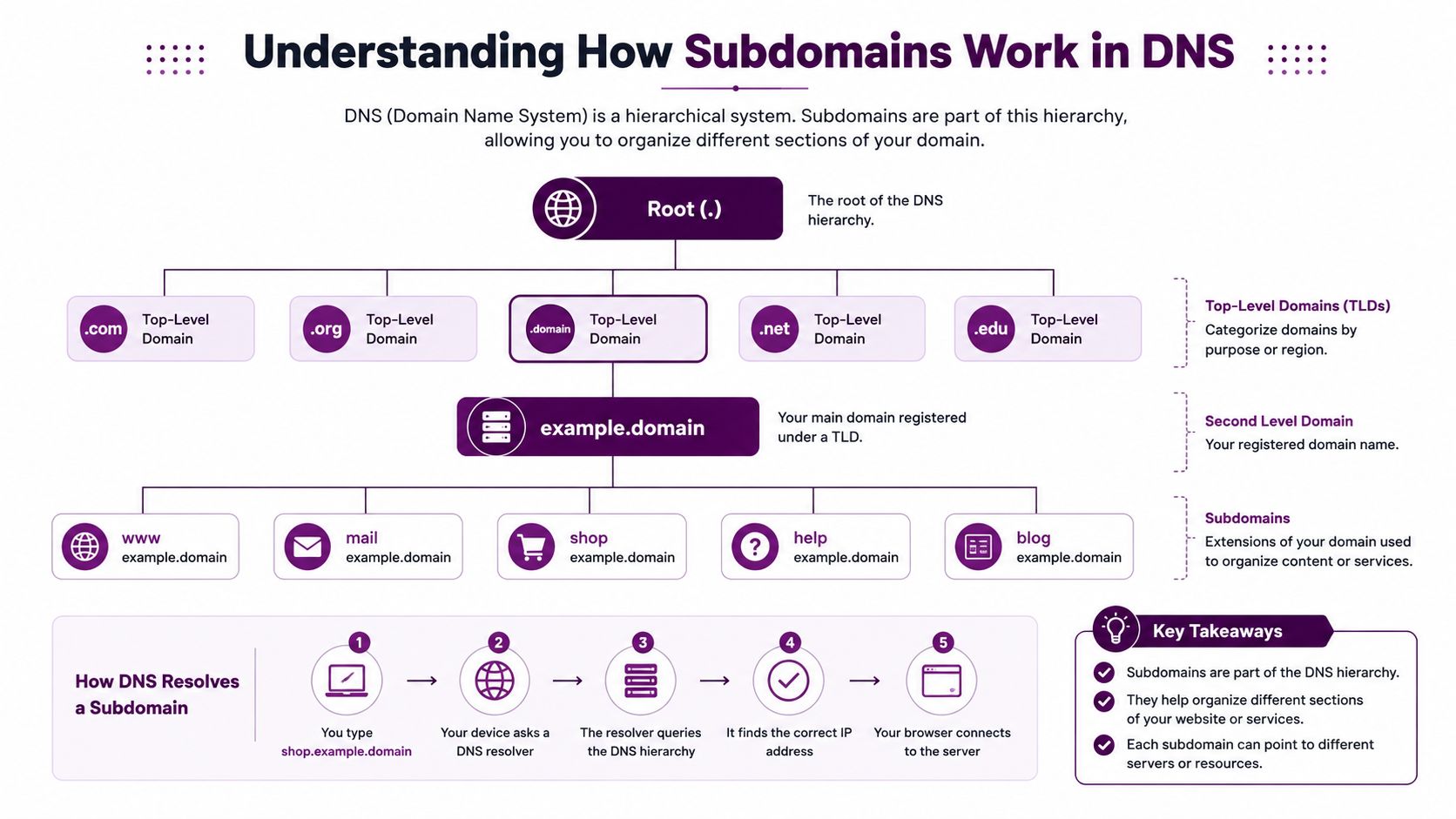
The label comes before the parent domain
The subdomain label appears before the registered domain name. That's why eu.example.com reads as a regional branch of the main site, while blog.example.com reads as a content branch. The structure is simple, but the implications are big, because the prefix signals that this is still part of the parent domain family.
DNS creates that connection through records, usually A records or CNAME records. You're not registering a new domain name when you add a subdomain. You're telling the internet where that hostname should point.
Why that difference matters
A common point of confusion is that a subdomain can be configured independently, but it still belongs to the same parent domain. That matters for branding because users may still read it as part of the main site. It matters for analytics because teams often need separate reporting and cross-property tracking. It matters for SEO because search engines can treat each hostname as a distinct property in practice even though it sits under the same brand umbrella.
DNS makes the name exist. Hosting makes the site answer.
That gap explains a lot of failed setup attempts. A record can be created correctly, yet the subdomain still won't serve pages until the host is also configured to recognize that hostname. In other words, DNS points the traffic, and the server has to know what to do with it.
Subdomain vs Subdirectory for SEO and Site Structure
The cleanest SEO question isn't “which one is better.” It's “what are you trying to separate, and what are you willing to manage?” Google has said it can treat subdomains and subdirectories similarly for ranking purposes, but real-world SEO teams still often see subdomains as separate properties that need their own effort. That's why the default recommendation for many sites is to keep related content in a subdirectory unless there's a strong operational reason not to.
Side by side comparison
Factor | Subdomain (blog.example.com) | Subdirectory (example.com/blog) |
|---|---|---|
SEO authority | Can feel split across properties | Usually keeps authority consolidated |
Technical setup | More moving parts, separate hostname handling | Simpler under one site structure |
Content governance | Easier to isolate teams and platforms | Easier to manage as one editorial system |
Analytics | Often needs extra tracking care | Usually simpler reporting |
Best fit | Distinct platform or function | Closely related content |
A subdomain wins when separation is the point. A subdirectory wins when consolidation matters more. If the blog, product pages, and guides are all part of one organic growth engine, a subdirectory often keeps the strongest signals in one place.
For related technical architecture questions, many teams also compare this decision with other segmentation choices, like faceted navigation, because both choices can influence crawl paths and indexation.
The SEO trade-off in plain language
When you split content into a subdomain, you often create a second SEO workload. That means more effort on internal links, backlinks, indexation checks, and performance monitoring. If the section is small or tightly linked to the main brand, that overhead may not pay off.
If the section needs its own stack, its own team, or its own market strategy, the split can be worth it. The key is not to confuse cleaner organization with stronger SEO by default. Cleaner organization helps humans first, and SEO only follows if the rest of the setup is disciplined.
Real-World Use Cases Where Subdomains Make Sense
Subdomains earn their place when the use case is distinctly different from the main site. International sites are a common example. A brand may run en.example.com and fr.example.com when it needs separate language or market experiences, especially if the content, legal requirements, or hosting setup differ by region.
Staging environments are another natural fit. Developers need a safe place to test changes without touching the production site, so staging.example.com keeps the experiment visible to the right people and hidden from customers. That separation is less about SEO and more about protecting the live experience.
Where brands usually split
Customer support portals often live on subdomains because the platform is different from the marketing site. A help center, a ticketing system, or a documentation library may be easier to run on its own stack. The same logic applies to ecommerce stores that need a platform separate from the content site, or to campaign microsites that need a short-term presence with their own design and tooling.
Some large brands use subdomains to keep major functions distinct. That's not a mandate, it's a reflection of operational needs. The pattern appears when the business wants one brand but several systems.
When a subdomain is the right answer
Distinct platform needs: If the new section runs on different software, a subdomain can keep the systems cleanly separated.
Separate teams: If one team owns support and another owns marketing, a subdomain can reduce handoff friction.
Market segmentation: If you need different language or regional experiences, a subdomain can create clearer boundaries.
Temporary environments: If the site is for staging, testing, or a launch campaign, a subdomain keeps the main site untouched.
The common thread is independence. If the section needs to live on its own schedule, with its own governance, a subdomain is usually more practical than forcing it into the root structure.
Technical Setup Steps for Creating a Subdomain
Creating a subdomain is a two-part job, and most beginner guides only explain the first half. DNS has to point the hostname somewhere, but the web server or hosting platform also has to serve content for that hostname. If either side is missing, you'll end up with a name that exists on paper but doesn't load in a browser.
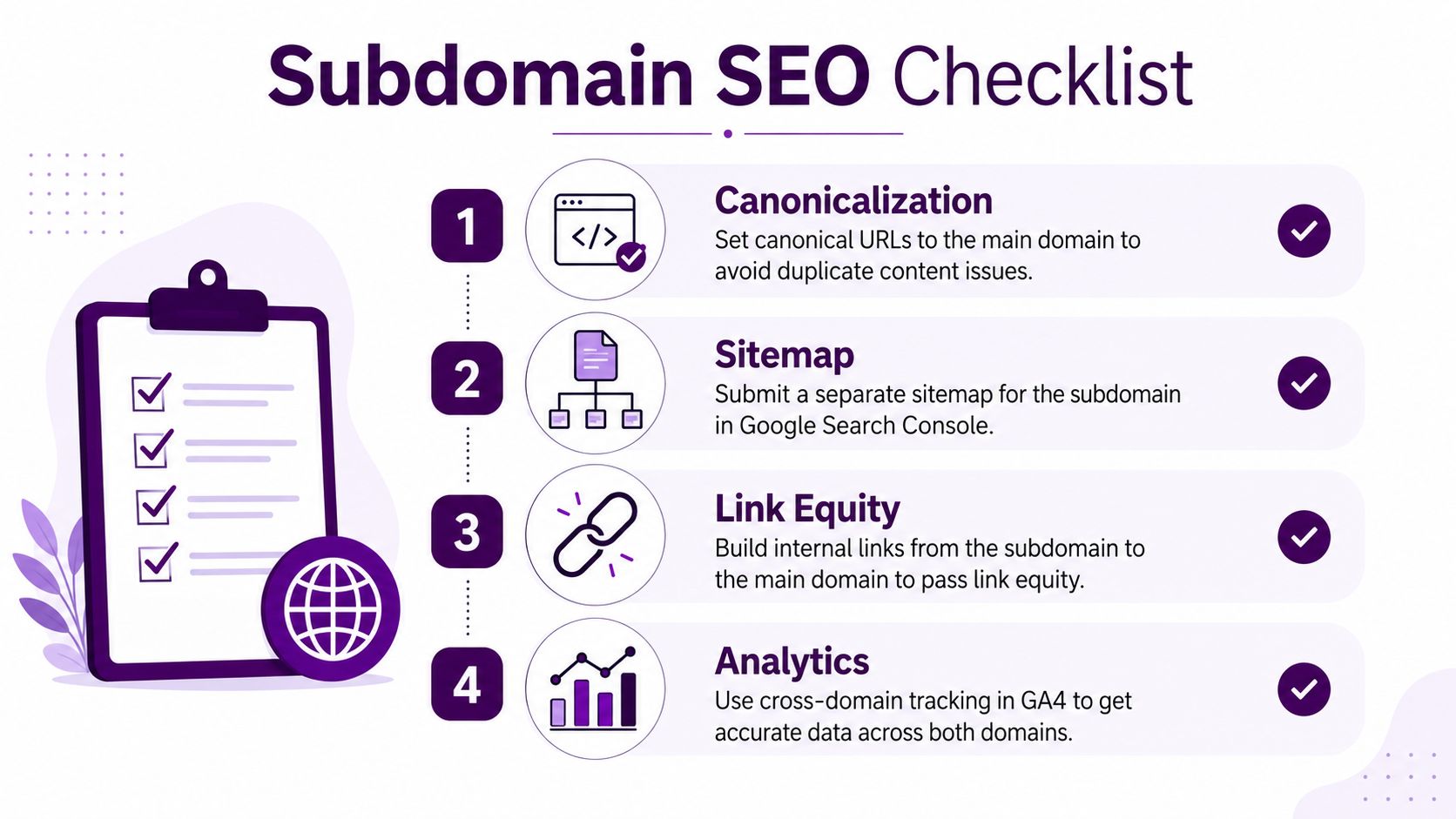
The setup sequence
First, create the DNS record that maps the subdomain to the right destination. That can be an A record if you're pointing to an IP address or a CNAME record if you're pointing to another hostname. Then configure the host so it recognizes that hostname and knows which site files or application should answer requests for it.
Next, set the document root or virtual host. That's the part that tells the server which content belongs to the subdomain. Without it, the server may show a default page, the wrong site, or nothing useful at all.
Don't skip SSL and propagation
You also need HTTPS on the subdomain, not just on the parent domain. The subdomain is its own endpoint, so it needs to be secured like one. DNS changes can take time to spread, and a practical planning benchmark is that propagation can take up to 48 hours according to Network Solutions, which is why launches need a buffer.
Troubleshooting clue: If the DNS record looks correct but the site still shows the wrong page, check host configuration before you keep changing DNS.
That's the most common failure point. People assume DNS is the whole job, then spend an hour waiting for a problem that lives on the server side. The fastest fix is usually to confirm that the host knows about the hostname and that the SSL certificate matches the subdomain.
For teams setting up a new property, a structured checklist helps. If you need a broader reference for verification and launch hygiene, the Google Search Console setup guide is a useful companion when you're making sure search engines can see the new section correctly.
SEO Implications and Best Practices for Subdomains
Subdomains can work well, but they come with hidden SEO costs. Every new hostname needs attention, which means more work on internal linking, indexation, canonicalization, and measurement. If the subdomain starts behaving like a separate site in search, the SEO team has to support it like one.
Keep the signals connected
A subdomain should not become a dead end. Link it to the main domain in visible, consistent ways so users and crawlers can move between properties without confusion. If the subdomain serves international audiences, use hreflang correctly so search engines understand language and regional targeting.
Analytics need the same care. If the main domain and subdomain are both part of one customer journey, make sure tracking can follow that journey cleanly. Otherwise, a visit can look fragmented even when the user experience is smooth.
Watch the cost of fragmentation
The biggest issue is not that a subdomain is “bad.” It's that each one creates another place where authority can scatter. That means another content plan, another link profile to build, and another technical surface to monitor. For a small team, that overhead can become expensive in time even when it doesn't involve direct spend.
If you're trying to decide how much infrastructure your site really needs, it helps to compare it with broader site SEO planning, including guidance like website SEO for small businesses. The same basic principle applies here, keep the architecture as simple as possible unless a clear business need justifies the split.
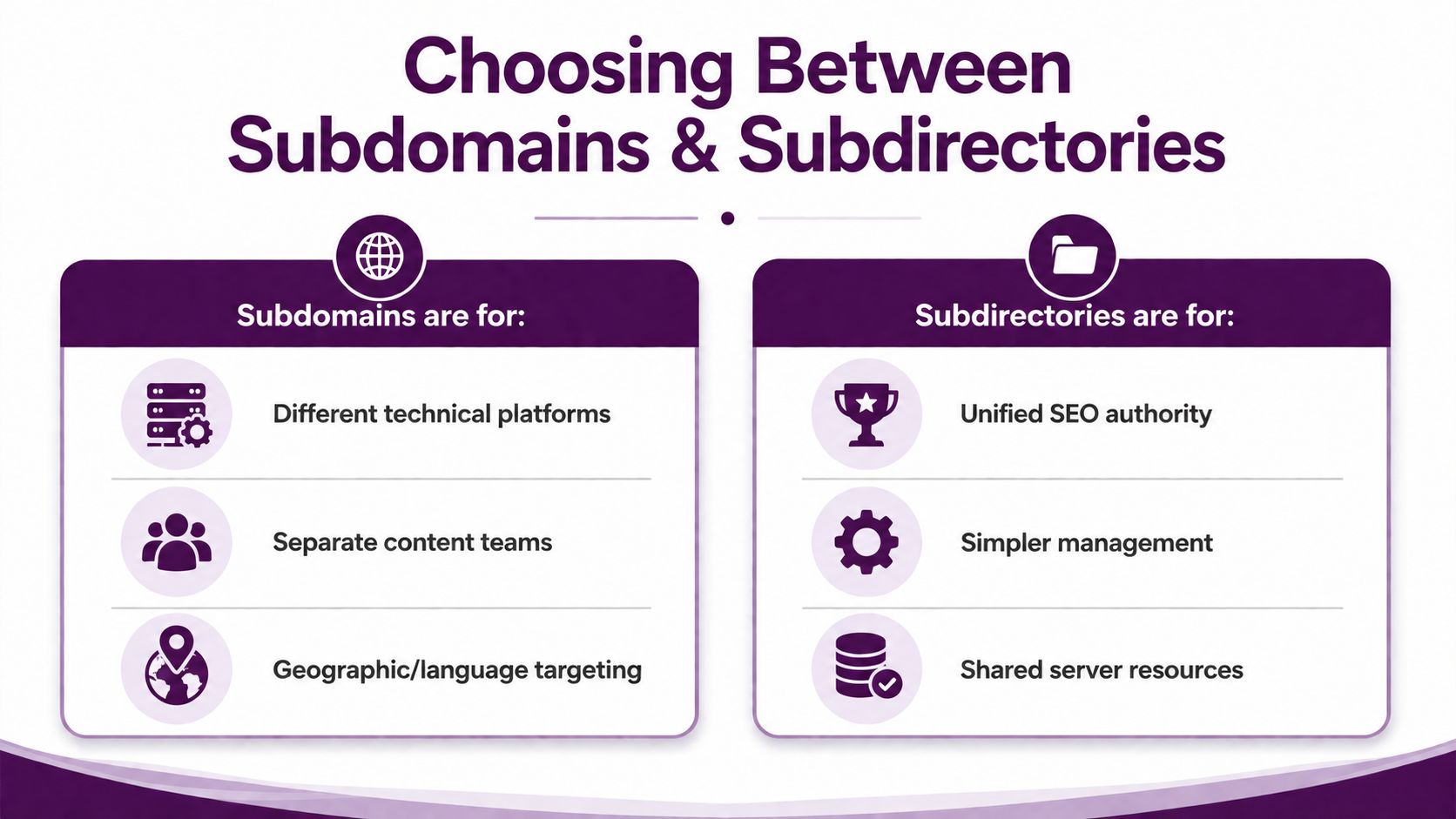
When to rethink the structure
If a subdomain never develops enough content, links, or user demand to justify its independence, consolidation may be smarter. Bringing related material back into a subdirectory can simplify governance and reduce the number of places SEO issues can hide. The decision should follow the business, but the maintenance burden should be part of the math from day one.
Making the Right Choice for Your Website
Use a subdomain when the new section needs its own technology, its own team, or its own operating rhythm. That includes staging environments, regional sites, support portals, and product areas that function like separate properties. If the content is closely related to the main site and shares the same editorial and technical workflow, a subdirectory usually keeps things cleaner.
A simple decision filter helps:
Different platform: Choose a subdomain when the section needs separate hosting or a different CMS.
Separate ownership: Choose a subdomain when another team will run it independently.
Distinct market: Choose a subdomain when language or region needs its own setup.
Shared growth goal: Choose a subdirectory when the content should strengthen one central SEO profile.
The most common mistake is using a subdomain just because it feels tidy. A blog does not automatically need its own hostname, and a product resource center does not need to be split by default. Every extra subdomain adds another place to maintain, measure, and earn authority.
The right architecture is the one your team can support consistently, not the one that sounds neat in a planning meeting.
Check your analytics, review how content is distributed, and look at whether each property is earning its keep. If a subdomain becomes hard to sustain or starts to feel isolated from the rest of the brand, it may be time to fold it back into the main site.
If you want a clearer plan for site structure, SEO workflows, and how your pages should support each other, visit Keyword Kick. It helps teams turn fragmented search data into practical next steps, which is exactly what you need when you're deciding whether a subdomain is solving a real problem or creating a new one.