Your store ranks for the right category terms. Shoppers land on relevant products, browse a few options, and leave without buying. The SEO report looks healthier than the sales report, and nobody agrees on whether the problem belongs to marketing, development, or operations.
An ecommerce website audit should answer that question with evidence. Check whether search engines can discover the catalog, whether pages explain the products accurately, and whether shoppers can complete an order without surprises. A payment failure deserves attention before a tidier meta description, even when the description is easier to fix.
Audit Areas, Checks and Red Flags at a Glance
Treat the audit as a connected inspection, not a collection of tool scores. A category page can be indexable yet link to unavailable variants. A fast product page can still hide delivery costs until payment.
Ecommerce audit areas, checks and red flags
| Audit area | Key checks | Tool to use | Red flag |
|---|---|---|---|
| Crawlability and indexation | Status codes, robots.txt, sitemap coverage, noindex tags | Site crawler, Google Search Console | Revenue URLs returning unsuccessful responses or carrying noindex |
| JavaScript rendering | Rendered versus source HTML, script-added links and prices | Crawler with rendering enabled | Product links missing from source HTML |
| Site speed | LCP, INP, CLS, mobile third-party scripts | PageSpeed Insights field data, CrUX | Product templates failing mobile Core Web Vitals |
| On-page and category content | Titles, H1s, descriptions, category copy | Site crawler, Search Console | Identical titles across indexable filtered categories |
| Product pages | Variants, stock, descriptions, reviews, images | Site crawler, manual review | Size or colour URLs competing with the parent |
| Structured data | Product, Offer, Breadcrumb markup | Rich Results Test, Search Console | Markup price differs from visible price |
| Site architecture | Depth, filters, internal links, orphan pages | Crawl depth report | Revenue products buried beyond normal category navigation |
| Checkout and trust | Fields, guest checkout, shipping, returns, errors | Mobile purchase test, GA4 funnel | Forced registration before payment |
| Backlinks | Referring pages, destination status, redirect paths | Backlink tool, Search Console links report | Valuable external links landing on removed products |
Gather evidence before changing anything
Use successive passes: what search engines can reach, what they see and understand, and what shoppers can do. Gather a complete crawl export, Search Console performance and indexing reports, GA4 checkout and purchase events, and a revenue-ranked landing-page list covering a representative trading period.
Check operational reliability too. UpTime Web Hosting's resource on website uptime and backup checks provides a useful companion for reviewing availability monitoring and recovery readiness.
Don't manually inspect the whole catalog. Start with a representative URL from each template, then confirm the pattern across different categories, stock states, devices, and markets. Expand the sample when implementations differ, not just because the catalog is large.
How to Check Crawling, Indexing and JavaScript Rendering
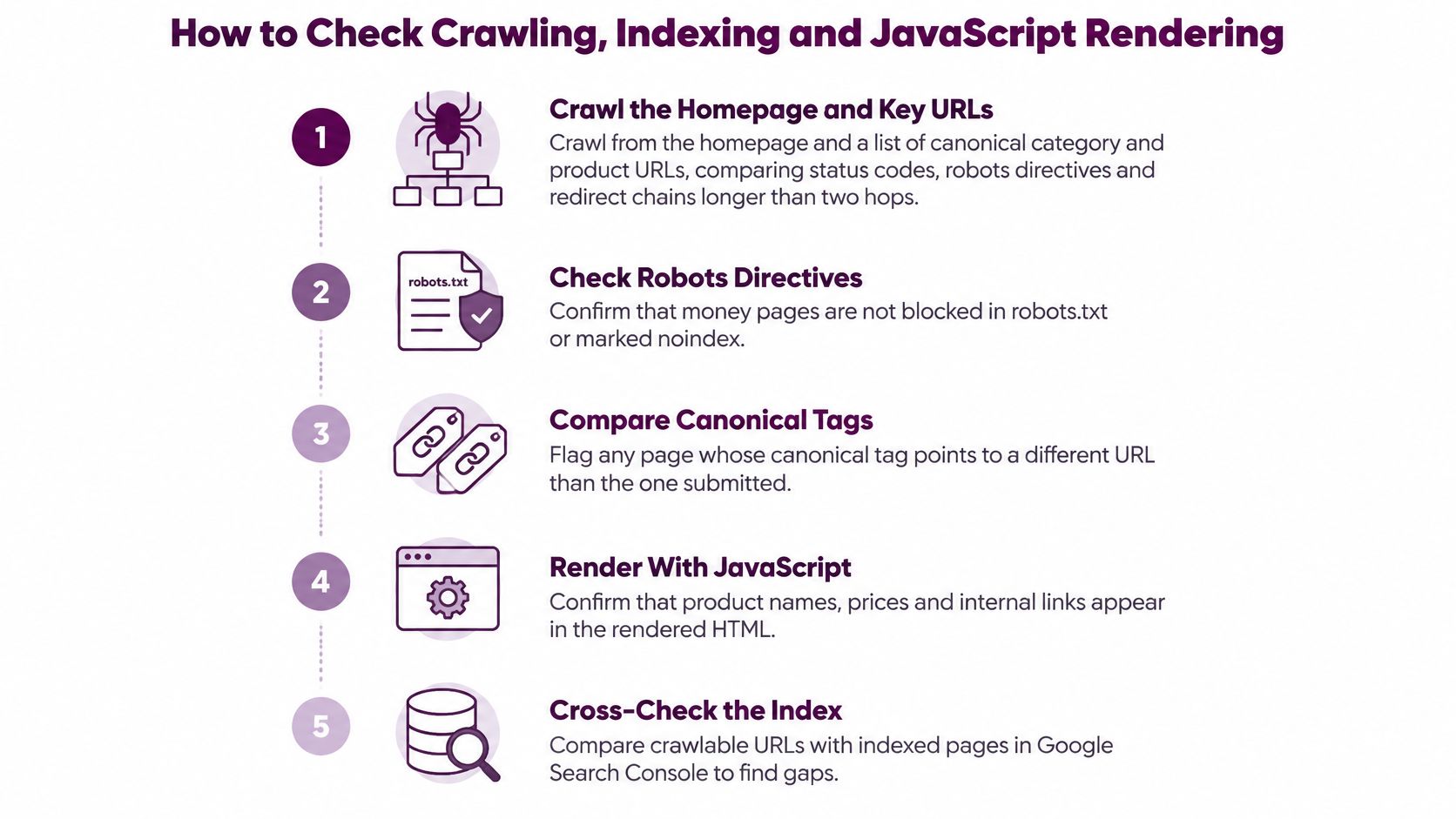
Crawl through navigation and from a URL list. In Screaming Frog or Sitebulb, crawl from the homepage, then separately crawl canonical category and product URLs exported from the catalog. Compare response codes, robots directives, and redirect paths: a URL-list crawl can find a working product that the navigation crawl never reaches.
Inspect the XML sitemaps. They should contain canonical, indexable URLs that return successful responses, rather than redirects, tracking parameters, or deliberately excluded pages. Don't remove temporarily unavailable products automatically; check whether the page still serves a useful shopping purpose.
Classify faceted navigation. Review sorting, colour, size, price, and combined filters, then decide which combinations deserve search landing pages. Preserve useful demand-led pages, consolidate duplicates, and restrict unproductive crawl paths without accidentally preventing search engines from seeing directives they need to process.
Compare declared and selected canonicals. Inspect representative URLs in Search Console and compare Google's selected canonical with the page's declaration. A mismatch needs diagnosis, not another tag: conflicting internal links, near-duplicate content, and inconsistent sitemap entries can all undermine your preferred URL.
Render the commercial templates. Enable JavaScript rendering and compare source HTML, rendered HTML, screenshots, and loaded resources. Verify that names, prices, availability, reviews, and navigational links remain accessible when scripts fail or requests are delayed.
Group findings by implementation. Assign each defect to its category, product, cart, checkout, account, or editorial template, then identify the shared component responsible. Escalate blocked products, inappropriate variant canonicals, and transaction crashes before isolated presentation defects.
Distinguish exclusion from discovery failure
An excluded URL isn't automatically an error. A sorting URL may be intentionally excluded, while a commercially important category excluded by the same rule is a serious defect. Record the intended indexing state alongside the actual state so developers know what success means.
Check robots.txt and noindex separately. Blocking crawling doesn't reliably remove an already known URL from search, and it can prevent a crawler from reading a page-level noindex directive. Canonical tags also aren't a substitute for controlling limitless filter combinations.
Use server logs when the crawl and Search Console tell different stories. Look for repeated crawler requests to filter combinations, persistent server errors, and important products that receive little crawling activity. Segment by template rather than drawing conclusions from sitewide totals.
Practical rule: A product link missing from source HTML is a discoverability defect to investigate, not a cosmetic detail. Rendering support doesn't make script-dependent navigation equally dependable.
Save crawl settings with the export. Otherwise, a later crawl with different rendering, parameter, or subdomain settings can look like an improvement when the test itself changed.
Structured Data and Site Architecture Checks
Product schema properties to audit
| Property | Status | Common audit error |
|---|---|---|
| name | Required for the product implementation | Markup name differs from visible title |
| image | Required for merchant-listing eligibility | Blocked image or placeholder |
| offers.price and offers.priceCurrency | Required for a priced merchant offer | Markup price differs from displayed price |
| offers.availability | Required in the store's offer-validation checklist | InStock on sold-out items |
| sku | Recommended when available | Same SKU reused across variants |
| gtin or mpn | Recommended when assigned | Missing identifier on branded products |
| brand | Recommended when applicable | Store name substituted for manufacturer |
| aggregateRating | Optional, only with eligible visible reviews | Ratings absent from the page |
| description | Recommended | Generic copy that doesn't describe the item clearly |
Search feature requirements differ between product snippets, merchant listings, and variant implementations. Treat this table as an implementation checklist, then use the Rich Results Test to establish eligibility for the specific feature you're targeting. Don't invent identifiers or ratings merely to clear warnings.
Price, currency, and availability should come from the same underlying catalog records as the visible purchase interface. Check sale prices, market-specific currencies, and selected variants rather than validating only the default product state.
Measure navigation, not just URL folders
Breadcrumb markup should reflect the visible category hierarchy. A breadcrumb needn't reproduce every segment of the URL, but it shouldn't describe a different relationship from the navigation shoppers use.
Run these architecture checks:
- Measure crawl depth. Find revenue-driving products that require unnecessarily deep category journeys. Exclude search shortcuts from this test so you can assess the browse path itself.
- Find orphans. Compare crawl discoveries with sitemap, catalog, and campaign destinations. A live product with no incoming internal link needs a deliberate navigation placement.
- Inspect category connections. Confirm that important subcategories receive links from relevant parent pages, not just a footer or an XML sitemap.
- Review filter routes. Establish which selections form useful landing pages and manage crawling of faceted URLs without removing valuable browsing options.
Keep category folders stable. Renaming a product doesn't require changing its URL, and session or date parameters shouldn't become permanent product addresses.
Validate the deployed output
Test sampled live pages, not just markup copied from a development ticket. Watch Search Console's enhancement reports after releases, particularly when price feeds, review systems, or variant selectors change.
Add relevant links from prominent categories and bestsellers to new or underperforming commercial pages. Choose links that help buyers compare or continue shopping; inserting unrelated products into every template creates clutter rather than a useful hierarchy.
Speed Problems and Third-Party Scripts That Slow Stores
A fast Lighthouse run on a developer's laptop does not prove that mobile shoppers get a fast experience. Start with CrUX field data in PageSpeed Insights, then use lab tests and Chrome DevTools to locate causes. If URL-level field data is unavailable, label origin-level results clearly.
Core Web Vitals thresholds for ecommerce pages
| Metric | Good | Needs improvement | Poor |
|---|---|---|---|
| LCP, largest contentful paint | 2.5 seconds or less | More than 2.5 seconds to 4 seconds | More than 4 seconds |
| INP, interaction to next paint | 200 milliseconds or less | More than 200 milliseconds to 500 milliseconds | More than 500 milliseconds |
| CLS, cumulative layout shift | 0.1 or less | More than 0.1 to 0.25 | More than 0.25 |
Use Core Web Vitals for SEO to interpret the metrics alongside field and lab results.
Match the symptom to the component
For LCP, inspect the main product image, its discovery priority, server response, and oversized galleries. Don't lazy-load the image shoppers need immediately, and avoid serving desktop-sized assets to narrow mobile viewports.
For INP, record how filters, variant selectors, and size controls respond in Chrome DevTools. Long JavaScript tasks can delay feedback after a page appears loaded. For CLS, reserve space for images, review summaries, banners, and consent interfaces before their content appears.
Third-party applications accounted for 44% of total page-load time in Yottaa's 2025 Ecommerce Technology Index, based on more than 500 million visits to over 1,300 ecommerce sites. Treat app ownership and execution as audit findings, not just developer concerns.
Inventory scripts before replacing the theme
Create a script register that records:
- Purpose and owner. Identify who relies on each app and which business decision depends on it.
- Loading conditions. Record the templates where it runs and whether consent or interaction should control execution.
- Measured cost. Capture network activity, main-thread work, and observed interaction delays.
- Removal risk. Check dependencies before disabling anything tied to payment, consent, or measurement.
Disable apps individually in a controlled environment, then repeat equivalent tests. Lab interaction measurements can indicate a likely improvement, but they do not immediately establish a change in field INP.
Prioritize tests on commercial templates with broad revenue exposure. When ranking fixes, weigh revenue impact and scope against effort: a script slowing checkout or many product pages usually deserves attention before a cosmetic speed improvement on one low-traffic page.
Category and Product Page Issues That Cost Rankings
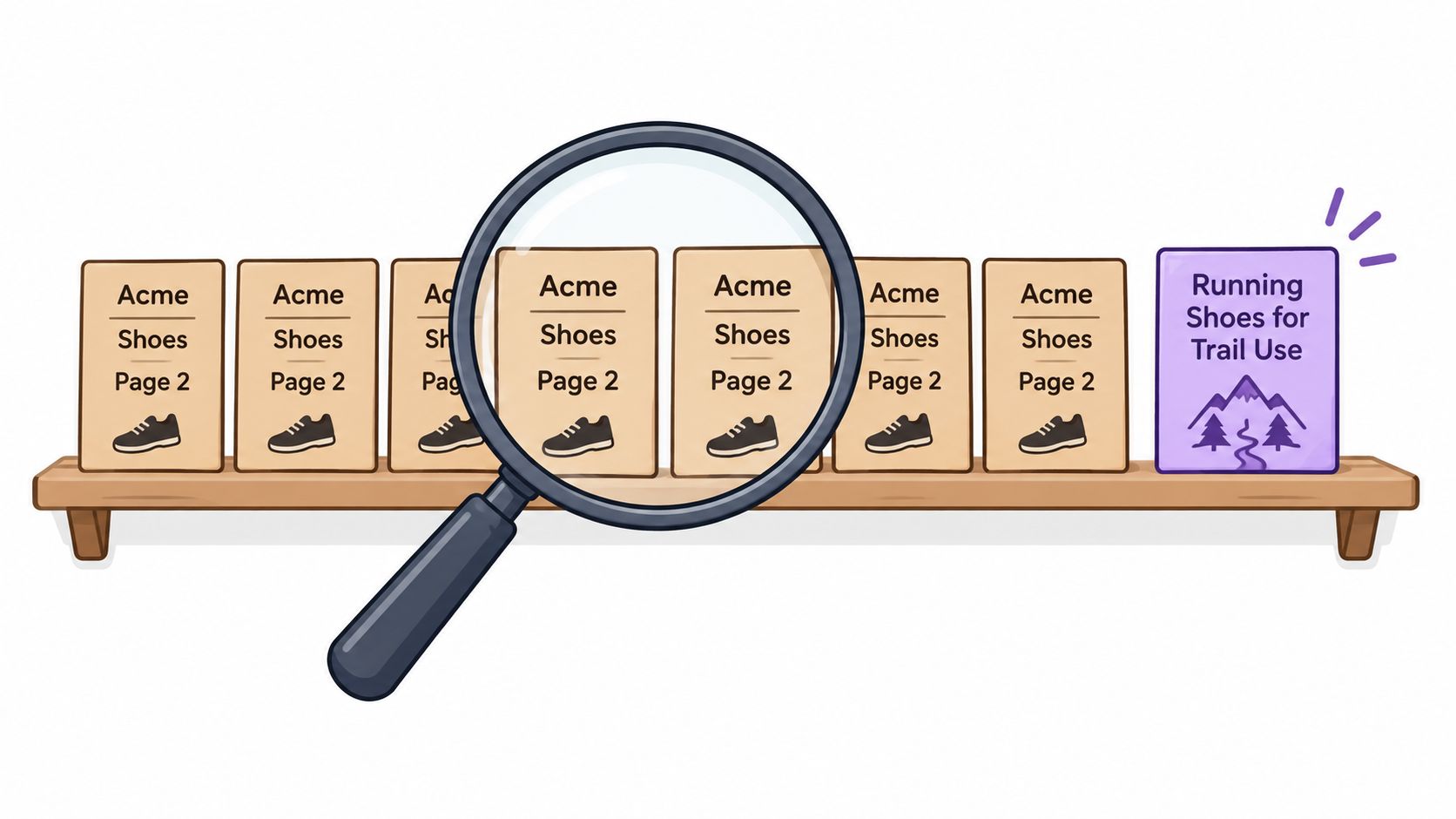
Repeated titles often begin with a reasonable template that nobody revisits. A brand, category, and pagination pattern can produce technically populated titles that don't distinguish meaningful landing pages.
Titles and copy should support a buying decision
Export titles and H1s, then group them by category intent. Rewrite duplicates on pages that deserve independent visibility, but don't spend time differentiating titles on filter combinations that shouldn't be indexed.
Category introductions should explain what distinguishes the range: sizing, materials, compatibility, or intended use. Keep essential guidance near the products and put detailed advice where it won't obstruct browsing. There's no useful universal word count.
For product descriptions, retain accurate manufacturer specifications but add information buyers can't get from a generic feed. Fit notes, dimensions in context, care instructions, compatibility limits, and realistic use cases help shoppers make a decision.
Use the WebinOne product page guide as a companion when reviewing how the gallery, specifications, buying controls, and supporting information fit together. Audit the buying task, not just whether each component exists.
Variants, stock and images need explicit rules
- Variants. Consolidate near-identical URLs when they serve the same search intent. Give genuinely distinct variants independent treatment only when the page content, availability, and demand justify it.
- Temporary stock gaps. Keep useful pages available with honest restock messaging and relevant alternatives. Don't send shoppers to the homepage merely because an item is temporarily unavailable.
- Permanent removal. Decide whether the page still helps buyers through specifications, support information, or replacement guidance before retiring it.
- Images. Write alt text that describes the product and meaningful visual differences. Check responsive image delivery and whether gallery assets remain sharp enough for inspection without excessive downloads.
A filtered category with unique demand needs more than a changed heading. It needs a useful selection, coherent internal links, and content that answers the narrower buying question.
Accessibility belongs in product discovery
The Contentsquare Foundation's European ecommerce accessibility report assessed 250 pages across the purchase journey and found that product pages scored lowest, averaging 3.5/10. Checkout improvements won't help shoppers who can't select the product they want.
Test size and colour controls with a keyboard. Confirm that focus remains visible, selected states are announced, controls have meaningful labels, and a screen reader can identify price and availability.
Passing an automated accessibility scan doesn't prove that a shopper can compare variants or add the correct item to the cart.
Ask disabled testers to complete realistic shopping tasks where possible. Record failed interactions alongside the affected product families so the team can distinguish a shared component failure from a page-specific defect.
Checkout, Shipping and Trust Friction to Measure
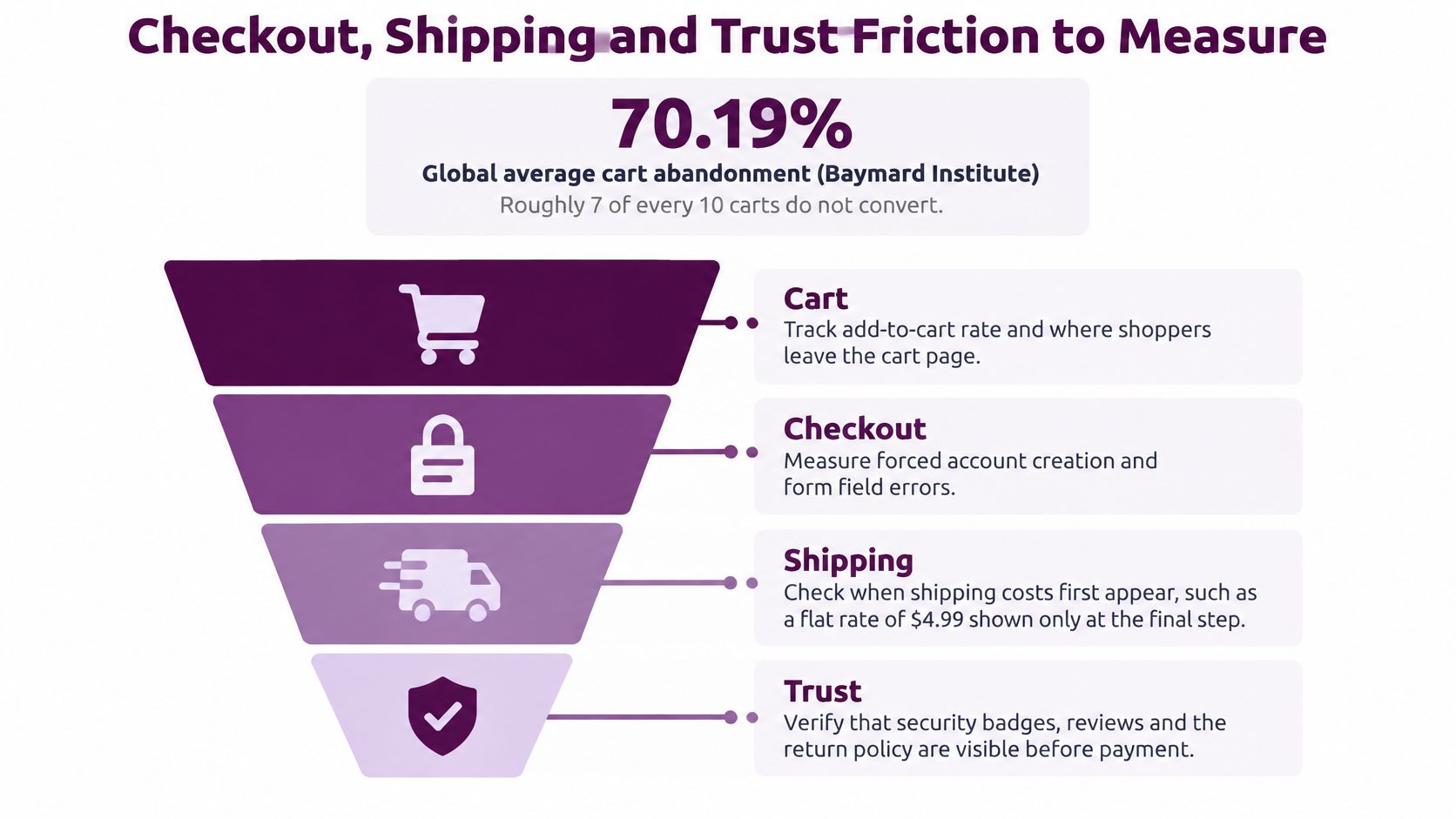
Baymard Institute's checkout-usability report puts global average cart abandonment at 70.19% and identifies the US shopper abandonment reasons attributed to Baymard below. That's a reason to inspect the funnel, not a forecast of the revenue your store can recover.
The 2025 consumer survey published by Constructor covered more than 1,500 consumers in the United States and Europe and reports the shipping, delivery, returns, and security findings attributed to that survey below. These are separate survey populations, so don't add the percentages or treat them as directly comparable experiments.
Reasons shoppers abandon and the audit check for each
| Reason | Share who cited it | Source | Audit check |
|---|---|---|---|
| Extra costs too high, including shipping, taxes, fees | 40% | Baymard, US shoppers | Expose landed cost before payment |
| High shipping costs | 62% | 2025 consumer survey, US and Europe | Display shipping rules before checkout |
| Slow delivery | 20% | Baymard, US shoppers | Show delivery windows by postcode |
| Long delivery times | 51% | 2025 consumer survey, US and Europe | Compare promises with carrier performance |
| Didn't trust site with card information | 19% | Baymard, US shoppers | Inspect payment reassurance and consistency |
| Required to create an account | 18% | Baymard, US shoppers | Test guest checkout |
| Checkout too long or complicated | 17% | Baymard, US shoppers | Count visible fields and interactions |
| Website errors or crashes | 17% | Baymard, US shoppers | Test failure recovery |
| Unclear return policy | 29% | 2025 consumer survey, US and Europe | Expose return eligibility on product pages |
| Data-security concerns | 27% | 2025 consumer survey, US and Europe | Explain necessary data collection |
Test promises as well as forms
Run mobile and desktop journeys as a guest, a new account, and a returning customer. Record when shoppers first see shipping charges, taxes, delivery estimates, and return restrictions.
- Challenge inputs. Test an invalid expiry date and a missing phone number using approved payment test modes. Check whether messages identify the problem and preserve entered information.
- Verify measurement. Inspect GA4 events for checkout entry, shipping, payment, and purchase. Validate cross-domain payment journeys and transaction deduplication.
- Check accessibility. Test labels, error announcements, keyboard focus, and payment recovery.
- Ask about uncertainty. Use the Formbricks survey for checkout abandonment to collect explanations analytics can't supply.
Separate unavoidable commercial terms from preventable interface failures. A shipping charge may require an operational decision; hiding it until payment is a presentation problem the website team can address.
Backlinks Worth Protecting and Reclaiming
External link work has distinct jobs: protect useful destinations, reclaim broken ones, and remove unnecessary redirect paths. Start with links pointing to categories and products, not a domain-wide authority score.
Protect links that still help buyers
Export referring pages from Ahrefs, Semrush, or another backlink tool, then reconcile them with Search Console's links report. Use estimated referring-page traffic as a sorting aid, not proof that a link sends qualified shoppers.
Inspect the actual linking page. A relevant buying guide, manufacturer directory, or specialist publication can be worth protecting even when a tool assigns it an unremarkable score.
Reclaim broken destinations carefully
- Removed products. Map the linked URL to the closest equivalent live product in the same family.
- Discontinued ranges. Use a relevant parent category when it provides a useful continuation of the original shopping intent.
- No suitable replacement. Keep a helpful discontinued-product resource or return an honest removal response. An unrelated redirect isn't automatically better.
- Redirect chains. Update the original destination to point directly to the final appropriate page, and ask important publishers to update their links when practical.
Don't redirect every missing product to the homepage. Someone following a detailed recommendation expects the item or a credible substitute, not the start of an unrelated browsing session.
A redirect should preserve the reason someone clicked the external link.
Review patterns without chasing every warning
Product-name anchors are normal. Repeated commercial anchors across unrelated, obviously manufactured pages deserve closer inspection, but an alarming toxicity score isn't sufficient evidence for disavowal.
Most stores don't need a disavow file. Consider it only with a manual action or a documented, substantial pattern of manipulative links you can't remove. Use a practical guide to auditing backlinks to organize the investigation before making irreversible cleanup decisions.
Turn Findings Into a Prioritized Fix List
A useful audit ends with decisions, not a longer spreadsheet. Give each finding a reproduction path, affected page group, commercial consequence, proposed correction, owner, and acceptance test.
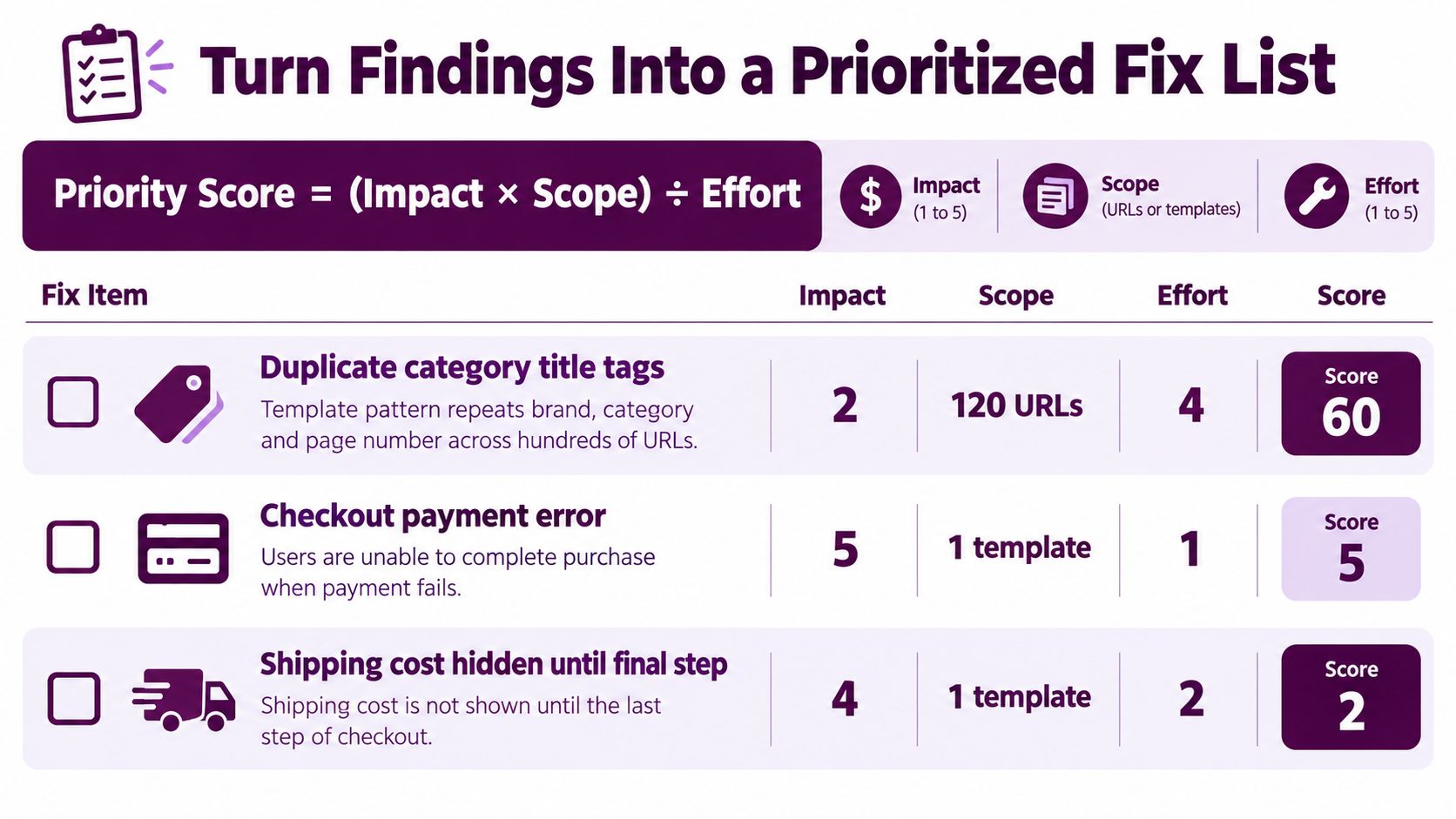
Use priority = revenue impact × scope ÷ effort as a planning model. Rate impact and effort on a consistent internal scale, and define scope before scoring anything.
Make scope commercially comparable
Don't compare raw product URL counts with checkout template counts. A shared checkout can affect the entire store while occupying a tiny number of URLs. Measure scope as the proportion of relevant revenue or shopping journeys exposed, using affected URL groups to calculate that exposure.
The scoring illustration shows the arithmetic, but mixed URL and template units shouldn't determine the release order.
Add a confidence note. A reproducible payment failure has stronger evidence than an untested assumption that different introductory copy will improve conversion. Include engineering dependencies, regression risk, and testing effort rather than estimating coding time alone.
Assign urgency and prove completion
The following windows are recommended operating targets, not external benchmarks.
Fix priority tiers and target timeframes
| Tier | Typical issues | Target window | Confirming metric |
|---|---|---|---|
| Critical | Checkout failures, noindex on important categories, blocked products | Within a week, with active outages escalated immediately | Checkout completion and intended product indexation |
| High | Variant canonical mistakes, incorrect Product markup, poor product loading | Within a month | Organic landing-page conversion and field performance |
| Medium | Low-traffic category titles, missing descriptive alt text, isolated orphans | Within a quarter | Search impressions and clicks by page group |
| Low | Cosmetic changes, minor edits on archived pages | When capacity allows | Revenue per session for affected templates |
Treat these tiers as defaults. An accessibility defect that prevents purchase isn't medium priority because someone filed it under missing labels, and an orphan bestseller isn't equivalent to an obsolete accessory.
After deployment, rerun the original acceptance test and monitor the same page groups in Search Console and GA4. Annotate promotions, stock changes, tracking changes, and seasonality so the team doesn't attribute every movement to the release.
Judge the result through purchase completion, revenue per session, and organic landing-page conversion, not traffic alone. Assign the highest-priority fixes now, each with a named owner, a due date, and evidence that will demonstrate completion.
Keyword Kick brings technical audits, JavaScript rendering, backlinks, and connected Search Console and GA4 signals into a shared SEO workspace. Visit Keyword Kick to bring your ecommerce audit findings together and turn them into a prioritized action list.