
You've got a spreadsheet with a few thousand keywords, half of them duplicates, and a content meeting tomorrow. Someone exported Search Console last month, someone else pasted in autocomplete ideas, and nobody can tell which terms you're already close to ranking for or which ones an AI answer now handles without a click.
That mess is exactly why you need to learn how to automate keyword research as a pipeline, not as a one off export. I'd start from owned search performance data, score what you can realistically capture, and finish with the actual SERP outcome. Volume and difficulty alone won't tell you where the next click comes from.
The Automated Keyword Pipeline at a Glance
Build the chain first, then write a single script. If you can't name the output of each stage, you'll automate confusion faster.
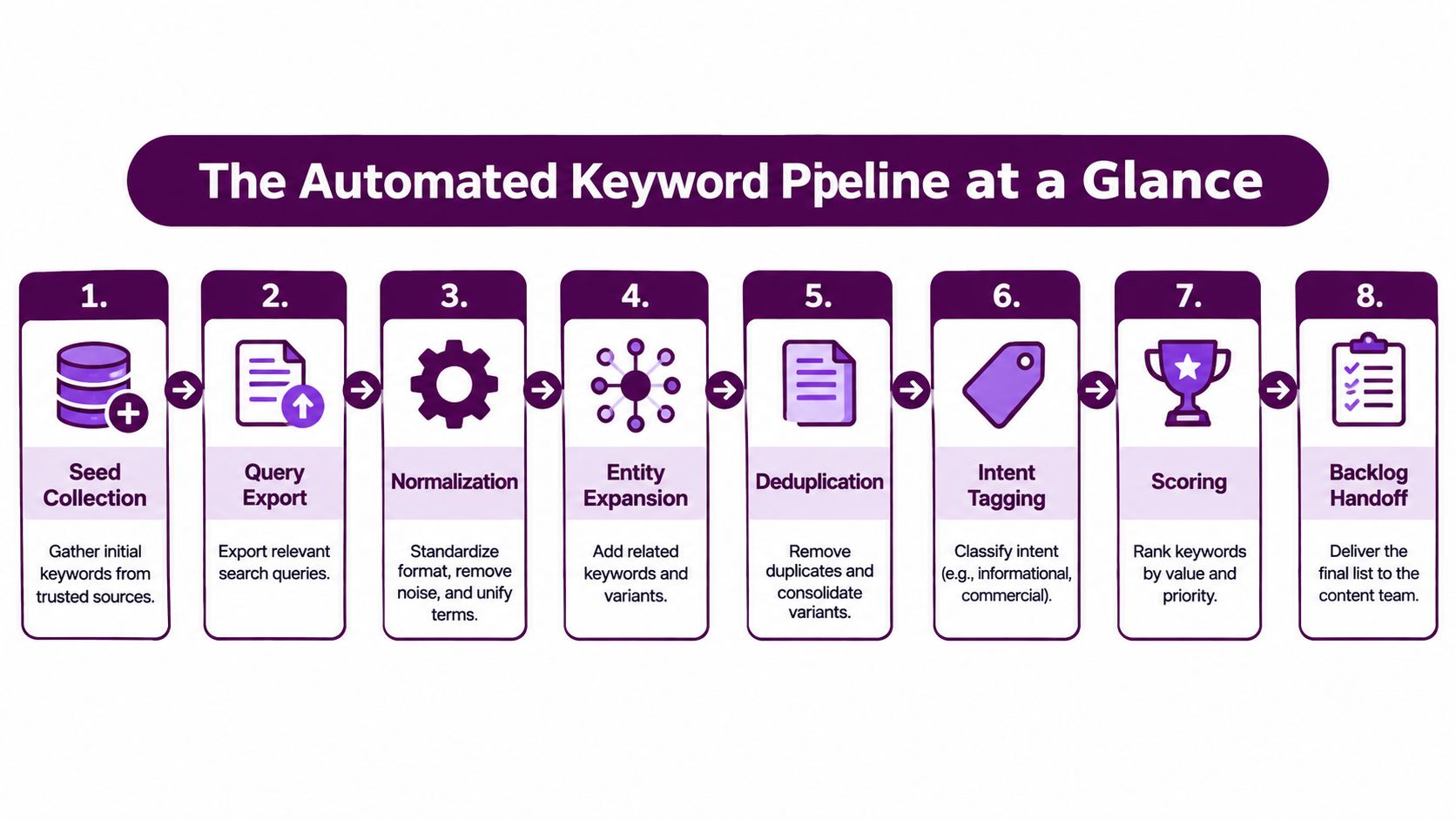
| Stage | Automation method | Output |
|---|---|---|
| Seed collection | Daily Search Console API pull plus product, service and question terms | Raw query table |
| Expansion | Autocomplete, People Also Ask and related-query pulls | Candidate keyword list |
| Normalization | Lowercase, punctuation strip, plural and spelling merge | Cleaned keyword list |
| Clustering | Token overlap, then embeddings for near-synonyms | Topic clusters mapped to URLs |
| Enrichment | Keyword data APIs for volume, difficulty, CPC and intent | Scored keyword table |
| Prioritization | Weighted opportunity score | Ranked backlog |
| Tracking | Daily SERP position snapshots | Position history by keyword |
| Reporting | Scheduled weekly brief from the stored tables | Stakeholder report |
Why the Order Matters
Expansion before normalization creates duplicates you'll pay to enrich twice. Enrichment before clustering wastes API calls on terms you'll merge anyway. Run token overlap first because it's cheap and explainable, then use embeddings only where near synonyms share intent but few words.
Seed collection also needs a human input that no API can invent. Add your product names, service names, and the phrasing customers use in sales calls and support tickets. Those terms anchor expansion to revenue, not just to topics a tool thinks are related.
Practical rule: every stage writes to one table keyed by query, page, country and date, so every score traces back to its source row.
That single keying rule is what makes re scoring possible. When you change weights, thresholds, or intent rules, you rerun the math on stored rows instead of re exporting everything by hand. It's also how you spot cannibalization, because the same query appearing for two pages becomes visible immediately.
Don't try to perfect all eight stages before launch. Get seed collection, normalization, and a basic ranked backlog working first, then add enrichment and SERP snapshots. A partial pipeline that runs daily beats a perfect design that lives in a notebook.
Set Up Your Data Sources Before Any Script Runs
Start with owned data because it's the cheapest and most reliable signal you'll get. Third party volume is an estimate. Search Console shows queries that already earned impressions for your pages.
Connect Search Console Properly
First, verify the Search Console property you want to automate, ideally the domain property so subdomains aren't split. Then enable the Search Console API in a Google Cloud project, create a service account, and add its email as a user on the property. Test access with a small query before you schedule anything.
The Google Search Console API documentation shows that searchanalytics.query() returns queries with clicks, impressions, CTR and average position, segmentable by page, country, device, search appearance, and date. Google recommends querying one day at a time and paging in increments of 25,000 rows, because the method caps at 50,000 rows per day for each search type, including web, image, and video.
Respect that cap from day one. Sites with many pages and countries hit it faster than you'd expect once you add dimensions. Querying one day at a time also makes failures cheap, because you rerun a single date instead of a whole month.
If you need the manual workflow first, use it to find keywords with Google Search Console and learn which dimensions matter for your site. Then automate that exact view.
Decide What Each Source Is For
- Search Console: proves existing visibility, especially high impressions with low CTR and positions near page one.
- Trends: shows direction and seasonality, not an exact search count.
- Seed list: product and service names, questions sales and support hear most, and your top pages by clicks.
- Keyword data APIs: fill volume, difficulty, and CPC gaps for terms you don't rank for yet.
Keyword research starts when you enter seed keywords related to your business or enter your domain to find keywords you already rank for. Do both. The domain view finds quick wins, while seed expansion finds gaps where you have no visibility at all.
Store every raw pull unchanged in its own table. Don't clean, merge, or score in place. When your formula changes in month two, and it will, you need the original query, page, country, device, clicks, impressions, CTR, and position rows to rescore history without guessing.
Document the limits next to the code. Anyone maintaining the pipeline later should see why requests are daily, why paging stops where it does, and which search type each job covers.
How to Pull and Expand Seed Keywords Automatically
Treat extraction as an information retrieval problem with quality controls, not as a prompt that returns a long list. A longer list isn't better if half of it is off topic.
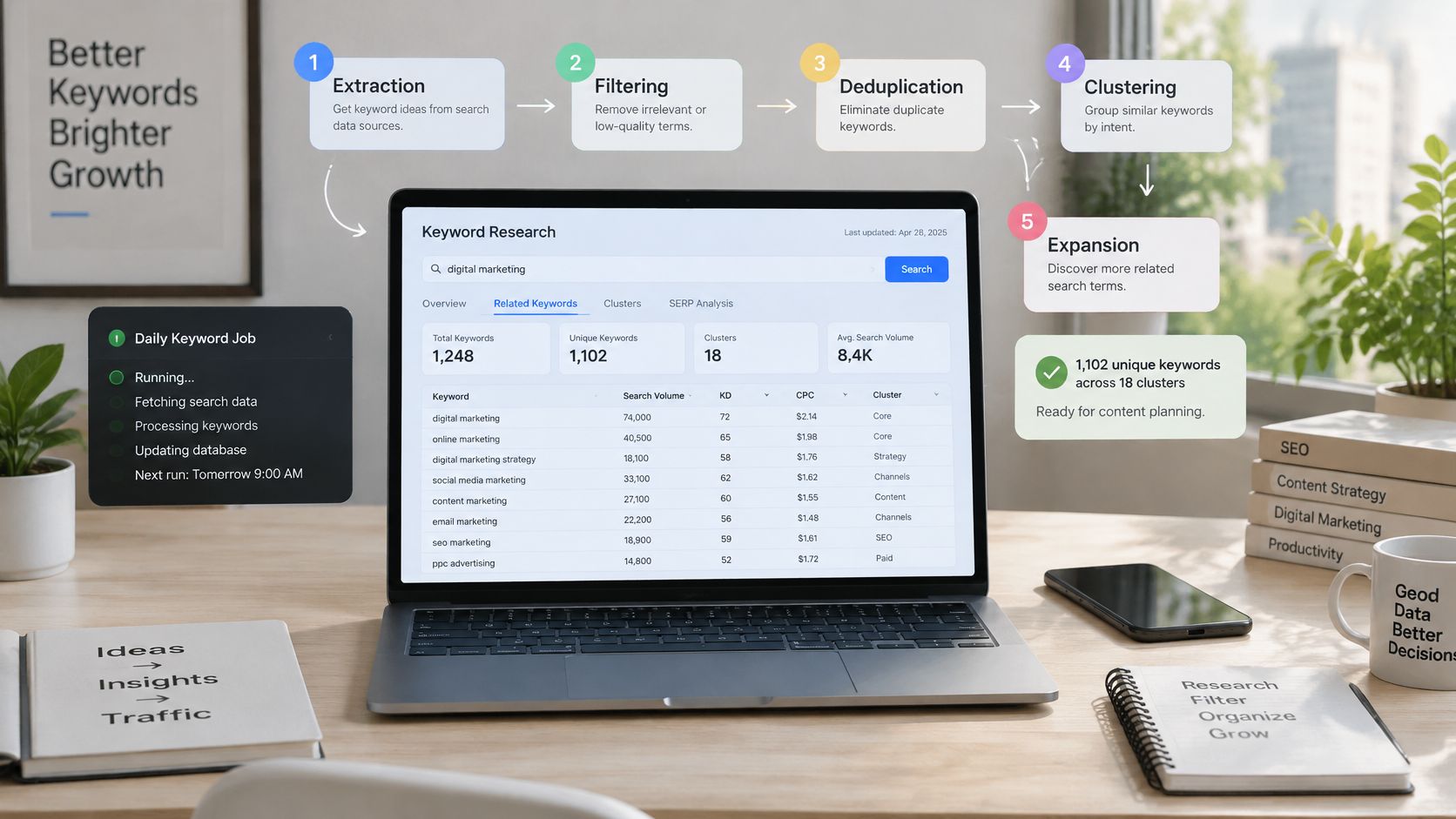
The Extraction Steps
- Run the daily pull. Store query, page, country, device, clicks, impressions, CTR, and position, because you'll need page level context for clustering and cannibalization checks.
- Remove brand terms with a regex list. Branded queries inflate opportunity and hide non branded demand, so keep them in a separate table for reputation monitoring.
- Expand each seed. Pull autocomplete and People Also Ask results, then add modifiers such as how to, best, vs, and pricing. Keyword ideas are generated from seed terms, related queries, autocomplete data, and People Also Ask results, so combine all four instead of relying on one source.
- Normalize before comparing. Lowercase everything, strip punctuation, and merge plurals and spelling variants. Skip this and "running shoe" and "running shoes" become two separate opportunities.
- Deduplicate, then cluster. Start with token overlap for obvious matches, then use embeddings for near synonyms. Map each finished cluster to one URL, or flag it as needing a new page.
- Label intent with rules first. Question words suggest informational intent, comparison words suggest commercial investigation, and product names often signal transactional intent. Send only the leftovers to a classifier, because rules are easier to audit.
- Sample and score quality. Pull a random sample, label it by hand, and calculate precision and recall before you trust the output.
For e commerce teams, the expansion step is where specific product language pays off. If you're working through store examples, this guide to find long tail keywords for Shopify is a useful companion for turning category seeds into longer, buyer specific phrases.
Measure Precision Before You Scale
The NIST publication on information extraction frames the trade off clearly, with precision as relevant retrieved keywords divided by all retrieved keywords and recall as relevant retrieved keywords divided by all relevant keywords, and increasing recall commonly reduces precision. That source also reports a case study on 7,278 short titles with only 0.3581 F1 and 0.4544 top-three mean average precision, despite outperforming baselines by 15–20% on texts under 10 tokens.
Short phrases are hard. "Apple store" can be navigational, local, or transactional, and two or three words rarely give a classifier enough context. That's why I wouldn't let automation publish or assign pages without review.
Keep a false positive log from the first run. Every irrelevant candidate you record becomes a rule, a blocklist entry, or a training example.
Benchmark discovery, clustering, intent classification, and URL assignment separately. A single aggregate accuracy number can hide a clustering stage that's merging buying guides with support questions. Review the highest impact clusters by hand, and use Keyword Kick's keyword gap analysis guide when you're comparing your clusters against competitor coverage.
Set a tunable threshold instead of one fixed output. For discovery you may accept lower precision to find more ideas, but for URL assignment you should demand much higher precision. When irrelevant candidates exceed the threshold you agreed, stop and fix the rules rather than cleaning the spreadsheet every week.
Scoring Keywords So the Backlog Ranks Itself
Sorting by volume puts famous, unreachable terms at the top of every backlog. A weighted score forces demand to compete with reachability, intent, and value.
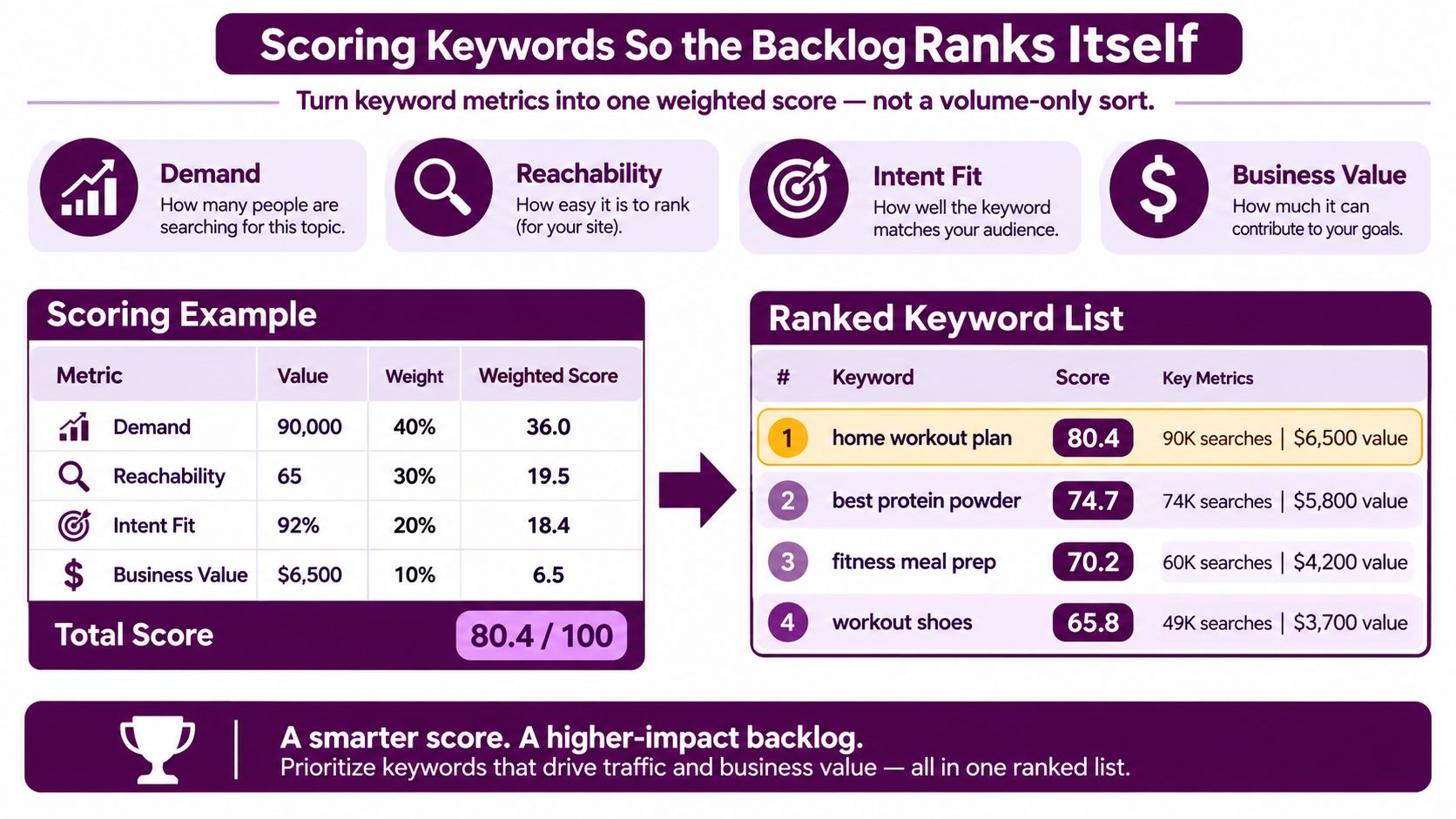
A Starting Formula You Can Adjust
Use four components for each keyword or cluster. Demand comes from volume or a relative trend signal. Reachability comes from difficulty, or better, from distance to page one when you already rank. Intent fit rewards commercial and transactional terms for product and category pages. Value uses CPC as a rough proxy for what a click is worth.
Start with 40 percent demand, 30 percent reachability, 20 percent intent fit, and 10 percent value as a hypothetical weighting. It's not magic. It's a starting point you'll revise after you see which scored terms actually move.
Say one term has 2,000 monthly searches, sits at position 14, and has difficulty 35. Another has 8,000 searches, sits at position 60, and has difficulty 78. The smaller term usually wins because you already own a result near page one, and improving that page is cheaper than starting from page six.
The Google Trends API documentation provides programmatic access across a rolling five-year window with daily, weekly, monthly, and yearly aggregation. Use daily data for spikes, weekly to smooth noise, and monthly or yearly for durable seasonality. Because Trends values are comparative rather than an absolute count of searches, use them for relative prioritization, such as which topic is accelerating or when to refresh content.
Combine that signal with Search Console. Trends can say interest is rising in a market, while your clicks and impressions show whether your site is capturing any of it. If interest rises and your impressions don't, that's a coverage gap worth scoring higher.
Keyword results can be filtered by volume, difficulty, intent, or CPC, grouped into topic clusters, and exported to an editorial calendar or content strategy. Export the top clusters weekly so the backlog updates itself instead of waiting for a quarterly research sprint.
Where the Score Misleads
CPC rewards commercial terms and undervalues informational queries that feed product pages through internal links and assisted conversions. Check intent before trusting the value component. A low CPC tutorial that consistently sends readers to a category page may be worth more than its score suggests.
Difficulty also doesn't know your existing authority on a topic. Once Search Console data exists, override reachability with the observed position for keywords you already rank for. A difficulty score built for the average site shouldn't outrank your own evidence.
Never compare Trends index values pulled from different requests. They're relative within each request, so adding them or ranking across separate pulls creates false winners. Pull competing terms together when you need a fair comparison.
Schedule Rank Tracking, Alerts and Reports
Automation fails when jobs run in the wrong order. Sequence matters as much as the queries themselves.
| Task | Frequency | Trigger or alert | Owner |
|---|---|---|---|
| Search Console pull | Daily, one day per request | Job fails or returns zero rows | Data owner |
| Rank snapshot for priority keywords | Daily | Position drops three or more places | SEO lead |
| Trends refresh | Weekly | Relative interest rises across four weeks | Strategist |
| Opportunity re-score | Weekly | Keyword crosses the score threshold | Strategist |
| Competitor visibility check | Weekly | Competitor gains five or more visibility points in a cluster | Content lead |
| Stakeholder report | Monthly, with a weekly digest | Quick-win count and movement | Account lead |
Set the Timing So Jobs Do Not Eat Stale Data
Run the Search Console pull early, for example with cron syntax **0 6 * * *** for a 06:00 daily run. Start dependent jobs an hour later, such as **0 7 * * ***, so a late export doesn't feed stale numbers into the score. Add a zero row check, because a successful job that returns nothing is usually an access or quota problem, not a quiet day.
To set up rank tracking, you enter the keywords to monitor, choose target search engines, and specify the geographic locations that matter to your business, and setup takes less than two minutes. Keep the tracked set focused on priority clusters. Tracking everything daily burns quota and buries the movements you care about.
Each daily SERP snapshot should store the organic top 10, whether an AI Overview block appears, which domains it cites, and whether your brand is among them. Position without that context can't explain a CTR drop.
Add Competitors and Alert on Action, Not Noise
Competitor analysis works by adding competitor domains within a project, after which the system tracks their keyword rankings, content strategy, backlink activity, and search visibility alongside your own. Measure visibility share on the same keyword set, or you're comparing different markets.
Alerts should fire on changes that need a person. A drop of three or more places for a priority keyword deserves review, while a one place wobble usually doesn't. Too many alerts train people to ignore all of them.
If an alert doesn't name an owner and a next action, it's a notification, not an alert.
Finish the week with a short report, not a data dump. Show wins, drops, new clusters, and three actions for the week. Stakeholders don't need every keyword that moved, they need to know what you'll fix, create, or stop doing.
Keep a monthly view as well for trends that weekly digests miss. Quick win counts, cluster movement, and competitor gains are easier to judge over a month than over seven noisy days.
Adding SERP Outcomes and AI Answer Visibility
A page can hold position one and still lose clicks. If your automation only reports rank and volume, it will call that page a winner while traffic falls.
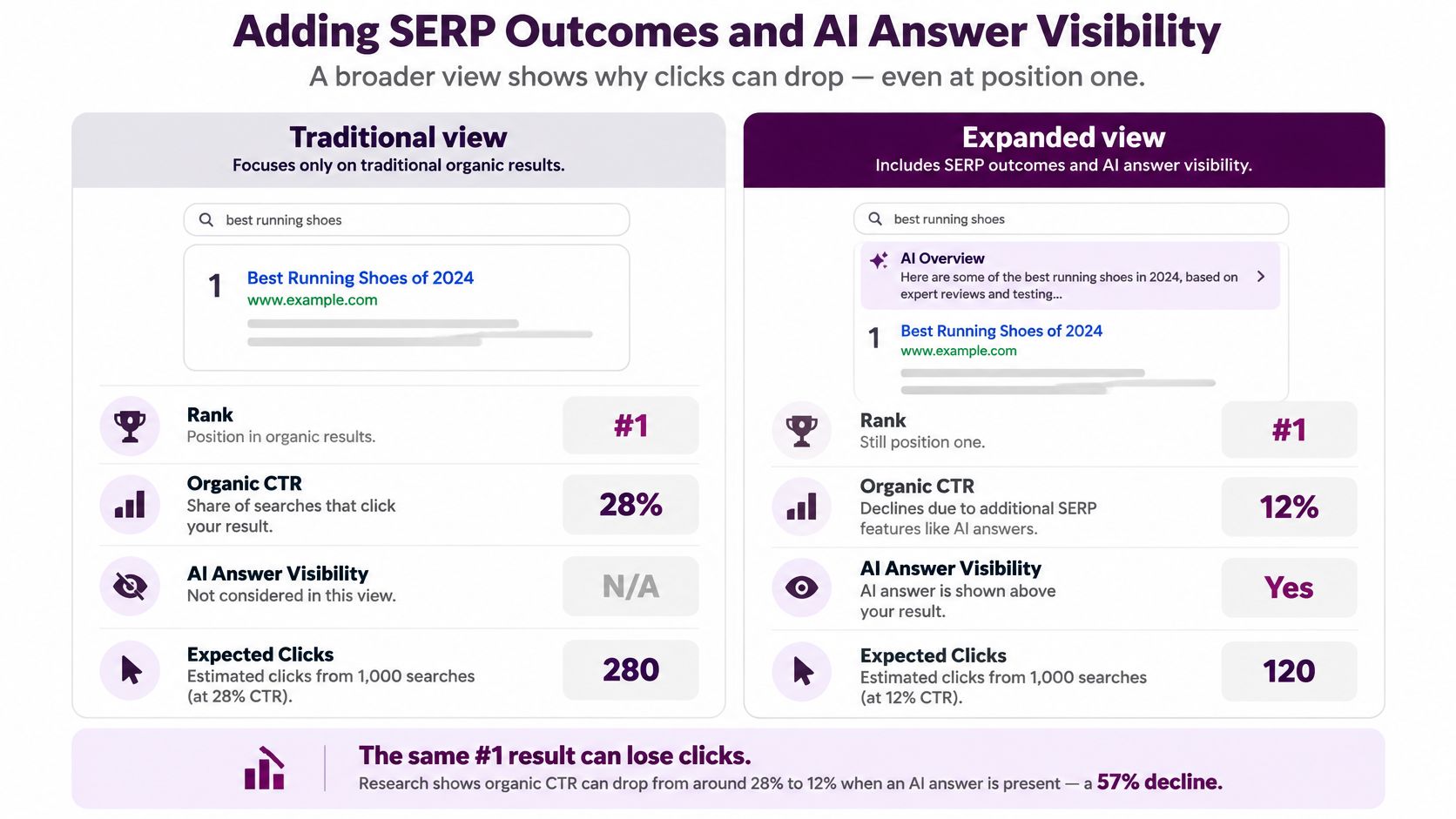
The G2 guide on automating keyword research reports DataForSEO analysis of more than 190 million keywords where AI Overviews appeared in 61.43% of analyzed Google results, up from 5.93% two years earlier, while measured desktop organic click-through rate for position one fell by 10.41 percentage points between September 2025 and August 2026. Treat that fall as a warning to measure capture, not just position.
Classify Each Keyword by Its Dominant Outcome
| SERP outcome | How to detect it | Action |
|---|---|---|
| Traditional click opportunity | Organic result in the top 10 with no answer block | Improve title, snippet and page depth |
| AI Overview present | AI Overview block in the stored SERP snapshot | Check citation, add a direct answer section |
| Citation eligibility gap | Your brand absent from the cited sources | Earn mentions and publish quotable, sourced content |
| Brand reputation | Brand-name queries, review snippets or knowledge panel | Monitor branded demand and reviews |
| Local or shopping exposure | Map pack or product carousel present | Fix business profile or product feed data |
Detect the outcome from the stored SERP snapshot, not from a manual search on your own laptop. Record whether an AI Overview appears, which domains it cites, and whether your brand is absent despite ranking well. You can monitor your brand in AI answers as part of that same check.
Consider a hypothetical 5,000 search query with an AI answer and no citation of your brand. It may be worth less than a hypothetical 400 search query where the answer is thin and your page is already in the top five. The smaller query offers incremental value you can capture.
Score that with a capture factor between 0 and 1 applied to volume. Use 1 for traditional click opportunities, and lower it when an AI Overview appears and your brand isn't cited. Multiply volume by the factor, then rank on that adjusted value instead of raw volume.
Store the factor in the same keyed table as the rest of the pipeline. When your rule changes, you can rerun history and see which clusters changed priority, and connect the result to assisted conversions, branded demand, and share of cited answers rather than positions alone.
Launch Your First Automated Run This Week
Don't aim for a complete system in week one. Aim for a trustworthy first run that produces a short list someone will use.
A Three Day Launch Plan
Day one is plumbing. Connect Search Console, pull a recent block of raw query data, and confirm daily row counts behave as expected. If access, paging, or storage fails here, nothing downstream matters.
Day two is quality control. Run expansion and clustering on your seed list, then review a 100 row sample by hand and record precision. Fix the worst false positives before you enrich anything, because enrichment makes bad candidates look credible.
Day three is delivery. Score the candidates, schedule the daily pull, and publish the first weekly brief to one stakeholder. One real reader will reveal confusing labels and missing actions faster than another internal review.
Check three signals before you expand the system. The false positive log should be shrinking, the quick win list should change week to week as data refreshes, and every top cluster should map to one URL. If a top cluster maps to three pages, you've found a cannibalization decision, not a content brief.
Build It or Buy It
Build in house when engineers can maintain scripts, credentials, quotas, and schema changes over the long term. Use a platform when maintaining scripts costs more than the subscription, or when the person who built the pipeline is the only person who can fix it.
I'd choose based on who will own the pipeline after month one, not on the first week's setup effort. The cheap build becomes expensive when it breaks during a reporting week and nobody owns the fix.
Whichever route you pick, keep the human review gate. Automation should surface candidates, evidence, and priorities. People should still decide which page gets created, merged, or left alone.
If you want this pipeline without maintaining every script yourself, Keyword Kick connects Search Console, keyword research, rank tracking, and competitor analysis in one workspace so you can score clusters and act on quick wins faster. Start with your seed terms or your domain, review the ranked backlog, and turn the first weekly brief into pages that capture real demand.