
You check the same 200 tracked keywords every month, publish around them, and traffic barely moves. Meanwhile, your site is already showing up for hundreds of specific searches you've never written down, most of them sitting low on page one or on page two. That's where learning how to find long tail keywords pays off. You stop guessing from a fixed list and start working from queries people already use.
Why Long Tail Keywords Hide in Plain Sight
Say a bakery owner tracks keywords and local SEO and wonders why rankings stall. The list is too broad to show what is happening. Someone searching long tail keywords for bakery websites has a clearer problem, a specific audience, and a different page need than someone searching a head term.
A long tail keyword is usually a query of three or more words with lower volume but clearer intent. One phrase rarely moves a site on its own. A cluster of related phrases around the same need can.
That long tail also keeps growing. In 2007, Google engineering executive Udi Manber estimated that 20-25% of queries each day had never been encountered before, Google later revised the commonly cited figure to approximately 15% by 2013, and in March 2025 Google Search advocate John Mueller reportedly said the proportion remains "always around 15%", according to PPC Land's history of long-tail queries.
Two jobs, not one
Finding a query is only half the work. The second job is deciding what it deserves, a new page, a section on an existing page, or no page at all. I would treat low competition as a warning sign until you've confirmed intent and business value, because easy traffic that never converts is still wasted effort.
Work through seven steps. Pull first-party queries, expand seeds, check the results page, score by value, then assign each target. You'll leave with a shortlist of targets, each with an intent label and a priority score, instead of a spreadsheet of disconnected phrases.
Five Sources That Surface Long Tail Queries
No single source gives you a complete picture. Search Console shows real demand for your own site, while public sources show how people phrase needs you don't rank for yet.
Long tail discovery sources and what each one shows
| Source | What It Reveals | Best For | How to Get It |
|---|---|---|---|
| Google Search Console queries | Exact queries already earning impressions | Finding page 2 gaps | Performance report, Queries tab, export as CSV |
| Google autocomplete | Common phrasings people type | Expanding seed terms | Type a seed term and note suggestions, using the same country and a logged-out window |
| People Also Ask | Follow-up questions tied to a query | FAQ sections and subtopics | Expand the boxes in a live results page |
| Related searches | Adjacent queries Google links together | Building topic clusters | Bottom of the results page |
| Competitor page headings | Subtopics that ranking pages cover | Spotting content gaps | Scan the H2 and H3 structure of the top three pages |
| Site search and support tickets | Words customers use in their own language | Conversational phrasing | Export site search logs and tag recurring ticket questions |
Start with two or three sources, not all six. I would anchor everything in Search Console, then add autocomplete for phrasing and competitor headings for gaps. Paste 20 to 30 candidates per source into one sheet and remove duplicates later, after you can see near-identical variants side by side.
Autocomplete and related searches change by location and login state, so record the country and browser setup you used. Otherwise you can't tell whether a difference next month is real demand or just a different search context. You can also find keyword opportunities through Google Trends when you need to check whether interest in a candidate is rising, flat, or fading before you commit time to it.
Support tickets deserve more respect than they usually get. Customers describe constraints in plain language, such as a tool they can't use or a budget they can't exceed. Those constraints often become the modifier that turns a broad topic into a useful long tail page.
Practical rule: If a phrase only appears in a keyword tool and nowhere in your own data, customer language, or a live results page, keep it as a candidate, not a commitment.
Start a sheet now with columns for query, source, impressions, position, and intent. Fill it from Search Console first.
How to Pull and Filter Queries in Search Console
This is the highest-value step in how to find long tail keywords because you're looking at searches that already produced impressions for your pages. You're not estimating demand. You're reading it.
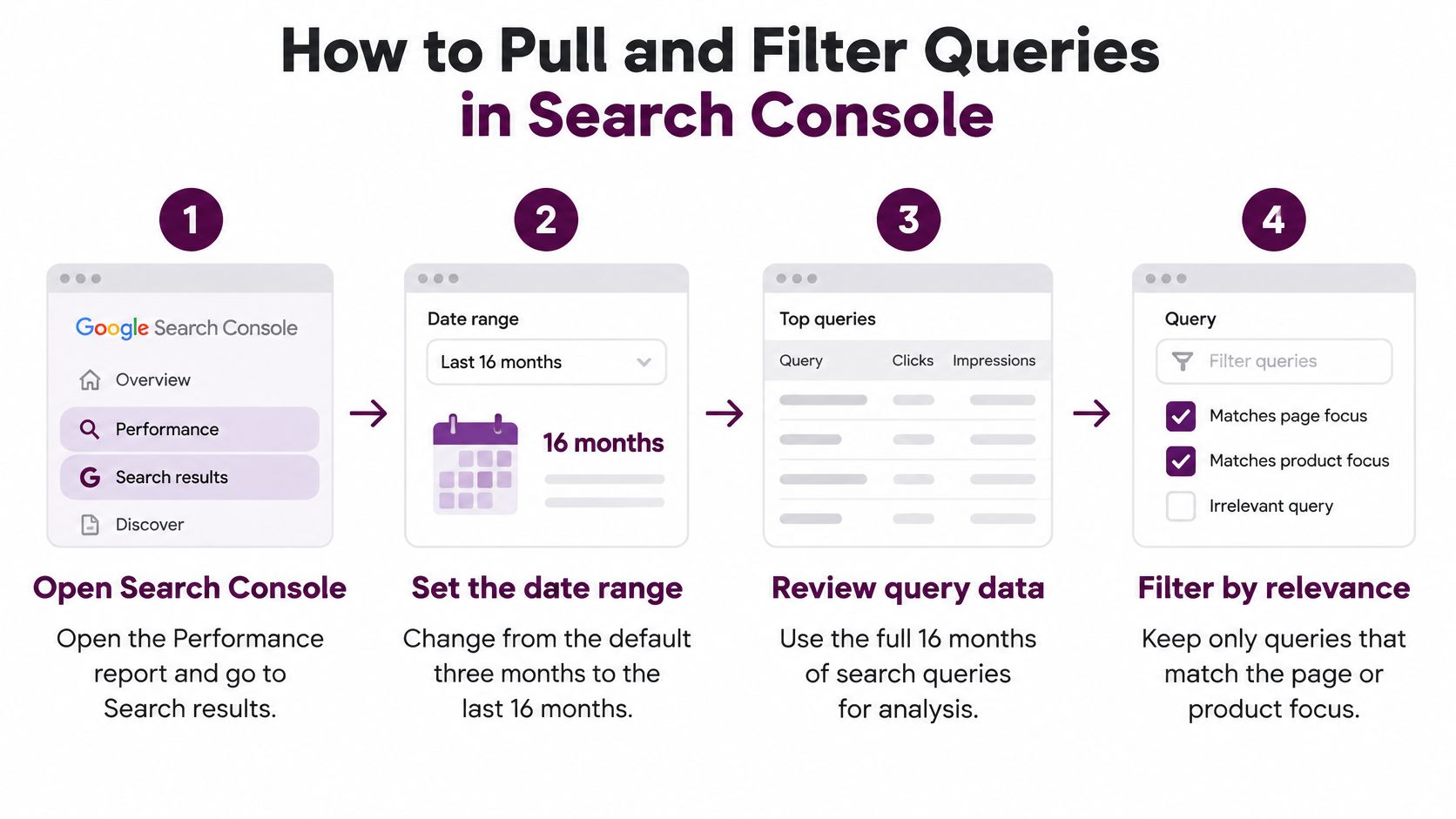
The seven-step pull
- Open Performance: Go to Search Console and open the Search results report under Performance.
- Expand the date range: Change the default view to the last 16 months, since Google's redesigned Search Console, announced on January 8, 2018, expanded the Search Performance report to provide 16 months of data, according to Google's announcement of the new Search Console. That window lets you compare year over year instead of reacting to a short snapshot.
- Filter by word count: On the Queries tab, add a custom regex filter, \S+(\s+\S+){2,}, to keep queries of three or more words. That keeps phrases like local SEO for bakeries in the export. If the file is unmanageably long, run \S+\s+\S+\s+\S+\s+\S+ as a second, tighter sort for four or more words.
- Sort by impressions: Put highest impressions first and skim the top 100 rows for queries that match topics you can serve.
- Shortlist positions 8 to 20: Prioritize queries with impressions but an average position between 8 and 20. A query hypothetically earning 40 impressions a month at position 12 is worth a closer look because a modest improvement can start earning clicks.
- Check stability over time: Open the Date view for a shortlisted query and look for steady impressions across the window. Steady demand beats a single spike from seasonality, news, or a one-off event.
- Export and archive: Download the CSV and archive it every quarter. Anything older than the retention window disappears, so your archive becomes your multi-year record.
For a deeper walkthrough of the report setup, see our guide to Search Console keyword research for 2026.
What a useful row looks like
Look at clicks, impressions, click-through rate, and average position together, and group the data by page before you decide anything. A query with impressions and almost no clicks usually means one of two things. Your position is too low, or your title doesn't promise what the searcher wants.
A useful row is a multi-word query with steady impressions, a position you can realistically improve, and a page already earning that impression.
I would ignore rows with tiny, erratic impressions on the first pass. Mark them, move on, and let the next quarterly pull tell you whether they were noise. Your first pass should produce targets you can brief this week, not a perfect census of every query you've ever touched.
How to Expand Seed Terms With Autosuggest and Modifiers
Search Console only shows queries you're already visible for. Seed expansion covers the adjacent needs you haven't earned impressions for yet, which is where new pages usually come from.

Build your seed list
Start with five to ten seed terms from product names, problems customers describe, and phrases your sales team hears. Keyword research starts when you enter seed keywords related to your business or enter your domain to find keywords you already rank for. If your seed list feels thin, this walkthrough on how to find seed keywords for your products is a useful way to build a fuller starting list from what you sell.
Type each seed into Google, add a space, then work through the letters a to z and note the autocomplete suggestions. It's slow, but it surfaces phrasing you'd never invent. Then run the same seeds through these modifiers.
Modifiers that turn one seed into long tail variants
| Modifier | Example Query | Intent Signal |
|---|---|---|
| best | best long tail keyword tools | Commercial investigation |
| how to | how to find long tail keywords | Informational, task-focused |
| for | long tail keywords for bakery websites | Niche audience, specific need |
| vs | Ahrefs vs Semrush for small blogs | Comparison, decision stage |
| without | long tail keywords without paid tools | Constraint-driven |
| how much | how much does keyword research cost | Price-aware, may be transactional |
Add natural-language variants too. Google reported that "How do I..." searches reached an all-time high in 2025, rising 25% year over year, while "Tell me about..." queries increased 70%, in Google's Year in Search 2025. Searchers increasingly type a complete problem instead of a keyword fragment, so your list should reflect that.
Three operator passes before grouping
- Quote the seed: Search "long tail keywords" in quotes and copy question-style titles from the results.
- Use allintitle: Search allintitle: plus the seed and one niche word, keeping phrases of three or more words.
- Mine headings: From the top three organic pages, copy H2 and H3 headings that name an audience, constraint, or comparison.
Then group everything into intent families. Say you collect how do I keep my bakery site showing up for local searches and local SEO for bakeries. Different wording, same desired outcome, so one strong page serves both. Merge phrasings that share an outcome, and split only when audience, stage, or constraints differ.
How to Check Intent and SERP Fit Before You Commit
I would apply a simple pass-or-park rule here. If the top results aren't the type of page you'd publish, or they don't answer the question your page would answer, the query goes to a parking list. It doesn't matter how attractive the volume looks.
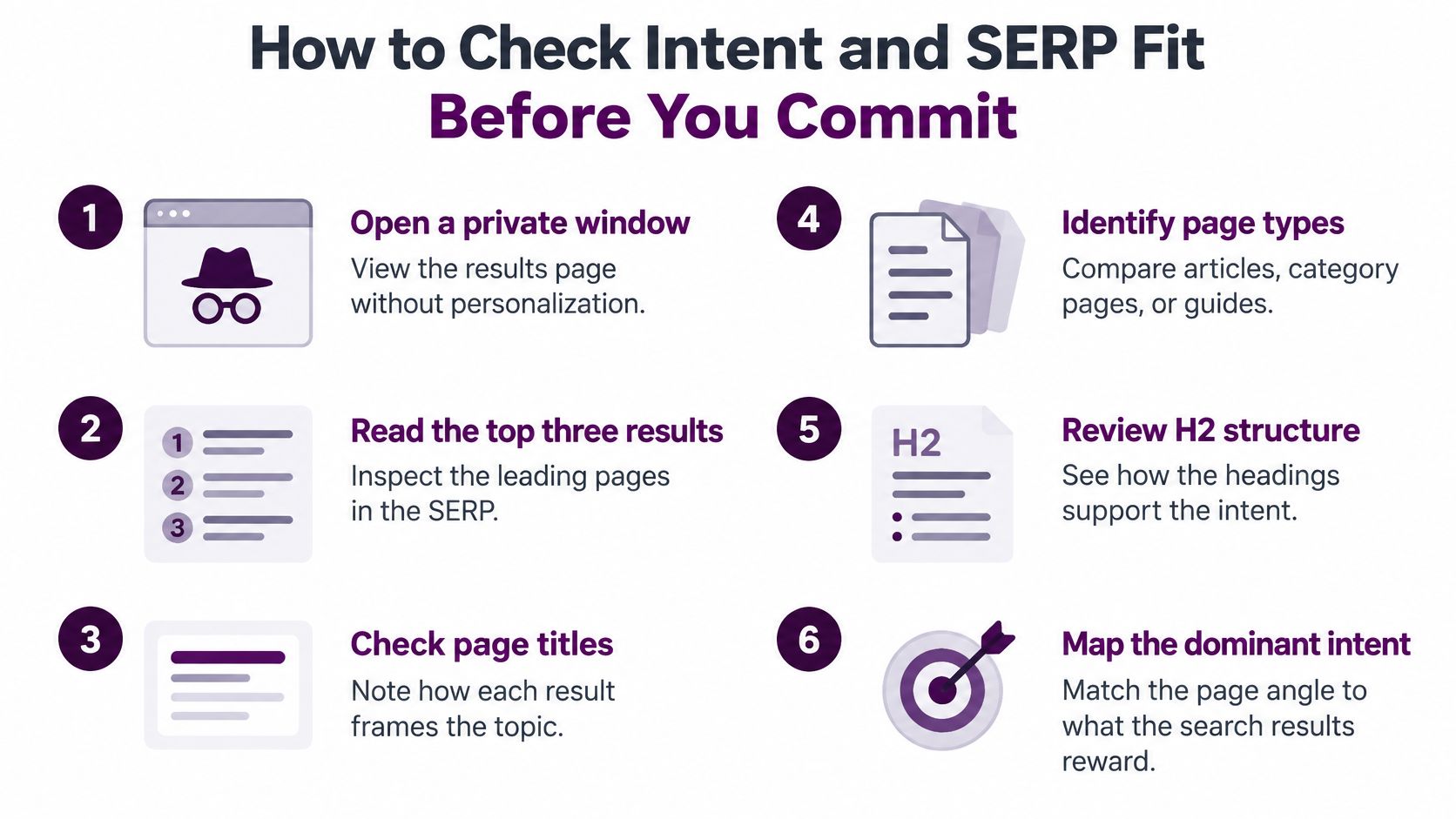
Open each candidate in a private window and read the top three results, their titles, page types, and H2 structure. This takes two minutes per query and prevents the most expensive mistake in the whole process, building the wrong kind of page well.
The five-point checklist
- Page type matches: The top three results are the same page type you'd publish.
- Question matches: The results answer the same question your page would answer.
- Organic results are visible: No shopping, map, or video block fills the top and pushes organic listings out of sight.
- A snippet is winnable: A featured snippet exists that you could target with a tight 40 to 60 word answer.
- Subtopics are beatable: The top pages cover subtopics you can match or beat, judged from the H2 and H3 list you collected during source and operator work, not from your Search Console export.
Fail item 1 or 2 and you park it. Fail item 5 and you're looking at a bigger investment than the query may justify.
SERP patterns and the intent they signal
| Dominant SERP Pattern | Intent It Signals | Action |
|---|---|---|
| Forum and discussion threads at the top | Firsthand experience and opinions | Write experience-led content or skip |
| Product or category listings | Purchase or shopping intent | Target only if you sell that product |
| Long guides and listicles | Broad learning and comparison | Expect to match their depth |
| Short featured snippet answer | Quick definition or fact | Write a tight answer block near the top |
| Calculators and tools | Completing a task | Consider a tool or interactive page |
| Mixed results with no clear pattern | Unclear intent | Park until the query clarifies |
Forum-heavy results are the classic trap. Searchers want firsthand experience, so a polished corporate guide often loses even when it's accurate. This guide on how to align pages with searcher needs goes deeper on matching format to intent. You can also find keywords that match search intent more reliably once you separate the outcome a searcher wants from the words they typed.
How to Prioritize Targets and Avoid Cannibalization
Volume-first prioritization is the habit to break. Long tail data is sparse and unstable, so a single low number tells you almost nothing. A cluster of related queries with clear commercial relevance can be worth far more than one higher-volume phrase that brings curious readers who never buy.

Score each candidate on five criteria.
- Impressions in the last 28 days: Evidence of current demand for your site.
- Average position: How far you are from earning clicks.
- Intent match: Whether an existing page already serves this need.
- Business value: GA4 conversions, assisted conversions, qualified leads, revenue, or product engagement tied to the landing page.
- Effort: Whether this needs a new page, a rewrite, or one added section.
That business-value test is the point Advanced Web Ranking's long-tail keyword guide makes about prioritizing by evidence of value rather than search volume alone, and why "low competition" isn't automatically attractive when commercial relevance is weak. Traffic without growth is just a nicer-looking chart.
The decision rule
Create a new page when intent is distinct and business value is clear. Add a section to an existing URL when the intent sits in the same family as a page you have. Ignore the query when it duplicates a page you already rank with.
Check overlap before you publish anything. Run a site: search on your domain with the query and see which URL appears. If two of your pages already compete for the same intent, consolidate them instead of publishing a third, because another near-duplicate dilutes your signals. Our guide can help you identify keyword overlap across pages before it turns into a cleanup project.
Prioritization template with example rows
| Query | Impressions (28 days) | Intent Match | Decision |
|---|---|---|---|
| how to find long tail keywords in GSC | 180 | Yes, existing guide | Update the existing guide |
| long tail keywords for bakery websites | 65 | No, niche and new | New dedicated page |
| long tail keywords vs short tail | 240 | Overlaps existing page | Merge into the existing URL |
| keyword research free tools reddit | 30 | Mixed | Park and review next quarter |
Those figures are illustrative, but the logic isn't. The bakery row wins a new page despite lower impressions because the audience is specific and unserved. Log every candidate this way, score it, and keep the top 10. Everything else waits for the next cycle.
Pick Your First Five Targets This Week
Take the five highest-scoring targets from your template and write a one-line brief for each. You need five fields, nothing more.
- Query: The exact phrase or intent family you're targeting.
- Intent: Informational, commercial, transactional, or navigational.
- Page type: Guide, comparison, product page, tool, or added section.
- Owner: One named person responsible for shipping it.
- Metric to watch: Impressions and average position first, conversions once clicks arrive.
Set the review point six to eight weeks out. That's long enough for impressions and average position to show whether a new page or an update moved anything, and short enough that you can still act on what you learn. Don't judge a long tail page on clicks in week two. Judge it on whether impressions broaden across the intent family.
Tools can speed up the sorting. Keyword Kick generates keyword ideas where each generated keyword comes with monthly search volume, keyword difficulty score, CPC data, search intent classification, and trend data, and results can be filtered by volume, difficulty, intent, or CPC, grouped into topic clusters, and exported to an editorial calendar or content strategy. That supports your judgement. It doesn't replace it, because the decision about which pages to build still comes from your own Search Console and conversion data.
Then make it a habit. Pull the long-range Search Console report each quarter, rerun the word-count filter, archive the export, and add anything new to your sheet. I would rather see a small list reviewed quarterly than a large list built once and trusted for a year.
Start your next keyword pull in Keyword Kick, where you can generate long tail ideas from a seed term or your own domain and evaluate each one with volume, difficulty, CPC, intent, and trend data in one place. Filter the list, group it into topic clusters, and export your top five targets straight into your editorial calendar. Bring your Search Console shortlist with you and turn it into a prioritized plan this week.