
You run a bakery, publish thoughtful posts about sourdough, and still wonder why your website isn't bringing people through the door. Your customers might be searching for bread near me, while home bakers want to know why their sourdough is flat. Both searches relate to your expertise, but they need different pages, and only one directly suggests a visit to your shop.
What Keyword Research Is and Why It Matters
Keyword research is the structured process of finding and evaluating the words people enter into search engines, then using that evidence to decide which pages to build and how to optimize them. A keyword can be a single word, a question, or a detailed phrase. It's not necessarily something you repeat throughout a page.
Think of a shopkeeper checking what customers ask for before stocking the shelves. Keyword research serves the same purpose for a website: you learn what people need before investing in content.

Connect Customer Language to Page Decisions
For the bakery, a location page could explain where the shop is, when it's open, and what's available. A sourdough troubleshooting guide would instead explain fermentation, dough strength, and shaping. Neither page should try to do the other's job.
Search has long been an important way people find information: a February 2012 Pew Research Center survey found that 91% of online American adults used search engines to find information on the web. That historical finding helps explain why businesses began treating search behavior as a planning input rather than an afterthought.
Demand isn't distributed evenly, either. In 2024, 148 Google query terms accounted for nearly 15% of total search volume, according to Rand Fishkin's analysis of Datos data, reported by MediaPost. That concentration doesn't mean a small business should chase the biggest terms. It means relevance matters when choosing from an uneven pool of demand.
A researcher evaluates:
- Wording and demand: How customers describe a need and whether people search for it.
- Relevance and intent: Whether your business can help and what the searcher wants.
- Competition and business value: Whether you can compete and what a useful visit could achieve.
For example, best running shoes for flat feet suggests comparison, so a buying guide fits. Why do my feet hurt when running suggests learning, so an educational explainer is more appropriate.
So, what is keyword research in SEO in practical terms? It's a method for deciding which pages deserve to exist and what each must satisfy. Start by naming a topic your business covers and listing the phrases customers would use to ask about it.
Keyword Metrics That Guide Every Choice
Core keyword metrics and how to read them
| Metric | What It Measures | How to Use It |
|---|---|---|
| Search volume | Average monthly searches for the exact query, sometimes grouped with close variants | Sizes demand; read as a range because tools estimate differently |
| Keyword difficulty | How hard page-one results are to beat | Compare keywords only within one tool, against your site's authority |
| CPC | Average price advertisers pay per click | Proxy for commercial value; higher values suggest buyers are competing |
| Trend | Direction of demand over time | Flags rising topics and seasonal dips before you commit a content calendar |
Every metric answers a different question. None is a verdict on its own, and combining them doesn't turn an estimate into a guarantee.
Read Volume and Difficulty as Estimates
Search volume helps you compare the relative size of opportunities. It doesn't tell you how many visitors your page will receive, how many searchers are unique people, or how many will become customers.
Check the selected country and language before comparing terms. Also check whether the tool groups similar phrases, because an exact-looking number may represent a broader set of searches. Treat small differences cautiously rather than assuming the larger estimate identifies the better opportunity.
Keyword difficulty estimates the competitive challenge. Tools use different methods, often drawing on ranking-page strength and backlink-related signals, so scores from separate tools aren't interchangeable. Content requirements also matter: competing with a useful calculator may require building a calculator, not writing a longer article.
Compare candidates within the same tool, then inspect the results yourself. A manageable score won't help if the query requires expertise, product access, or evidence you can't provide.
Practical rule: Use metrics to narrow your choices, then use the actual search results to test those choices.
Use CPC and Trends Without Overreading Them
Cost per click, or CPC, comes from paid advertising. Higher advertiser spending can suggest commercial interest, but it doesn't prove that organic visitors will convert for your business. It also isn't the price you must pay to appear in organic results.
Trend adds the time dimension. A bakery planning content about holiday bread needs to understand seasonal interest, while a software company should distinguish lasting demand from attention around a product announcement. Google Trends can help you compare interest over time, but its relative-interest display isn't a monthly search count.
Say you offer freelance SEO services. A narrowly searched phrase about hiring a freelance SEO consultant could be worth more to you than a popular definition query. The smaller audience has a clearer reason to contact you, while the larger audience may only want an explanation.
Begin with terms that match your offering and present a competitive challenge you can realistically address. Use volume to compare the remaining opportunities, not to rescue irrelevant ones.
Search Intent and the Page It Needs
Search intent types and the page each one needs
| Intent | Searcher's Goal | Example Query | Page to Build |
|---|---|---|---|
| Informational | Learn or understand a topic | what is keyword research | Guide or explainer |
| Navigational | Reach a specific site or login | [brand name] login | Brand's own page for that destination |
| Commercial | Compare options before buying | best keyword research tools | Comparison or review page |
| Transactional | Buy, sign up or start a trial | keyword research software pricing | Product or pricing page |
Search intent is the reason behind a query. Topic relevance alone isn't enough: a page about software can still disappoint someone who wants to see its price.
Audience language needs interpretation, too. Google's SEO Starter Guide explains that knowledgeable and less familiar users may use different terms for the same subject. Your task is to understand the need behind the wording, not just recognize a phrase.
Check the Results Before Choosing a Format
Search the candidate keyword in your target market and inspect the leading organic results. The search engine results page, often shortened to SERP, gives you practical evidence of the formats search engines currently consider relevant.
Look for patterns:
- Guides and explainers: Searchers likely need to understand something or complete a task.
- Comparisons and reviews: Searchers are evaluating alternatives.
- Product, category, and pricing pages: Searchers may be ready to choose or buy.
- Official destinations: Searchers want a particular brand, account page, or service.
Open the pages rather than judging by titles alone. A guide might include product recommendations, and a category page might contain substantial educational content. Identify the main job each page performs.
Correct the Page, Not Just the Keywords
Suppose a team publishes a blog post targeting keyword research software pricing. In this scenario, the results mostly contain pricing pages, but the post explains how software subscriptions work without showing the company's plans.
Adding the phrase to more headings won't fix the mismatch. A dedicated pricing page with clear inclusions, billing information, and a next step is a better fit. The educational post can remain useful for a different question.
A page can mention the right subject and still answer the wrong need.
Some queries have mixed intent. If the results contain both guides and products, record a primary intent and note the secondary need rather than pretending the category is certain.
Give every candidate an intent label before adding it to a publishing plan. Then write a simple completion test: after visiting this page, what should the searcher understand or be able to do?
How to Run Keyword Research Step by Step
Start with a business problem, not an empty spreadsheet. A bakery might want more local orders; a software company might need better pages for prospects comparing tools. That purpose helps you reject attractive-looking keywords that don't support the site.
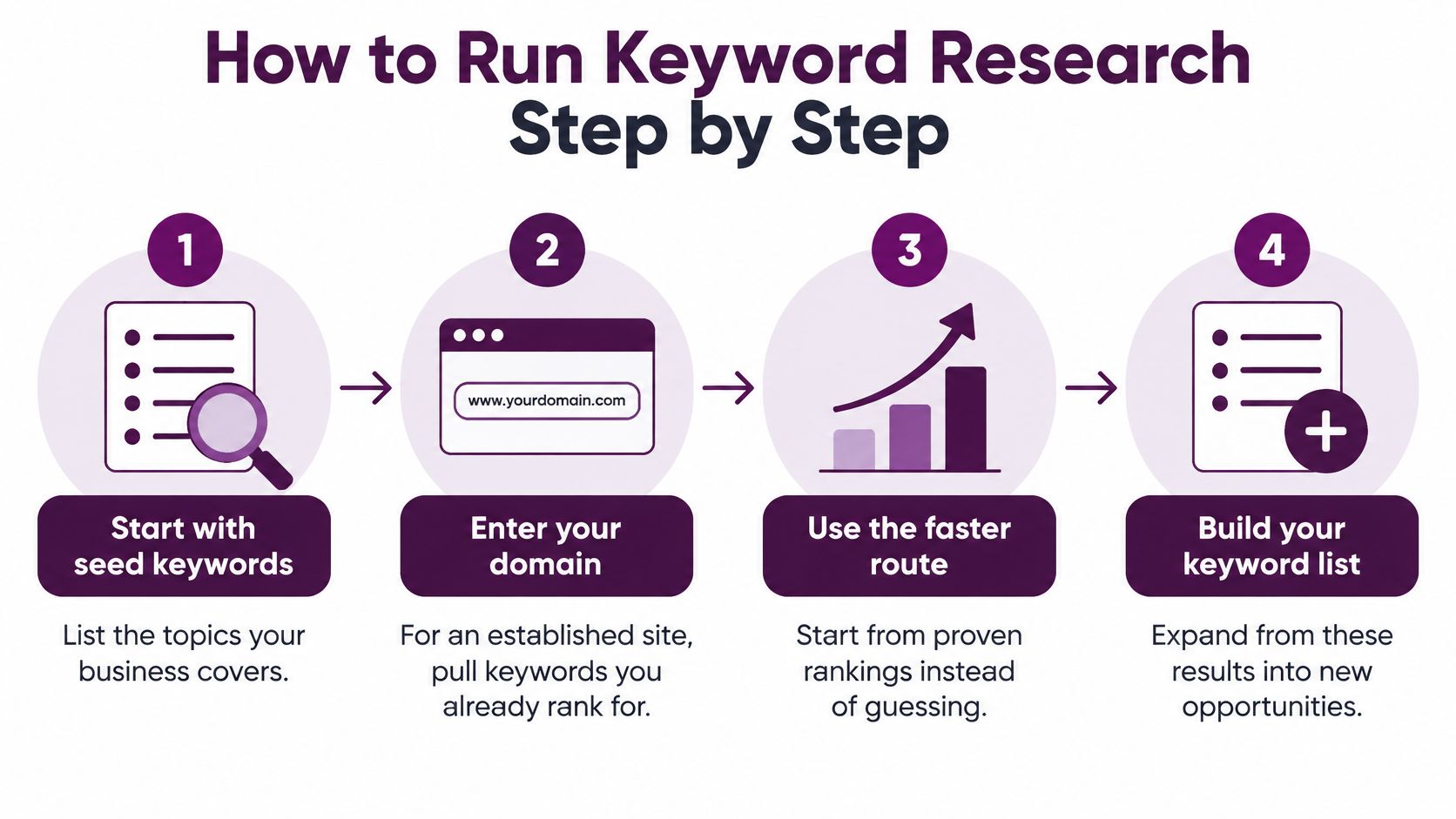
Discover and Clean Your Candidates
Start with seed keywords or your domain. Enter broad topics related to your business, such as sourdough bread, bread delivery, or baking classes. For an established site, enter your domain to find keywords you already rank for. Existing visibility gives you an evidence-based starting point, but don't assume every ranking query is strategically useful.
Expand through different discovery routes. Use autocomplete, related searches, People Also Ask questions, customer enquiries, and competitor pages. Seed-based research expands your topics; domain-based analysis reveals existing visibility and competitive gaps; question-based research captures how people describe problems. Collect broadly enough to see patterns without treating list size as the objective.
Remove noise before evaluating opportunities. Delete duplicate entries, irrelevant topics, and searches aimed solely at another brand's login or support destination. Keep relevant competitor-comparison terms when you can address them. A competitor's ranking is a clue, not an instruction to copy their content plan.
Customer wording deserves its own column. If buyers consistently describe a service differently from your internal team, preserve that language instead of immediately replacing it with industry terminology.
Turn Candidates into Page Assignments
Label the primary intent. Apply the results-based check and record the page format the searcher needs. For more help reasoning through ambiguous phrases, Riff Analytics' guide to search intent analysis for keyword selection is a useful companion. Don't accept an automated label without checking whether the results support it.
Record the metrics consistently. Keep volume, difficulty, CPC, and trend alongside the target market and the tool used. Mixing countries or difficulty scales makes comparison unreliable. Leave a note when customer evidence supports a term that a tool reports as having little demand.
Assess what competing would require. Inspect leading pages for format, usefulness, specialist expertise, original evidence, and links. Google Research's information-retrieval overview describes the importance of links and descriptive anchor text in web retrieval. Don't reduce the challenge to placing the keyword in a title.
Group candidates and assign a destination. Give related phrases a shared page when they describe the same task. Record whether that destination exists, needs improvement, or must be created, then give it a provisional priority. Avoid assigning separate URLs merely because the wording differs.
Keyword research sheet template
| Keyword | Intent | Target Page | Priority |
|---|---|---|---|
| what is keyword research | Informational | Guide or explainer | High |
| keyword research software pricing | Transactional | Product or pricing page | Medium |
| best keyword research tools | Commercial | Comparison or review page | High |
These priorities are illustrative, not universal recommendations. Add your metric columns, market, proposed URL, and rationale to the working sheet. A useful row should explain a decision, not just preserve a number.
Grouping Keywords into Topic Clusters
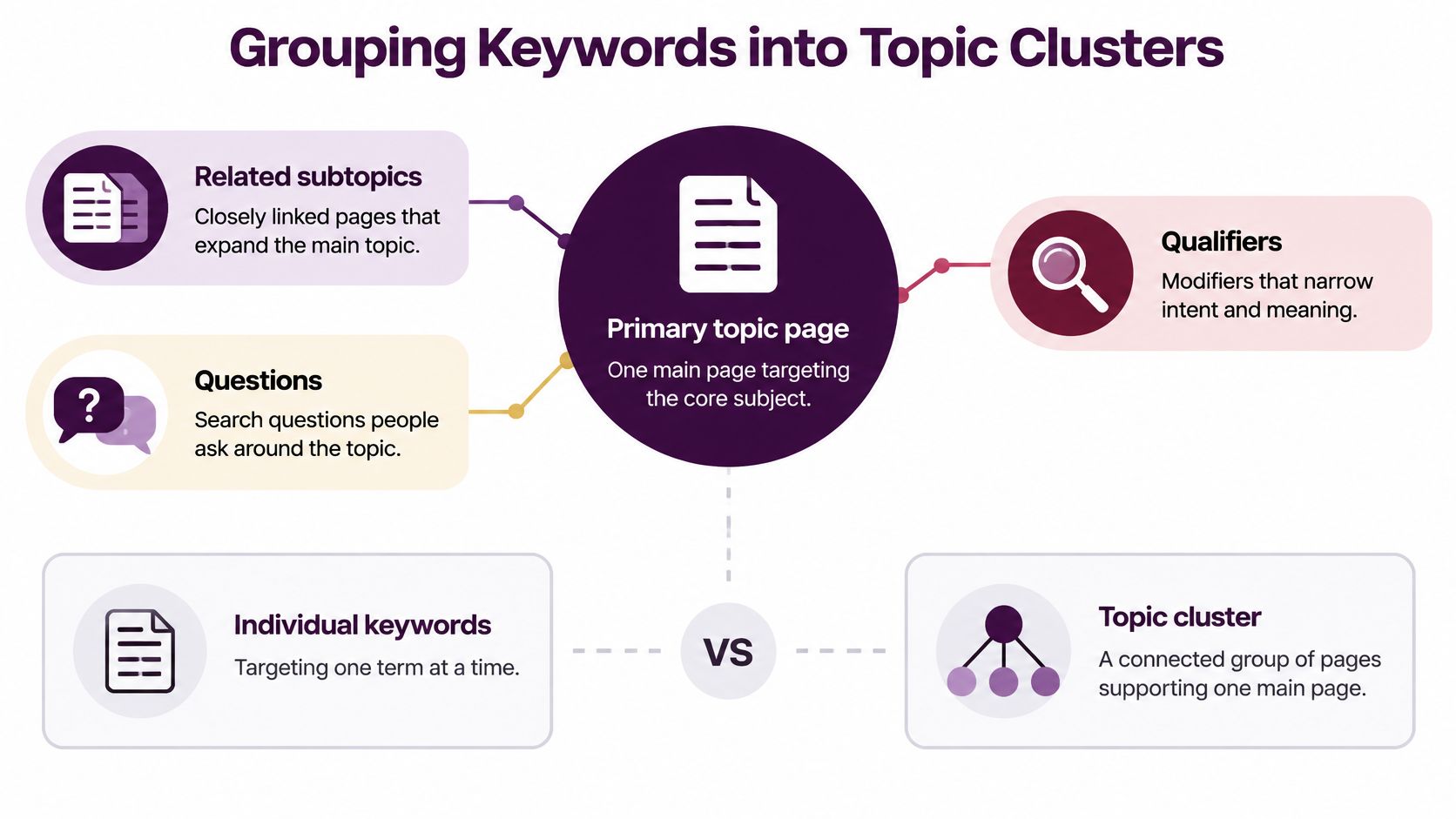
Targeting individual keywords can produce a fragmented website: separate posts for slightly different wording, broad articles with unclear purposes, and useful pages nobody can find. Topic clusters organize the work around subjects and distinct searcher needs.
There are two levels to distinguish. A page-level keyword group contains phrases a single page can satisfy. A site-level topic cluster connects a primary topic page with supporting pages that handle separate, related tasks.
Build Around Tasks, Not Word Variants
Consider a primary page about keyword research. Supporting pages could address keyword research tools and long-tail keywords, because each can justify focused treatment. Keyword research for beginners, however, might belong on the primary guide if that page already serves beginners well.
The range of wording is substantial. In September 2024, 612,981 keywords were searched only once in Datos' panel, representing 2.2% of total Google search volume, according to SparkToro's analysis of approximately 332 million queries. That finding illustrates varied query language, not a reason to publish a separate page for every rare phrase.
Use these grouping criteria:
- Shared task: Combine phrases when the same explanation, product selection, or instructions would satisfy them.
- Different deliverable: Separate terms when one needs a tool comparison and another needs an implementation guide.
- Meaningful depth: Create a supporting page when the subject warrants independent treatment, not merely another heading.
- Useful connections: Link pages where readers have a genuine reason to continue.
Know When to Combine or Separate Pages
Overlap between ranking URLs can support a grouping decision. If the same pages appear for closely related searches, they may belong together; if results consistently require different formats, separate destinations may be more appropriate.
For software businesses, Raze's SaaS SEO playbook offers additional context for organizing related subjects. Keyword Kick's topical authority guide can help connect those page relationships to broader subject coverage.
Keyword tools can support filtering by volume, difficulty, intent, or CPC, grouping related results, and exporting selections into an editorial calendar. Review those groups before publication, because shared vocabulary doesn't always mean shared intent.
Before creating a URL: Write down the distinct task it will serve. If it's indistinguishable from an existing page's task, improve that page instead.
Prioritizing Keywords and Knowing Their Limits
Prioritize business value and intent fit before demand. A keyword deserves attention when you can explain who it serves, what useful action might follow, and why your site can provide a credible answer.
Use a simple rating of high, medium, or low across business value, intent fit, and feasibility. Then account for your existing coverage, competing pages, likely backlink requirements, production cost, and whether updating an established URL would be more practical than starting from scratch.
Judge Opportunities Beyond Rankings
A high position isn't the same as a valuable outcome. Even a historical Pew Internet report from 2004 noted that users typically viewed 1.8 result pages per search, illustrating why visibility mattered, but position alone never explained whether a visit helped the business.
AI answers add another decision: does the searcher still need to act beyond the results page?
An analysis of more than 10 million keywords reported by Search Engine Land found that AI Overviews appeared for about 6.5% of tracked queries in January 2025, nearly 25% in July, and below 16% by November, while zero-click rates for comparable keywords declined from 33.75% to 31.53% after an Overview appeared. Those findings don't justify assuming that an AI answer automatically eliminates clicks.
Separate answerability from actionability. A brief definition may be satisfied directly in search; someone choosing a product, testing software, downloading a template, or checking original evidence may still need a website. Informational coverage can support awareness, but don't forecast sales from visibility alone.
Track Search Console impressions and clicks alongside qualified visits, enquiries, sign-ups, and revenue in your analytics and customer systems. Use those outcomes to prioritize keywords by revenue potential, while retaining educational pages with a clear supporting role.
Recheck the Opportunity in Each Market
A translated keyword isn't automatically a localized strategy. Semrush's AI Overviews study describes differences in AI Overview exposure and click behavior across query types, reinforcing the need to inspect the actual search environment rather than apply a universal assumption.
Compare local-language wording, country-specific results, mobile layouts, and prominent search features. A regional page may be justified when currency, availability, regulations, delivery, or buying expectations materially change the answer. If the need and offering remain the same, another regional URL may add duplication without helping visitors.
Keep candidates that pass both tests: they matter to your business, and you can satisfy them competitively in the intended market. Put uncertain opportunities into a review list rather than forcing them into the publishing queue.
Turn Your Keyword List into a Content Plan
A keyword list becomes useful when someone can act on it. Choose a manageable set of priorities, mixing improvements to existing pages with new destinations that fill a genuine gap. Assign each page an owner, a deliverable, and a clear searcher outcome.
For each assignment, decide whether to create, update, or merge. Keep the keyword group, intended audience, page format, supporting evidence, internal links, and business action together. Use those decisions to map your content for search, rather than treating the calendar as a list of disconnected article titles.
Plan a Month of Concrete Work
- First week, establish the shortlist: Gather candidates, check customer wording, and confirm intent labels.
- Second week, organize coverage: Build clusters, identify overlap, and connect proposed destinations.
- Third week, make page decisions: Assign creation, updates, or consolidation, then prepare briefs and required evidence.
- Fourth week, publish and measure: Complete the selected work, verify indexing accessibility, and establish performance tracking.
Before drafting, use Pure Write's guide to how to outline search-friendly content to translate the page's purpose into a useful structure. An outline should answer the visitor's main question before adding background material.
In Keyword Kick, we bring rank tracking, backlink analysis, site audits, keyword research, and competitor analysis into a single workspace. Each generated keyword includes monthly search volume, difficulty, CPC, intent classification, and trend data, so you can keep the evidence beside your decisions.
Review Search Console impressions, clicks, and average position monthly, then compare page outcomes with your original purpose. Today, choose a priority keyword and write down its intent, target page, and the specific need that page must satisfy.
Keyword Kick helps you find keyword opportunities and evaluate them alongside rankings, competitors, backlinks, and technical issues. Visit Keyword Kick to start with a seed topic or your domain, then turn the strongest opportunities into clear page priorities.