
A sitemap is often treated like a big red submission button. A site owner publishes a new collection of product pages, generates sitemap.xml, submits it in Google Search Console, and waits for visibility to improve. When traffic doesn't move, the sitemap gets blamed.
That diagnosis is usually wrong. A sitemap helps search engines discover URLs, but it doesn't force crawling, indexing, rankings, or traffic. It works best as a clean operational signal, especially when a website is large, frequently updated, or difficult to diagnose. The central question isn't whether a sitemap exists. It's whether the file accurately represents the pages you want indexed and gives your team enough structure to find problems quickly.
Why Your Sitemap Might Be Ignored
A technically valid sitemap can sit in Search Console with no obvious effect. The URLs may return a successful response, the XML may parse correctly, and the file may be submitted from the right property. Yet the pages still might not appear in search.
That outcome is normal when the sitemap is doing its actual job, which is suggesting URLs for discovery. It isn't an indexing command. Google still evaluates the page itself, including its content, accessibility, duplication signals, internal links, and overall usefulness. A sitemap can't turn a thin category page into a valuable result or resolve a page that conflicts with its canonical directive.

The submission trap
A common enterprise failure looks like this:
- A merchandising team launches many filtered product URLs.
- The CMS adds every URL to the sitemap automatically.
- The SEO team submits the file.
- Search Console shows discovery or indexing anomalies.
- The team assumes Google is failing to process the sitemap.
The more likely issue is that the file is communicating too much. Parameter URLs, redirected pages, blocked pages, duplicate templates, and pages marked noindex don't become better candidates because they appear in XML. They create conflicting signals that make the file less useful as a representation of the site's preferred inventory.
A sitemap should contain pages you want search engines to discover and potentially index. That normally means accessible, indexable, canonical URLs with content that serves a clear purpose. It shouldn't be an export of every URL your database can produce.
Practical rule: Treat the sitemap as a curated list of preferred URLs, not as a complete database dump.
What an ignored sitemap tells you
If submitted URLs aren't indexed, inspect the pages before changing the XML. Check whether the URL resolves to the intended content, whether the page is linked from the site, whether another URL is canonical, and whether the content deserves a standalone search result. For duplicate-page investigations, teams can also use tools for spotting duplicate pages to separate sitemap errors from broader content problems.
The useful outcome isn't a higher submitted count. It's a reliable gap between what the sitemap recommends and what the site supports. When those signals agree, Search Console becomes far more useful for finding genuine indexing issues.
XML Sitemap Structure and Essential Tags
A valid XML sitemap has a simple core. The document declares the sitemap namespace, contains a <urlset> element, and places one <url> element around each submitted location. The <loc> value is the essential URL field. It should be an absolute URL using the preferred protocol and hostname.
A minimal structure looks like this:
<?xml version="1.0" encoding="UTF-8"?>
<urlset xmlns="http://www.sitemaps.org/schemas/sitemap/0.9">
  <url>
    <loc>https://www.example.com/example-page/</loc>
    <lastmod>2026-01-15</lastmod>
  </url>
</urlset>
The date above is an example format, not a recommendation to fabricate update dates. Use lastmod only when it reflects a meaningful content change. A generated timestamp that changes every time the CMS publishes something can make the signal noisy and reduce its diagnostic value.
Required and optional fields
<loc> is the field every URL entry needs. The URL must match the version you want crawled and indexed. Avoid mixing protocol versions, hostnames, or URL formats that represent the same page.
<lastmod> is optional and can help search engines understand when a page materially changed. It shouldn't be refreshed just because the sitemap regenerated. A product description update, a substantial editorial revision, or a meaningful availability change may justify a new value. A template deployment that touches every page may not.
<changefreq> and <priority> are also optional. They can describe your own expectations, but they aren't a substitute for a sound internal linking structure or accurate update signals. Don't use priority as a ranking lever, and don't assign every URL the same artificial urgency. If your generator creates these fields automatically, audit whether the output reflects reality.
Validation before publication
XML is strict about syntax. Preserve the encoding declaration, close every element, escape reserved characters correctly, and ensure the server returns the file consistently. A single malformed entry can prevent reliable processing of the document.
For teams that don't want to build the file manually, an automated sitemap creation tool can produce a starting XML file from a URL list. The generation step still needs editorial and technical filtering. A cleanly formatted sitemap full of non-canonical URLs remains a bad sitemap.
For a broader reference on implementation details and current considerations, 2026 sitemap best practices offers another resource to compare with your own setup. Use any external checklist as a review aid, not as a reason to add tags or URLs without a clear operational purpose.
Handling Large Sites and Index Files
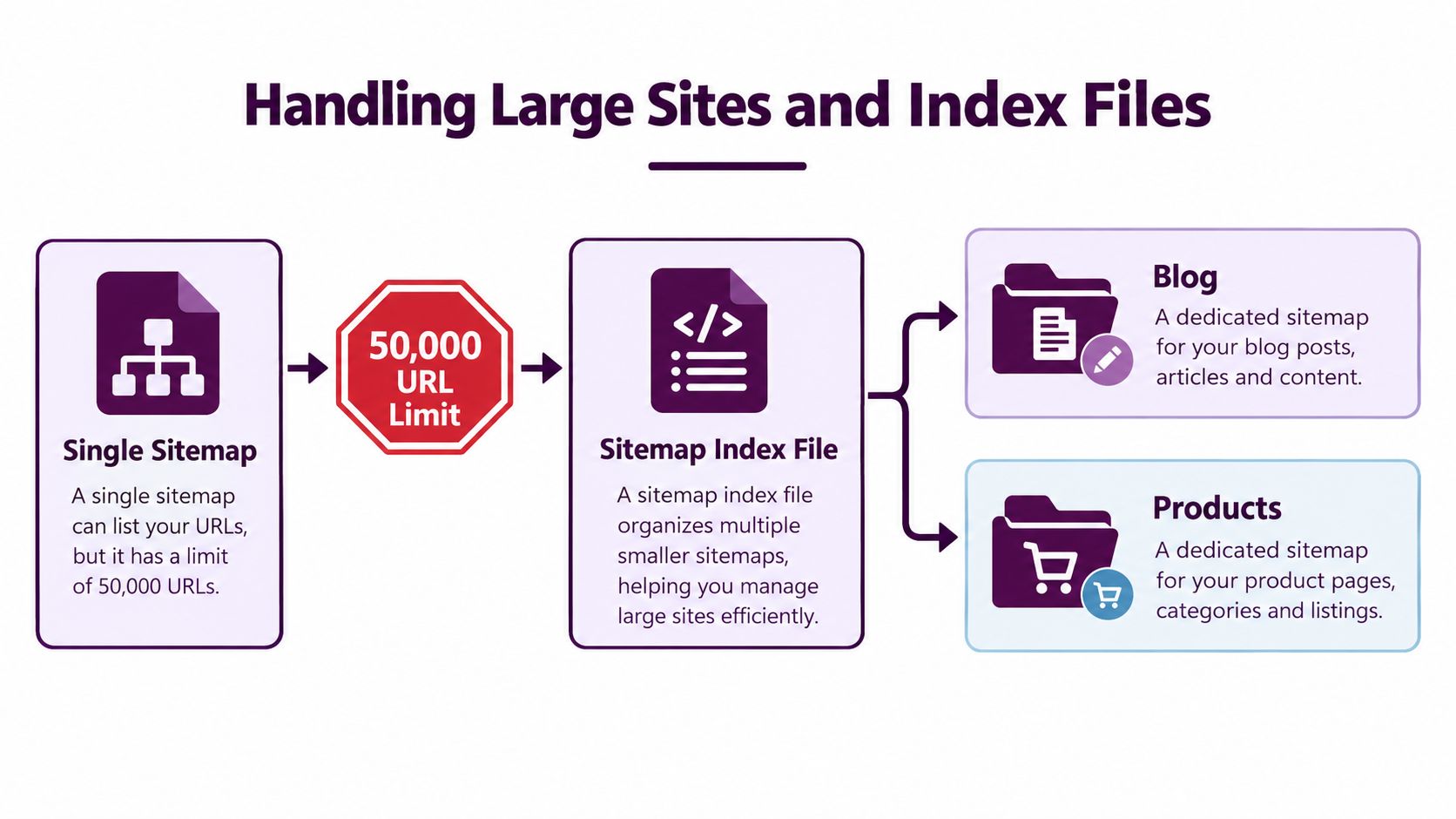
A growing site can outlive a single sitemap before anyone notices. Keep each sitemap file below 50,000 URLs and 50MB uncompressed, as specified in Google's sitemap documentation. Gzip reduces the file transferred to crawlers, but it does not change the uncompressed limit. Once either threshold is reached, distribute the URLs across multiple sitemap files.
A sitemap index acts as the operating layer for those files. It lists child sitemap locations rather than individual page URLs. The same protocol supports up to 50,000 sitemap files in one index, provided every child file remains within its own limits. Scale alone should not determine the structure. The useful question is whether the structure makes ownership, monitoring, and troubleshooting easier.
Split for diagnosis, not just compliance
A small site may be easier to maintain with one file. Splitting it without an operational reason adds generation jobs, references, and opportunities for stale data to remain in production.
On a large site, segmentation turns indexing anomalies into narrower investigations:
- Compare a product sitemap with product-page indexing in Search Console.
- Review blog URLs separately from commerce URLs.
- Isolate language-specific files when a localization release produces unexpected indexing results.
- Separate fast-changing inventory from stable evergreen content so update problems are easier to identify.
Organize files around the way your team investigates failures. Content type is a practical default, but it is not always the best boundary. A multilingual retailer may get clearer signals from language and market groups. A publisher with several independent templates may use template-based files. A site with frequent product changes may separate groups by update cadence.
A maintainable operating model
Place the index where it can reference child sitemaps on the same site and at the same or a lower directory level, as Google documents. Use stable, descriptive filenames. Temporary export dates create avoidable maintenance work unless deployment reliably updates the index and removes obsolete references.
Assign ownership to every sitemap group. The product publishing team should know which file contains product URLs, while technical SEO should validate the complete index. When Search Console reports an anomaly, compare the affected group with server logs, canonical tags, response codes, and recent releases. A focused group makes that comparison faster than inspecting one undifferentiated file.
The segmentation decision should answer one question: will this split help someone isolate an indexing or deployment problem? If the answer is no, keep the architecture simpler.
Canonicalization and Hreflang Integration
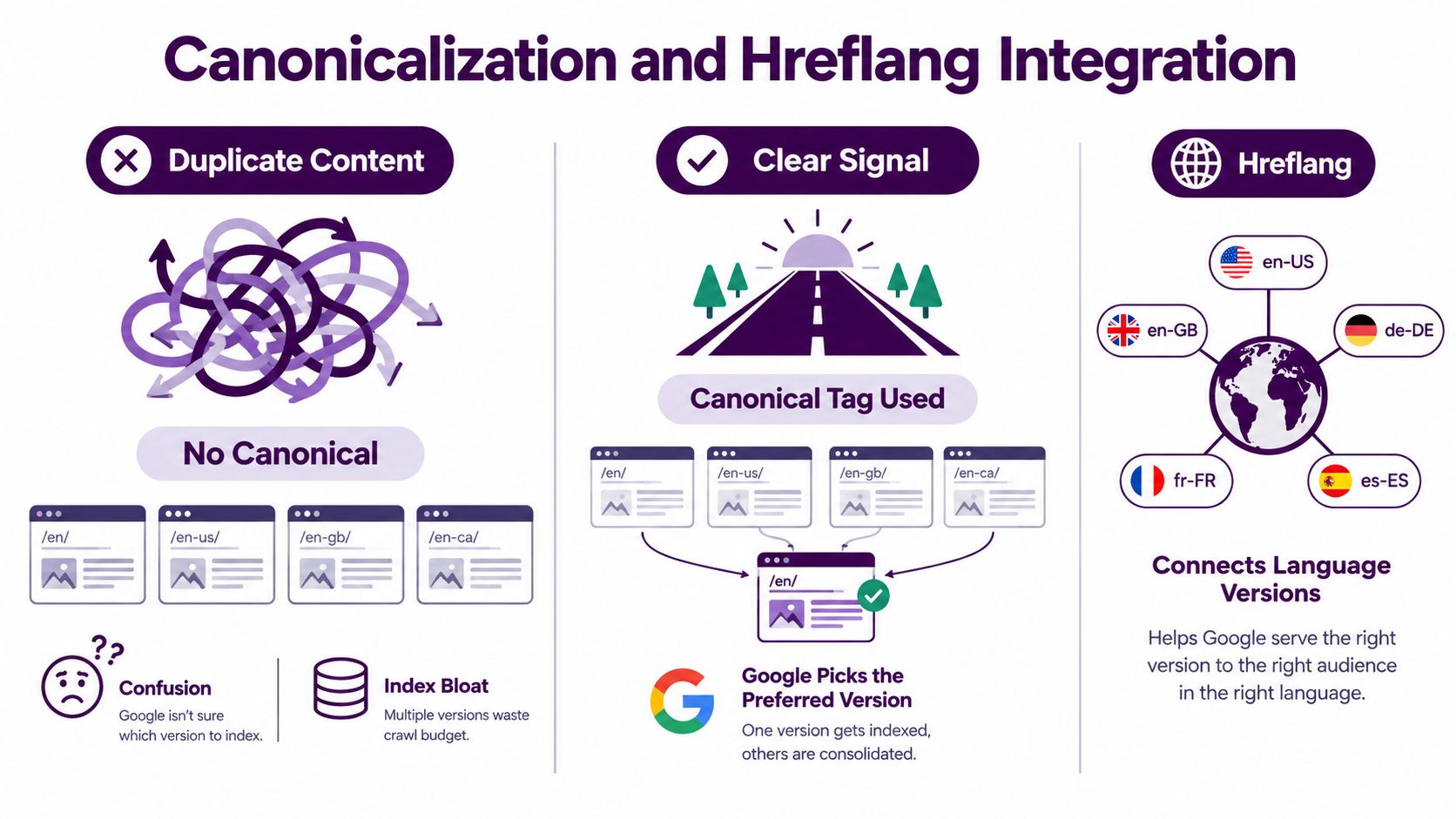
A sitemap and a canonical tag should point in the same direction. If several URLs display substantially similar content, place the preferred, indexable version in the sitemap and keep alternate versions out unless there's a specific reason to submit them. This reduces ambiguity about which URL represents the page.
Consider a product page available through category paths, tracking parameters, and sorting parameters. The sitemap shouldn't list every route to that product. It should list the URL your site treats as canonical. The alternate URLs need their own appropriate handling through canonical signals, redirects, parameter controls, or site architecture.
Canonical URLs versus alternate versions
These signals serve different purposes:
| Signal | Main job | Practical sitemap treatment |
|---|---|---|
| Canonical tag | Identifies the preferred version among similar URLs | Submit the preferred URL when it is indexable |
| Sitemap | Suggests URLs worth discovering and processing | Keep entries aligned with canonical choices |
| Hreflang | Connects equivalent localized versions for different languages or regions | Use the relevant localized URLs consistently |
| Redirect | Moves users and crawlers from an old URL to a destination | Submit the destination, not the redirecting URL |
A canonical tag doesn't make every duplicate page disappear, and a sitemap doesn't override a conflicting canonical. When those signals disagree, investigation becomes harder because the submitted URL no longer represents the page's stated preference.
Multilingual architecture
For localized sites, each language or regional page should have a clear relationship with its alternatives. Hreflang annotations can express those relationships, while the sitemap can list the indexable localized URLs. Keep the URL set consistent across the page markup and any sitemap-based localization implementation.
Don't use the sitemap to compensate for missing language architecture. If the French page links to an English equivalent but omits other available alternates, or if one region points to a URL that redirects elsewhere, the issue is structural. Review reciprocal relationships, language codes, canonicals, and the actual content served at each URL.
Google's current guidance also emphasizes exact URL matching and selecting one mobile or desktop version in a sitemap. That reflects a broader operating principle: submit the specific canonical version you expect to be processed, not a collection of alternates that leaves the preferred URL unclear.
Submitting and Monitoring in Search Console
Publishing sitemap.xml is only the deployment step. Search Console gives you a way to submit the file and observe how Google processes the URLs, but the report is most valuable when your sitemap is segmented in a way your team understands.

A practical submission workflow
- Open the verified property that matches the sitemap's site and protocol.
- Go to the Sitemaps area under the indexing reports.
- Enter the sitemap path, or submit the sitemap index rather than every child file when the index is the site's control point.
- Confirm that Search Console accepts the submission and records the file.
- Return after processing to review discovered URLs, processing warnings, and any reported errors.
Google's interface and report labels can change, so use this guide by Amax Marketing as a supplementary walkthrough rather than relying on screenshots alone. A practical Google Search Console guide 2026 can also help teams connect sitemap review with broader performance and indexing workflows.
Read the anomalies, not just the status
“Submitted URL excluding soft 404” usually means the URL was submitted, but Google sees the page as effectively unavailable or lacking enough substantive content to function as a normal result. Check the rendered page, visible content, response behavior, internal links, and whether the page should exist at all. If it is a thin or retired URL, remove it from the sitemap. If it is a legitimate page, improve the content and resolve the technical condition rather than resubmitting the same file.
“Discovered, currently not indexed” is different. Google knows about the URL but hasn't selected it for indexing at that point. Compare the affected URLs with indexed pages in the same template or sitemap group. Look for weak internal linking, duplication, low-value variations, recent bulk publishing, or inconsistent canonical signals.
A Search Console exclusion is a diagnostic starting point, not proof that the sitemap failed.
When an entire child sitemap shows unusual results, check the generator, deployment timestamp, URL filters, and recent releases. When only individual URLs fail, inspect those pages directly. This distinction prevents a team from rebuilding the whole sitemap to fix a template-level problem.
Sitemap Prioritization and Crawl Budget
The <priority> tag looks attractive because it appears to offer a direct way to tell crawlers which pages matter most. In practice, the stronger prioritization signals come from the site's architecture, links, content quality, and consistent inclusion decisions.
A commercial page buried behind several weak category paths doesn't become important because its XML entry says it has high priority. A content pillar linked from navigation, related articles, category hubs, and relevant anchor text has a clearer role in the site.
A useful priority workflow
Start with business value. Identify the pages that support core products, services, categories, and authoritative content. Then inspect whether those pages have strong internal paths from important sections of the site.
Next, remove noise. Archive variants, low-value filters, duplicate routes, temporary campaigns, and pages that aren't meant for organic search shouldn't consume attention merely because a CMS exports them. The sitemap should reflect the pages your team would defend if asked why Google should index them.
Finally, connect monitoring to the same groups:
- Create: Generate URLs from canonical, indexable page data.
- Filter: Exclude redirects, blocked pages, non-indexable URLs, and unwanted variants.
- Group: Organize files around content ownership or troubleshooting value.
- Submit: Send the index or relevant sitemap to Search Console.
- Compare: Review sitemap status against indexing, internal links, and page-level diagnostics.
- Update: Correct the source system, then regenerate the affected file.
This workflow treats crawl budget as an allocation problem. The goal isn't to submit more URLs. It's to make the URLs you submit more useful, easier to reach, and easier to investigate when indexing diverges from expectations.
HTML Sitemaps for Users and Bots
An HTML sitemap serves a different audience from an XML sitemap. It gives people a navigable overview of the site and can provide crawlers with another path to deeper pages. That makes it useful on complex websites, but only when the page is organized around human navigation rather than an unfiltered URL dump.
A footer link can make the HTML sitemap discoverable without competing with primary navigation. Group links by meaningful categories, services, products, or editorial subjects. Use descriptive link text and remove pages that users don't need to browse.
More links aren't automatically better
Publishing thousands of links on one page can create a poor user experience and make the page difficult to maintain. It can also expose low-value URL variants that should never have been part of the site's public information architecture. An HTML sitemap shouldn't compensate for broken navigation or orphaned content at scale.
Use it to support pages that deserve discovery but don't fit naturally in the main menu. Review the destination URLs before adding them. They should resolve to useful pages, avoid unnecessary duplication, and belong to a logical group.
XML supports machine discovery. HTML supports user navigation and internal linking. They can complement each other, but they shouldn't be generated from the same unfiltered export without review. The same principle applies to both formats: publish a clear map of the site you want people and crawlers to understand.
Sitemap Best Practices Checklist
A sitemap review should test URL quality and the system that maintains it. Before publishing or regenerating one, check:
- Choose preferred URLs: Include canonical, indexable pages that deserve discovery. Separate product, category, and editorial groups when ownership or diagnosis differs.
- Validate access: Confirm submitted URLs are crawlable, resolve to intended content, and are not blocked or marked
noindex. - Check file boundaries: Keep each sitemap within the protocol limits of 50,000 URLs and 50MB uncompressed, as specified in Google's documentation.
- Use an index deliberately: Split files when limits require it, or segment by content type, directory, country, or template for clearer monitoring.
- Keep dates honest: Set
lastmodfor meaningful content changes, not routine regeneration. - Align signals: Match sitemap URLs with canonical tags, redirects, internal links, and localized-page relationships.
- Remove noise: Exclude redirects, duplicate variants, blocked URLs, temporary pages, and content not intended for organic search.
- Monitor groups: Review Search Console results by sitemap after releases, migrations, template changes, and large updates. A drop in one group narrows the likely failure.
- Test the source system: Fix generation logic in the CMS or deployment layer instead of editing exports repeatedly.
A sitemap is ready when Google receives a clean URL set and your team can trace failures. Keyword Kick connects Search Console, technical SEO signals, rankings, backlinks, and site audits to investigate sitemap-related indexing gaps. Visit Keyword Kick to audit affected URL groups and prioritize technical fixes.