
A single keyword in Google Ads can cost $5.42 on average, yet the same market also contains bids that reach $732 per click for terms like “truck collision attorney” in U.S. keyword-planner data, which is why the cost of keyword is never just a neat number in a spreadsheet. That gap is the entire story, because the price you see on the screen is only one part of what you pay to win demand, whether you buy clicks or try to earn them.
The mistake many make is treating keyword research as a pricing lookup. In practice, keyword economics are split between paid acquisition, where the cost is visible and auction-driven, and organic acquisition, where the cost is distributed across content, technical work, links, and time. Once you stop confusing those two, you can judge keyword value the way a performance marketer should, by total investment, not just CPC.
Why Keyword Costs Vary by 100x or More
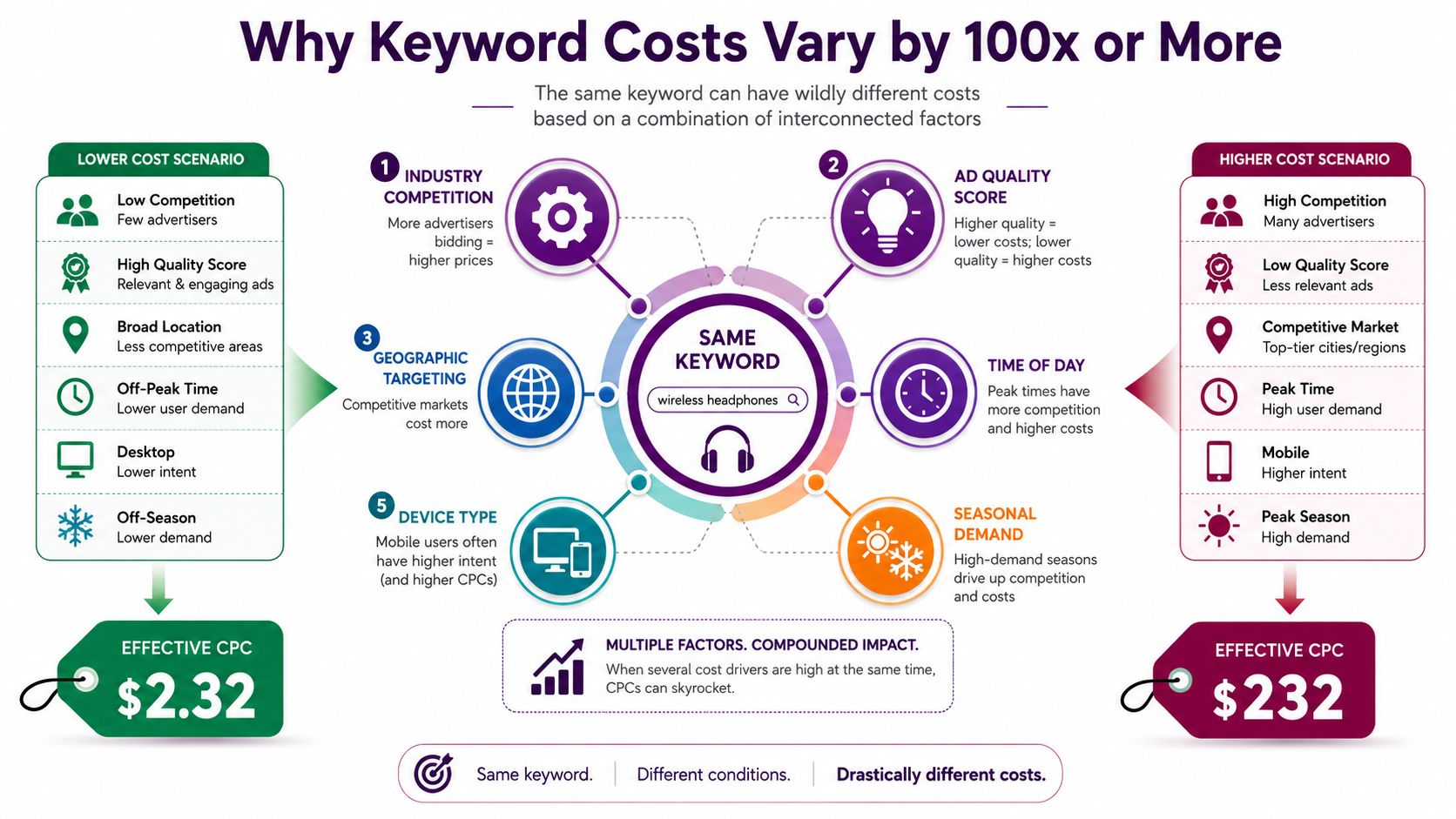
The spread in keyword pricing is too wide to reduce to one benchmark. WordStream's benchmark puts average search CPC at $5.42 across industries, but its expensive keyword categories show insurance at $54.91, loans at $44.28, mortgage at $47.12, and attorney at $47.07 per click. That means high-intent auctions can sit in a completely different cost band from broad averages. PPC.io's dataset goes further, showing “truck collision attorney” at up to $732 per click, with 60,500 monthly searches, and “houston maritime attorney” ranging from $8 to $750 per click (high CPC keyword analysis).
What drives the spread
Keyword cost is shaped by the auction, not by a list price. Google Keyword Planner's bid ranges are estimates, and the per-click price moves with competition, search demand, and the value advertisers expect from that query. A keyword with modest CPC can still drain budget if it has heavy query volume, while a pricey term can stay manageable if it converts cleanly and you control match types and negatives. Google's own forecast guidance treats the number as a planning input, not a promise of what you will pay (Google Ads Keyword Planner forecast cost definition, keyword cost calculator explanation).
Broad averages miss the part that matters. They blur the difference between informational searches and commercial searches, and they hide the way high-lifetime-value verticals push auctions upward. WordStream's benchmark and the PPC.io dataset point in the same direction, legal, finance, and insurance terms are expensive because more advertisers can justify aggressive bids when one conversion can be worth a lot (WordStream keyword price overview).
Why intent matters more than term length
Long-tail terms often cost less because they narrow the auction. That is why a resource like long tail keywords for real estate agents is useful, not because every long-tail phrase is cheap, but because specificity usually reduces wasted impressions and sharpens buyer intent. The practical point is simple, a keyword's cost reflects how many serious buyers are competing for the same click, not how many words are in the query.
Practical rule: if you budget on average CPC alone, you are underestimating the true variance in the auction and overestimating how far one number can take you.
Calculating Paid Keyword Cost Step by Step
Keyword cost is easiest to estimate when you move from a single term to a cluster view. Start with one practical formula, monthly cost equals monthly searches times estimated CTR times CPC, because it estimates the spend tied to the traffic you can realistically capture, not just the bid range in a planning tool. That distinction matters because Google Keyword Planner's forecast cost is an average daily spend estimate, so it should guide budgeting, not be treated as a guarantee of what you will pay.
A practical way to estimate spend
The formula stays the same across business models, but the inputs do not. A local plumber usually works with lower search volume and a tight geography, an ecommerce store may spread clicks across many product and category terms, and a B2B SaaS team often pays more for fewer, higher-value leads. Keyword cluster planning matters more than obsessing over one phrase, because the actual bill comes from the full demand pocket around a topic, not a single keyword in isolation.
Business Type | Keyword | Monthly Searches | Avg CPC | Est. CTR | Monthly Cost |
|---|---|---|---|---|---|
Local Service Business | plumbing repair near me | Qualitative estimate needed | Qualitative estimate needed | Qualitative estimate needed | Qualitative estimate needed |
E-commerce Store | running shoes | Qualitative estimate needed | Qualitative estimate needed | Qualitative estimate needed | Qualitative estimate needed |
B2B SaaS Company | soc 2 compliance companies | Qualitative estimate needed | $38 to $419 bid range in dataset | Qualitative estimate needed | Qualitative estimate needed |
The table works as a planning model, not a promise. For the SaaS example, the dataset behind high CPC keyword analysis shows “soc 2 compliance companies” with a top-of-page bid range of $38–$419, which is a strong signal to treat the number as a warning flag rather than a final forecast.
How to refine the estimate before launch
Intent is the biggest adjustment. If a keyword sits close to purchase, your CTR and CPC assumptions should reflect competitive commercial behavior, not generic search averages. If the term is broader, discount the forecast, because more impressions will not automatically mean qualified clicks, and more clicks will not automatically mean better economics.
Useful filter: budget the cluster, not the term. One keyword with a reasonable CPC can still become expensive once it pulls enough traffic.
Campaign teams that manage multiple ad groups usually need a structured workflow, not a loose keyword list. An agentcentral PPC guide helps keep the focus on campaign structure, bid control, and ongoing hygiene, while Keyword Kick can be used to connect keyword research, rank tracking, backlinks, and SEO analysis so paid demand and organic demand can be reviewed against the same query set.
The Hidden Cost of Ranking Organically
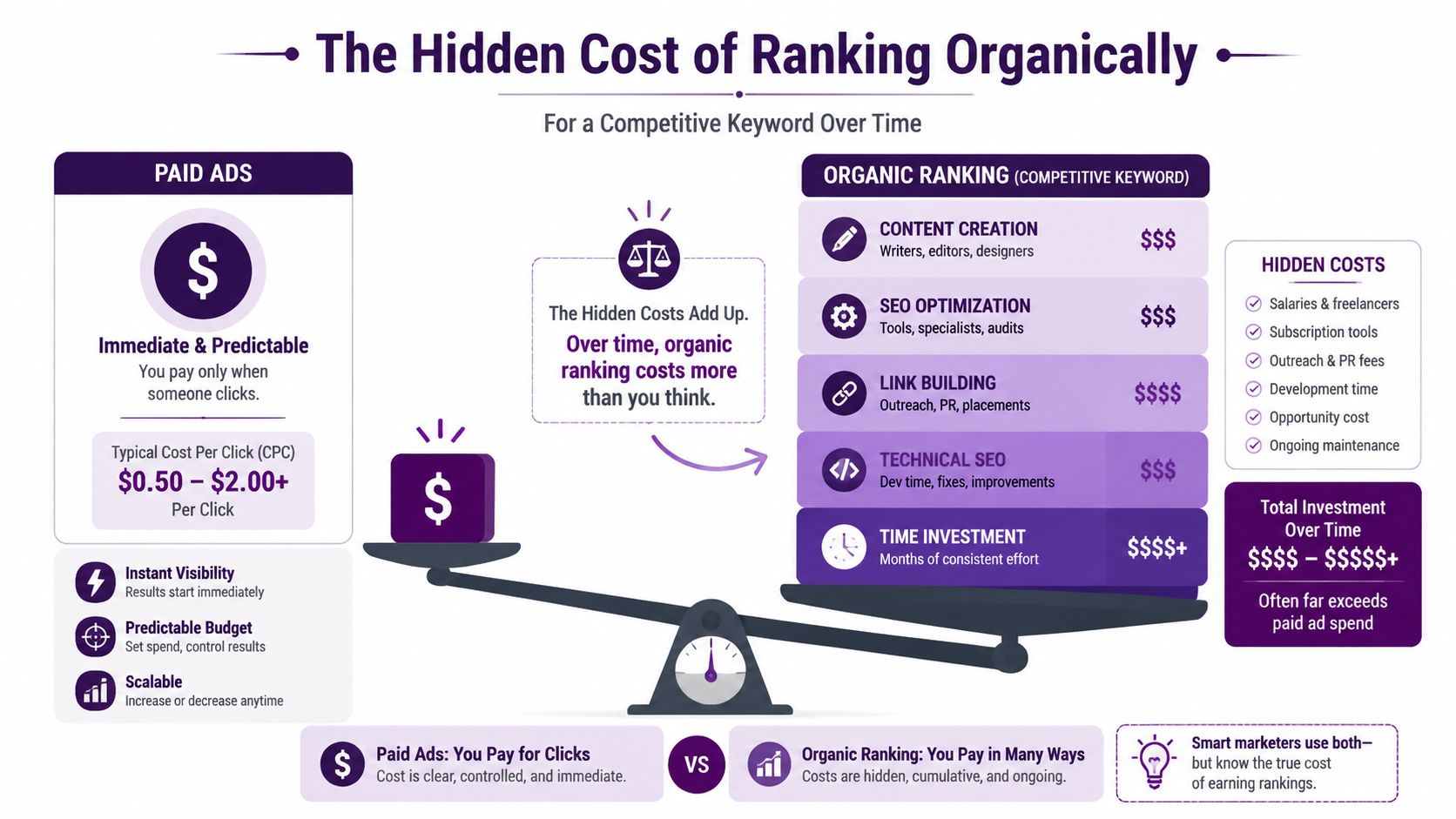
Organic clicks are not free. They are prepaid through work that never shows up as a CPC line item. One independent breakdown of a single-keyword SEO project shows the cost spread across strategy, content, UX, development, editorial work, and link building, with link building alone estimated at $37,500 in that example. The same breakdown is a useful reminder that keyword research often stops at paid click cost and ignores the actual acquisition cost of earning a ranking.
What gets buried in organic acquisition
The hidden cost is not a single line item, it is a stack of them. Writers produce the page, editors shape the answer, designers and UX specialists improve engagement, developers remove technical blockers, and SEO teams build links plus internal relevance signals. A page may eventually earn traffic without a per-click fee, but the acquisition path still gets paid for through different budget lines and over a longer horizon. The single-keyword SEO cost breakdown makes that split visible.
That is why “free traffic” is a misleading phrase. If a keyword sits in a competitive vertical, the work needed to compete can cost more than buying clicks for the same intent, especially when the page needs authority before it can rank. Paid search gives you a visible click price, while organic search hides the same economic pressure in content, links, and time.
Why the organic bill can exceed the paid bill
Paid search makes the marginal cost visible. Organic search hides the same cost in operational effort, and that hidden bill grows when the query sits in a crowded market. For teams planning around high-value commercial terms, the key question is not whether SEO is cheaper in theory, it is whether the current domain strength and content stack can earn the keyword without a larger total investment than buying the demand directly.
The earlier section on paid pricing already showed how extreme CPC can get, but organic has its own escalation curve. A page that needs sustained promotion, author expertise, and technical support before it ranks is not a one-time content expense. It becomes a multi-layer project, and those layers need to be counted before anyone calls the keyword “cheap.”
Organic ranking is often cheaper per click after it works, but the upfront bill can be the larger number.
For teams weighing that tradeoff, how to improve organic traffic in 2026 is useful because the problem is not only whether a page can rank, it is whether the effort required to rank makes sense for the query's value.
When to Choose Paid vs Organic Keywords
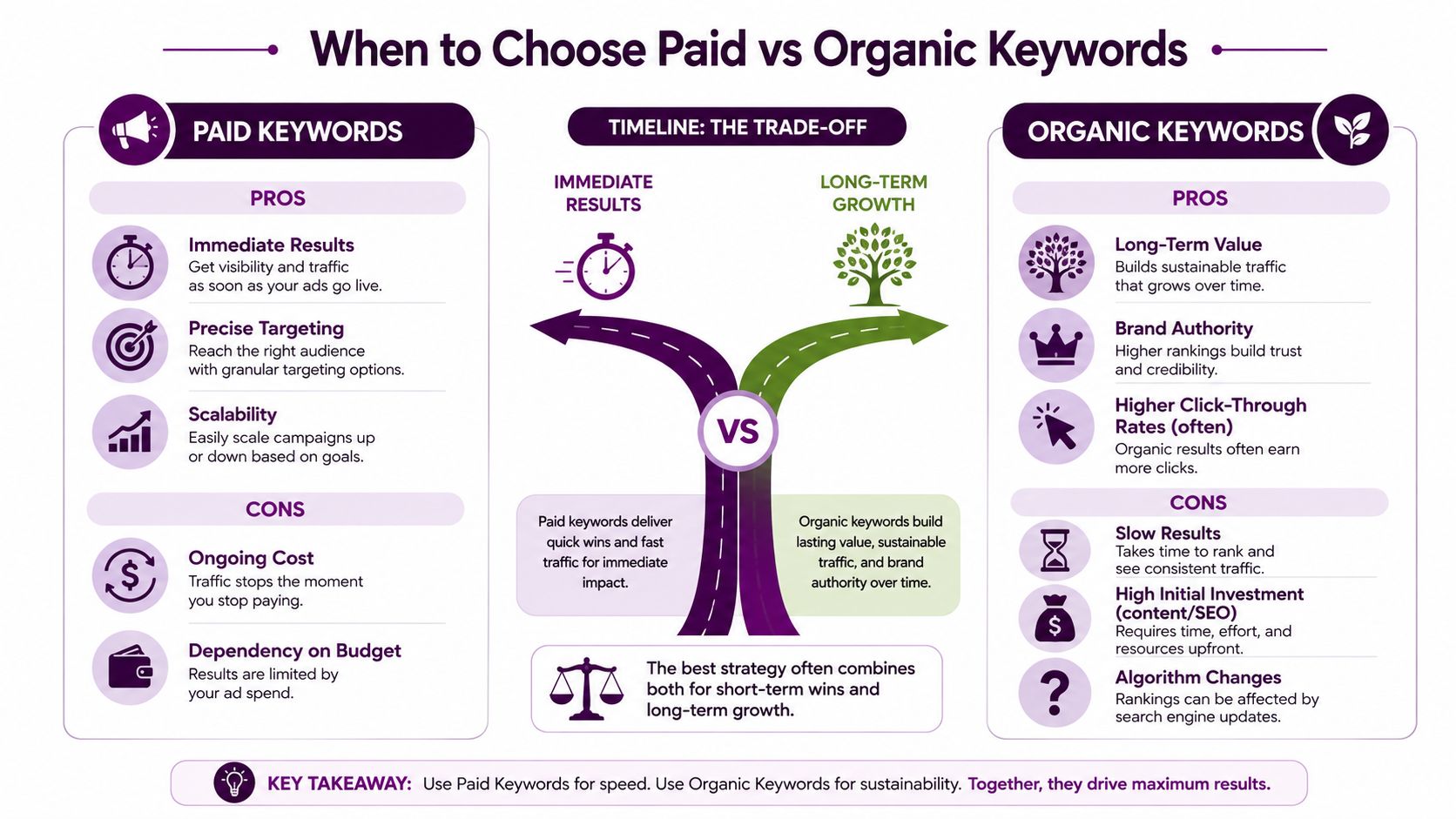
Paid and organic are two different ways to buy access to demand. Paid search makes sense when the query is commercially hot, the team needs visibility now, or the business can turn one conversion into enough downstream value to justify the CPC. Organic makes more sense when the query is informational, the topic can build lasting authority, or the team can wait for compounding visibility instead of buying each click outright.
A clean decision lens
Use paid when the keyword is expensive but tightly tied to revenue. A high CPC does not automatically mean avoid the term. It often means the market is valuable enough that the auction reflects real lead value, especially in categories like legal, finance, and insurance where the click is only one part of the economics.
Use organic when the goal is durable visibility and the team has time to build relevance. Organic rarely moves faster, and it is not cheap at the start if the page needs content, links, and technical work. The payoff changes later, because once the page ranks, each additional visit no longer carries a direct media cost.
How the hybrid approach usually wins
The strongest accounts do not force a single answer. They buy the highest-intent terms that need immediate coverage, then build organic pages around the broader topic cluster so the account is not trapped in auction dependency. That split keeps short-term demand capture and long-term authority moving together instead of competing for budget.
A simple framework:
Choose paid first when the query is commercial, the offer converts reliably, and the team needs results now.
Choose organic first when the query is educational, the audience research journey is long, or the business can wait for compounding visibility.
Use both when the keyword cluster contains valuable bottom-funnel terms and broader information gaps.
Short answer: if the click is expensive and the keyword converts, paid can still be the rational move. If the query supports long-term authority, organic usually belongs in the plan too.
Estimating Keyword ROI and Value
Cost only matters if you know what the keyword returns. The right ROI model starts with monthly searches times CTR times conversion rate times conversion value, because that tells you the revenue the keyword can plausibly create before you compare it with spend. A keyword with a higher CPC can still be the better deal if it converts into higher-value customers or stronger lifetime value, while a cheap keyword can be a budget leak if the traffic is weak.
The revenue side of the equation
A keyword's value is not just last-click revenue. For ecommerce, the conversion value may be an average order value, but for SaaS and services, you need to think in customer lifetime value or expected deal value. That's why the same click can be worth very different amounts depending on business model, follow-up speed, and close rate.
The useful test is break-even. If the expected value of the keyword's traffic is below the cost to acquire it, the keyword is a drain even if the CPC looks small. If the expected value is above the cost, then the higher-priced keyword can be a rational buy because it produces more value per qualified visitor.
Why expensive keywords can outperform cheap ones
A cheap keyword can attract curiosity, not buyers. A more expensive keyword often sits closer to the commercial decision, so the click is costlier but the downstream economics are healthier. That's the part many teams miss when they fixate on CPC alone, they compare only the input cost and ignore the quality of the traffic and the value of the conversion path.
Break-even rule: do not judge a keyword by CPC alone, judge it by the revenue it can realistically return per click.
You can build the decision in a simple order:
Estimate search demand and likely CTR.
Assign conversion rate based on historical performance or a conservative assumption.
Multiply by the conversion value you get from that customer.
Compare the result against the paid cost or the organic acquisition cost.
This model works whether you're evaluating a few keywords or a whole topic cluster. It gives you a way to reject low-value traffic even when it looks inexpensive, and to back a costly term when the economics justify it.
Keyword Prioritization Framework
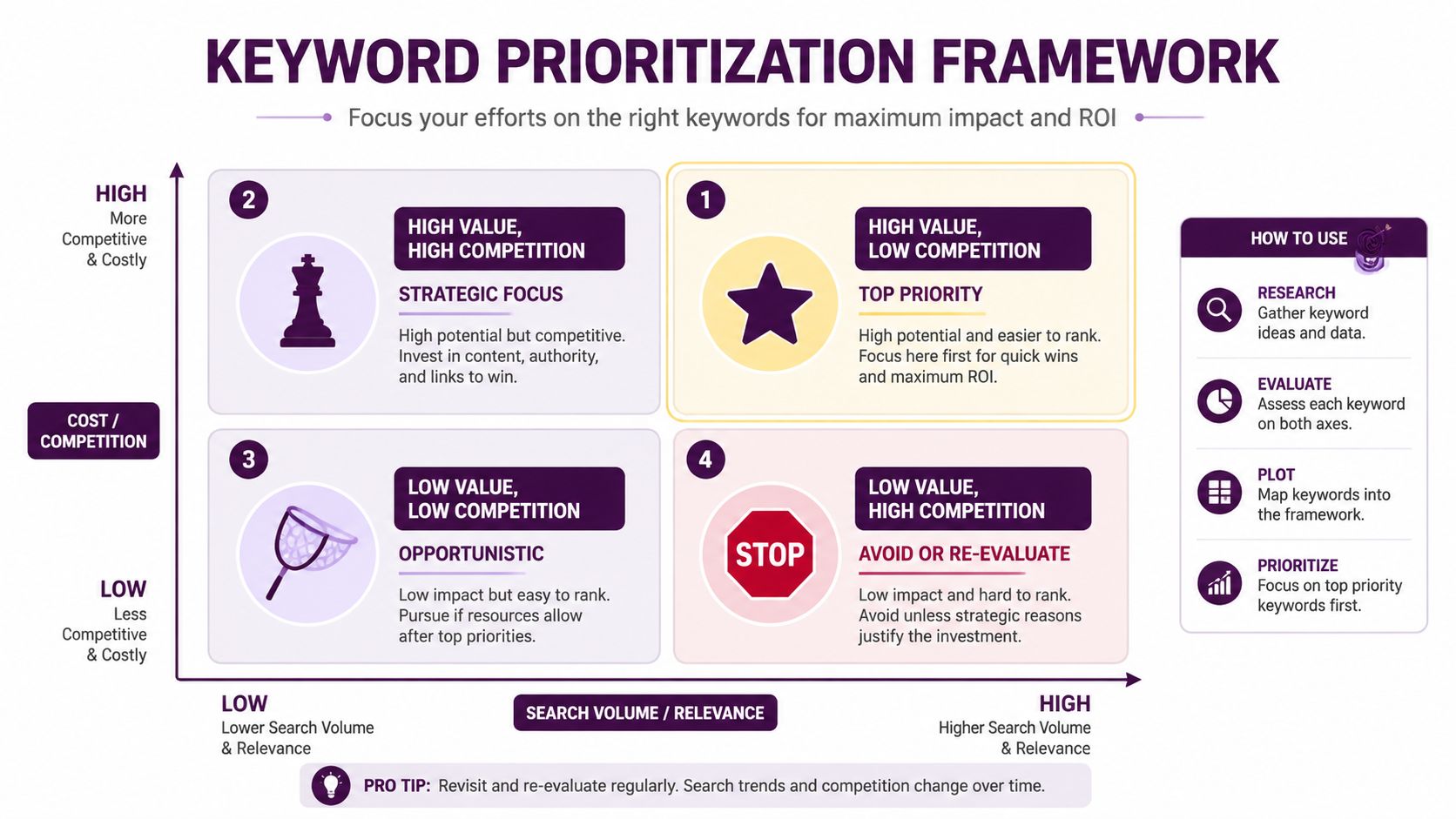
A keyword list quickly becomes useless if every term is treated equally. The better approach is to score each keyword by cost, competition, search volume, and business value, then sort them into categories that reflect how you'll use budget. That keeps the team from spending time on vanity searches and helps you isolate the terms that deserve paid spend, content investment, or both.
The four buckets that matter
The first bucket is high value, low competition. These are the quickest wins, because the economics are strongest and the path to visibility is least painful. The second is high value, high competition, which belongs in strategic planning because the keyword may be worth the fight but not the first dollar of budget.
The third bucket is low value, low competition. These can be opportunistic, but they should not distract the team from terms that drive revenue. The fourth is low value, high competition, which is usually the money pit category, expensive to win and weak in payoff.
If you want a more revenue-centered way to build the scoring logic, how to choose keywords revenue focused guide 2026 gives a useful framing for sorting terms by business outcome rather than raw interest.
How different businesses should weigh the matrix
Ecommerce teams usually weight search volume and conversion value heavily because catalog breadth makes scale valuable. SaaS teams care more about commercial intent and lead quality, since a small number of qualified demos can matter more than many low-intent visits. Local services often care most about geography, urgency, and direct response, because a small set of nearby buyers can be enough to justify the campaign.
Field-tested approach: if a keyword is costly, crowded, and weakly connected to revenue, it should move down your list fast.
A scoring template doesn't need to be fancy to work. It just needs to force a decision on each term, instead of letting the loudest keyword win the budget by default.
Using Tools to Validate Keyword Cost Estimates
I've seen keyword plans fall apart because the team trusted one forecast and never checked the market. Google Keyword Planner gives bid ranges and forecasted cost, but those numbers are only a starting point, and they're most useful when you compare them with actual auction behavior, rank tracking context, and the structure of the SERP. The right workflow is to validate before launch, not after you've already spent the money.
A simple validation workflow
Start with Keyword Planner to get the bid range and the expected traffic shape. Then compare the term against your own account data if you've run similar campaigns, because historical CPC often tells you more than a fresh estimate. If the keyword is competitive, inspect the SERP, since ads, shopping units, maps, and other features can depress organic click-through rates and change the economics of the term.
After that, check whether your quality score potential is likely to help or hurt. Better landing page alignment and tighter ad relevance can lower actual cost, while weak relevance can make a forecast look far better than reality. That's one reason I prefer to validate in clusters, because isolated keywords hide how the broader account structure affects the final bill.
What to trust, and what to treat carefully
Trust bid ranges as a directional signal. Do not treat them as a fixed price. Trust your own conversion data when you have it, because real audience response beats generic market estimates. Be careful with broad keyword averages, because they can flatten the gap between cheap informational queries and expensive commercial ones.
For teams that want all the signal in one workspace, Keyword Kick brings keyword research, rank tracking, backlinks, and technical SEO signals together so the estimate isn't built from disconnected screenshots. That matters because the decision to buy a keyword or pursue it organically depends on more than CPC, it depends on the total search picture around the query.
A practical checklist before launch:
Verify volume: make sure the keyword has enough demand to matter.
Check intent: confirm the query matches the stage of the funnel.
Review CPC range: use the bid estimate as a guardrail, not a promise.
Inspect SERP layout: see what competes for clicks before you budget.
Test one cluster first: validate economics before scaling spend.
The cheapest estimate is often the most dangerous one, because it leaves out the part where the market actually responds.
If you're ready to stop guessing about keyword economics, build your next plan in Keyword Kick. It pulls keyword research, rank tracking, backlinks, and technical signals into one view so you can compare paid and organic costs with less noise and make a cleaner call on where value sits.