You're staring at a spreadsheet packed with 8,000 search terms, and the content team wants to know which five deserve attention next month. The problem isn't a lack of data. It's that a flat keyword list doesn't tell you what each query means, which page should target it, or whether visibility will lead to a click or a business result.
A useful digital marketing keyword workflow turns that spreadsheet into a decision stack. It connects audience intent, funnel stage, topic specificity, business value, page format, and search performance. The result is a smaller, more defensible set of actions your team can execute and measure.
What Digital Marketing Keywords Actually Mean
Digital marketing keywords are the words and phrases people enter into search engines when they're looking for information, products, services, brands, or solutions. They connect a person's question with the page, advertisement, product listing, or social post your business publishes.
That makes a keyword more than an SEO input. It can guide paid-search targeting, content planning, social search optimization, product naming, landing-page copy, and customer research. A phrase such as “email marketing tools for small business” tells you something about the searcher's category, audience, and likely comparison process. A phrase such as “Mailchimp login” points toward a known destination instead.
Think of keywords as the questions a receptionist hears throughout the day. “What does your company do?” requires a different response from “Can I speak to billing?” or “I'm ready to sign up.” The words provide a clue, but the underlying need determines the right answer.
Practical rule: Don't ask only, “How many people search this phrase?” Ask, “What does this person expect to find, and can our site answer it credibly?”
A local service business might use keyword research to improve local search targeting, while an e-commerce team could use the same thinking to organize category and product pages. In both cases, the query is a signal about the next useful response.
Search intent is the foundation of that interpretation. Use the search intent glossary to establish shared language across SEO, content, paid media, and sales teams. Once everyone describes a term by what the searcher wants, the spreadsheet becomes easier to prioritize.
Every keyword should pass through three lenses:
Intent: What outcome does the searcher want?
Funnel stage: How close are they to taking meaningful action?
Keyword type: How broad or specific is the wording?
Those lenses prevent a high-volume phrase from automatically outranking a smaller query with clearer commercial value.
Three Ways to Look at Every Keyword
A raw term becomes strategically useful when you classify it from three directions. Start with intent, which describes the searcher's immediate purpose.
Keyword Example | Intent | Funnel Stage | Type |
|---|---|---|---|
what is CRM software | Informational | Awareness | Long-tail |
HubSpot login | Navigational | Decision or retention | Long-tail |
best CRM for small business | Commercial | Consideration | Long-tail |
buy Salesforce subscription | Transactional | Decision | Long-tail |
Informational queries seek explanations, definitions, or instructions. “What is CRM software?” belongs in an educational guide. Navigational queries help someone reach a specific destination, as with “HubSpot login.” Commercial queries indicate evaluation, such as “best CRM for small business.” Transactional queries signal action, such as “buy Salesforce subscription.”
Intent and funnel stage overlap, but they aren't identical. Awareness searches usually ask for context. Consideration searches compare options or approaches. Decision searches seek a purchase, sign-up, booking, download, or other conversion. A query such as “CRM pricing” can sit between consideration and decision because the searcher may still be comparing providers or may already have a short list.
The third lens is keyword type, based on breadth and specificity. Head terms are broad phrases, often made up of one or two words, such as “CRM.” Body terms add context, such as “CRM software.” Long-tail terms express a narrower need, such as “CRM software for small business with email automation.”
Long-tail opportunities dominate the search arena. Multiple industry sources report that roughly 70% of search traffic comes from long-tail keywords, while another cited dataset says 94.74% of keywords receive 10 or fewer monthly searches and only 0.0008% exceed 100,000 monthly searches (keyword research statistics). The practical lesson is breadth. A specific phrase may attract fewer searches, but it often gives your team a clearer brief and a more precise page to build.
To classify a term, write down its intended answer, likely funnel stage, and level of specificity. If your team can't agree, inspect the current results page before assigning the keyword to a page.
How to Build a Keyword List That Actually Fits Your Site
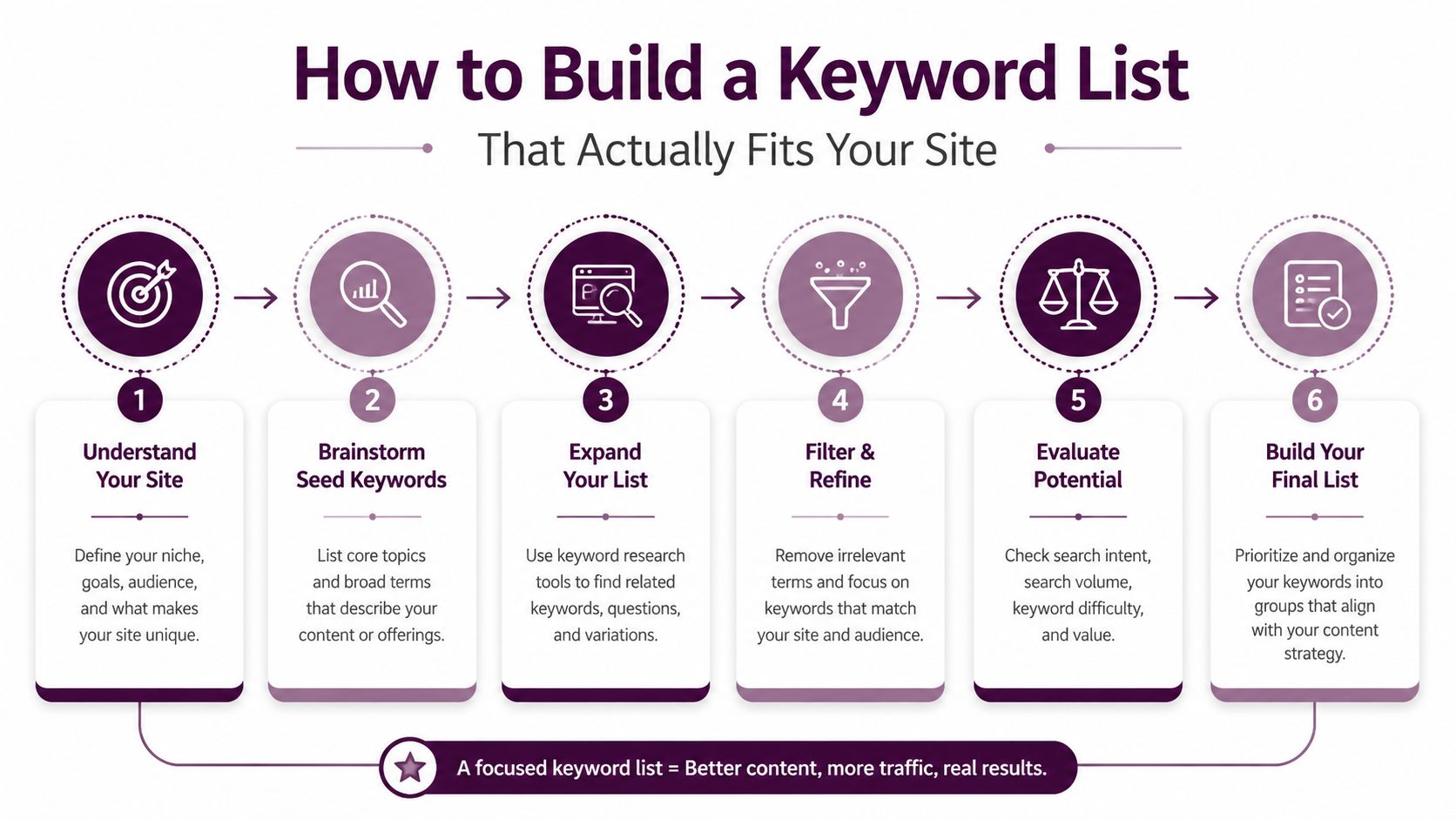
A useful list starts with your customers, not with a keyword tool. Ask sales representatives what prospects request during calls, review customer-support transcripts, and examine the language on competitor homepages. Capture exact wording, recurring problems, product categories, objections, and location references. The output should be a seed list grouped by customer need, not a pile of disconnected phrases.
Expand each seed through several discovery sources. Google autosuggest, “People Also Ask,” forum discussions, internal site search, and a paid keyword database reveal variations that a team might not invent internally. For paid campaigns, a specialist guide to Google Ads keyword research for e-commerce can help connect query discovery with product and campaign structure.
Keep the useful output from this stage separate from the final target list. At first, you're collecting language. Filtering comes next.
Relevance comes before metrics
Remove terms that your site can't answer or serve commercially. A keyword may look attractive but still be wrong if it describes a product you don't sell, a region you don't serve, or a problem your team can't address with firsthand expertise.
For every surviving term, name the page that could satisfy it. If you can't identify a credible page format, mark the term for review instead of forcing it into the plan.
Group variants into topics
Cluster close variants around a core need. For example, “email marketing tools for small business,” “best email software for small companies,” and “small business email automation tools” may belong to one comparison cluster. The cluster gives the writer one primary subject and a set of supporting questions.
Validate each cluster against the live results page. Note whether Google displays featured snippets, product carousels, local results, videos, comparison pages, or prominent ads. Those features affect the format and the opportunity, even when the wording looks relevant.
Use the keyword research workflow from zero to a first ranking as a practical reference while documenting the inputs and outputs of each stage.
Your working file should now contain the original customer language, expanded variants, relevance decisions, topic clusters, and SERP observations. That's enough structure to prioritize without treating a tool's volume estimate as a publishing order.
From List to Priorities Using Intent and Value
Prioritization works better at the cluster level than at the individual-keyword level. Search demand is highly fragmented. One cited analysis found that 90.3% of queries received 10 or fewer impressions, so many individual rows are too sparse for stable CTR conclusions (Google Search query data analysis). Grouping related variants gives your team a stronger basis for judgment.
Score each cluster across three axes:
Intent fit: Does the query align with the funnel stage your business needs most?
Specificity: Does the wording reveal a meaningful problem, audience, product, or action?
Business value: Would the resulting visitor be a plausible lead, buyer, subscriber, or retained customer?
You can use a simple qualitative scale such as low, medium, or high rather than pretending that every decision needs false precision. A zero-volume report doesn't automatically make a cluster worthless. Inspect the SERP, review related questions, and look for a clear connection to your offer. Sparse reporting may reflect limited measurement rather than limited usefulness.
Consider a B2B SaaS company selling workflow software:
Cluster | Search Intent | Funnel Stage | Volume | Business Value | Priority Score |
|---|---|---|---|---|---|
what is workflow automation | Informational | Awareness | High | Low | Medium |
workflow automation software for agencies | Commercial | Consideration | Medium | High | High |
buy workflow automation software | Transactional | Decision | Low | High | High |
The informational cluster may attract broad interest, but the commercial cluster gives the company a clearer opportunity to explain fit, compare capabilities, and move qualified prospects toward a demo. The transactional cluster may be smaller still, yet its action language can justify immediate optimization of a product or pricing page.
A high-volume keyword can be a weak business opportunity if the page attracts the wrong audience.
Review the rubric regularly, but don't rebuild it from scratch every cycle. Preserve the original reasoning, record changes in SERP composition, and adjust priorities when customer language, product positioning, or conversion quality changes.
Mapping Keywords to the Right Pages and Formats
A prioritized cluster should produce a publishing decision, not just a row in a spreadsheet. Decide which page type answers the query, which on-page elements support the topic, and what action the visitor should take next.
Take a generic article titled “Email Marketing Tips.” It might attract broad informational interest, but it doesn't clearly serve someone searching for “email marketing tools for small business.” Reshape it into a comparison-style page with a focused title, evaluation criteria, product examples, implementation guidance, and a clear path to a trial, consultation, or product comparison.
The page brief could look like this:
Primary term: Place the central phrase in the H1, title tag, introduction, and URL where it reads naturally.
Secondary terms: Use close variants as H2s, comparison criteria, and section prompts.
Supporting questions: Answer them in FAQs, examples, and explanatory copy.
Conversion path: Match the CTA to the searcher's stage, such as a guide download for awareness or a demo request for decision intent.
Media context: Write descriptive image alt text that explains the image, rather than inserting unrelated keywords.
Format should follow intent. Transactional clusters usually belong on product, service, pricing, or comparison pages. Informational clusters fit guides, tutorials, and explainers. Navigational clusters need clean brand hubs, login pages, support destinations, or location pages.
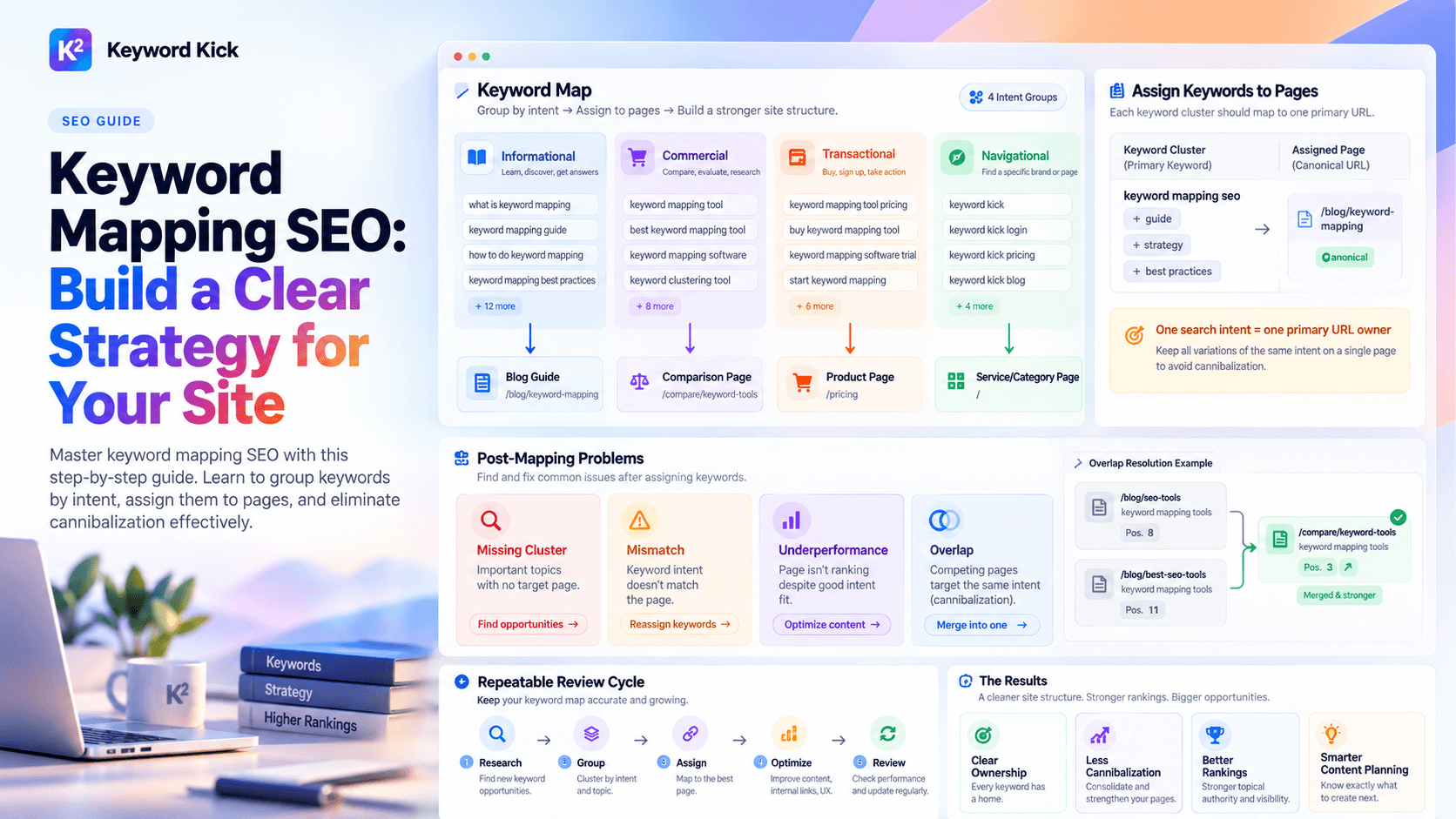
Don't create a new page every time you discover a related phrase. First ask whether an existing page can absorb the cluster without losing focus. If the searcher wants a different answer, a separate page may be justified. If the variation only changes wording, strengthen the existing page instead.
Give writers a one-page checklist:
Audience: Who is searching?
Need: What answer or action do they expect?
Format: Which page type best satisfies that expectation?
Coverage: Which related questions belong on the page?
Proof: What firsthand expertise or evidence supports the answer?
CTA: What should the reader do next?
Ownership: Which existing page could conflict with this target?
That checklist turns keyword research into a brief a writer, designer, developer, and conversion team can use together.
Measuring Whether Your Keywords Are Working
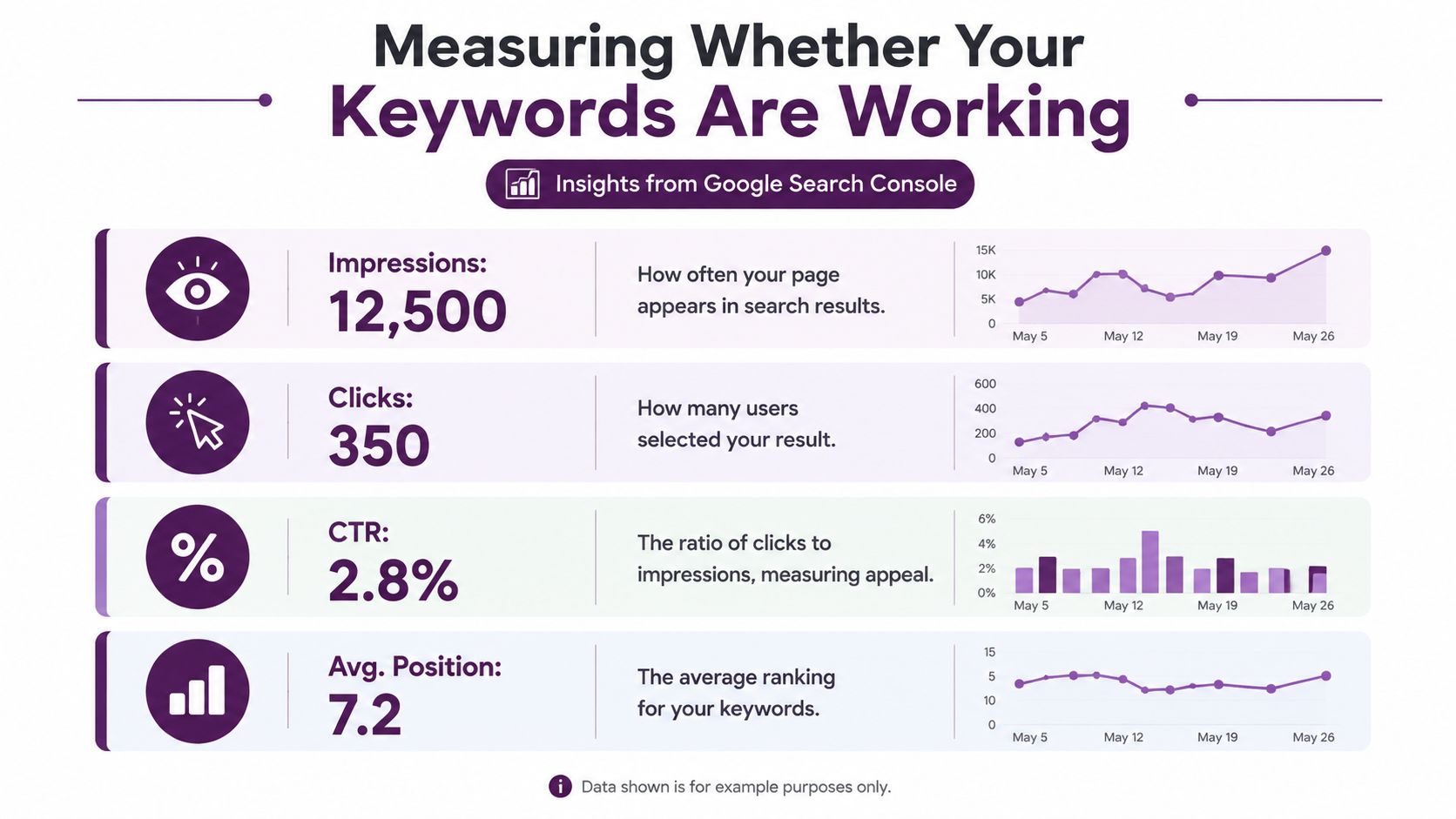
Google Search Console gives four useful signals, but they work as a diagnostic stack rather than a scoreboard. Clicks count visits from Google Search, impressions count how often your site appears, CTR is clicks divided by impressions, and average position represents the average position of the topmost result from your site for a query or page (Google Search performance report).
Read the pattern, then choose an action:
Impressions rise while clicks stay flat: Your page is entering more searches, but the title or description may not match the strongest intent. Rewrite the title to promise the answer visible on the page.
Impressions are strong and CTR is weak: The snippet may not fit the SERP format. Test clearer benefit language, answer the query more directly, and assess whether structured data is appropriate.
CTR is healthy but position remains weak: Searchers respond when they find you, but competing pages may cover the subject more completely. Expand thin sections, add original examples, improve internal links, and strengthen supporting evidence.
Position looks strong while clicks remain flat: A search feature may satisfy the query before the user reaches your result. Review the SERP and consider targeting the featured answer, product result, video result, or another visible format.
Google counts an impression when a result appears on a viewed results page, even if the user doesn't scroll to it. That's why an impression increase can represent expanded eligibility rather than increased attention.
The query and page dimensions also matter. Segment performance by device, country, page, and query instead of treating the entire site as one keyword. A cluster that performs well on desktop may need a different layout or CTA on mobile.
Zero-click behavior changes the meaning of success. Track clicks, but also review branded search movement, assisted conversions, qualified leads, and sales influence. A page can build recognition or support a later conversion even when the initial search doesn't produce a direct click. For a broader measurement framework, use this practical SEO performance guide.
Turning Keyword Data Into Weekly Actions
Quarterly keyword reports often arrive after the opportunity has changed. A weekly review gives the team a shorter path from evidence to implementation, especially when SERP layouts, query wording, and business priorities shift.
Reserve a focused Monday session for four decisions. Pull recent Search Console queries, flag clusters with impression and CTR gaps, re-score priorities against the current results page, and assign two concrete content updates. The work might involve rewriting a title, expanding a comparison section, consolidating overlapping pages, improving internal links, or creating a missing page format.
The dashboard should answer operational questions, not merely display rankings:
Which page deserves attention first?
Which query cluster has gained relevant visibility?
Where does the page promise differ from the searcher's expectation?
Which opportunity is credible for this team to win?
What action will someone complete this week?
Keyword Kick can serve as one analyst layer for this workflow. Its K² AI Agent connects Google Analytics 4, Google Search Console, rank tracking, backlinks, and technical SEO signals in one workspace, with keyword research, intent classification, keyword-to-page mapping, competitor analysis, SERP feature tracking, and cannibalization detection. Teams can use that consolidated view to turn fragmented signals into a prioritized queue rather than manually switching among spreadsheets, Ahrefs, and GA4.
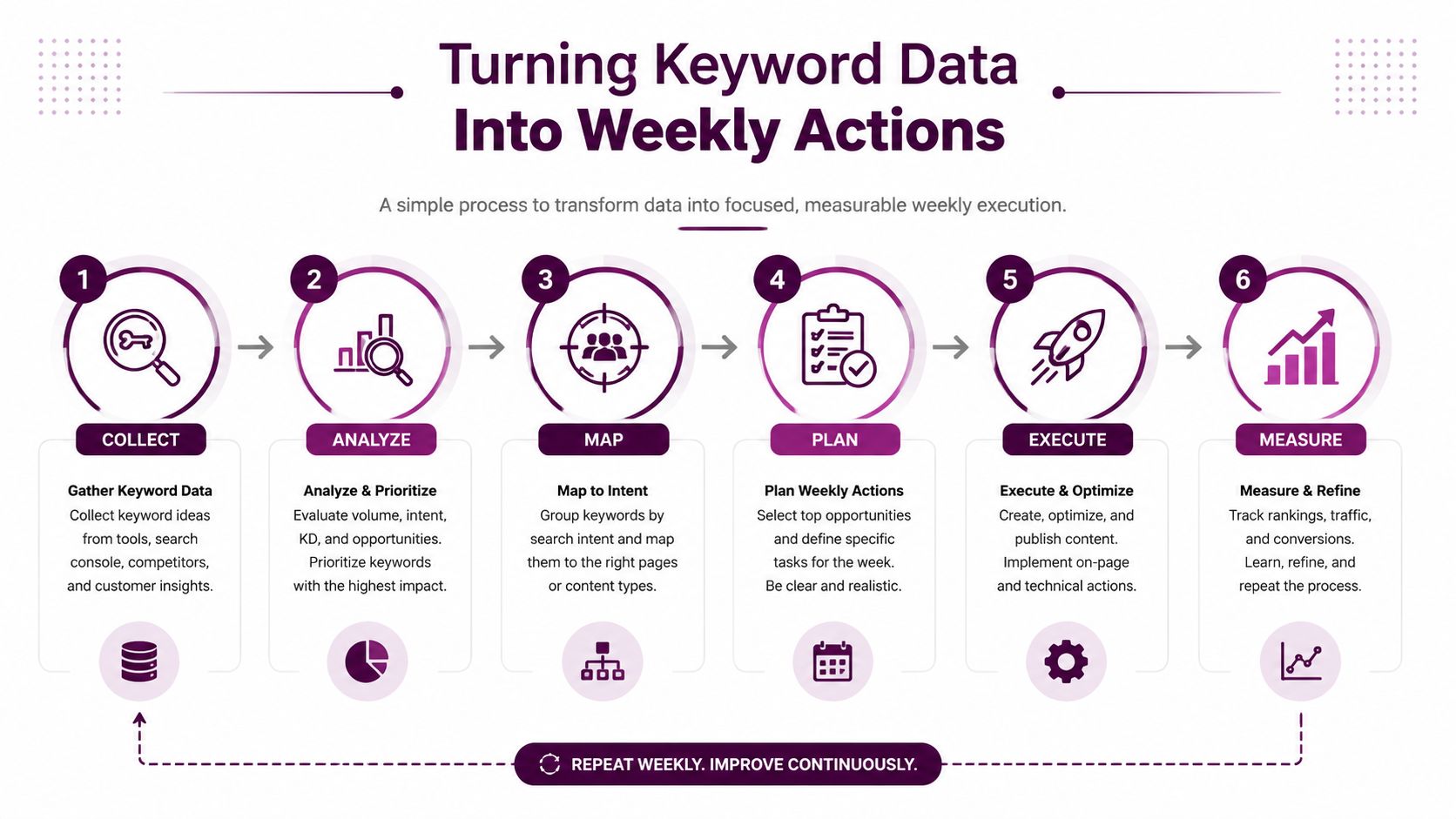
Rankings aren't the deliverable. A completed, prioritized action is the deliverable. The team should record what changed, why it changed, and what signal will confirm or challenge the decision.
Each update creates new research inputs. A newly visible query may reveal an unmet question. A CTR gap may suggest a better title or page format. A cannibalization issue may expose two competing interpretations of one topic. Feed those observations back into the keyword set, and the workflow compounds knowledge instead of restarting every quarter.
Wrapping Up and Common Questions
Digital marketing keywords work best as a decision stack, not a vanity spreadsheet. Research reveals the language customers use. Prioritization weighs intent and business value. Mapping assigns each cluster to the right page. Measurement shows whether the page earns visibility, attention, and meaningful business contribution.
Keep the loop connected. A keyword list without page mapping creates backlog. A page plan without measurement creates assumptions. A report without weekly action creates observation without progress.
How often should you refresh a keyword list?
Review performance and new query data weekly, then conduct a deeper strategic review whenever your products, markets, competitors, or customer language change. Don't delete a term only because its reported volume is small. Reassess whether it belongs to a valuable intent cluster and whether your site can answer it well.
Next action: Schedule a recurring review and bring the sales and customer-support teams into the next refresh.
Are long-tail keywords worth pursuing when volume is low?
Yes, when the phrase clearly identifies a problem, audience, location, product, or action your business serves. Long-tail demand is distributed across many specific searches, so a useful portfolio can outperform a plan built around a few broad terms. Judge the cluster by relevance, credibility, and downstream value rather than volume alone.
Next action: Select one specific customer problem and group its close query variants before choosing a page.
How should branded and non-branded terms be balanced?
Branded terms help existing users find your site, products, support resources, or account destinations. Non-branded terms introduce your business to people who haven't chosen you yet. Assign both to the right pages, but evaluate them differently. Branded performance often reflects accessibility and retention, while non-branded performance reflects discovery and category competition.
Next action: Separate branded and non-branded queries in your reporting, then give each group its own page and conversion objective.
Keyword Kick helps agencies, in-house teams, and consultants turn keyword research, Search Console data, rankings, technical signals, and competitor insights into prioritized SEO actions. Visit Keyword Kick to connect your search data and identify which pages and keyword clusters deserve attention first.