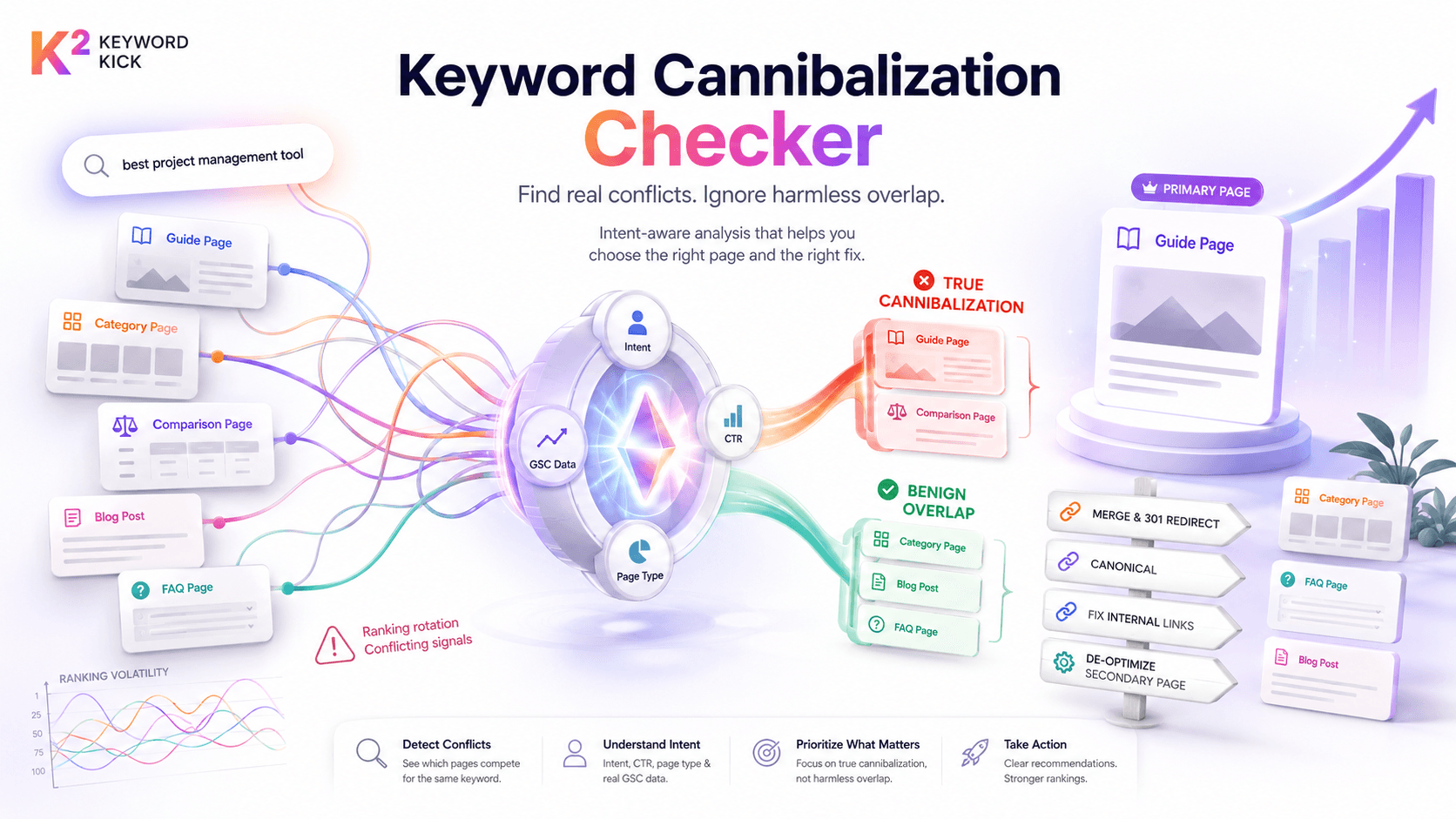
You publish a new page, update an old one, add a comparison article, and suddenly rankings start rotating between URLs that should have one clear winner. One week the guide ranks. The next week the category page appears. Then both slip and a competitor takes the click.
That's the moment many search for a keyword cannibalization checker. The problem is that many checkers stop at overlap. They tell you two pages rank for the same query, but they don't tell you whether that overlap is healthy, harmless, or actively costing you traffic. That distinction matters because fixing the wrong conflict can do more damage than leaving it alone.
A good workflow has two jobs. First, find overlaps fast. Second, separate true cannibalization from pages that serve different intents. After that, the fix should match the scenario. A blog post colliding with a product page needs a different treatment than duplicate collection pages or near-identical articles.
Why Your Own Pages Are Your Biggest SEO Competitors
If your site has grown past a small handful of pages, this issue is probably already present. Keyword cannibalization is estimated to affect approximately 30% to 40% of websites with more than 50 unique pages, and sites with unresolved conflicts often see a 15% to 25% drop in organic traffic for the affected keyword clusters within 60 days according to the verified industry analysis summarized above.
What keyword cannibalization actually is
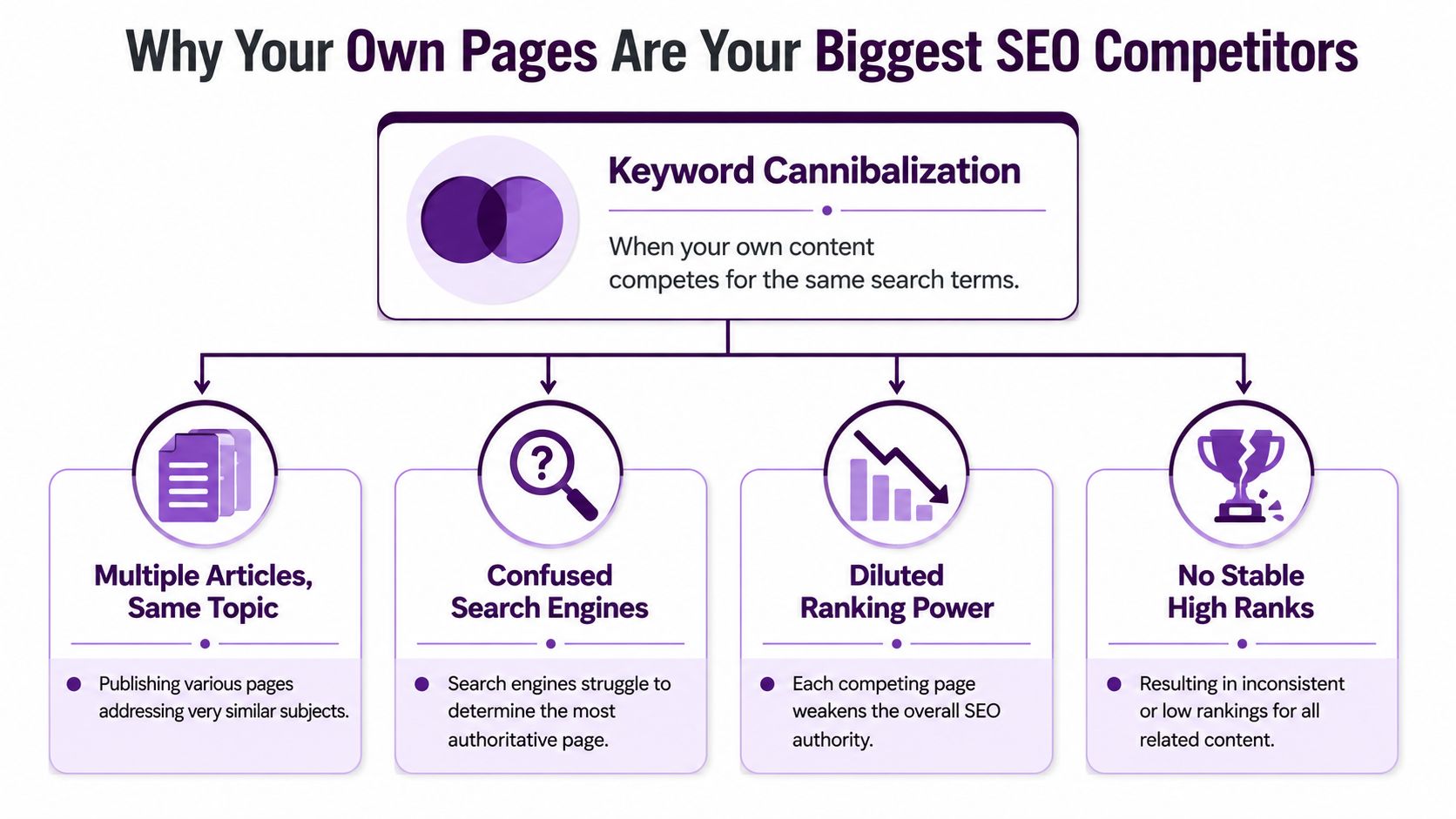
Cannibalization happens when multiple URLs on the same domain target the same keyword and satisfy the same search intent. That second part matters. If two pages happen to share terms but solve different problems, that isn't automatically a problem.
When the conflict is real, Google gets mixed signals about which page should rank. Internal links point to both. Anchor text gets split. External links may accumulate across several URLs. Title tags and headings overlap. Instead of one strong candidate, you give Google a small cluster of middling candidates.
That usually shows up in a few ways:
Ranking volatility: One page ranks, then another replaces it, then neither holds position.
Weak CTR: The page Google surfaces isn't the one users want, so impressions rise without proportional clicks.
Conversion mismatch: Informational pages win for commercial terms, or thin commercial pages win for research queries.
Wasted authority: Links and relevance signals spread across duplicates instead of reinforcing one page.
Practical rule: If you can't clearly state which URL should own a query, Google probably can't either.
Why a checker becomes necessary
On a small site, you can sometimes spot this manually. On a large site, you can't. Once content teams, category managers, and SEO teams all publish around the same topics, overlap becomes a normal side effect of growth.
A checker helps you find those collisions before they compound. It's the same reason local SEO teams audit page targeting before they try to improve your local search ranking. You need one clear destination per intent, not a stack of similar pages pulling in different directions.
If you need a baseline definition before you audit anything, the Keyword Kick glossary entry on keyword cannibalization is a useful reference point.
How a Keyword Cannibalization Checker Really Works
A keyword cannibalization checker is often treated like a black box. It isn't. The core logic is simple. The tool looks for queries that generate impressions or clicks for more than one URL on your site, then groups those overlaps so you can inspect them.

Why Google Search Console data matters
The best checkers start with Google Search Console because GSC shows how Google is distributing impressions and clicks across your URLs. That's much more useful than guessing from a crawler or a standalone rank tracker.
According to the verified data above, tools that integrate GSC data report 94% accuracy in identifying true cannibalization, compared with 76% for tools relying only on crawl-based rank tracking. The same verified dataset notes that adoption of GSC-powered checkers rose from 22% in 2020 to 57% in 2025 among SEO teams.
That difference makes sense in practice. A crawler can tell you that two pages mention the same phrase. It can't reliably tell you which page Google is testing for that query, which URL earns clicks, or whether the overlap is stable or sporadic.
What the checker is actually evaluating
A solid workflow usually combines several signals:
Query-to-URL overlap
The same search term appears against multiple URLs in GSC.Impression distribution
If Google keeps shifting impressions between pages, that's often a sign of unresolved ambiguity.Click concentration
One URL may get most clicks while another steals occasional impressions. That's a weaker concern than two pages splitting clicks evenly.Ranking pattern over time
Rotation matters more than a one-off appearance.Page type mismatch
If a blog post wins for a commercial query instead of the product or category page, the checker should surface that as a strategic issue, not just a technical one.
A checker doesn't prove a problem. It narrows your review list. Diagnosis still requires judgment.
What weak tools get wrong
The bad version of this process is simple keyword matching. It flags every overlap and calls it cannibalization. That creates noise, especially on large sites where a guide, category page, and FAQ naturally share topic terms.
The stronger approach is to pull the overlap list, then layer in intent, page role, CTR, and business value. If you want a better grasp of how ranking data fits into that review, this rank tracking guide from Keyword Kick is worth bookmarking.
Diagnosing True Cannibalization vs Benign Overlap
Teams often make the wrong call. They see two URLs ranking for one query, assume there's a problem, and merge pages that should have stayed separate.
That's backwards.
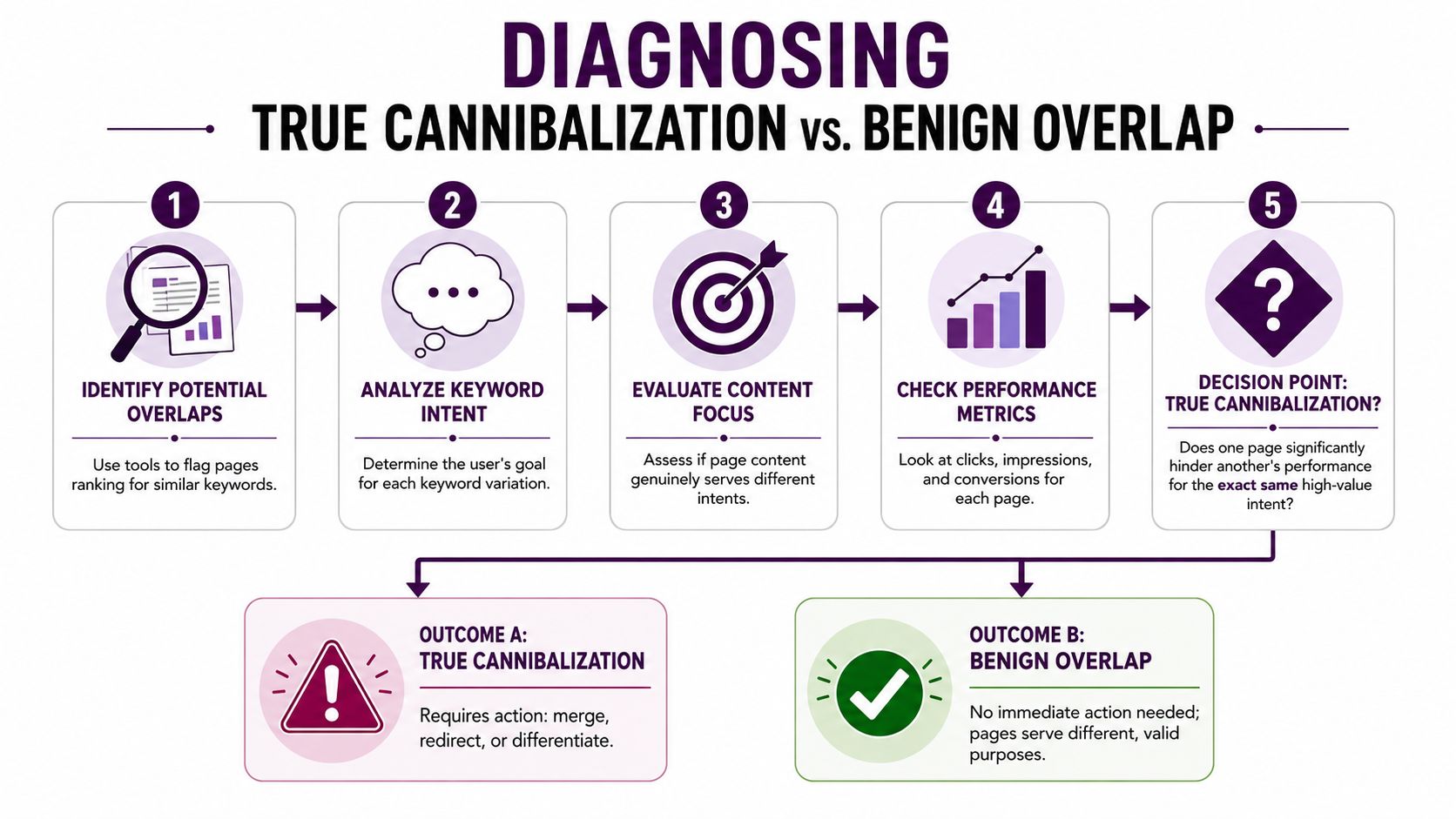
Real cannibalization only occurs when pages target the same keywords and fulfill the same intent, as Ahrefs explains in its keyword cannibalization guide. The verified data also states that a 2025 analysis found 68% of flagged cannibalization issues were, in fact, intentional segmentation for different user intents, while only 12% of checker tutorials included intent-validation steps.
Start with intent, not keywords
Two pages can rank for the same phrase and still be fine.
A simple example:
A category page targets users ready to browse products.
A buying guide targets users comparing options before they buy.
An FAQ page answers support-style questions that happen after product consideration starts.
Those pages may all surface for variations of the same term. That isn't harmful if the searcher's needs differ and each page earns its own clicks for its own job.
Use this question first: Would the same searcher be satisfied by either page equally? If yes, you may have a problem. If no, you probably have segmentation.
The diagnostic framework I'd give a junior SEO
Review each flagged pair or cluster with this sequence.
Check the SERP each page is trying to win
Search the query manually and look at what Google prefers. Is the result set mostly category pages, product pages, comparison articles, glossaries, or tutorials?
If your two competing pages belong to the same page type and answer the same need, the overlap is suspicious. If one page aligns with the live SERP and the other doesn't, you've likely found the weaker URL.
Compare CTR divergence
If two URLs get impressions for the same query but one consistently earns the clicks, that often tells you Google is testing one page while users prefer the other. A big CTR difference can be a clue that one URL is the natural primary page and the other is noise.
What you're looking for isn't a precise threshold. It's a pattern:
one page attracts engagement
the other gathers stray impressions
rankings rotate without a clear reason
That pattern usually means signals need consolidation.
Review post-click behavior and conversion role
This part is where junior teams often stop too early. They look at rank overlap and ignore what happens after the click.
Ask:
Does one page convert while the other informs?
Does one page have stronger assisted conversion value?
Are users bouncing because the page ranking isn't the page they expected?
If the “wrong” page wins, rankings may look acceptable while business outcomes get worse.
Field note: Don't merge a guide into a product page just because they share a query. If the guide captures early-stage demand and the product page closes late-stage demand, they may need cleaner differentiation, not consolidation.
Signals that usually mean true cannibalization
Use these as a working checklist:
Same intent: Both pages serve the same searcher need.
Same page type: Two blog posts, two category pages, or two near-duplicates compete for one term.
Ranking rotation: The winning URL changes frequently.
Split internal linking: Your site sends mixed relevance signals.
No clear primary page: The team can't name the intended winner immediately.
Signals that often mean benign overlap
Not every overlap deserves action.
Different funnel stages: Guide vs product page.
Different query modifiers: “best,” “vs,” “pricing,” “how to,” and “near me” often imply different expectations.
Different conversion paths: One educates, one transacts, one supports retention.
SERP diversity: Google is already rewarding multiple content types.
If you need another lens while reviewing these clusters, a content gap analysis resource from Keyword Kick can help identify where the issue is missing differentiation rather than true duplication.
Prioritizing Your Fixes for Maximum Impact
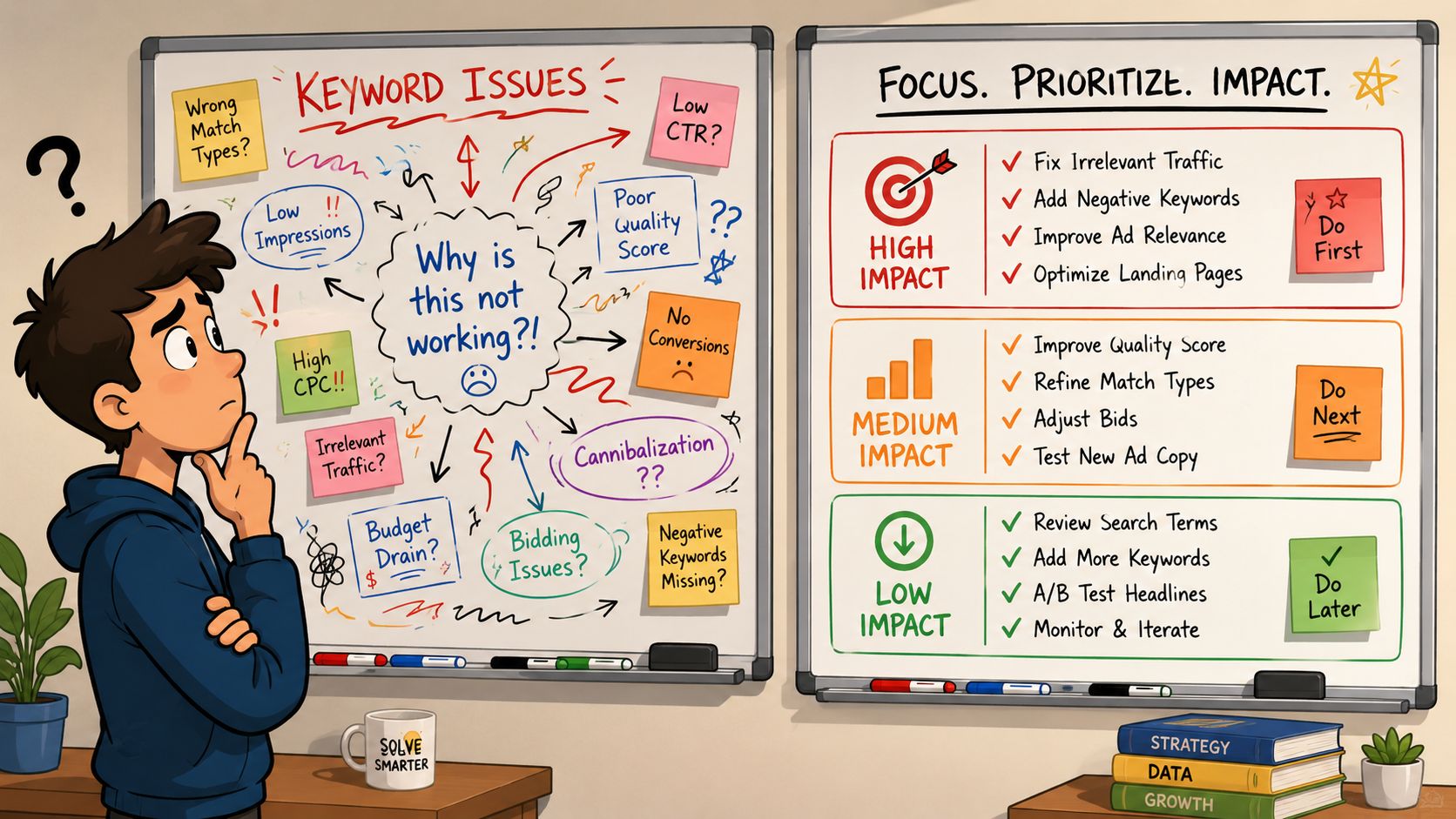
Once you've confirmed the conflicts that are real, don't rush into fixing all of them. That's how teams burn weeks cleaning up edge cases while the valuable problems sit untouched.
Focus on business impact first
I prioritize confirmed cannibalization using three lenses.
Commercial value
Start with the terms tied to revenue, pipeline, qualified leads, or high-intent traffic. If a blog post is stealing visibility from a product, collection, or service page, that issue usually deserves faster action than two informational posts overlapping on a low-stakes query.
Strength of the wrong winner
A conflict becomes more urgent when the weaker URL keeps winning. Common pattern: an old article ranks because it has links and history, but the category page should own the term. You don't need to panic. You do need to decide whether to strengthen the target page, de-optimize the wrong one, or merge signals.
Severity of intent conflict
Some issues are mild. Others create ongoing confusion because the pages are nearly interchangeable. The tighter the intent overlap, the higher the priority.
Fix the conflicts where the wrong page is winning for a valuable query. Those are the ones that usually move traffic and conversions together.
A practical triage model
I like to sort each issue into one of these buckets:
Priority level | What it looks like | What to do |
|---|---|---|
High | Commercial query, wrong URL winning, same intent | Fix first |
Medium | Important topic, some overlap, mixed intent | Review manually and refine |
Low | Informational overlap, different roles, stable performance | Monitor, don't force a fix |
What not to prioritize
Leave these alone unless performance data says otherwise:
Healthy SERP coverage: Two pages own different slices of the same topic.
Minor impression overlap: A page appears occasionally without stealing meaningful clicks.
Supporting content: FAQ, glossary, or help pages that reinforce the main asset without overtaking it.
The point isn't to eliminate overlap. The point is to eliminate harmful ambiguity.
The Cannibalization Fix Playbook With Examples
A lot of teams hesitate here, and the concern is valid. The verified data notes that a 2024 study by Neil Patel's team found 45% of agencies hesitated to fix cannibalization because they feared losing traffic, with many guides failing to provide scenario-specific remediation workflows, as referenced in this YouTube discussion of SEO cannibalization fixes.
That fear usually comes from using the wrong fix for the wrong situation.
Choosing the right fix
Fix Method | Best For | Primary Action | SEO Impact |
|---|---|---|---|
Merge and 301 redirect | Near-identical pages with one clear winner | Combine useful content and redirect the weaker URL | Consolidates authority and removes duplicate competition |
Canonical tag | Necessary duplicates or overlapping variants that must stay live | Canonicalize the secondary page to the preferred URL | Signals preferred index target while keeping both pages accessible |
Content de-optimization | A weaker page ranking for the wrong query but still useful for another topic | Rewrite titles, headings, and copy to shift focus | Reduces direct competition without deleting the page |
Internal linking overhaul | Mixed signals across related pages | Route anchors and supporting links to the primary URL | Clarifies hierarchy and reinforces page priority |
Play one: merge and 301 redirect
Use this when you have two posts that are functionally the same. Maybe one is an older article and one is the “updated” version. Maybe two service pages were created by different teams and target the same term with barely any distinction.
Do it this way:
Pick the page with the strongest combination of relevance, links, and conversion value.
Pull any unique sections from the weaker page into the winner.
Update title, headings, internal links, and on-page framing so the surviving page clearly owns the topic.
Add a 301 redirect from the weaker URL to the preferred one.
Revisit internal links so they point directly to the final URL, not the redirected one.
Best trade-off: strong consolidation.
Main risk: if the weaker page served a distinct intent, you can erase useful entry points.
Play two: canonical tag
This is better for cases where both pages need to exist. E-commerce teams hit this often with close variants, filtered collections, or duplicate-style pages created for merchandising or navigation reasons.
Use a canonical when:
both pages are necessary for users
the content overlap is substantial
you want one page treated as the primary SEO asset
What doesn't work is using canonicals as a bandage for bad architecture. If the pages are intended to target different intents, they need differentiation, not canonicalization.
Play three: content de-optimization
This fix gets overlooked, but it's one of the safest options when a useful page ranks for a query it shouldn't own.
Example: a blog post about “how to choose running shoes” starts outranking the category page for “running shoes.” Don't delete the article if it still serves an upper-funnel purpose. Instead:
Rewrite the title tag: Shift away from the exact commercial term.
Tighten the H1: Make the informational angle explicit.
Trim repeated commercial phrases: Remove unnecessary exact-match repetition.
Add internal links: Point readers and crawlers toward the target category page with clearer anchor text.
This keeps the page alive while pushing it toward the intent it should serve.
If the page is valuable but misaligned, refocus it before you remove it.
Play four: internal linking overhaul
Sometimes the pages are fine. The site architecture isn't.
This happens when dozens of blog posts, FAQs, and old landing pages all link inconsistently to different URLs using the same anchor. Google sees scattered reinforcement and keeps testing multiple candidates.
The fix:
choose one primary page for the target query
update supporting pages to link toward that URL
use anchor text that matches the page's intended topic
remove links that promote secondary pages unnecessarily
This is often the cleanest first move when you aren't ready to merge or redirect.
A quick decision guide by scenario
Blog post vs blog post
Usually a merge and 301 problem if intent is the same.
Product page vs FAQ page
Often a canonical or clearer differentiation problem, depending on whether both need to exist.
Category page vs guide
Usually a de-optimization and internal linking problem, not a merge.
Legacy landing page vs updated landing page
Almost always merge and redirect, assuming the newer page is the intended owner.
A Start-to-Finish Keyword Kick Workflow
A clean workflow keeps teams from turning a cannibalization audit into a random cleanup project.
Start by connecting your data sources and pulling a report that shows queries with multiple ranking URLs. Don't act on every flagged overlap. Sort by the queries that matter most to the business, then inspect the competing pages one cluster at a time.
The workflow I'd use
First, review the overlap list and name the page that should win. If nobody on the team can identify the intended URL quickly, you've already found a governance problem.
Next, inspect the live SERP and compare page intent. If the pages serve different roles, keep both and sharpen differentiation. If they serve the same role, choose the stronger asset and decide on the fix: merge, canonical, de-optimize, or rework internal linking.
Then update the site signals around that decision:
revise titles and headings
fix conflicting internal links
remove mixed anchor patterns
align supporting pages around the primary URL
After launch, monitor the designated winner in Search Console and your rank tracker. Watch for cleaner impression concentration, steadier rankings, and better click share going to the intended page. If a secondary page keeps resurfacing, that usually means intent still isn't distinct enough or internal linking remains messy.
A similar principle shows up outside classic SEO too. If you've ever worked with marketplace listings, you've seen how weak targeting creates overlap and confusion. The Trendlytic guide for Redbubble sellers is a good example of how keyword clarity affects discoverability even in a different search environment.
The important part is discipline. A keyword cannibalization checker gives you the shortlist. Genuine gains come from diagnosing intent correctly, choosing the least destructive fix, and tracking whether the right page takes control afterward.
If you want to turn this process into a repeatable workflow, Keyword Kick helps you pull fragmented SEO signals into one place, spot competing URLs faster, and decide what to fix first without guessing.