Google stopped using rel="next" and rel="prev" as an indexing signal in March 2019, so modern pagination SEO depends on canonicalization, internal linking, and crawl efficiency. The tags once had a formal role, but they can no longer compensate for a pagination structure that wastes crawl attention or hides important content.
You've probably seen the symptoms already. A category page has hundreds of numbered URLs, Google Search Console shows many pages discovered but not indexed, and newly published products take longer to appear than they should. Meanwhile, page two, page three, and increasingly deep archive URLs keep attracting crawlers despite producing little search value.
That's the hidden cost of pagination. The problem isn't that numbered pages exist. The problem is allowing weak, repetitive, or inaccessible URLs to compete with the product, article, and landing pages that matter most. Good pagination gives users manageable navigation while giving search engines a clear path through the site. Poor pagination creates indexing drift, where Google's understanding of which URLs deserve attention gradually diverges from your business priorities.
Understanding the Crawl Budget Drain
A large store can have a healthy product catalog and still present Googlebot with an inefficient maze. A category page links to the next page, every filter creates another variation, and older archive pages remain reachable long after their content has stopped attracting users. The result is a growing set of URLs that must be discovered, fetched, and processed even when the pages contribute little unique value.
Google describes pagination as a sequence of pages connected by next, previous, and page-number links. That sequence matters because crawlers don't see a category as one abstract collection. They encounter individual URLs, evaluate their signals, and decide how much attention each deserves. The historical guidance on paginated sets also recognized that links and other indexing properties could be consolidated across a logical sequence, but that doesn't make every page equally valuable today. Google's pagination guidance for e-commerce and result lists makes clear that the underlying URLs and links still matter even though the old pagination tags no longer do.
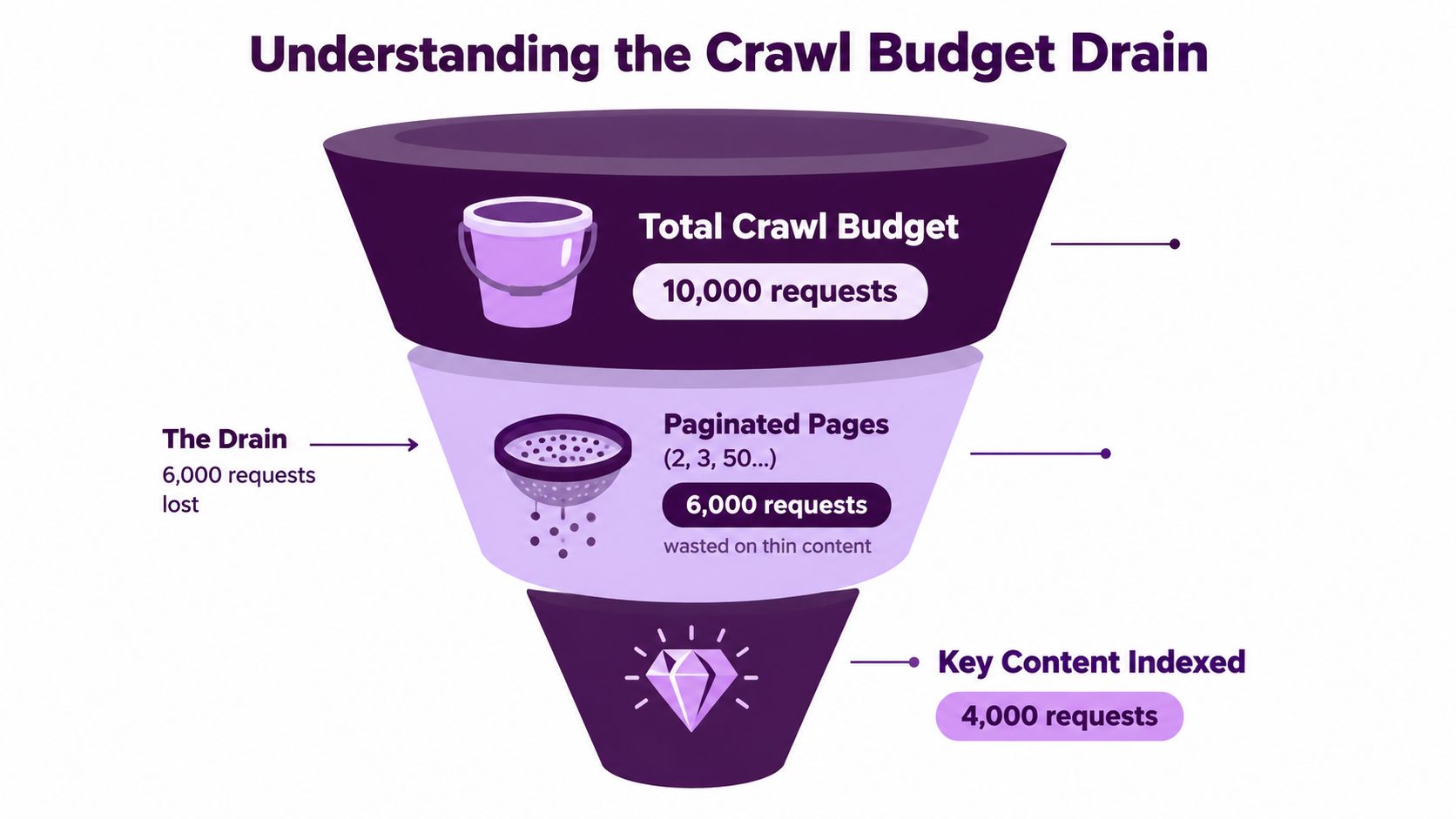
The diagram is an illustration of the mechanism, not a benchmark for every website. On a real site, the drain appears when pagination, faceted navigation, internal search URLs, and sorting parameters create many crawlable paths to similar content. Each additional URL increases the number of pages Google must assess before it reaches deeper products or newer articles.
Where crawl waste becomes visible
Suppose a retailer has a popular category with a long product list. Page one receives strong internal links from navigation and editorial content. Page two receives less attention. Deeper pages depend almost entirely on a chain of adjacent links, and their products may have no direct route from the category hub or another relevant page.
That architecture creates two problems:
- Crawl competition: Paginated URLs compete for crawl attention with product pages, editorial content, and recently updated landing pages.
- Discovery delay: A product buried deep in a sequence may be technically accessible but still receive weak and infrequent discovery signals.
- Indexing drift: Google may index some archive or page-state URLs while leaving commercially important URLs unindexed.
- Thin-page repetition: Similar headings, filters, navigation, and product grids can make later pages look less useful than the items they contain.
A self-referencing canonical and a clean HTML link structure help, but they don't turn a low-value page into a high-value one. Use crawl reports and server logs to understand which URL patterns attract requests, then diagnose crawl inefficiencies before changing tags in isolation. If faceted navigation is multiplying the problem, review how to handle faceted navigation alongside pagination rather than treating the two systems as unrelated.
The practical rule is simple: make every crawlable paginated URL earn its place. Keep pages that help users and expose valuable items, reduce paths that only rearrange the same collection, and give important product or article URLs direct internal links so they don't depend solely on a deep sequence.
The Evolution of Pagination Signals
A page-two URL can remain crawlable, indexable, and internally linked while the SEO team still treats it as a problem to hide. That assumption comes from an earlier stage of Google Search. On September 15, 2011, Google published formal guidance recommending rel="next" and rel="prev" to describe the relationship between URLs in a paginated series. The guidance framed pagination as a sequence and explained that Google could consolidate indexing properties, including links, across that sequence. It also said searchers could usually be sent to the first page.
Google clarified in March 2012 that these attributes were a strong hint, not an absolute command. In March 2019, it stated that the tags were no longer used as an indexing signal. The full history appears in Google's original pagination announcement. It explains why legacy templates still contain markup that modern Google does not rely on.
The practical consequence is a change in priority. Instead of asking whether a template tells Google that several URLs belong together, ask: Can Google independently discover, understand, and evaluate each URL that matters?
That question puts the technical elements in their proper roles:
- Canonical tags identify the preferred representation of a page. They should not act as a blanket instruction to remove every later page from consideration.
- Internal links create the routes crawlers can follow. Numbered links, functioning next links, and direct links from relevant hubs all support discovery.
- Unique page states distinguish a legitimate sequence page from a duplicate created by sorting or filtering.
- Crawl control limits unnecessary URL expansion where parameters produce near-identical collections.
A paginated category has a sequence, but each URL still needs a clear purpose and a crawlable route. That distinction matters because indexing drift can develop even when the markup looks tidy. Google may index one archive page, omit another, and leave valuable products or articles dependent on an unreliable path through the series.
Independent guidance recommends keeping paginated URLs internally linked, indexable, and self-referencing with canonical tags. Collapsing every later page to page one can hide deeper items from discovery. This pagination SEO guide explains that practical distinction.
Retaining rel="next" and rel="prev" may be harmless for other systems, but it is not a modern Google strategy. Migration work should address crawlable page URLs, direct internal links, and correct canonicalization before anyone spends time preserving obsolete hints. A JavaScript-driven sequence that never creates accessible URLs remains a discovery problem, regardless of its pagination markup.
Infinite Scroll vs Traditional Pagination
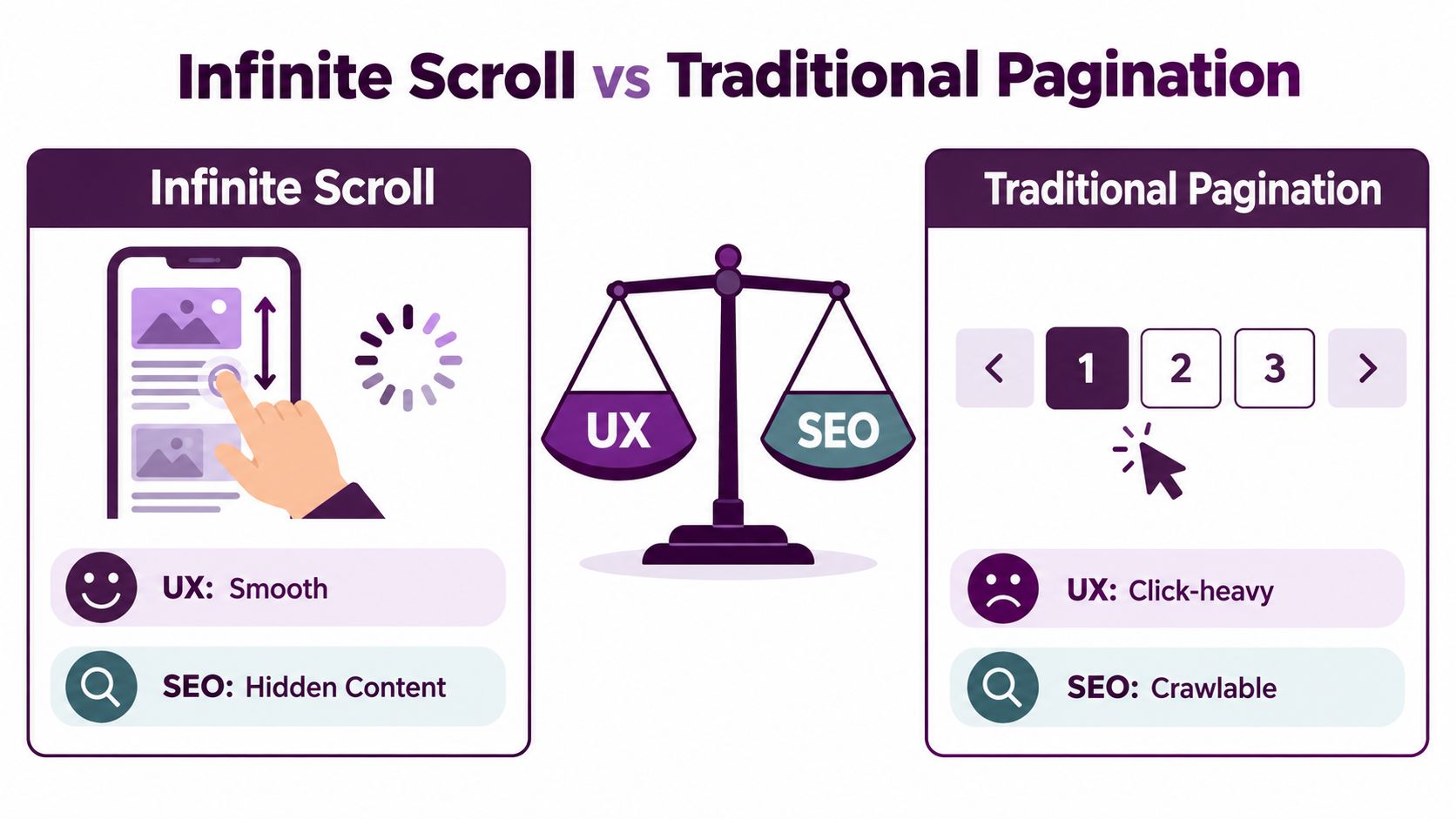
A shopper reaches the end of a category page, scrolls again, and sees more products appear without leaving the screen. The experience feels efficient, but the SEO outcome depends on what exists behind that interaction. Can crawlers reach every meaningful item through stable, standard URLs, or does the collection depend on scroll events and client-side state?
Traditional pagination gives each segment its own address. Page two has one URL, page three has another, and ordinary links expose the sequence. Users take more navigation actions, but the site provides a shared route for people, crawlers, and shared links. That structure also makes crawl budget easier to manage because search engines can evaluate defined page states instead of repeatedly processing an expanding interface.
| Feature | Traditional Pagination | Infinite Scroll |
|---|---|---|
| URL model | Each segment has a stable, crawlable URL | Each loaded state needs deliberate URL handling |
| User experience | Clear progress, with more navigation actions | Smooth browsing, with less visible position |
| Content discovery | Standard links expose later segments | Items can remain hidden behind scrolling |
| Sharing | A specific page in the sequence can be shared | A deep state needs history and URL support |
| Failure mode | Thin or weakly linked pages consume crawl attention | Important content exists only after client-side interaction |
| SEO fit | Strong when pages are indexable and internally linked | Viable with a crawlable paginated fallback or equivalent |
The hidden cost of a weak infinite-scroll implementation is broader than missed discovery. Search engines may process the first state, skip later states, or index inconsistent combinations of loaded content. That indexing drift can leave products or articles dependent on an unreliable path through the collection. Google's guidance has moved away from treating pagination hints as the main solution, so the durable answer remains accessible URLs, ordinary links, and useful page states.
A scroll interface can still work when it has a crawlable foundation. Each loaded segment should correspond to a distinct URL, and a load more control should resolve to that state rather than trigger an opaque script. A view-all page removes the sequence, but a very large collection can load slowly, strain the server, and become harder to filter or use.
Choose traditional pagination when each segment needs a durable URL or the collection is too large for one practical page. Use infinite scroll with a paginated fallback when continuous browsing drives the experience but search visibility still matters. Consider view-all for a collection small enough to stay usable and performant. Treat load more as a presentation layer, not as a substitute for crawlable URLs.
Users can scroll through the collection while crawlers and share links reach clearly defined states. That separation preserves the interface choice without allowing the interface to determine what search engines can discover.
Implementing Canonical Tags Correctly
The most common pagination canonical mistake is pointing every page in a series to page one. That setup looks tidy, but it can tell Google that page two, page three, and deeper pages aren't preferred destinations. If those pages contain products or articles that deserve independent discovery, the shortcut can hide the very URLs the site needs search engines to process.
A stronger default is self-referencing canonicalization. Page one canonicalizes to page one. Page two canonicalizes to page two. Each URL identifies itself as the preferred version of the content it serves.
A practical implementation sequence
Start with the URL, not the tag.
- Create a stable URL for each page state. Use a path or query parameter that resolves to a real page. Avoid relying on a fragment identifier, because a hash-based state doesn't provide the same crawlable URL model.
- Render the collection in the initial HTML when possible. JavaScript can enhance browsing, but the page should have a dependable fallback that exposes the items and navigation.
- Add a self-referencing canonical. The canonical should match the URL that users and crawlers are viewing, including the intended pagination state.
- Link the series with ordinary anchors. Next, previous, and selected page links should resolve without requiring a click handler to manufacture the destination.
- Give important items additional routes. A product or article shouldn't be reachable only after a crawler traverses a long chain of category pages.
- Separate filtered states from standard pages. Sorting and faceting can generate URLs that look like pagination but represent a different collection. Decide which states deserve crawling and canonicalization.
The canonical tag doesn't consolidate every relationship in a series. It helps identify the preferred URL for the current page. Internal linking communicates hierarchy and discovery, while page content and metadata help distinguish legitimate segments from accidental duplicates.
When page-one canonicalization is deliberate
There are cases where a business intentionally wants only the first page represented in search. That may be appropriate for a low-value archive or a temporary collection, but it should be a conscious decision based on the content and the site's goals. It isn't a universal pagination rule.
Audit adjacent templates for contradictions. A page can carry a self-canonical while being blocked from crawling, omitted from internal links, or redirected through a script. Use a duplicate content detection guide to identify overlapping URL clusters, then decide whether each cluster needs consolidation, removal, or better architecture.
Diagnosing Issues with GA4 and Search Console
A category can look healthy in GA4 while Google spends its crawl attention on sorting states, stale archive URLs, and thin pagination. The reverse also happens: later pages may receive little organic traffic yet expose products that users need. Diagnose both outcomes together, then trace them back to URL patterns and internal links.
Start with Search Console's indexing report. Group examples by /page/, ?page=, sorting parameters, faceted paths, and older formats that remain linked internally. Look for pages that are discovered but not indexed, excluded despite exposing valuable items, or assigned a canonical that conflicts with the site's intended structure. Inspect representative URLs with URL Inspection, including a later page rather than only the category root.
Google's earlier pagination guidance centered on rel="next" and rel="prev". Its later guidance removed those signals as a required solution, which makes the underlying architecture more important. Search Console should therefore confirm whether Google can discover useful pages through ordinary links, not merely whether legacy tags exist. Use this Google Search Console how-to to review the inspection and reporting features. Connect every status to a URL pattern and a business purpose.
Join crawl signals to user behavior
GA4 supplies the behavioral context that indexing reports lack. Compare paginated landing pages with the products or articles they expose:
- High entry, low progression: Visitors reach a category segment but rarely continue or select an item. Review relevance, layout, and the segment's depth in the catalog.
- Strong progression, weak organic visibility: Users find value after navigating, while search engines may lack direct paths to those later pages or their products.
- Crawlable URLs with no engagement: A large URL group receives little traffic or interaction. Check for sorting, filtering, or stale archive states consuming crawl budget.
- Important products absent from search: Trace their internal route. If it depends on deep pagination, add direct paths from category hubs, editorial pages, or related collections.
Low traffic on page two alone does not justify removing it. It may still support discovery for products that attract demand elsewhere. The diagnosis depends on the page's role, the items it exposes, links pointing to it, indexing outcome, and crawl activity.

Create an audit view joining URL pattern, canonical target, index status, organic entrances, item clicks, and crawl activity. It reveals indexing drift by showing where Google spends attention and whether those pages support users. Review the view after template changes so crawl waste and coverage gaps do not persist unnoticed.
Actionable Migration Checklist
Pagination repairs can create as many problems as they solve if the team changes URLs, canonical tags, and internal links at the same time without a record of the old state. Treat the work as an architecture migration. Preserve useful paths, remove accidental duplication, and validate each layer before expanding the change across the site.
Before changing the templates
- Inventory every pagination pattern. Export URLs using paths, query parameters, sorting, filtering, and search states. Include old formats that may still appear in internal links or external references.
- Classify page purpose. Separate category pages, product listings, blog archives, internal search results, and filtered collections. They may need different crawl and index decisions.
- Map valuable deep content. Identify products, articles, and landing pages that currently depend on pagination for discovery. Add them to the migration test set.
- Record current signals. Capture canonical targets, robots directives, status codes, internal links, titles, and index coverage before deployment.
During implementation
- Give each intended page state a stable URL. Make sure the server returns the correct content without requiring a scroll event or a client-only transition.
- Use self-referencing canonicals by default. A page should point to itself unless the business has a documented reason to consolidate it elsewhere.
- Repair the link path. Keep next and previous links functional, expose useful page numbers, and link key items directly from stronger category or editorial pages.
- Remove accidental URL multiplication. Decide which sort and filter combinations need crawlable URLs. Don't let every interface state become a permanent search path.
- Keep metadata coherent. Make page titles and visible headings distinguish the collection and pagination state where that helps users understand their location.
After release
Test a representative sample from the first page, a middle page, and a deep page. Check rendered HTML, canonical output, internal links, response status, and whether the listed products or articles match the URL's intended state.
Then monitor Search Console and GA4 together. Look for changes in excluded URL patterns, discovery of important item pages, organic entrances to category segments, and progression from collection pages to detail pages. Don't react to one fluctuation. Compare URL groups and investigate whether the new architecture is sending crawlers and users toward the same high-value destinations.
Finally, make pagination part of release QA. New catalog templates, JavaScript components, filters, and archive systems can recreate the same waste even after a successful cleanup. Add checks for stable URLs, self-canonicals, crawlable anchors, and direct links to priority content before a new template reaches production.
Keyword Kick helps agencies, brands, and in-house teams connect Google Analytics 4, Google Search Console, rank tracking, backlinks, and technical SEO signals in one workspace. Use Keyword Kick to audit pagination patterns, surface indexing issues, and turn crawl and visibility findings into prioritized actions for your site.