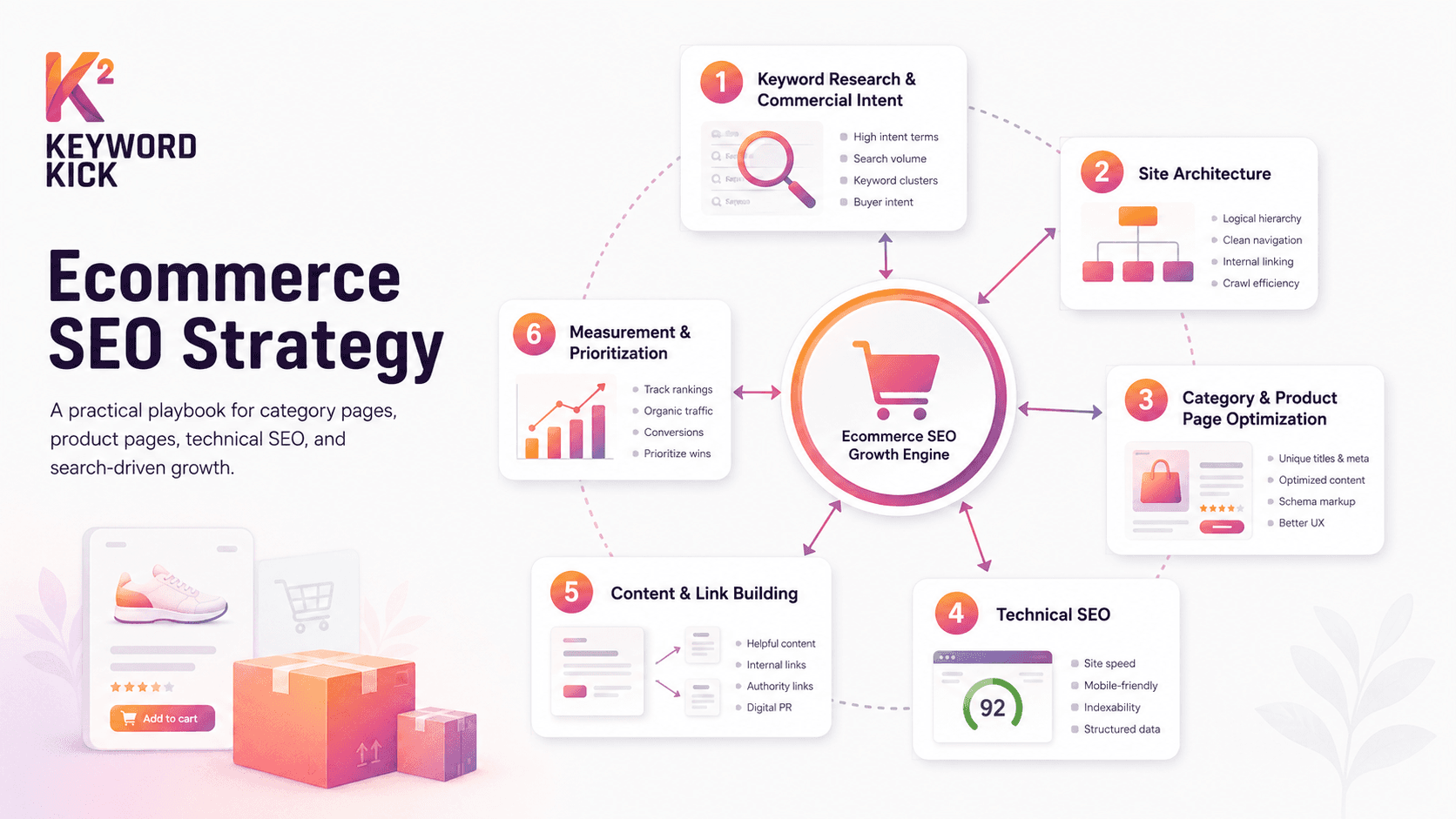
If you're running ecommerce SEO right now, the workload probably feels mismatched to the results. You fix duplicate titles, then discover faceted URLs are getting indexed. You rewrite a category page, then realize the main revenue leak is a slow mobile template. You publish content, but the pages that make money still aren't the ones gaining visibility.
That usually happens because the team is operating from a checklist instead of a system. A useful SEO strategy for ecommerce doesn't start with random tasks. It starts with prioritization, page roles, and a hard question: which actions are most likely to increase qualified traffic to pages that can sell?
Beyond the Checklist Why Ecommerce SEO Needs a Playbook
Large ecommerce sites break simple SEO advice.
A basic checklist works fine on a ten-page brochure site. It falls apart when you have thousands of SKUs, layered navigation, seasonal inventory changes, overlapping search intent, and templates that can generate endless low-value URLs. In that environment, every SEO task has a second-order effect. A small change to category copy can improve rankings, but the same site can still underperform if internal links are weak, product data is inconsistent, or search engines are wasting time crawling filters no one should ever index.
That's why teams need a playbook. Not a list of best practices. A decision framework.
What a playbook changes
A playbook forces the team to define page purpose before touching copy or code. Category pages exist to win broader commercial demand. Product pages exist to capture exact-item demand and convert it. Content exists to support discovery, decision-making, and authority. Technical SEO exists to make those pages discoverable, crawlable, and eligible to surface correctly.
When those roles are clear, prioritization gets easier.
Instead of asking, “What SEO task should we do next?” the team asks:
Which page type drives the most revenue opportunity
Which blockers prevent those pages from ranking or converting
Which fixes scale across templates instead of helping one URL at a time
Which work improves both discoverability and shopping behavior
Practical rule: If a task can't be tied to an important page type, a known search intent, or a measurable business outcome, it probably shouldn't be first in line.
This is also where a lot of ecommerce teams go wrong. They spend weeks polishing blog content while core category templates remain thin, slow, or poorly linked. Or they obsess over rank tracking without fixing the architecture and product data issues that hold back the entire catalog.
SEO is an operating system, not a campaign
The strongest ecommerce programs treat SEO like merchandising and site operations. It isn't a one-off project. It's an ongoing system that connects keyword intent, information architecture, product data, internal linking, and performance.
If you need a useful outside perspective on the basics that online retailers need to get right, Ascendly Marketing's guide for online retailers is a solid companion resource. It helps frame SEO as part of sales growth rather than just a traffic exercise.
A playbook matters because search visibility isn't evenly distributed. Ranking gains near the top of the page have outsized value, and ecommerce SERPs are highly competitive. Teams that win don't do more SEO tasks. They make better sequencing decisions.
Mastering Keyword Research for Commercial Intent
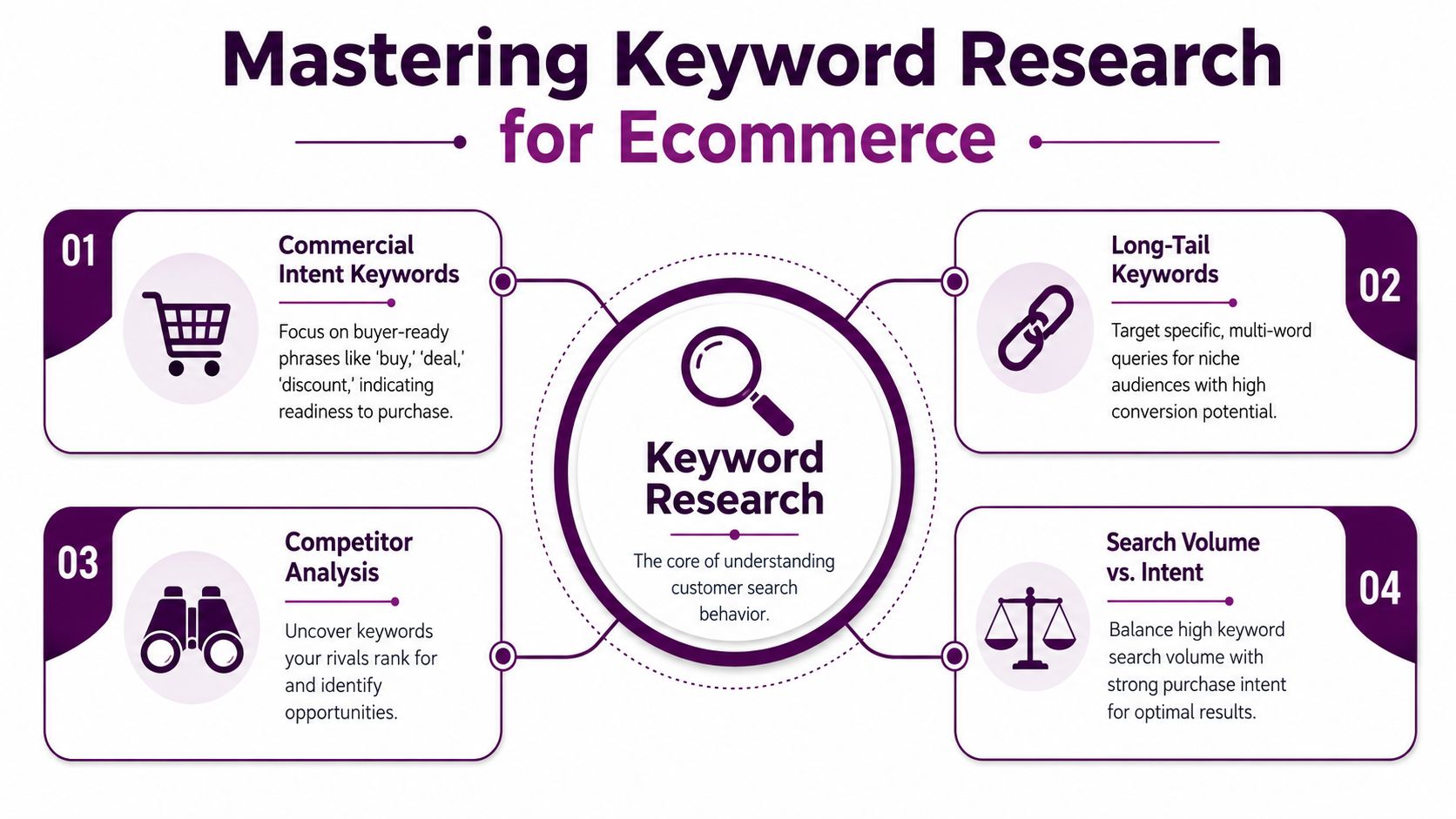
Keyword research for ecommerce usually fails at the mapping stage, not the discovery stage.
Many groups can generate a long list of terms. Fewer teams can decide which query belongs to which page, and fewer still can keep pages from competing against each other. That's where rankings stall. A category page targets the same phrase as a product page. Three subcategories overlap. A blog post accidentally outranks a collection page for a transactional query.
The fix is to build a keyword intent matrix.
Build the matrix by page type
Start with the pages you already have. Export product pages, category pages, subcategory pages, and editorial content into a sheet. Then assign each page one primary query cluster based on intent.
Use this model:
Query type | Best page type | Example for a running shoe store |
|---|---|---|
Specific commercial | Product page | Nike Air Max 90 men's size 11 |
Broad commercial or comparison | Category page | men's running shoes |
Modifier-led commercial | Subcategory or curated collection | trail running shoes for women |
Informational | Guide or blog post | best shoes for marathon training |
The discipline here matters more than the tool. One page should own one primary intent cluster. Supporting terms can sit underneath it, but you don't want five pages trying to rank for the same commercial phrase.
What to look for in real ecommerce queries
Good ecommerce keyword research isn't just about volume. It's about proximity to purchase and fit with the right template.
Here's the practical filter I use:
Buyer-ready terms belong on product pages. These include model names, size modifiers, SKU-style searches, and product-specific qualifiers.
Browsing and comparison terms belong on category or subcategory pages. These are the searches users make when they know the product type but haven't chosen the exact item.
Question-led queries belong in support content, but only when that content can internally link back to revenue pages in a useful way.
BigCommerce's ecommerce SEO guidance supports this page-mapping approach and also warns about a common trap: duplicate manufacturer descriptions and repetitive category copy can create index bloat and weaken relevance signals in large stores, as noted in BigCommerce's ecommerce SEO article.
If Google is showing mostly category pages for a query, trying to rank a single product page for that term is usually wasted effort.
A sample matrix in practice
Take a store that sells coffee gear.
A weak setup looks like this:
The grinder category targets “best coffee grinder”
A blog post also targets “best coffee grinder”
Two product pages mention the same phrase in titles
Collection pages repeat boilerplate copy
A stronger setup looks like this:
Category page: coffee grinders
Subcategory page: burr coffee grinders
Product page: Baratza Encore burr coffee grinder
Guide: how to choose a coffee grinder
Comparison page: burr grinder vs blade grinder
That structure reduces cannibalization and gives every intent a clean destination.
What not to do
Teams waste time when they:
Chase broad terms first: These look attractive, but they're often the hardest to win and the easiest to map incorrectly.
Let filters become accidental landing pages: If no one intentionally optimized the page, it shouldn't be ranking by accident.
Copy supplier text: That weakens differentiation and muddies relevance across similar products.
Ignore query patterns from existing data: Search Console and internal site search often reveal the language buyers use.
If you want a practical refresher on the process itself, this keyword research guide from Keyword Kick walks through the fundamentals cleanly.
Designing a Scalable SEO-Friendly Site Architecture
A good architecture makes the right pages easy to find. A bad one buries them under parameters, duplicate paths, and confusing navigation.
Most ecommerce SEO problems don't start on the page. They start in the structure around the page. Search engines can't rank what they can't consistently crawl, interpret, and prioritize. Users won't convert on pages they can't reach quickly or understand in context.
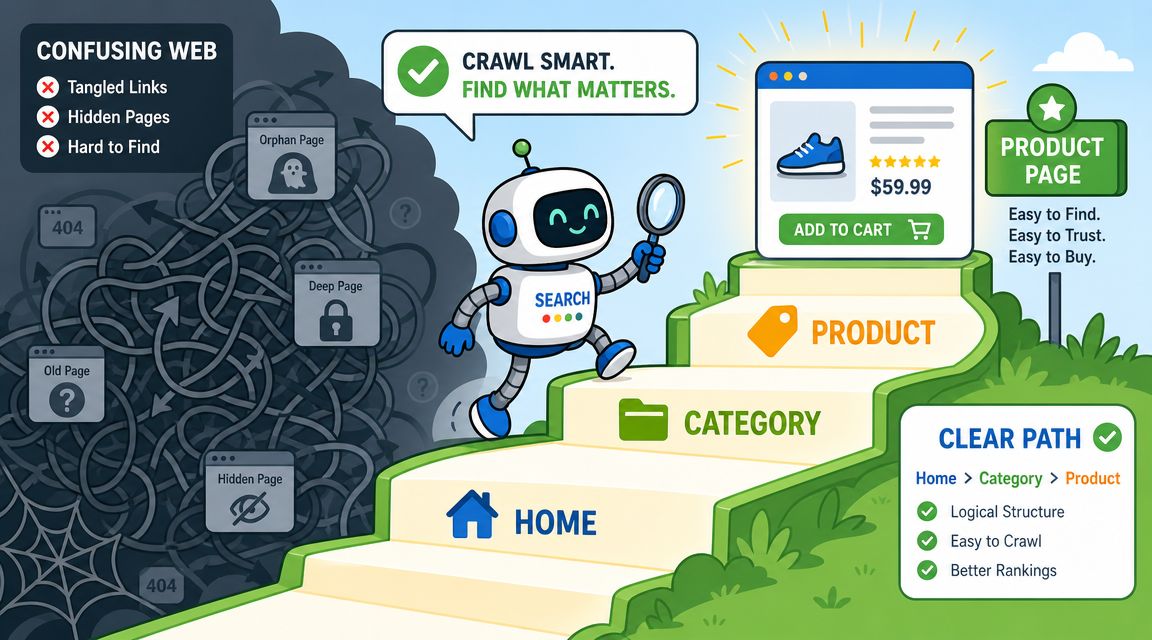
Good structure versus bad structure
Here's a simple comparison.
Structure | Better choice | Weaker choice |
|---|---|---|
Category hierarchy | /running-shoes/trail/ | /cat?id=18&sort=top |
Product path | /running-shoes/trail/brooks-cascadia-17 | /product/48392?ref=collection |
Navigation logic | consistent parent-child relationships | overlapping categories with no clear ownership |
Internal paths | crawlable HTML links | JavaScript-heavy paths with weak discoverability |
Clean URLs don't rank on their own. But they help reinforce page context, reduce duplication, and make the site easier to maintain.
The category tree has to reflect search demand
A scalable architecture starts with a category tree that matches how people shop and search. Not how the warehouse organizes inventory. Not how the CMS happens to store attributes.
That means:
Top-level categories should map to meaningful commercial demand
Subcategories should reflect genuine distinctions such as use case, product type, or brand grouping
Product pages should sit under a clear hierarchy, with breadcrumbs that reinforce parent relationships
Internal links should consistently point users and crawlers toward canonical revenue pages
If a page only exists because of an internal merchandising shortcut, it may not deserve indexation.
A useful outside read on this point is Wistec's piece on digital strategy and site structure. It reinforces something many teams learn late: structure often shapes performance more than another round of copy edits.
Faceted navigation needs selective indexation
Architecture usually turns into an SEO mess.
Filters are useful for shoppers. They're dangerous for search if every combination creates a crawlable, indexable URL. Color, size, price, material, sleeve length, width, compatibility, and sort orders can explode into a huge inventory of low-value pages fast.
Search Engine Land calls out a more nuanced approach in its advanced ecommerce SEO guidance: use internal search insights to reshape categories and product pages, and index filters selectively rather than treating all filters the same in Search Engine Land's advanced ecommerce SEO tips.
Decide which filtered pages deserve to exist for search
Use this decision model:
Index a filtered or curated page when the filter reflects a distinct search intent with enough business value to justify a dedicated landing page.
Keep it non-indexed when the combination is narrow, duplicative, temporary, or unlikely to earn external demand.
Promote it into the architecture when internal search data keeps revealing the same pattern and users consistently want that path.
For example, “women's waterproof trail running shoes” may deserve a searchable landing page if users repeatedly seek that combination. “Blue size 7 waterproof trail running shoes sorted by price low to high” usually does not.
The real job isn't making every filter crawlable. It's deciding which filtered views should become intentional landing pages and which ones should stay as user-only tools.
Architecture rules that scale
A scalable setup usually shares a few traits:
Flat access to priority pages: Important categories and products are reachable through clean internal paths.
Consistent breadcrumbs: These help users orient themselves and reinforce hierarchy.
Canonical discipline: One preferred version of each page gets the signals.
Updated sitemaps: Revenue pages should always be represented cleanly.
Controlled experimentation: New collections, sale pages, and seasonal hubs should fit the same logic instead of creating structural exceptions every quarter.
When architecture is sound, every other SEO task works better. Without it, optimization gets expensive because the team keeps fixing symptoms instead of the system.
On-Page Optimization for Product and Category Pages
On-page SEO for ecommerce is where a lot of teams confuse completion with quality.
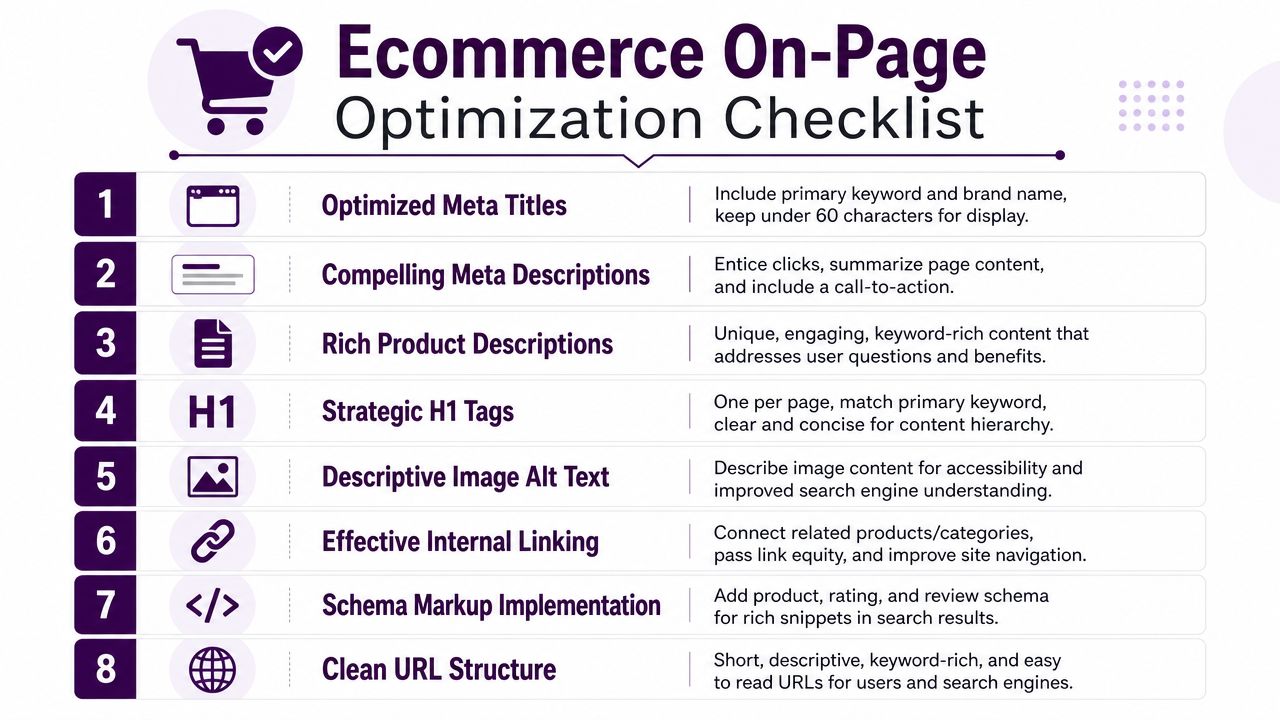
Yes, every page needs a title tag, an H1, body copy, alt text, internal links, and structured data. But the key question is whether those elements help the page win the click and support the sale. Ticking boxes isn't enough. The page has to make its purpose obvious to Google and useful to a shopper.
Optimize for the click before the visit
Ranking improvements matter more near the top of the SERP. Position 1 gets about 27.6% CTR and position 2 gets 15.8% CTR, according to Lumar's SEO statistics reference. That click concentration is exactly why weak titles, vague metadata, and incomplete product data are costly on ecommerce pages.
Google's ecommerce guidance also reinforces a practical reality. Discoverability improves when product data and structured data are easy for Google to parse. For ecommerce teams, that makes schema and clean product-page implementation foundational, not optional.
Product pages need specificity
A weak product title looks like this:
Running Shoe | BrandName
A stronger one looks like this:
Brooks Ghost 16 Men's Running Shoe
The second title gives search engines and shoppers much more to work with. Brand, model, audience, and product type are all clear.
For product pages, focus on:
Titles that identify the item clearly: Include brand, model, and the defining attribute set that matters to buyers.
Descriptions that answer purchase questions: Don't recycle supplier text if you can avoid it. Add fit, material, use case, compatibility, care, or feature details that help users decide.
Image alt text that describes the product: Useful for accessibility and for clearer image context.
Visible trust details: Shipping, returns, availability, and specs often decide whether traffic turns into revenue.
Category pages need intent alignment
Category pages often underperform because teams either leave them empty or overstuff them with generic copy.
A category page should do three things well:
Clarify what the shopper is browsing.
Help them narrow choices.
Send strong relevance signals for the main query cluster.
That usually means a clean H1, a short and useful intro, subcategory links where relevant, and internal links to buying guides or comparison content when those help decision-making.
Working standard: If category copy could be pasted onto five other collections without changing much, it isn't strong enough yet.
Schema markup is a non-negotiable layer
Structured data helps search engines understand the commercial details on the page. For ecommerce, the critical implementations are typically Product, Offer, and Review markup where appropriate and accurately supported by visible page content.
The important part isn't just adding markup. It's making sure the markup matches what users see:
Product name
Availability
Price
Review information
Breadcrumb context
When the page content and the markup disagree, SEO teams create unnecessary risk and confusion.
A useful cross-channel analogy is Amazon listing work. Anyone who has optimized my listings on Amazon has seen the same principle: better-structured product data improves visibility because the platform can interpret the listing more confidently. Google works differently, but the operational lesson is similar.
A clean execution checklist
Page type | Must-have element | Common mistake |
|---|---|---|
Product page | unique title and useful product description | copying manufacturer content |
Product page | accurate schema | markup that doesn't match visible content |
Category page | clear H1 and query-focused intro | thin copy with no differentiation |
Category page | internal links to subcategories or support content | orphaned collections |
Both | descriptive images and crawlable links | relying only on visual UI elements |
Most on-page fixes don't fail because the team forgot the rule. They fail because nobody decided what the page needs to rank for, who it's for, and what information that user needs before buying.
Driving Authority with Content and Link Building
Authority for ecommerce doesn't come from publishing generic blog posts every week. It comes from creating content that supports commercial pages and earns links because it helps someone make a decision.
I've seen stores publish plenty of articles and still struggle because the content sits in a separate universe from the catalog. It doesn't strengthen category pages. It doesn't answer buying objections. It doesn't give anyone a reason to link.
Start close to revenue
The most useful content usually starts near the product.
A cookware brand, for example, shouldn't begin with broad lifestyle content if the core category pages are still weak. It should build assets like:
pan comparison guides
induction compatibility guides
care and cleaning resources
size selection guides
“best for” collections tied to real use cases
Those assets do two jobs. They help users choose, and they create internal linking pathways into category and product pages.
Build outward in layers
A practical content model works in three layers:
Bottom-of-funnel assets
Buying guides, product comparisons, fit guides, compatibility pages, and FAQs that directly support transactional pages.Mid-funnel decision content
Articles for shoppers comparing options, materials, or use cases. These often link naturally into key categories.Top-of-funnel reach content
Broader educational or trend-led content that introduces new audiences, but only if the team has a real path from that content into the catalog.
Many stores lose discipline. They jump to broad editorial topics because they're easier to brainstorm, even though the strongest ROI often comes from content that supports products already close to conversion.
For a practical breakdown of outreach approaches that still hold up, this guide to link building strategies is a useful reference.
Three link-building tactics that work for ecommerce
Not every ecommerce brand needs the same link strategy. But these tend to work because they fit how product-led businesses operate.
Resource-driven outreach: Create a useful asset such as a size guide, care manual, compatibility chart, or buyer's checklist. Niche publishers and community sites are much more likely to link to a resource than to a product page.
Product-led review relationships: Work with relevant bloggers, editors, or niche creators who already cover the category. The best opportunities come from fit, not scale.
Digital PR from product knowledge: If your brand has unique expertise, original photography, category insights, or trend observations, package that into something journalists or industry publishers can cite.
Good ecommerce links usually point to something useful, not something promotional.
What doesn't work well
Weak link-building for ecommerce often looks like this:
guest posts on irrelevant sites
outreach to publishers with no connection to the category
content built for volume with no commercial routing
“ultimate guides” that don't offer anything a shopper can't get elsewhere
Authority compounds when content, internal linking, and commercial pages support each other. If they don't, you can build links and still struggle to move the pages that matter.
Optimizing for Performance Mobile and International Users
Technical performance changes the value of everything else you do.
You can map keywords well, build useful category pages, and improve product data, but the site still leaks revenue if core templates are slow, unstable on mobile, or confusing across markets. On ecommerce sites, performance problems don't stay isolated. They repeat across category grids, product galleries, and checkout-adjacent experiences.
Speed is a revenue issue
One ecommerce SEO guide notes that 40% of users abandon websites that take more than 3 seconds to load, which is why page speed isn't just a technical score. It's a conversion and revenue risk, as cited in Passionfruit's ecommerce SEO guide.
The fix sequence matters. Start by auditing Core Web Vitals and identifying the heaviest templates first. On most stores, the biggest offenders are obvious once you look:
oversized product images
bloated JavaScript from apps and widgets
heavy galleries and review modules
slow server response
uncompressed media
Prioritize template-level fixes
Don't optimize page by page if the problem lives in the template.
A better order looks like this:
Priority area | Why it matters | Practical fix |
|---|---|---|
Category templates | affect large parts of the catalog | reduce script weight and improve image handling |
Product templates | influence both rankings and conversion | compress galleries, simplify modules, lazy load where appropriate |
Shared assets | repeat across many pages | convert images to WebP and remove unnecessary payloads |
Delivery layer | affects response time sitewide | use a CDN and solid hosting |
The same source recommends compressing large assets, serving images in modern formats like WebP, and using a CDN. That's a practical place to start because image-heavy templates are common on ecommerce sites.
If you need a technical refresher on the metrics and remediation process, this guide on improving Core Web Vitals is a helpful reference.
Mobile-first means template-first
Mobile SEO on ecommerce sites isn't just about responsive design. It's about whether the main shopping tasks still work under constraint.
Check the mobile version of:
category filters
product image galleries
sticky add-to-cart behavior
review modules
variant selectors
accordion content blocks
A desktop design that feels polished can become frustrating fast on a phone if filters cover the screen, buttons jump, or scripts delay interaction.
The best mobile SEO fix is often removing friction, not adding more interface elements.
International stores need clear market signals
For brands serving multiple countries or languages, international SEO usually breaks when teams mix catalog logic, duplicate content, and weak localization decisions.
The core principles are straightforward:
keep country and language targeting consistent
make sure each market version has a clear purpose
avoid accidental duplication across near-identical pages
use hreflang carefully and only when the alternate versions correspond
A lot of international issues are operational, not theoretical. Prices differ. shipping rules differ. availability differs. copy differs by market. SEO only works if those versions are clearly managed and technically coherent.
When performance, mobile usability, and international targeting are aligned, every ranking gain becomes more valuable because the visit lands on a page that loads quickly, works cleanly, and matches the shopper's market context.
How to Measure and Prioritize Your SEO Efforts
Most ecommerce teams don't have a measurement problem. They have a prioritization problem disguised as a measurement problem.
There's usually plenty of data. Rankings in one tool. Traffic in another. Revenue in analytics. Technical issues in a crawler. Search queries in Search Console. The friction comes from trying to decide what deserves attention first. That's hard when every dashboard tells a different story.

Track page types, not just sitewide SEO
Recent industry data shows the average ecommerce brand ranked for 1,783 keywords in organic search in 2025, with SEO conversion rates hovering around 3-4%, according to Reboot Online's ecommerce SEO statistics. That scale is the key point. Ecommerce visibility isn't one ranking. It's a spread of thousands of queries connecting to downstream shopping behavior.
That means sitewide traffic is too blunt to guide action.
Break performance into page groups:
category pages
product pages
editorial or guide content
branded versus non-branded entry pages
top revenue templates
A category section losing visibility needs a different response than a drop on blog content. A product page with impressions but weak clicks needs a different fix than a page with traffic but poor conversion.
Use a simple prioritization model
I like a three-part filter:
Business value
Does the page or template support meaningful revenue opportunity?Visibility gap
Is the page close enough to improved rankings that optimization could move the needle?Scalability
Will this fix help one URL, or a whole class of pages?
That framework keeps teams from spending a week on a low-impact page just because it looks interesting in a report.
What to review every week
A weekly operating view should answer a few direct questions:
Which category and product pages gained or lost non-branded visibility
Which templates show technical issues that affect many URLs
Which high-intent queries are driving impressions but weak click-through
Which landing pages attract organic traffic but don't support shopping progress well
Which content pieces are assisting commercial pages through internal links
You don't need a complicated executive dashboard to do this well. You need a consistent way to connect rankings, traffic, behavior, and page type.
Turn data chaos into a roadmap
The practical goal is simple. Every reporting cycle should produce a short list of next actions with a reason behind each one.
For example:
rewrite titles and snippets on a group of category pages with strong impressions but weak clicks
improve internal linking into a high-margin collection that already sits near page one
fix template-level indexation issues that create duplicate product paths
rewrite product copy on priority SKUs that rely too heavily on supplier text
resolve technical issues on a slow category template affecting major organic entry points
Better SEO reporting doesn't mean more charts. It means the team can answer, with confidence, what to do next and why it matters.
That's the difference between monitoring SEO and operating it. A strong SEO strategy for ecommerce isn't just a plan to get more traffic. It's a repeatable system for deciding which changes are most likely to increase qualified discovery, improve shopping behavior, and grow revenue.
Keyword Kick helps ecommerce teams turn messy SEO data into a prioritized action plan. Instead of bouncing between Search Console, GA4, rank trackers, backlink tools, and site audits, you can use Keyword Kick to connect the signals that matter, spot what's hurting visibility, and identify which pages to optimize first. If your team needs clearer direction instead of more dashboards, it's worth a look.