You're probably in one of two situations right now. Either your store has strong products and decent paid performance, but organic search still feels inconsistent. Or traffic is coming in, yet the pages driving revenue aren't the pages getting the SEO attention.
That gap is where most ecommerce teams stall.
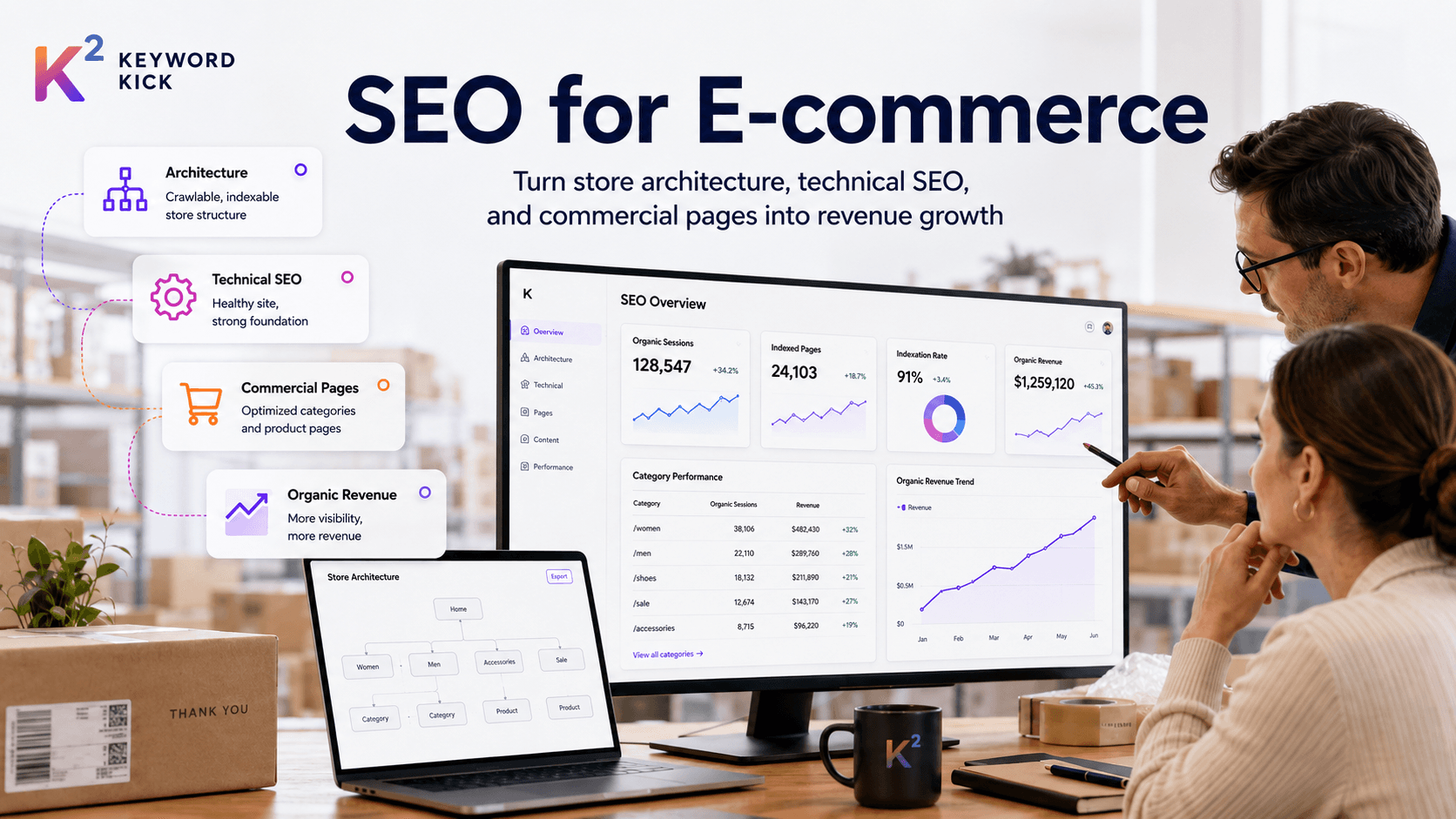
SEO for ecommerce isn't a checklist item you hand to a content writer or a developer once a quarter. It's a workflow. Architecture decides what can rank. technical SEO decides what gets crawled and indexed. Commercial page optimization decides what gets clicked and bought. Content and authority decide whether you can keep expanding beyond branded demand.
The teams that win don't treat these as separate projects. They connect them to revenue.
Why SEO Is Your Most Powerful E-commerce Channel
A well-designed store can still be practically invisible. Great photography, clean UX, competitive pricing, and fast fulfillment won't help much if your category and product pages never surface when buyers search.
That's why SEO keeps outperforming short-term acquisition thinking. Paid ads rent visibility. SEO builds an asset your store keeps benefiting from after the work ships.
The economics are hard to ignore. SEO delivers an average 8x ROI, roughly twice that of PPC, while ecommerce SEO can generate a 5.2x ROI over a 36-month period, according to Seoprofy's SEO statistics roundup. The same source reports that Google holds about 89.85% of global search traffic, which means most product discovery still runs through one dominant gatekeeper.
That concentration changes how ecommerce teams should think about acquisition. You don't need to win every channel equally. You need to build strong visibility where intent is already explicit.
Why compounding matters more than spikes
Paid campaigns are useful. They're also fragile. Turn budget down and traffic drops with it.
SEO behaves differently:
Category pages compound: A strong collection page can rank for broad commercial queries and keep pulling in demand.
Product pages scale: Every well-optimized PDP adds another chance to capture long-tail intent.
Internal links preserve gains: Improvements on one section can support others when authority is distributed correctly.
Technical fixes reveal existing value: Sometimes the fastest growth comes from better indexation, not more content.
Practical rule: If your store depends on paid search to stay visible for products people already know they want, your margin is carrying a problem SEO should solve.
Ecommerce brands often overinvest in campaigns and underinvest in discoverability. That's backwards. Search is where buyers compare models, evaluate features, check availability, and narrow choices. If your store isn't present in those moments, competitors or marketplaces will be.
The Blueprint for E-commerce Site Architecture
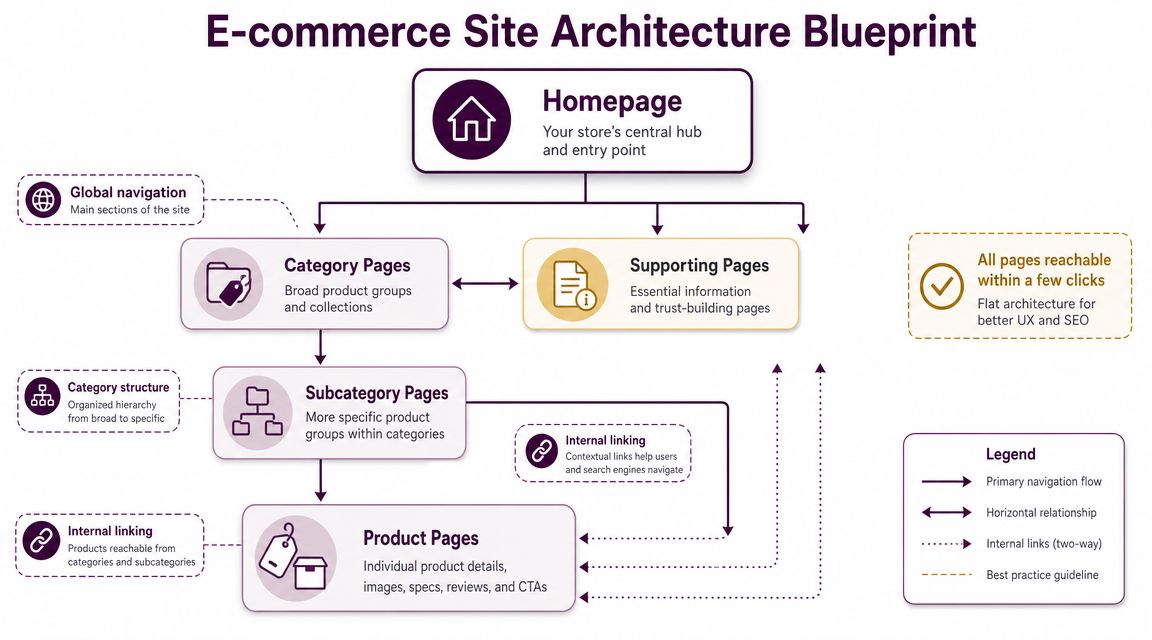
Think of your site like a department store. The homepage is the entrance. Category pages are the main aisles. Subcategories are the shelves. Product pages are the items people came to inspect. If customers and crawlers have to wander through side corridors, filters, and duplicate paths to find the same product, the store feels disorganized.
Search engines react the same way.
A clean architecture does three jobs at once. It helps shoppers browse. It helps Google understand hierarchy. It reduces waste from duplicate and low-value URLs.
Build a flat, predictable hierarchy
Most stores don't need a clever structure. They need a boring one that scales.
A strong hierarchy usually looks like this:
Homepage
Primary categories
Subcategories where they help buyers narrow choices
Product pages
Supporting pages like FAQ, returns, shipping, and buying guides
The rule is simple. Important pages should be reachable quickly and linked from the right parent pages. If your highest-margin category is buried behind promotional landing pages, seasonal filters, and JavaScript-heavy menus, you're making discovery harder than it needs to be.
What good architecture usually includes
Descriptive URLs: Use readable paths that reflect hierarchy.
Consistent category logic: Group products by how buyers search, not by internal merchandising jargon.
Breadcrumbs: They reinforce hierarchy for users and search engines.
Contextual internal linking: Related categories, sibling collections, and relevant buying guides should connect naturally.
Your architecture should answer two questions instantly. What kind of page is this, and how does it relate to the rest of the catalog?
Faceted navigation is where stores get messy
This is the part that breaks many ecommerce sites.
Filters are helpful for users. They're dangerous for SEO when every combination creates a crawlable, indexable URL. Color, size, material, brand, price range, fit, and sort order can explode into thousands of pages that don't deserve to rank.
Lumar notes that ecommerce sites commonly struggle with duplicate URLs from filters, color and size variants, and parameters. Its guidance recommends canonical tags for near-duplicates, noindex for low-value facet pages, and including unique location or variant URLs in sitemaps where they matter, as outlined in Lumar's guide to common ecommerce SEO issues.
A practical filter decision framework
Don't ask whether a filter page can exist. Ask whether it should be indexed.
Filter type | Should it be indexable | Typical handling |
|---|---|---|
Broad category refinements with search demand | Sometimes | Self-canonical if it deserves to rank |
Thin combinations with little standalone value | Usually no | Canonicalize or noindex |
Sort orders and session-driven parameters | No | Keep out of index |
Product variants that don't need unique search visibility | No | Canonical to primary product URL |
Unique variants or location pages with distinct value | Sometimes | Include in sitemap and support properly |
SEO and merchandising need to work together. A “black running shoes” filtered page may deserve indexation if it matches real buying behavior and has enough product depth. A page for “black running shoes size 11 sorted by newest” probably doesn't.
What works and what doesn't
What works
A small set of intentional, indexable filtered pages
Canonical logic that reflects the preferred ranking URL
Sitemaps focused on commercial pages
Navigation that reinforces your primary category strategy
What doesn't
Letting every parameterized URL into the index
Using canonicals as a blanket fix while still exposing endless crawl paths
Creating overlapping categories that target the same query
Naming collections around internal product teams rather than search demand
A strong architecture keeps your store legible. It tells Google which pages matter, which ones are duplicates, and which paths lead to actual revenue.
Optimizing Commercial Pages for Clicks and Conversions
Architecture creates the map. Commercial page optimization decides whether searchers enter your store or choose someone else.
The two page types that matter most are category pages and product detail pages. They do different jobs, so they shouldn't be optimized the same way. A category page acts like a digital storefront. A PDP acts like your best sales associate.
Start with intent, not volume
Most ecommerce keyword mistakes happen because teams chase broad terms without mapping intent to page type. If a query signals browsing, comparison, or research, it may not belong on a product page. If a query signals purchase intent, it usually shouldn't be handed to a blog post.
Use a simple framework before you write or optimize anything.
Target Keyword | Intent Type (Buy, Compare, Info) | Monthly Search Volume | Page Type (Category, PDP, Blog) | Priority (High, Medium, Low) |
|---|---|---|---|---|
buy trail running shoes | Buy | [fill with your data] | Category | High |
waterproof trail running shoes mens | Buy | [fill with your data] | Category | High |
nike pegasus vs brooks ghost | Compare | [fill with your data] | Blog | Medium |
best running shoes for wet weather | Info | [fill with your data] | Blog | Medium |
womens black waterproof trail shoe | Buy | [fill with your data] | PDP or Category | High |
The blank volume cells are deliberate. Use your own keyword tool and merchandising data. The framework matters more than a generic list.
Category pages should act like curated shelves
A category page shouldn't be a thin product grid with a title tag attached. That's rarely enough in competitive search results.
Strong category pages usually include:
A clear primary heading: Match the core commercial intent.
Introductory copy that helps, not rambles: A short paragraph near the top is often enough.
Useful filtering and sorting: Good for users, controlled for SEO.
Subcategory links: Help users refine and help search engines understand depth.
Internal links to guides or FAQs: Add decision support without distracting from purchase flow.
What doesn't work is dumping a block of copy above the fold that pushes products down just to “add content.” If your SEO copy hurts shopping, it's doing the wrong job.
PDPs should remove doubt
Product pages win when they answer buying questions fast. Search visibility helps, but conversion depends on clarity.
A strong PDP usually needs:
A precise product title that reflects what the item is.
Unique product copy that explains fit, materials, use case, and differentiators.
Images that support evaluation, not just aesthetics.
Structured details like dimensions, compatibility, care instructions, or ingredients where relevant.
Reviews and Q&A that address objections in the language customers use.
The best PDPs don't just describe the product. They reduce hesitation.
Search results now judge your pages before users click
This matters more than it used to. An estimated 58 to 60 percent of Google searches were zero-click in 2025, and People Also Ask boxes appear in about 64.9 percent of searches, based on figures cited by SEO Sherpa's SEO statistics roundup. The same source notes that product SERPs are dominated by images, reviews, and video thumbnails.
For ecommerce teams, that means ranking isn't enough. Your listing needs to communicate value before the visit.
How to earn stronger SERP visibility
Use product structured data: Help search engines understand price, availability, and reviews.
Write titles for real shoppers: Include the essential modifiers buyers care about.
Improve image quality and relevance: Product SERPs are visual.
Add on-page FAQ content where useful: It can support broader query coverage.
Keep inventory and pricing accurate: Inconsistent signals hurt trust.
What works is alignment. The category page should match broad commercial intent. The PDP should satisfy product-specific intent. Structured data should reinforce what the page already makes clear.
What doesn't work is trying to make one page do every job. A PDP won't replace a buying guide. A blog post won't replace a collection page. A category page won't answer every detailed product question.
Technical SEO for Performance and Indexing
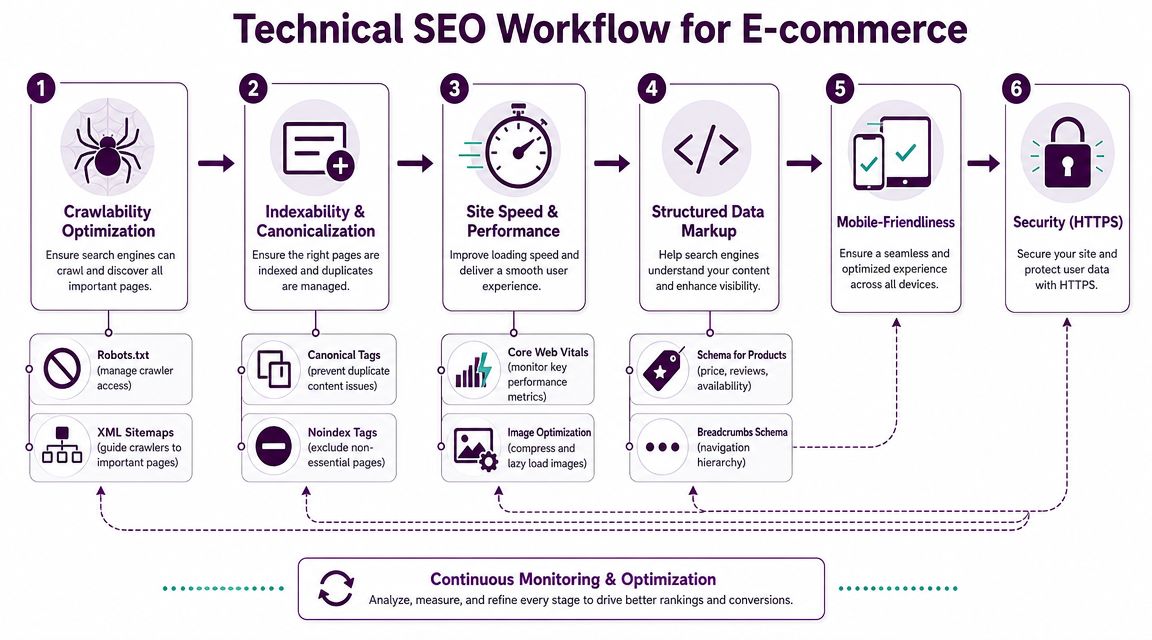
Technical SEO for ecommerce is mostly operational discipline. You're making it easier for Googlebot to enter the store, find the right aisles, ignore clutter, and understand what each page represents.
For large catalogs, this matters because crawl paths multiply fast. Filters, pagination, parameters, discontinued products, and variant URLs all compete for attention. If you don't control that system, the wrong pages get crawled and the right ones get delayed.
Crawlability and index control
Think of crawl budget like a delivery route. If the driver spends half the day checking empty side streets, fewer important packages get delivered on time.
Victorious recommends a practical mix of canonical tags to consolidate product variants, limiting low-value parameter URLs from indexation via robots.txt or noindex, and prioritizing key commercial pages in XML sitemaps, as covered in its guide to technical SEO for ecommerce.
That advice lines up with what works in real stores.
Focus your crawl path on revenue pages
Put category and product pages first in XML sitemaps
Remove expired or low-value URLs when they no longer deserve discovery
Use canonicals intentionally for variants and near-duplicates
Block or noindex crawl traps created by filters and parameters
Audit internal linking to make sure important pages receive consistent support
If your sitemap is full of search-result pages, faceted URLs, or legacy campaign pages, you're sending mixed signals.
Performance affects both ranking and conversion
Ecommerce teams sometimes split performance into two separate conversations. SEO cares because slow pages can hurt visibility. CRO cares because slow pages hurt sales. They're the same issue.
Product pages are especially vulnerable. Large image files, client-side rendering, review widgets, recommendation modules, and app scripts can all drag down load behavior. Category pages often suffer from oversized grids, lazy loading mistakes, and filter interactions that break usability.
A practical performance workflow includes:
Compressing and properly sizing product imagery
Reducing unnecessary third-party scripts
Testing how variant selection affects rendering
Making sure important content is available without relying entirely on JavaScript
Reviewing template-level issues before page-level exceptions
If you need a compact reference while auditing templates and crawl behavior, Feather's overview of technical SEO best practices is a useful companion resource.
Structured data is how you label the shelves
Search engines don't infer everything correctly from visual design. Structured data gives explicit context.
For ecommerce, that usually means marking up:
Products
Availability
Price
Reviews
Breadcrumbs
The key is accuracy. Structured data should reflect what's on the page. If your markup says a product is in stock but the page says otherwise, you're creating trust and eligibility problems.
Clean technical SEO doesn't feel dramatic. It removes friction, reduces ambiguity, and lets your strongest pages get discovered without interference.
Teams working inside Shopify or hybrid stacks often benefit from pairing platform decisions with SEO monitoring. If that's your setup, it's worth reviewing how Keyword Kick and Shopify integration can support e-commerce SEO workflows so technical changes and SEO priorities stay aligned.
Content and Link Building to Build Authority
A lot of ecommerce content underperforms because it's disconnected from commercial pages. Teams publish articles that attract impressions but never strengthen category rankings or move shoppers toward products.
That's a waste.
Content should help your store rank for more of the buying journey, then pass relevance and internal authority toward the pages that convert. When it does that well, content stops being a side project and starts acting like sales support.
Use content to support categories, not compete with them
The best ecommerce content usually sits in one of three buckets:
Buyer guides
Comparison content
Use-case education
A buyer's guide helps someone choose within a category. A comparison page helps someone narrow between options. Use-case education helps someone understand what they need before they're ready to browse products.
These assets work because they capture earlier-stage intent and create natural internal links back to category and product pages.
What strong ecommerce content looks like
Buying guides: “How to choose a carry-on suitcase for international travel”
Comparison pages: “Hard shell vs soft shell luggage”
Use-case pages: “Best luggage features for business travel”
Care and maintenance guides: Useful for products with longevity or material considerations
FAQ hubs: Helpful where customers repeatedly ask the same pre-purchase questions
What doesn't work is publishing generic blog posts unrelated to the catalog. If an article can't reasonably link a reader toward a category, subcategory, or PDP, question why it exists.
Link building for ecommerce works best when it starts with assets you already own
Ecommerce teams often overcomplicate link building. You already have suppliers, products, launches, seasonal campaigns, customer expertise, and merchandising insight. Those are assets.
Good link opportunities often come from:
Supplier and brand relationships: Ask for stockist or partner links where appropriate.
Gift guides and editorial roundups: Especially for visually distinctive or seasonal products.
Product-led PR: New launches, collaborations, limited editions, and trend commentary.
Resource pages and expert contributions: Strong for niche and specialist categories.
Original on-site assets: Buying guides, compatibility tools, or educational content worth citing.
A press release won't fix weak SEO by itself, but for product launches and newsworthy campaigns it can support discovery and coverage when used correctly. If your team handles launches regularly, Press Release Zen's SEO guide is a practical reference on how to think about press releases in an SEO context.
Keep authority flowing back to revenue pages
This is the part many teams miss. Content that earns links should not sit isolated in a blog folder with no path to commercial pages.
Use internal linking deliberately:
Link guides to relevant categories
Link comparison pages to the products being evaluated
Link FAQs to shipping, returns, or fit information on PDPs
Update older content with links to newer collections or core pages
Authority shouldn't pool in informational pages. It should circulate through the store.
A content program for seo for ecommerce is healthy when blog traffic helps category pages rank better, not when the blog becomes the only part of the site that gets visibility.
Measuring What Matters and Troubleshooting Drops
SEO reporting for ecommerce often gets stuck on the easiest metrics to screenshot. Sessions. Rankings. A few winner keywords. None of that is enough when leadership wants to know what organic search contributed.
The better question is page-level impact. Which pages gained visibility. Which pages influenced revenue. Which sections lost coverage, clicks, or conversions. That's how you separate noise from action.
Traffic is useful, but it's not the score
As AI-assisted results expand, clicks from informational queries can get squeezed even when visibility stays strong. Bluetuskr points out that as AI Overviews increase and can reduce clicks on informational queries, ecommerce teams should prioritize impression share, assisted conversions, and page-level revenue impact rather than organic sessions alone, as discussed in its ecommerce SEO guide.
That shift matters because some SEO wins now happen before the click.
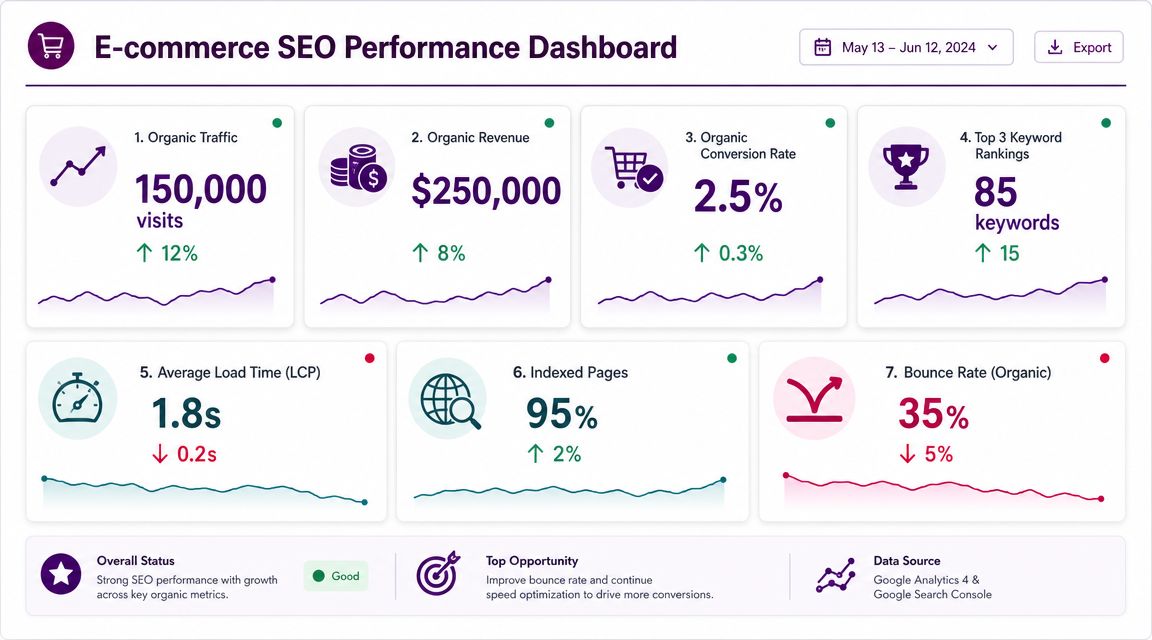
The KPI set that usually matters most
A useful ecommerce SEO scorecard often includes:
Impression share on commercial queries: Are your money pages appearing more often?
Page-level organic revenue: Which categories and PDPs drive sales?
Assisted conversions: Where does organic influence later purchase paths?
Coverage of priority pages: Are your key templates indexed and discoverable?
SERP feature visibility: Are your pages earning richer presentation where relevant?
If you want current benchmarks and context around search behavior, this collection of ecommerce SEO statistics is useful for framing stakeholder conversations.
How to diagnose a drop without guessing
When organic performance falls, don't start with theories about algorithm updates. Start with evidence.
Check the pattern first
Symptom | Likely area to inspect first |
|---|---|
Traffic down across many sections | Technical issue, tracking issue, or broad ranking loss |
Only category pages down | Internal linking, cannibalization, competitive displacement, template changes |
Only PDPs down | Indexation, duplicate handling, stock status, structured data, content quality |
Clicks down but impressions stable | SERP changes, weaker snippets, zero-click pressure |
Revenue down faster than traffic | Conversion, merchandising, inventory, or intent mismatch |
Then inspect in this order
Tracking integrity
Make sure the problem is real before treating it as SEO. Broken analytics setups waste weeks.Indexation and crawlability
Confirm key pages are still crawlable, canonicalized correctly, and present in sitemaps.Template or deployment changes
Review releases affecting titles, internal links, rendering, faceted rules, or page copy.Query and page segmentation
Separate branded from non-branded. Separate categories from PDPs. Separate informational from commercial intent.Competitive SERP shifts
If rankings moved, inspect who replaced you and why. Better pages often beat better domains.
When a store loses organic traffic, the first question isn't “What changed in Google?” It's “What changed on the site, in tracking, or in the result page we depend on?”
Proving SEO value to executives
Executives don't need a tour of every keyword movement. They need a business explanation.
A strong quarterly readout usually answers:
Which sections gained or lost commercial visibility
Which pages contributed the most revenue impact
What technical blockers were removed
What priority opportunities are next
What resources are required to capture them
That's how SEO stops sounding like channel reporting and starts sounding like a source of magnified operational gains.
The Audit-to-Action Workflow Your 90-Day Plan
Most ecommerce SEO programs don't fail because teams lack ideas. They fail because everything feels urgent at once. The fix is sequencing.
A good 90-day plan starts with control, moves into commercial page improvements, then scales authority. That order matters because content won't save pages that aren't being indexed properly, and link building won't fix a broken category structure.
Days 1 through 30
Use the first month to clean the foundation.
Audit crawling and indexation: Review canonical tags, faceted URLs, parameter handling, and sitemap quality.
Fix architecture issues: Resolve overlapping categories, shallow internal linking, and buried priority pages.
Review template-level technical problems: Check rendering, image weight, mobile usability, and structured data accuracy.
Validate measurement: Before reporting progress, validate analytics tracking and quality so the team trusts the data.
This stage is about control. You want search engines spending time on the right URLs and analytics capturing the right outcomes.
Days 31 through 60
The second month should focus on the pages closest to revenue.
Prioritize by business value
Don't optimize every page equally. Start with:
Top categories by margin or demand
Collections with ranking upside
Best-selling PDPs
Pages sitting close to stronger visibility but underperforming on clicks or conversion
Tighten the page experience
Work through titles, headings, on-page copy, internal links, image quality, and FAQ coverage. Make category pages easier to understand and PDPs easier to buy from.
This is also a good time to standardize workflows using an ecommerce SEO checklist so merchandising, content, and SEO teams work from the same operating document.
Days 61 through 90
The third month expands authority.
Publish supporting buying guides and comparison content
Strengthen internal links from content to categories and PDPs
Launch targeted outreach tied to products, launches, and seasonal campaigns
Refresh older informational content so it supports current commercial priorities
By this point, the site should be easier to crawl, the right pages should be stronger, and content should be feeding authority back into revenue-generating sections.
A useful rule for ongoing prioritization is simple. If a task won't improve discovery, clicks, conversion support, or measurement clarity, it probably doesn't belong at the top of the backlog.
Keyword Kick helps SEO teams turn all of this into a working system. Instead of jumping between GA4, Search Console, audits, rankings, backlinks, and page reports, Keyword Kick brings the data together and shows what to fix first, which pages matter most, and how to tie SEO work back to growth.