Popular advice says to treat Google Analytics 4 as a dashboard upgrade and rebuild your old reports. That's the wrong starting point for an SEO team. GA4 changes how interactions are collected and interpreted, so a chart that looks familiar may not answer the same question it did before.
The practical question isn't just what is Google Analytics 4, but which decisions its data can support. GA4 can help you understand what people do after landing on a page. It can't, by itself, establish why organic visibility changed or whether every conversion was observed. Use it alongside search and business data, and you're better placed to separate a real SEO problem from a measurement gap.
The Reality of Google Analytics 4 for SEO Teams
GA4 isn't a redesigned Universal Analytics dashboard. It's an event-based measurement system that records interactions such as page views, scrolls, purchases, and sign-ups, then analyzes them across user journeys (Google's GA4 documentation). That shift matters in day-to-day SEO work: teams need to know what an event means, how reliably it fires, and what information accompanies it before treating a report as evidence.
The change affects how you diagnose traffic and conversion movements. A decline in GA4 organic sessions may be worth investigating, but it doesn't prove that rankings fell. The change could reflect a genuine loss of search visits, a tagging issue, consent choices, browser restrictions, or differences in how traffic is attributed. Google describes privacy-safe modeled conversions as a way to address cases where analytics cookies aren't available and conversions may otherwise be assigned to Direct. Modeling can help fill gaps, but it doesn't make every observed or modeled figure equivalent to a verified business record.
That's where teams can fall into false precision. A detailed chart can still rely on incomplete event collection or assumptions about unobserved journeys. Treat GA4 as a source for behavioral patterns and trends, not a perfect census of every search visit and outcome. For decisions with commercial consequences, compare the analytics story with evidence from Search Console, rankings, and order or lead systems.
Practical rule: Don't label a content or ranking failure from a GA4 chart alone. First check whether search visibility changed and whether the events used to measure outcomes are still collecting consistently.
A useful analytics practice is to define what success means before choosing dashboards. Teams looking for a broader way to frame measurement can also consult GolfRep's analytics tips for club growth. The same principle applies to SEO: report on outcomes that matter to the organization, then check whether the measurement behind them is dependable.
Understanding the Event-Based Data Model
Think of Universal Analytics as organizing much of its reporting around a visit, while GA4 records individual interactions as events. A page view, a form submission, and a purchase each become an event in the same broad measurement framework. That makes it possible to analyze behavior across websites and apps, but it also means teams must define their measurement carefully rather than assume a default session report will answer every question.
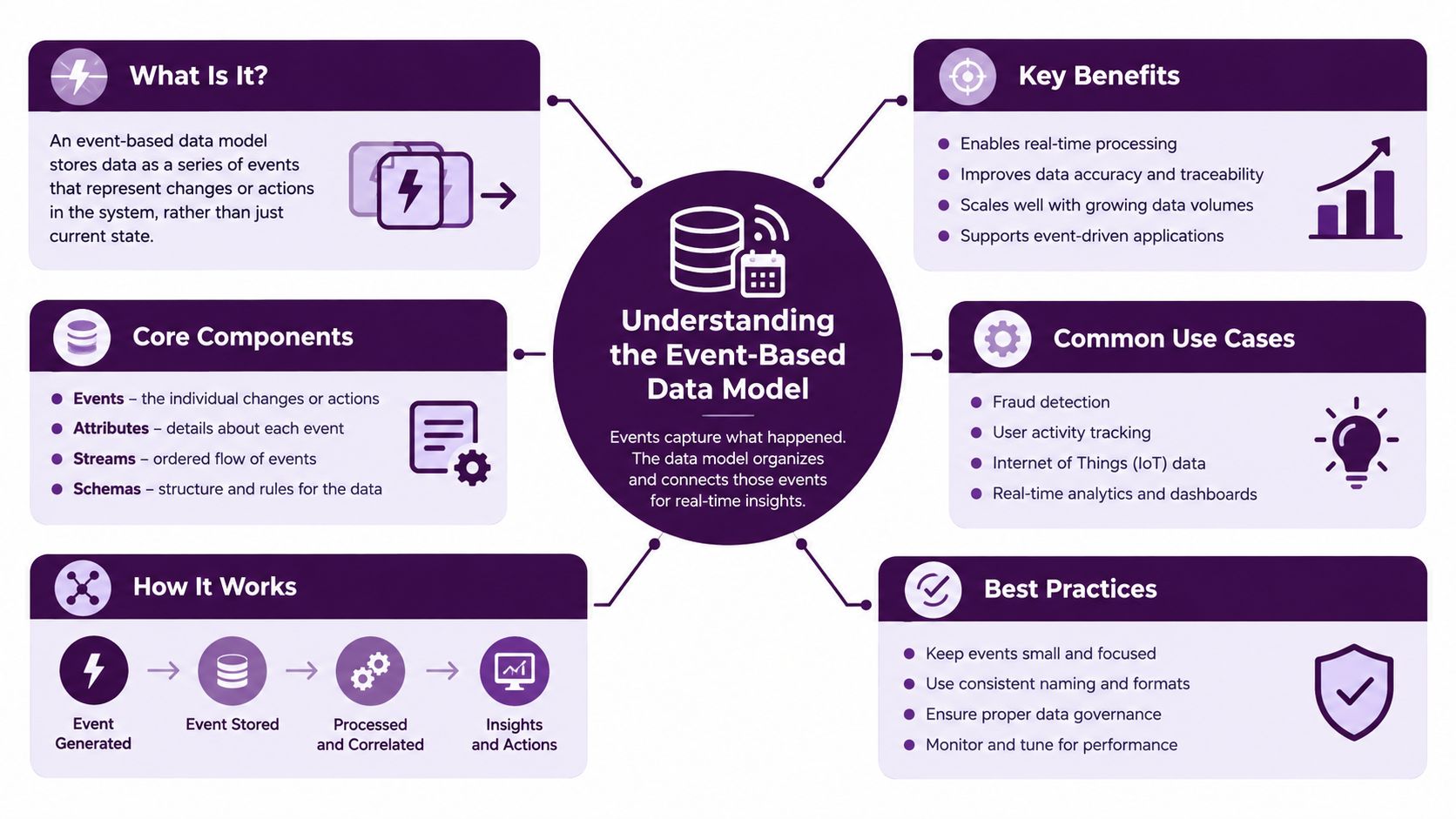
In a GA4 BigQuery export, each row represents an event. Associated records such as event_params hold details about that interaction, including typed values. Analysts can query nested parameters with UNNEST(event_params) and combine events with identifiers to investigate questions such as which organic landing pages contribute to key actions. Google's BigQuery export documentation describes this event and parameter structure.
The flexibility comes with a trade-off. If one team sends lead_submit, another sends form_complete, and a third records only a generic click, a report may fail to compare equivalent actions. Missing landing-page context, inconsistent content groupings, or poorly defined values can also make cross-channel analysis unreliable. This isn't a dashboard problem. It's a measurement design problem.
Build a taxonomy people can maintain
Before implementing events, write down the question each one should answer. For an organic landing page, you might need to understand which page brought a visitor in, what content group it belongs to, and whether the visitor completed a meaningful action. For a commerce journey, you may need purchase value and product-level detail. Agree on names and parameter definitions with analysts, marketers, and developers, then use the same conventions across web and app data.
A useful taxonomy is specific enough to support decisions without becoming a catalogue of every possible click. Keep event names consistent, document parameter meanings, and test the resulting data before relying on it. In BigQuery, validate that expected parameters appear and have usable values. A technically flexible model only becomes analytically useful when people implement it consistently.
Core Measurement Concepts and Parameters
An event records an interaction; parameters add context. Google defines event parameters as key-value pairs describing details about an interaction. Those details feed the dimensions and metrics used across Analytics reports and explorations, and Google's recommended ecommerce events support product details through an items array, including up to 27 custom parameters per item (Google's event parameter guidance).
For SEO and content teams, the useful distinction is between recording activity and capturing enough context to interpret it. A page view tells you that a page was viewed. A page location, content group, and landing-page context can help you understand which type of page was involved and whether it was the entry point. A file download or video interaction may show engagement, but it matters only if the team knows what the event represents and whether the collection is dependable.
Design events around decisions
Start with the action you want to evaluate, then specify its trigger and context. For lead generation, a dedicated submission event is usually more informative than treating any button click as a lead. For ecommerce, a purchase event should carry useful transaction and product context, rather than merely recording that a purchase event occurred. Avoid adding parameters just because they're available. Each one should support a report or analysis the team will use.
| Event Name | Trigger Condition | SEO Value |
|---|---|---|
page_view |
A page loads or its tracked location changes | Connects page consumption with landing-page and content analysis |
scroll |
A visitor reaches the configured scroll trigger | Offers a limited engagement signal when interpreted alongside page and event context |
file_download |
A visitor downloads a tracked file | Helps assess whether organic content leads to resource use |
generate_lead |
A visitor completes a defined lead action | Connects organic visits to a business-relevant outcome |
purchase |
A completed purchase is recorded | Connects search landing pages with transaction and product context |
Treat that table as a starting point, not a universal implementation spec. A team should confirm that each trigger matches its website and business process. For a broader discussion of connecting analytics goals to commercial outcomes, Reddog Consulting Group's resource on how to track true profitability with Google Analytics goals can help frame the measurement conversation.
Finally, create a shared event dictionary. Record the event name, trigger, parameters, owner, and intended use in reporting. That makes it easier to spot duplicate or overlapping events and gives future analysts a basis for validating the data rather than guessing what a label means.
Navigating Data Gaps and Modeled Conversions
GA4, Search Console, and a CRM can show different versions of organic performance because they measure different parts of the journey. Search Console describes search activity and visibility; GA4 records behavior after a visit reaches the site; the CRM or order system records business outcomes according to its own rules. Consent choices and browser restrictions can limit what analytics observes, while modeling may affect how some conversions are represented.
A rise in Direct traffic alongside a fall in reported organic conversions doesn't automatically mean rankings or content have weakened. Some conversions may be attributed differently when analytics cookies aren't available. Other differences can come from gaps between event implementation and the business system's record of a lead or purchase. For missing search-query information in analytics, use this resource to decode missing organic search data, then compare the appropriate search and analytics views instead of expecting one platform to provide a complete account.
Use a diagnosis sequence
When a report moves unexpectedly, investigate in a consistent order:
- Check visibility: Look at Search Console clicks and impressions, plus rank data for the affected pages and topics. If those signals also weakened, a search-side change deserves attention.
- Check collection: Confirm that landing-page and key-action events still appear as expected. Review recent site, tag, consent, or form changes that might affect measurement.
- Check business records: Compare analytics conversions with CRM leads or server-side order records where those are available. Differences can reveal missed events or attribution gaps.
- Check attribution: Review whether a change in credit assignment or modeled data could explain the pattern before treating the channel report as a direct count.
Use GA4 for trend detection when collection is stable and the question concerns on-site behavior. Be more cautious when consent coverage, identity stitching, or event quality is uncertain. In those cases, independent search data and business records should inform the decision, not merely serve as a footnote to an analytics chart. The aim isn't to force all systems to agree. It's to understand why they differ and choose the source that is best suited to the question.
High-Value Reports and KPIs for Search Visibility
GA4's default reports don't always mirror familiar Universal Analytics views. Rather than trying to reproduce every old report exactly, decide which SEO question needs an answer and build the view around it. For landing-page performance, combine the page or landing-page dimension with organic channel context and a meaningful outcome. For content analysis, add a content grouping that reflects how your site is organized. Explorations are useful when you need to compare these dimensions or examine how users move between events.
Engagement rate can help describe visits that meet GA4's engagement criteria, but it shouldn't become a stand-in for content quality. A page can answer a searcher's question quickly without generating a long on-site journey. Conversely, an engaged visit doesn't prove that the page satisfied the search intent or generated business value. Pair behavioral metrics with relevant key events, landing-page context, and search visibility.
Choose reports by the decision they support
A landing-page exploration can help compare organic entry pages by engagement and key events. A path or funnel exploration can help investigate which actions appear along a journey, provided the underlying events are implemented consistently. Traffic acquisition views can help assess channel patterns, but channel attribution isn't the same as proof that organic search caused a conversion.
GA4's data-driven attribution assigns conversion credit according to the measured contribution of interactions for a key event rather than relying on a fixed position-based rule. That can help teams consider organic search's role across touchpoints, but the output still depends on what the implementation and consent conditions make observable. Document the attribution model and use it as one perspective, not a replacement for business-system records.
For a broader way to choose useful measures, see this guide on analytics metrics for SEO teams. If you're testing changes to landing pages or content, keep measurement separate from interpretation: an experiment can help compare versions, while an A/B testing guide can inform how to structure that work. Don't claim a page change caused a movement just because the two happened at the same time.
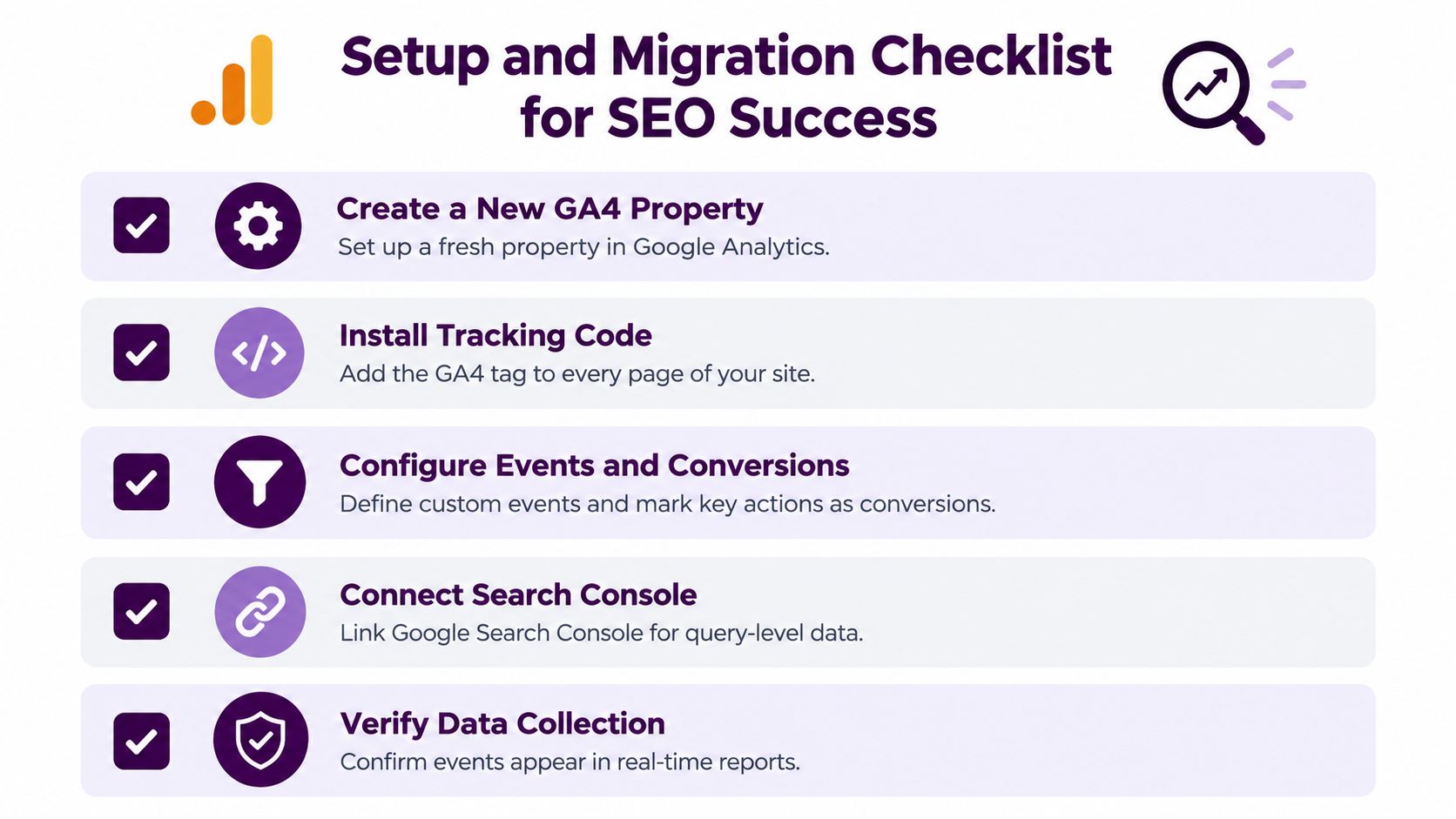
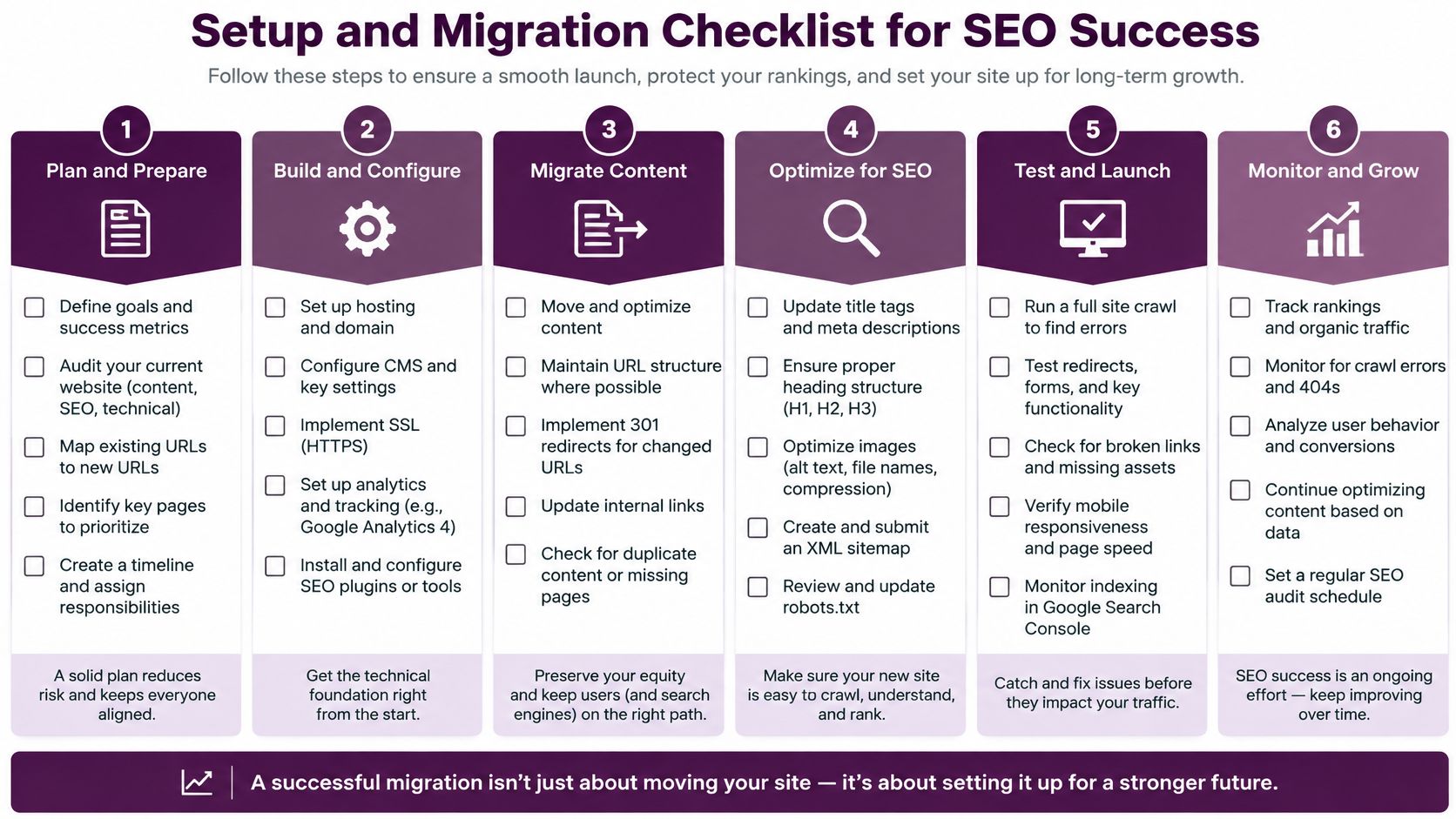
Setup and Migration Checklist for SEO Success
A useful GA4 setup starts with the decisions you need to make, not with a long list of tags. Google's transition away from Universal Analytics made migration an operational necessity for organizations using its analytics ecosystem. Standard Universal Analytics properties stopped processing new hits on July 1, 2023, and Analytics 360 properties stopped on July 1, 2024; historical reporting for standard properties remained available until July 1, 2024, according to Google's GA4 transition announcement. Because the data models differ, old and new reports shouldn't be assumed to compare directly.
Use this practical sequence when creating or auditing a property:
- Define outcomes. Agree on which actions count as meaningful leads, purchases, or other business results. Give each event a clear name and trigger so teams don't mistake incidental clicks for success.
- Install and verify collection. Confirm the GA4 tag is present where needed and test that the expected events and parameters arrive. A report that looks complete can still omit actions if implementation wasn't checked.
- Connect search data. Link Search Console where appropriate, then verify that the reporting views you need are available. Use search data to understand discovery and GA4 to study post-click behavior.
- Review journeys across domains. If users move between domains during a conversion journey, configure measurement so that the handoff doesn't appear as an unrelated referral. Test the journey end to end.
- Filter internal activity carefully. Define how your organization identifies internal traffic and check that the filter does what you intend before relying on the resulting reports.
- Plan for analysis and maintenance. Document event definitions, owners, and validation routines. Treat analytics as an implementation that needs ongoing checks, not a one-time tag installation.
Decide whether BigQuery fits the work
BigQuery can make event-level analysis more flexible, but it adds operational choices around completeness and freshness. For standard properties, the daily export supports up to 1 million events per day. Streaming can make current-day data available within minutes, but it can contain gaps and has an additional BigQuery charge; Google details these limits in its BigQuery export guidance.
For authoritative trend and attribution reporting, decide whether the daily export fits your needs before building critical dashboards around streaming data. If you use streaming for operational monitoring, document its limits so a partial current-day view isn't mistaken for a complete performance result. Whatever the setup, assign someone to validate collection after significant site or tracking changes.
Integrating Analytics with Broader SEO Intelligence
GA4 is useful for understanding what people do after arriving on a site. It doesn't explain, on its own, why they found the page, whether rankings shifted, or whether a technical problem reduced search visibility. Pair its post-click behavior with Search Console, rank tracking, backlink analysis, and technical audits to build a fuller diagnosis.
For example, if an organic landing page loses GA4 sessions, compare its Search Console performance and ranking trends before rewriting the page. If visibility appears stable but recorded leads fall, inspect event collection and CRM records. If both visibility and on-site outcomes weaken, technical diagnostics and content relevance may help identify a more plausible cause. Those are different problems, and they call for different responses.
Google's migration guidance reinforces the value of combining analytics with search visibility and technical diagnostics: GA4 explains post-click behavior, while search platforms help teams understand discovery. For store owners who need a more focused search workflow, this guide to Search Console for e-commerce SEO can help connect search reporting with commercial pages.
Keyword Kick is one option for bringing GA4, Search Console, rankings, backlinks, and technical SEO signals into a shared workspace, where its K² AI Agent can surface prioritized recommendations. The key is not to let a combined dashboard replace judgment. Use the underlying evidence to decide whether a change calls for content work, technical investigation, or a measurement fix.
If your team is diagnosing organic traffic changes with disconnected reports, connect your GA4 and search data in Keyword Kick to compare user behavior with visibility, rankings, and technical signals. Use that combined view to prioritize the next investigation and turn the findings into practical SEO actions.