
You've just deployed a change, and a page that worked minutes ago now returns 400 Bad Request. Refreshing doesn't help. The browser works on another site, the origin appears healthy, and your application logs show nothing useful. That last detail matters: the request may be failing before it reaches your application at all.
A reliable 400 bad request fix starts by treating the error as an environment-debugging problem. The browser, an extension, a proxy, a CDN, NGINX, and the application can all alter or reject a request. Work through those layers in order instead of repeatedly clearing cache and hoping the error disappears.
What a 400 Bad Request Actually Means
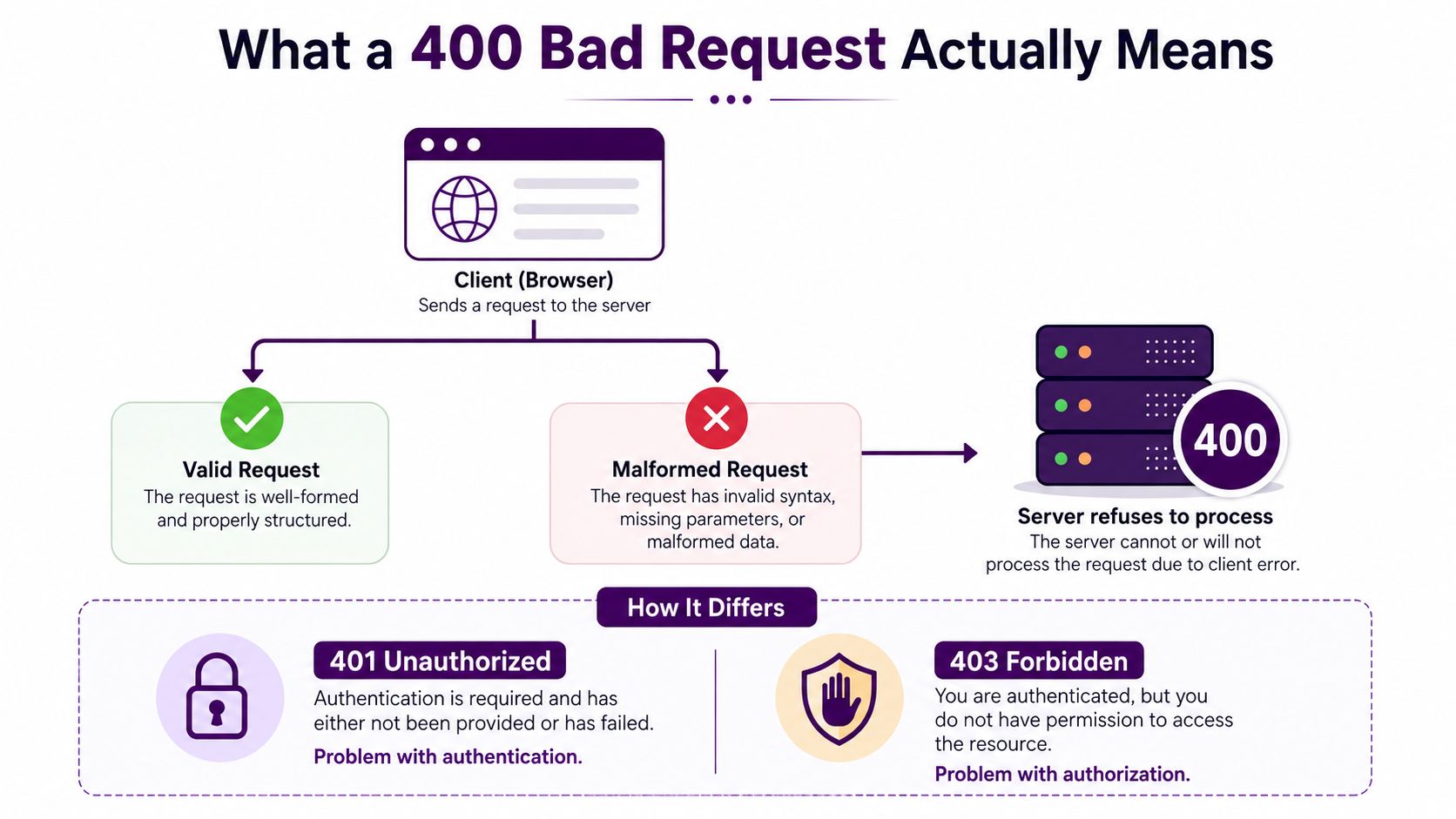
400 Bad Request is a standardized 4xx client-error response. RFC 7231 defines it for situations where a server can't or won't process a request because it perceives a client-side problem, including malformed syntax, invalid message framing, or deceptive request routing. The standard also preserves the operational rule that a client shouldn't repeat the same request without modification. See the HTTP semantics defined in RFC 7231.
That doesn't mean the human using the browser caused the error. A browser profile can send stale cookies, an extension can rewrite headers, and a CDN rule can transform a query string. A badly configured server can also classify a valid user action as malformed. The useful question is not “Who is at fault?” but which layer rejected the request, and what did it see?
Follow the request path
A browser request usually travels through several boundaries:
Client layer: browser, cookies, cache, extensions, URL construction, or API client.
Edge layer: TLS termination, CDN, WAF, load balancer, or corporate proxy.
Origin layer: NGINX, Apache, application server, and request-validation middleware.
The response can be a blank browser page, a branded CDN error, an HTML error generated by NGINX, or a JSON object returned by an API. The presentation doesn't identify the source by itself. Response headers, request IDs, and logs do.
Separate neighboring status codes
A 400 is not interchangeable with nearby errors. 401 Unauthorized concerns missing or invalid authentication, while 403 Forbidden means the server understood the request but refuses access. 414 URI Too Long, 413 Payload Too Large, and 431 Request Header Fields Too Large can share causes with a 400, such as oversized URLs, bodies, or headers, but they point toward more specific limits.
MDN's current 400 status reference places the response among the core 4xx signals used across modern web platforms. In practice, start with the request line, URL encoding, headers, framing, and routing. Only after those are valid should you inspect application business rules.
Browser and Client-Side Fixes to Try First
Start with the affected site, not the entire browser. Site-specific state is a frequent cause of a request that fails in a normal profile but works elsewhere. Clearing cookies for the exact domain reportedly resolves the issue about 70% of the time, according to ITPro's 400 troubleshooting guide.
Remove stale site state
Delete cookies and cached data for the affected origin, then close and reopen the tab. If the site uses a service worker, unregister it from browser developer tools before testing again. Avoid clearing every saved login and browsing record unless the evidence points to a broader browser problem. For browser-specific instructions, these quick cache clearing tips are a useful reference.
A private window is a fast diagnostic, not just a workaround. If the URL works there, compare cookies, extensions, and stored service-worker state between profiles. If it fails in both modes, move quickly to the URL and network checks rather than repeatedly deleting data.
Inspect the request itself
Look at the complete URL before changing server configuration. Check for:
Encoding errors: Spaces, brackets, or other reserved characters should be percent-encoded where required.
Duplicated delimiters: A malformed query string can produce unexpected parsing behavior.
Copied state: Long redirect parameters or form-generated values may be truncated or altered.
Unexpected host or path: Confirm that the link points to the intended origin and route.
Extensions can mutate requests too. Disable ad blockers, privacy tools, security add-ons, and developer extensions one at a time. Incognito mode often disables extensions by default, so it provides a clean comparison.
Test DNS and network state
A stale resolver cache, captive portal, corporate proxy, or router state can send the browser through an unexpected path. Flush the local DNS cache using the operating system's supported method, confirm the hostname resolves consistently, and test from another network or device. Recent troubleshooting guidance also emphasizes browser, device, and network isolation for 400 errors, especially when only one profile or device fails.
For an API client, perform the same isolation with different tools. Remove cookies and authorization headers, regenerate signed requests, verify the body encoding, and compare the client output with a known-good request. The handoff point is a verbose curl reproduction:
`curl -v
Capture the request and response headers. Once the failure is reproducible outside the browser, server-side forensics becomes much faster.
Server-Side Diagnostics by Platform
The first useful server-side question is whether the application ran. If the reverse proxy records a 400 but Express, Gunicorn, or the application access log has no matching request, the rejection happened upstream. That distinction prevents wasted debugging inside route handlers that never received the request.
NGINX
Search the error log for phrases such as client sent invalid request line, client sent too large header, or client sent invalid header. Then inspect client_header_buffer_size, large_client_header_buffers, and, where relevant, underscores_in_headers.
A request line or individual header must fit the applicable buffer. Increasing the buffer can restore service, but it's only durable when you also identify the source of the growth, such as accumulated cookies or an overlong redirect parameter. Test and reload safely with:
nginx -t && nginx -s reload
Apache
Apache commonly exposes request rejection through error_log and access_log. Search for AH01630, request failed, mod_security, or messages tied to request-line and field-size limits. Review LimitRequestFieldSize, LimitRequestLine, and ModSecurity rules before raising limits globally.
A one-line configuration adjustment may remove an artificial ceiling, but broad increases can expand the amount of data Apache must parse. Prefer a route-specific or rule-specific change when the endpoint has unusual requirements.
Express and Node.js
Express often surfaces malformed JSON through raw-body parsing errors, while oversized bodies can appear as PayloadTooLargeError. Inspect express.json({ limit }), body-parser settings, and middleware order. A parser placed before authentication or routing can reject a request before your handler emits its own diagnostic response.
Reproduce the exact body rather than simplifying it:
`curl -v -H "Content-Type: application/json" --data-binary @payload.json
Check whether the JSON is valid, whether Content-Length matches the transmitted body, and whether a proxy altered transfer framing.
Python WSGI stacks
With Gunicorn or uWSGI behind NGINX, a proxy failure can hide the original application behavior and sometimes surface as a different upstream error. Compare NGINX access and error logs with Gunicorn or uWSGI logs, then review header-buffer, request-line, and timeout settings at every hop.
Use a narrow change, reload the affected layer, and retest the same captured request. The comparison below keeps the investigation tied to a log field and a concrete setting.
Platform | Log Field to Grep | Config Directive | Typical Fix |
|---|---|---|---|
NGINX |
|
| Correct malformed input or increase the relevant buffer, then reduce header growth |
Apache |
|
| Adjust the matching limit or rule, not every request limit |
Express |
|
| Validate body encoding and set a route-appropriate parser limit |
Gunicorn or uWSGI | Worker, header, and upstream errors | Header and request-size settings | Align proxy and WSGI limits, then compare logs across hops |
For broader technical context around how request failures fit into site architecture, consult this guide to technical SEO and modern site systems. Keep the operational diagnosis in your logs, not in assumptions about which platform “usually” causes a 400.
When the CDN or Proxy Is the Culprit
A healthy origin doesn't prove the request is healthy at the edge. Cloudflare, Akamai, Fastly, an AWS Application Load Balancer, an NGINX ingress controller, or a corporate proxy can reject or rewrite traffic before your application sees it.
Map the path first:
client → CDN or proxy → origin
Then compare the same request at each boundary. Use verbose curl from outside the affected network, preserve the original Host header, and record status, response headers, and any request identifier. To test the origin while keeping the public hostname, use --resolve with the appropriate origin endpoint:
`curl -v --resolve example.com:443:ORIGIN_HOST
If the public request returns 400 but the direct origin request succeeds, investigate the edge. If both fail, inspect origin logs and request construction.
Read edge headers as evidence
Cloudflare responses may include cf-cache-status, cf-ray, and cf-connecting-ip. These fields help correlate the response with an edge request and determine whether the response was generated or passed through by the CDN. Temporarily use Development Mode or pause the proxy only during a controlled test, then restore protection immediately after the comparison.
Header | What it tells you | Origin vs edge signal |
|---|---|---|
| Cloudflare request correlation identifier | Present on a Cloudflare-handled response |
| Cache handling state | Helps distinguish cache behavior from origin processing |
| Client address forwarded by Cloudflare | Useful when comparing forwarded identity |
| Proxy chain for the client request | Missing or malformed values point to forwarding problems |
| Original request protocol | Incorrect values can break redirect and security logic |
Check transformations and security rules
Review WAF custom rules, rate limits, Transform Rules, header normalization, and query-string rewrites. A rule that strips Content-Length, changes encoded delimiters, or removes a required authentication header can turn a valid request into one the origin rejects.
For AWS ALB and ingress layers, compare target health with application logs and verify X-Forwarded-For and X-Forwarded-Proto plumbing. If mutual TLS is involved, confirm that the terminating layer forwards the expected client-certificate chain rather than an empty value.
Disable one layer at a time, document the resulting status, and re-enable each layer after testing. The goal isn't to leave the proxy bypassed. It's to identify the exact transformation or policy responsible for the 400.
Preventing 400s From Hurting SEO and Crawl Health
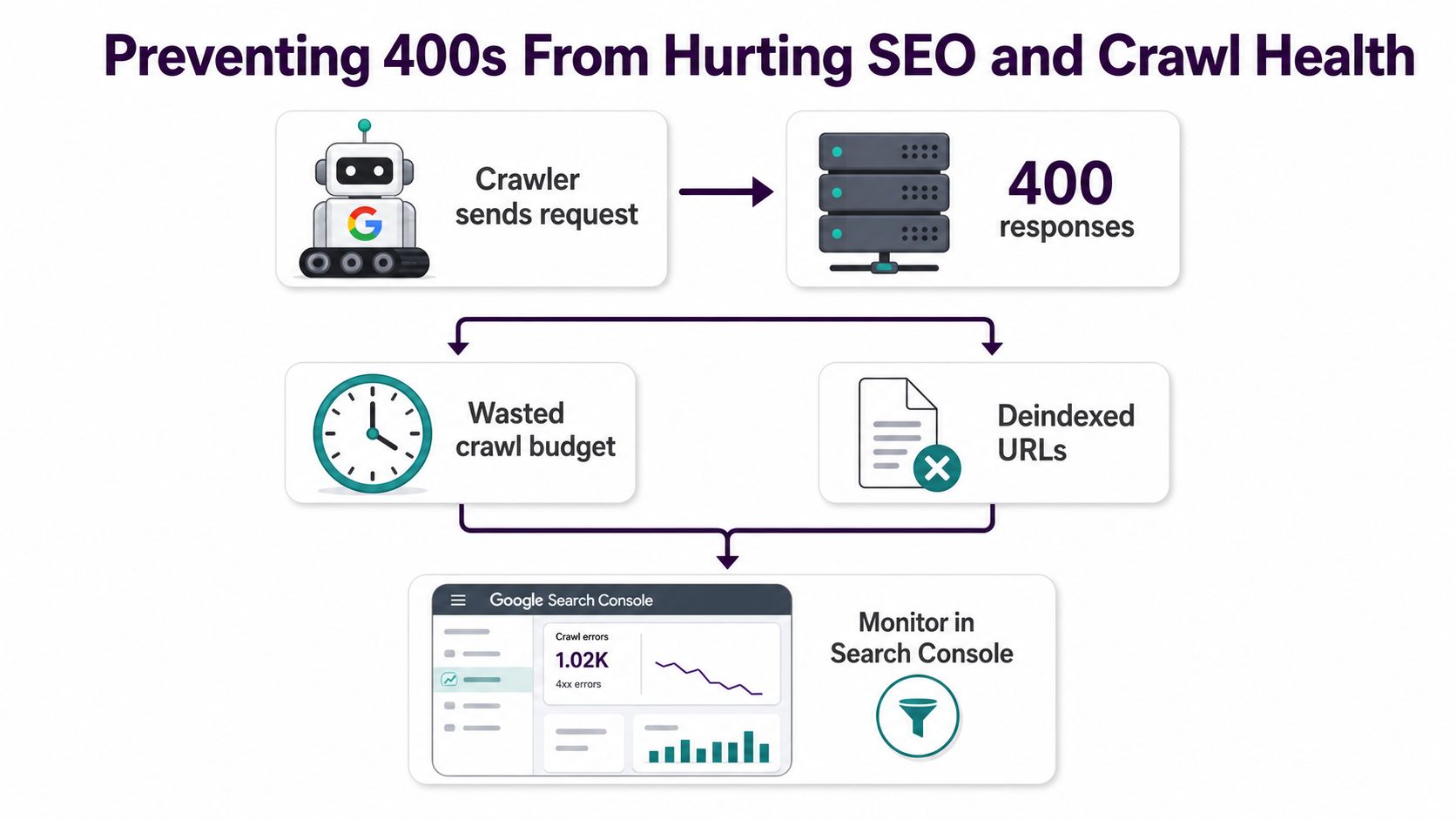
A 400 on an interactive API endpoint is an operational defect. A 400 on a crawlable page, sitemap URL, or important internal link is also a search visibility problem. Search engines can't reliably fetch, interpret, or retain URLs that repeatedly return request errors, and a broad spike can consume crawler attention on failed requests instead of useful pages.
Treat the error as a route and host health signal. In Search Console, inspect crawl statistics by host status and look for URLs reported as submitted but returning a 4xx response. The Google Search Console workflow for SEO monitoring helps connect URL-level coverage findings with broader performance and indexing checks.
Make crawlable requests boring
Search-facing URLs should have stable syntax and predictable responses. Validate XML sitemaps before submission, remove malformed query variants from internal links, and make canonicalization consistent across redirects, HTML, and sitemap entries. Don't use a 400 as a substitute for a deliberate response to a URL you understand. If a parameter is unsupported, decide whether the correct behavior is a redirect, a canonical page, or a more specific client-error response.
Keep robots.txt reachable and test important templates with a request that resembles a crawler. A browser-only check can miss problems caused by headers, cookies, URL encoding, or edge rules.
Monitor the failure before crawlers report it
Synthetic monitoring should request representative routes, not only the homepage. For forms and APIs, send valid POST payloads and assert the expected successful response class. A GET check against / won't detect a broken JSON parser, oversized authentication header, or WAF rule affecting a conversion endpoint.
Correlate 4xx logs with deployment markers, CDN rule changes, schema migrations, and releases. Alert on unusual changes in the baseline rather than relying on a fixed universal threshold. A practical runbook should record the failing URL, request ID, edge headers, origin log line, configuration diff, and the test that proves recovery.
SEO safeguard: A successful homepage check can coexist with broken product, form, or sitemap requests. Monitor the requests search engines and users actually need.
A Repeatable 400 Fix Checklist
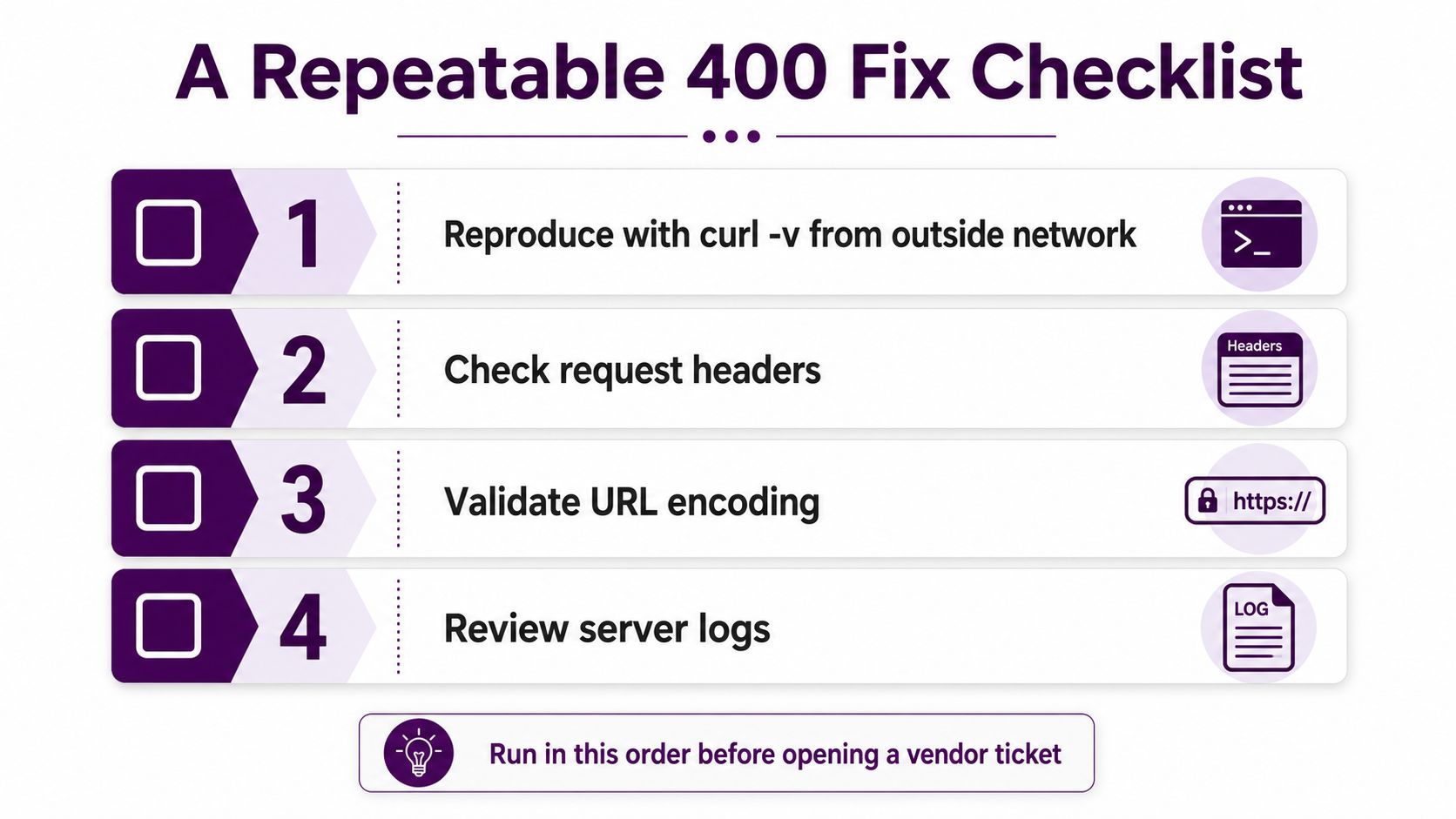
Run the same sequence every time. Consistency keeps teams from changing five variables at once and losing the evidence that identifies the fault.
Reproduce externally: Run
curl -vfrom outside the affected office, VPN, or home network. Save the request and response headers, status, body, and any CDN identifier.Compare the edge and origin: Use
--resolveto send the public hostname to the origin endpoint. A changed status isolates the CDN, WAF, load balancer, or ingress path.Strip state: Remove cookies,
Authorization, custom headers, and optional tracing fields. Add them back in groups until the 400 returns.Validate the URL: Inspect path segments, query delimiters, percent-encoding, redirect parameters, and generated links. Test a minimal known-good URL on the same route.
Check size and framing: Confirm that
Content-Lengthmatches the body, JSON parses correctly, and form data uses the encoding the endpoint expects.Inspect platform limits: Review NGINX header buffers, Apache request limits, Express parser settings, and Gunicorn or uWSGI request handling. Align limits across every proxy hop.
Review recent edge changes: Check WAF policies, Transform Rules, rate limits, ingress annotations, and load-balancer changes. Roll back one suspect change in a controlled test.
Capture the durable fix: Record the exact log line, request sample, configuration diff, root cause, and monitoring check. A cleared cookie is a temporary recovery, not a postmortem.
Build prevention into the stack
Request-validation middleware should reject malformed input with a useful, structured response and log the reason without exposing sensitive data. Header caps should reflect real application requirements, while cookie and token design should keep session state compact. Edge rules need version control, review, and a rollback path.
A useful technical SEO audit checklist can help place these checks alongside crawlability, canonicalization, redirects, and indexability reviews. The strongest prevention combines application logs, proxy logs, synthetic requests, Search Console monitoring, and a runbook that someone can follow during an incident.
Incident habit: Don't close a 400 ticket when clearing cookies works once. Reproduce it in a clean profile after authentication, identify the rejecting layer, and verify that the same request remains healthy after the fix.
Keyword Kick connects Google Search Console, crawl signals, rank tracking, and technical SEO data so your team can prioritize the pages and request paths that need attention first. Visit Keyword Kick to turn 400-error findings into a monitored, prioritized SEO action plan.