You already know the feeling. A merchandiser adds color, size, brand, and price filters to a category page, the shopper experience gets better, and then the crawler starts discovering a URL space that looks limitless. The store still sells shoes, jackets, or appliances, but search engines now have to decide which facet pages deserve attention, which ones are duplicates, and which ones should never have been crawlable in the first place.
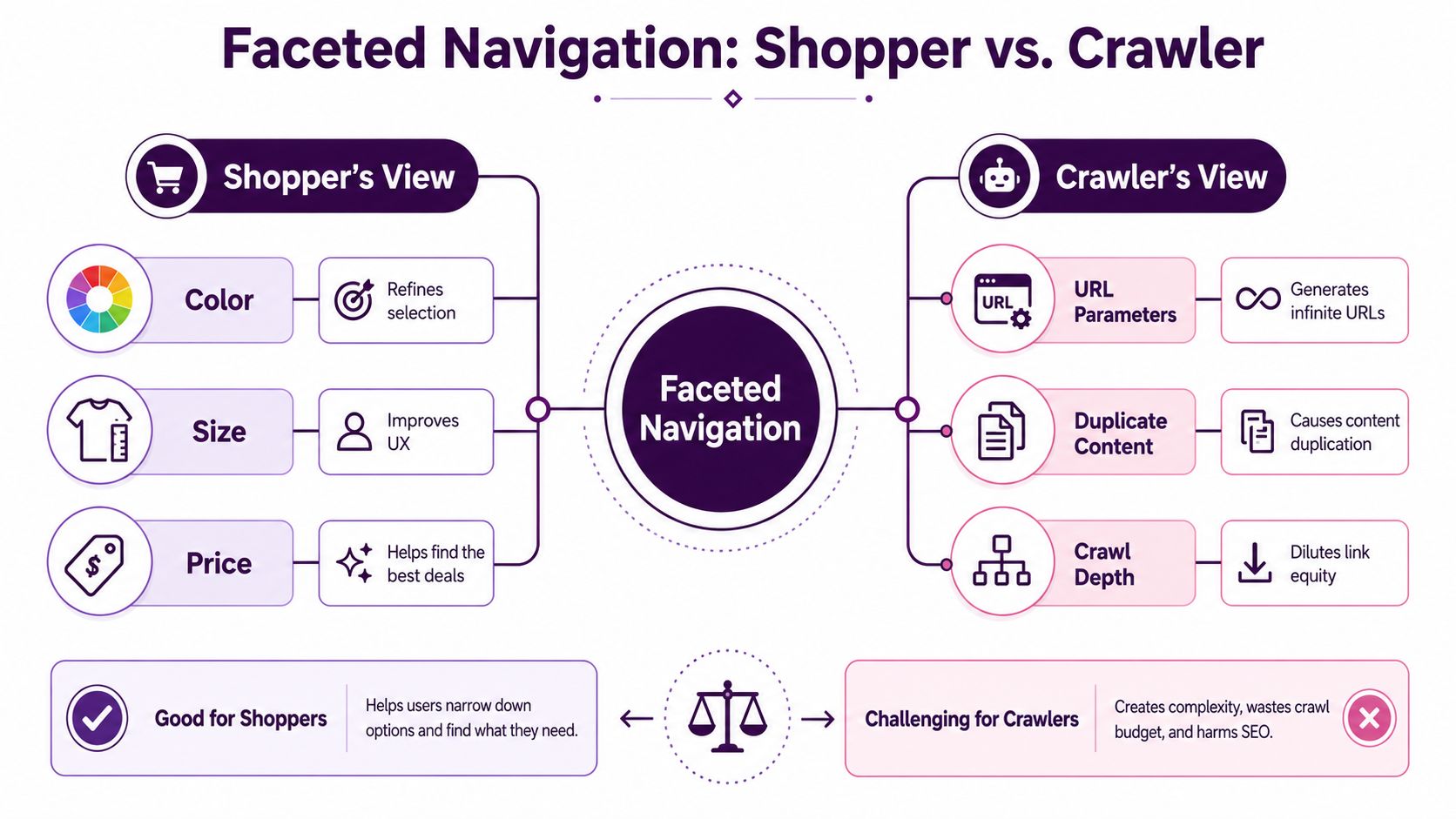
That tension is the whole job of faceted navigation SEO. On the shopper side, facets help people narrow a huge catalog into something usable. On the crawler side, the same filters can generate a near-endless set of parameterized or path-based URLs, many of which are thin, repetitive, or empty. A controlled setup keeps the few combinations with real demand visible, and puts everything else behind the right technical guardrails.
If you've ever had a category page that ranked well, then watched it lose traction after filters were rolled out, you've probably already felt the trade-off. For a practical reminder of how this plays out on ecommerce pages, stop losing sales with better seo is a useful reference point because the SEO issue usually starts where commercial intent is strongest.
Introduction to Faceted Navigation and Its SEO Impact
A category page for men's running shoes, laptops, or patio furniture usually starts with a clean taxonomy. Then the filters arrive, color, size, brand, material, rating, price, and a dozen more attributes layered on top of the same base listing. That system is faceted navigation, and it's useful because shoppers can zero in on the product set they want instead of scrolling forever.
The SEO problem starts when each combination turns into a crawlable URL. A single category can fan out into a huge number of variants, and not all of them deserve to exist in search. If you let every combination act like a page, the site shifts from a tidy catalog into a sprawling URL graph that search engines have to sort through.
Shopper value and crawler risk
On the shopper side, facets reduce friction. They help people answer a simple question faster, which is whether a product set contains the right option in the right price band. On the crawler side, the same functionality can generate duplicates, thin pages, and inconsistent parameter patterns that don't add search value.
The healthiest outcome is not “index all filters” or “index none of them.” It's a demand-led URL space, where only the smallest stable set of facet URLs with real search intent gets a place in the index. Everything else should be classified deliberately, not left to chance.
Practical rule: if a filtered page doesn't have a clear search purpose and enough inventory to justify it, it probably shouldn't be fighting for indexation.
The language matters too. Teams often use “faceted navigation,” “faceted search,” and “filters” interchangeably, and that's fine. What matters for SEO is whether the filter state changes the URL, whether that URL can be crawled, and whether the page has a genuine reason to exist beyond a single session.
Why Faceted Navigation Breaks Crawl and Rankings
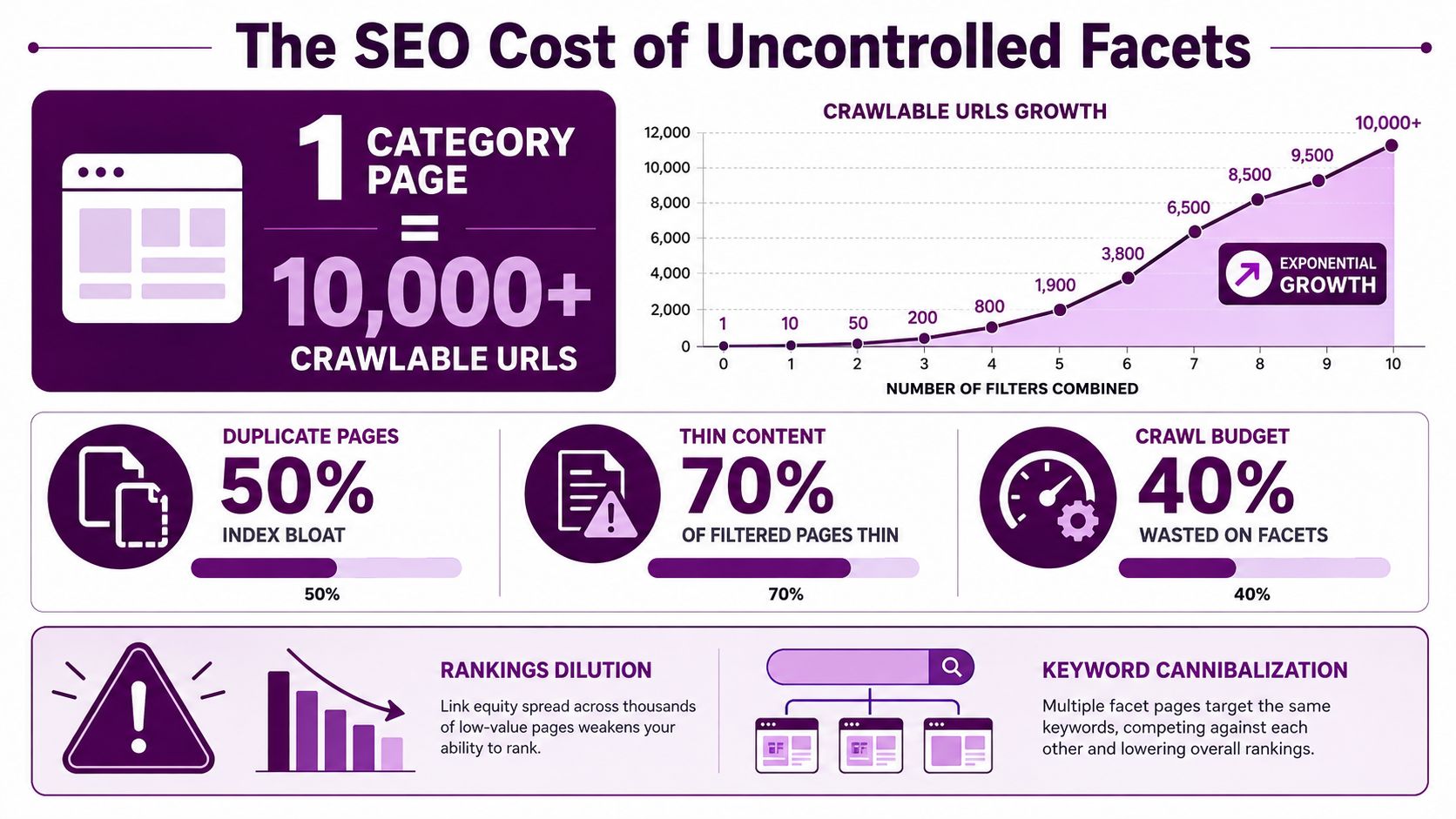
Uncontrolled facets don't just make a site messy, they distort how crawlers spend time. One published example says 10 facets with 5 options each can generate 1,953,125 URL combinations per category, and scaling that to 50 categories can expose Google to roughly 100 million URLs. The same source says that can waste about 30% to 60% of crawl capacity (Digital Applied).
What breaks first
The first symptom is usually duplication. A 2021 study of 500 ecommerce sites found that 68% had serious duplicate-content problems caused by filters, and those sites were generating an average of 12 to 15 URLs for the same set of products (SeoRoast). That doesn't mean every filtered page is bad, it means many sites let the same inventory surface through too many URL paths.
Crawl budget is the next casualty. The same source cites Screaming Frog analysis showing faceted URLs can consume 35% of a typical store's crawl budget, rising above 60% in large stores (SeoRoast). When that happens, important pages get discovered later, revisited less often, or lost in the noise of parameter variants.
Why the damage spreads
Search engines don't just see more URLs, they see split signals. Internal links point in multiple directions, relevance gets diluted across near-duplicates, and long-tail queries can get attached to the wrong version of a page. That's why one site may think it has “better coverage” after launching filters, while rankings get less stable.
Practical rule: if filtered URLs are multiplying faster than product or search demand, the site is paying crawl costs without earning index value.
That's also why two extremes both fail. Blocking everything hides potentially valuable long-tail landings. Canonicalizing everything back to a broad category page can suppress facet combinations that deserve to rank. The right answer is selective, not absolute.
How to Audit Your Faceted Navigation Setup
A useful audit starts with one question, which facet URLs should exist at all. On large e-commerce sites, the mistake is usually not the filters themselves, it is letting every combination behave like a page with equal weight. Color, size, price, brand, and rating are only attributes until a specific combination has demand, enough inventory, and a reason to stand on its own.
Build the URL inventory first
Start by crawling the site and mapping every facet pattern before you decide what to do with it. Pull parameterized URLs, path-based filters, sort combinations, and any page that returns a product set. Then compare that inventory with the pages you want search engines to find.
Use Keyword Kick's technical SEO audit workflow as a reference for the wider audit process, then keep the faceted-navigation work focused on URL discovery, indexability, and internal link exposure. The goal is to sort pages into three buckets, not to label everything as good or bad.
Index candidates: combinations with clear demand and inventory support.
Noindex candidates: combinations that help users but do not deserve indexation.
Block-crawl candidates: combinations that add no unique user or search utility.
That classification needs to happen before implementation. If the rules come later, teams usually end up with conflicting signals, duplicate URLs in the index, or robots rules that stop Google from seeing the canonical setup you wanted it to follow.
Check for duplicate patterns and bad statuses
When filters create many URL variants for the same product set, the audit should flag that immediately. The problem is not just duplicate content, it is split relevance, weaker internal signals, and search engines spending time on pages that do not add anything new.
Look at zero-result combinations too. A filter state with no products should not turn into a thin fallback page that pretends to be useful. A proper 404 is a cleaner signal than a soft-404 or an empty shell.
Empty filter states are dead ends, not landing pages.
Audit the URL hygiene
Pay close attention to the shape of the URLs themselves. Google's December 2024 guidance says to keep a consistent order of filters in the URL path and avoid odd parameter separators, because inconsistent ordering can create duplicate variants at scale (Google Developers). On large international sites, the same facet state can be rendered in several syntactic forms, and that is enough to multiply crawl paths without adding value.
The audit question is simple. Which facet combinations deserve stable URLs, and which ones are only producing crawl noise? Once that split is clear, the next step is to map each URL to the right control, then verify the result in crawl data, indexing reports, and server logs.
Configuring URLs Canonicals and Crawl Controls That Work
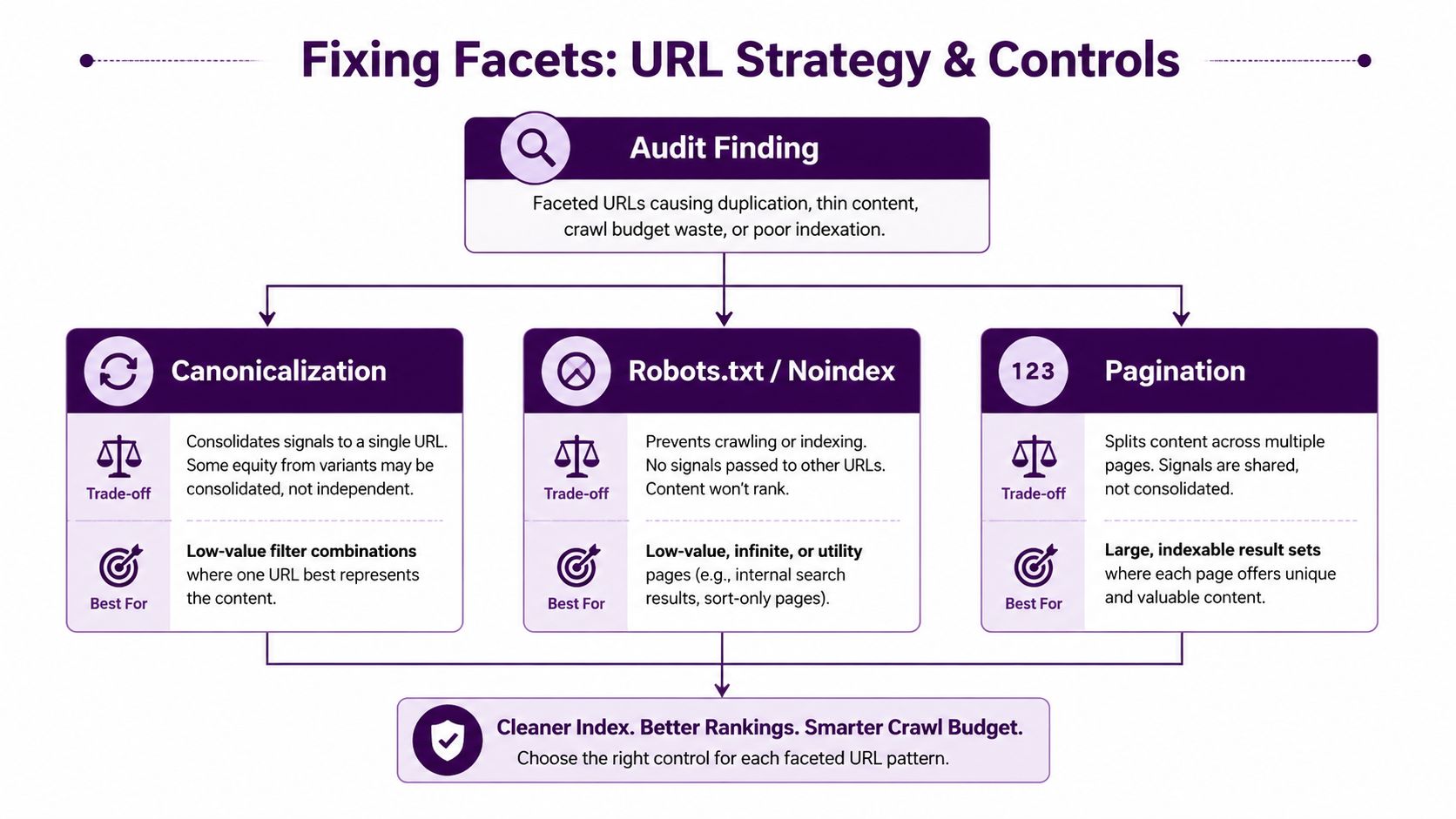
A faceted setup gets cleaner when each URL is assigned a role up front. Start by deciding whether a page should be indexable, kept out of search results, or excluded from crawl, then apply the matching control to that bucket. Index pages get self-referencing canonicals and strong internal links. Don't index pages use noindex. Block crawl pages are kept out with robots.txt or equivalent controls, as outlined by Botify.
Use canonicals where the page can stand on its own
A canonical tag works best on facet pages that are legitimate variants and have some value, but should consolidate to a preferred URL. It signals the main version without pretending the other versions do not exist. For pages meant to rank, the page itself needs unique H1s and content, inclusion in XML sitemaps only when it is a canonical target, and a coherent structure with breadcrumbs and parent or child linking.
Use the canonical URL concept as a rule for consolidation, not as a patch for weak page design. If a filtered page is the search target, it needs consistent linking and content support to earn that role. If it is not the target, forcing every variation into the same canonical bucket just asks search engines to sort out intent that the site has not made clear.
Use noindex and robots with clear separation of duties
noindex is for pages you do not want in search results. robots.txt is for pages you do not want crawled. Mixing noindex and robots.txt creates brittle setups that send conflicting signals to crawlers.
A low-value filter combination that still needs to be fetched before Google can see the directive can use noindex. A combination that adds no value and only consumes crawl capacity can be blocked from crawl. The important part is to avoid handing the crawler several conflicting signals for the same URL.
Practical rule: do not canonicalize every filtered URL back to the category page unless the facet has no standalone search demand.
That mistake is common on large ecommerce sites. It looks tidy in a crawl report, but it can suppress long-tail landing pages that should exist as real targets. The better model is selective whitelisting, where only the few combinations with proven value stay indexable.
Keep the site structure coherent
Internal linking should reinforce the URLs you want indexed. If a facet page is meant to rank, it should be discoverable from category and subcategory paths, not only from the filter panel. If it is not meant to rank, keep it out of the strongest internal paths so crawlers do not keep rediscovering it.
Filter states also need clean URL behavior. Search engines and users both benefit when a page state is consistent, shareable, and easy to recognize in the crawl graph, rather than appearing in several forms that point to the same result set. That is where disciplined URL hygiene does the work, because it keeps the smallest stable set of valuable facet URLs visible while the rest stay out of the way.
Handling Pagination Rendering and Crawl Budget Tuning
Pagination turns messy fast when it stacks on top of facets. A filtered results page, then page two of that filtered set, then another filter layered on top can create a crawl surface that looks tidy to users and noisy to bots. The aim is not to remove pagination. It is to keep the URL space predictable so search engines can understand which states matter and which ones do not.
Keep the render state and the URL aligned
AJAX filtering is fine when the page state updates in the URL as the user filters. That separation matters. If the browser cannot bookmark or share the filtered state, search engines often face the same visibility gap, and the page becomes harder to classify correctly.
Keep the filter order consistent and avoid odd parameter separators. That guidance from Google's December 2024 update reduces duplicate URL variants that would otherwise look like different states to a crawler.
Reduce crawl friction before it becomes index bloat
Crawl-budget thinking gets practical here. You do not need every combination to be crawlable just because the front end can render it. Keep filter depth shallow, prevent duplicate filters in path-based URLs, and make sure the system does not generate alternate syntaxes for the same state.
Use crawl budget as a design constraint, not only a reporting metric. If the same product set can be reached through multiple parameter orders or path variants, the crawler has to process all of them before it learns which one matters.
A stable URL architecture usually does three things well.
It normalizes filter order: one canonical sequence, no alternative permutations.
It avoids odd separators: use standard parameter syntax instead of inventive formatting.
It limits exposure: only combinations with a clear purpose stay discoverable.
That does not mean every page should be hidden. It means crawl paths should be earned. Large international catalogs feel this most sharply because inconsistent URL generation can multiply across locales and category layers, turning one implementation issue into many duplicate clusters.
Practical rule: if a facet state cannot be explained in one consistent URL pattern, it probably is not ready for broad crawl exposure.
Implementation Checklist Troubleshooting and Measuring Success
A faceted setup is easy to inspect on paper and easy to drift out of control after launch. Start with the highest-value question, which facet URLs deserve to exist as indexable targets at all. After that, map each state to the right control, whether that means index, noindex, or crawl blocking, and keep the URL format clean so the crawler sees one stable version of each meaningful combination.
Fast validation checks
Open a filtered page and check the basics without guessing. The status code should be correct, the canonical should point to the intended target, noindex pages should stay out of index targets, and zero-result combinations should return a real 404. If the facet state changes through AJAX, the URL should change with it so the page state is visible to crawlers and analysts.
For pages meant to rank, the strongest acceptance test is practical rather than theoretical. They need unique H1s and content, they should appear in XML sitemaps only when they are true canonical targets, and they should be reachable through breadcrumbs plus parent or child links. That keeps “indexable” from turning into “exposed by accident,” which is a common failure on large catalogs. As noted earlier, Sitebulb also frames those pages as a combination of clear content, clean targeting, and sensible internal linking.
What to watch after launch
The most common mistake is over-canonicalizing valuable facet pages back to the broad category. That removes too much specificity, and the long-tail landing pages you wanted to keep start disappearing from search. The other common mistake is to leave the setup untouched after launch, then let stock changes and merchandising updates create new combinations that no one reclassifies.
Routine checks should focus on a few signals:
Indexed facet URL count: keep it limited to the whitelisted set.
Organic traffic to whitelisted facets: it should come from real demand, not accidental exposure.
Cannibalization signals: these should ease once duplicate states stop competing.
Crawl behavior: watch for fewer wasted requests on low-value combinations.
A stable faceted system still needs governance. Inventory changes, merchandising priorities shift, and search demand moves, so the URL set has to be reviewed and maintained, not just fixed once and left alone.