A website audit can look healthy on paper and still leave a business with broken conversion paths, invisible pages, and unresolved performance problems. Across 100,000+ websites audited in H1 2026, the median score was only 71/100, just 6.8% earned an A, and performance issues affected 71.2% of sites, according to SEOmator's 2026 audit analysis. The practical lesson is uncomfortable but useful: an audit's value doesn't come from finding the most issues. It comes from identifying which issues deserve action first.
A strong process connects crawlability, indexing, content, page experience, accessibility, conversions, and emerging search requirements. This guide shows how to perform a website audit without turning the result into an unranked spreadsheet of warnings. You'll learn how to scope the work, establish a baseline, diagnose technical and content problems, and build a roadmap around business impact.
Why Most Website Audits Miss the Mark
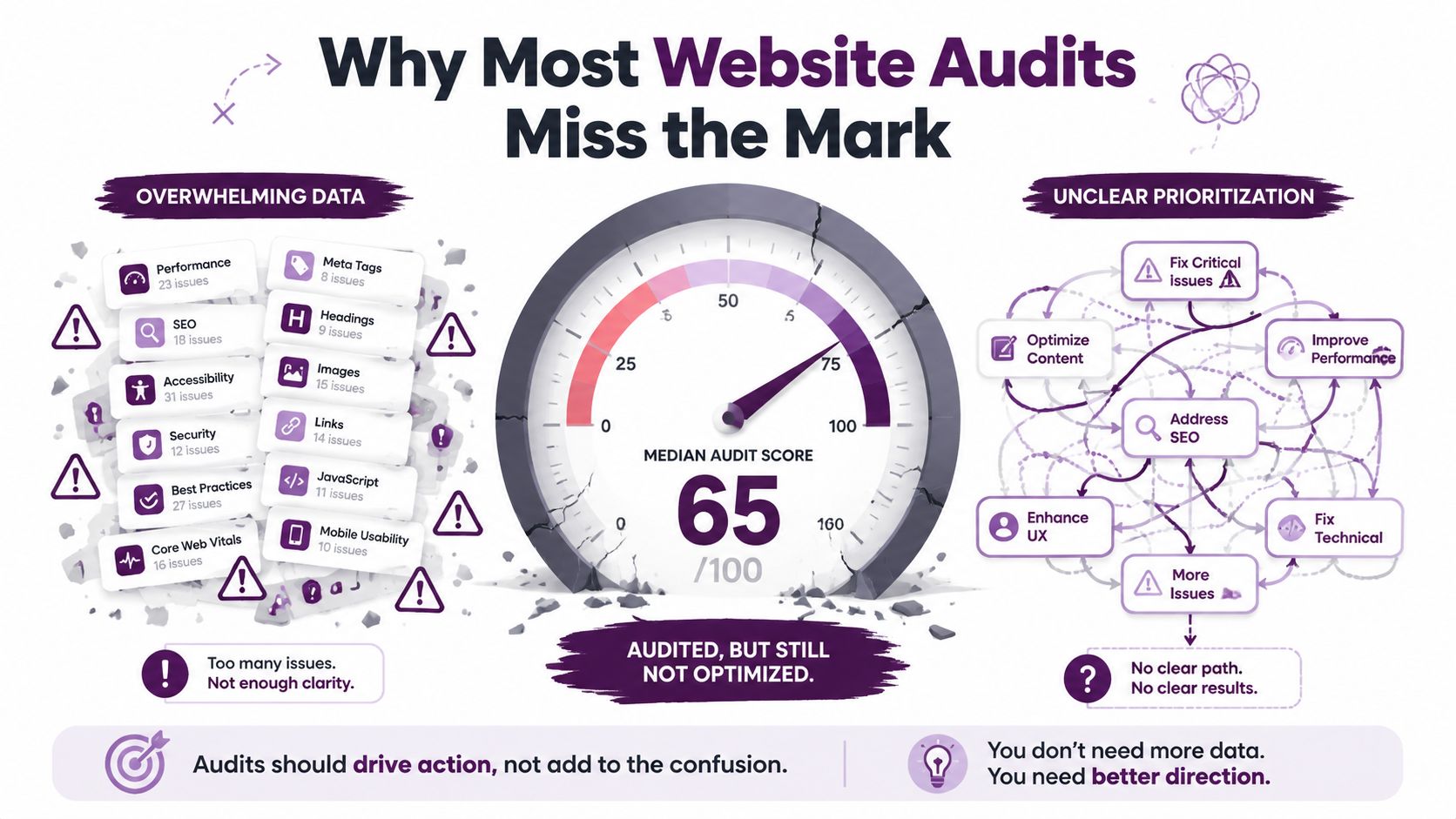
An audit can fail before the first crawl finishes. It collects missing title tags, redirects, broken links, duplicate pages, and speed warnings, then presents them as if they carry equal weight. That creates activity without progress. A broken checkout form and a low-priority image filename may both appear as issues, but their commercial risk is entirely different.
The baseline remains sobering. The median audited website scored 71/100, only 6.8% received an A, and 71.2% had performance issues, according to SEOmator's large-scale 2026 audit data. A passing-looking report can still leave serious weaknesses in speed, mobile usability, technical accessibility, or conversion flow.
The checklist is no longer the diagnosis
Early SEO audits focused on keywords, title tags, meta descriptions, and visible copy. Those checks still matter, but they cover only basic on-page signals. A useful audit also asks whether search engines can discover and index the page, whether visitors can use it comfortably, whether the content matches intent, and whether systems can interpret its meaning.
Use Google Search Console as the primary reference for indexing and crawl problems. GA4 can help explain changes in traffic and engagement. The audit should also examine XML sitemaps, robots.txt, Core Web Vitals, mobile usability, structured data, HTTP status codes, and internal links, as outlined in this modern SEO audit guide.
Content and technical SEO belong in the same decision process. A strong page that search engines cannot crawl has limited value. A fast page aimed at the wrong intent will still fail the searcher. AI-driven discovery adds another consideration: clear structure, direct answers, and machine-readable signals help systems interpret and surface a page.
Practical rule: An audit should end with a ranked action plan, not a longer issue list.
Tool output also needs judgment. Hundreds of alerts are not useful if the platform cannot connect them to affected templates, revenue paths, or search visibility. The analyst still has to determine scope, severity, and ownership. That is why practitioners should understand why many AI SEO tools fail, particularly when detection is presented as diagnosis.
A focused audit may uncover fewer issues than a full crawl, yet produce a better decision. Start with the pages, templates, and technical conditions closest to the business objective, then expand only when the evidence justifies it.
Scoping Your Audit Before You Start
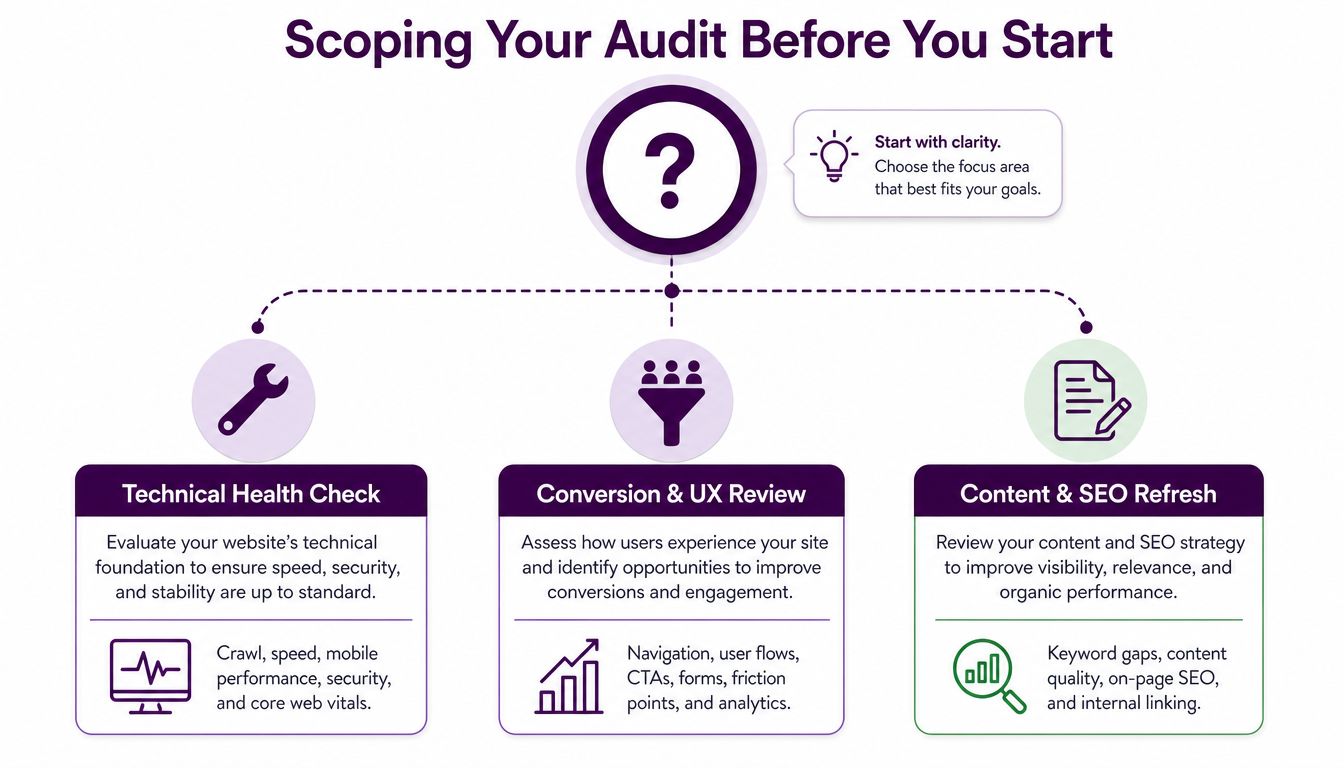
Before opening a crawler, define the business question. “Audit the website” is too broad to guide decisions. A traffic drop, a platform migration, a new-client onboarding review, and routine maintenance each require a different depth of investigation.
Start by choosing the audit type:
Traffic-drop investigation: Focus first on changes in rankings, organic landing pages, indexing, algorithm-related timing, templates, and analytics tracking.
Migration audit: Prioritize redirects, canonicalization, robots.txt, sitemaps, status codes, internal links, and index coverage before and after launch.
New-client baseline: Document the site's current visibility, technical condition, content structure, competitors, and business priorities.
Recurring maintenance sweep: Review high-risk signals quickly, then reserve deeper analysis for findings that changed or affect strategic pages.
A full audit can examine the whole site, but a scoped audit may focus on a template, directory, market, or conversion path. That distinction prevents a small team from spending its entire sprint fixing low-impact pages while a central revenue page remains broken.
Establish the baseline first
Record the starting condition before making recommendations. A technical audit framework from DeltaV Digital recommends documenting current keyword rankings, organic traffic, the percentage of pages indexed, and the traffic trajectory. These measures provide context for every later finding.
Use Google Search Console to inspect queries, pages, indexing, and crawl signals. Use GA4 to understand landing-page behavior, engagement patterns, and whether traffic changes affect meaningful journeys. Segment the data by site section or template rather than relying only on whole-domain averages. A problem affecting product pages needs a different response from one affecting editorial articles.
Write down the business objective in one sentence. For example, an online store may need more qualified product-page visits, while a lead-generation site may care more about form completion and service-page visibility. A publisher may prioritize discoverability across article templates, while a local business may need strong location and service pages.
Ask the right scoping questions
For e-commerce, ask which product categories generate the most commercial value, whether faceted navigation creates indexable duplicates, and whether mobile users can complete the purchase path.
For lead generation, inspect forms, phone links, consultation CTAs, service pages, and the route from informational content to contact. For publishers, evaluate article templates, internal linking, archive behavior, and whether important content can be crawled efficiently. For local businesses, check location pages, service relevance, contact details, map interactions, and mobile usability.
Technical Foundation and Crawlability Checks
Technical auditing should follow the path a search engine takes from discovery to indexing. Start with robots.txt, XML sitemaps, and the site's most important URLs. Then validate what Google reports in Search Console instead of treating a crawler's warning as definitive.
Begin with access and discovery
Open robots.txt and look for rules that block critical directories, assets, or page types. A staging directive left on a production site can prevent discovery, while an overly broad disallow rule can hide an entire commercial section. Compare the directives with the pages the business wants indexed.
Review the XML sitemap next. It should contain canonical, indexable URLs that return successful responses, not redirected, blocked, or obsolete addresses. Submit the sitemap in Google Search Console and inspect whether the indexed set broadly matches the pages included. A mismatch doesn't automatically indicate an error, but it does tell you where to investigate.
Use Google Search Console's Page indexing report to distinguish excluded pages from actual failures. “Crawled, currently not indexed” calls for content, duplication, internal-linking, or quality analysis. A server error points toward hosting or application stability. A redirect issue may reflect migration logic or an incorrect canonical target. The report gives you a starting signal, not a complete explanation.
Validate status codes and internal paths
Crawl the site with Screaming Frog, Sitebulb, or a comparable tool. Export URLs returning 4xx and 5xx responses, then separate internal links from external references. A broken internal link to a key service page can interrupt both users and crawlers, while an obsolete external citation may be less urgent.
Important pages should return 200 OK, use the intended canonical URL, and remain reachable through meaningful internal links. Check redirect chains, orphan pages, accidental noindex directives, and canonical tags that point to unrelated pages. For JavaScript-heavy sites, compare the raw HTML with the rendered version. If core navigation or product information appears only after rendering, verify that search engines receive the content you expect.
Security also belongs in the foundation review. Confirm that important pages load consistently over HTTPS and that certificate or mixed-content problems don't create browser warnings or broken assets. For a more detailed technical sequence, use this guide to boost rankings with technical audits, then compare its recommendations with your own site's templates and business priorities. The technical SEO audit workflow from Keyword Kick offers another reference for organizing these checks.
Content Quality and AI-Readiness Evaluation
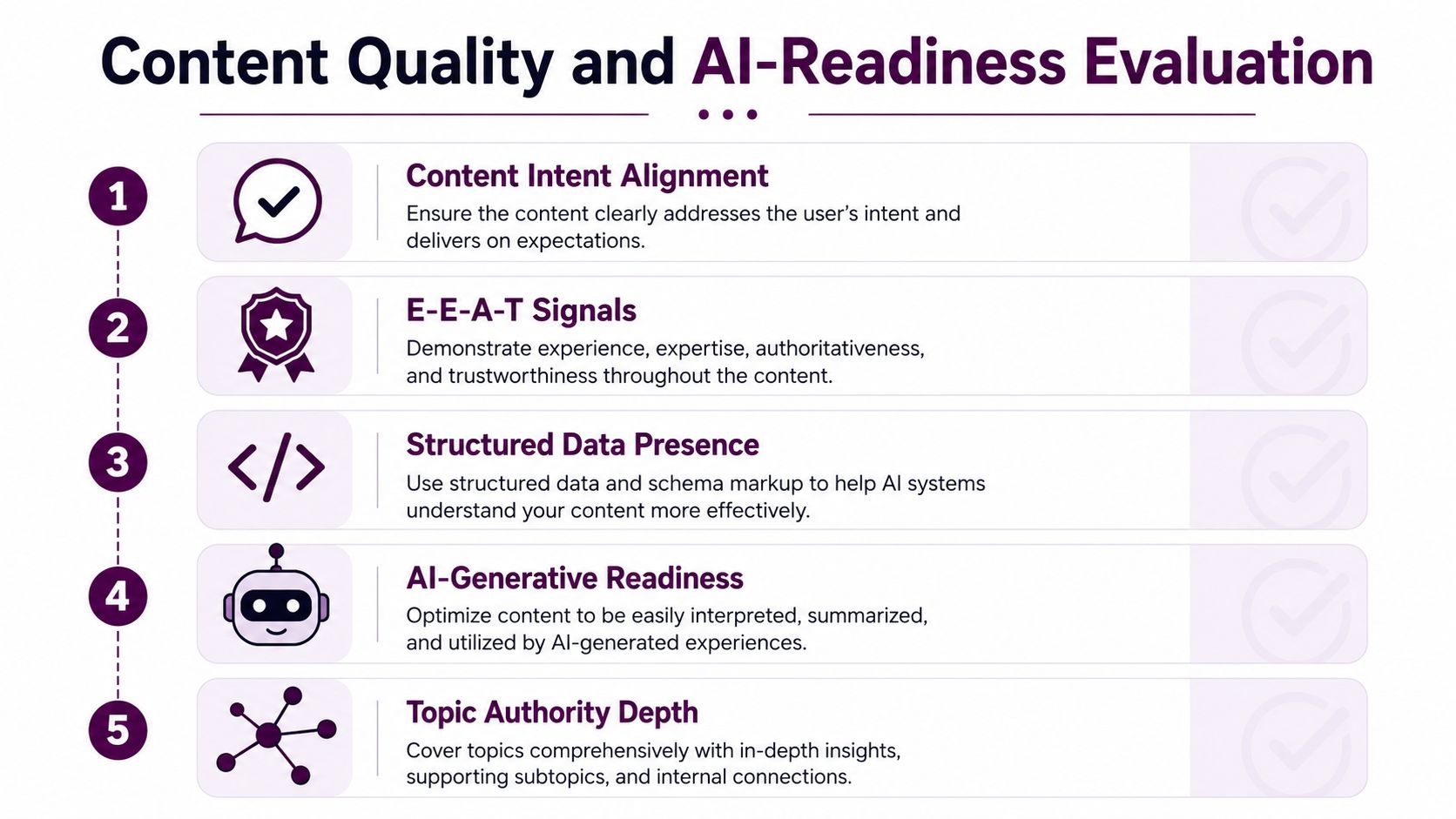
A content audit shouldn't ask only whether a page contains a target keyword. It should ask whether the page serves a distinct intent, demonstrates credible expertise, and gives both people and machines a clear answer.
Start by mapping each important URL to one primary intent. A category page should help users compare or browse products. A service page should explain the offer and support a decision. An informational article should answer the question directly and guide readers toward a relevant next step. When several pages target the same intent, assess whether they compete with one another, split internal links, or should be consolidated.
Evaluate the page as a retrieval unit
Searchers often scan before they read. Put the direct answer, definition, recommendation, or decision criteria near the top when the query calls for it. Use descriptive headings, short sections, tables where comparison helps, and internal links that explain the relationship between pages.
Check whether the page contains evidence of first-hand knowledge, clear authorship, relevant credentials, editorial review, or other trust signals where the topic requires them. Don't treat these elements as decorative badges. They should support the claims and help visitors understand why the organization is qualified to answer.
Structured data helps machines interpret page meaning, but markup must match visible content. Validate relevant schema types, check required properties, and remove obsolete or misleading markup. FAQ, article, product, local business, and review-related formats may be useful when they accurately describe the page and comply with search guidelines.
Connect content depth with machine readability
AI readiness isn't a separate content category. It emerges when a page has a clear subject, explicit answers, logical structure, supporting context, and reliable signals about who created it. A vague introduction followed by unsupported generalities gives both users and retrieval systems less to work with.
Compare the page against visible competitors by looking at the questions they answer, the subtopics they cover, the formats they use, and the gaps they leave open. Assess freshness by checking whether facts, examples, screenshots, product details, and recommendations still match the current offer. Avoid rewriting a page solely because it's old. Update it when the search intent, competitive field, or underlying information has changed.
For a practical framework that connects traffic opportunities with content decisions, review this SEO content audit approach for 2026. The useful output isn't a generic “improve quality” note. It's a specific decision: retain, refresh, consolidate, redirect, expand, or remove.
Performance and User Experience Signals
Performance and usability belong in the same audit because speed alone does not guarantee a workable mobile experience. Start with field data to see how real visitors experience key templates across devices and networks. Use lab tools afterward to reproduce problems and identify their causes.
For Core Web Vitals, assess LCP under 2.5 seconds, INP under 200 milliseconds, and CLS under 0.1. These thresholds are defined in 2026 audit guidance on Core Web Vitals and AI search. Field data reveals whether problems affect actual users. Lighthouse and Chrome DevTools can then expose render-blocking resources, oversized images, long tasks, layout shifts, and third-party scripts.
Metric | Good Threshold | E-commerce Priority | Content Site Priority |
|---|---|---|---|
LCP | Under 2.5 seconds | Product imagery, pricing, and primary content should render quickly | Article headline and opening content should appear promptly |
INP | Under 200 milliseconds | Filters, carts, forms, and checkout interactions need responsive feedback | Menus, search, subscriptions, and interactive content should respond quickly |
CLS | Under 0.1 | Reserve space for images, banners, recommendations, and purchase controls | Stabilize ads, embeds, images, and article components |
Independent analysis found that only 48% of mobile websites achieved good Core Web Vitals, as reported by SEOmator. Treat that result as a prioritization signal, not a reason to chase a laboratory score. Review the slowest high-traffic templates first, then address interactions closest to revenue, lead generation, or retention.
Accessibility requires a separate pass within the same user experience review. WebAIM reported failures on 95.9% of one million homepages tested in February 2026, according to its data summary. Run axe or Lighthouse, then verify keyboard navigation, focus states, form labels, color contrast, heading order, and alternative text manually.
Fix accessibility barriers because visitors need a usable site. Improvements to structure and interaction often help all users, but they should not be presented as an SEO shortcut. For site-specific prioritization, connect each issue to the template, audience, and business action it affects. A checkout interaction deserves attention before a low-traffic article component, even when both produce similar tool warnings.
Prioritizing Findings by Business Impact
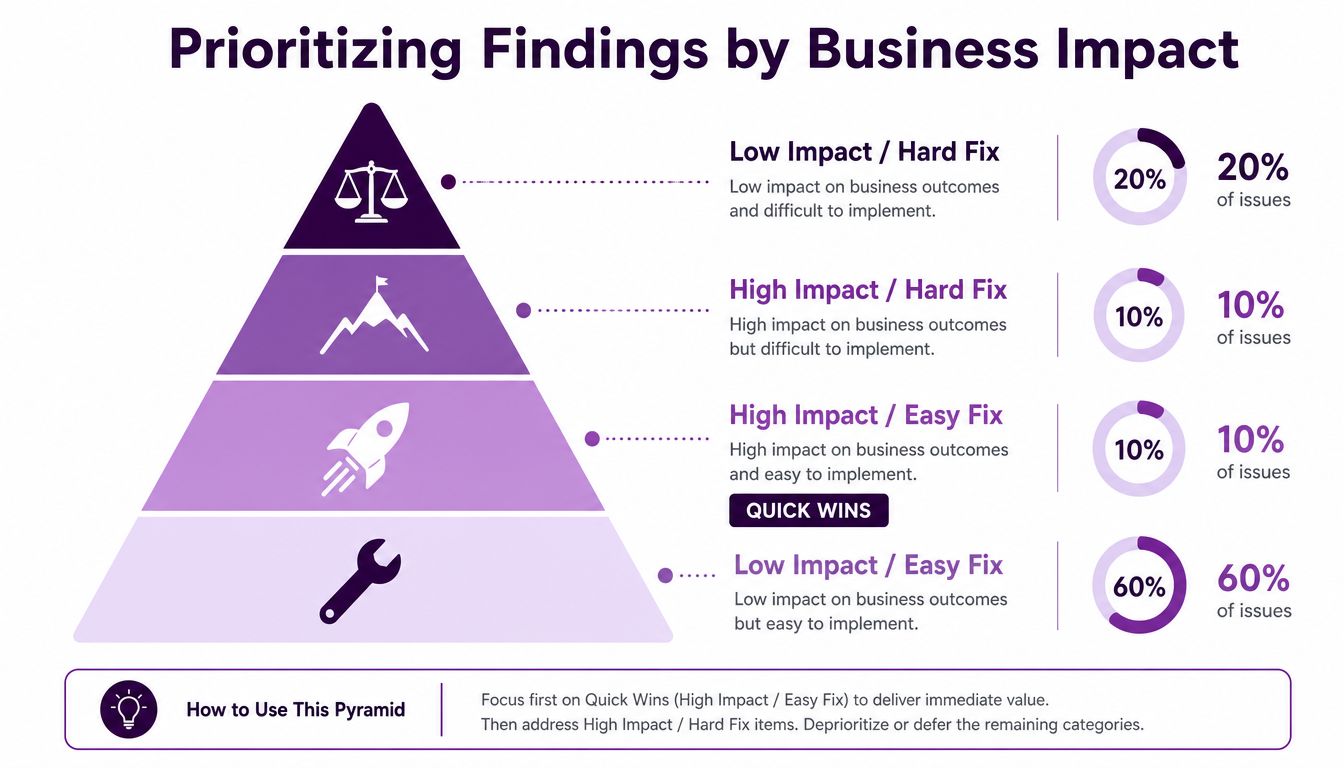
An audit becomes useful when every finding has an owner, an impact hypothesis, an effort estimate, and a place in the release plan. I recommend scoring findings on two axes: business impact and implementation effort. Add confidence when the evidence is incomplete, but don't let uncertainty become an excuse to delay obvious blockers.
Use this order:
High impact, low effort: Fix broken forms, incorrect indexation directives, critical redirects, missing canonical targets, or obvious mobile navigation failures.
High impact, high effort: Plan template rebuilds, migration corrections, checkout performance work, information architecture changes, or large-scale content consolidation.
Low impact, low effort: Batch minor metadata improvements or clean up noncritical broken references when the team has spare capacity.
Low impact, high effort: Defer cosmetic refactoring, marginal schema expansion, or changes that lack a clear connection to visibility, usability, or conversion.
Apply the matrix by site type
For e-commerce, start with revenue blockers. A broken add-to-cart interaction, a slow product template, unavailable variants, or a faceted-navigation problem can affect both customers and crawl efficiency. Fix the path to purchase before spending time on low-value product descriptions.
For lead generation, test every primary form, phone link, booking flow, and CTA on mobile and desktop. Then prioritize service pages that attract qualified searches but fail to make the next step clear. A publisher may put article discoverability, internal linking, archive handling, and template performance ahead of conversion work. A local business should first protect service and location pages, contact actions, map access, and consistent business information.
Resolve conflicts with evidence
Teams often argue over whether to fix speed, content, or technical errors first. Use affected URLs and business journeys to settle the debate. If a slow template powers the pages that receive valuable organic visits, performance work may outrank a broad content refresh. If indexing excludes the pages that should generate demand, content expansion won't solve the immediate problem.
Estimate effort with the person responsible for implementation, not from an SEO spreadsheet. Separate one-template fixes from one-page fixes, and identify dependencies such as design, engineering, legal review, or editorial approval. Sequence the roadmap so quick blockers create room for deeper projects, while every major initiative has a measurable starting baseline.
Building a Recurring Audit Cadence
A website audit shouldn't be a fire drill that happens only after traffic disappears. Use a recurring rhythm that combines light monitoring with deeper reviews. Current audit guidance increasingly recommends monthly lighter sweeps, quarterly thorough audits, and immediate reviews after migrations or traffic drops, as described in the 2026 website audit checklist from Innovative Group.
Keep monthly checks narrow
Each month, review:
Indexing signals: New errors, unexpected exclusions, sitemap changes, and important pages that disappear.
Traffic anomalies: Organic landing-page changes, ranking losses, tracking problems, and unusual section-level movement.
Performance regressions: Core Web Vitals trends, major template changes, broken assets, and mobile usability complaints.
Conversion paths: Forms, calls, checkout steps, booking tools, and prominent CTAs.
A quarterly review should revisit architecture, crawlability, content intent, cannibalization, structured data, competitor positioning, accessibility, and template-level performance. After a migration, redesign, CMS change, or major traffic drop, don't wait for the next scheduled review.
Document remediation, not just discovery
Use a shared register with the URL or template, issue, evidence, business impact, effort, owner, status, implementation date, and validation result. Keep the original baseline so stakeholders can compare later performance with the state that triggered the work. Recheck fixes in Search Console, crawlers, analytics, and browser testing rather than marking tickets complete when code ships.
A focused audit process compounds because each cycle reveals patterns. Repeated indexing failures may point to a CMS rule, recurring layout shifts may come from a shared component, and repeated content overlap may require a stronger editorial model. The team then fixes systems, not just symptoms.
Keyword Kick helps agencies and in-house teams bring rankings, Google Search Console, GA4, backlinks, and technical SEO signals into one workspace, with site audits, Core Web Vitals checks, JavaScript rendering, and prioritized recommendations. Visit Keyword Kick to turn your next audit into an evidence-based action plan, then assign the highest-impact fixes before the issue list takes over.