
Your store probably isn't invisible. It's just underperforming in ways that are easy to miss.
That's the pattern on ecommerce SEO audits: thousands of products, a respectable number of indexed pages, some category rankings, and enough organic traffic to make the channel look healthy at a glance. But revenue plateaus. New products take too long to get discovered. Category pages attract visits that don't convert. Merchants keep publishing content while technical debt keeps draining results.
Random SEO checklists don't fix that. SEO optimization for ecommerce works when you treat the site like a commercial system, not a blog with product pages attached. The highest-return wins usually come from better prioritization: fixing what blocks crawl efficiency, aligning page types to intent, and removing friction between search visibility and purchase.
Beyond the Basics of Ecommerce SEO
A lot of teams hit the same ceiling. They've already handled the obvious work: title tags, category copy, some internal links, maybe a handful of product description rewrites. Rankings move a bit, then flatten.
That plateau is normal. According to SeoProfy's ecommerce SEO data analysis, the average eCommerce brand ranked for exactly 1,783 organic keywords in 2025 and generated approximately 9,625 monthly visits from organic search alone. That benchmark matters because it shows many stores already have a baseline level of search visibility. The challenge lies in turning that baseline into scalable growth.
Why the usual playbook stalls out
On most stores, the issue isn't effort. It's sequencing.
Teams spend weeks debating homepage metadata while Google wastes time crawling filtered URLs that should never compete in search. They write blog posts for top-of-funnel traffic while high-margin category pages still have weak internal links and thin copy. They optimize product descriptions on pages that load poorly on mobile.
That's backwards.
Practical rule: If search engines can't crawl the right pages efficiently, content improvements land on the wrong foundation.
A better operating model starts with revenue logic. Ask three questions for every proposed task:
What page type benefits
What commercial outcome should change
What is this task replacing on the priority list
That last part matters. SEO roadmaps fail when everything looks important.
What “good” looks like in practice
A healthy ecommerce SEO program usually does four things well:
Protects crawl resources: Search engines reach product and category pages quickly.
Maps intent to the right URLs: Category pages target category demand. Product pages target exact product demand.
Improves purchase confidence: Descriptions, media, FAQs, and trust signals answer objections before checkout.
Measures SEO as a revenue channel: Not just rankings, but add-to-cart behavior, assisted purchases, and landing page performance.
If you want a second perspective on optimizing ecommerce performance, that resource is useful because it ties visibility work to measurable business outcomes instead of treating SEO as a standalone task list.
For teams building a more systematic process, this ecommerce SEO checklist is a practical reference point. Use it as an audit aid, not a substitute for prioritization.
Build Your Foundation with a Technical SEO Audit
Technical SEO is where most ecommerce gains get delayed, not because the issues are mysterious, but because teams keep treating them as cleanup work. They're not cleanup. They decide whether category and product pages can earn visibility in the first place.
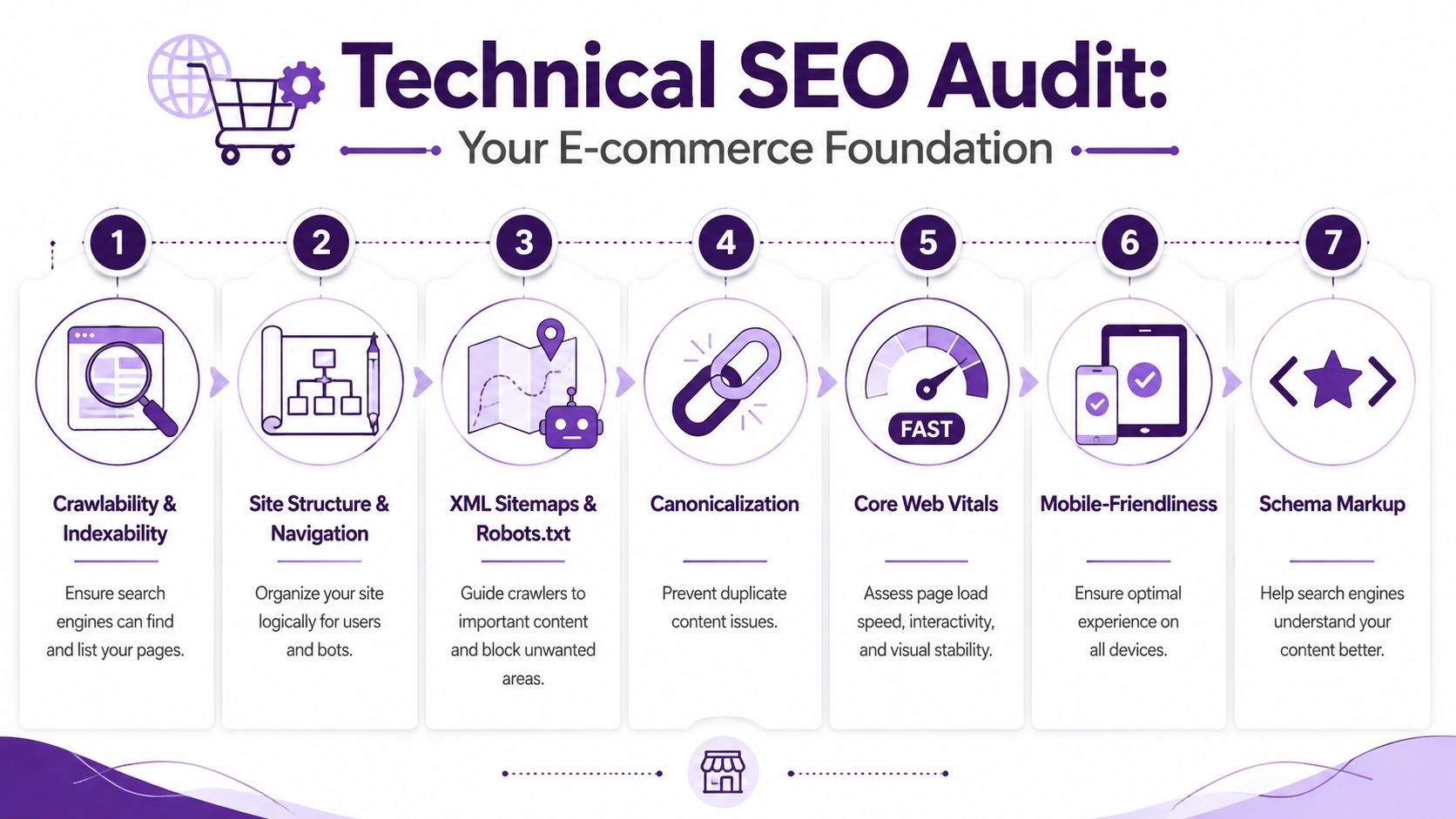
Start with crawlability and indexability
Before rewriting copy, check whether search engines can reach and index the pages that matter.
This sounds basic, but it catches expensive mistakes all the time. Product folders get blocked in robots.txt. Parameter-heavy category URLs get indexed instead of the canonical versions. XML sitemaps list broken URLs, redirected URLs, or pages that shouldn't be there at all.
Your first pass should focus on four checks:
XML sitemap quality
Include canonical, indexable product and category URLs. Remove redirects, errors, and URLs blocked from indexing.Robots.txt rules
Confirm you aren't blocking essential product, collection, brand, or subcategory paths by accident.Indexation gaps
Compare submitted pages, discovered pages, and indexed pages in Google Search Console.Canonical integrity
Make sure duplicate product variants, sort orders, and tracking parameters resolve toward the preferred URL.
A technical audit becomes much easier when you follow a structured review path. This site audit checklist for pre-publish and live SEO issues is useful for keeping teams aligned on what to verify before changes go live.
Tie performance metrics to money
Technical SEO isn't separate from conversion. It directly affects it.
According to Landingi's ecommerce SEO benchmarks, SEO-driven leads for e-commerce achieve a 14.6% conversion rate compared to 1.7% for outbound marketing methods. The same source notes that pages with Largest Contentful Paint under 2.5 seconds and Cumulative Layout Shift under 0.1 can see a 15-20% increase in organic conversion rates compared to slower, unstable pages.
That changes the conversation with stakeholders. You're not asking engineering to improve LCP because a dashboard turned red. You're asking them to remove friction from a channel that already converts efficiently.
Fast pages don't just rank better. They waste fewer high-intent sessions.
A practical way to audit this is by template, not by homepage. Review:
Category pages: Especially image-heavy grids and filter interactions
Product pages: Main image render, review widgets, pricing modules, sticky add-to-cart elements
Search results pages: Internal search often becomes a performance bottleneck
Cart-adjacent flows: Not for ranking, but for conversion continuity from SEO landing pages
Watch for JavaScript rendering failures
Modern ecommerce builds often rely on JavaScript frameworks, and that creates a recurring SEO problem. If critical product or category content only appears after client-side rendering, crawlers may not process it reliably.
The usual trouble spots are familiar:
Problem area | What goes wrong | What to check |
|---|---|---|
Facet interactions | Filtered results require full client-side execution | Whether product links exist in crawlable HTML |
Category content blocks | Intro copy loads after scripts fire | Whether rendered HTML contains indexable text |
Pagination or infinite scroll | Bots can't reach deeper listings cleanly | Presence of crawlable links to additional products |
Review and FAQ modules | Useful trust content stays hidden from crawlers | Whether important content is visible without heavy JS dependency |
If you're running Next.js, a custom React stack, or app-heavy Shopify themes, confirm where server-side rendering or pre-rendering is needed. SEO teams lose months optimizing copy that search engines never fully process.
Technical priorities that usually pay off first
Not every issue belongs at the top of the queue. In most ecommerce audits, these are the items worth shipping early:
Unblock important URLs: Fix accidental noindex rules, robots exclusions, and bad canonicals.
Clean the sitemap set: Submit only pages you want discovered and indexed.
Stabilize core templates: Improve LCP and CLS on category and product pages first.
Reduce JS dependence: Ensure core content, links, and page structure exist in rendered HTML.
Add schema where it matters: Product and breadcrumb markup help search engines interpret your catalog more accurately.
That last point matters, but only after crawl and rendering basics are sound. Schema doesn't rescue a page that bots struggle to access.
Master Your Architecture Faceted Navigation and Crawl Budget
Most ecommerce SEO advice spends too much time on metadata and not enough on architecture. That's a mistake, especially once a store has real inventory depth.
Filters, sort orders, pagination rules, and JavaScript-driven navigation can subtly turn a manageable catalog into a crawl trap. The site still looks clean to users. Search engines see thousands of low-value URL combinations, duplicate paths, and dead-end states.
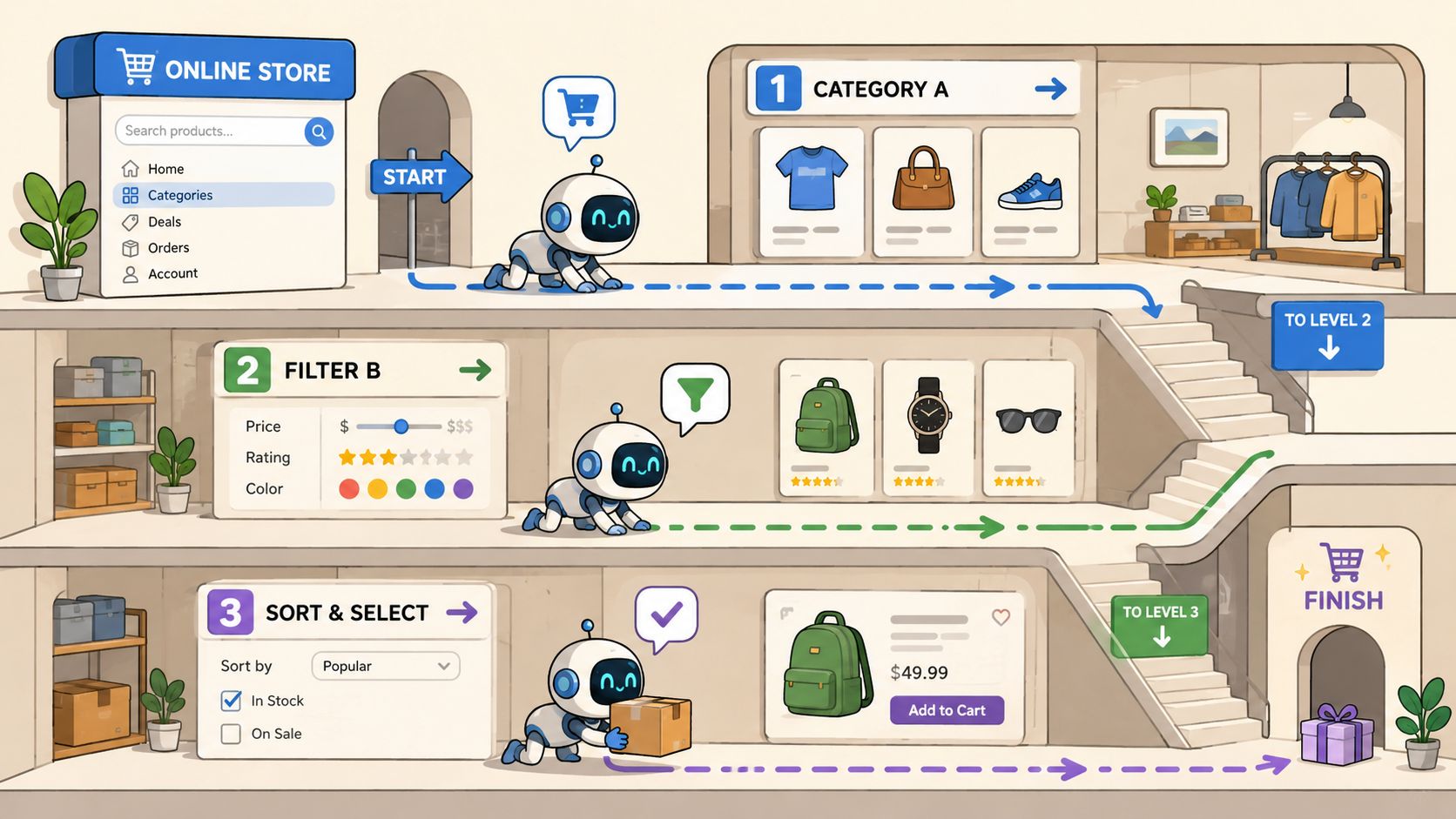
The hidden cost of faceted navigation
If your category page can be filtered by size, color, brand, material, price, rating, and availability, you don't have a handful of URLs. You have an exploding URL set.
According to Botify's analysis of technical SEO issues on mid-size ecommerce sites, 68% of mid-size ecommerce sites lose over 30% of their crawl budget due to unoptimized faceted navigation and non-ranking JavaScript dependencies. The same source says brands implementing URL parameter controls and server-side filtering saw a 45% increase in indexed product pages within 90 days.
That's one of the clearest ROI cases in ecommerce SEO because crawl waste doesn't stay isolated in technical reports. It delays indexation for new products, weakens category coverage, and spreads internal authority across pages that were never meant to rank.
Which filters deserve indexable pages
Not every filtered page is bad. Some deserve to rank.
“Black running shoes,” “women's waterproof hiking boots,” or “oak dining tables” may match clear search demand and deserve curated landing pages. The problem starts when every ad hoc combination becomes crawlable by default.
Use this decision model:
Index a filtered version when it maps to repeatable search demand, has unique commercial intent, and can support distinct copy, internal links, and product selection.
Canonicalize or block it when it's just a convenience layer for users and adds no independent ranking value.
Return a clean non-indexable experience when the combination creates near-empty results, duplicate sets, or unstable inventory patterns.
If a filtered URL wouldn't deserve its own title tag, internal links, and merchandising logic, it probably shouldn't be indexable.
What usually works better than broad noindex use
A lot of teams slap noindex on faceted pages and call it solved. That's incomplete.
Noindex can stop pages from appearing in search, but it doesn't automatically prevent crawlers from spending time on them. For large URL sets, you need stronger control across architecture and rendering.
Here's where merchants usually get better results:
Tactic | Best use case | Common mistake |
|---|---|---|
URL parameter controls | Large sets of filter combinations | Leaving parameters crawlable without rules |
Server-side filtering | Important product lists that need crawlable output | Relying on JS-only filter states |
Canonical tags | Consolidating duplicate paths to preferred URLs | Canonicalizing pages with materially different intent |
Internal link restraint | Keeping bots focused on priority paths | Linking heavily to every filter state |
Robots controls | Suppressing low-value crawl spaces | Blocking assets or paths needed for rendering |
Pagination deserves attention too. Infinite scroll looks modern, but if it doesn't expose crawlable product links and paginated discovery paths, product depth suffers.
Architecture fixes that improve ROI fastest
When crawl budget is leaking, don't start with cosmetic improvements. Start where Google's attention is being misallocated.
The most impactful fixes are usually:
Audit parameter behavior: List every filter and sort parameter the platform can generate.
Separate user utility from SEO value: Some URL states help shoppers but shouldn't compete in search.
Promote only strategic facets: Build indexable landing pages intentionally for search-worthy combinations.
Render important filtered states server-side: Don't depend on client-side experiences alone.
Trim internal links to low-value URL variants: Navigation should reinforce the hierarchy you want indexed.
This part of SEO optimization for ecommerce often gets delegated too late because it requires SEO, development, and merchandising to agree on page purpose. But when it's fixed, the gains tend to be broader than almost any isolated content task. Search engines discover more of the catalog, index healthier product sets, and spend less time on noise.
Optimize Product and Category Page Content That Converts
Once technical waste is under control, content starts doing real work. Not decorative work. Commercial work.
Category and product pages don't need more words for the sake of it. They need the right information, in the right order, on the right page type. That means matching intent, answering buying questions, and reducing doubt before the shopper reaches the cart.
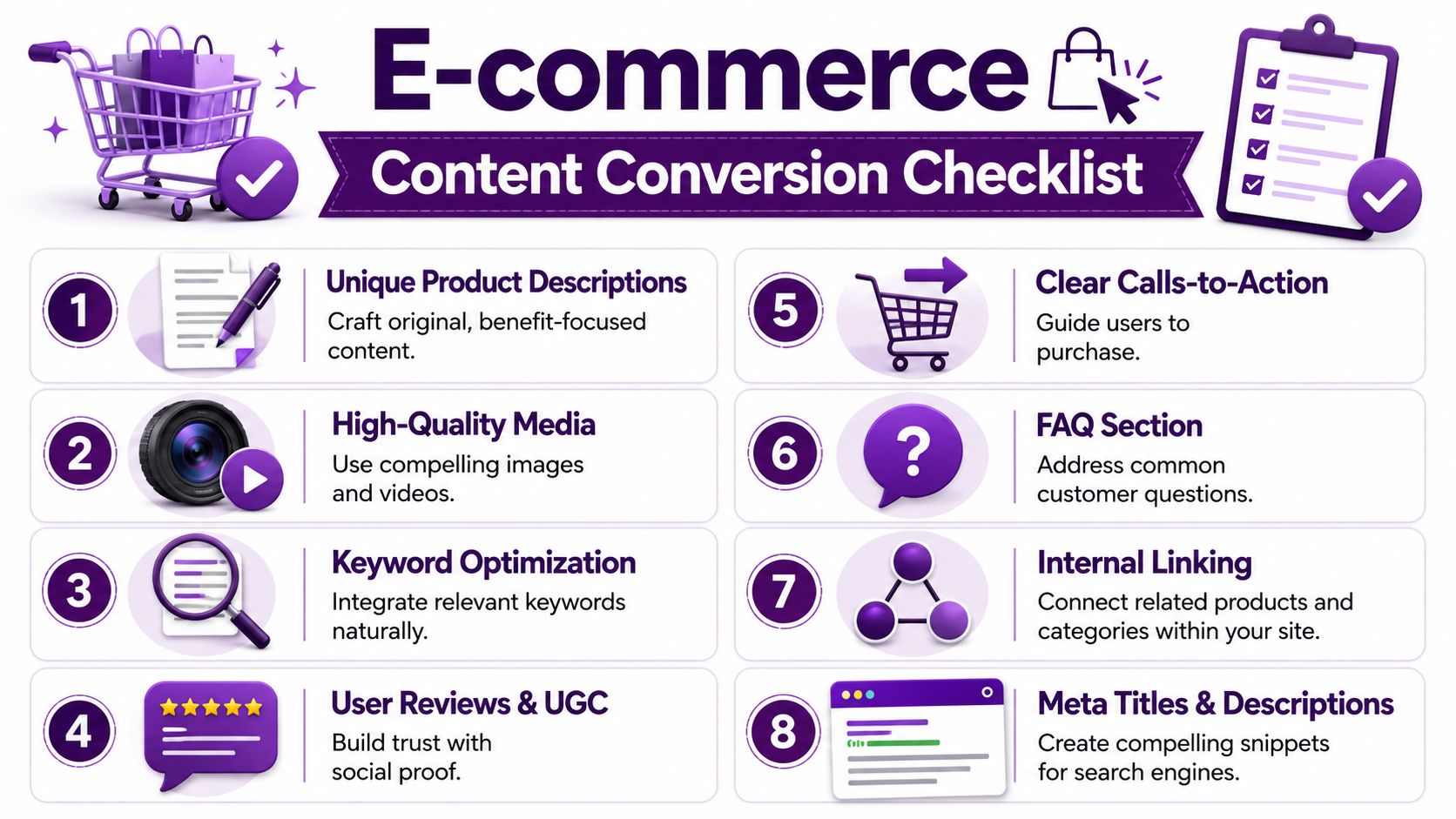
Start with purchase-intent keyword mapping
A lot of ecommerce teams still build content plans around volume first. That's how you end up with traffic that doesn't buy.
According to StudioHawk's ecommerce SEO guidance, e-commerce SEO success hinges on targeting high-conversion keywords with explicit purchasing intent, such as “buy,” “discount,” or “shop.” That source also recommends using the Google Search Console regex filter (buy|purchase|discount|deal|sale|cheap|order|shop|get|price|coupon|promo|offer) to isolate commercial intent patterns.
That's a practical method because it helps you see which pages already attract buyers, not just browsers.
Map intent like this:
Category pages should target product-type and modifier demand. Think “linen bedding,” “men's trail running shoes,” or “ergonomic office chairs.”
Product pages should target exact-item demand, model terms, brand plus product names, and bottom-funnel modifiers.
Support content should answer pre-purchase questions that help category and product pages convert, not compete with them.
Product copy that actually earns its place
Most weak product pages share the same problems: manufacturer copy, thin specs, vague benefits, and no effort to answer the customer's real objections.
StudioHawk's guidance states that product pages should include at least 1,000 words of well-structured, benefit-focused content where appropriate, and that ignoring these steps results in a 30% lower organic conversion rate compared to sites that fully implement them.
The phrase “where appropriate” matters. Not every product needs an essay. But high-value, competitive, or consideration-heavy products often do need much more than a short manufacturer paragraph.
A strong product page usually includes:
Clear benefit language: Not just what the item is, but who it's for and why it solves a problem.
Specific specifications: Dimensions, materials, compatibility, fit, care, warranty, and shipping-relevant details.
Decision support: Comparisons, use cases, size guidance, or setup information.
Trust content: Reviews, Q&A, policies, and proof that the product matches the promise.
Thin product pages force customers to keep researching. Strong product pages give them enough clarity to move.
Category pages should sell the selection, not just list it
Category pages are often the strongest commercial SEO assets on the site, yet teams keep treating them like thin wrappers around a product grid.
Good category pages help users narrow choices. They explain the assortment, introduce key differences, and route traffic toward subcategories or featured products. They also create stronger signals for search engines about what the page represents.
That usually means:
Category page element | Why it matters |
|---|---|
Focused intro copy | Clarifies the category without pushing products too far down |
Subcategory links | Helps users and bots understand the hierarchy |
Buying guidance | Supports shoppers who aren't ready to choose from a grid alone |
FAQ content | Captures common objections and long-tail demand |
Internal links to priority products | Passes relevance and authority into revenue pages |
Use structured data and FAQs to increase clarity
Structured data should support what the page visibly communicates. On product pages, that usually means Product schema. On category and hierarchy paths, breadcrumb markup helps reinforce the site structure.
FAQ content is underused on ecommerce pages, especially for AI and voice-style searches. When the questions mirror how shoppers speak, they do more than pad the page. They answer bottom-funnel concerns such as fit, returns, setup, compatibility, and delivery expectations.
Examples that tend to work well:
Will this fit a small apartment entryway?
Is this machine washable?
What size should I order if I'm between sizes?
Does this work with a standing desk frame from another brand?
These questions often convert because they remove the final hesitation.
If your CRO work needs a stronger framework alongside SEO improvements, TryThisFit's guide on sales conversion is a useful companion resource. It's especially relevant when your organic landing pages attract qualified traffic but too few visitors move forward.
Metadata still matters, but it's not the main event
Title tags and meta descriptions are still worth cleaning up. Keep title tags concise. Write meta descriptions that speak to the offer, not just the keyword. If the page includes perks like free shipping or easy returns, use them when they're accurate and commercially meaningful.
But metadata can't rescue a weak page.
If the category lacks useful context, if the product page repeats supplier copy, or if the shopper still has unresolved questions after scrolling, the ranking win won't translate into revenue. That's the distinction that separates cosmetic SEO from ecommerce SEO that pays for itself.
Enhance Performance Speed and Mobile User Experience
A lot of performance conversations in ecommerce go nowhere because they stay trapped in technical language. Lighthouse score. JavaScript payload. Render path. Third-party scripts.
Those details matter, but the business issue is simpler. Slow pages waste buying intent.
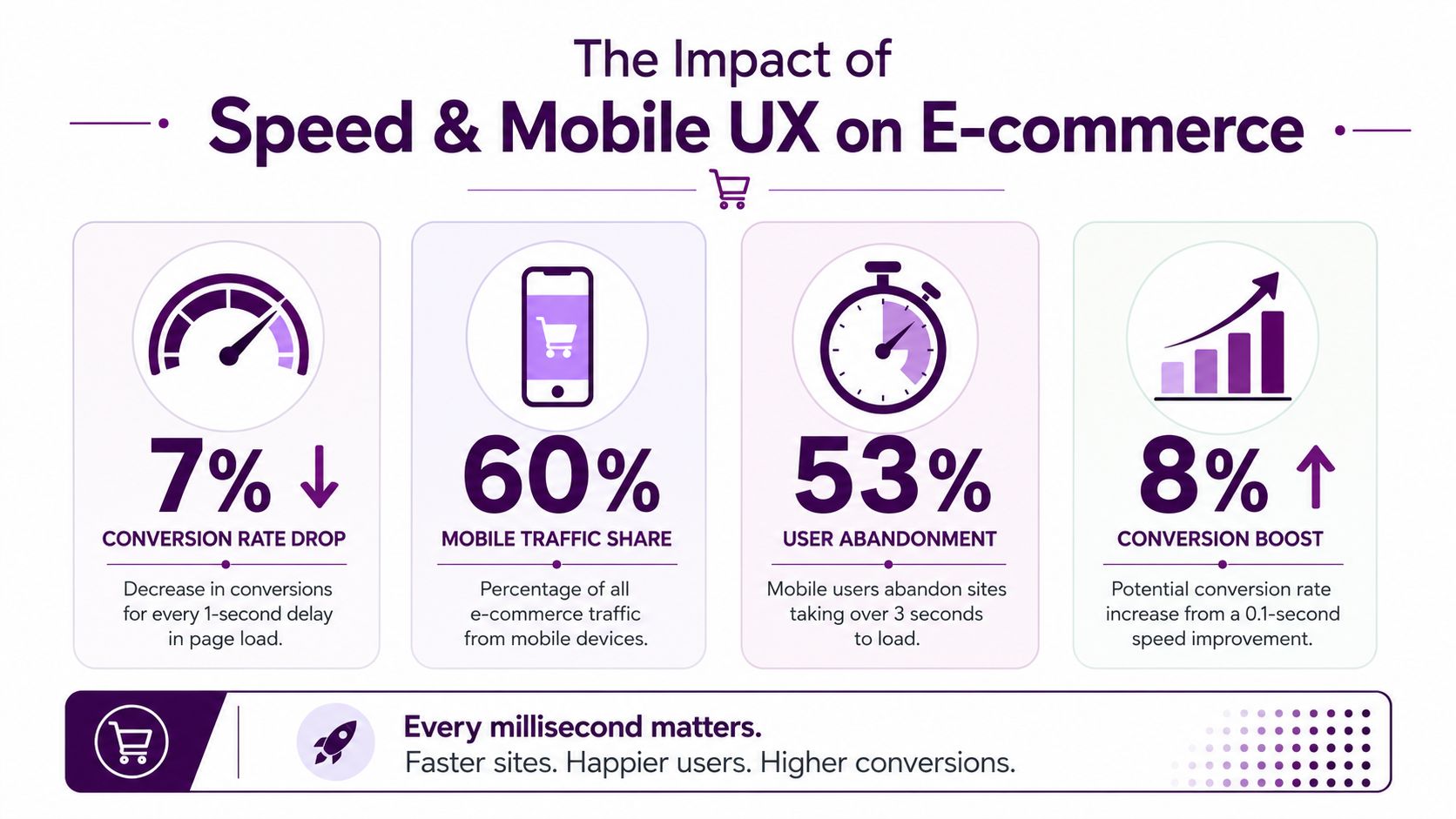
Most stores are still slower than they think
According to Reboot Online's ecommerce performance analysis, the average eCommerce website scores 67 out of 100 in Google Lighthouse, and 70.5% of sites are rated “needs improvement.” The same analysis reports an average add-to-cart rate of 6.69% across online shopping sites.
Those two figures belong in the same conversation. If a store brings in traffic but makes users wait, shift, reload, or fight the interface on mobile, add-to-cart behavior suffers.
Where speed problems usually come from
On ecommerce sites, the heaviest delays usually come from the same places:
Oversized media: Large hero images, product galleries, and uncompressed assets
App and script bloat: Reviews, personalization tools, chat widgets, A/B testing tags, and tracking scripts
Render-blocking resources: CSS and JavaScript that delay visible content
Theme inefficiencies: Especially on product listing and product detail templates
Mobile interaction friction: Tiny tap targets, sticky elements covering content, and checkout prompts that interrupt browsing
The worst part is that teams often optimize the homepage while their category and product templates remain sluggish. That's where organic users land, and that's where performance work should start.
A fast homepage doesn't save a slow product page.
What to fix first on revenue-driving templates
Don't chase a perfect score. Remove the bottlenecks that affect shoppers before and during product evaluation.
A practical order of operations looks like this:
Compress and size images properly
Product galleries should load the right asset size for the device, not the largest available version by default.Trim third-party scripts
Audit every app, widget, and tag. If a tool doesn't affect revenue, retention, or legal compliance, it shouldn't be slowing product pages.Prioritize visible content
The main product image, title, price, and primary call to action should render quickly.Stabilize layout shifts
Reserve space for images, review modules, sticky bars, and promotional inserts so the page doesn't jump while loading.Improve mobile controls
Filters, swatches, quantity selectors, and add-to-cart buttons need to be easy to use with a thumb, not just a mouse.
Mobile UX is where conversion gains often hide
A desktop audit can miss problems that are obvious on a phone: filter overlays that trap users, review widgets that expand unpredictably, accordions that hide key sizing information, or sticky banners that cover add-to-cart.
On mobile, every unnecessary interaction costs attention. The user came from search with a specific task. Your page should help them compare, evaluate, and act without friction.
That means:
Mobile issue | Why it hurts ecommerce SEO performance |
|---|---|
Small tap targets | Users misclick, get frustrated, and abandon product exploration |
Crowded product pages | Key information gets buried below scripts, popups, or oversized modules |
Weak filter UX | Category browsing becomes slower and less accurate |
Slow image interaction | Shoppers can't inspect products confidently |
Interrupted checkout path | Organic sessions lose momentum after product evaluation |
The point of performance work isn't technical neatness. It's preserving intent. If someone lands on a product page from search, likes the product, and still doesn't add it to cart, speed and usability are often part of the reason.
Measure and Prioritize Fixes with an ROI Model
By this point, a long backlog has likely accumulated. Technical issues. Content rewrites. schema gaps. Internal link improvements. Mobile UX bugs. Merchandising requests. Developer dependencies.
The hard part isn't finding work. It's deciding what deserves attention first.
Stop prioritizing by whoever shouts loudest
A lot of SEO roadmaps get built by urgency theater. The merch team wants a category refreshed before peak season. The developer wants to clean up old redirect logic. The content team wants more buying guides. Leadership wants rankings for a head term.
That's how teams stay busy without building momentum.
Use a simple ROI model instead. Score each task on two dimensions:
Impact on revenue path
Effort to implement
Then add a third filter for dependency risk, because some tasks look simple until they require design, engineering, legal review, and platform constraints.
A short version looks like this:
Priority tier | Impact | Effort | Typical examples |
|---|---|---|---|
Ship first | High | Low to medium | Fixing blocked product pages, broken canonicals, missing internal links to key categories |
Plan next | High | High | Faceted navigation controls, major template speed improvements, structured product page overhauls |
Fill gaps later | Medium | Low | Metadata cleanup, image alt refinement, low-priority blog refreshes |
Defer or drop | Low | Any | Cosmetic tasks with no clear connection to traffic quality or conversion |
Tie SEO metrics to commercial outcomes
SEO teams get more traction when they stop reporting in isolation. Rankings, impressions, and clicks matter, but executives care about what those changes produce.
That means connecting search metrics to business signals such as:
Landing page conversion quality
Add-to-cart behavior
Revenue by page type
Performance of non-brand category pages
Index coverage on product and category templates
If a category page gains visibility but doesn't improve commercial performance, the problem may be weak product selection, poor mobile UX, mismatched intent, or thin trust content. If impressions rise on product pages that rarely convert, you may be ranking for the wrong modifiers.
For teams trying to build cleaner reporting, this guide on how to measure SEO performance is a helpful reference for tying SEO outputs to business decisions.
Build a repeatable workflow, not a heroic sprint
The best ecommerce SEO teams don't win because they know more tactics. They win because they review the same system consistently.
A workable monthly cycle often includes:
Audit what changed: New indexation issues, traffic shifts, category losses, product discovery problems
Review commercial pages first: Revenue-driving categories and products before editorial content
Group tasks by page template: One template fix can affect hundreds or thousands of URLs
Sequence by implementation reality: Quick wins first, then larger structural work with stakeholder alignment
Measure after deployment: Did indexation improve, did page experience stabilize, did conversion behavior move
The strongest SEO roadmap is the one your team can actually ship, validate, and repeat.
What experienced teams do differently
They don't ask, “What can we optimize?”
They ask, “What change will improve visibility or conversion on pages that matter most, with the least wasted effort?”
That shift sounds small, but it changes everything. It keeps teams from polishing low-value pages while important categories underperform. It reduces random acts of SEO. It makes technical work easier to justify. And it gives stakeholders a clearer reason to support the roadmap, because each task has a business case attached to it.
That's the heart of SEO optimization for ecommerce. Not more activity. Better decisions.
Keyword Kick helps SEO teams turn scattered data from Google Analytics 4, Google Search Console, rank tracking, backlinks, and technical audits into a prioritized action list. If you need a clearer way to decide which ecommerce SEO fixes to ship first, Keyword Kick is worth a look.