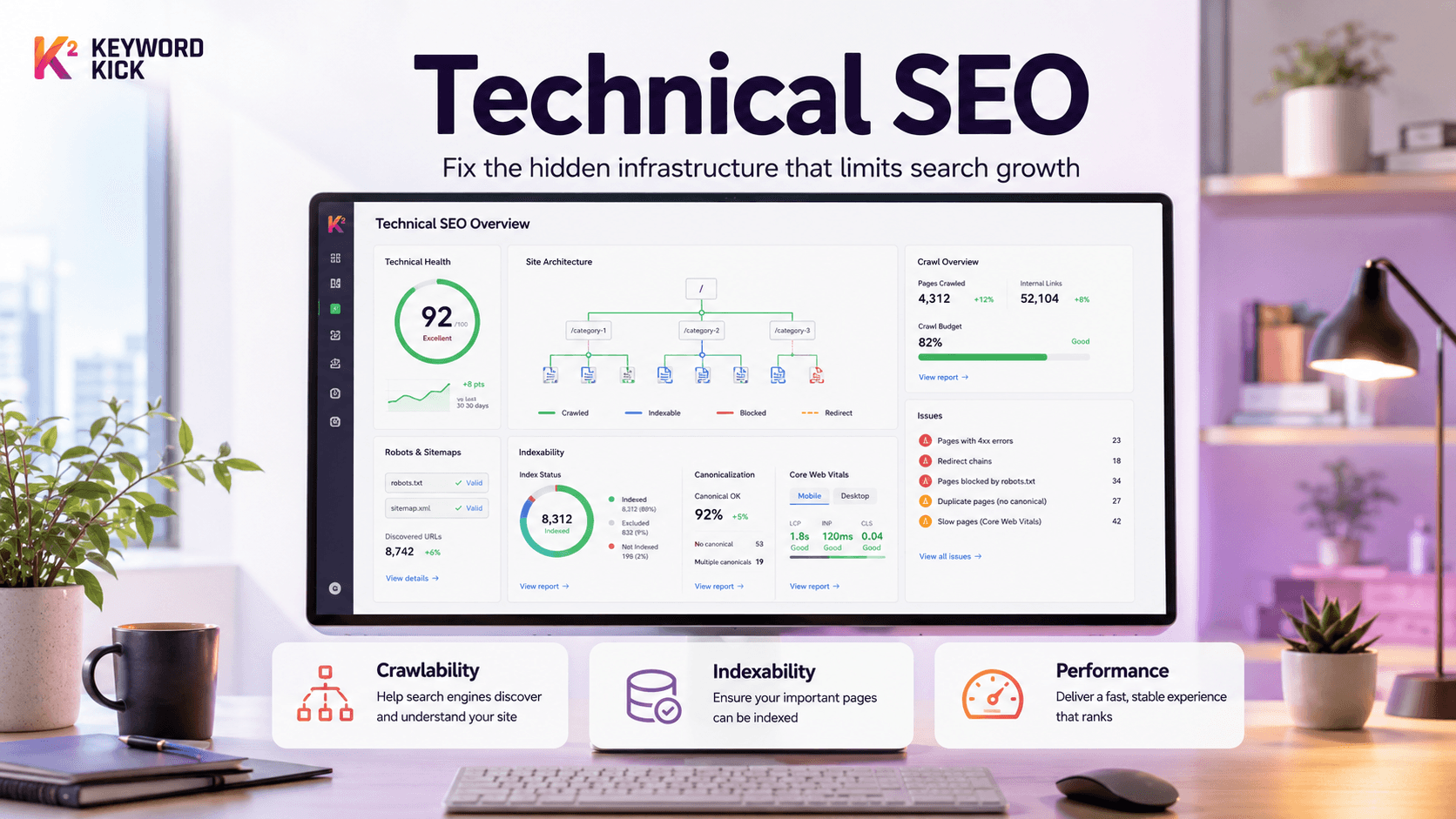
You've published the content. The pages look good. Your team has promoted them. Maybe you've even earned a few links.
And yet search traffic barely moves.
That's the point where many teams assume they have a content problem, when they have an infrastructure problem. Google can't rank pages it can't reliably crawl, render, understand, or index. If the foundation is weak, every blog post, product page, and landing page is working uphill.
That's what technical SEO solves. Not with mystery fixes or a giant spreadsheet of busywork, but by removing the hidden blockers that keep strong content from showing up at all.
The Invisible Barrier Holding Your Traffic Back
A common version of this problem looks like this. A brand invests in category pages, publishes helpful articles, refreshes metadata, and still sees weak organic performance. Rankings stall. New pages take too long to appear. Old pages vanish after a redesign. The content team keeps shipping, but the site never seems to collect the full value.
Usually, the issue isn't that the content is bad. It's that the site is hard for search engines to process.
I've seen this happen after migrations, CMS changes, JavaScript rebuilds, and even routine template updates. A robots.txt rule blocks a section that should be open. Canonical tags point to the wrong version. Internal links disappear in mobile templates. A site becomes visually cleaner for users but technically harder for crawlers.
Practical rule: If great pages aren't earning visibility, check whether search engines can access and index them before you rewrite the content.
Technical SEO sits underneath the work marketers talk about most. It handles the mechanics that decide whether a page is discoverable in the first place. When that layer fails, you don't just lose rankings. You lose reporting clarity, conversion opportunities, and confidence in your marketing decisions.
That's why technical SEO matters even if you don't think of yourself as a technical marketer. You don't need to write server logic to benefit from it. You need to know which issues are foundational, which are secondary, and which ones are mostly noise.
The useful question isn't just what is Technical SEO. The useful question is this: which technical fixes drive growth, and which ones are just activity without impact?
What Technical SEO Actually Is and Is Not
Think of your website like a book.
Content is the writing. Brand is the voice. Keyword strategy is the table of contents and subject focus. But technical SEO is the printing press, the binding, the page numbering, and the distribution network. If the pages are missing, duplicated, out of order, or impossible to ship, it doesn't matter how good the writing is.

The plain English definition
Michigan Technological University defines technical SEO as the process of optimizing a website's technical aspects to improve search rankings by making pages easier for search engines to crawl and index in its overview of technical SEO fundamentals.
That's the cleanest definition because it strips away the jargon. Technical SEO is the infrastructure layer that makes your content discoverable.
In practice, that includes work on:
Site architecture so important pages are easy to reach
Crawl controls like robots.txt and XML sitemaps
Indexation signals such as canonicals and status codes
Performance factors like speed, mobile-friendliness, and HTTPS
Clarity signals such as metadata and structured data
If you're also thinking about AI visibility, the same foundation matters there too. A useful companion read is this guide to generative GEO, because the technical layer increasingly affects whether systems can cite or surface your pages at all.
What technical SEO is not
Teams often waste time by bundling every SEO activity into the technical bucket, then ending up with fuzzy priorities.
Technical SEO is not:
Keyword research. That's about demand and language.
Content strategy. That's about coverage, depth, and intent.
Link building. That's about authority and references.
Copy optimization. That's about relevance and persuasion.
Those areas matter. They just solve different problems.
A strong page can still fail if the technical layer hides it. A technically clean page can also fail if the content is thin or misaligned with search intent.
The boundary is simple. If the issue affects whether search engines can access, interpret, store, or properly serve a page, it belongs in technical SEO. If it affects what the page says or why others link to it, it belongs somewhere else.
The Three Core Pillars of Technical SEO
Technical SEO works best as a triage system, not a giant checklist.
A site can have fifty small issues and still grow. It can also have one structural problem that blocks crawling, splits indexing signals, or slows key templates enough to hurt revenue pages. The job is to fix the constraints in the right order.
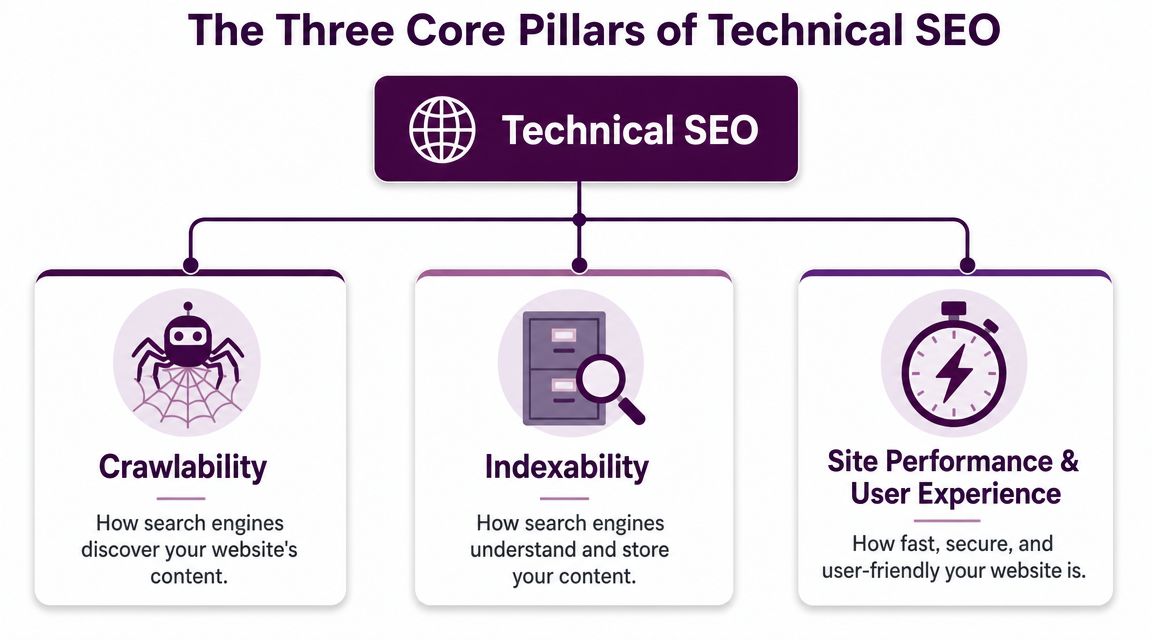
Crawlability and indexing
Start here because nothing else matters if search engines cannot reliably reach and store the pages that drive the business.
Google's documentation on how search crawling gets started reinforces the basics: make important resources accessible, use sitemaps to surface URLs worth revisiting, and configure crawl controls carefully. On larger sites, this becomes a prioritization problem. Faceted URLs, parameter duplicates, and low-value archive pages can absorb crawler attention that should go to product, category, or lead-gen pages.
The work inside this pillar usually includes:
Internal linking that exposes important pages through standard crawl paths
XML sitemaps that reflect index-worthy URLs, not every URL the CMS can generate
robots.txt rules that prevent wasted crawling without blocking pages that need to rank
Status codes and redirects that send both users and bots to the correct destination
Canonical and noindex directives that reduce duplication and mixed signals
This is usually the most impactful technical work. If important pages are hard to discover, refreshed slowly, or excluded from the index, speed tweaks and schema additions will not fix the underlying problem.
Performance and user experience
Once pages can be crawled and indexed correctly, the next question is operational. Do those pages load fast, behave predictably, and work cleanly on mobile devices?
Google uses Core Web Vitals as part of its broader page experience guidance, so teams should treat metrics like LCP, INP, and CLS as working thresholds rather than abstract lab scores. Performance also affects more than rankings. Slow templates suppress engagement, reduce page depth, and lower the odds that paid and organic traffic turns into pipeline or sales.
This pillar usually includes:
HTTPS so sessions are secure and browser trust warnings do not get in the way
Mobile usability so the primary experience works on the devices that drive the majority of visits
Reliable rendering so key content does not disappear behind JavaScript failures or delayed assets
Stable templates so layouts do not shift while users try to read, tap, or buy
Teams often waste time chasing tiny speed gains on low-value pages. The better workflow is to fix template-level issues on the pages that matter most. Product detail pages, service pages, category hubs, and top landing pages usually deserve attention first.
If your team wants a more practical breakdown of these metrics, this guide to Core Web Vitals for SEOs explains what to measure and what to fix first.
Content clarity
The third pillar is interpretation.
Search engines need clear signals about what a page is, which version should be treated as primary, and how that page fits into the rest of the site. Yet, even technically valid sites can face challenges. Pages may be crawlable and fast, but duplicated URLs, inconsistent canonicals, weak metadata, or mismatched schema can still blur relevance and dilute signals.
Common work in this pillar includes:
Canonical tags that consolidate duplicate or near-duplicate URLs
Structured data that accurately reflects the visible page content
Consistent metadata across templates so page purpose is obvious
URL normalization so one preferred version collects signals instead of several competing versions
A simple rule helps with prioritization. Fix access first, then page experience, then clarity. That order prevents busywork and keeps technical SEO tied to outcomes instead of random issue counts.
How Technical Issues Impact Rankings and Revenue
A site can lose revenue long before anyone labels it an SEO problem.
The pattern is familiar. Rankings slip on a few money pages, paid search has to cover the gap, conversion rates soften on mobile, and the team responds by rewriting copy or publishing more content. Meanwhile, the actual issue sits lower in the stack. Important URLs are hard to crawl, the wrong version of a page is being indexed, or key templates load slowly enough to lose impatient visitors before they engage.
That is why technical SEO matters to revenue. It affects three points in the funnel at once: whether search engines can process the page correctly, whether the page earns the click, and whether the visit turns into a lead or sale. A technical issue does not need to trigger a penalty to hurt performance. It only needs to interfere with discovery, interpretation, or usability on pages that drive demand.
Technical issues versus business impact
Technical Issue | Impact on SEO KPIs | Impact on Business KPIs |
|---|---|---|
Blocked important pages in robots.txt | Key URLs may not be crawled or refreshed reliably | Fewer qualified visits to revenue-driving pages |
Wrong canonical tags | Google may index the wrong version or split signals across duplicates | Product, service, or lead-gen pages underperform |
Slow LCP or unstable page layout | Lower page experience quality and weaker engagement | More drop-offs before users read, click, or buy |
Weak internal linking | Important pages become harder to discover and prioritize | High-value pages stay invisible despite strong content |
Missing or inconsistent structured data | Less clarity in search presentation and page interpretation | Lower click potential from SERP impressions |
Broken redirects after site changes | Equity and crawl paths break across old and new URLs | Lost demand, wasted campaigns, and reporting confusion |
The key point is prioritization. A blocked product category can suppress traffic and sales immediately. A minor schema warning often does not. Teams get better results when they sort issues by impact on revenue pages, not by how long an audit tool's issue list looks.
I use two filters with clients:
Does this prevent Google from finding, rendering, or indexing pages that matter?
Does this create friction on pages that influence leads, sales, or qualified conversions?
If the answer is yes to either one, it deserves attention. If the answer is no to both, it can usually wait.
This is also where technical debugging becomes practical, not theoretical. If a page intermittently fails to load resources, drops tracking events, or behaves differently for users and crawlers, a browser capture can help isolate the cause. Teams that need to trace those request-level issues can use debugging with HAR files in Chrome to verify what the page is requesting and where it breaks.
The trade-off is simple. Fix the issues that affect indexation, crawl paths, and user experience on high-value templates first. Leave the low-impact cleanup for later. That workflow protects rankings, but above all, it protects the pages that produce revenue.
Real-World Examples of Technical SEO Problems
Technical SEO gets easier to understand when you look at failures that show up in normal business settings, not in textbook examples. Most problems aren't exotic. They come from ordinary decisions made during redesigns, migrations, or CMS changes.
The migration that broke demand capture
An ecommerce team redesigned its category structure and launched with new URLs. The content stayed strong. The product inventory stayed strong. But the old URLs redirected through chains, some mapped to loosely related pages, and some didn't resolve cleanly at all.
The business symptom looked like a ranking problem. It was, in reality, a routing problem.
The fix was boring but high impact: clean one-step redirects from old pages to their closest replacements, refreshed internal links, and updated sitemap entries. Once the crawl paths stabilized, search engines had a cleaner version of the site to process.
The SaaS site with duplicate intent
A SaaS company had separate pages for overlapping use cases, industries, and feature combinations. The copy was different enough to pass a superficial review, but the intent was nearly identical across several clusters.
Google had to decide which page represented the core topic. It kept rotating the visible URL.
That kind of duplication doesn't always produce a manual penalty. It produces indecision. Rankings become unstable because the site sends mixed signals about which page should rank. In these cases, the solution is usually consolidation, stronger internal linking to the preferred page, and cleaner canonical logic where true duplicates exist.
The most expensive technical issues often look like content issues at first. That's why diagnosis matters more than activity.
The JavaScript site that hid its own content
A startup launched a sleek frontend that relied heavily on client-side rendering. Users with modern browsers could use it. Search engines had a much harder time seeing core text and internal links in a dependable way.
Technical SEO moves beyond theory. If key content appears late, loads only after interaction, or depends on scripts that aren't reliably processed, your page may be visually present but search-invisible.
When teams run into this kind of issue, browser-level debugging is often the fastest way to see what's being requested and when. This walkthrough on debugging with HAR files in Chrome is useful when you need to isolate resource-loading problems with developers.
The remedy usually includes server-side rendering, pre-rendering, or at minimum a review of what appears in the initial HTML response. Search engines need a stable path to the main content. Fancy interfaces don't change that requirement.
What these examples have in common
Different industries, same pattern:
A site change introduced ambiguity
Search engines received weaker crawl or indexing signals
The business blamed content before checking infrastructure
That pattern is why technical SEO should be diagnostic first. You're not collecting fixes. You're removing the few blockers that suppress everything else.
Your Prioritized Technical SEO Audit Checklist
Most audit checklists are too long to be useful. A better system is triage. Fix the issues that block visibility first, then improve performance on important pages, then add enhancements that strengthen search appearance.
Ahrefs notes in its overview of technical SEO priorities that technical SEO becomes a top priority mainly when something is broken or preventing pages from being indexed. That's the right frame. Don't start with polish if the foundation is broken.
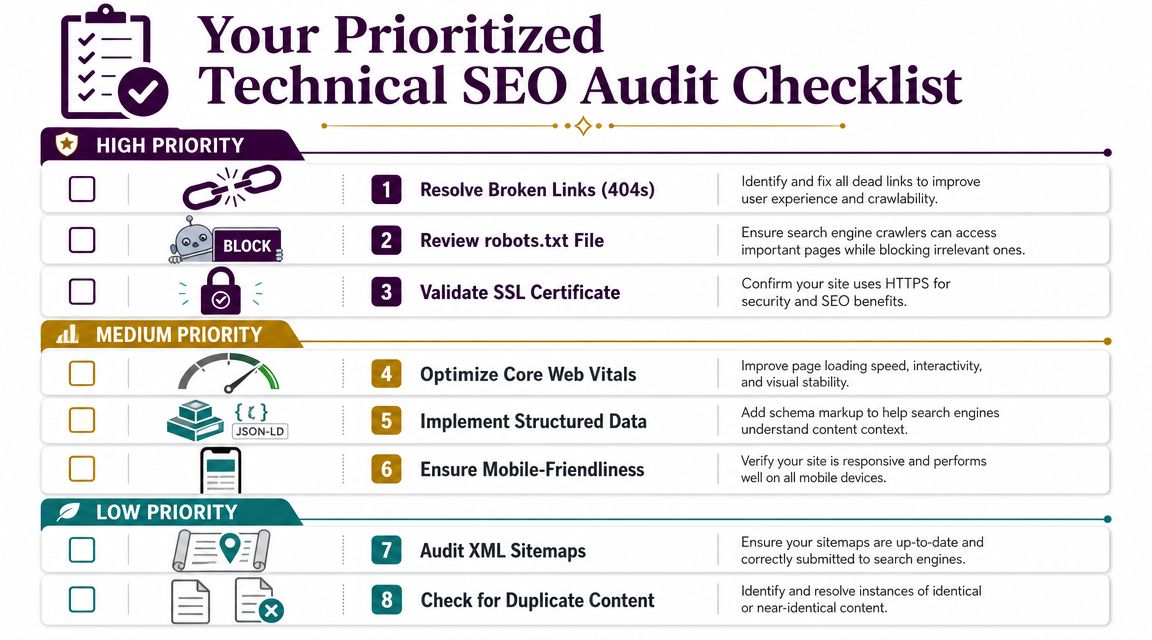
High priority fixes
These are the issues that can suppress the whole site or a critical section.
Check indexability first. Use Google Search Console URL Inspection on key pages. Confirm they aren't blocked, noindexed, or canonically pointed somewhere else.
Review robots.txt and crawl access. Make sure important templates, directories, and resources are accessible to crawlers.
Fix broken links and bad redirects. Audit 404s, redirect chains, and redirected internal links, especially after migrations or CMS updates.
Validate HTTPS consistency. Ensure the secure version is the version users and crawlers reach.
If you want a broader operational checklist to pair with this process, Rebus has a practical guide on SEO strategies for businesses through auditing.
Medium priority improvements
These issues usually don't erase visibility, but they can hold back rankings, engagement, and conversion.
Improve Core Web Vitals on high-value templates. Focus on pages that already drive traffic or revenue.
Test mobile usability. Check that content, navigation, and core features work on mobile without hidden elements.
Audit duplicate and near-duplicate pages. Consolidate where intent overlaps too heavily.
Review internal linking. Important pages should be easy to reach from navigation, hubs, and contextual links.
This is also the point where a unified audit workspace helps. Tools like Screaming Frog, Google Search Console, PageSpeed Insights, and platforms such as Keyword Kick's technical SEO checklist can help teams centralize issues by impact instead of tracking them in disconnected reports.
Lower priority enhancements
These are worth doing, but only after the fundamentals are under control.
Add structured data where it fits the page type. Product, article, organization, and FAQ markup can improve clarity.
Refresh XML sitemaps. Keep them current and focused on pages that deserve indexing.
Clean up metadata inconsistencies. This won't rescue a broken site, but it can sharpen presentation and relevance signals.
Key takeaway: The right audit order is simple. Access first, experience second, enhancements third.
A good audit doesn't produce the longest issue list. It produces the shortest path to restored visibility.
Building a Sustainable Technical SEO Workflow
Technical SEO works best when it stops being a rescue project.
Teams get into trouble when they treat it as a one-time cleanup, then let redesigns, content launches, and engineering releases happen without technical checks. The same classes of problems come back. Indexation drifts. redirects pile up. page templates slow down. nobody notices until traffic drops.
A workable rhythm is simpler than many anticipate.
A practical operating cadence
Quarterly deep audits for crawlability, indexation, rendering, and template-level issues
Monthly monitoring in Google Search Console and performance tools for spikes in errors, drops in indexed pages, or speed regressions
Pre-launch checks for migrations, new templates, faceted navigation changes, and major content rollouts
Editorial handoff rules so content teams know how canonicals, internal links, metadata, and page states should work
If your team wants a repeatable process, this guide to a technical SEO audit workflow is a useful operational reference.
The larger point is straightforward. Technical SEO isn't separate from growth. It protects the discoverability of the pages you already invest in, and it keeps future releases from subtly damaging search performance.
That's why the answer to what is Technical SEO isn't “a list of backend tasks.” It's the discipline of making sure your site can be found, understood, and served correctly before you ask content and links to do the heavy lifting.
Keyword Kick helps teams turn technical SEO, rankings, Search Console data, backlinks, and analytics into prioritized actions instead of scattered reports. If you want a clearer view of what's hurting visibility and what to fix first, explore Keyword Kick.