
You've finished keyword research. The spreadsheet is full, the exports are clean, and the team is ready to publish. Then the argument starts. One person wants to target the largest volume term, another wants to chase a low-difficulty phrase, and nobody can say whether the right action is a new page, an update, or no page at all.
That's the post-research problem. What to do after keyword research isn't a publishing checklist. It's a prioritization system for deciding which opportunities deserve resources, which existing URLs need attention, and which terms should stay out of the production queue.
The Moment You Have a Keyword List and No Plan
A keyword export can leave a team with more options than decisions. One person sees the highest-volume term, another prefers the lowest-difficulty phrase, and nobody has established whether the next action is to create a URL, improve an existing page, or leave the opportunity alone.
Treat the list as a portfolio of decisions, not a publishing queue. For every cluster, choose one of three actions:
Build a page: The cluster has a clear intent, meaningful business value, and no suitable URL currently serves it.
Improve a page: An existing URL matches the topic and sits close enough to ranking that focused optimization can produce a faster return.
Deprioritize the term: The opportunity is weak, disconnected from the business, or more expensive than stronger clusters.
Assign intent before comparing search volume. A large 2026 analysis of 5.8 billion global queries found that informational searches represented 55.3%, navigational searches 29.8%, commercial searches 13.2%, and transactional searches 1.7% of queries, as reported in this keyword research statistics analysis. Your export will usually contain a substantial informational layer. Informational intent should not be assumed to mean a blog post.
Let the search results choose the page type
Review the live SERP for every important cluster. Search volume estimates demand. The SERP shows the format Google currently rewards, so it should determine the initial page-type recommendation.
Check for these signals:
Featured snippets and definition blocks: Build concise explanations, structured answers, or process-led content.
People Also Ask results: Organize a guide around direct subanswers and relevant FAQ coverage.
Shopping modules and product grids: Use a product, category, comparison, or buying page instead of defaulting to an article.
Tools, templates, and calculators: Consider an interactive asset when users need to complete a task, not just read an explanation.
Brand-heavy results: Treat the term as potentially navigational and unsuitable for acquisition content.
Do not map every informational phrase to its own article. Closely related questions should usually support one authoritative page, particularly because many keywords receive little individual demand. One recent summary found that 94.74% of keywords receive 10 or fewer monthly searches, supporting topic grouping rather than one URL per phrase. Cluster the terms first, then decide whether the combined opportunity justifies a page.
Search intent clusters and matching page types
Intent Type | % of Queries | Dominant SERP Features | Recommended Page Type |
|---|---|---|---|
Informational | 55.3% | Featured snippets, People Also Ask, guides | Blog post, resource guide, glossary, tutorial |
Navigational | 29.8% | Brand results, sitelinks, branded pages | Brand page, login page, product or location page |
Commercial | 13.2% | Comparisons, reviews, category pages, product listings | Comparison page, category page, buying guide |
Transactional | 1.7% | Product pages, shopping results, pricing and conversion pages | Product page, service page, checkout or sign-up page |
Use these percentages as planning context, not as a template for every keyword. Your site, audience, SERP mix, and commercial priorities still determine the right destination.
Practical rule: Do not approve a content brief until someone documents the dominant intent and the page type supported by the SERP.
The first decision is therefore intent, followed by destination and business value. Once each cluster has a probable action, your team can score the opportunity, compare execution cost, and assign it to the right two-week queue. That process turns a keyword spreadsheet into an operating plan.
Score Opportunities So You Know What to Build First
A keyword list can leave a team with too many plausible next steps. Rank opportunities by expected value and execution cost before anyone assigns a brief. The scorecard should prioritize clarity over complexity and prevent the loudest stakeholder from choosing the next topic by instinct.
Score each cluster from 0 to 5 across four inputs:
Reach: Search demand relative to the rest of your list.
Ranking difficulty: How difficult the current results appear to displace, interpreted alongside intent.
Business value: Whether the cluster supports a product, sign-up, qualified lead, or useful top-of-funnel asset.
Competitive content quality: The quality of the strongest ranking pages, based on completeness, clarity, originality, evidence, and usefulness.
Multiply the four scores. A cluster with reach 4, difficulty opportunity 3, business value 5, and content quality gap 4 earns 240. A broad informational cluster with scores of 5, 1, 1, and 2 earns 10, despite its larger apparent reach. Build the first opportunity. Treat the second as a weak investment unless it supports a broader strategic need.
Set an internal threshold. For example, clusters below 15 should be refreshed, bundled into a stronger topic, or saved for later instead of receiving a standalone page. This cutoff is a working rule, not an industry standard. Change it when production capacity or commercial priorities change.
Review the top-ranking pages before locking the score. A high difficulty number can hide weak content, while a low difficulty number can conceal a mismatch between your site and the SERP. Use this guide to prioritize high-conversion keywords when commercial value matters more than volume.
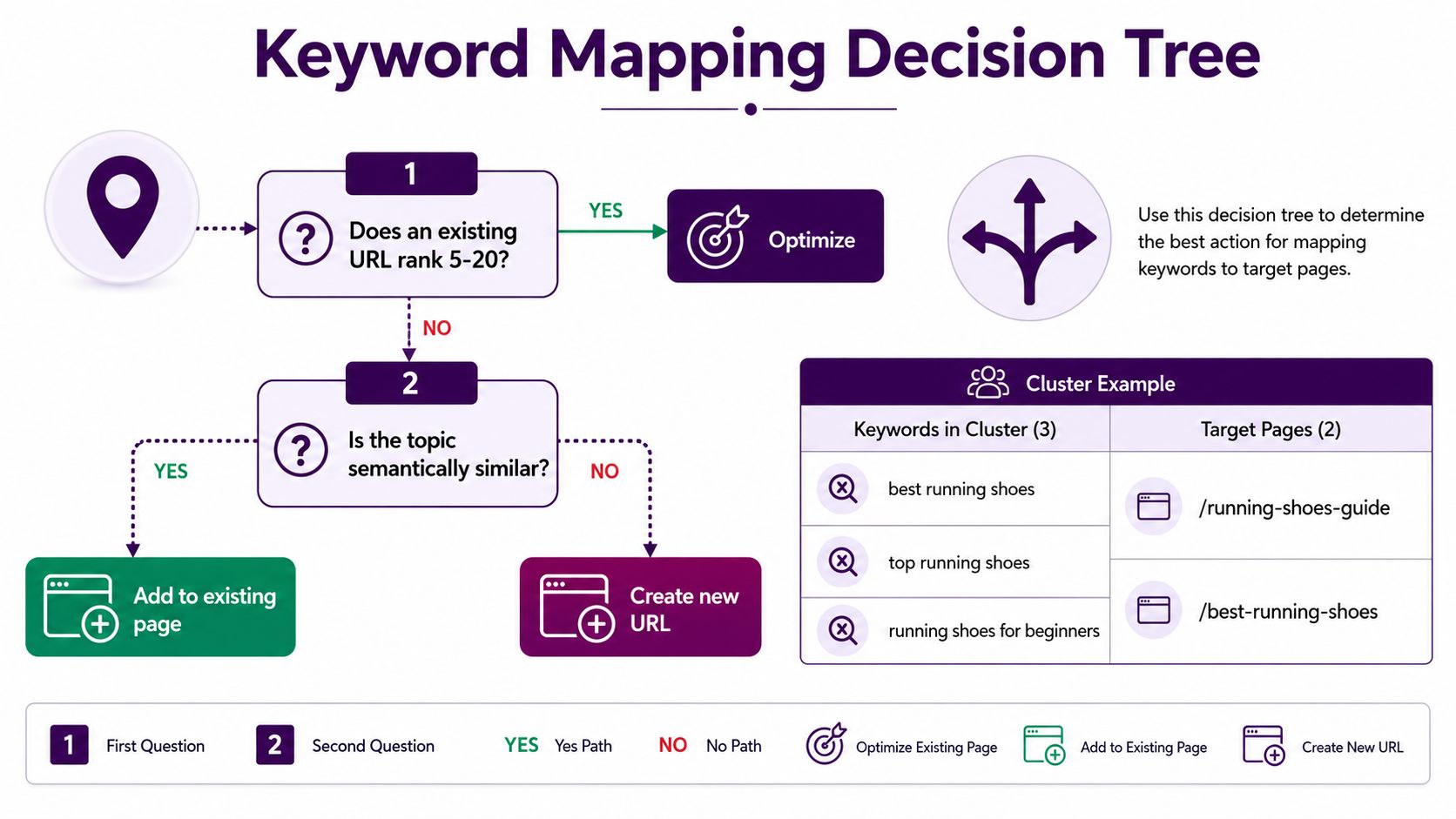
Keep the scoring sheet beside revenue assumptions and the page inventory. A revenue-focused keyword selection guide can help separate attractive traffic from commercially useful demand. Use the ranked list to decide which URLs to optimize, which pages to create, and which opportunities to defer.
Map Keywords to Existing Pages or New URLs
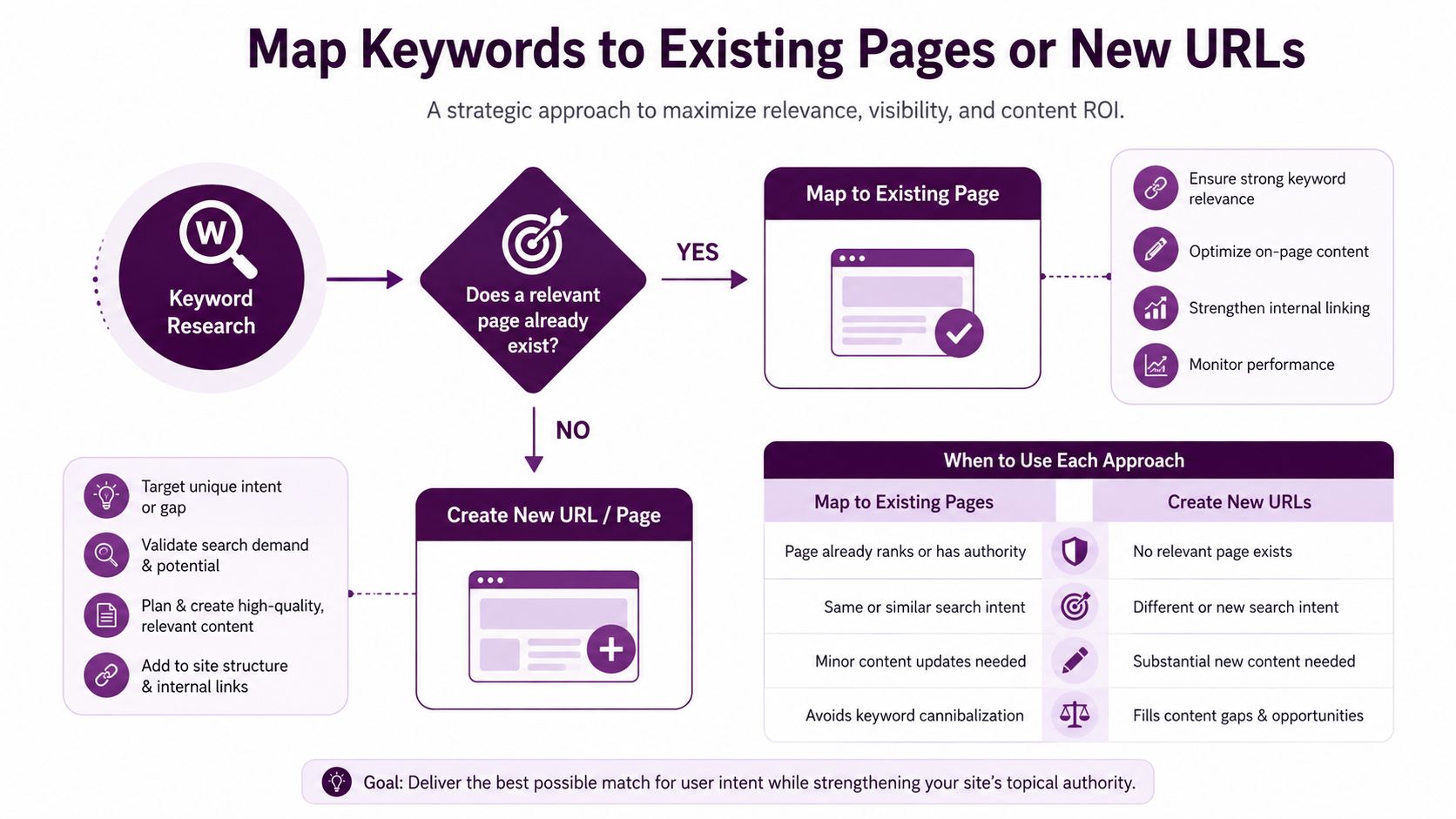
Keyword mapping is the bridge between research and production. The rule is simple: one URL gets one primary keyword and one dominant intent. Supporting variants can live on that page, but don't assign the same primary target to several URLs without a deliberate reason.
Run every priority cluster through this decision tree:
Does a relevant existing URL already rank in positions 5 to 20? Optimize it before creating anything new. It already has topical and technical history, so changing its intent alignment, title, headings, internal links, and depth may be more efficient than starting from zero.
Do several URLs overlap around the same intent? Consolidate them. Select the stronger URL, merge unique value from the weaker page, and use a 301 redirect where appropriate.
Is there no suitable URL? Create a new page with one primary keyword, supporting variants, a defined page type, and a clear internal linking route.
The third decision matters because a keyword with no current page match may still be a poor standalone opportunity. If the site lacks the supporting topic structure, mark the cluster for later or create the parent resource first.
Build one shared mapping sheet
Use these columns:
URL: Existing destination or proposed slug.
Primary keyword: The single main target.
Supporting keywords: Close variants and subtopics.
Intent: Informational, navigational, commercial, or transactional.
Action: Optimize, consolidate, create, or deprioritize.
Owner: The person responsible for the next decision.
Internal links: Pages that should link in and pages the URL should support.
An industry summary cited by keyword mapping guidance on cannibalization says that over 60% of large websites have unnoticed cannibalization issues. Whether your site is large or small, the operational lesson is the same. Audit existing URLs before commissioning new content.
Use a content map as the working reference, not a document that sits in a planning folder. This step-by-step content map example can help your team structure the sheet around clusters, destinations, and ownership.
Don't let writers choose the target URL after the brief is assigned. That decision belongs in the map, where the team can see overlap, authority, and internal linking together.
Write Content Briefs That Writers Actually Use
A brief should remove decisions from the drafting process. If a writer has to ask which audience matters, what the page must accomplish, or which format to use, the SEO team hasn't finished the planning work.
Use five sections in every brief:
Section | Purpose | Key Fields |
|---|---|---|
Outcome | Defines success before drafting | Cluster, primary keyword, intent, audience, business goal |
SERP evidence | Connects the brief to current results | Ranking formats, content gaps, useful features, expected page type |
Editorial direction | Gives the page a distinct reason to exist | Angle, promise, reader problem, differentiation |
On-page plan | Turns strategy into implementation | Title tag, H1, H2 outline, internal links, schema, media |
Quality control | Prevents avoidable revisions | Accuracy checks, experience signals, examples, linking, final review |
Start with the outcome. State the cluster, the primary keyword, the dominant intent, and the action you want the reader to take. Don't give writers a list of interchangeable targets. That invites keyword stuffing and produces pages with no clear purpose.
Then describe the SERP pattern. Record whether the results favor a tutorial, comparison, list, product page, calculator, or another format. Note the questions the ranking pages answer poorly, but don't instruct the writer to imitate them. The brief should define the gap your page will close.
Make the promise testable
A strong angle can be summarized in one sentence: “After reading this page, the reader can do X without Y.” That sentence gives the writer a boundary. It also gives the editor a standard for deciding whether a section belongs.
Specify internal links before drafting. Name the parent page, relevant sibling pages, and the destinations that should receive authority from the new URL. If the page needs a table, original example, video, calculator, or visual, include it in the brief rather than requesting it at the end.
For teams creating content that supports acquisition, this resource on effective lead generation content offers useful strategic context. Your final checklist should still be site-specific, covering factual accuracy, firsthand expertise, clear authorship, useful examples, conversion paths, and internal link placement.
Require the writer to confirm the scope before drafting. That small checkpoint catches mismatched intent and unrealistic deliverables before they become editorial rework.
Quick Wins and Refreshes Beat New Pages for Most Sites
Publishing new pages feels productive because the output is visible. For an established site, it often isn't the best first move. Existing URLs that already sit near the first page have accumulated relevance, links, and user signals that a new page doesn't possess.
Organic click-through rate is sharply position-sensitive. One benchmark reports average CTR of 27.6% for position one, about 15.7% for position two, and 11% for position three, while another benchmark set reports 39.8% for position one and 42.9% for featured snippets, as summarized by SISTRIX's Google CTR data. The sources use different datasets, so don't treat the figures as a universal forecast. Treat them as proof that small ranking improvements near the top can matter more than adding another unproven URL.
Run the refresh sequence in controlled waves
Use a staged workflow rather than changing everything simultaneously:
Early work: Refresh pages already ranking in the middle of the results. Fix intent mismatch, sharpen the introduction, improve headings, add missing answers, and strengthen internal links.
Next pass: Rewrite title tags and meta descriptions around the actual promise of the page. Check whether the snippet accurately reflects the content and gives searchers a reason to click.
Depth and format: Add original visuals, useful tables, structured answers, and FAQ coverage where they serve the query. Don't add schema or FAQ text to decorate a page.
Review: Re-check cannibalization, search intent, internal links, and the page's conversion path. If the URL still lacks a clear role, change the action rather than endlessly editing it.
A practical SEO workflow recommends using a last-90-days Search Console view and prioritizing pages with average position 11 to 20, impressions over 100, and clicks over 10 to find quick-win candidates. Those thresholds are described in this post-research SEO workflow. Use them as filters, then apply judgment about relevance and business value.
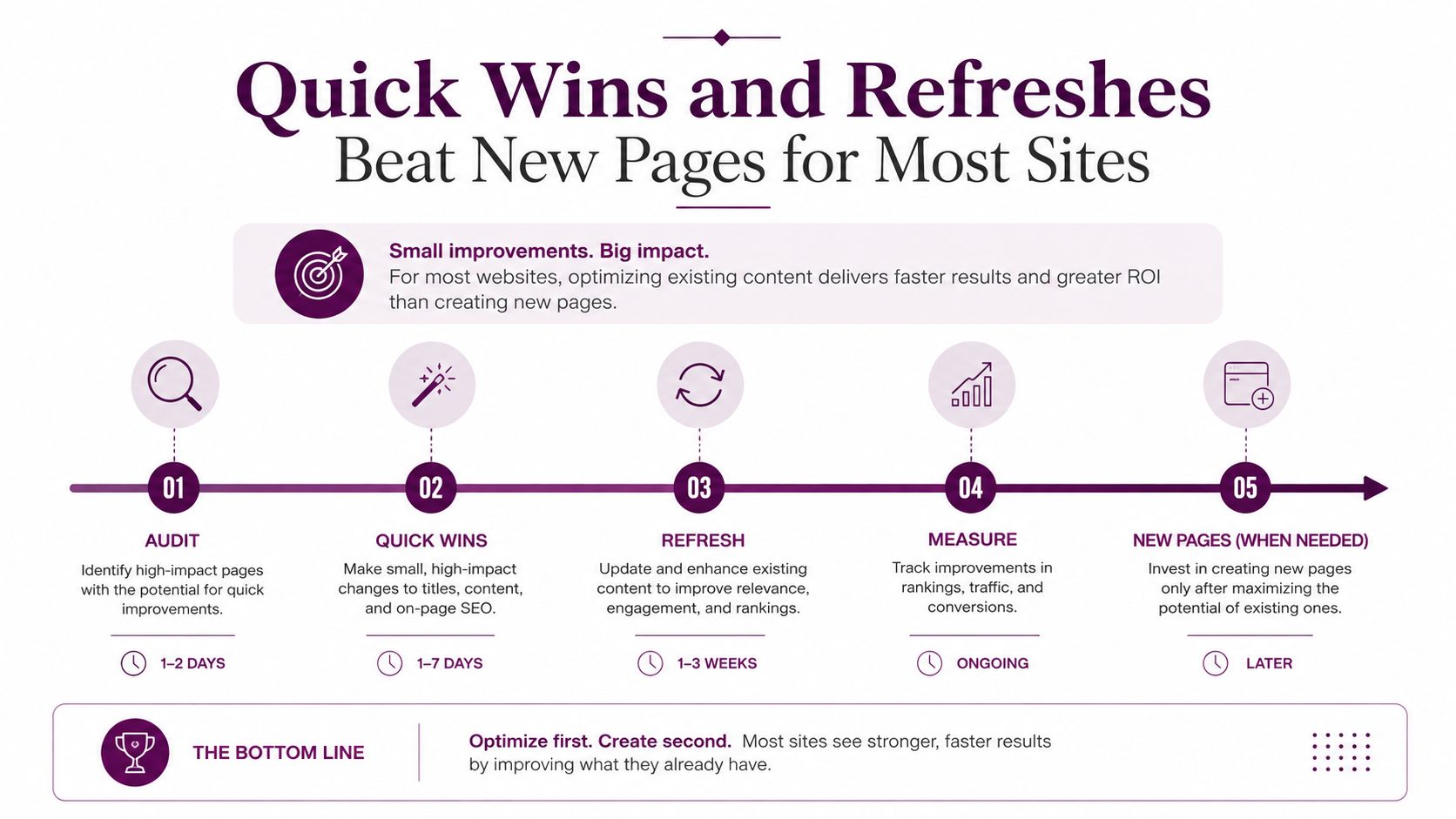
Keep new URL creation for clusters that have no credible existing match and that pass your opportunity score. The page-two quick-win keyword guide provides a useful way to identify candidates without abandoning the broader prioritization system.
Track KPIs and Iterate Every Week
A post-research workflow needs a weekly operating rhythm. Measurement shouldn't arrive after publication as a reporting exercise. It should determine whether the team writes a new brief, refreshes an existing page, or tests the conversion path.
Track four primary KPIs:
KPI | Target Benchmark | Action If Missed |
|---|---|---|
Tracked rankings | Movement into the top 10 and top 3 for priority terms | Recheck intent, content quality, links, and technical barriers |
Organic sessions | Growth to mapped URLs relative to the page's baseline | Inspect impressions, rankings, seasonality, and internal links |
Organic conversions | More qualified actions from organic landing pages | Run a CRO test, clarify the offer, or revise intent alignment |
Share of voice | Stronger visibility against selected competitors | Find missing clusters, SERP features, or authority gaps |
Add two diagnostic measures. Monitor the impression-to-click ratio for pages that have visibility but weak snippets, and audit internal link coverage across each cluster. A page can rank and still underperform if its title fails to earn the click or if related pages don't support its importance.
Use a Monday-to-Friday loop
Monday: Pull Search Console, Analytics, rank tracking, conversion, and SERP feature data.
Tuesday: Re-score the queue. Choose one action, refresh, create, consolidate, or CRO test.
Wednesday and Thursday: Produce the brief, implement the refresh, or launch the approved test.
Friday: Record movement, document changes, and decide what deserves another cycle.
Set decision rules before the dashboard creates emotional debates. Stop investing in pages that miss their agreed targets after 90 days, unless the business case has changed or the page has a strategic role. Double down on clusters that beat the forecast. For pages ranking in positions 4 to 10, test formats that can earn featured snippets, FAQ visibility, or HowTo treatment, but only where the content naturally supports them.
The point isn't to predict rankings perfectly. It's to make the next action obvious from the evidence.
Your First 14 Days After Keyword Research
The first two weeks should end with a frozen production queue, assigned owners, active briefs, and a measurement loop. Don't let the team spend the period polishing the keyword spreadsheet.
Days one through seven
Days 1 and 2: Cluster the raw list by intent. Validate the top 20 keywords against live SERPs and record the dominant page type, SERP features, and obvious content gaps.
Days 3 and 4: Apply the opportunity score. Flag existing URLs with quick-win potential and decide whether each priority term belongs to an optimization, consolidation, creation, or deprioritization path.
Days 5 and 6: Complete the keyword map. Audit competing URLs, define primary and supporting terms, and trace internal links across each cluster.
Day 7: Hold the review meeting. Get stakeholder sign-off, resolve conflicts, assign owners, and freeze the production queue.
Days eight through fourteen
Days 8 to 10: Build briefs for the top three priorities. Include intent, SERP evidence, editorial angle, on-page requirements, internal links, conversion goal, and quality checks.
Days 11 and 12: Schedule the 90-day refresh sequence for existing pages ranked in positions 5 to 20. Separate content edits, snippet work, internal linking, and follow-up measurement.
Day 13: Configure the KPI dashboard and create the CRO test backlog. Include ranking movement, mapped URL sessions, organic conversions, competitor visibility, impression-to-click ratio, and internal link coverage.
Day 14: Hold the first weekly review. Compare what was shipped with what was planned, record baseline data, and lock the next sprint.
One operating rule keeps the system useful: review, don't rewrite. Review the map, scores, URLs, and outcomes regularly. Rewrite only when the evidence shows that the page, intent, or business priority needs to change.
Keyword Kick helps agencies and marketing teams turn fragmented ranking, Search Console, Analytics, competitor, backlink, and technical SEO data into prioritized next actions through its K² AI Agent. Visit Keyword Kick to connect your post-research decisions to a shared workflow for mapping, refreshes, cannibalization checks, and weekly performance reviews.