You're probably in one of two situations right now. Your store gets traffic, but sales don't move the way they should. Or your paid campaigns are carrying too much of the revenue load, and every month starts with the same pressure to buy visibility again.
That's where ecommerce SEO stops being a marketing side project and becomes a profit system.
SEO ecommerce isn't about chasing random rankings. It's about making sure the right category pages, product pages, and supporting content show up when buyers are close to a decision. That matters because SeoProfy reports that 23.6% of eCommerce orders come from organic search traffic. Nearly 1 in 4 orders can start with search. If your store underperforms in organic, you're not just missing visits. You're missing revenue-bearing sessions.
Most stores don't fail because they ignored title tags. They fail because they treat every SEO task as equally urgent. It isn't. Fixing a filter explosion, restructuring a weak category, and improving a thin product template don't carry the same business value.
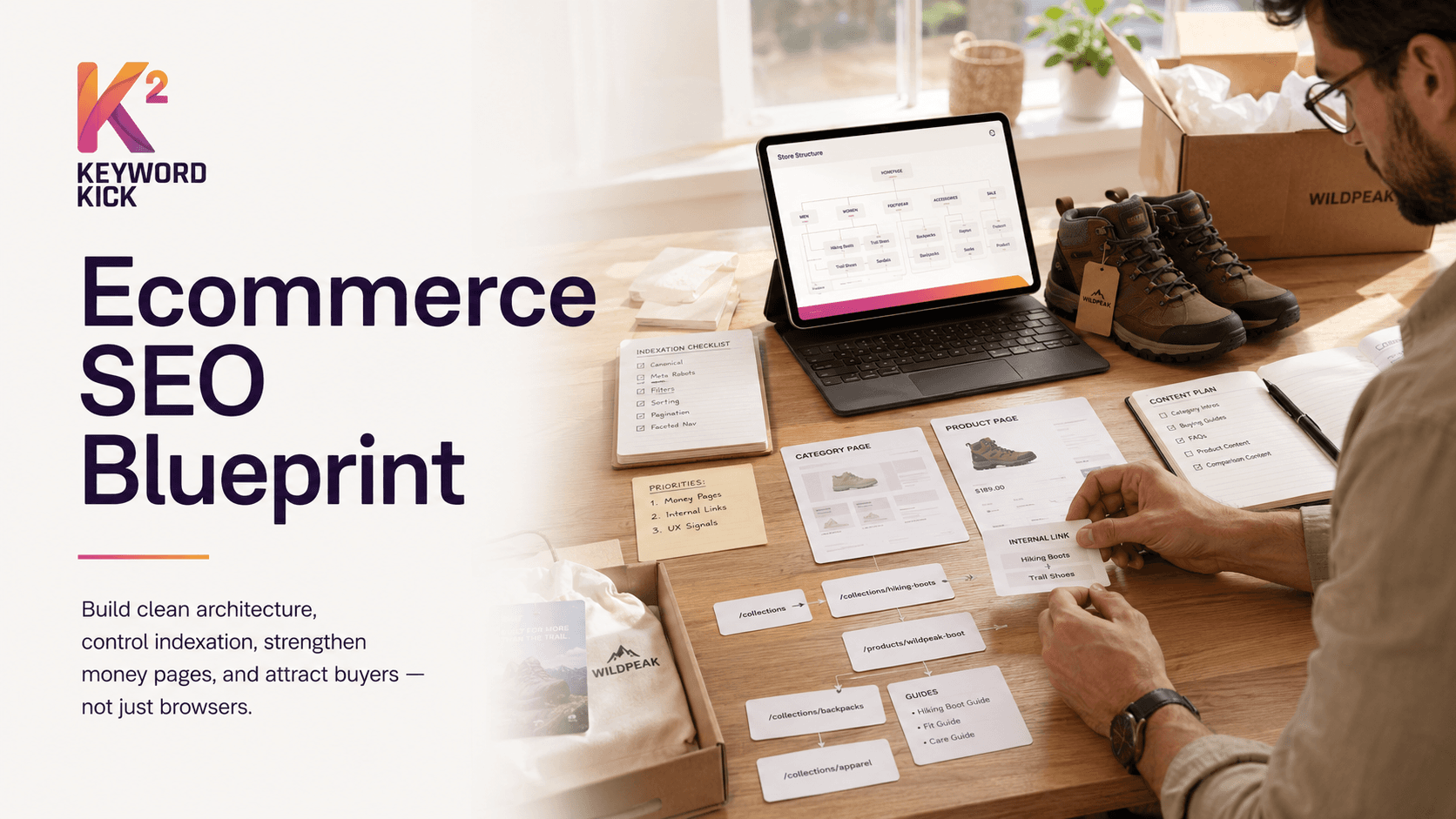
The stores that win take a prioritized approach. They build a clean architecture first. They control indexation. They strengthen money pages. Then they expand with content that attracts real buyers instead of low-intent browsers.
If your goal is more qualified organic traffic, this practical guide on how to improve organic traffic in 2026 is a useful companion. But traffic alone isn't enough. A healthy store needs search visibility tied to merchandising, conversion, and revenue.
Why Your Store Needs More Than Just Traffic
A store can rank, get clicks, and still struggle to grow. That usually happens when traffic lands on the wrong pages, product pages don't answer buying questions, or category pages attract broad interest but don't help shoppers narrow down a choice.
Traffic is only useful when it matches intent.
A searcher looking for “waterproof hiking boots men” doesn't want your homepage. They want a category page with the right brands, sizes, filters, shipping details, and enough context to buy confidently. A searcher looking for a specific SKU wants the exact product page, not a vague collection. Good ecommerce SEO aligns those outcomes.
What ecommerce SEO actually means
For stores, SEO is the discipline of making your catalog understandable to both search engines and shoppers. That includes:
Category alignment: Categories need to target how people shop, not how your inventory system labels products.
Product clarity: Product pages need original copy, specs, media, trust signals, and structured information.
Technical control: Search engines need a clean path to your index-worthy URLs.
Internal routing: Content and navigation need to funnel attention toward commercial pages.
Practical rule: If a page can rank but can't help someone choose or buy, it isn't finished.
The revenue lens changes the priority
A lot of ecommerce teams spend too much time on low-impact tasks because generic SEO advice turns everything into a checklist. That's the wrong model for a store.
The better model is simple. Ask which fixes improve revenue pathways first.
Here's the difference:
Weak approach | Strong approach |
|---|---|
Optimize every page lightly | Prioritize high-value categories and products |
Let faceted URLs grow unchecked | Control crawl paths and index only what matters |
Publish blog content with no commercial link path | Build content that supports category discovery and conversion |
Measure rankings in isolation | Measure organic revenue by landing page type |
That's why a practical ecommerce SEO strategy starts with architecture and index control, not endless copy tweaks.
The Blueprint for a High-Ranking Store
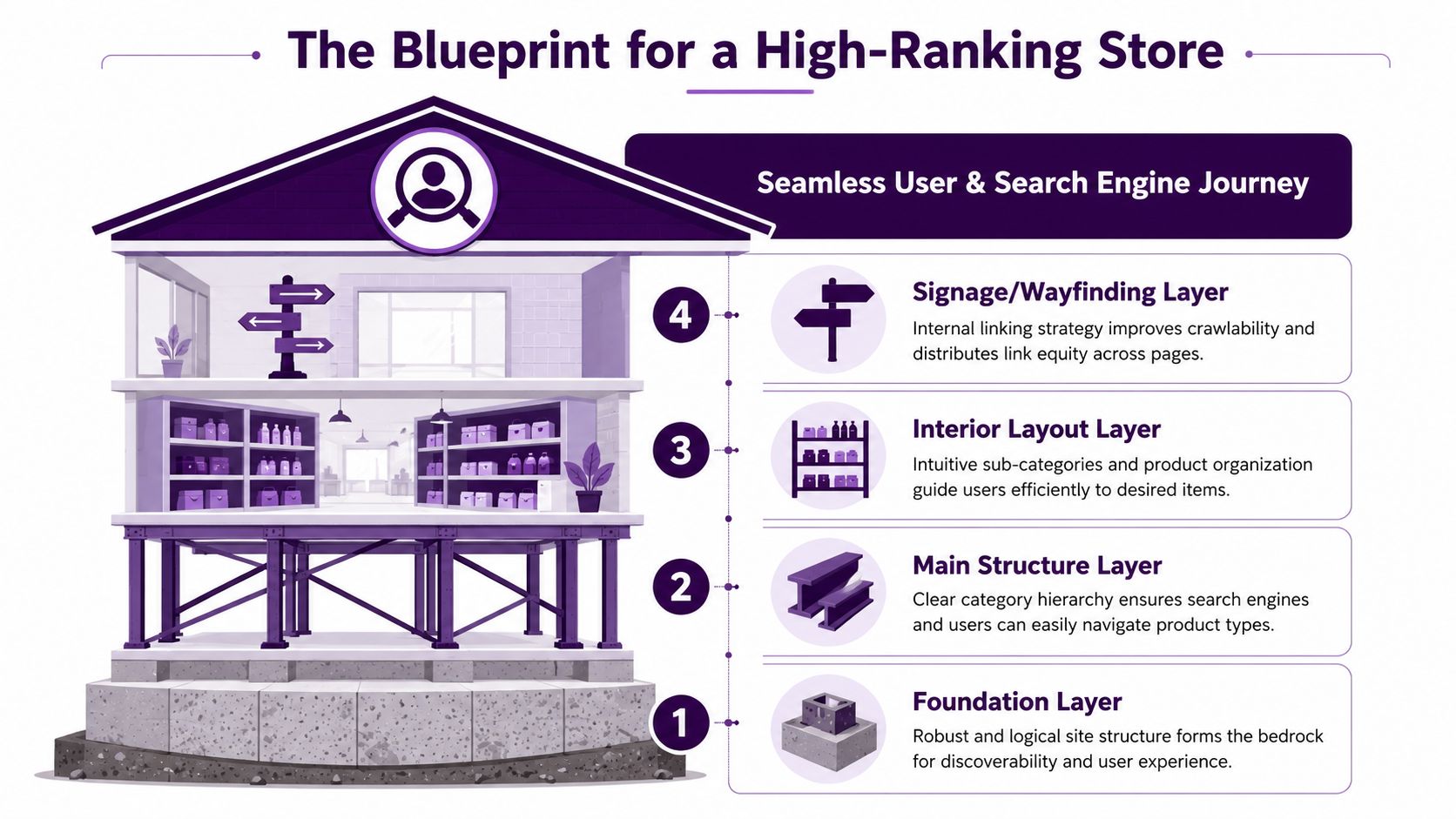
A physical store with bad layout loses sales fast. If customers can't find jackets without walking through cookware, clearance bins, and back-office doors, they leave. Search engines behave the same way. If your site structure is messy, they waste time crawling low-value URLs and struggle to understand which pages matter most.
That's why architecture comes first.
SeoProfy notes that ecommerce SEO can generate 5.2x ROI over a 36-month period, while the average ROI in the first 6 months is only 0.8x. That gap is a reminder to build the store correctly before expecting strong compounding returns.
This visual captures the idea well:
Keep the hierarchy shallow
Most stores bury product and category pages too deep. A shopper shouldn't have to click through five layers to find “women's black ankle boots.” Search engines shouldn't have to crawl endless branches either.
A good structure usually follows a simple path:
Homepage
Primary category
Subcategory
Product page
That doesn't mean every catalog fits one rigid model. A store selling auto parts, supplements, or industrial components may need brand, compatibility, or use-case layers. The point is to keep key pages easy to reach and easy to interpret.
Name URLs and categories like buyers think
Internal naming often reflects ERP logic instead of search demand. That's how you end up with category labels that make sense internally but don't match how customers search.
A better setup looks like this:
Clear category names: “Running Shoes” beats “Performance Footwear Collection”
Meaningful subcategories: “Trail Running Shoes” tells both users and Google what lives there
Clean URLs: Avoid unnecessary parameters in indexable page paths
Consistent breadcrumbs: Reinforce hierarchy on every page
If you want a second opinion on store fundamentals, this guide to online shop SEO is a solid reference because it keeps the focus on practical store setup rather than theory.
Internal links are wayfinding, not decoration
Many stores rely too heavily on top navigation and forget the rest of the site. That leaves important pages isolated.
Use internal links in places where they help a shopper make progress:
Breadcrumbs to move up and across category levels
Category intro copy to point to important subcategories
Related product modules to surface alternatives and complements
Editorial content to route informational traffic into money pages
Stores usually don't have an SEO problem first. They have a page-priority problem disguised as an SEO problem.
What works and what doesn't
Works | Doesn't work |
|---|---|
A category structure based on product types, brands, and shopper modifiers | A structure based on internal team naming conventions |
Breadcrumbs and crawlable links | JavaScript-heavy paths with weak HTML linking |
Reusable category templates with enough room for unique copy | Thin collection pages that are just product grids |
Clear parent-child relationships | Categories that overlap and compete with each other |
A strong blueprint makes every later SEO action more effective. Without it, technical fixes become patchwork.
Mastering Technical SEO for Ecommerce
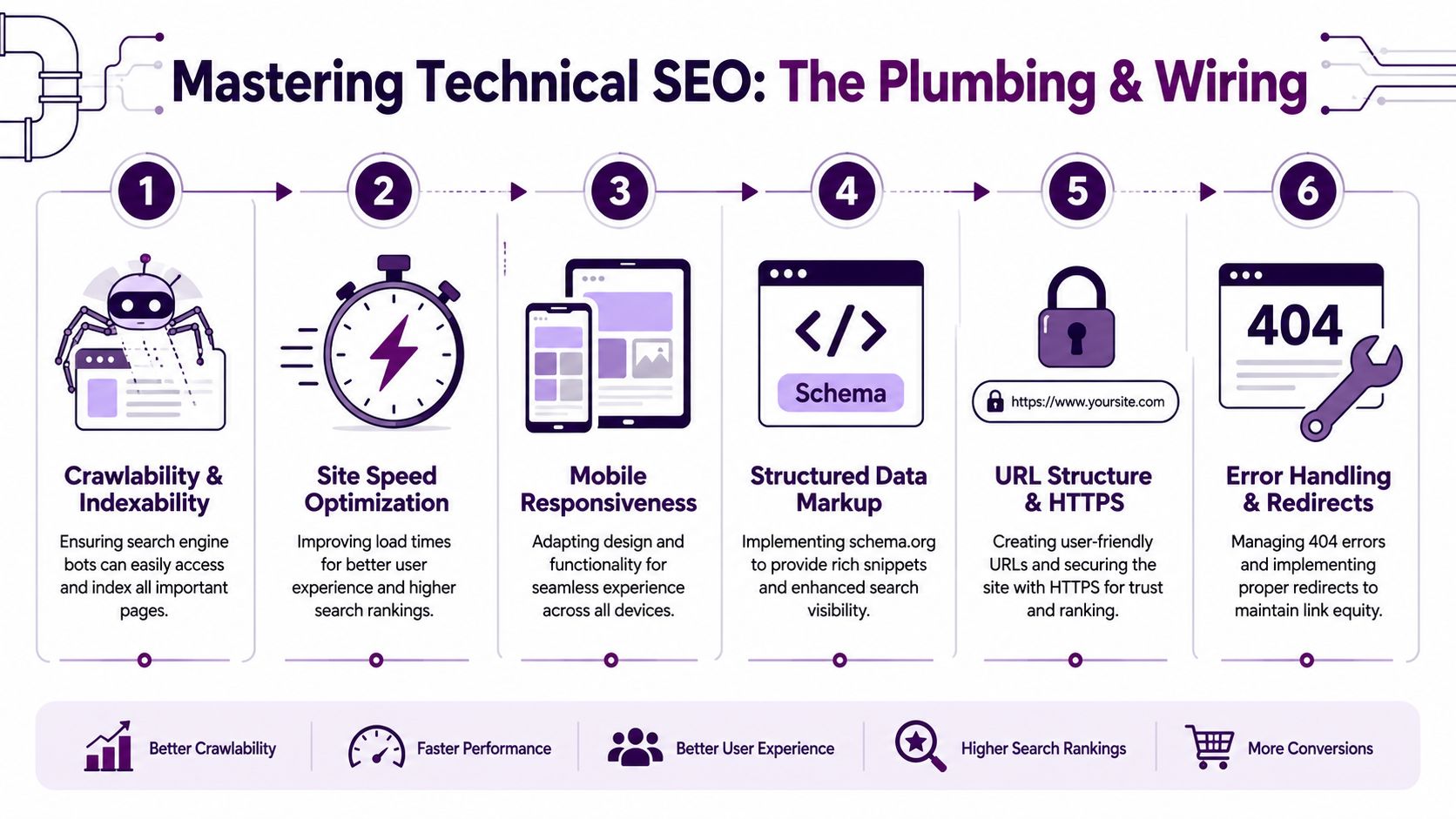
Technical SEO on ecommerce sites is mostly about restraint. You're trying to stop search engines from spending time on URLs that don't deserve visibility, while making sure they can reliably reach the pages that do.
That matters because stores generate URL clutter faster than almost any other site type. Filters, sort orders, variants, session parameters, internal search pages, and pagination can turn a clean catalog into an indexation mess.
This is the operational side of the job:
Faceted navigation needs rules
Faceted navigation is one of the biggest ecommerce SEO failure points. Lumar highlights that faceted navigation can create duplicate URLs, waste crawl budget, and split ranking signals if it isn't managed carefully, while also noting that some facet pages deserve indexing when they match real search demand.
That nuance matters.
A color filter with no search demand usually shouldn't become an indexable page. A high-intent filtered collection such as “men's waterproof hiking boots” might deserve its own page if shoppers search for it and the page has unique value.
Decide which filtered pages deserve to exist
Teams often make one of two mistakes. They index too many filter combinations, or they block everything and lose useful search entry points.
Use this decision framework:
Page type | Keep indexable | Consolidate or restrict |
|---|---|---|
High-demand filtered category with clear commercial intent | Yes, if it has useful content and stable URL logic | No |
Sort-order pages | No | Yes |
Parameter combinations with little user value | No | Yes |
Empty or near-empty filtered results | No | Yes |
Internal search result URLs | No | Yes |
The important part isn't the table. It's the discipline to apply it consistently across the catalog.
Canonicals fix some problems, not all of them
Canonical tags help when multiple URLs represent substantially the same content. They do not solve every crawl issue by themselves.
Use canonicals when:
Variants create duplicate or near-duplicate URLs
Tracking parameters produce alternate versions of the same page
Collection paths duplicate product URLs
Don't treat canonicals as an excuse to let every low-value URL stay fully crawlable. If search engines can still access millions of useless combinations, they'll keep spending resources there.
Robots directives need precision
Many ecommerce teams either block too aggressively or too loosely. Both create problems.
Use restrictive crawl controls for URLs that add no standalone value, such as certain parameterized paths, internal search pages, or machine-generated combinations. Keep important category, product, and editorial pages fully accessible.
If you run Shopify, the implementation details can get messy fast. This Keyword Kick article on Shopify integration for e-commerce SEO is useful if your stack includes collection templates, app-driven filters, and a growing catalog.
The goal isn't to make every URL perfect. It's to make search engines spend their attention on pages that can actually rank and sell.
Variants and pagination need business logic
Variant handling is where technical SEO and merchandising collide. A product like “Nike Air Max 90” might have multiple sizes and colors. Should each variant get its own page? Sometimes yes. Often no.
Use separate URLs when a variant has clear standalone demand and enough unique information to justify it. Consolidate when the only difference is a minor attribute and separate pages would create thin duplication.
Pagination is less about old-school markup debates and more about crawlable product discovery. Category pages still need search engines to reach deeper products. Infinite scroll can work for users, but it needs crawlable fallbacks so products beyond the first view aren't effectively hidden.
The technical audit order that saves time
Don't audit everything at once. Start in this order:
Index bloat sources such as filters, search pages, and duplicate URL paths
Canonical conflicts between templates, variants, and parameter pages
Broken internal routes including orphaned categories and weak pagination paths
Template issues on product and category pages
Redirect and status code cleanup for removed, moved, and seasonal products
That order tends to expose the biggest revenue blockers early.
Optimizing Product and Category Pages That Convert
Once the site is crawlable and structured properly, the money pages need to earn their rankings. That means product and category pages have to do two jobs at the same time. They need to match search intent, and they need to help someone move toward purchase.
Most stores only do one.
This is the checklist I'd use on any commercial template:
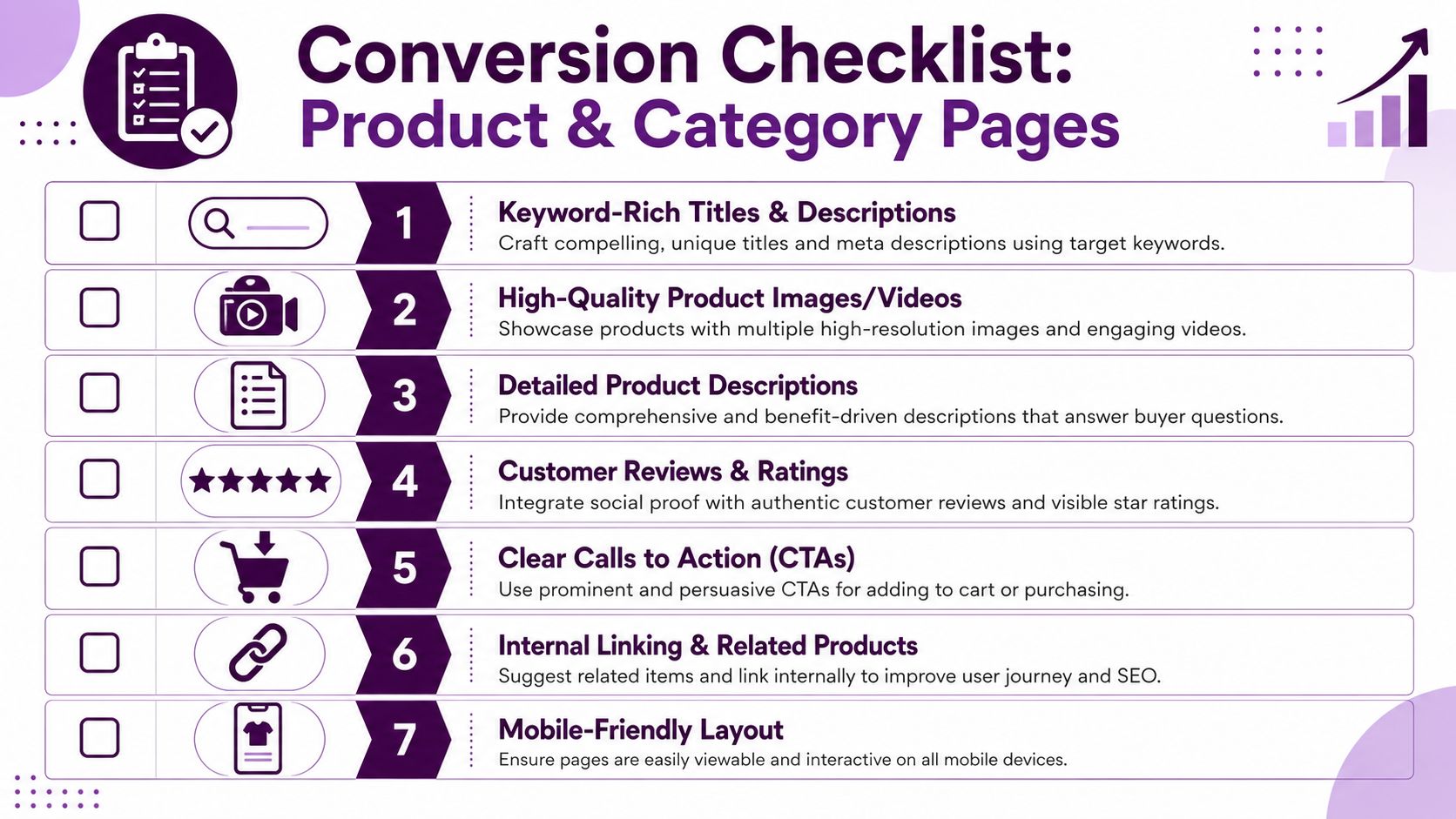
Category pages should guide a decision
A category page isn't just a product grid with an H1. It needs to reassure the shopper that they're in the right place and help them narrow options quickly.
Strong category pages usually include:
A specific title tag and H1 that match the product type and modifier
Short intro copy that clarifies what's on the page without pushing products too far down
Useful subcategory links when shoppers need to refine by use case, brand, or feature
Visible filtering and sorting that reflect how buyers compare products
Internal links to guides, comparisons, or adjacent collections
A weak category page often ranks inconsistently because it doesn't express enough intent. It looks interchangeable with dozens of other collections.
Product pages need more than manufacturer copy
A product page has to answer the buyer's objections before they ask support.
That means your page should cover:
what the product is
who it's for
why it's different
what specs matter
what shipping, returns, and availability look like
what related options someone should consider
If you're also selling through marketplaces, this same discipline applies there. Teams working cross-channel can learn from this piece on how to drive profitability with Amazon listings, because many of the same principles carry over. Better titles, stronger features, clearer benefits, and sharper merchandising all support conversion.
Structured data increases visibility when it's accurate
Structured data is one of the few technical enhancements that directly affects how your listings can appear in search.
In an ecommerce SEO discussion, an expert said that product schema plus Merchant Center configuration can be “hugely beneficial”, and that carousel structured data can give transactional category pages more presence in search results, as covered in this technical SEO discussion on YouTube.
That works when the markup matches the page and the operational data is trustworthy.
Use structured data to support:
Product details such as name, price, and availability
Review visibility when reviews are present and handled properly
FAQ content where the questions are useful on-page
Breadcrumb context for hierarchy
Transactional category enhancements where appropriate
Rich result eligibility is not a substitute for a strong page. It's an amplifier for one.
Conversion details matter to SEO outcomes
SEO teams sometimes act as if conversion is someone else's department. On ecommerce sites, that separation hurts performance.
If a page ranks but users bounce because sizing is unclear, reviews are buried, shipping information is vague, or the call to action is weak, the page isn't doing its job. Strong SEO ecommerce work improves the landing page itself.
A good CRO reference for commercial pages is this conversion rate optimization playbook for 2026, especially if you're trying to tighten category and product templates after rankings start improving.
What I'd fix first on underperforming money pages
If the issue is this | Fix this first |
|---|---|
Category page ranks but doesn't convert | Improve filtering clarity, intro copy, merchandising logic, and trust elements |
Product page gets impressions but weak clicks | Rewrite title and meta description, improve main image and visible offer clarity |
Product page gets clicks but weak sales | Strengthen copy, specs, reviews, delivery information, and CTA prominence |
Category page can't hold rankings | Improve uniqueness, internal links, and search intent match |
The page doesn't need more words by default. It needs better answers.
Content Strategies That Attract Buyers Not Just Browsers
A lot of ecommerce brands still treat content like a side blog that lives far away from the catalog. They publish trend posts, generic listicles, and broad awareness pieces that might bring visits but rarely help commercial pages win.
That's outdated.
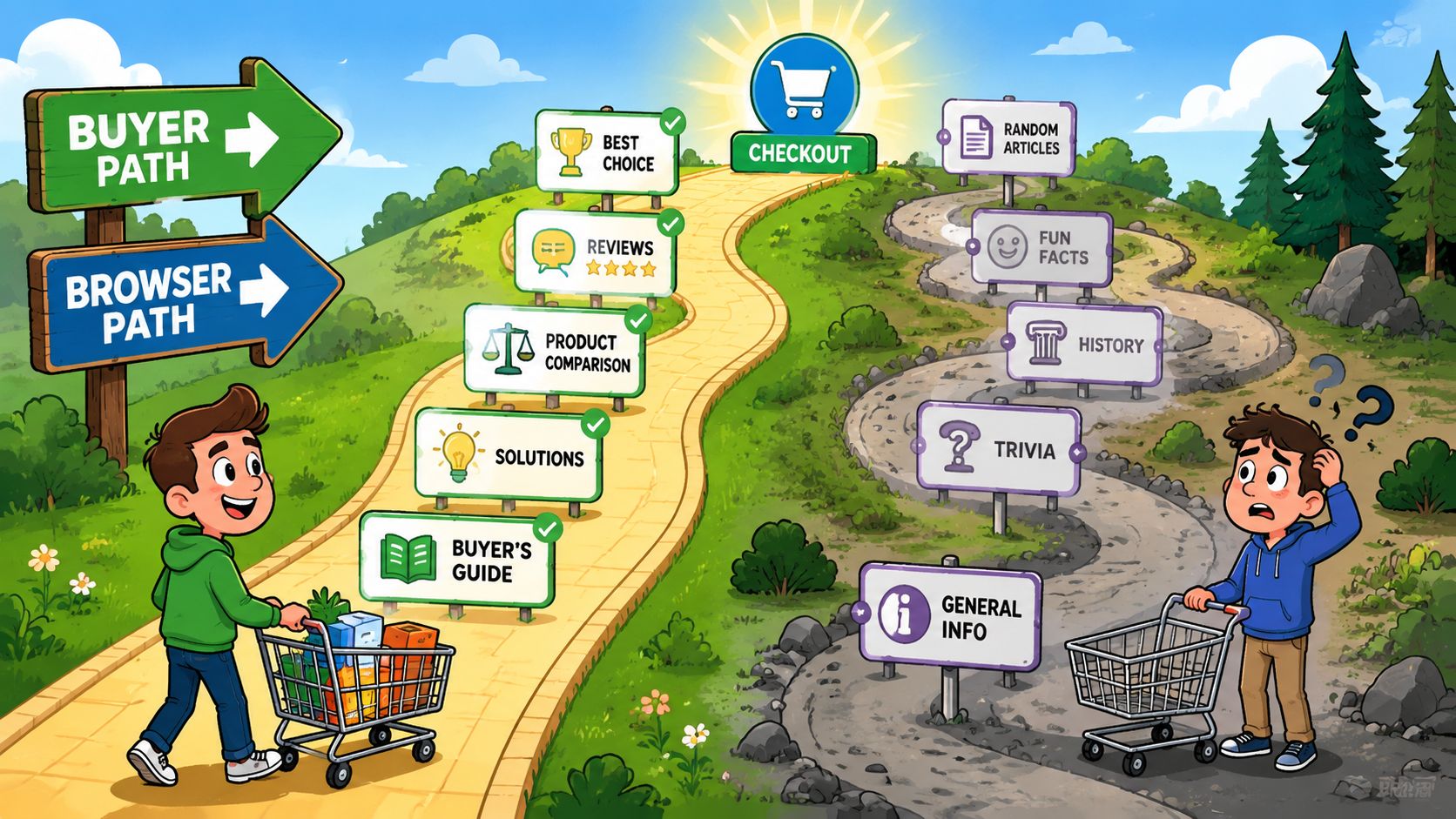
BigCommerce points toward a category-led content strategy with listicles and buying guides, showing that content shapes discoverability across the entire purchase funnel. That's the right direction because buyers don't always start with a product query. Many start with comparison, problem-solving, or category education.
This difference is the whole game:
Build around a hub and spoke model
The cleanest content model for ecommerce is a hub and spoke system.
Your hub is the category or collection page that drives revenue. Your spokes are the supporting pieces that answer adjacent questions and route authority and users back to that commercial page.
For example:
Hub page | Supporting spokes |
|---|---|
Espresso machines | Best espresso machines for small kitchens, espresso machine buying guide, semi-automatic vs automatic espresso machines |
Trail running shoes | How to choose trail running shoes, trail vs road running shoes, best trail running shoes for wet conditions |
Standing desks | Best standing desks for home offices, standing desk size guide, electric vs manual standing desks |
This is different from random content marketing. Every article exists to support a commercial path.
Content should solve pre-purchase friction
Good ecommerce content answers the questions that stop someone from buying. It doesn't just attract a click.
That means creating:
Buying guides when the category is confusing
Comparison pages when shoppers evaluate alternatives
Use-case content when products depend on context
Fit, sizing, or compatibility guidance when mistakes are costly
Gift and seasonal guides when demand shifts around events
A store selling mattresses shouldn't only optimize product pages. It should publish comparison content around firmness, sleeping position, cooling features, and room sizes, then link those assets naturally into mattress category and product pages.
A blog post without a route into the catalog is usually just an isolated traffic asset.
Don't confuse informational traffic with qualified traffic
Some informational keywords attract people who won't buy. Others attract shoppers who are one or two steps away from purchase.
The difference usually shows up in the topic itself.
“History of espresso” may be interesting. It won't usually help a machine category rank or sell. “Best espresso machine for beginners” is much closer to a buying decision. So is “how much counter space does an espresso machine need.”
That's why content prioritization matters. Start with topics that have a clear commercial bridge.
Internal linking is where content starts paying off
Publishing a buying guide isn't enough. It needs to send people and relevance signals toward the right pages.
Use internal links in both directions:
From content to category pages using descriptive, natural anchor text
From category pages back to guides when the guide helps the shopper choose
From product pages to comparison or FAQ content when the purchase needs more explanation
This turns content into a support system for SEO and conversion, not a disconnected editorial archive.
What works better than generic blogging
Weak content move | Better move |
|---|---|
Broad lifestyle posts with no commercial tie | Buying guides tied to a specific category |
News commentary with no shelf life | Evergreen comparison and selection content |
One-off blog posts with no internal link plan | Topic clusters connected to revenue pages |
Publishing based on ideas alone | Publishing based on search intent and merchandising priorities |
For ecommerce SEO, content works best when it helps a shopper make a decision your category or product pages can fulfill.
Measuring Success and Planning for Future Growth
A store can improve rankings and still make bad decisions if the reporting is wrong. That happens when teams obsess over keyword positions but can't tie organic traffic to product discovery, conversion quality, or revenue by landing page type.
Rankings matter. Revenue matters more.
Track business outcomes first
The most useful ecommerce SEO reporting starts with a few core questions:
Which category pages drive organic revenue?
Which product pages attract search demand but underperform on conversion?
Which content pieces assist commercial journeys?
Which sections of the site are gaining visibility without contributing to sales?
That reporting usually comes from combining Google Analytics 4, Google Search Console, and your ecommerce platform data. Search Console shows which queries surface your pages. Analytics shows what those visitors do next. Your store data confirms whether the session turned into revenue.
If you can't connect landing pages to organic revenue, you're guessing which SEO work matters.
Separate vanity gains from real gains
A ranking increase doesn't always deserve celebration. Sometimes the query isn't valuable. Sometimes the page wins clicks but sends weak traffic. Sometimes a broad informational page grows while your commercial pages stay flat.
Use a simple review model:
Signal | What it might mean |
|---|---|
Clicks up, revenue flat | Intent mismatch or weak page conversion |
Impressions up, clicks weak | Snippet or SERP presentation issue |
Product traffic up, category traffic flat | Overreliance on bottom-funnel demand |
Content traffic up, assisted value unclear | Internal linking or journey design problem |
This is how you avoid spending another quarter polishing pages that don't move the business.
Sitemaps become an operating tool at scale
As a catalog grows, XML sitemaps stop being a basic SEO setup item and become a management tool. Sitebulb notes that ecommerce teams often don't need to split sitemaps until a file exceeds 50 MB or 50,000 URLs, and that sitemap structure can also be used for analysis.
That matters on large stores because sitemap organization helps you monitor which page groups are supposed to be indexed and which sections are changing most often. It also gives you a clearer view during launches, migrations, or inventory expansion.
Plan migrations and catalog growth before they happen
Store redesigns, platform changes, and category expansions often damage SEO because teams think about redirects too late. The same goes for inventory growth. A category that works with a small catalog can become chaotic once filters, seasonal products, and multiple brands pile in.
For migration planning, protect:
URL continuity for high-value pages
Category intent mapping so new templates still target the right queries
Redirect logic for removed or renamed pages
Template parity for metadata, copy blocks, and internal links
Index control so new parameter behaviors don't flood the crawl path
Growth is good. Uncontrolled growth is expensive.
Your Prioritized Ecommerce SEO Action Plan
The fastest way to waste time on ecommerce SEO is to do everything halfway. Stores improve faster when the work is sequenced by business impact.
Here's the playbook I'd use.
Phase 1 in the first week
Start with structural and technical issues that can block everything else.
Focus on these first:
Audit indexable URLs: Find faceted pages, search-result URLs, duplicate paths, and variant clutter that shouldn't be indexed.
Review site hierarchy: Make sure core categories, subcategories, and top products sit in a clear structure.
Check internal linking paths: Breadcrumbs, category links, and product discovery paths should all be crawlable and useful.
Clean canonical logic: Canonicals should support consolidation, not hide architectural mistakes.
Prioritize money sections: Identify the categories and product templates that matter most for revenue.
If the foundation is messy, stop there and fix it before moving into content production.
Phase 2 in the first month
Once search engines can access the right pages, improve the pages that should generate sales.
Work through this set:
Priority | What to do |
|---|---|
Highest | Rewrite top category pages to better match intent and improve usability |
High | Upgrade product templates with stronger copy, specs, FAQs, and trust elements |
High | Implement and validate structured data where it supports visible page content |
Medium | Improve title tags and meta descriptions on commercial pages with weak click appeal |
Medium | Add internal links between guides, categories, and related products |
This phase is where many stores finally see the gap between “ranking page” and “selling page.”
Phase 3 in the first quarter
After the commercial templates are stronger, build scale.
That usually means:
Publish buying guides and comparisons for high-intent pre-purchase topics
Create category support content that answers selection questions
Expand internal linking so authority flows into core categories
Review sitemap and crawl patterns as catalog sections grow
Develop linkable assets that fit the category and support authority
What to ignore until later
Not every SEO task deserves immediate attention.
Delay these unless they're tied to a specific problem:
low-value blog cleanup
minor metadata edits on pages with no commercial upside
broad content expansion with no category support path
speculative keyword projects disconnected from inventory
The winning move is usually narrower than teams expect. Fix fewer things, but fix the ones that change how buyers find and choose products.
A mature SEO ecommerce program isn't a pile of tactics. It's a prioritization system. Get the structure right. Control crawl waste. Make your category and product pages useful. Then build supporting content that sends qualified demand into the catalog.
That's the playbook that compounds.
If you want a clearer way to prioritize all of this, Keyword Kick helps teams connect GA4, Google Search Console, rankings, backlinks, and technical SEO signals in one place so you can see which pages need attention first and what actions will move visibility and revenue.