You're staring at six tabs, a half-updated spreadsheet, and three different tools that all seem to agree that something's wrong, but none of them tell you what to fix first. That's the daily frustration with SEO work at scale. The problem usually isn't a lack of data, it's that the data never turns into a clean, ranked list of actions.
A good seo recommendations tool solves that bottleneck by turning scattered findings into decisions. That matters because organic search still carries enormous demand, with Google handling more than 8.5 billion searches per day and organic results earning 94% of all clicks in the cited industry summary, while the top three organic results receive 68.7% of clicks and only 0.78% of users visit page two, so small ranking gains can have outsized value, especially when 68% of online experiences begin with a search engine. The difference between “we found a problem” and “fix this page today” is where good SEO teams win, which is why I've come to care less about how much a tool can detect and more about how intelligently it ranks what to do next. For a broader framing of why visibility alone isn't enough, the internal discussion on why data visibility is no longer enough is worth reading alongside a practical Surva.ai platform selection guide.
The Real SEO Bottleneck Is Recommendations, Not Data
The hardest days in SEO usually don't start with bad traffic. They start with too much information, a crawl report showing duplicate titles, a Search Console export with soft declines, a ranking tracker saying a few pages slipped, and a stakeholder asking which issue matters. Teams don't need more signal, they need a tool that tells them what deserves attention first.
Metrics, alerts, and recommendations are not the same thing
A metric tells you something changed. An alert tells you the change might matter. A recommendation tells you what to do, who should do it, and why it should move the needle.
That distinction sounds simple until you're buried in a site audit. I've seen teams spend days fixing low-value technical items because the tool surfaced them prominently, while the pages with real commercial value stayed untouched. The practical difference is that a recommendation connects a finding to a business outcome, not just a technical state.
That's also why recommendation systems have become the useful layer in modern SEO platforms. HubSpot's recommendation workflow organizes issues by category, impact, and technical difficulty, then supports rescans after updates, which is a strong example of the shift from raw diagnostics to prioritized action. If you're evaluating tools, the guide to automate your content scaling is useful context for understanding how automation and prioritization are increasingly linked.
Practical rule: if a tool can't tell you what to fix first, it's reporting, not recommending.
Why prioritization changes the job
The old workflow was simple. Export crawl errors, export rankings, export analytics, then hope the loudest issue was the right issue. That approach breaks quickly on larger sites because the number of possible fixes grows much faster than the team's ability to execute.
The better model is to sort recommendations by expected value. A missing alt attribute and a page that's been cannibalizing its own keywords do not belong in the same queue just because both are SEO problems. One is hygiene, the other can affect a meaningful revenue page.
That's why the best recommendation tools feel less like checklists and more like editors. They cut through noise, put commercial pages ahead of low-stakes clutter, and help teams ship the few fixes that matter.
What an SEO Recommendations Tool Actually Does
A real seo recommendations tool is not just a scanner with a nicer interface. It connects crawls, performance data, and search visibility signals, then turns them into instructions that a marketer, developer, or content owner can use. That means the tool has to do more than find issues, it has to explain why the issue matters and how much confidence the system has in the fix.
From findings to prescriptions
A raw finding says a page has no canonical tag, or that a title is missing, or that links are broken. A recommendation says that issue should be fixed, because it's affecting discoverability, indexability, or click performance, and it belongs to a specific owner. HubSpot's SEO tooling shows this logic clearly, since it scans pages, analyzes on-page factors, and lets users filter issues by impact, category, and technical difficulty before rescanning pages after updates. That's the difference between a dashboard and an operating system for SEO work.
The data layers behind a trustworthy recommendation matter just as much as the interface. A credible tool should combine Google Analytics 4, Google Search Console, rank tracking, backlink signals, technical crawl output, and SERP feature data. Without that blend, the tool can only guess. With it, the tool can notice that a page lost clicks, ranked lower, and also dropped a rich result, which is much more useful than a lonely “traffic declined” alert.
Google's own guidance reinforces which signals matter. The SEO Starter Guide from Google stresses sitemaps and links for discovery, robots.txt and noindex for visibility control, canonicalization for duplicate content, and Search Console for ongoing monitoring. A serious recommendation system should map its advice back to those fundamentals, not offer generic content tips detached from crawlability or indexation.
What makes the output trustworthy
The strongest tools don't just stack data sources. They reconcile them. If Search Console says impressions are steady but analytics show clicks falling, the recommendation should look different than if crawl data shows the page is blocked or canonicalized incorrectly.
That's also where workflow tools become practical. Teams that want to SEO optimization tools in a broader stack should care about whether the recommendation engine unifies technical, content, and SERP signals before it speaks. If it doesn't, you're probably looking at a prettier report, not a better decision layer.
The Core Components That Separate a Real Tool From a Toy
The easiest way to judge a recommendation engine is to ask whether it helps you get work done on Monday morning. Weak tools surface issues in bulk and leave the sorting to you. Strong tools continuously diagnose, weigh impact, unify data, and tell you what to do next in a way that survives the messiness of a real team.
Continuous diagnostics and impact weighting
A toy tool runs a crawl, spits out a list, and waits for the next manual run. A real one keeps scanning so changes, regressions, and new opportunities don't hide for weeks. That matters because the value of a recommendation depends on whether the problem still exists when the team gets to it.
Impact weighting is the second separator. A weak recommendation says “fix duplicate metadata.” A strong one says which page group is most important, why it's hurting visibility, and whether the issue is worth pausing other work. HubSpot's filters by category, impact, and technical difficulty show how the industry has moved toward that model, and rescans make the loop tighter.
A recommendation is only useful if it still matters when the task reaches the queue.
Data unification, execution, and validation
The third component is data unification. If the tool can't line up analytics, rankings, crawl output, and SERP behavior in one place, you end up translating between systems by hand. That's where good teams lose time, and where bad priorities sneak in.
The fourth and fifth pieces are execution support and re-validation. Weak tools stop after saying what's wrong. Strong tools support owners, task assignment, and a repeat check after the fix ships. That closes the loop, so the same problem doesn't get “solved” three times in three different dashboards.
The sixth component is AI-search awareness. Classic keyword rankings still matter, but they're no longer the full story on every query. If a page is competing in a SERP that shows an AI Overview, recommendation quality depends on whether the tool understands question coverage, entity depth, and content structure, not just blue-link position.
How to Evaluate an SEO Recommendations Tool Before You Buy
A buying decision here isn't about which dashboard looks cleanest. It's about which system will shape how your team prioritizes work for the next few years. If you choose badly, you inherit a queue full of noise, and that gets expensive fast.
Test the logic, not the promises
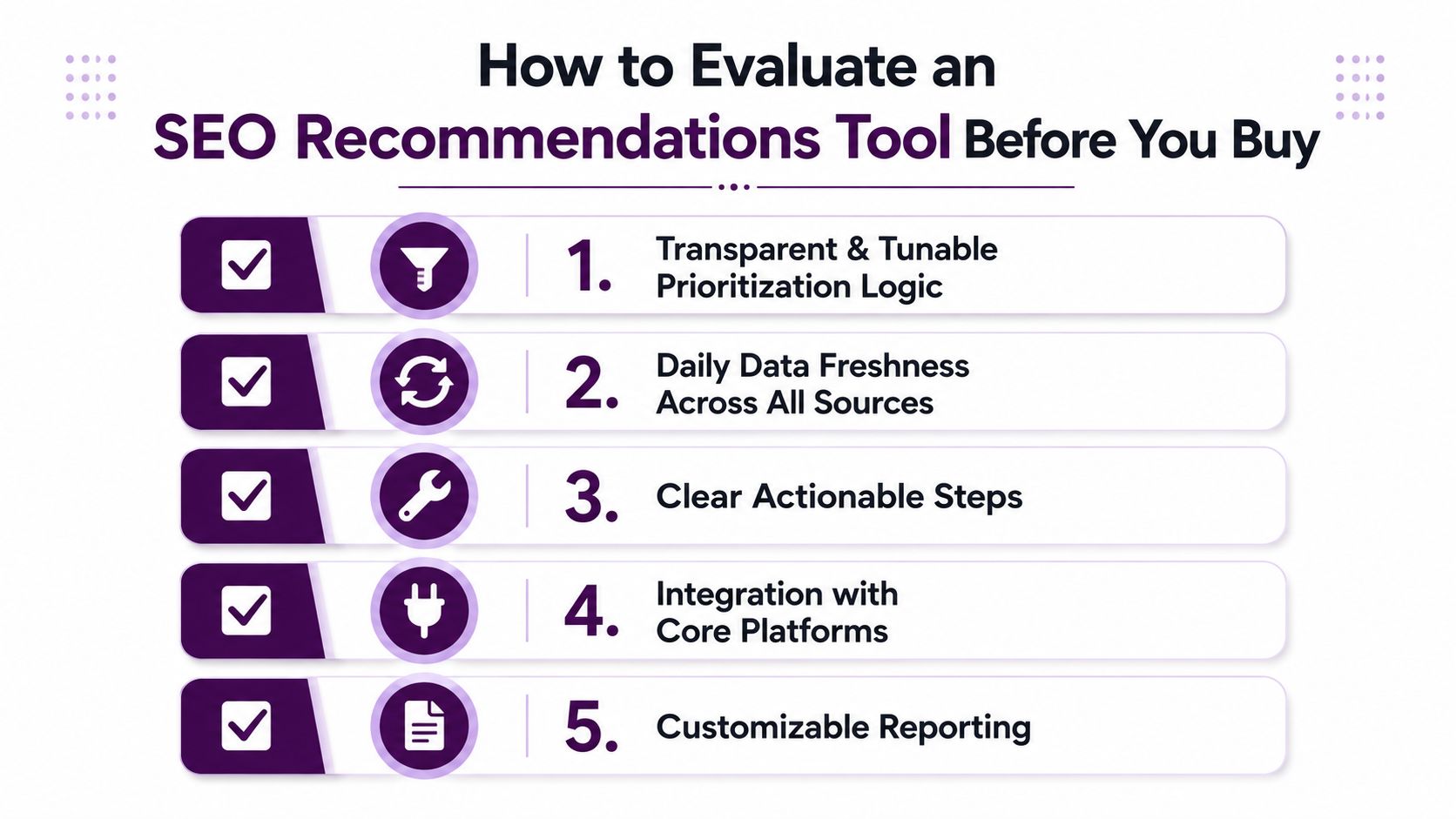
Start with prioritization logic. If a vendor can't explain why one fix is above another, you're trusting a black box. Ask whether the system shows impact, effort, and the reason a recommendation was ranked the way it was.
Then test data freshness. Stale recommendations are a common failure mode after migrations, major content updates, or sitewide template changes. If the underlying crawl, analytics, or Search Console data lags too much, the tool will keep recommending fixes that no longer match reality.
Check integration depth and AI visibility
Native integration matters more than export convenience. A team that spends its days in GA4 and Search Console shouldn't have to bounce between disconnected reports to understand why a page is losing visibility. The best tools bring those inputs together in one reviewable workflow.
You also need to ask how the tool behaves on AI-heavy SERPs. Search Engine Land's gap-analysis guidance now explicitly says teams should track which competitors appear in AI Overviews, and that changes the question from “what ranks?” to “what keeps us present when the SERP is answering directly?” If the tool only thinks in classic keyword positions, it's already behind the market.
A simple rubric helps:
Prioritization transparency: can you see why a recommendation is ranked first?
Signal coverage: does it combine crawl, analytics, ranking, and SERP data?
Workflow fit: can multiple people act on it without spreadsheet relay?
AI-search readiness: does it account for answer-driven SERPs?
Commercial fit: does the pricing and trial structure match team size and maturity?
That's the lens I'd use with any vendor, whether you're evaluating HubSpot, a specialized audit platform, or a system like Keyword Kick that ties multiple SEO signals into one recommendation layer.
Implementation Workflow From Zero to First Wins
The best rollout starts smaller than expected. Don't begin by cleaning every issue in the account. Begin by making sure the tool can see the right data, then let it show you what it thinks matters most, then challenge that ranking against your business priorities.
Start with data and baseline truth
Connect Search Console, analytics, rankings, and crawl data first. If one of those sources is missing, the recommendations will often look confident while still being incomplete. That's how teams get misled by a partial picture.
After the connections are live, validate a baseline. Check whether the tool is seeing the right domain, the right page set, and the right ownership structure. If the scan is off, every recommendation that follows becomes harder to trust.
Triage with intent, not volume
Your first review should separate high-value pages from low-stakes noise. Commercial pages, high-intent category pages, and content that already attracts meaningful search demand should usually get first attention, because improvements there can matter more than fixing dozens of minor technical items.
Assign fixes by owner, not by category alone. Content owners should handle copy, intent coverage, and internal linking. Developers should handle rendering, indexing controls, and template-level issues. If the same person owns every task, the queue looks simpler than it really is, and momentum slows.
Treat recommendations like a backlog, not a one-time audit export.
Verify every win and keep the loop open
After a fix ships, rerun the crawl or rescan the page, then check whether Search Console and other connected sources reflect the change. If the issue persists, either the original fix was incomplete or the recommendation was based on stale assumptions.
The biggest pitfall is assuming the first pass solved the problem permanently. SEO work is iterative. Pages change, templates shift, and new cannibalization patterns appear as content grows.
Keyword Kick in Practice
A practical recommendation tool should feel like an analyst sitting beside the team, not a report generator. In Keyword Kick, the K² AI Agent connects GA4, Search Console, rank tracking, backlink data, and technical audits in one workspace, then turns those inputs into prioritized next steps instead of separate exports.

A traffic dip that needs more than a chart
A commercial category page drops in traffic and the team sees the decline in the dashboard. That's not enough to act on. The useful question is why the page fell, whether the issue is isolated, and what should be fixed first.
In a realistic review, the tool might trace the drop to a cannibalization problem alongside a lost featured snippet, then order the next steps around the highest-impact fix sequence. That kind of answer is much more useful than a list of generic on-page issues, because it tells the team what changed in search behavior, not just what exists on the page.
The platform's daily updates and technical auditing, including JavaScript rendering, matter because they help keep the diagnosis current when a site's frontend or templates change. Its pricing structure, including a free forever plan and a 7-day trial on paid tiers, also lowers the friction of testing whether the workflow fits before committing.
If you want a more detailed example of how teams spot the pages that can move fastest, the internal guide on finding quick-win keywords and page 2 opportunities pairs well with this kind of recommendation workflow.
The point of a tool like this isn't that it knows SEO magic. It's that it reduces translation work between data sources, so the team spends less time explaining the problem and more time fixing the page that matters.
Troubleshooting, Next Steps, and Choosing Today
Conflicting recommendations across tools usually mean each system is optimizing a different slice of the truth. One may be focused on crawl hygiene, another on rankings, and another on content opportunities. If the recommendations disagree, go back to the signal that matters most for the page in question, then verify it against Search Console and crawl data before making a call.
Quick Troubleshooting Reference
Symptom | Likely Cause | Fastest Fix |
|---|---|---|
Recommendations conflict across tools | Different data sources or ranking logic | Recheck the page in Search Console and crawl output |
Data looks stale after a migration | Crawl timing or source reconnect issues | Rescan the domain and confirm the right property is connected |
The queue is full of low-value fixes | Prioritization is based on issue count, not impact | Re-sort by business value and page importance |
AI-heavy queries still underperform | The tool ignores answer-driven SERPs | Review entity depth and question coverage on the target page |
If you're choosing a tool this week, use four questions. Does it unify data well enough to reduce manual translation? Does it rank fixes by impact instead of just surfacing errors? Does it adapt to AI-driven SERPs where the answer may appear before the click? Does the pricing match the team that will use it?
If you can answer those four cleanly, you're close. If not, you're probably buying more reporting than recommendation.
If you want an SEO recommendations tool that turns scattered search data into clear next steps, Keyword Kick is built around that workflow. It unifies GA4, Search Console, rankings, backlinks, and technical signals so you can prioritize fixes instead of sorting tabs. Visit Keyword Kick to see how the K² AI Agent fits into that process.